lights SKODA RAPID SPACEBACK 2017 Workshop Manual
[x] Cancel search | Manufacturer: SKODA, Model Year: 2017, Model line: RAPID SPACEBACK, Model: SKODA RAPID SPACEBACK 2017Pages: 184, PDF Size: 28.06 MB
Page 151 of 184

›If it is not possible to start the engine, switch on the ignition so that the
steering wheel does not lock and so that the turn signal lights, windscreen
wipers and windscreen washer system can be used.›
Take the vehicle out of gear or move the selector lever into position N if the
vehicle is fitted with an automatic gearbox.
›
Keep the tow rope taut at all times during the towing procedure.
WARNING■ Spiral tow ropes must not be used for towing » Fig. 173- , the towing
eye may unscrew out of the vehicle - risk of accident.■
The tow rope should not be twisted - there is a risk of accidents.
CAUTION
■ Do not tow-start the engine – risk of damaging the engine! The battery from
another vehicle can be used as a jump-start aid » page 147, Jump-starting .■
For off-road towing manoeuvres, there is a risk to both vehicles that the fas-
teners may become overloaded and damaged.
Note
We recommend that you use a tow rope from ŠKODA Original Accessories.
Front towing eye
Fig. 174
Remove cap / install towing eye
Cap removal/fitting
›
To remove , press down on the cap in the direction of arrow
1
and remove it
in the direction of arrow
2
» Fig. 174 .
›
To fit it, insert the cap in arrow range
1
and then press on the opposite
edge of the cap. The cap must engage firmly.
Removing/installing the towing eye›To fit, screw in the towing eye by hand in the direction of the arrow3
» Fig. 174 until it clicks into place » .
For tightening purposes, we recommend, for example, using the wheel
wrench, towing eye from another vehicle or a similar object that can be pushed through the eye.
›
To remove it, unscrew the towing eye in the opposite direction to arrow
3
.
WARNINGThe towing eye must always be firmly in place, otherwise the towing eye
could break whilst being towed.
Towing eye rear
Fig. 175
Rear towing eye
The rear towing eye is located below the bumper on the right.
Remove the protective cap before using the towing eye. » Fig. 175. Replace the
protective cap after using the towing eye.
Vehicles with a trailer device
For vehicles with a factory-fitted towing device, the pre-installed detachable
tow-bar may be used » page 111, Hitch .
149Emergency equipment and self-help
Page 155 of 184

Fuses and light bulbs
Fuses
Introduction
Fig. 184
Blown fuse
This chapter contains information on the following subjects:
Fuses in the dashboard
153
Fuse arrangement in the dashboard
154
Fuses in the engine compartment
155
Fuse arrangement in the engine compartment
156
Individual electrical circuits are protected by fuses. A blown fuse is recognisa-
ble from the melted-through metal strip » Fig. 184.
WARNINGAlways read and observe the warning notes before completing any work in
the engine compartment » page 128, Engine compartment .
CAUTION
■
Replace the faulty fuse with a new one of the same amperage.■If a newly inserted fuse again blows after a short time, then seek assistance
from a specialist garage.■
“Do not repair” the fuses and do not replace them with stronger fuses - dan-
ger of fire and damage to another electrical system.
Note
■ We recommend always carrying replacement fuses in the vehicle.■There can be several power-consuming devices for one fuse. Multiple fuses
may exist for a single power-consuming device.Fuses in the dashboardFig. 185
Remove the fuse box cover.
Read and observe and on page 153 first.
The fuses are located on the bottom of the dash panel behind a cover.
Replacing fuses
›
Remove the ignition key, turn off the lights and all electrical consumers.
›
Remove the cover of the fuse box » Fig. 185 in the direction of the arrow.
›
Remove the plastic clip from the holder in the fuse box cover.
›
Use the clip to pull the fuse out, then insert a new fuse.
›
Replace the bracket at the original position.
›
Insert the top edge of the cover into the dash panel first.
›
Push the lower edge of the cover in the region
A
.
153Fuses and light bulbs
Page 157 of 184

No.Power consumer41Rear window heater42Power windows - front passenger43Trailer device - electrical outlet44Cigarette lighter, 12-volt socket in the interior, 12-volt socket in the
luggage compartment45Power windows - rear right46Front and rear window washer, operating lever under the steering
wheel47Trailer device - electrical outlet48Towing hitch - right light49Fuel pump50Infotainment51Heating of the external mirror52KESSY53Steering lock (KESSY)54ABS or ESC55Not assigned56Not assigned57Not assigned58Rear seat heating59Not assigned
Fuses in the engine compartment
Fig. 187
Cover for the fuse box - variant 1
Fig. 188
Cover for the fuse box - variant 2
Read and observe
and on page 153 first.
Replacing fuses
›
Remove the ignition key, turn off the lights and all electrical consumers.
›
Press the cover in the direction of arrow
1
» Fig. 187 or » Fig. 188 and re-
move the cover in the direction of arrow
2
.
›
Remove the plastic clip from the holder on the cover of the fuse box in the
dashboard.
›
Replace the defective fuse.
›
Replace the cover, push the lock buttons of the cover together and lock.
›
Replace the bracket at the original position.
CAUTION
The cover of the fuse box in the engine compartment must always be used
correctly, otherwise water may penetrate into the fuse box – there is a danger
of damage to the vehicle!155Fuses and light bulbs
Page 158 of 184
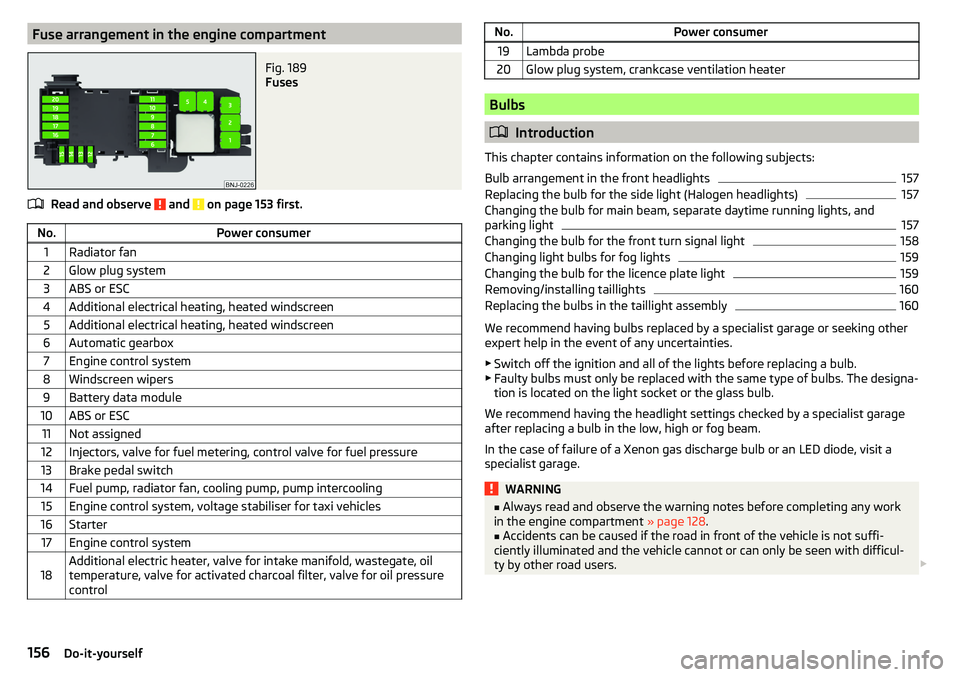
Fuse arrangement in the engine compartmentFig. 189
Fuses
Read and observe and on page 153 first.
No.Power consumer1Radiator fan2Glow plug system3ABS or ESC4Additional electrical heating, heated windscreen5Additional electrical heating, heated windscreen6Automatic gearbox7Engine control system8Windscreen wipers9Battery data module10ABS or ESC11Not assigned12Injectors, valve for fuel metering, control valve for fuel pressure13Brake pedal switch14Fuel pump, radiator fan, cooling pump, pump intercooling15Engine control system, voltage stabiliser for taxi vehicles16Starter17Engine control system18Additional electric heater, valve for intake manifold, wastegate, oil
temperature, valve for activated charcoal filter, valve for oil pressure
controlNo.Power consumer19Lambda probe20Glow plug system, crankcase ventilation heater
Bulbs
Introduction
This chapter contains information on the following subjects:
Bulb arrangement in the front headlights
157
Replacing the bulb for the side light (Halogen headlights)
157
Changing the bulb for main beam, separate daytime running lights, and
parking light
157
Changing the bulb for the front turn signal light
158
Changing light bulbs for fog lights
159
Changing the bulb for the licence plate light
159
Removing/installing taillights
160
Replacing the bulbs in the taillight assembly
160
We recommend having bulbs replaced by a specialist garage or seeking other
expert help in the event of any uncertainties.
▶ Switch off the ignition and all of the lights before replacing a bulb.
▶ Faulty bulbs must only be replaced with the same type of bulbs. The designa-
tion is located on the light socket or the glass bulb.
We recommend having the headlight settings checked by a specialist garage after replacing a bulb in the low, high or fog beam.
In the case of failure of a Xenon gas discharge bulb or an LED diode, visit a
specialist garage.
WARNING■ Always read and observe the warning notes before completing any work
in the engine compartment » page 128.■
Accidents can be caused if the road in front of the vehicle is not suffi-
ciently illuminated and the vehicle cannot or can only be seen with difficul-
ty by other road users.
156Do-it-yourself
Page 159 of 184

WARNING (Continued)■H7 and H15 bulbs are pressurised and may burst when changing the bulb -
risk of injury! We therefore recommended wearing gloves and safety
glasses when changing a bulb.■
Do not carry out any work on the Xenon gas discharge lamps - risk of
death!
CAUTION
■ Do not take hold of the glass bulb with naked fingers (even the smallest
amount of dirt reduces the working life of the light bulb). Use a clean cloth,
napkin, or similar.■
The cap of the filament bulb must always be seated correctly in the head-
light, otherwise this may allow water and debris to enter the headlight - risk of
damage to the headlights.
Note
■ This Owner's Manual only describes the replacement of bulbs where it is pos-
sible to replace the bulbs on your own without any complications arising. Other
bulbs must be replaced by a specialist garage.■
We recommend that a box of replacement bulbs always be carried in the ve-
hicle.
Bulb arrangement in the front headlights
Fig. 190
Left headlight
Read and observe and on page 156 first.
Bulb arrangement » Fig. 190
Low beam or low beam with Xenon gas discharge lamp
Main beam, separate daytime running lights, and parking light
Turn signal light (at the front)
ABCReplacing the bulb for the side light (Halogen headlights)Fig. 191
Changing the bulb for the low beam
Read and observe
and on page 156 first.
›
Remove the protective cap
A
» Fig. 190 on page 157 .
›
Remove the socket with the bulb by jiggling it out in the direction of arrow
1
» Fig. 191 .
›
Remove the connector.
›
Insert the connector with the new bulb in the direction of arrow
2
so that
the fixing lug
A
fits the bulb into the recess on the reflector.
›
Attach the connector.
›
Fit the protective cap
A
» Fig. 190 on page 157 .
Changing the bulb for main beam, separate daytime running
lights, and parking light
Fig. 192
Replacing the bulb for main
beam and separate daytime run-
ning lights
157Fuses and light bulbs
Page 160 of 184
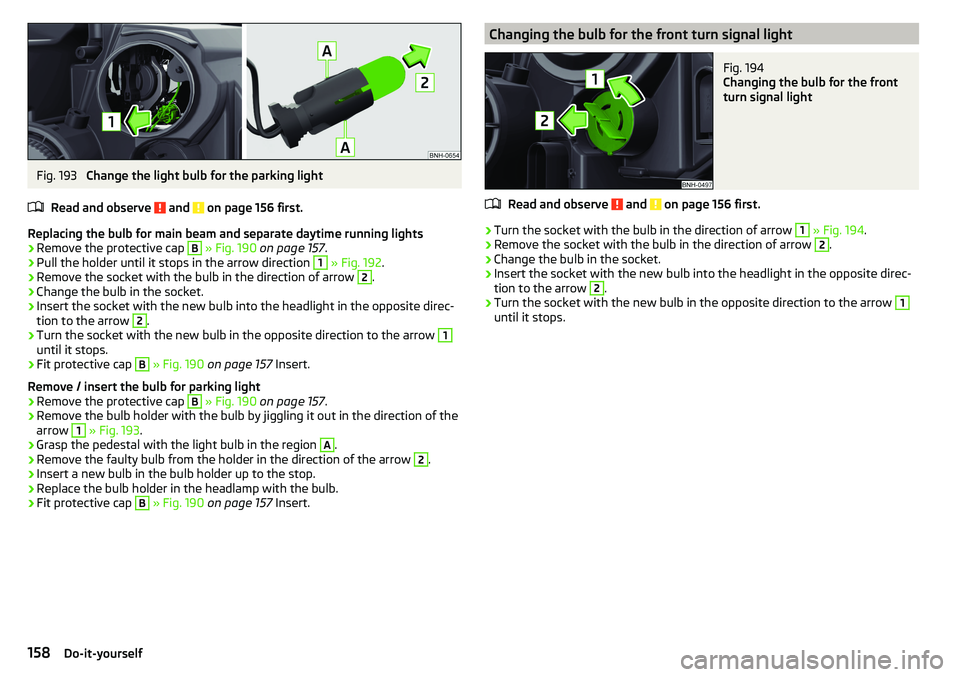
Fig. 193
Change the light bulb for the parking light
Read and observe
and on page 156 first.
Replacing the bulb for main beam and separate daytime running lights
›
Remove the protective cap
B
» Fig. 190 on page 157 .
›
Pull the holder until it stops in the arrow direction
1
» Fig. 192 .
›
Remove the socket with the bulb in the direction of arrow
2
.
›
Change the bulb in the socket.
›
Insert the socket with the new bulb into the headlight in the opposite direc-
tion to the arrow
2
.
›
Turn the socket with the new bulb in the opposite direction to the arrow
1
until it stops.
›
Fit protective cap
B
» Fig. 190 on page 157 Insert.
Remove / insert the bulb for parking light
›
Remove the protective cap
B
» Fig. 190 on page 157 .
›
Remove the bulb holder with the bulb by jiggling it out in the direction of the
arrow
1
» Fig. 193 .
›
Grasp the pedestal with the light bulb in the region
A
.
›
Remove the faulty bulb from the holder in the direction of the arrow
2
.
›
Insert a new bulb in the bulb holder up to the stop.
›
Replace the bulb holder in the headlamp with the bulb.
›
Fit protective cap
B
» Fig. 190 on page 157 Insert.
Changing the bulb for the front turn signal lightFig. 194
Changing the bulb for the front
turn signal light
Read and observe and on page 156 first.
›
Turn the socket with the bulb in the direction of arrow
1
» Fig. 194 .
›
Remove the socket with the bulb in the direction of arrow
2
.
›
Change the bulb in the socket.
›
Insert the socket with the new bulb into the headlight in the opposite direc-
tion to the arrow
2
.
›
Turn the socket with the new bulb in the opposite direction to the arrow
1
until it stops.
158Do-it-yourself
Page 161 of 184
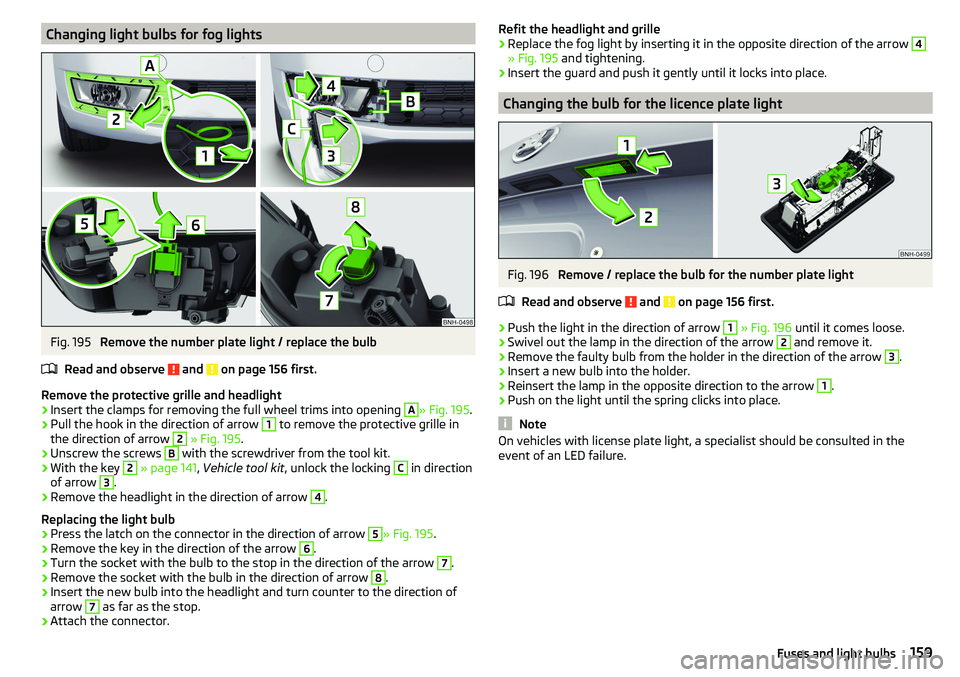
Changing light bulbs for fog lightsFig. 195
Remove the number plate light / replace the bulb
Read and observe
and on page 156 first.
Remove the protective grille and headlight
›
Insert the clamps for removing the full wheel trims into opening
A
» Fig. 195 .
›
Pull the hook in the direction of arrow
1
to remove the protective grille in
the direction of arrow
2
» Fig. 195 .
›
Unscrew the screws
B
with the screwdriver from the tool kit.
›
With the key
2
» page 141 , Vehicle tool kit , unlock the locking
C
in direction
of arrow
3
.
›
Remove the headlight in the direction of arrow
4
.
Replacing the light bulb
›
Press the latch on the connector in the direction of arrow
5
» Fig. 195 .
›
Remove the key in the direction of the arrow
6
.
›
Turn the socket with the bulb to the stop in the direction of the arrow
7
.
›
Remove the socket with the bulb in the direction of arrow
8
.
›
Insert the new bulb into the headlight and turn counter to the direction of
arrow
7
as far as the stop.
›
Attach the connector.
Refit the headlight and grille›Replace the fog light by inserting it in the opposite direction of the arrow 4
» Fig. 195 and tightening.
›
Insert the guard and push it gently until it locks into place.
Changing the bulb for the licence plate light
Fig. 196
Remove / replace the bulb for the number plate light
Read and observe
and on page 156 first.
›
Push the light in the direction of arrow
1
» Fig. 196 until it comes loose.
›
Swivel out the lamp in the direction of the arrow
2
and remove it.
›
Remove the faulty bulb from the holder in the direction of the arrow
3
.
›
Insert a new bulb into the holder.
›
Reinsert the lamp in the opposite direction to the arrow
1
.
›
Push on the light until the spring clicks into place.
Note
On vehicles with license plate light, a specialist should be consulted in the
event of an LED failure.159Fuses and light bulbs
Page 162 of 184

Removing/installing taillightsFig. 197
Remove light / pull out connector
Read and observe
and on page 156 first.
Removing
›
Open the boot lid.
›
Insert the clamps for removing the full wheel trims into opening
A
» Fig. 197 .
›
Remove the cover by pulling the hook in the direction of arrow
1
.
›
Unscrew the screws
B
with the key from the tool kit.
›
Grasp the lamp and carefully remove in the direction of arrow
2
.
›
Press the latch on the connector in the direction of arrow
3
.
›
Carefully remove the connector from the tail lamp assembly in the direction
of the arrow
4
.
Fitting
›
Insert the connector into the light and lock it securely.
›
Insert the lamp with the pin
B
» Fig. 198 on page 160 into the recesses
C
» Fig. 197 in the body.
›
Carefully push the cover in » .
›
Screw the tail lamp into place and install the cover. The cover must engage
securely.
› Close the boot lid.
CAUTION
■
Ensure that the cable bundle does not become pinched between the body
and the lamp when it is being refitted – risk of damage to the electrical instal-
lation and risk of water ingress.■
If you are not sure whether the cable bundle has become pinched, we recom-
mend that you have the light connection checked by a specialist garage.
■
Ensure that the vehicle paintwork and the tail lamp are not damaged when
removing and installing the tail lamp.
Replacing the bulbs in the taillight assembly
Fig. 198
Outer part of the lamp/inner part of the lamp
Read and observe
and on page 156 first.
Outer part of the lamp
›
Turn the holder with the bulb
A
in the direction of the arrow
1
» Fig. 198 .
›
Remove the holder with the bulb from the light housing in the direction of
the arrow
2
and replace the bulb.
›
Reinsert the holder with the bulb into the lamp housing and turn in the op-
posite direction of the arrow
1
to the stop.
Inner parts of the lamp
›
Unlock the bulb holder using the marked area with arrows » Fig. 198 and re-
move the bulb holder from the light.
›
Turn the respective light bulb counter-clockwise to the stop and remove it
from the bulb holder.
›
Insert a new bulb into the holder and turn in a clockwise direction to the
stop.
›
Insert the bulb holder in the tail lamp assembly.
160Do-it-yourself
Page 171 of 184

Index
A
ABS Operation
97
Warning light32
Acceptance and recycling of used vehicles
120
Accessories118
Adjusting Steering wheel
11
Adjusting the seats10
Adjustment Beam range
54
Advance warning / emergency braking37
Advice on tyre/wheel usage136
Air-conditioning system Air outlet vents
84
Airbag15
Adjustments and impairments to the airbag system
119
Deactivation18
Deployment16
Warning light32
Airbag system15
Air conditioning82
Air distribution control84
Climatronic83
Manual air conditioning82
Air distribution control84
Air outlet vents84
Alarm49
Trailer117
All-year tyres139
Anti-lock braking system (ABS)97
Anti-theft alarm system49
Trailer117
Anti-theft wheel bolts143
Armrest Front64
Rear65
Ashtray70
Assembling the tow bar, Step 1
113
tow bar, Step 2113
Assist systems96
Auto Check Control38
Automatic drive Selector lever
92
Automatic driving light control55
Automatic gearbox92
Kickdown94
Malfunction34
Selector lever-emergency unlocking151
Selector lever lock93
Starting-off and driving94
Tiptronic93
Warning light34
Automatic shutdown of consumers133
Automatic transmission Selector lever lock
93
AUX68
Avoiding damage to your vehicle95
B
Ball bar Standby position
112
Ball head Check fitting
114
Ready position112
Battery Change in key
150
Belts12
Belt tensioners14
Bluetooth See Owner´s Manual -Infotainment
6
Bonnet Closing129
Opening129
Boot Cargo element
79
Class N1 vehicles79
Hooks77
See boot lid51
Storage compartments78
Boot cover Parking position
78
Boot lid Automatic locking
51
Open/Close51
Brake Assist (HBA)98
Brake booster89
Brake fluid133
Check133
specification133
Brake pads New
89
Brake pedal (automatic transmission) Warning light
34
Brakes Brake booster
89
Brake fluid133
Braking and stabilisation systems96
Handbrake90
Information on braking89
Warning lights30
Brake system96
Braking Running in
94
Breakdown kit145
Breakdown service see Help in an emergency
8
Buttons in the door Electric window
52
169Index
Page 172 of 184
C
Camera See reversing camera
101
CAR See Owner´s Manual -Infotainment
6
Car battery Check condition
134
Cover134
Disconnecting and reconnecting135
Replacing135
Warning light34
Winter operation134
CAR button See Owner´s Manual -Infotainment
6
Car care Exterior
123
Interior125
Outside124
Car computer see multifunction display
39
Care and maintenance118
Cargo element79
Carrier81
Car washing122
Exterior123
Interior125
Washing122
Central locking45
Problems49
Central locking button47
Change battery
150
Changing Windscreen wiper blades
152
Changing a wheel141
Changing141
Changing gear Selector lever
92
Changing wheelsWheels141
Charging a vehicle battery135
Check Brake fluid
133
Engine oil131
Fit ball head properly114
Oil level131
Checking Battery status
134
Coolant132
Checks Statutory checks
118
Children and safety19
Child safety lock49
Child seat19
Classification21
Installation location21, 23
ISOFIX22, 23
on the front passenger seat20, 21
TOP TETHER24
Cigarette lighter70
Cleaning the vehicle Outside
124
Windows124
Climatronic82
air distribution control84
Automatic mode84
Operating elements83
Clothes hook73
Cockpit27
Lighting57
Comfort signalling55
COMING HOME56
Compartments67
Component protection119
Computer see multifunction display
39
Coolant131
Checking132
Refilling132
Temperature display29
Warning light35
CORNER See Fog lights with the CORNER function
56
Correct routing of seat belt
13
Correct seated position10
Correct seating position12
Cup holders69
D
DAY LIGHT See Daytime running lights
54
Daytime running lights54
Dazzle60
De-icing the windscreen and rear window59
Deactivation Airbag
18
Delayed locking of the boot lid See boot lid
51
Departure angle166
Diesel127
Diesel fuel127
Diesel particle filter (DPF)36
Digital Clock38
Digital Service Plan121
Dipstick131
Display Cardinal points
37
Coolant temperature29
Fuel level29
Gear changes38
In the instrument cluster37
MAXI DOT41
Service intervals42
170Index