brake SKODA ROOMSTER 2008 1.G User Guide
[x] Cancel search | Manufacturer: SKODA, Model Year: 2008, Model line: ROOMSTER, Model: SKODA ROOMSTER 2008 1.GPages: 248, PDF Size: 46.44 MB
Page 68 of 248
Seats and Stowage67
Using the systemSafetyDriving TipsGeneral MaintenanceBreakdown assistancePraktikTechnical Data
Put bicycle into the bicycle carrier
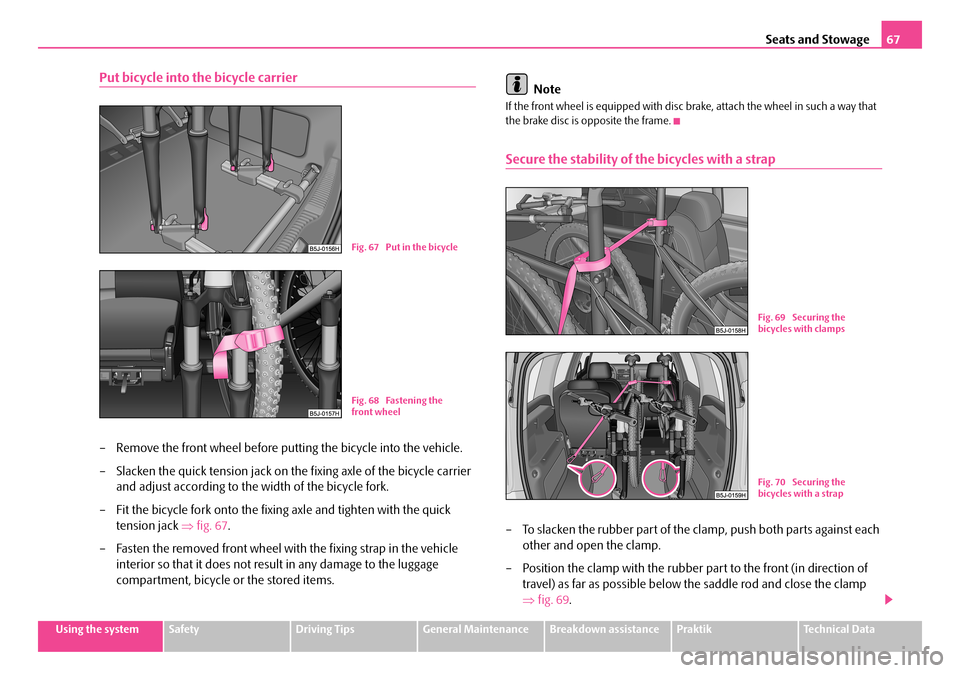
– Remove the front wheel before putting the bicycle into the vehicle.
– Slacken the quick tension jack on th e fixing axle of the bicycle carrier
and adjust according to the width of the bicycle fork.
– Fit the bicycle fork onto the fixing axle and tighten with the quick
tension jack ⇒fig. 67.
– Fasten the removed front wheel with the fixing strap in the vehicle
interior so that it does not resu lt in any damage to the luggage
compartment, bicycle or the stored items.
Note
If the front wheel is equipped with disc brake, attach the wheel in such a way that the brake disc is opposite the frame.
Secure the stability of the bicycles with a strap
– To slacken the rubber part of the cl amp, push both parts against each
other and open the clamp.
– Position the clamp with the rubber part to the front (in direction of
travel) as far as possible below the saddle rod and close the clamp
⇒ fig. 69.
Fig. 67 Put in the bicycle
Fig. 68 Fastening the front wheel
Fig. 69 Securing the bicycles with clamps
Fig. 70 Securing the bicycles with a strap
NKO A05R 20 MR08.book Page 67 Wednesday, March 28, 2007 9:42 AM
Page 91 of 248
Starting-off and Driving90
Ignition lock
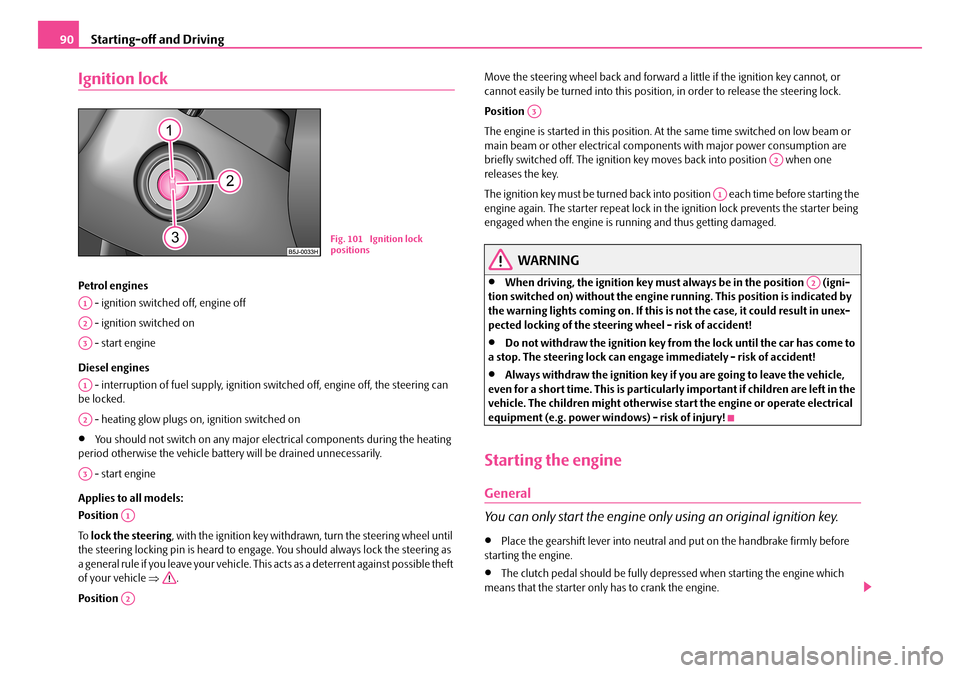
Petrol engines
- ignition switched off, engine off
- ignition switched on
- start engine
Diesel engines
- interruption of fuel supply, ignition sw itched off, engine off, the steering can be locked.
- heating glow plugs on, ignition switched on
•You should not switch on any major elec trical components during the heating period otherwise the vehicle batt ery will be drained unnecessarily.
- start engine
Applies to all models:
Position
To lock the steering, with the ignition key withdrawn, turn the steering wheel until the steering locking pin is heard to engage. You should always lock the steering as a general rule if you leave your vehicle. This acts as a deterrent against possible theft of your vehicle ⇒.
Position
Move the steering wheel back and forward a little if the ignition key cannot, or cannot easily be turned into this position , in order to release the steering lock.
Position
The engine is started in this position. At the same time switched on low beam or main beam or other electrical compon ents with major power consumption are briefly switched off. The ignition key moves back into position when one releases the key.
The ignition key must be turned back into position each time before starting the engine again. The starter repeat lock in th e ignition lock prevents the starter being engaged when the engine is r unning and thus getting damaged.
WARNING
•When driving, the ignition key must always be in the position (igni- tion switched on) without the engine running. This position is indicated by the warning lights coming on. If this is not the case, it could result in unex- pected locking of the steerin g wheel - risk of accident!
•Do not withdraw the ignition key from the lock until the car has come to a stop. The steering lock can engage immediately - risk of accident!
•Always withdraw the ignition key if you are going to leave the vehicle, even for a short time. This is particularly important if children are left in the vehicle. The children might otherwise st art the engine or operate electrical equipment (e.g. power windows) - risk of injury!
Starting the engine
General
You can only start the engine only using an original ignition key.
•Place the gearshift lever into neutral and put on the handbrake firmly before starting the engine.
•The clutch pedal should be fully depr essed when starting the engine which means that the starter only has to crank the engine.
Fig. 101 Ignition lock positions
A1
A2
A3
A1
A2
A3
A1
A2
A3
A2
A1
A2
NKO A05R 20 MR08.book Page 90 Wednesday, March 28, 2007 9:42 AM
Page 93 of 248
Starting-off and Driving92
•Contact the nearest specialist garage to obtain professional assistance.
Starting the engine after fuel tank has run dry
It may take longer than normal to start the engine after refuelling if the fuel tank has run completely dry - up to one minute. This is because the fuel system must first of all be filled while the attempting to start the engine.
Switching off the engine
– The engine can be swit ched off by turning the ignition key from posi-
tion ⇒page 90, fig. 101 into position .
WARNING
•Never switch off the engine before the vehicle is stationary - risk of acci- dent!
•The brake booster only operates when the engine is running. Greater physical effort for braking is required when engine is switched off. Because if you do not stop as normal, this can cause an accident and severe injuries.
Caution
you should not switch the engine off right away at the end of your journey after the engine has been operated fo r a lengthy period at high loads but should be allowed it to run at idling speed for about 2 minutes . This prevents any accumulation of heat when the engine is switched off.
Note
•The radiator fan may continue running fo r a further 10 minutes or so after the engine and the ignition have been switched off. The coolant fan may, however, also switch on again after some time if the coolant temperature rises because of an accumulation of heat in the engine or if the engine is warm and the engine compartment is additionally heated by strong sunlight.
•This is why particular care is required when carrying out any work in the engine compartment ⇒page 174, “Working in the engine compartment”.
Shifting (manual gearbox)
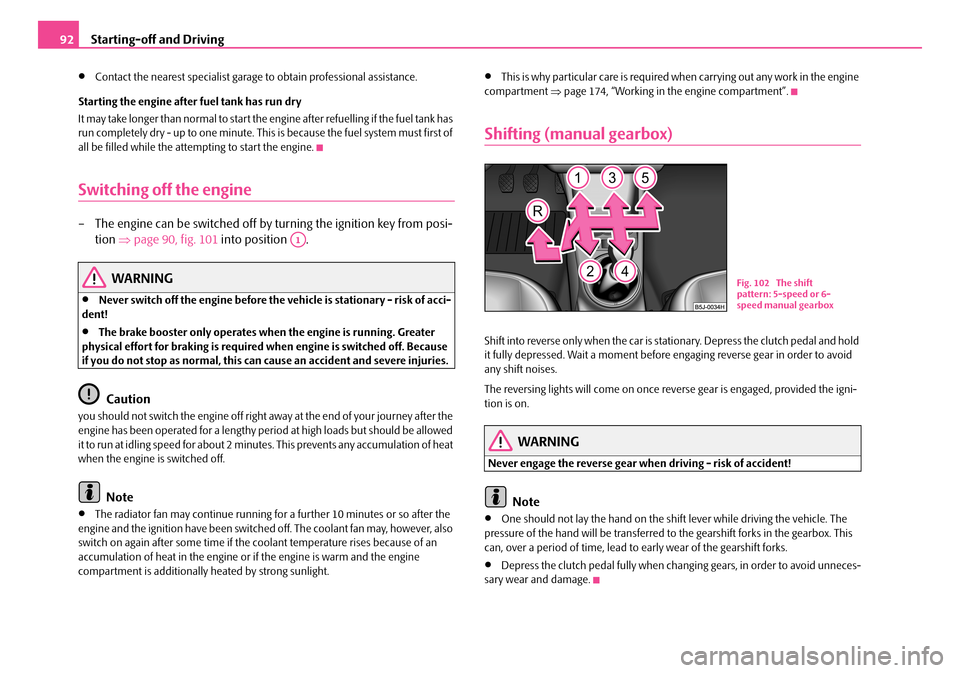
Shift into reverse only when the car is stationary. Depress the clutch pedal and hold it fully depressed. Wait a moment before engaging reverse gear in order to avoid any shift noises.
The reversing lights will come on once reverse gear is engaged, provided the igni- tion is on.
WARNING
Never engage the reverse gear when driving - risk of accident!
Note
•One should not lay the hand on the shift lever while driving the vehicle. The pressure of the hand will be transferred to the gearshift forks in the gearbox. This can, over a period of time, lead to early wear of the gearshift forks.
•Depress the clutch pedal fully when changing gears, in order to avoid unneces- sary wear and damage.
A1
Fig. 102 The shift pattern: 5-speed or 6-speed manual gearbox
NKO A05R 20 MR08.book Page 92 Wednesday, March 28, 2007 9:42 AM
Page 94 of 248
Starting-off and Driving93
Using the systemSafetyDriving TipsGeneral MaintenanceBreakdown assistancePraktikTechnical Data
Handbrake
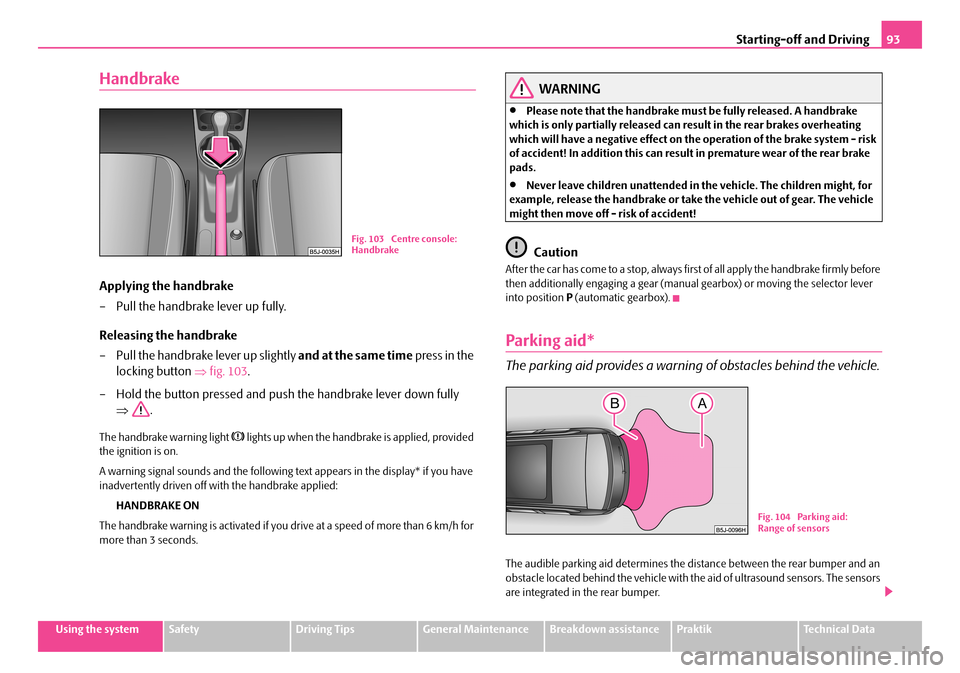
Applying the handbrake
– Pull the handbrake lever up fully.
Releasing the handbrake
– Pull the handbrake lever up slightly and at the same time press in the
locking button ⇒fig. 103.
– Hold the button pressed and push the handbrake lever down fully
⇒ .
The handbrake warning light lights up when the handbrake is applied, provided the ignition is on.
A warning signal sounds and the following te xt appears in the display* if you have inadvertently driven off with the handbrake applied:
HANDBRAKE ON
The handbrake warning is activated if you drive at a speed of more than 6 km/h for more than 3 seconds.
WARNING
•Please note that the handbrake must be fully released. A handbrake which is only partially released can re sult in the rear brakes overheating which will have a negative effect on th e operation of the brake system - risk of accident! In addition this can result in premature wear of the rear brake pads.
•Never leave children unattended in the vehicle. The children might, for example, release the handbrake or take the vehicle out of gear. The vehicle might then move off - risk of accident!
Caution
After the car has come to a stop, always firs t of all apply the handbrake firmly before then additionally engaging a gear (manua l gearbox) or moving the selector lever into position P (automatic gearbox).
Parking aid*
The parking aid provides a warning of obstacles behind the vehicle.
The audible parking aid determines the distance between the rear bumper and an obstacle located behind the vehicle with th e aid of ultrasound sensors. The sensors are integrated in the rear bumper.
Fig. 103 Centre console: Handbrake
Fig. 104 Parking aid: Range of sensors
NKO A05R 20 MR08.book Page 93 Wednesday, March 28, 2007 9:42 AM
Page 95 of 248
Starting-off and Driving94
Range of sensors
The clearance warning begins at a distance of about 160 cm from the obstacle (area ⇒page 93, fig. 104). The interval between the warning signals becomes shorter as the clearance is reduced.
A continuous tone sounds fr om a clearance of just 30 cm (Bereich ) - danger area. You should not reverse any further after this signal sounds!
Activating
The parking aid is activated automatically when reverse gear is engaged and the ignition is turned on. This is confir med by a brief acknowledgement signal.
Deactivating
The parking aid is deactivated by removing the reverse gear.
WARNING
•The parking aid is not a substitute fo r the driver paying proper attention and it is always the driver's responsibility to take care when parking the vehicle or carrying ou t similar manoeuvres.
•You should therefore satisfy yourself, before reversing, that there is no small obstacle, such as a rock, thin post, trailer drawbar etc., behind your vehicle. Such an obstacle might not be within the range detected by the sensors.
Note
•When operating with a trailer, the parking aid is without function.
•A system fault is indicated if a warning signal sounds for about 5 seconds after switching the ignition on and engaging reve rse gear and there is no obstacle close to your vehicle. Have the fault re ctified by a specialist workshop.
•The sensors must be kept clean and free of ice to enable the parking aid to operate properly.
•If the parking aid is activated and the selector lever of the automatic gearbox is in the position , warning signal indicates interruption (vehicle can no longer move).
Cruise control system (CCS)*
Introduction
The cruise control system (CCS) maintains a constant speed, more than 30 km/h, once it has been set, without you having to depress the accelerator pedal. This is only possible within the range which is permitted by the power output and braking power of the engine. The cruise control syst em makes it possible - particularly on long journeys - for you to rest your “accelerator foot”.
WARNING
•The cruise control system must not, for safety reasons, be used in dense traffic or on unfavourable road surfaces (such as icy roads, slippery roads or loose chippings) - risk of accident!
•In order to prevent unintentional use of the cruise control system, always switch off the system after use.
Note
•Models fitted with a manual gearbox: Always depress the clutch pedal if you switch on the cruise control system when the gearbox is in Neutral. Otherwise the engine can rev up unintentionally.
•The cruise control system is not able to maintain a constant speed when driving on steep downhill sections. The weight of the vehicle increases the speed at which it travels. One should shift down in good time to a lower gear or slow the vehicle down by applying the foot brake.
•It is not possible on vehicl es fitted with an automatic gearbox to switch on the cruise control system if the selector lever is in the position P, N or R.
AA
AB
AP
NKO A05R 20 MR08.book Page 94 Wednesday, March 28, 2007 9:42 AM
Page 96 of 248
Starting-off and Driving95
Using the systemSafetyDriving TipsGeneral MaintenanceBreakdown assistancePraktikTechnical Data
Storing a speed
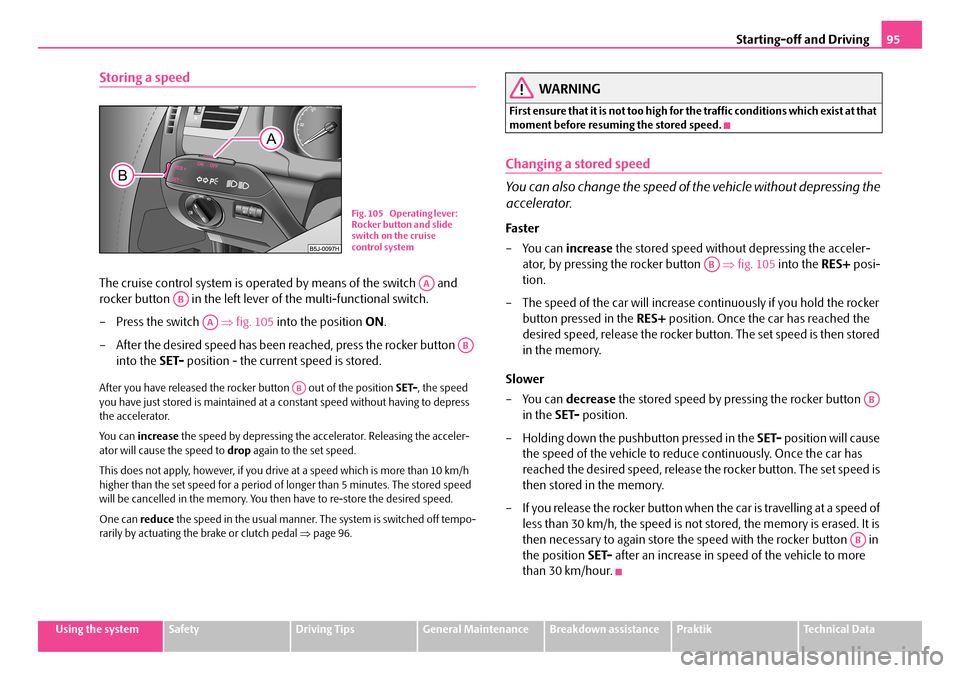
The cruise control system is operated by means of the switch and
rocker button in the left lever of the multi-functional switch.
– Press the switch ⇒fig. 105 into the position ON.
– After the desired speed has been reached, press the rocker button
into the SET- position - the current speed is stored.
After you have released the rocker button out of the position SET-, the speed you have just stored is maintained at a constant speed without having to depress the accelerator.
Yo u c a n increase the speed by depressing the accelerator. Releasing the acceler- ator will cause the speed to drop again to the set speed.
This does not apply, however, if you drive at a speed which is more than 10 km/h higher than the set speed for a period of longer than 5 minutes. The stored speed will be cancelled in the memory. You th en have to re-store the desired speed.
One can reduce the speed in the usual manner. The system is switched off tempo- rarily by actuating the brake or clutch pedal ⇒page 96.
WARNING
First ensure that it is not too high for the traffic conditions which exist at that moment before resuming the stored speed.
Changing a stored speed
You can also change the speed of the vehicle without depressing the
accelerator.
Fa s t er
–You can increase the stored speed without depressing the acceler-
ator, by pressing the rocker button ⇒fig. 105 into the RES+ posi-
tion.
– The speed of the car will increase co ntinuously if you hold the rocker
button pressed in the RES+ position. Once the car has reached the
desired speed, release the rocker butto n. The set speed is then stored
in the memory.
Slower
–You can decrease the stored speed by pressing the rocker button
in the SET- position.
– Holding down the pushbutton pressed in the SET- position will cause
the speed of the vehicle to reduce continuously. Once the car has
reached the desired speed, release the rocker button. The set speed is
then stored in the memory.
– If you release the rocker button when the car is travelling at a speed of
less than 30 km/h, the speed is not stored, the memory is erased. It is
then necessary to again store the sp eed with the rocker button in
the position SET- after an increase in speed of the vehicle to more
than 30 km/hour.
Fig. 105 Operating lever: Rocker button and slide switch on the cruise control system
AA
AB
AA
AB
AB
AB
AB
AB
NKO A05R 20 MR08.book Page 95 Wednesday, March 28, 2007 9:42 AM
Page 97 of 248
Starting-off and Driving96
Switching off the cruise control system temporarily
– You can switch off temporarily the cruise control system, if you
depress the brake or clutch pedal.
The set speed remains stored in the memory.
Press the rocker button in the position RES+ for the resumptionof the stored speed after releasing the clutch or brake pedal.
WARNING
First ensure that it is not too high for the traffic conditions which exist at that moment before resuming the stored speed.
Switching off the cruise control system completely
– Press the switch ⇒page 95, fig. 105 to the right into position
OFF .
AB
AA
NKO A05R 20 MR08.book Page 96 Wednesday, March 28, 2007 9:42 AM
Page 98 of 248
Automatic gearbox97
Using the systemSafetyDriving TipsGeneral MaintenanceBreakdown assistancePraktikTechnical Data
Automatic gearbox
6-speed automatic gearbox*
Introduction
Your car is equipped with an electronically controlled 6-speed automatic gearbox. Shifting up and also down through the gears is performed automatically.
At the same time this is a conventional automatic gearbox. The maximum speed is reached in the 5th gear. The 6th gear serves as an economic driving programme, which is intended to reduce the fuel consumption.
Information for driving with an automatic gearbox
Shifting up and down through the gears is performed automatically.
You can also, however, switch the gearbox over into the Tiptronic mode.
This mode makes it possible for you to also shift gears manually
⇒ page 100.
Starting-off and Driving
– Depress the brake pedal and hold it depressed.
– Press the Shiftlock button (button in handle of the selector lever),
move the selector lever into the desired position, e.g. D ⇒page 98,
and then release the Shiftlock button.
– Wait a moment until the gearbox ha s shifted (a slight engagement
nudge can be felt).
– Release the brake pedal and depress the accelerator ⇒.
Stopping for a short time
– The selector lever position N does not have to be selected when stop-
ping just for a short time, such as at a cross roads. It is sufficient to hold
the vehicle stationary using the foot brake. The engine can, however,
be allowed just to idle.
Parking
– Depress the brake pedal and hold it depressed.
– Apply the handbrake firmly.
– Press and Shiftlock button in the selector lever, move the selector
lever to P and then release the Shiftlock button.
The engine can only be started when the selector lever is in position P or N ⇒ page 90.
It is sufficient to engage selector lever position P when parking on a flat surface. When parking on a slope you should first apply the handbrake firmly and then move the selector lever into position P. This is to ensure that there is no excessive pressure acting on the lock mechanism and that it is easier to subsequently move the selector lever out of position P.
If the selector lever position N is selected by accident while driving it is first neces- sary to release pressure on the accelerato r pedal and wait for idling speed of the engine to be reached before engaging a drive position in the selector lever.
WARNING
•Do not depress the accelerator when changing the position of the selector lever if the car is stationary an d the engine is running - risk of acci- dent!
•Never move the selector lever into position R or P when driving - risk of an accident!
NKO A05R 20 MR08.book Page 97 Wednesday, March 28, 2007 9:42 AM
Page 99 of 248
Automatic gearbox98
•When the engine is running and the vehicle is stationary, it is necessary to hold the car with the brake pedal in all the positions of the selector lever (except P and N) since the power transmission is never completely inter- rupted, also not when the engine is idling - the vehicle "creeps".
Selector lever positions
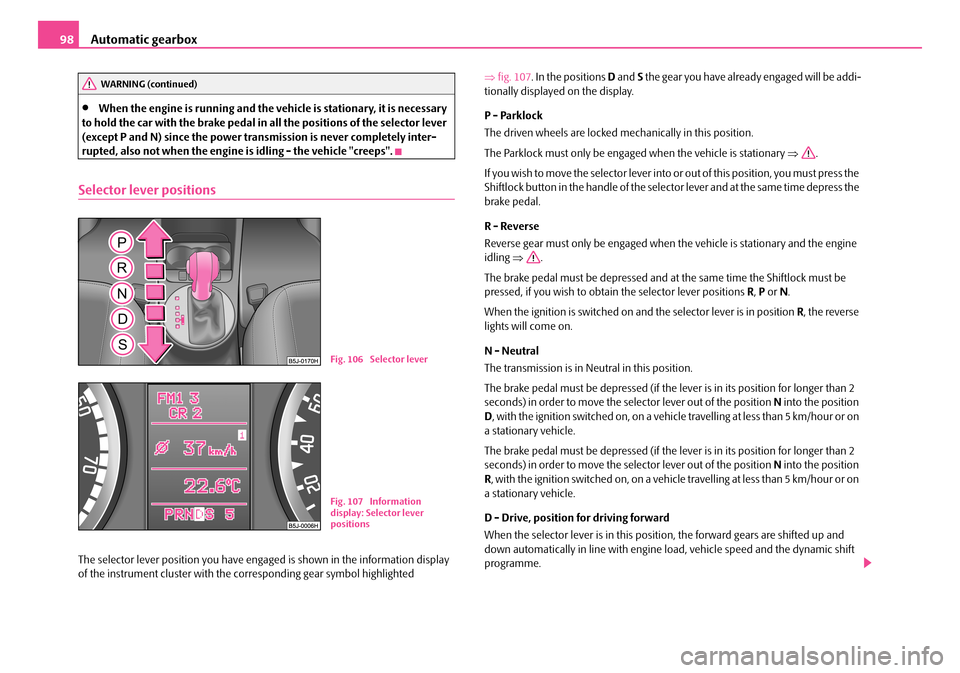
The selector lever position you have engaged is shown in the information display of the instrument cluster with the co rresponding gear symbol highlighted
⇒ fig. 107. In the positions D and S the gear you have already engaged will be addi- tionally displayed on the display.
P - Parklock
The driven wheels are locked mechanically in this position.
The Parklock must only be engage d when the vehicle is stationary ⇒.
I f y o u w i s h t o m o v e t h e s e l e c t o r l e v e r i n to or out of this position, you must press the Shiftlock button in the handle of the selector lever and at the same time depress the brake pedal.
R - Reverse
Reverse gear must only be engaged when the vehicle is stationary and the engine idling ⇒.
The brake pedal must be depressed and at the same time the Shiftlock must be pressed, if you wish to obtain the selector lever positions R, P or N.
When the ignition is switched on and the selector lever is in position R, the reverse lights will come on.
N - Neutral
The transmission is in Neutral in this position.
The brake pedal must be depressed (if the lever is in its position for longer than 2 seconds) in order to move the selector lever out of the position N into the position D , with the ignition switched on, on a vehicle travelling at less than 5 km/hour or on a stationary vehicle.
The brake pedal must be depressed (if the lever is in its position for longer than 2 seconds) in order to move the selector lever out of the position N into the position R , with the ignition switched on, on a vehicle travelling at less than 5 km/hour or on a stationary vehicle.
D - Drive, position for driving forward
When the selector lever is in this position, the forward gears are shifted up and down automatically in line with engine load, vehicle speed and the dynamic shift programme.
WARNING (continued)
Fig. 106 Selector lever
Fig. 107 Information display: Selector lever positions
NKO A05R 20 MR08.book Page 98 Wednesday, March 28, 2007 9:42 AM
Page 100 of 248
Automatic gearbox99
Using the systemSafetyDriving TipsGeneral MaintenanceBreakdown assistancePraktikTechnical Data
You must depress the brake pedal ⇒ if you wish to move the selector lever into position D from N when the vehicle is travelling at less than 5 km/hour or is stationary.
In certain circumstances (e.g. when driving in mountainous regions or when towing a trailer) it may be beneficial to select the manual shift programme ⇒page 100 for a short time in order to adapt the gearbox ratios manually to the driving situations.
S - Position for sporty style of driving
Shifting up later into a higher gear makes it possible to fully exploit the power potential of the engine. The gearbox also then shifts down at higher engine speeds as in the position D.
The gearbox does not shift into the 6th gear in the position S, because the maximum speed is achieved with the 5th gear.
The Shiftlock on the selector lever grip must be pressed when moving the selector lever out of the position D into the position S.
WARNING
•Never move the selector lever into position R or P when driving - risk of an accident!
•When the engine is running and the vehicle is stationary, it is necessary to hold the car with the brake pedal in all the positions of the selector lever (except P and N) since the power transmission is never completely inter-rupted, also not when the engine is idling - the vehicle "creeps".
•You must on no account unintentionally operate the throttle (e.g. by hand from the engine compartment) if a drive position is engaged when the car is stationary. The vehicle would ot herwise immediately start off - also when the handbrake is firmly applied - risk of an accident!
•You must move the selector lever into position P and firmly apply the handbrake first before you or any other person opens the bonnet and starts working on the engine when it is running - risk of accident! It is also essential to observe all warnings ⇒page 174, “Working in the engine compartment”.
Selector lever lock
Automatic selector lever lock
With the ignition on, the selector lever is locked when it is in the positions P and N. You must first of all depress the brake pedal in order to move the selector lever out of this position. The warning light ⇒page 27 lights up in the instrument cluster as a reminder for the driver when the selector lever is in position P and N:
A time delay element ensures that the sele ctor lever is not blocked when rapidly switching over the position N (e.g. from R to D). This does, for example, allow one to seesaw out a stuck vehicle. The selector lever lock will click into place if the lever is in the N position for more than 2 seconds without the brake pedal being pressed.
The selector lever lock is only active if th e vehicle is stationary or moving at speed of less than 5 km/hour. The lock is switched off automatically into position N when the car is travelling at a higher speed.
Shiftlock button
The Shiftlock button in the handle of sele ctor lever prevents certain selector lever positions being engaged inadvertently. The selector lever lock is cancelled when you press the Shiftlock button.
Note
For vehicles fitted with manual gearbox, yo u can withdraw the ignition key in each selector lever position after switching off the ignition.
Kickdown function
The kickdown function provides you with maximum acceleration
power.
Depressing the accelerator pedal allows th e kickdown function to be activated in the desired driving program. This function has precedence over the driving programme and serves for maximum accelera tion of the vehicle when exploiting the maximum power potential of the engine without taking into account the current selector lever position ( D, S or Tiptronic). The gearbox shifts down to one or several gears in line with the driving state and the vehicle accelerates. The
NKO A05R 20 MR08.book Page 99 Wednesday, March 28, 2007 9:42 AM