brake SKODA ROOMSTER 2008 1.G Owner's Guide
[x] Cancel search | Manufacturer: SKODA, Model Year: 2008, Model line: ROOMSTER, Model: SKODA ROOMSTER 2008 1.GPages: 248, PDF Size: 46.44 MB
Page 101 of 248
Automatic gearbox100
gearbox does not shift up into the highest gear until the engine has reached its maximum revolutions for this gear range.
WARNING
Please note that using the kickdown fu nction can result in the driven wheels spinning on a smooth or slippery road surface - risk of skidding!
Dynamic shift programme
The automatic gearbox of your vehicle is controlled electronically. Shifting up and down through the gears is performed auto matically on the basis of pre-defined driving programmes.
Adopting a moderate style of driving will cause the gearbox to select the most economical driving programme. Shifting up into a higher gear as soon as possible and shifting down as late as possible will have a favourable effect on your fuel consumption.
Adopting a sporty style of driving with rapid movements of the accelerator pedal combined with sharp acceleration and frequent changes in speed, exploiting the top speed of the car or depressing the a ccelerator pedal (kickdown function), will cause the gearbox to switch over to this style of driving and shift down earlier with frequent changes in gears in comparison to the moderate style of driving.
Selecting the most appropriate driving programme for the particular style of driving is a continuous process. Irrespective of this it is, however, possible to switch or shift down into a dynamic shift programme by depressing the accelerator rapidly. The gearbox shifts down into a lower gear matc hing the speed of the car and this allows you to accelerate rapidly (e.g. when ov ertaking) without having to depress the accelerator pedal fully into the kickdown range. The original programme will be reactivated to match your part icular style of driving once the gearbox has shifted up again.
When driving in hilly regions, the gears are selected to match uphill and downhill sections. This avoids the ge arbox frequently shifting up and down when negotiating an uphill stretch. When driving downhill, it is possible to shift down into the Tiptronic position, in order to exploit the engine brake torque.
Tiptronic
The Tiptronic allows the driver to also shift gears manually.
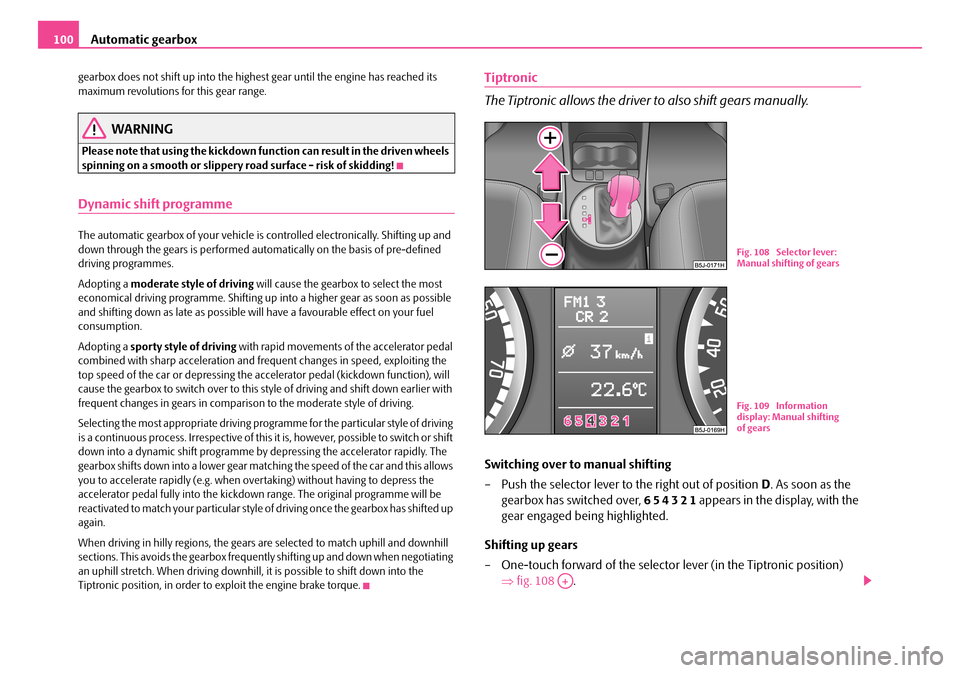
Switching over to manual shifting
– Push the selector lever to the right out of position D. As soon as the
gearbox has switched over, 6 5 4 3 2 1 appears in the display, with the
gear engaged being highlighted.
Shifting up gears
– One-touch forward of the selector lever (in the Tiptronic position)
⇒ fig. 108 .
Fig. 108 Selector lever: Manual shifting of gears
Fig. 109 Information display: Manual shifting of gears
A+
NKO A05R 20 MR08.book Page 100 Wednesday, March 28, 2007 9:42 AM
Page 114 of 248
Communication113
Using the systemSafetyDriving TipsGeneral MaintenanceBreakdown assistancePraktikTechnical Data
you with details about the technical possibilities for retrofitting of mobile tele- phones and radio transmitters.
Operation of mobile phones or two-way radio systems may interfere with func- tioning of the electronic systems of your vehicle. The reasons for this may be:
•no external aerial,
•external aerial incorrectly installed,
•transmission power greater than 10 watts.
You should therefore not operate a mobile phone or two-way radio system inside the vehicle without the use of an external aerial, or with an external aerial which has been incorrectly installed.
You should also be aware of the fact that only an external aerial makes it possible to achieve the optimal range of such equipment.
WARNING
•If a mobile phone or two-way radio sy stem is operated inside the vehicle without using an external aerial, or wi th an external aerial which has been incorrectly installed, the result can be excessive electromagnetic fields which may cause harm to your health.
•Please always pay full attention to the traffic situation around you!
•You must not install two-way radio systems, mobile phones or mounts on the covers of the airbags or within the immediate deployment range of airbags. This might result in injuries to the occupants in the event of an acci- dent!
Note
Please also refer to the operating instru ctions of the mobile phones and two-way radio systems.
Input AUX-IN*
The input for external audio sources AUX-IN is located on the right next to the hand- brake and is marked with . This input serves for connecting external audio sources (e.g. portable mp3 player) to the your radio system. The input AUX-IN* is only available in combination with a radio installed in the factory. The description on how to operate AUX-IN* can be found in the relevant operating instructions of the radio.
Note
If an external audio source is connected via AUX-IN*, which has a separate power supply, this can lead to an interference of the audio signals.
CD changer*
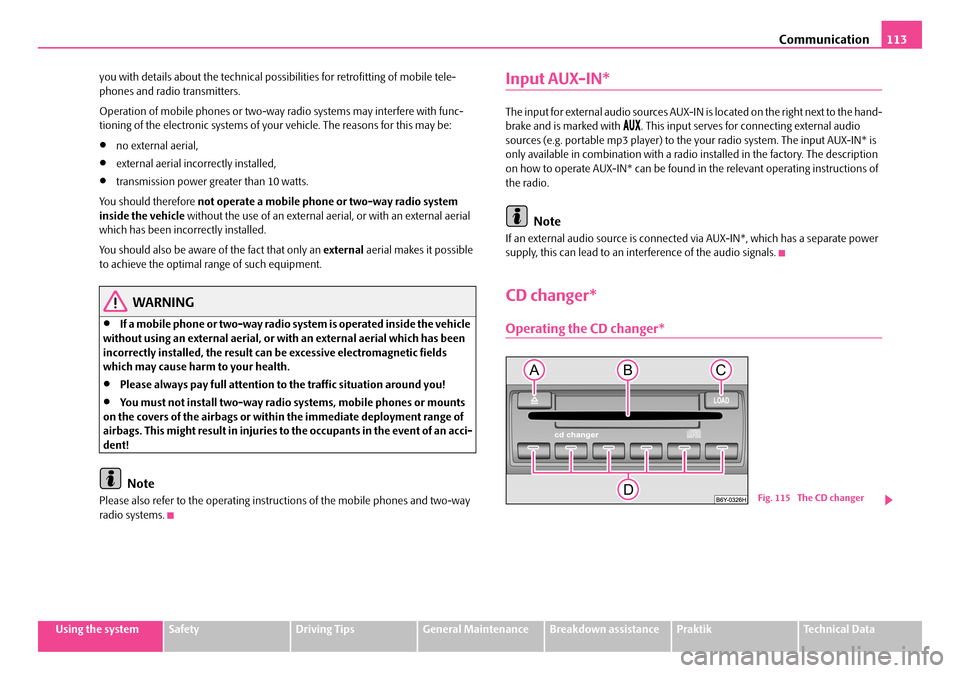
Operating the CD changer*
Fig. 115 The CD changer
NKO A05R 20 MR08.book Page 113 Wednesday, March 28, 2007 9:42 AM
Page 120 of 248
Passive Safety119
Using the systemSafetyDriving TipsGeneral MaintenanceBreakdown assistancePraktikTechnical Data
Correct seated position
Correct seated position for the driver
Correct seated position for the driver is important for safe and
relaxed driving.
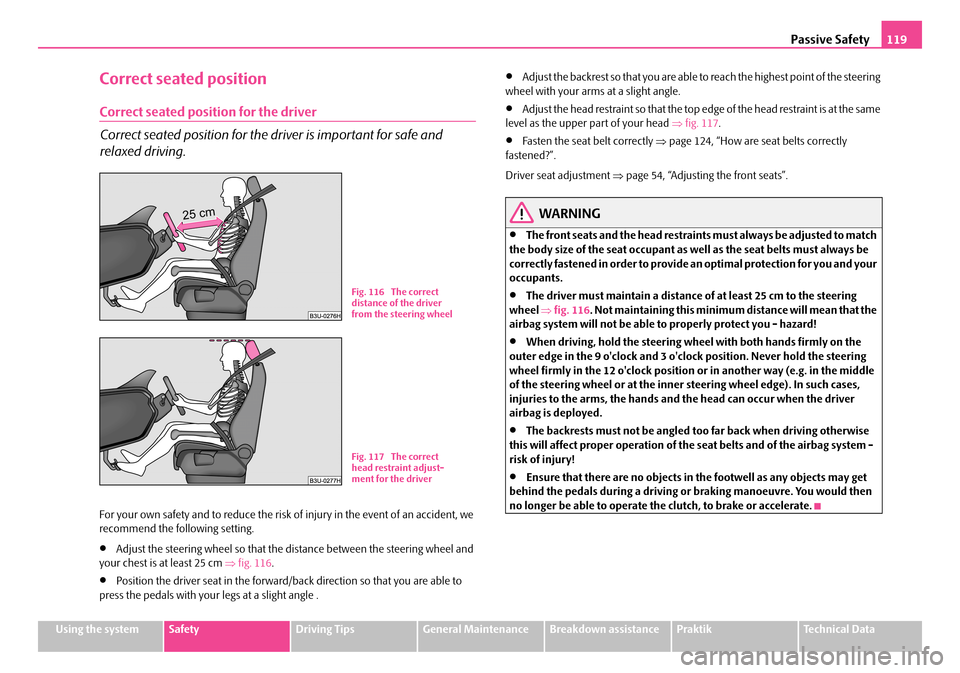
For your own safety and to reduce the risk of injury in the event of an accident, we recommend the following setting.
•Adjust the steering wheel so that the distance between the steering wheel and your chest is at least 25 cm ⇒fig. 116.
•Position the driver seat in the forward/back direction so that you are able to press the pedals with your legs at a slight angle .
•Adjust the backrest so that you are able to reach the highest point of the steering wheel with your arms at a slight angle.
•Adjust the head restraint so that the top edge of the head restraint is at the same level as the upper part of your head ⇒fig. 117.
•Fasten the seat belt correctly ⇒page 124, “How are seat belts correctly fastened?”.
Driver seat adjustment ⇒page 54, “Adjusting the front seats”.
WARNING
•The front seats and the head restraints must always be adjusted to match the body size of the seat occupant as well as the seat belts must always be correctly fastened in order to provide an optimal protection for you and your occupants.
•The driver must maintain a distance of at least 25 cm to the steering wheel ⇒fig. 116. Not maintaining this minimum distance will mean that the airbag system will not be able to properly protect you - hazard!
•When driving, hold the steering wheel with both hands firmly on the outer edge in the 9 o'clock and 3 o'clock position. Never hold the steering wheel firmly in the 12 o'clock position or in another way (e.g. in the middle of the steering wheel or at the inner steering wheel edge). In such cases, injuries to the arms, the hands and the head can occur when the driver airbag is deployed.
•The backrests must not be angled to o far back when driving otherwise this will affect proper operation of the seat belts and of the airbag system - risk of injury!
•Ensure that there are no objects in the footwell as any objects may get behind the pedals during a driving or braking manoeuvre. You would then no longer be able to operate the clutch, to brake or accelerate.
Fig. 116 The correct distance of the driver from the steering wheel
Fig. 117 The correct head restraint adjust-ment for the driver
NKO A05R 20 MR08.book Page 119 Wednesday, March 28, 2007 9:42 AM
Page 121 of 248
Passive Safety120
Correct seated position for the front passenger
The front passenger must maintain a distance of at least 25 cm from
the dash panel so that the airbag offers the greatest possible safety
when an airbag is deployed.
For the safety of the front passenger and to reduce the risk of injury in the event of an accident, we recommend the following setting.
•Adjust the front passenger seat as far as possible to the rear.
•Adjust the head restraint so that the top edge of the head restraint is at the same level as the upper part of your head ⇒page 119, fig. 117.
•Fasten the seat belt correctly ⇒page 124, “How are seat belts correctly fastened?”.
In exceptional cases the front pass enger airbag can be deactivated ⇒page 135, “Deactivating an airbag”.
Adjusting the passenger seat ⇒page 54, “Adjusting the front seats”.
WARNING
•The front seats and the head restraints must always be adjusted to match the body size of the seat occupant as well as the seat belts must always be correctly fastened in order to provide an optimal protection for you and your occupants.
•The front passenger must maintain a distance of at least 25 cm to the dash panel. Not maintaining this minimum distance will mean that the airbag system will not be able to properly protect you - hazard!
•Always keep your feet in the footwell when the car is being driven - never place your feet on the instrument panel, out of the window or on the surfaces of the seats. You will be exposed to increased risk of injury if it becomes necessary to apply the brake or in the event of an accident. If an airbag is deployed, you may suffer fata l injuries when adopting an incorrect seated position!
•The backrests must not be angled too far back when driving otherwise this will affect proper operation of th e seat belts and of the airbag system - risk of injury!
Correct seated position for the occupants on the rear seats
Occupants on the rear seats must si t upright, keep the feet in the
footwell and must have their seat belts correctly fastened.
To reduce the risk of injury in the event of a sudden braking manoeuvre or an acci- dent, the occupants on the rear seats must observe the following.
•Adjust the head restraints so that the to p edge of the head restraints are at the same level as the upper part of your head ⇒page 119, fig. 117.
•Fasten the seat belt correctly ⇒page 124, “How are seat belts correctly fastened?”.
•If you are transporting ⇒page 137, “Transporting children safely” children in the vehicle, please use a suitable child restraint system.
WARNING
•The head restraints must always be adjusted to match the body size, in order to offer an optimal protection for you and your occupants.
•Always keep your feet in the footwell when the car is being driven - never put your feet out of the window or on the surfaces of the seats. You will be exposed to increased risk of injury if it becomes necessary to apply the brake or in the event of an accident. If th e head airbag* is deployed and when adopting an incorrect seated position, you are exposing yourself to an increased risk of injury and in the event of an accident you may suffer fatal injuries!
•If the occupants on the rear seats are not sitting upright, the risk of injury is increased due to incorrec t routing of the seat belt.
•The backrests must not be angled too far back when driving otherwise this will affect proper operation of the seat belts and of the airbag system - risk of injury!
NKO A05R 20 MR08.book Page 120 Wednesday, March 28, 2007 9:42 AM
Page 126 of 248
Seat belts125
Using the systemSafetyDriving TipsGeneral MaintenanceBreakdown assistancePraktikTechnical Data
– Slowly pull the belt webbing at the tongue of the lock over your chest
and pelvis ⇒.
– Insert the tongue of the lock into th e seat belt buckle belonging to the
seat until it is heard to lock in place.
– Pull on the belt to check that it has also reliably engaged in the lock.
Each three-point seat belt is equipped with an inertia reel. This inertia reel offers you complete freedom of movement if the belt is unreeled slowly. If the brakes are applied suddenly, the inertia reel will block. It also blocks the belts when the car accelerates, when driving downhill and when cornering.
Expectant mothers must also wear the seat belt ⇒.
WARNING
•The shoulder part of the seat belt must never run across your neck but must run approximately over the middl e of the shoulder and fit snugly against the chest. The lap part of the belt must run across the hip and must never be routed across the stomach. It must always fit snugly ⇒page 124, fig. 121 . Adjust the belt webbing as required.
•The lap part of the belt should be positioned as low as possible at the pelvis of an expectant mother in order to avoid exerting any pressure on the lower abdomen.
•Always ensure that the webbing of the seat belts is properly routed. Seat belts which are not correctly adjusted ca n themselves cause injuries even in minor accidents.
•A seat belt which is hanging too loose can result in injuries as your body is moved forward by the kinetic energy produced in an accident and is then suddenly held firm by the belt.
•Only insert the lock tongue into the lo ck which is the correct one for your seat. This will affect the protection whic h the belt offers and increase the risk of an injury.
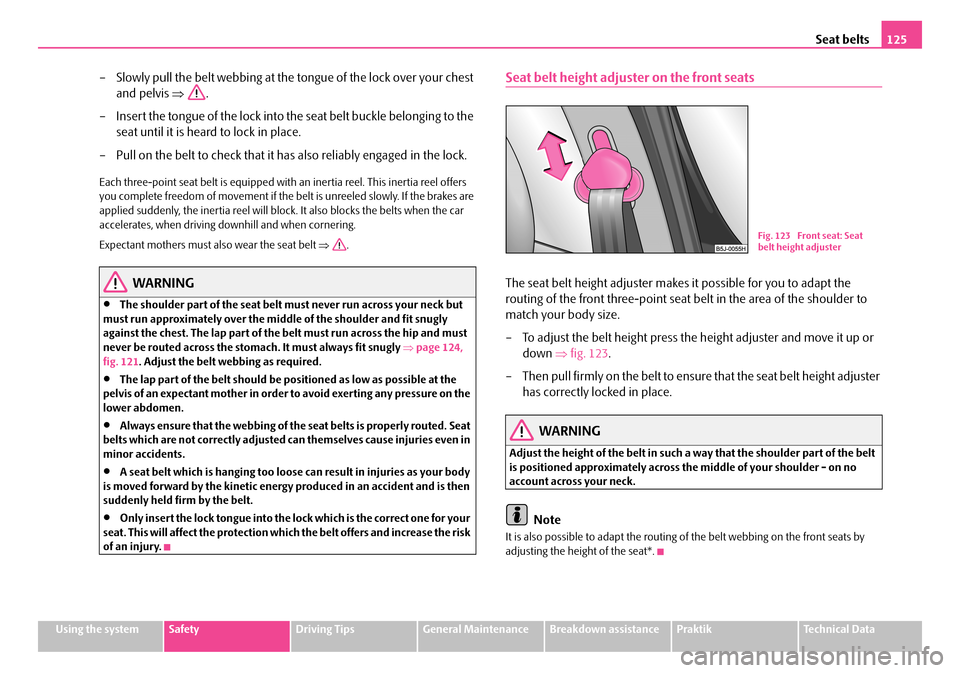
Seat belt height adjuster on the front seats
The seat belt height adjuster makes it possible for you to adapt the
routing of the front three-point seat belt in the area of the shoulder to
match your body size.
– To adjust the belt height press the height adjuster and move it up or
down ⇒fig. 123.
– Then pull firmly on the belt to ensure that the seat belt height adjuster
has correctly locked in place.
WARNING
Adjust the height of the belt in such a way that the shoulder part of the belt is positioned approximately across the middle of your shoulder - on no account across your neck.
Note
It is also possible to adapt the routing of the belt webbing on the front seats by adjusting the height of the seat*.
Fig. 123 Front seat: Seat belt height adjuster
NKO A05R 20 MR08.book Page 125 Wednesday, March 28, 2007 9:42 AM
Page 146 of 248
Intelligent Technology145
Using the systemSafetyDriving TipsGeneral MaintenanceBreakdown assistancePraktikTechnical Data
Driving Tips
Intelligent Technology
Electronic stability programme (ESP)*
General
General
The ESP aids you maintain control of your vehicle in situations in borderline driving situations such as when negotiating a curve too fast. The risk of skidding is reduced and your car thus offers greater driving stability depending on the conditions of the road surface. This occurs at all speeds.
The following systems are integrated into the electronic stability programme:
•Electronic Differential Lock (EDL),
•Traction control system (TCS),
•Antilock brake system (ABS),
•Brake Assist.
Operating principle
The ESP switches on automatically when the engine is started and then conducts a self-test. The ESP control unit processes data from the individual systems. It also processes additional measurement data which are supplied by highly sensitive sensors: the rotational velocity of the vehi cle about its vertical axis, the lateral accel- eration of the vehicle, the brakin g pressure and the steering angle.
The direction which the driver wishes to ta ke is determined based on the steering angle and the speed of the vehicle and is constantly compared with the actual behaviour of the vehicle. If differences exis t, such as the car beginning to skid, the ESP will automatically brake the appropriate wheel.
The car is stabilised again by the forces which take effect when the wheel is braked. Intervention into the brake system takes place primarily on the outer front wheel of a vehicle which tends to oversteer (tendency for the rear of the vehicle to break away) while occurs this is on the inner re ar wheel of a vehicle which tends to under- steer (tendency to shift out of the curve). This braking control cycle is accompanied by noises.
The ESP operates in combination with the ABS ⇒page 149, “Antilock brake system (ABS)*”. If there is a fault in the ABS system, the ESP also does not operate.
The ESP warning light ⇒page 27 lights up in the instrument cluster when there is a fault on the ESP.
Switching off
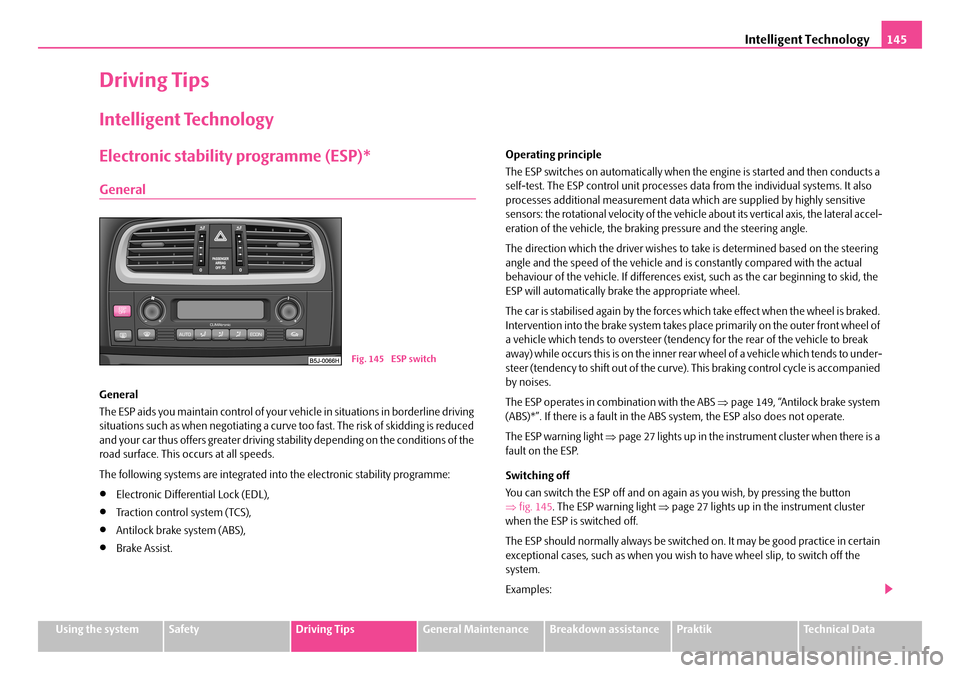
You can switch the ESP off and on again as you wish, by pressing the button ⇒ fig. 145. The ESP warning light ⇒page 27 lights up in the instrument cluster when the ESP is switched off.
The ESP should normally always be switched on. It may be good practice in certain exceptional cases, such as when you wish to have wheel slip, to switch off the system.
Examples:
Fig. 145 ESP switch
NKO A05R 20 MR08.book Page 145 Wednesday, March 28, 2007 9:42 AM
Page 147 of 248
Intelligent Technology146
•when driving with snow chains,
•when driving in deep snow or on a loose surface,
•when it is necessary to rock a car free when it has become stuck.
then you should switch on the ESP again.
WARNING
It is also not possible for the ESP to overcome the physical limits of the vehicle. Even if a vehicle fitted with ESP you should still always adapt your style of driving to the condition of the road surface and the traffic situation. This particularly applies when driving on slippery and wet roads. The increased safety offered must not tempt you to take greater risks than other- wise - risk of an accident!
Note
•All four wheels must be fitted with the same tyres in order to achieve problem-free operation of the ESP. Differing rolling circumferences of the tyres can lead to an undesirable reduction in the engine output.
•Changes to vehicle (e.g. on engine, on the brakes, on chassis or other assign- ment of tyres and wheels) can influence the function of the ESP ⇒page 193, “Accessories, changes and replacement of parts”.
Traction control system (TCS)*
The traction control system prevents the driven wheels from spinning
when accelerating.
General
The TCS makes it much easier, and sometimes at all possible, to start off, accelerate and climb a steep hill when the conditions of the road surface are unfavourable.
Operating principle
The TCS switches on automatically when th e engine is started and then conducts a self-test. The system monitors the speeds of the driven wheels with the aid of the ABS sensors. If the wheels ar e spinning, the force transmitted to the road surface is automatically adapted by reducing the engi ne speed. This occurs at all speeds.
The TCS operates in combination with the ABS ⇒page 149, “Antilock brake system (ABS)*”. The TCS will not function if a fault exists in the ABS system.
The TCS warning light ⇒page 26 lights up in the instrument cluster when there is a fault on the TCS.
Switching off
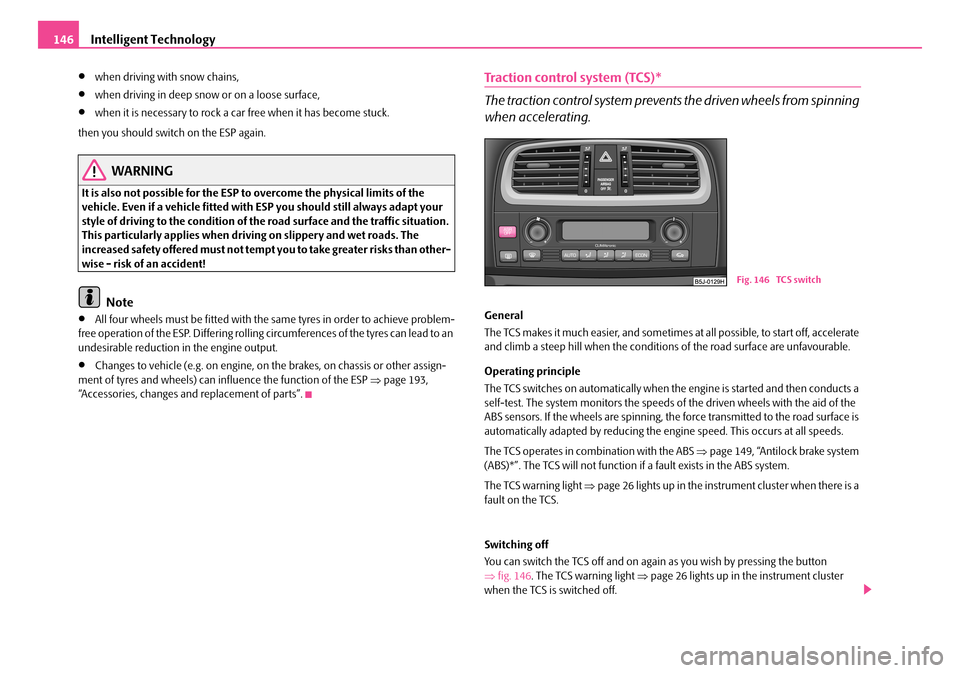
You can switch the TCS off and on again as you wish by pressing the button ⇒ fig. 146. The TCS warning light ⇒page 26 lights up in the instrument cluster when the TCS is switched off.
Fig. 146 TCS switch
NKO A05R 20 MR08.book Page 146 Wednesday, March 28, 2007 9:42 AM
Page 148 of 248
Intelligent Technology147
Using the systemSafetyDriving TipsGeneral MaintenanceBreakdown assistancePraktikTechnical Data
The TCS should normally always be switched on. It may be good practice in certain exceptional cases, such as when you wish to have wheel slip, to switch off the system.
Examples:
•when driving with snow chains,
•when driving in deep snow or on a loose surface,
•when it is necessary to rock a car free when it has become stuck.
then you should switch on the TCS again.
WARNING
You should always adjust your style of driving to the conditions of the road surface and the traffic situation. The increased safety offered must not tempt you to take greater risks than otherwise - risk of an accident!
Note
•All four wheels must be fitted with the same tyres in order to achieve problem- free operation of the TCS. Differing rollin g circumferences of the tyres can lead to an undesirable reduction in the engine output.
•Changes to vehicle (e.g. on engine, on the brakes, on chassis or other assign- ment of tyres and wheels) can in fluence the function of the TCS ⇒page 193, “Accessories, changes and replacement of parts”.
Electronic Differential Lock (EDL)*
The electronic differential lock pr events an individual wheel from
slipping.
Models fitted with ESP are equipped with electronic differential lock (EDL).
General
The EDL makes it much easier, and sometimes at all possible, to start off, accelerate and climb a steep hill when the conditio ns of the road surface are unfavourable.
Operating principle
The EDL is activated automatically, that is without any action on the part of the driver. It monitors the speeds of the driven wheels with the aid of the ABS sensors. Should only one drive wheel begin spinning on a slippery surface there will be an appreciable difference in the speed of the driven wheels. The EDL function brakes the slipping wheel and the differential transmits a greater driving force to the other driven wheel. This control proce ss is also accompanied by noises.
Overheating of the brakes
The EDL switches off automatically if unus ually severe stresses exist in order to avoid excessive heat generation in the disc brake on the wheel which is being braked. The vehicle can continue to be driven and has the same characteristics as a vehicle not fitted with EDL.
The EDL switches on again automatically as soon as the brake has cooled down.
WARNING
•Depress the accelerator carefully when accelerating on uniformly slip- pery road surfaces, such as ice and sn ow. The driven wheels might still spin despite the EDL and affect the stability of the vehicle - risk of an accident!
•You should always adapt your style of driving to the condition of road surface and to the traffic situation even when your vehicle is fitted with EDL. The increased safety offered must not tempt you to take greater risks than otherwise - risk of an accident!
Note
•If the ABS or TCS or ESP warning light comes on, this may also indicate a fault in the EDL. Please have the car inspected as soon as possible by a specialist garage.
•Changes to vehicle (e.g. on engine, on the brakes, on chassis or other assign- ment of tyres and wheels) can in fluence the function of the EDL ⇒page 193, “Accessories, changes and replacement of parts”.
NKO A05R 20 MR08.book Page 147 Wednesday, March 28, 2007 9:42 AM
Page 149 of 248
Intelligent Technology148
Brakes
What has a negative effect on braking efficiency?
Wear-and-tear
Wear-and-tear to the brake pads is greatly dependent on the operating conditions of the vehicle and your style of driving. Particularly if you drive a great deal in towns and over short distances or if you adopt a sporty style of driving, it may be neces- sary to have the thickness of the brake pads inspected at a specialist garage between the service inspections.
Wet roads or road salt
There may be a certain delay before the brakes take full effect under certain condi- tions such as when driving through water, during heavy rain showers or after the vehicle has been washed in an automatic vehicle wash, since the brake discs and brake pads may be moist or even have a coating of ice on them in winter. You should dry the brakes as soon as possib le (by applying and releasing the brakes several times, if the road conditions and the traffic situation allows it).
There also may be a certain delay before the full braking efficiency is available when driving on roads which have been treated wi th road salt if you have not used the brakes for some considerable time beforeha nd. The layer of salt on the brake discs and brake pads must first be rubb ed off when you apply the brakes.
Corrosion
Corrosion on the brake discs and dirt on th e bake pads occur if the vehicle has been parked for a long period and if you do not make much use of the braking system.
We recommend cleaning the brake discs by firmly applying the brakes at a fairly high speed if you do not make much use of the braking system or if surface corro- sion is present ⇒.
Faults in the brake surface
If you notice that the braking distance has suddenly become longer and that the brake pedal can be depressed further, it is possible that a brake circuit of the dual- circuit brake system has failed. Drive, in such cases, to the nearest specialist garage without delay in order to have the problem rectified. Drive at a reduced speed while on your way to the dealer and adapt your style of driving to the higher brake pedal pressure required.
Low brake fluid level
An insufficient level of brake fluid may result in problems in the brake system. The level of the brake fluid is monitored electronically ⇒page 28, “Brake system ”.
WARNING
•Only apply the brakes for the purpose of drying and cleaning the brake discs if the traffic conditions permit this. Do not place any other road users in jeopardy.
•When retrospectively mounting a front spoiler, solid wheel hubs etc. one must ensure that the air supply to the front wheel brakes is not reduced otherwise the braking sy stem could run too hot.
•Allow for the fact that new brake pads do not achieve their full braking efficiency until approximately 200 kilo metres. New brake pads must be first “run in” before they develop their optimal friction force. You can, however, compensate for this slightly reduced braking force by increasing the pres- sure on the brake pedal. This guidelin e also applies to any new brake pads installed at a future date.
Caution
•Never allow the brakes to ru b by applying slight pressure if you do not wish to brake the vehicle. This causes the brakes to overheat and can also result in a longer braking distance and excessive wear.
•Before negotiating a steep downhill section, please reduce your speed and shift down into the next lower gear (manual ge arbox) or select a lower driving stage (automatic gearbox). This enables you to make full use of the braking power of the vehicle and reduces the strain on the brakes . Any additional braking should be done intermittently, not continuously.
Brake booster
The brake booster boosts the pressure which you generate with the brake pedal. The necessary pressure is only gene rated when the engine is running.
NKO A05R 20 MR08.book Page 148 Wednesday, March 28, 2007 9:42 AM
Page 150 of 248
Intelligent Technology149
Using the systemSafetyDriving TipsGeneral MaintenanceBreakdown assistancePraktikTechnical Data
WARNING
•Never switch off the engine before the vehicle is stationary.
•The brake booster only operates when the engine is running. Greater physical effort for braking is required when engine is switched off. Because if you do not stop as normal, this can cause an accident and severe injuries.
Antilock brake system (ABS)*
ABS prevents the wheels locking when braking.
General
The ABS contributes significan tly to enhancing the active safety of your vehicle. Compared to a car not fitted with the ABS brake system, you are able to retain optimal steering ability even during a fu ll brake application on a slippery road surface because the wheels do not lock up.
You must not expect, however, that the br aking distance will be shorter under all circumstances as a result of the ABS. Th e braking distance for example on gravel and fresh snow, when you should anyway be driving slowly and cautiously, will be longer.
Operating principle
As soon as the vehicle speed has increase d to about 20 km/hour an automatic test procedure is conducted during which you wi ll be able to hear a pumping noise for about 1 second.
The brake pressure will be reduced on a wheel which is rotating at a speed which is too low for the speed of the vehicle and tend ing to lock. This control cycle is notice- able from a pulsating movement of the brake pedal which is accompanied by noises. This is consciously intended to pr ovide the driver with the information that the wheels are tending to lock (ABS control range). You must always keep the brake pedal depressed to enable the ABS to optima lly control the brake application in this braking range. Never interrupt the application of the brakes!
WARNING
•The ABS can also not overcome the physic al limits of your vehicle. Please do not forget this, particularly when driv ing on icy or wet road surfaces. If the ABS is operating within the control ra nge, adapt your speed immediately to the conditions of the road surface and the traffic situation. The increased safety offered by the ABS must not tempt you to take greater risks than otherwise - risk of an accident!
•The normal braking system is still fully functional if there is an ABS fault. Visit a specialist garage as quickly as po ssible and adjust your style of driving to take account of the ABS fault in the meantime since you will not know how great the damage is.
Note
•A warning light comes on if a fault occurs in the ABS system ⇒page 27.
•Changes to vehicle (e.g. on engine, on the brakes, on chassis or other assign- ment of tyres and wheels) can in fluence the function of the ABS ⇒page 193, “Accessories, changes and replacement of parts”.
Brake Assist*
During a severe brake application (e.g. if a hazard exists), the Brake Assist increases the braking force and thus makes it possible to rapidly produce the pressure required in the brake system.
The majority of drivers do apply the brakes in good time in dangerous situations, but do not depress the brake pedal with suff icient pressure. Consequently, it is not possible for the car to achieve its maxi mum deceleration and the car covers a greater distance than necessary.
The Brake Assist is activated by the very quick operation of the brake pedal. In such cases, a much greater braking pressure ex ists than during a normal brake applica- tion. This makes it possible, even with a relatively low resistance of the brake pedal, to produce an adequate pressure in the brake system in the shortest possible time, which is required for maximum deceleration of the car. You must apply the brake
NKO A05R 20 MR08.book Page 149 Wednesday, March 28, 2007 9:42 AM