engine SKODA ROOMSTER 2014 1.G Owner's Manual
[x] Cancel search | Manufacturer: SKODA, Model Year: 2014, Model line: ROOMSTER, Model: SKODA ROOMSTER 2014 1.GPages: 204, PDF Size: 14.15 MB
Page 5 of 204
Table of Contents
Board literature4
Notes
5
Structure and more information about the
Operating Instructions
6
Abbreviations
Safety
Passive Safety
8
General information
8
Correct and safe seated position
9
Seat belts
12
Using seat belts
12
Inertia reels and belt tensioners
15
Airbag system
16
Description of the airbag system
16
Airbag overview
17
Deactivating airbags
20
Transporting children safely
22
Child seat
22
Fastening systems
25
Operation
Cockpit
29
Overview
28
Instruments and Indicator Lights
30
Instrument cluster
30
Multifunction display (MFD)
33
Service Interval Display
36
MAXI DOT display
37
Warning lights
39Unlocking and locking47Unlocking and locking47
Central locking system
49
Remote control
52
Anti-theft alarm system
53
Luggage compartment lid
54
Electrical power windows
55
Mechanical windows
58
Lights and visibility
59
Lights
59
Interior lights
63
Visibility
64
Windscreen wipers and washers
65
Rear window
67
Seats and stowing
69
Front seats
69
Rear seats
70
Head restraints
72
Boot
73
Variable loading floor in the luggage
compartment (Estate)
76
Bicycle carrier in the luggage compartment
78
Roof rack system
80
Useful equipment
80
Storage compartments
83
Praktik
87
Heating and air-conditioning
90
Heating, ventilation, cooling
90
Heating
91Air conditioning system (manual air
conditioning system)93
Climatronic (automatic air conditioning
system)
95
Communication and multimedia
97
Universal telephone preinstallation GSM II
97
Voice control
102
Multimedia
103
Driving
Starting-off and Driving
106
Starting and stopping the engine
106
Brakes
108
Manual gear changing and pedals
109
Automatic transmission
110
Running in
113
Economical driving and environmental
sustainability
113
Avoiding damage to your vehicle
117
Driving abroad
118
Assist systems
119
Brake assist systems
119
Parking aid
120
Cruise Control System
121
START-STOP
123
Tyre pressure monitoring
125
Hitch and trailer
126
Hitch
126
Trailer
129
General Maintenance
Car care
132
Services, modifications and technical
alterations
132
Washing vehicle
1352Table of Contents
Page 6 of 204
Taking care of your vehicle exterior136Taking care of the interior139
Inspecting and replenishing
142
Fuel
142
Engine compartment
145
Engine oil
148
Coolant
150
Brake fluid
152
Vehicle battery
153
Wheels
156
Tyres and wheel rims
156
Approved tyre / rim combinations
160
Winter operation
163
Do-it-yourself
Emergency equipment and self-help
165
Emergency equipment
165
Changing a wheel
166
Puncture set
169
Jump-starting
172
Towing the vehicle
173
Fuses and light bulbs
175
Fuses
175
Replacing bulbs
178
Technical data
Technical data
183
Vehicle data
183
Index
3Table of Contents
Page 10 of 204
AbbreviationsAbbreviationDefinitionrpmEngine revolutions per minuteABSAnti-lock brake systemAGAutomatic gearboxAGMVehicle battery typeTCSTraction controlCO2Carbon dioxideDPFDiesel particle filterDSGAutomatic double clutch gearboxEDLelectronic differential lockECEEconomic Commission for EuropeEPCEPC fault lightESCElectronic Stability ControlDRim depthEUEuropean UnionGSMGlobal System for Mobile communicationsHBAHydraulic brake assistHHCUphill start assistkWKilowatt, measuring unit for the engine outputMDIInputs for connecting external devicesMFDMultifunction displayMGManual gearboxN1Panel van intended exclusively or mainly for the transporta-
tion of goodsNmNewton meter, measuring unit for the engine torquePINpersonal identification numberSIM carda card for the identification of the mobile network operatorTDI CRDiesel engine with turbocharging and common rail injection
systemTSIPetrol engine with turbocharging and direct injectionVINVehicle identification number7Abbreviations
Page 11 of 204
Safety
Passive Safety
General information
Introduction
This chapter contains information on the following subjects:
Before setting off
8
Driving safety
8
Safety equipment
8
In this section you will find important information, tips and notes on the sub-
ject of passive safety in your vehicle.
We have combined everything here which you should be familiar with, for ex-
ample, regarding seat belts, airbags, child seats and safety of children.
WARNING■ This chapter contains important information on how to use the vehicle for
the driver and his occupants.■
You can find further information on safety concerning you and those trav-
elling with you in the following chapters of this owner's manual.
■
The complete on-board literature should always be in the vehicle. This
applies in particular, if you rent out or sell the vehicle.
Before setting off
Read and observe
on page 8 first.
For your own safety and the safety of the people travelling with you, please
pay attention to the following points before setting off.
Ensure that the lighting and the turn signal system are functioning proper-
ly.
Ensure that the function of the wiper and the condition of the wiper
blades are free of any defects.
Ensure that all of the windows offer good visibility to the outside.
Adjust the rear-view mirror so that vision to the rear is guaranteed.
Ensure that the mirrors are not covered.
Check the tyre inflation pressure.
Check the engine oil, brake fluid and coolant level.
Secure all items of luggage.
Do not exceed the permissible axle loads and permissible gross weight of
the vehicle.
Close all doors as well as the bonnet and boot lid.
Ensure that no objects can obstruct the pedals.
Protect children in suitable child seats with correctly fastened seat
belts » page 22 , Transporting children safely .
Adopt the correct seated position » page 9, Correct and safe seated
position . Tell your passengers to assume the correct seated position.
Driving safety
Read and observe
on page 8 first.
The driver is fully responsible for himself and his occupants. If your driving
safety is effected, you place yourself and the oncoming traffic at risk.
The following guidelines must therefore be observed. Do not become distracted from concentrating on the traffic situation, e.g.
by your passengers or mobile phone calls.
Never drive when your driving ability is impaired, e.g. due to medication, al-
cohol or drugs.
Keep to the traffic regulations and the permissible speed limit.
Always adjust the driving speed to the road, traffic and weather condi-
tions.
Take regular breaks on long journeys – at least every two hours.
Safety equipment
Read and observe
on page 8 first.
The following list contains only part of the safety equipment in your vehicle.
› Three-point seat belts for all the seats.
› Belt force limiters for the front seats.
› Belt tensioners for the front seats.
› Seat belt height adjusters for the front seats.
› Front airbag for the driver and the front passenger.
› Side airbags.
8Safety
Page 20 of 204
System descriptionRead and observe
on page 16 first.
The functional status of the airbag system is indicated by the indicator light
in the instrument cluster » page 44.
When the airbags are deployed, they fill with gas and inflate.
A grey white or red, non-harmful gas is released when the airbag is inflated.
This is perfectly normal and is not an indication of a fire in the vehicle.
Depending on the vehicle equipment, the airbag system consists of the
following modules.
› Electronic control unit.
› Front airbag for the driver and the front passenger
» page 18.
› Side airbags
» page 19.
› Head airbags
» page 19.
› Airbag warning light in the instrument cluster
» page 44.
› Key switch for the front passenger airbag
» page 21.
› Warning light for the front passenger airbag deactivation/activation in the
middle of the dash panel » page 21.
Note
■
The airbag system needs no maintenance during its working life.■If you sell your vehicle, provide the complete vehicle documentation to the
new owner. Please note that the information relating to the possibility of de-
activating the front passenger airbag must be included!■
When disposing of vehicle or parts of the airbag system, it is important to
comply with the national legal requirements.
Airbag deployment
Read and observe
on page 16 first.
The airbags inflate in fractions of a second and at a high speed in order to beable to offer additional protection in the event of an accident.
The airbag system is only functional when the ignition is switched on.
In certain accident situations, the several airbags may be deployed simultane-
ously.
The airbags are not deployed in the case of minor frontal and side collisions,
rear-end collisions, tilting of the vehicle and vehicle rollover.
Deployment factors
It is not possible to generally determine which deployment conditions apply to
the airbag system in every situation. An important role is played by factors
such as the type of object that the vehicle hits (hard/soft), the impact angle,
vehicle speed etc.
A decisive factor for the deployment of the airbags is the deceleration which
occurs. The control unit analyses the nature of the collision and activates the
relevant restraint system.
If the vehicle deceleration which occurs and is measured during the collision
remains below the prescribed reference values specified in the control unit,
the airbags are not deployed although the vehicle may well suffer severe dam-
age to the bodywork as a consequence of the accident.
The following airbags will be deployed in the event of a severe frontal
collision.
› Driver’s front airbag.
› Front passenger airbag.
The following airbags will be deployed in the event of a severe side collision. › Front side airbag on the side of the accident.
› Head airbags on the side of the accident.
When an airbag is deployed, the following events occur.
› The interior lighting comes on (if the switch for the interior light is in the door
contact position).
› The hazard warning lights are switched on.
› All the doors are unlocked.
› The fuel supply to the engine is interrupted.
Airbag overview
Introduction
This chapter contains information on the following subjects:
Front airbags
18
Side airbags
19
Head airbags
1917Airbag system
Page 33 of 204
Instruments and Indicator Lights
Instrument cluster
Introduction
This chapter contains information on the following subjects:
Overview
30
Engine revolutions counter
31
Speedometer
31
Coolant temperature gauge display
31
Fuel gauge
31
Counter for distance driven
32
Digital clock
32
Display of the second speed
32
Recommended gear
32
Fault display
The Error message will appear in the display if there is a fault in the instru-
ment cluster. Ensure that the fault is rectified as soon as possible by a special-
ist workshop.
WARNING■ Concentrate fully at all times on your driving! As the driver you are fully
responsible for road safety.■
Never operate the controls in the instrument cluster while driving, only
when the vehicle is stationary!
OverviewFig. 20
Instrument cluster
Read and observe
on page 30 first.
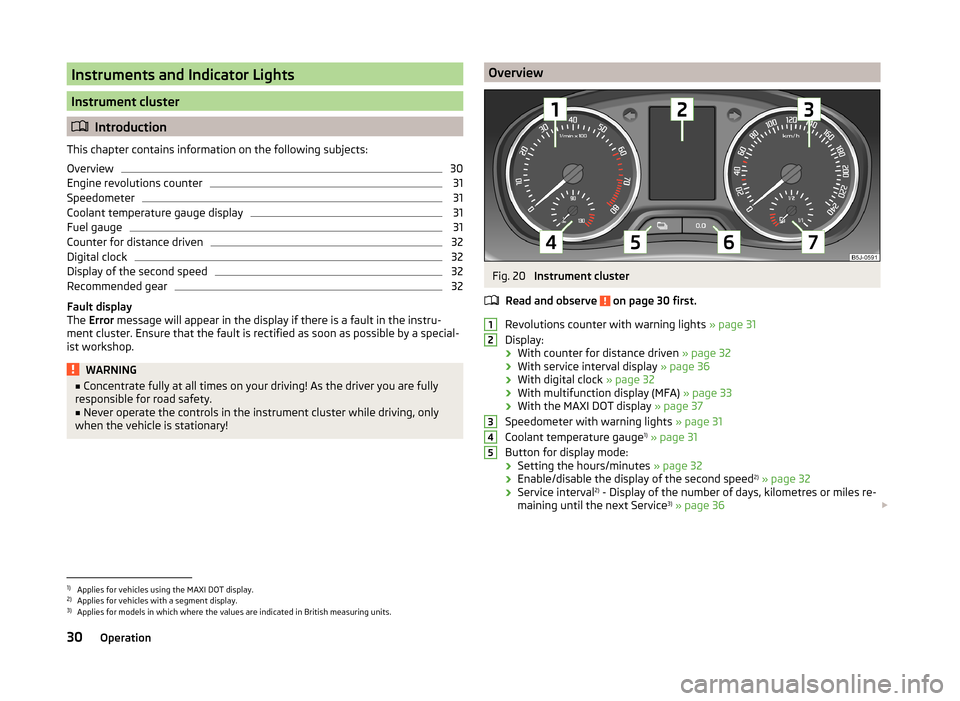
Revolutions counter with warning lights » page 31
Display:
› With counter for distance driven
» page 32
› With service interval display
» page 36
› With digital clock
» page 32
› With multifunction display (MFA)
» page 33
› With the MAXI DOT display
» page 37
Speedometer with warning lights » page 31
Coolant temperature gauge 1)
» page 31
Button for display mode:
› Setting the hours/minutes
» page 32
› Enable/disable the display of the second speed 2)
» page 32
› Service interval 2)
- Display of the number of days, kilometres or miles re-
maining until the next Service 3)
» page 36
123451)
Applies for vehicles using the MAXI DOT display.
2)
Applies for vehicles with a segment display.
3)
Applies for models in which where the values are indicated in British measuring units.
30Operation
Page 34 of 204
Button for:› Reset trip meter
» page 32
› Set hours/minutes
› Enable/disable the mode selected by means of button 5
Fuel gauge 1)
» page 31
Engine revolutions counter
Read and observe
on page 30 first.
The red scale range of the rev counter
1
» Fig. 20 on page 30 indicates the
range in which the engine control unit begins to limit the engine speed. The
engine control unit restricts the engine speed to a steady limit.
You should shift into the next higher gear before the red scale of the revolu-
tion counter is reached, or move the selector lever into position D if your car is
fitted with an automatic gearbox.
To maintain the optimum motor speed, observe the gearshift indica-
tor » page 32 .
For the sake of the environment
Shifting up in good time has the following benefits.■It helps to reduce fuel consumption.■
It reduces engine noise.
■
It protects the environment.
■
It benefits the life and reliability of the engine.
Speedometer
Read and observe
on page 30 first.
Warning against speeding
An audible warning will sound when the vehicle speed exceeds 120 km/h 2)
. The
audible warning is switched off once the vehicle speed falls below 120 km/h.
67Coolant temperature gauge display
Read and observe
on page 30 first.
The coolant temperature gauge
4
» Fig. 20 on page 30 works only when the
ignition is switched on.
In vehicles with a segment display, the coolant temperature is indicated only
by one of the warning lights » page 41,
Coolant coming on or going off.
Cold range
The pointer in the left of the scale indicates that the engine has not yet
reached its operating temperature. Avoid high speeds, full throttle and high engine loads. This prevents possible damage to the engine.
The operating range
The engine has reached its operating temperature as soon as the pointer
moves into the middle of the scale. At very high ambient temperatures or un-
der heavy engine loads, the pointer may move even further to the right.
High temperature range
The coolant temperature is too high if the pointer reaches the red area of the
scale. Further information » page 41.
CAUTION
■
Additional headlights and other attached components in front of the air inlet
impair the cooling efficiency of the coolant.■
Never cover the radiator - there is a risk of the engine overheating.
Fuel gauge
Read and observe
on page 30 first.
The fuel gauge
7
» Fig. 20 on page 30 only works when the ignition is switch-
ed on.
The fuel remaining is displayed in the segment display on vehicles with the
segment display.
The fuel tank has a capacity of about 55 litres. The warning light lights up
when the fuel level reaches the reserve range
» page 44 .
1)
Applies for vehicles using the MAXI DOT display.
2)
This function is only enabled in certain countries.
31Instruments and Indicator Lights
Page 38 of 204
The display is updated regularly while you are driving.
Range
The estimated range is displayed in kilometres. It indicates the distance you can still drive with your vehicle based on the level of fuel in the tank and the
same style of driving.
The display is shown in steps of 10 km. The value is displayed in steps of 5 km
after the
has come on.
The fuel consumption over the preceding 50 km is used to calculate the infor-
mation. The range will increase if you drive in a more economical manner.
If the memory is set to zero (after the battery has been disconnected), a fuel
consumption of 10 l/100 km is used initially, then the value is adapted accord-
ing to the style of driving.
Distance travelled
The distance travelled since the memory was last erased is displayed. Reset
the memory to zero if you want to measure the distance travelled from a par-
ticular moment » page 34, Operation .
The maximum distance indicated in both memories is 1999 km or 9999 km on
vehicles with a MAXI DOT display. The indicator is set back to zero when this
period is exceeded.
Average speed
The average speed since the memory was last erased is displayed in km/hour .
Set the memory to zero at the start of measurement to determine the average
speed over a certain period » page 34, Operation .
No value will appear in the display until you have driven approximately 300 m
after this information has been deleted.
The display is updated regularly while you are driving.
Current speed
The current speed, identical to the display on the speedometer 3
» Fig. 20 on
page 30 , is displayed.
Oil temperature 1)
The current engine oil temperature is displayed. If the oil temperature is lower
than 50 °C or if a fault in the system for checking the oil temperature is
present, only - -.- is displayed instead of the oil temperature.
Warning against speeding
The warning that the speed limit is being exceeded can be enabled/disabled in
the display » page 35.
Warning against speeding
Read and observe
on page 33 first.
Adjust the speed limit while the vehicle is stationary
›
Press button
A
» Fig. 23 on page 34 to select the Warning at (MAXI DOT
display) or
(segment display) menu item.
›
Press button
B
to activate the ability to set the speed limit 2)
(value flashes).
›
Use button
A
to set the required speed limit, e.g. 50 km/h.
›
Confirm the speed limit that was set with button
B
, or wait approx. 5 sec-
onds until the setting is saved automatically (the value stops flashing).
This allows you to set the speed in 5 km/h intervals.
Adjusting the speed limit while the vehicle is moving
›
Press button
A
» Fig. 23 on page 34 to select the Warning at (MAXI DOT
display) or (segment display) menu item.
›
Drive at the desired speed, e.g. 50 km/h.
›
Press button
B
to accept the current speed as the speed limit (the value
flashes).
If you wish to adjust the set speed limit, you can do so in 5 km/h intervals (e.g. the accepted speed of 47 km/h increases to 50 km/h or decreases to 45 km/h).
›
Confirm the speed limit that was set by pressing button
B
again, or wait ap-
prox. 5 seconds until the setting is saved automatically (the value stops
flashing).
Change or delete speed limit
›
Press button
A
» Fig. 23 on page 34 to select the Warning at (MAXI DOT
display) or (segment display) menu item.
›
Pressing button
B
disables the speed limit.
›
Pressing the button
B
activates the ability to change the speed limit.
If the set speed limit is exceeded, an audible signal will sound as a warning.
The Warning at (MAXI DOT display) or
(segment display) menu item appears
in the display with the limit set.
1)
Applies for vehicles using the MAXI DOT display.
2)
An initial value of 30 km/h is displayed automatically if no value has been specified.
35Instruments and Indicator Lights
Page 41 of 204
SettingsRead and observe
on page 37 first.
You can change certain settings yourself through the MAXI DOT display. The
current menu item is shown in the top of the display under a line.
You can select the following menu options:
Language
You can set the language for the warning and information texts here.
MFD data
Activate or deactivate certain displays of the multifunction display here.
Time
The time, time format (12 or 24 hour indicator) and the changeover between
summer/winter time can be set here.
Winter tyres
Here, you can set the speed at which an audible signal should sound. This
function is, for example, used for winter tyres where the maximum permissible
speed is lower than the maximum speed of the vehicle.
The following is shown on the information display if this speed is exceeded: Winter tyres: max. speed ... km/h.
Units of measurement
The units for the temperature, consumption and distance driven can be set
here.
Alt. speed dis.
Display of the second speed in mph 1)
can be activated here.
Service
The days and kilometres remaining until the next service can be displayed
here.
Factory setting
The display can be restored to its factory settings here.
Door, boot lid and bonnet warning
Read and observe
on page 37 first.
If at least one door is open, or the boot or bonnet is open, the MAXI DOT dis-
play shows the vehicle with the corresponding door or boot/bonnet open.
An audible signal also sounds if the vehicle is travelling at more than 6 km/h.
Auto Check Control
Read and observe
on page 37 first.
Vehicle condition
Certain functions and conditions of individual vehicle systems are checked
continuously when the ignition is switched on and also while driving.
Some error messages and other information are displayed in the MAXI DOT
display. The messages are displayed simultaneously with the icons in the MAXI
DOT display or with the warning lights in the instrument cluster » page 39.
The Vehicle status menu item is shown in the main menu of the MAXI DOT
display whenever at least one fault message is present. The first of the fault
messages is displayed after this menu item is selected. Several error messages
are shown on the display under the message e.g. 1/3. This indicates that the
first of a total of three error messages is being displayed.
As long as the operational faults are not rectified, the symbols are always indi-
cated again. After they are displayed for the first time, the symbols continue to
be indicated without any extra messages for the driver.
Warning symbols
Engine oil pressure too low» page 40Clutches of the automatic DSG gearbox
are too hot» page 38Check engine oil level,
engine oil sensor defective» page 40
Clutches of the automatic DSG gearbox are too hot
If the symbol appears in the MAXI DOT display, this indicates that the tem-
perature of the automatic DSG gearbox clutches is too high.
1)
On models on which the speedometer indicates mph, the second speed is displayed in km/h.
38Operation
Page 42 of 204
The following message is shown in the MAXI DOT display.Gearbox overheated. Stop. Owner's manual!
Stop the vehicle, switch off the engine, and wait until the
icon goes out –
there is a risk of gearbox damage. You can continue your journey as soon as
the icon disappears.WARNINGIf you have to stop for technical reasons, park the vehicle at a safe distance
from the traffic, switch off the engine and switch on the hazard warning
lights system » page 63.
Note
■
Warning messages shown in the MAXI DOT display must be confirmed with
button B » Fig. 25 on page 37 to call up the main menu.■
As long as the operational faults are not rectified, the symbols are always in-
dicated again. After they are displayed for the first time, the symbols continue
to be indicated without any extra messages for the driver.
Warning lights
Introduction
This chapter contains information on the following subjects:
Handbrake
39
Brake system
40
Seat belt warning light
40
Generator
40
Open door
40
Engine oil
40
Coolant
41
Power steering
42
Electronic Stability Control (ESC)
42
Traction Control System (ASR)
42
Anti-lock brake system (ABS)
42
The rear fog light
43
Bulb failure
43
Exhaust inspection system
43
Glow plug system (diesel engine)
43 EPC fault light (petrol engine)43 Diesel particulate filter (diesel engine)43
Fuel reserve
44
Airbag system
44
Tyre pressure
45
Windscreen washer fluid level
45
Traction control (TCS) switched off
45
Turning signal system
46
Low beam
46
Fog lights
46
Cruise control system
46
Selector lever lock
46
Main beam
46
The warning lights show certain functions/faults and may be accompanied by
audible signals.
WARNING■ If illuminated warning lights and the corresponding descriptions and
warning notes are not observed, this may result in severe injuries or major
vehicle damage.■
The engine compartment of your car is a hazardous area. There is a risk of
injuries, scalding, accidents and fire when working in the engine compart-
ment, e.g. inspecting and replenishing oil and other fluids. It is essential to
observe safety notes » page 145, Engine compartment .
Handbrake
Read and observe
on page 39 first.
The warning light comes on if the handbrake is applied. An audible warning
is also given if you drive the vehicle for at least 3 seconds at a speed of more
than 6 km/h.
The following message is shown in the MAXI DOT display. Release parking brake!
39Instruments and Indicator Lights