warning lights SKODA SUPERB 2008 2.G / (B6/3T) User Guide
[x] Cancel search | Manufacturer: SKODA, Model Year: 2008, Model line: SUPERB, Model: SKODA SUPERB 2008 2.G / (B6/3T)Pages: 272, PDF Size: 18.25 MB
Page 19 of 272

Instruments and Indicator/Warning Lights
18
The readout is shown in steps of 10 km. After lighting up of the indicator light for the
fuel reserve the display is shown in steps of 5 km.
The fuel consumption for the last 50 km is taken as a basis for calculating the range.
If you drive in a more economical manner from this moment on, the range will be
increased accordingly.
If the memory is set to zero (after disc onnecting the battery), the fuel consumption
of 10 l/100 km is calculated for the range; afterwards the value is adapted accord-
ingly to the style of driving.
Distance driven
The distance driven since the memory was last erased appears in the display
⇒ page 15. If you wish to measure the distance driven of a particular time, you
must set the memory to zero at this moment in time by pressing the button on
the windshield wiper lever ⇒page 15, fig. 6 or the handwheel on the multifunc-
tion steering wheel* ⇒page 16, fig. 7 .
The maximum distance indicated in both switch positions is 9999 km. The indicator
is set back to null if this period is exceeded.
Average speed
The average speed since the memory was last erased is shown in the display in
km/hour ⇒page 15. If you wish to determine the average vehicle speed over a
certain period of time you must set the memory to zero at the start of the measure-
ment using the button on the windshield wiper lever ⇒page 15, fig. 6 or with
the handwheel on the multifunction steering wheel* ⇒page 16, fig. 7 .
A zero appears in the display for the first 100 m you drive after erasing the memory.
The indicated value will be updated every 5 seconds while you are driving.
Current speed*
The current speed which is identical to the display of the speedometer, is indicated
on the display ⇒page 10, fig. 2 .
Warning against excessive speeds
Warning against excessive speeds
This function enables you to set a speed limit, e.g. if you drive in town. A text in the
display is intended to draw your attention to the fact that you have exceeded the set
speed limit.
You can set the desired speed limit as follows:
•Select the menu Speed warning --- km/h (warning at --- km/h) .
•You can drive at the desired speed, e.g. 50 km/h
•Press the button on the windshield wiper lever ⇒fig. 10 or the handwheel
on the multifunction steering wheel* ⇒page 16, fig. 7 . Speed warning
50 km/h (warning at 50 km/h) is displayed on the information display* ⇒fig. 9 .
ABAD
ABAD
A2
Fig. 9 Speed setting
Fig. 10 Multi-functional
indicator: Control elements
ABAD
NKO B6 20.book Page 18 Wednesday, March 26, 2008 3:15 PM
Page 20 of 272

Instruments and Indicator/Warning Lights19
Using the systemSafetyDriving TipsGeneral MaintenanceBreakdown assistanceTechnical Data
If you now exceed the set speed limit,
Speed 50 km/h exceeded (speed 50 km/h
exceeded) w i l l b e s h o w n o n t h e d i s pl a y. T h i s m e s s a g e i s i n d i ca te d fo r a s l o n g a s t h e
speed is reduced below the set limit or switch off the message by pressing the
button on the windshield wiper lever ⇒page 18, fig. 10 or the handwheel
on the multifunction steering wheel* ⇒page 16, fig. 7 .
An audible signal sounds as an additional warning signal.
The set speed limit remains stored even after switching off the ignition.
Information display*
Introduction
The information display provides you with information in a convenient way
concerning the current operating state of your vehicle . The information system
also provides you with data (depending on the equipment installed in the vehicle)
relating to the radio, mobile phone, multi-functional indicator, navigation system
and automatic gearbox.
Certain functions and oper ating conditions are always being checked on the
vehicle when the ignition is switched on and also while driving.
Functional faults, if required repair work and other information are indicated by red
symbols ⇒page 22 and yellow symbols ⇒page 23.
Lighting up of certain symbols is comb ined with an acoustic warning signal. Information and texts giving warnings
are also shown in the display ⇒page 26.
The display of text is possible in the following languages: Czech, English, German, French, Italia n, Spanish, Portuguese and Chinese.
You can select the desired la nguage in the setting menu.
The following information can be shown in the display (depending on the equip-
ment installed on the vehicle):
Caution
Pull out the ignition key while having contact with the display (for example when
cleaning) in order to prevent any damage.
Main menu
ABAD
Fig. 11 Instrument cluster:
Information display
Main menu⇒page 19
Door, luggage compartment door and bonnet ajar
warning⇒page 21
Service Interval Display⇒page 12
Selector lever positions of the automatic DSG⇒page 123
Fig. 12 Information display:
Controls on the windshield
wiper lever
NKO B6 20.book Page 19 Wednesday, March 26, 2008 3:15 PM
Page 21 of 272

Instruments and Indicator/Warning Lights
20
Operating with the buttons on the windshield wiper lever
– You can activate the MAIN MENU by pressing the rocker switch
⇒ page 19, fig. 12 for more than 1 second.
– You can select the menu through the rocker switch . When the pushbutton is briefly pressed, the information you have selected is
displayed.
Operating with the buttons on the multifunction steering wheel
– You can activate the MAIN MENU by pressing the rocker switch
⇒ fig. 13 for more than 1 second.
– You can select the individual menus by pressing the handwheel . After briefly pressing the handwh eel , the desired menu is indi-
cated.
– After briefly pressing the button you can achieve a higher level, by pressing the button for longer than 1 second, you can call up the
MAIN MENU .
You can select the following information (d epending on the equipment installed on
the vehicle):
„MFD (Onboard computer) ⇒ page 14
„Driving time
„Current consumption
„Average fuel consumption
„Range
„Distance driven
„Average speed
„Current speed
„Warning against excessive speeds
„Audio ⇒ page 21
„Navigation ⇒ page 21
„Phone ⇒ page 138
„Aux. Heating ⇒ page 106
„Vehicle status ⇒ page 22
„Setup ⇒ page 23
The menu Audio is only displayed when the Radio* is switched on.
The menu Navigation is only displayed when the Navigation* is switched on.
Aux. Heating is only then displayed, if the vehicle is fitted with auxiliary heating*.
Note
•If warning messages are indicated in the information display, ⇒page 21
⇒ page 22, you must confirm them with th e button on the windshield wiper
lever or with the button on the multi-func tion steering wheel in order to call up
the main menu.
•If you do not activate the information display at that moment, the menu shifts
to one level higher every 10 seconds.
Fig. 13 Information display:
Controls on the multifunc-
tion steering wheel
AA
AA
AB
AC
AD
AD
AC
AC
ABAD
NKO B6 20.book Page 20 Wednesday, March 26, 2008 3:15 PM
Page 22 of 272

Instruments and Indicator/Warning Lights21
Using the systemSafetyDriving TipsGeneral MaintenanceBreakdown assistanceTechnical Data
Door, luggage compartment door and bonnet ajar warning
The door, luggage compartment door and bonnet ajar warning lights up when at
least one of the three items door, luggage compartment or bonnet are not closed
when the ignition is turned on. The symbol indicates which door is still open or
whether the luggage compartment door or bonnet is not closed ⇒fig. 14 .
The symbol goes out as soon as the door s, luggage compartment door and bonnet
are completely closed.
A warning signal sounds if the car is driven at a speed of more than 6km/hour and
if the door or the luggage compartment door is open.
Audio
These displays indicate the normal information from the display of the radio*.
Operation of the radio* is described in separate operating instructions to be found
in the on-board literature.
Navigation system*
The controls for the navigation system, radi o, CD player are located in the centre
console on both sides of the monitor screen. Navigation data is also shown in the
information display of the instrument cluster.
Information and warning texts are displaye d preferentially when the navigation
system is switched on.
Operation of the navigation system is described in separate operating instructions
to be found in the on-board literature.
Fig. 14 Information display:
Door warningFig. 15 Information display:
Radio display
NKO B6 20.book Page 21 Wednesday, March 26, 2008 3:15 PM
Page 23 of 272
Instruments and Indicator/Warning Lights
22
Auto Check Control*
Car state
The Auto Check Control carries out a check of certain functions and vehicle compo-
nents. The check is performed constantly wh en the ignition is switched on, both
when the vehicle is stationary, as well as when driving.
Some operational faults, urgent repairs, service work or other information appear
in the display of the instrument cluster. The displays are shown with a red or yellow
light symbol depending on the priority of the message.
The red symbols indicate danger (priority 1) while the yellow symbols indicate a
warning (priortity 2). Information for the driver may also appear in addition to the
symbols ⇒page 26.
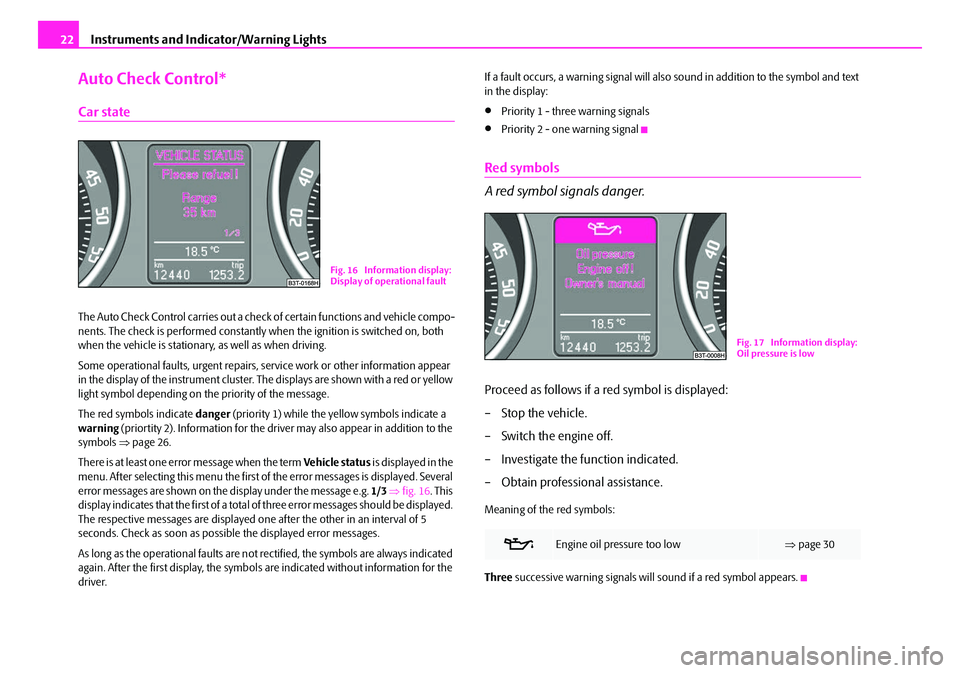
There is at least one error message when the term Vehicle status is displayed in the
menu. After selecting this menu the first of the error messages is displayed. Several
error messages are shown on the display under the message e.g. 1/3 ⇒ fig. 16 . This
display indicates that the first of a total of three error messages should be displayed.
The respective messages are displayed one after the other in an interval of 5
seconds. Check as soon as poss ible the displayed error messages.
As long as the operational faults are not rectified, the symbols are always indicated
again. After the first display, the symbol s are indicated without information for the
driver. If a fault occurs, a warning signal will also sound in addition to the symbol and text
in the display:
•Priority 1 - three warning signals
•Priority 2 - one warning signal
Red symbols
A red symbol signals danger.
Proceed as follows if a red symbol is displayed:
– Stop the vehicle.
– Switch the engine off.
– Investigate the function indicated.
– Obtain professional assistance.
Meaning of the red symbols:
Three
successive warning signals will sound if a red symbol appears.
Fig. 16 Information display:
Display of operational fault
Engine oil pressure too low ⇒page 30
Fig. 17 Information display:
Oil pressure is low
NKO B6 20.book Page 22 Wednesday, March 26, 2008 3:15 PM
Page 24 of 272
Instruments and Indicator/Warning Lights23
Using the systemSafetyDriving TipsGeneral MaintenanceBreakdown assistanceTechnical Data
Yellow symbols
Check the relevant function as soon as possible.
The meaning of the yellow symbols:
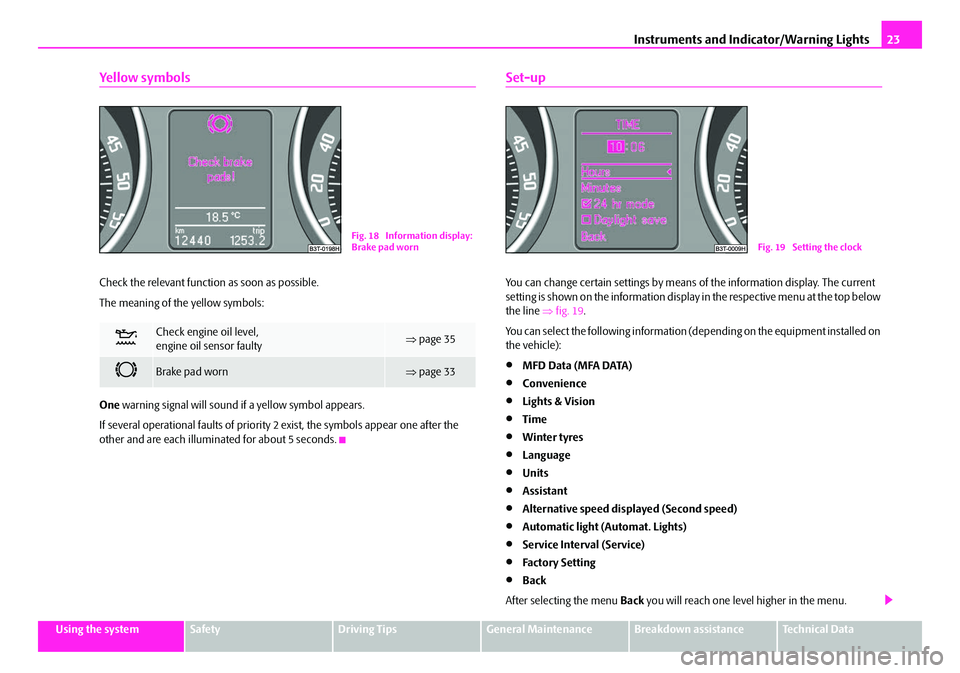
One warning signal will sound if a yellow symbol appears.
If several operational faults of priority 2 exist, the symbols appear one after the
other and are each illumi nated for about 5 seconds.
Set-up
You can change certain settings by means of the information display. The current
setting is shown on the information display in the respective menu at the top below
the line ⇒ fig. 19.
You can select the following information (d epending on the equipment installed on
the vehicle):
•MFD Data (MFA DATA)
•Convenience
•Lights & Vision
•Time
•Winter tyres
•Language
•Units
•Assistant
•Alternative speed displayed (Second speed)
•Automatic light (Automat. Lights)
•Service Interval (Service)
•Factory Setting
•Back
After selecting the menu Back you will reach one leve l higher in the menu.
Check engine oil level,
engine oil sensor faulty⇒page 35
Brake pad worn⇒page 33
Fig. 18 Information display:
Brake pad wornFig. 19 Setting the clock
NKO B6 20.book Page 23 Wednesday, March 26, 2008 3:15 PM
Page 25 of 272

Instruments and Indicator/Warning Lights
24
Displays of the MFA
Here you can switch off or on certain displays of the multi-functional indicator.
Comfort*
You can set the following functions (depen ding on the equipment installed on the
vehicle):
Lights and Visibility
Here you can set how long the light should stay on for the function Coming/Leaving
Home and the intensity of the footwell li ghting. Furthermore you can here switch
on or off the function daylight drivin g lights and convenience turn signal. After selecting the menu
Fa c t o r y s e t t i n g the factory setting is established again.
Time
Here you can set the time, the time format (12 or 24 hour indicator) and the time
change summer/winter time.
Winter tyres
Here you can set at which speed a warning signal should sound. This function is
used for e.g winter tyres with the permissible maximum speed less than the
maximum speed of the vehicle.
When exceeding the speed, the following is displayed on the information display*:
Snow tyres max. speed ... km/h (Winter tyres maximum ... km/h)
Language
Here you can set in which language the warning and information texts should be
displayed.
Measures
Here you can set the units for temperat ure, consumption and distance driven.
Assistant
Here you can adjust the tones of the acoustic signals of the parking aid*.
Second speed
Here you can switch on the display of the second speed in mph or in km/h
2).
Service
Here you can have the kilometers still to be driven and the days until the following
service interval shown and the Service Interval Display reset.
Factory Setting
After selecting the menu Factory Setting the factory setting of the information
display is established again.
Rain closing
On vehicles with ra in sensor you can switch on or off the
function for automatic closing of the windows and the
sliding/tilting roof in case of rain and locked vehicle. If it
is not raining and the function is set, the windows
including the sliding/tilting roof are closed automatically
after approx. 12 hours.
Door openHere you can switch on or off the functions for opening
a single door and automatic closing.
ATA c onfir mHere you can set if a signal tone should sound addition-
ally when activating or deactivating the anti-theft alarm
system .
Window op.Here you can set the convenience mode only for the
driver window or for all the windows.
Mirror downHere you can switch on or off the function for mirror
adjustment on the front pass enger side when engaging
the reverse gear .
Mirror adjust.Here you can switch on or off the function for left and
right exterior mirror adjustment simultaneously.
Factory setting
After selecting this menu the convenience setting is
reset to factory setting. The following is displayed in the
information display:
Factory setting for convenience is set
.
2)Valid for countries where the values are indicated in British measuring units.
NKO B6 20.book Page 24 Wednesday, March 26, 2008 3:15 PM
Page 26 of 272

Instruments and Indicator/Warning Lights25
Using the systemSafetyDriving TipsGeneral MaintenanceBreakdown assistanceTechnical Data
Information display in the rear centre console
The time and the outside temperature is displayed on the information display in the
rear centre console when th e ignition is switched on ⇒fig. 20 .
The values are taken over by the instrument cluster.
Fig. 20 Centre console at
rear: Information display
NKO B6 20.book Page 25 Wednesday, March 26, 2008 3:15 PM
Page 27 of 272

Instruments and Indicator/Warning Lights
26
Warning lights
Overview
The warning lights indicate certain functions or faults.
Fig. 21 Instrument cluster with warning lights
Turn signal lights (to the left)⇒ page 27
Turn signal lights (to the right)⇒page 27
Fog lights⇒page 28
Main beam⇒page 28
Low beam⇒page 28
Rear fog light⇒page 28
Speed regulating system⇒page 28
Failure of the light bulbs⇒page 28
Adaptive headlights*⇒page 28
Diesel particle filter* (diesel engine)⇒page 28
Airbag system⇒page 29
NKO B6 20.book Page 26 Wednesday, March 26, 2008 3:15 PM
Page 28 of 272
Instruments and Indicator/Warning Lights27
Using the systemSafetyDriving TipsGeneral MaintenanceBreakdown assistanceTechnical Data
WARNING
•If you do not pay attention to the warning lights coming on and the corre-
sponding descriptions and warning notes, this may result in severe body
injuries or major vehicle damage.
•The engine compartment of your car is a hazardous area. There is a risk
of injuries, scalding, accidents and fire when working in the engine
compartment, e.g. inspecting and replenis hing oil and other fluids. It is also
essential to observe all warnings ⇒page 209, “Working in the engine
compartment”.
Note
•The arrangement of the indicator light is dependent on the model version. The
symbols shown in the following functional description are to be found as indicator
lights in the instrument cluster.
•Operational faults are shown in the instrument cluster as red symbols (priority
1 - danger) or yellow symbols (priority 2 - warning).
Turn signal system
Either the left or right indicator light flashes depending on the position of the
turn signal lever.
The indicator light flashes at twice its normal rate if a turn signal light fails. This does
not apply when towing a trailer.
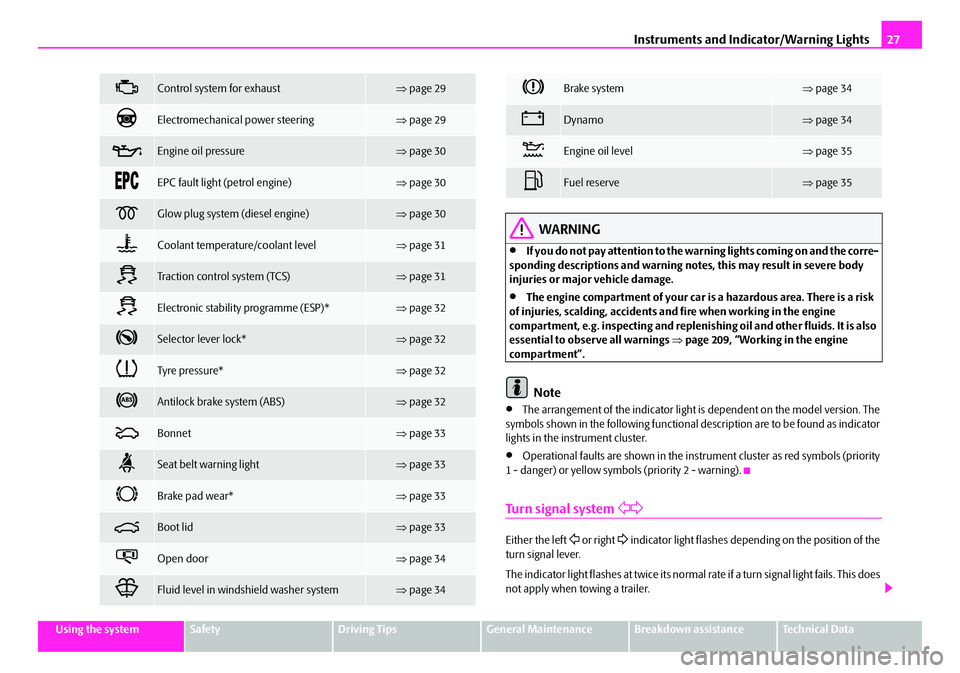
Control system for exhaust⇒ page 29
Electromechanica l power steering⇒page 29
Engine oil pressure⇒page 30
EPC fault light (petrol engine)⇒page 30
Glow plug system (diesel engine)⇒page 30
Coolant temperature/coolant level⇒page 31
Tra c t i o n c o n t r o l s y s t e m ( TC S )⇒page 31
Electronic stability programme (ESP)*⇒page 32
Selector lever lock*⇒page 32
Tyre pressure*⇒page 32
Antilock brake system (ABS)⇒page 32
Bonnet⇒page 33
Seat belt warning light⇒page 33
Brake pad wear*⇒page 33
Boot lid⇒page 33
Open door⇒page 34
Fluid level in windshield washer system⇒page 34
Brake system⇒page 34
Dynamo⇒page 34
Engine oil level⇒page 35
Fuel reserve⇒page 35
NKO B6 20.book Page 27 Wednesday, March 26, 2008 3:15 PM