ECO mode SKODA SUPERB 2013 2.G / (B6/3T) User Guide
[x] Cancel search | Manufacturer: SKODA, Model Year: 2013, Model line: SUPERB, Model: SKODA SUPERB 2013 2.G / (B6/3T)Pages: 274, PDF Size: 17.31 MB
Page 54 of 274
Lights and visibility
Lights
Introduction
This chapter contains information on the following subjects:
Parking and low beam lights
51
Daylight running lights (DAY LIGHT)
52
Turn signal and main beam
53
Automatic driving lamp control
53
Adaptive headlights (AFS)
54
Fog lights
55
Fog lights with the CORNERfunction
55
Rear fog light
55
COMING HOME / LEAVING HOME
55
Hazard warning light system
56
Parking lights
57
Unless otherwise stated, the lights only work when the ignition is switched on.
On models fitted with right-hand steering the position of the controls differs
from that shown in » Fig. 30 on page 51. The symbols which mark the positions
of the controls are identical.
Keep the headlights lenses clean. The following guidelines must be ob-
served » page 200 , Headlight lenses .
WARNING■
The activation of the lights should only be undertaken in accordance with
national legal requirements.■
The driver is always responsible for the correct settings and use of the
lights.
WARNING (Continued)■ The automatic driving lamp control only operates as a support and does
not release the driver from his responsibility to check the light and, if necessa-
ry, to switch on the light depending on the given light conditions. The light
sensor cannot, for example, detect rain or snow. Under these conditions we
recommend switching on the low beam or fog lights!■
Never drive with only the side lights on! The side lights are not bright
enough to light up the road sufficiently in front of you or to be seen by other
oncoming traffic. Therefore always switch on the low beam when it is dark or
if visibility is poor.
Note
The headlights may mist up temporarily. When the driving lights are switched on,
the light outlet surfaces are free from mist after a short period, although the
headlight lenses may still be misted up in the peripheral areas. This mist has no
influence on the life of the lighting system.
Parking and low beam lights
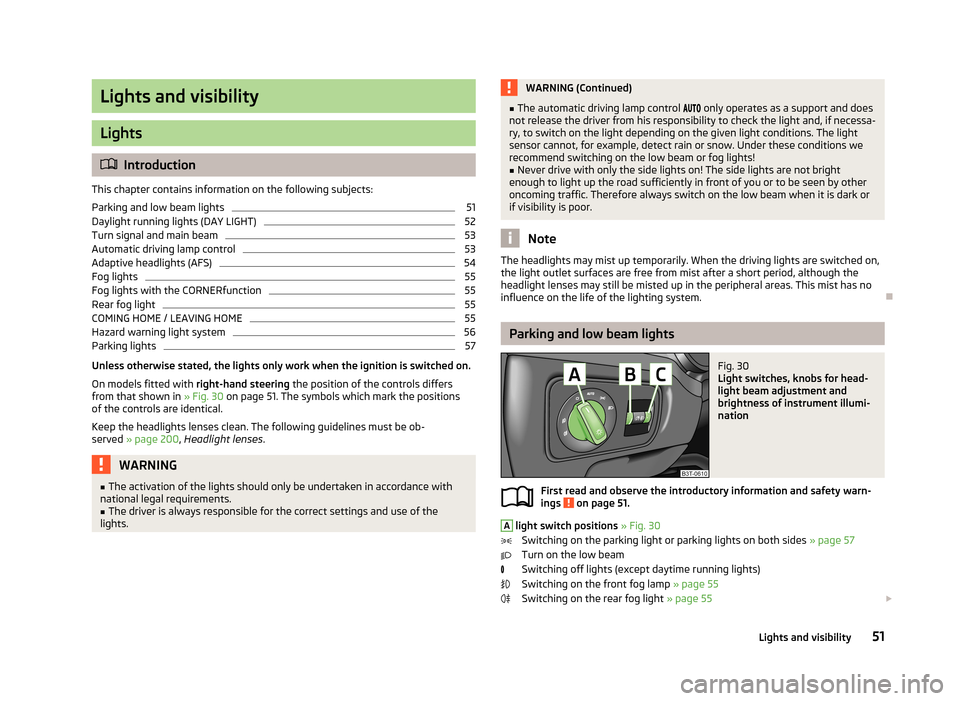
Fig. 30
Light switches, knobs for head-
light beam adjustment and
brightness of instrument illumi-
nation
First read and observe the introductory information and safety warn- ings on page 51.
A
light switch positions » Fig. 30
Switching on the parking light or parking lights on both sides » page 57
Turn on the low beam
Switching off lights (except daytime running lights) Switching on the front fog lamp » page 55
Switching on the rear fog light » page 55
51Lights and visibility
Page 57 of 274
The light switches off when automatic wiping/wiping (position 2 or 3) is not
switched on for longer than approx. 4 seconds.
CAUTION
Do not affix any stickers or similar objects in front of the light sensor on the wind-
screen, so that its functionality is not impaired or disabled.
Adaptive headlights (AFS)
First read and observe the introductory information and safety warn-ings
on page 51.
The AFS system makes sure the street remains lit up depending on the traffic and weather situation.
The system automatically adjusts the cone of light in front of the vehicle to the driving speed or the use of the wiper.
The AFS system works in tandem with automatic driving lamp control
, please
read the following » page 53.
The AFS system can work only if the following condition is met. The light switch is in the position
.
The AHL system operates in the following modes.
Out of town mode
The cone of light in front of the vehicle is similar to the low beam. The mode is
active if none of the following modes are active.
City mode
The light cone in front of the vehicle is adjusted so that this and the adjacent
sidewalks, intersections, pedestrian crossings, etc. are illuminated. The mode is
active at speeds of 15-50 km / h.
Motorway mode
The cone of light in front of the vehicle is adjusted so that the driver can respond in time to an obstruction or other hazard in time. The mode is activated gradually
from a speed of 90 km/h. It is most effective at speeds above 120 km/h.
Rain mode
The cone of light in front of the vehicle is adjusted so that the driver can reduce
the glare from oncoming vehicles in rain.
The mode is active at speeds of 15 – 70 km/h and if the windscreen wipers contin-
uously operate for a period of time longer than 2 minutes. The mode is deactiva-
ted when the windscreen wipers are switched off for longer than 8 minutes.
Dynamic cornering lights
The cone of light in front of the vehicle is adjusted to the steering angle so that the road in the curve is illuminated. This function is active at speeds greater than
10 km.h and in all AFS modes.
Tourist lights (Travel mode)
This mode makes it possible to drive in countries with opposing traffic system (driving on the left/right) without dazzling the oncoming vehicles.
When this mode is active, the above-mentioned modes and the side swivel of the
headlights is deactivated.
This mode can be enabled or disabled via the Maxi DOT display in the Travel
mode » page 29 menu option.WARNINGIf the AFS system is defective, the headlights are automatically lowered to the
emergency position, which prevents a possible dazzling of oncoming traffic.
This reduces the cone of light in front of the vehicle. Drive carefully and visit a
specialist garage as soon as possible.
Note
When the “Tourist light” mode is active, the warning icon flashes for about 10
seconds each time the ignition is switched on.
54Using the system
Page 65 of 274

Note■Each time the ignition switches off for the third time, the position of the wind-
screen wipers changes. This counteracts an early fatigue of the wiper rubbers.■
The rear window wiper only operates if the boot lid is closed.
■
Keep the wiper blades clean. They may become soiled, e.g., with wax residues
after washing in automatic car wash systems » page 197.
■
The windscreen washer nozzles for the windscreen are heated when the en-
gine is running and the outside temperature is less than approx. +10 °C.
Windscreen wipers and washers
Fig. 44
Operating lever: Windscreen
wipers and washer settings
First read and observe the introductory information and safety warn-
ings on page 61.
Lever positions » Fig. 44
Wipers off
Periodic windscreen wiping/automatic wiping in rain
slow windscreen wiping
rapid windscreen wiping
Flick windscreen wiping (spring-tensioned position)
Automatic wipe/wash for windscreen (spring-tensioned position) Wiping the rear window pane (the windscreen wiper wipes at regular inter- vals after a few seconds)
Automatic wipe/wash for the rear window (spring-tensioned position)
Switches for setting the required break between the individual wiper strokes
(
1
periodic windscreen wiping) or the wiper speed in rain (
1
automatic
windscreen wiping in rain)
01234567AAutomatic wipe/wash for windscreen
The wash system operates immediately, the windscreen wipers wipe somewhat
later. The wash system and the windscreen wiper operate simultaneously at a
speed of more than 120 km/h.
Letting go of the lever will cause the windscreen wash system to stop and the wiper to continue for another 3-4 wiper strokes (depending on the period of
spraying of the windscreen).
At a speed of more than 2 km/h, the wiper wipes once again 5 seconds after the
last wiper stroke in order to wipe the last drops from the windscreen. This func-
tion can be activated/deactivated by a specialist garage.
Automatic wipe/wash for the rear window (Superb Combi)The wash system operates immediately, the windscreen wiper wipes somewhat later.
Letting go of the lever will cause the windscreen wash system to stop and the
wiper to continue for another 2-3 wiper strokes (depending on the period of
spraying of the windscreen). The lever remains in position 6
» Fig. 44 .
Automatic rear window wiper (Superb Combi)
If the lever is in position
2
» Fig. 44 or
3
the rear window is wiped every
30 or 10 seconds if the vehicle's speed exceeds 5 km/h.
If automatic windscreen wiping in rain is activated (the lever is in the position
1
)
the function is only active if the windscreen wipers operate in continuous mode
(no break between each wiping process).
Automatic rear window wiping can be activated/deactivated via the MAXI DOT
display in the menu item Rear wiper » page 29 .
Winter setting of the windscreen wiper If the windscreen wipers are in rest position, they cannot be folded out from the
windscreen. For this reason we recommend adjusting the windscreen wipers in
winter so that they can be folded out from the windscreen easily.
› Switch on the windscreen wipers.
› Switch off the ignition.
The windscreen wipers remain in the position in which they were when switching
off the ignition.
The service position can also be used as a winter position » page 243.
62Using the system
Page 83 of 274

Glasses storage boxFig. 72
Opening the glasses storage box
First read and observe the introductory information and safety warn-ings on page 74.
Opening
›
Press the button
A
» Fig. 72 .
The box folds in the direction of the arrow.
Closing
›
Swivel the lid on the glasses storage box against the direction of the ar- row » Fig. 72 until it is heard to lock.
WARNING■
The compartment must only be opened when removing or inserting the
spectacles and otherwise must be kept closed!■
The box must be closed before leaving and locking the vehicle – risk of im-
pairment to the functions of the anti-theft alarm system!
CAUTION
Do not put any heat-sensitive objects in the glasses storage box - they may be
damaged.
Storage compartment on the passenger sideFig. 73
Tray open / operating air supply
First read and observe the introductory information and safety warn- ings
on page 74.
A pen holder is provided in the stowage compartment.
Opening
›
Press the button » Fig. 73 -
.
The flap folds down.
Closing
›
Lift the lid upwards until it clicks into place.
Air supply
›
Open the air supply by pulling the lever in the direction of the arrow » Fig. 73 -
.
›
The air supply is closed by pressing the lever in the opposite direction to that of
the arrow.
Opening the air supply when the air conditioning system is switched on allows
cooled air to flow into the storage compartment.
Opening the air inlet when the air conditioning system is on causes fresh or inte-rior air to flow into the storage compartment.
We recommend closing the air supply if it is operated in heating mode or the cool-ing system for the storage compartment is not being used.
80Using the system
Page 101 of 274
Air conditioning system
Heating, ventilation and cooling
Introduction
This chapter contains information on the following subjects:
Air outlets
99
Using the air conditioning system economically
99
Operational problems
100
The heating effect is dependent upon the coolant temperature, thus full heat
output only occurs when the engine has reached its operating temperature.
If the cooling system is switched on, the temperature and air humidity drops in
the vehicle. The cooling system prevents the windows from misting up during
winter months.
It is possible to briefly activate recirculated air mode to enhance the cooling ef-
fect.
Please refer to the information regarding recirculated air mode for the air-condi-
tioning system » page 102 or for Climatronic » page 105.
WARNINGFor your own safety and that of other road users, ensure that all the windows
are free of ice, snow and misting. Please familiarize yourself about how to cor- rectly operate the heating and ventilation systems, how to demist and defrost
the windows, as well as with the cooling mode.
CAUTION
■ The air inlet in front of the windscreen must be free (e.g. of ice, snow or leaves)
to ensure that the heating and cooling system operates properly.■
After switching on the cooling Condensation from the evaporator of the air con-
ditioning may drip down and form a puddle below the vehicle. This is not a leak!
Note■ The used air streams out through the vents in the boot.■We recommend that you do not smoke in the vehicle when the recirculating air
mode is operating since the smoke which is drawn at the evaporator from the in- terior of the vehicle forms deposits in the evaporator of the air conditioning sys-tem. This produces a permanent odour when the air conditioning system is oper-ating which can only be eliminated through considerable effort and expense (re-
placement of compressor).
98Using the system
Page 102 of 274
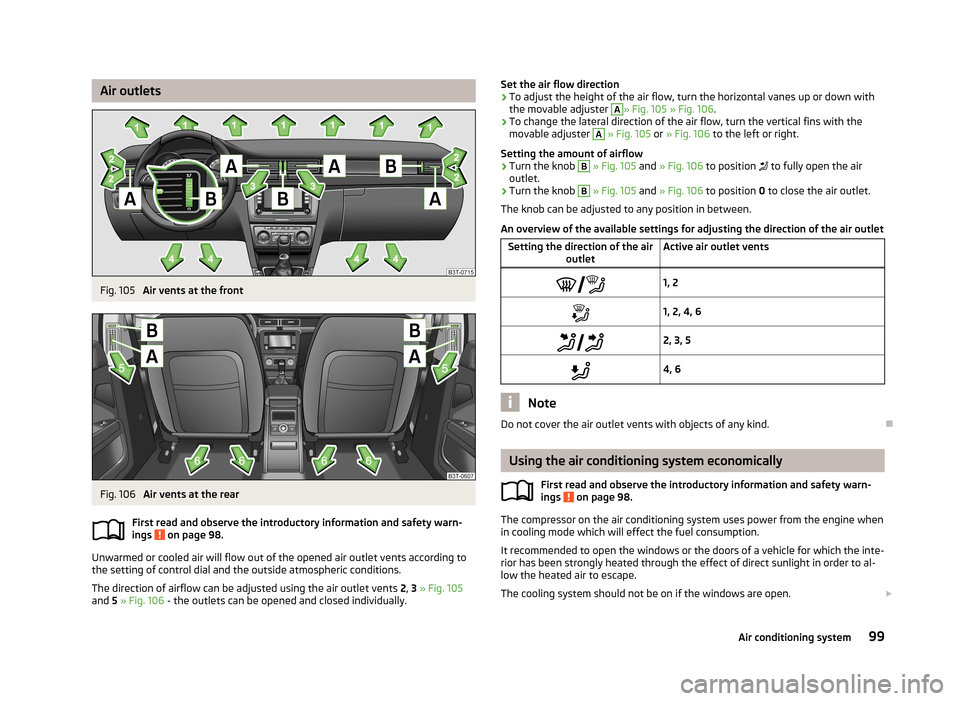
Air outletsFig. 105
Air vents at the front
Fig. 106
Air vents at the rear
First read and observe the introductory information and safety warn-
ings
on page 98.
Unwarmed or cooled air will flow out of the opened air outlet vents according to
the setting of control dial and the outside atmospheric conditions.
The direction of airflow can be adjusted using the air outlet vents 2, 3 » Fig. 105
and 5 » Fig. 106 - the outlets can be opened and closed individually.
Set the air flow direction›To adjust the height of the air flow, turn the horizontal vanes up or down with
the movable adjuster A
» Fig. 105 » Fig. 106 .
›
To change the lateral direction of the air flow, turn the vertical fins with the
movable adjuster
A
» Fig. 105 or » Fig. 106 to the left or right.
Setting the amount of airflow
›
Turn the knob
B
» Fig. 105 and » Fig. 106 to position to fully open the air
outlet.
›
Turn the knob
B
» Fig. 105 and » Fig. 106 to position 0 to close the air outlet.
The knob can be adjusted to any position in between.
An overview of the available settings for adjusting the direction of the air outlet
Setting the direction of the air outletActive air outlet vents1, 21, 2, 4, 6 2, 3, 54, 6
Note
Do not cover the air outlet vents with objects of any kind.
Using the air conditioning system economically
First read and observe the introductory information and safety warn-ings
on page 98.
The compressor on the air conditioning system uses power from the engine whenin cooling mode which will effect the fuel consumption.
It recommended to open the windows or the doors of a vehicle for which the inte- rior has been strongly heated through the effect of direct sunlight in order to al-low the heated air to escape.
The cooling system should not be on if the windows are open.
99Air conditioning system
Page 103 of 274
For the sake of the environmentPollutant emissions are also lower when fuel is being saved » page 143, Eco-
nomical driving and environmental sustainability .
Operational problems
First read and observe the introductory information and safety warn-
ings
on page 98.
If the cooling system does not operate at outside temperatures higher than +5 °C,
there is a problem in the system. The reasons for this may be.
› One of the fuses has blown. Check the fuse and replace if necessa-
ry » page 244 .
› The cooling system has switched off automatically for a short time because the
coolant temperature of the engine is too hot » page 11.
If you are not able to resolve the operational problem yourself, or if the cooler output has reduced, switch off the cooling system and seek assistance from a
specialist garage.
Air conditioning system (manual air conditioning
system)
Introduction
This chapter contains information on the following subjects: Control elements
100
adjusting
102
Recirculated air mode
102
The cooling system operates only if the following conditions are met. The cooling system is switched on » page 100.
The engine is running.
The outside temperature is above approx. +2 °C.
The blower switch is switched on (positions 1-4).
Under certain circumstances, air at a temperature of about 5 °C can flow out of the vents when the cooling system is switched on.
If the desired interior temperature can also be achieved without activating the
cooling system, fresh air mode should be selected.
The cooling system is switched off at a high coolant temperature in order to pro-
vide cooling at a high load of the engine.
CAUTION
Lengthy and uneven distribution of the air flow out of the vents (especially
around the feet) and large differences in temperature, for example, when getting
out of the vehicle, can cause susceptible individuals to catch a cold.
Note
We recommend that you have the air conditioning system cleaned by a specialist
garage once every year.
Control elements
Fig. 107
The air conditioning system: Control elements
First read and observe the introductory information and safety warn- ings
on page 100.
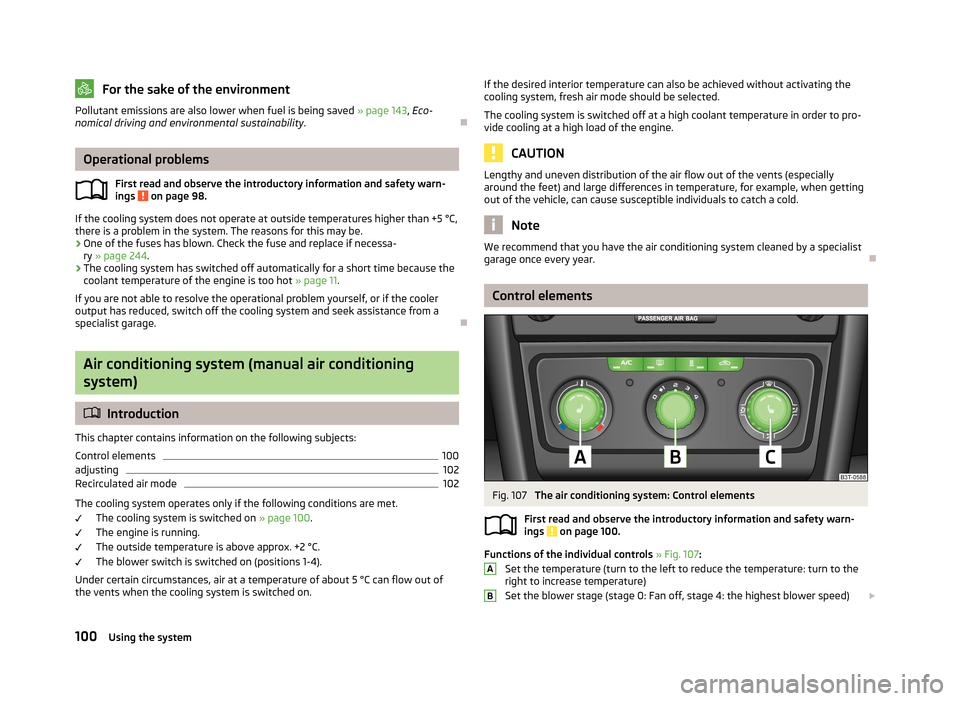
Functions of the individual controls » Fig. 107 :
Set the temperature (turn to the left to reduce the temperature: turn to the right to increase temperature)
Set the blower stage (stage 0: Fan off, stage 4: the highest blower speed)
AB100Using the system
Page 105 of 274

adjustingFirst read and observe the introductory information and safety warnings
on page 100.
Recommended basic settings of the control elements of the air conditioning system for the respective operating modes:
SettingsControl dial settings » Fig. 107 on page 100Button » Fig. 107 on page 100Air outlet vents 2 » Fig. 105
on page 99ABC
Defrost/defog windscreen and
side windows a)Desired tempera-
ture3 or 4Automaticallyswitched onDo not switch onOpen and align with the side windowThe fastest heatingTo the right up tothe stop3Switched offBriefly switch onOpeningComfortable heatingDesired tempera- ture2 or 3Switched offDo not switch onOpeningThe fastest coolingTo the left up to
the stopbriefly 4, then 2 or 3ActivatedBriefly switch onOpeningComfortable coolingDesired tempera- ture1, 2 or 3ActivatedDo not switch onOpen and align to the roofFresh air mode - ventilationTo the left up tothe stopDesired positionSwitched offDo not switch onOpeninga)
We recommend that you do not use this setting in countries with high humidity levels. This can result in heavy cooling of the window glass and the following fogging from outside.
We recommend that you leave the air outlet vents 3 » Fig. 105 on page 99 in the
opened position.
Recirculated air mode
First read and observe the introductory information and safety warn-ings
on page 100.
Recirculated air mode prevents polluted air outside the vehicle from getting into
the vehicle, for example when driving through a tunnel or when standing in a traffic jam.
Switching on/off
›
Press the symbol button
.
The indicator light in the button lights up.
› Press the symbol button
again.
The indicator light in the button goes out.
Recirculated air mode is switched off automatically if the air distribution controlC
» Fig. 107 on page 100 is turned to position . Recirculated air mode can be
switched on again from this setting by repeatedly pressing the symbol button .
WARNINGDo not leave recirculated air mode on over a longer period of time, as “stale”
air can cause fatigue of the driver and passengers, reduce attention levels and
also cause the windows to mist up. The risk of having an accident increases.
Switch off recirculated air mode as soon as the windows start to mist up.
102Using the system
Page 106 of 274
Climatronic (automatic air conditioning system)
Introduction
This chapter contains information on the following subjects:
Control elements
103
automatic mode
104
Switching the cooling system on/off
104
Setting the temperature
104
Recirculation mode - Version 1
105
Recirculation mode - Version 2
106
Controlling blower
106
Defrosting windscreen
106
The Climatronic in automatic mode ensures the best-possible setting of the tem-
perature of the outflowing air, the blower stage and air distribution.
The system also takes sunlight into account, which eliminates the need to alterthe settings manually.
The cooling system operates only if the following conditions are met. The cooling system is switched on » page 100.
The engine is running.
The outside temperature is above approx. +2 °C.
The cooling system is switched off at a high coolant temperature in order to pro-
vide cooling at a high load of the engine.
Aeration of the vehicle when ignition is switched off
On models fitted with power sliding/tilting roof with sollar cells, the fresh air blower is automatically switched over to “solar mode” if the sun ray's are suffi-
cient after switching off the ignition. The solar cells on the sliding/tilting roof de-
liver power for the fresh air blower. This supplies the interior of the car with fresh air.
For an optimum ventilation, the air outlet vents 2 and 3 must be opened » Fig. 105
on page 99.
The ventilation functions only when the sliding/tilting roof is fully closed.
Note■ We recommend that you have Climatronic cleaned by a specialist garage once
every year.■
On vehicles equipped with a factory-fitted radio or radio navigation system, the
Climatronic information is also shown on their displays. This function can be
switched off, see » operating instructions for the radio or navigation system .
Control elements
Fig. 108
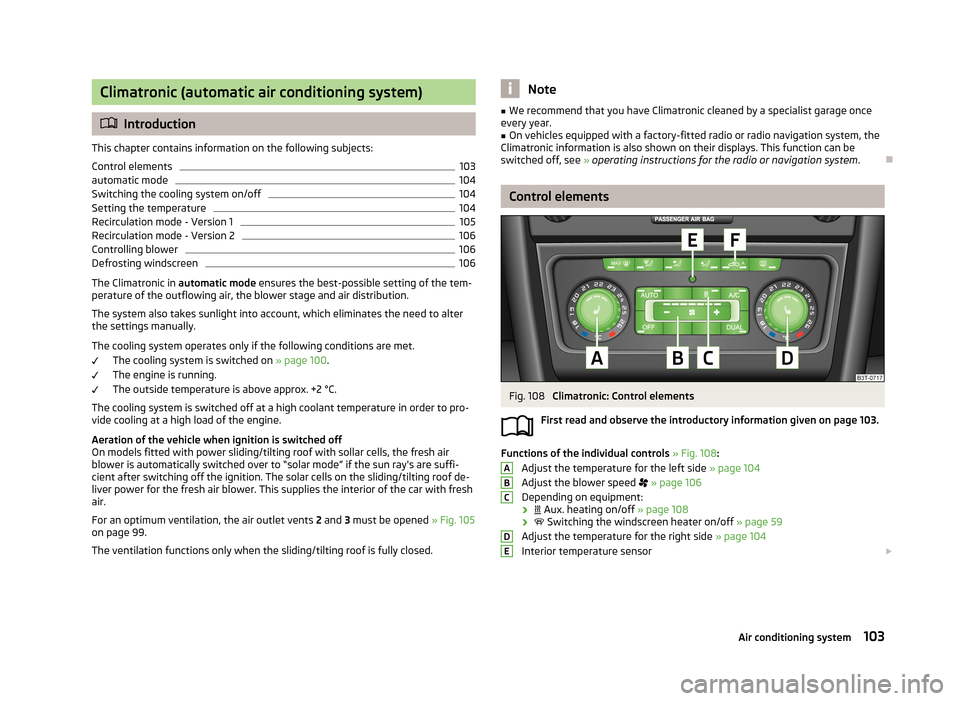
Climatronic: Control elements
First read and observe the introductory information given on page 103.
Functions of the individual controls » Fig. 108 :
Adjust the temperature for the left side » page 104
Adjust the blower speed
» page 106
Depending on equipment:
›
Aux. heating on/off » page 108
›
Switching the windscreen heater on/off » page 59
Adjust the temperature for the right side » page 104
Interior temperature sensor
ABCDE103Air conditioning system
Page 107 of 274
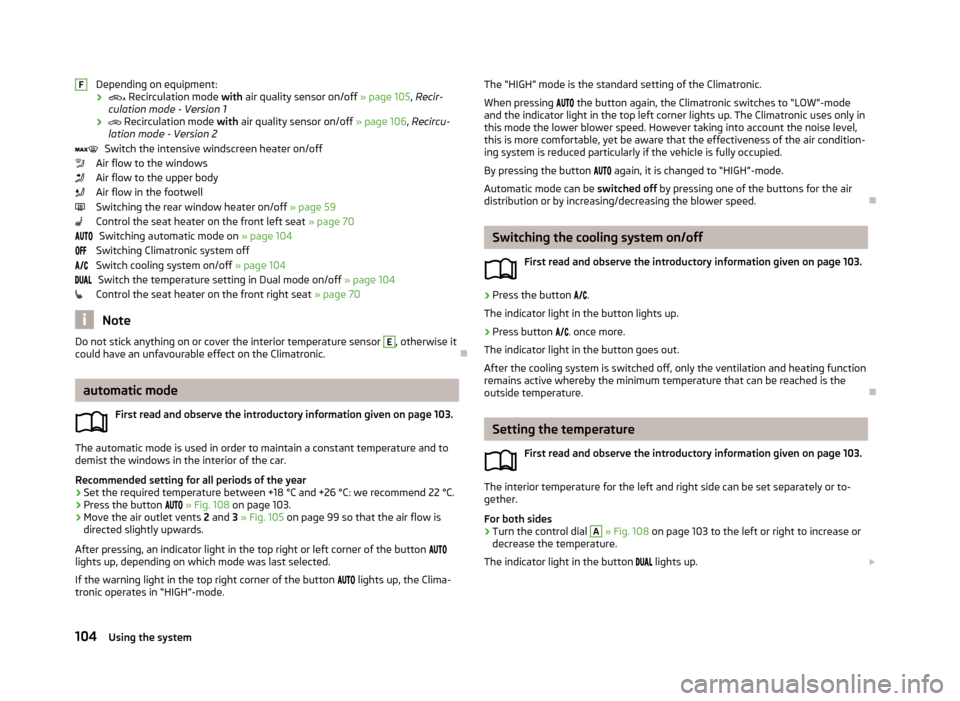
Depending on equipment:
›
Recirculation mode with air quality sensor on/off » page 105, Recir-
culation mode - Version 1
›
Recirculation mode with air quality sensor on/off » page 106, Recircu-
lation mode - Version 2
Switch the intensive windscreen heater on/off
Air flow to the windows
Air flow to the upper body
Air flow in the footwell
Switching the rear window heater on/off » page 59
Control the seat heater on the front left seat » page 70
Switching automatic mode on » page 104
Switching Climatronic system off
Switch cooling system on/off » page 104
Switch the temperature setting in Dual mode on/off » page 104
Control the seat heater on the front right seat » page 70
Note
Do not stick anything on or cover the interior temperature sensor E, otherwise it
could have an unfavourable effect on the Climatronic.
automatic mode
First read and observe the introductory information given on page 103.
The automatic mode is used in order to maintain a constant temperature and to
demist the windows in the interior of the car.
Recommended setting for all periods of the year
›
Set the required temperature between +18 °C and +26 °C: we recommend 22 °C.
›
Press the button
» Fig. 108 on page 103.
›
Move the air outlet vents 2 and 3 » Fig. 105 on page 99 so that the air flow is
directed slightly upwards.
After pressing, an indicator light in the top right or left corner of the button
lights up, depending on which mode was last selected.
If the warning light in the top right corner of the button
lights up, the Clima-
tronic operates in “HIGH”-mode.
FThe “HIGH” mode is the standard setting of the Climatronic.
When pressing the button again, the Climatronic switches to “LOW”-mode
and the indicator light in the top left corner lights up. The Climatronic uses only in
this mode the lower blower speed. However taking into account the noise level, this is more comfortable, yet be aware that the effectiveness of the air condition-ing system is reduced particularly if the vehicle is fully occupied.
By pressing the button again, it is changed to “HIGH”-mode.
Automatic mode can be switched off by pressing one of the buttons for the air
distribution or by increasing/decreasing the blower speed.
Switching the cooling system on/off
First read and observe the introductory information given on page 103.
›
Press the button
.
The indicator light in the button lights up.
›
Press button
. once more.
The indicator light in the button goes out.
After the cooling system is switched off, only the ventilation and heating function remains active whereby the minimum temperature that can be reached is the
outside temperature.
Setting the temperature
First read and observe the introductory information given on page 103.
The interior temperature for the left and right side can be set separately or to-
gether.
For both sides
›
Turn the control dial
A
» Fig. 108 on page 103 to the left or right to increase or
decrease the temperature.
The indicator light in the button
lights up.
104Using the system