ignition SKODA SUPERB 2013 2.G / (B6/3T) Owner's Manual
[x] Cancel search | Manufacturer: SKODA, Model Year: 2013, Model line: SUPERB, Model: SKODA SUPERB 2013 2.G / (B6/3T)Pages: 274, PDF Size: 17.31 MB
Page 12 of 274
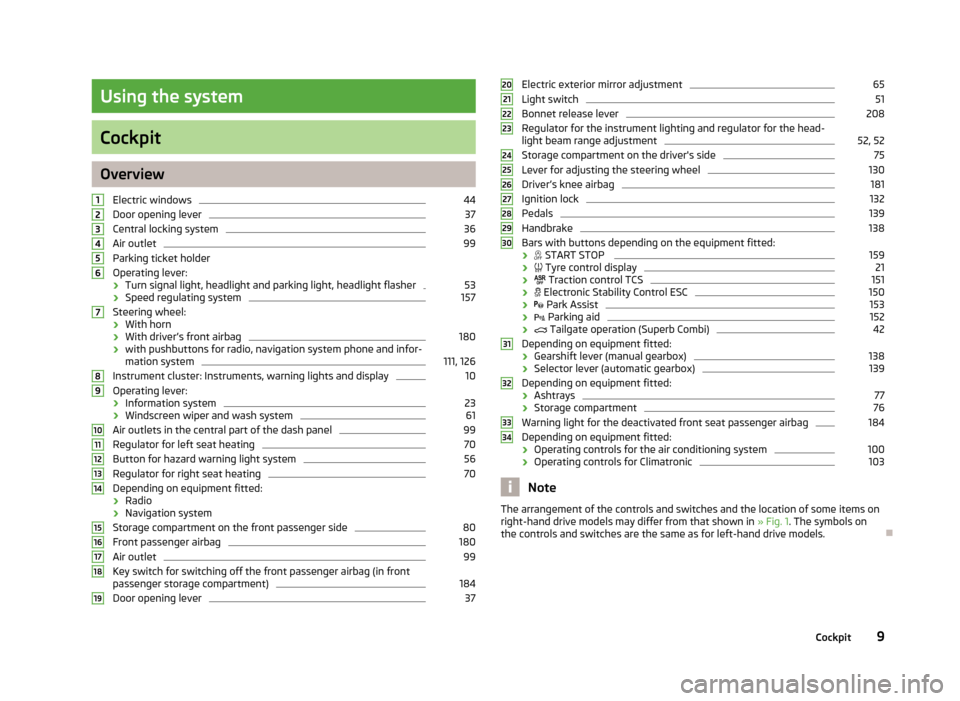
Using the system
Cockpit
OverviewElectric windows
44
Door opening lever
37
Central locking system
36
Air outlet
99
Parking ticket holder
Operating lever:
› Turn signal light, headlight and parking light, headlight flasher
53
›
Speed regulating system
157
Steering wheel:
› With horn
› With driver’s front airbag
180
›with pushbuttons for radio, navigation system phone and infor-
mation system
111, 126
Instrument cluster: Instruments, warning lights and display
10
Operating lever:
› Information system
23
›Windscreen wiper and wash system
61
Air outlets in the central part of the dash panel
99
Regulator for left seat heating
70
Button for hazard warning light system
56
Regulator for right seat heating
70
Depending on equipment fitted:
› Radio
› Navigation system
Storage compartment on the front passenger side
80
Front passenger airbag
180
Air outlet
99
Key switch for switching off the front passenger airbag (in front
passenger storage compartment)
184
Door opening lever
3712345678910111213141516171819Electric exterior mirror adjustment65Light switch51
Bonnet release lever
208
Regulator for the instrument lighting and regulator for the head- light beam range adjustment
52, 52
Storage compartment on the driver's side
75
Lever for adjusting the steering wheel
130
Driver’s knee airbag
181
Ignition lock
132
Pedals
139
Handbrake
138
Bars with buttons depending on the equipment fitted:
›
START STOP
159
›
Tyre control display
21
›
Traction control TCS
151
›
Electronic Stability Control ESC
150
›
Park Assist
153
›
Parking aid
152
›
Tailgate operation (Superb Combi)
42
Depending on equipment fitted:
› Gearshift lever (manual gearbox)
138
›
Selector lever (automatic gearbox)
139
Depending on equipment fitted:
› Ashtrays
77
›
Storage compartment
76
Warning light for the deactivated front seat passenger airbag
184
Depending on equipment fitted:
› Operating controls for the air conditioning system
100
›Operating controls for Climatronic
103
Note
The arrangement of the controls and switches and the location of some items on
right-hand drive models may differ from that shown in » Fig. 1. The symbols on
the controls and switches are the same as for left-hand drive models.2021222324252627282930313233349Cockpit
Page 14 of 274
Fuel gauge » page 12
Button for:
› Reset trip counter for the distance driven
» page 12
› Set hours/minutes
› enable / disable the mode selected by means of the 3
key
Engine revolutions counter
First read and observe the introductory information and safety warn-ings
on page 10.
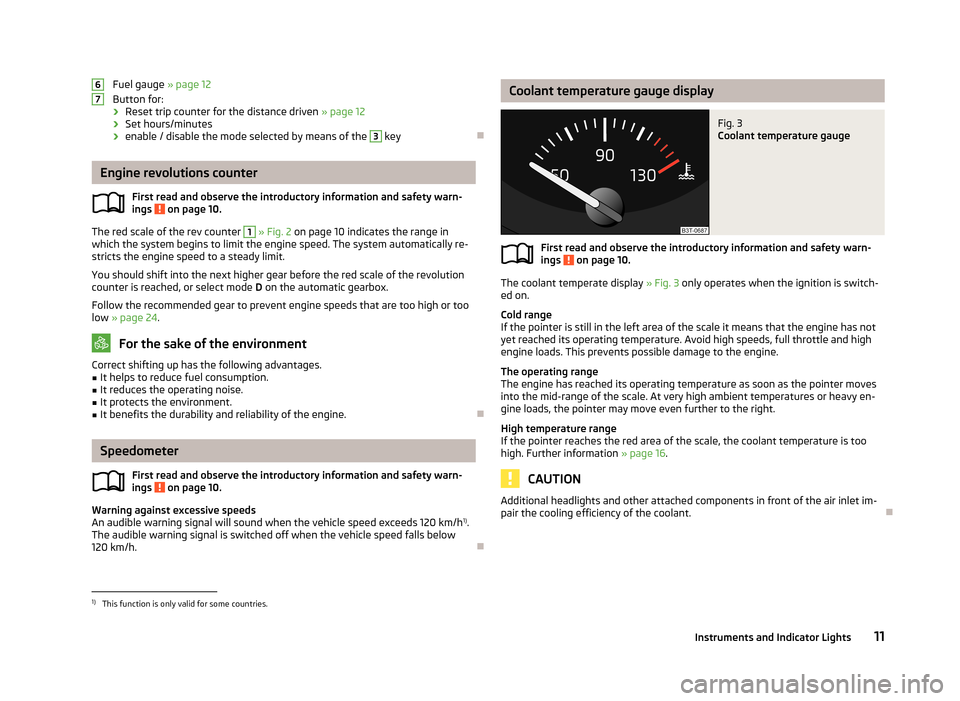
The red scale of the rev counter
1
» Fig. 2 on page 10 indicates the range in
which the system begins to limit the engine speed. The system automatically re-
stricts the engine speed to a steady limit.
You should shift into the next higher gear before the red scale of the revolution counter is reached, or select mode D on the automatic gearbox.
Follow the recommended gear to prevent engine speeds that are too high or too low » page 24 .
For the sake of the environment
Correct shifting up has the following advantages.■It helps to reduce fuel consumption.■
It reduces the operating noise.
■
It protects the environment.
■
It benefits the durability and reliability of the engine.
Speedometer
First read and observe the introductory information and safety warn-
ings
on page 10.
Warning against excessive speeds
An audible warning signal will sound when the vehicle speed exceeds 120 km/h 1)
.
The audible warning signal is switched off when the vehicle speed falls below
120 km/h.
67Coolant temperature gauge displayFig. 3
Coolant temperature gauge
First read and observe the introductory information and safety warn-
ings on page 10.
The coolant temperate display » Fig. 3 only operates when the ignition is switch-
ed on.
Cold range
If the pointer is still in the left area of the scale it means that the engine has not
yet reached its operating temperature. Avoid high speeds, full throttle and high
engine loads. This prevents possible damage to the engine.
The operating range
The engine has reached its operating temperature as soon as the pointer moves into the mid-range of the scale. At very high ambient temperatures or heavy en-
gine loads, the pointer may move even further to the right.
High temperature range
If the pointer reaches the red area of the scale, the coolant temperature is too high. Further information » page 16.
CAUTION
Additional headlights and other attached components in front of the air inlet im-
pair the cooling efficiency of the coolant.
1)
This function is only valid for some countries.
11Instruments and Indicator Lights
Page 15 of 274
DisplayFig. 4
Display types
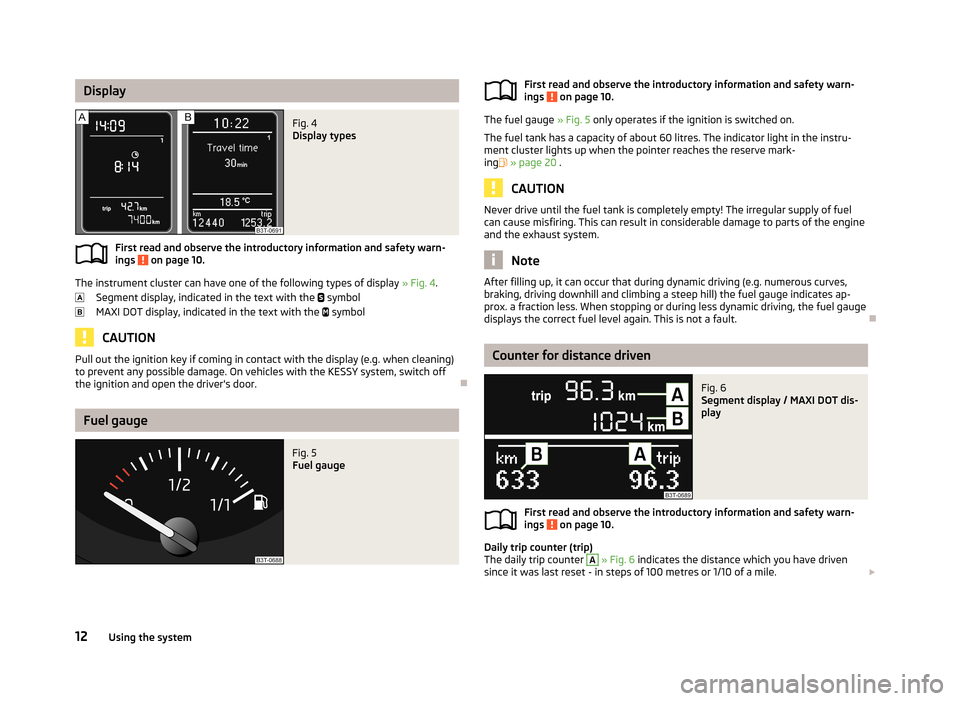
First read and observe the introductory information and safety warn-ings on page 10.
The instrument cluster can have one of the following types of display » Fig. 4.
Segment display, indicated in the text with the
symbol
MAXI DOT display, indicated in the text with the
symbol
CAUTION
Pull out the ignition key if coming in contact with the display (e.g. when cleaning)
to prevent any possible damage. On vehicles with the KESSY system, switch off
the ignition and open the driver's door.
Fuel gauge
Fig. 5
Fuel gaugeFirst read and observe the introductory information and safety warn- ings on page 10.
The fuel gauge » Fig. 5 only operates if the ignition is switched on.
The fuel tank has a capacity of about 60 litres. The indicator light in the instru- ment cluster lights up when the pointer reaches the reserve mark-ing » page 20 .
CAUTION
Never drive until the fuel tank is completely empty! The irregular supply of fuel
can cause misfiring. This can result in considerable damage to parts of the engine
and the exhaust system.
Note
After filling up, it can occur that during dynamic driving (e.g. numerous curves,
braking, driving downhill and climbing a steep hill) the fuel gauge indicates ap-
prox. a fraction less. When stopping or during less dynamic driving, the fuel gauge displays the correct fuel level again. This is not a fault.
Counter for distance driven
Fig. 6
Segment display / MAXI DOT dis-
play
First read and observe the introductory information and safety warn-
ings on page 10.
Daily trip counter (trip)
The daily trip counter
A
» Fig. 6 indicates the distance which you have driven
since it was last reset - in steps of 100 metres or 1/10 of a mile.
12Using the system
Page 16 of 274
Reset trip counter for the distance driven›Press and hold the 7 » Fig. 2 on page 10 button.
Odometer
The odometer B
» Fig. 6 indicates the total distance the vehicle has travelled.
Note
If the second speed display is enabled on vehicles with a segment display, this
speed will be shown instead of the odometer.
Digital clock
First read and observe the introductory information and safety warn-ings
on page 10.
The clock is set with the buttons
3
and
7
» Fig. 2 on page 10.
Select the display that you wish to change with the button
3
and carry out the
change with the button
7
.
In vehicles equipped with the MAXI DOT display, it is also possible to set the clock
in the Time menu » page 29.
Display of the second speed
First read and observe the introductory information and safety warn-
ings
on page 10.
The display can show the current speed in mph 1)
.
This feature is provided for driving in countries with different speed units.
Maxi DOT display
The display of the second speed can be set in the menu item settings » page 29,
Settings .
Segment display
›
Press the
3
» Fig. 2 on page 10 key repeatedly, until the odometer display flash-
es » page 12 .
›
Press the
7
key while the display flashes.
The second speed is displayed instead of the odometer.
The display of the second speed can be disabled in the same way.
Display in rear centre console
Fig. 7
Centre console at rear: Display
First read and observe the introductory information and safety warn-
ings on page 10.
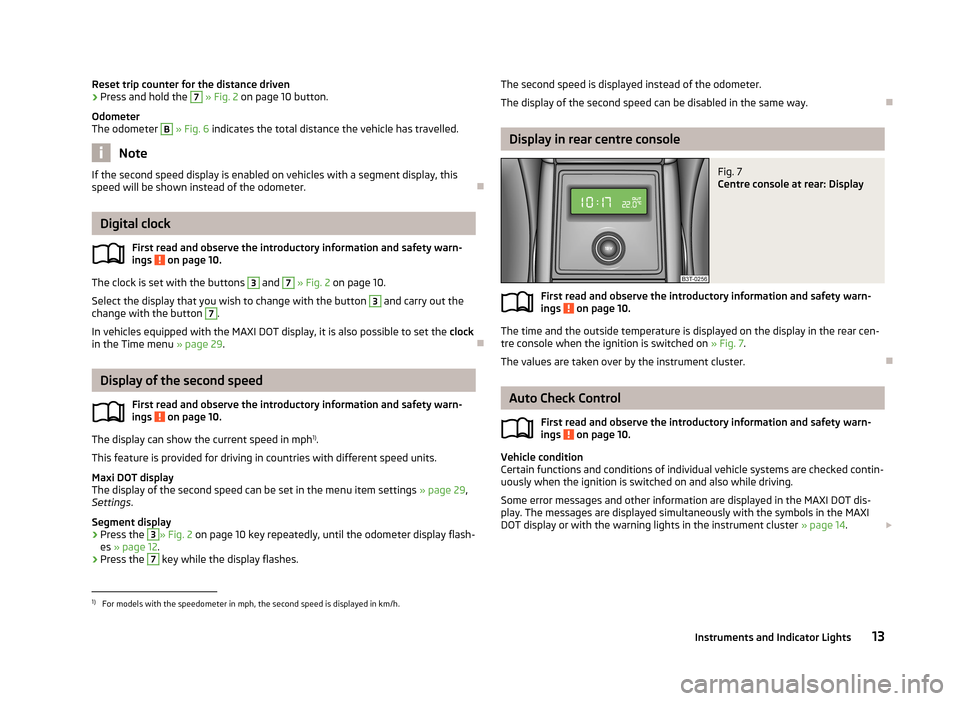
The time and the outside temperature is displayed on the display in the rear cen- tre console when the ignition is switched on » Fig. 7.
The values are taken over by the instrument cluster.
Auto Check Control
First read and observe the introductory information and safety warn-
ings
on page 10.
Vehicle condition
Certain functions and conditions of individual vehicle systems are checked contin-
uously when the ignition is switched on and also while driving.
Some error messages and other information are displayed in the MAXI DOT dis- play. The messages are displayed simultaneously with the symbols in the MAXI
DOT display or with the warning lights in the instrument cluster » page 14.
1)
For models with the speedometer in mph, the second speed is displayed in km/h.
13Instruments and Indicator Lights
Page 18 of 274
Windscreen washer fluid level21 Pads21
Turn signal system
21
Low beam
22
Fog lights
22
Cruise control system
22
Selector lever lock/starting (KESSY system)
22
Main beam
22
The indicator lights show certain functions/faults and may be accompanied by au-
dible signals.
WARNING■ If illuminated indicator lights and the corresponding descriptions and warn-
ing notes are not observed, this may result in severe injuries or major vehicle
damage.■
The engine compartment of your car is a hazardous area. There is a risk of
injuries, scalding, accidents and fire when working in the engine compart-
ment, e.g. inspecting and replenishing oil and other fluids. It is essential to ob-
serve safety notes » page 206, Engine compartment .
Handbrake
First read and observe the introductory information and safety warn-
ings
on page 14.
The indicator light
comes on if the handbrake is applied. An audible warning is
also given if you drive the vehicle for at least 3 seconds at a speed of more than
6 km/h.
The following message is shown in the MAXI DOT display. Release parking brake!
Brake system
First read and observe the introductory information and safety warn-
ings
on page 14.
The indicator light illuminates if the brake fluid level in the braking system is
too low or there is a fault in the ABS.
The following message is shown in the MAXI DOT display. Brake fluid: Log book!
Stop the vehicle, switch off the engine, and check the level of the brake flu-
id » page 214 »
.
WARNING■
If you have to stop for technical reasons, then park the vehicle at a safe dis-
tance from the traffic, switch off the engine and activate the hazard warning
light system » page 56.■
The following guidelines should be observed when opening the bonnet and
checking the brake fluid level » page 206, Engine compartment .
■
If the warning light is displayed simultaneously with warning light
» page 19 , Antilock brake system (ABS) , do not continue your jour-
ney! Seek help from a specialist garage.
■
A fault to the ABS system or the braking system can increase the vehicle's
braking distance – risk of accident!
Seat belt warning light
First read and observe the introductory information and safety warn-ings
on page 14.
The indicator light
comes on after the ignition is switched on as a reminder for
the driver and front passenger to fasten the seat belt. The indicator light only
goes out if the driver or front passenger has fastened his seat belt.
If the seat belt has not been fastened by the driver or front passenger, a perma-
nent warning signal sounds at vehicle speeds greater than 20 km/h and simulta- neously the indicator light
flashes.
If the seat belt is not fastened by the driver or front passenger during the next
90 seconds, the warning signal is deactivated and the indicator light
lights up
permanently.
15Instruments and Indicator Lights
Page 20 of 274
WARNING■If you have to stop for technical reasons, then park the vehicle at a safe dis-
tance from the traffic, switch off the engine and activate the hazard warning
light system » page 56.■
Carefully open the coolant expansion bottle. If the engine is hot, the cooling
system is pressurized - risk of scalding! It is therefore best to allow the engine to cool down before removing the cap.
■
Do not touch the radiator fan. The radiator fan may switch itself on auto-
matically even if the ignition is off.
Bonnet
First read and observe the introductory information and safety warn-ings
on page 14.
The indicator light
comes on if the bonnet is unlocked.
WARNINGIf you have to stop for technical reasons, then park the vehicle at a safe dis-
tance from the traffic, switch off the engine and activate the hazard warning
light system » page 56.
Boot lid
First read and observe the introductory information and safety warn-
ings
on page 14.
The indicator light
comes on if the boot lid is opened.
WARNINGIf you have to stop for technical reasons, then park the vehicle at a safe dis-
tance from the traffic, switch off the engine and activate the hazard warning
light system » page 56.
Power steering/steering lock (KESSY system)
First read and observe the introductory information and safety warn-
ings
on page 14.
Power steering
If the indicator light lights up, this indicates a partial failure of the power steer-
ing and the steering forces can be greater. Seek help from a specialist garage.
If the indicator light lights up, this indicates a complete failure of the power
steering and the steering assist has failed (significantly higher steering forces).
Seek help from a specialist garage.
Steering lock (KESSY system)
› While the indicator light
is flashing, the steering lock cannot be released. Fur-
ther information » page 37, KESSY .
› If the warning light
flashes, a signal tone sounds, and the following message
appears in the MAXI DOT-display Steering column lock: Workshop!) , the electri-
cal steering lock is faulty. Seek help from a specialist garage.
› If the warning light
flashes, a beep sounds and in the MAXI DOT display the
message Steering lock defective appears, then the electric steering lock is bro-
ken. Park the car,
do not continue the journey . After switching off the igni-
tion, it is then no longer possible to lock the steering, to activate the electrical
components (e.g. radio, navigation system), to switch on the ignition again and to start the engine. Seek help from a specialist garage.
WARNINGIf you have to stop for technical reasons, then park the vehicle at a safe dis-
tance from the traffic, switch off the engine and activate the hazard warning
light system » page 56.
Note
If the vehicle battery has been disconnected and reconnected, the yellow indica-
tor light comes on after switching on the ignition. The indicator light must go
out after driving a short distance. Visit a specialist garage if the yellow warning
light stays on after having started the engine again and driving a short dis-
tance.
17Instruments and Indicator Lights
Page 21 of 274
Engine oil levelFirst read and observe the introductory information and safety warn-
ings
on page 14.
The indicator light lights up (oil quantity too low)
The following message is shown in the MAXI DOT display. Check oil level!
Stop the vehicle, switch off the engine, and check the level of the engine
oil » page 211 .
The indicator light will go out if the bonnet is left open for more than 30 seconds.
If no engine oil has been replenished, the indicator light will come on again after
driving about 100 km.
The indicator light
flashes (engine oil level sensor faulty)
The following message is shown in the MAXI DOT display. Oil sensor: Workshop!
If the engine oil level sensor is faulty, the indicator light flashes
several times
and an audible signal sounds when the ignition is turned on.
Seek help from a specialist garage.
WARNINGIf you have to stop for technical reasons, then park the vehicle at a safe dis-
tance from the traffic, switch off the engine and activate the hazard warning
light system » page 56.
Traction Control System (ASR)
First read and observe the introductory information and safety warn-
ings
on page 14.
The indicator light flashes
to show that the ASR is currently operating.
If the indicator light
comes on immediately after starting the engine, the ASR
can be switched off for technical reasons. Switch the ignition off and on again. If
the indicator light does not light up after you switch the engine back on, the ASR
is fully functional again.
If the indicator light lights up, there is a fault in the ASR.
The following message is shown in the MAXI DOT display. Error: Traction control (ASR)
Seek help from a specialist garage.
Further information » page 151, Traction Control System (TCS) .
Note
If the vehicle's battery has been disconnected and reconnected, the indicator
light comes on after switching on the ignition. The indicator light should go out
after driving a short distance.
Electronic Stability Control (ESC)
First read and observe the introductory information and safety warn-
ings
on page 14.
The indicator light flashes
to show that the ESC is currently operating.
If the indicator light
comes on immediately after you start the engine, the ESC
might be switched off due to technical reasons. Switch the ignition off and on
again. If the indicator light does not light up after you switch the engine back on,
the ESR is fully functional again.
If the warning light lights up
there is a fault in the ESC system.
The following message is shown in the MAXI DOT display.
Error: Electronic Stability Control (ESC)
Seek help from a specialist garage.
Further information » page 150, Electronic Stability Control (ESC) .
Note
If the vehicle's battery has been disconnected and reconnected, the indicator
light comes on after switching on the ignition. The indicator light must go out
after driving a short distance.18Using the system
Page 22 of 274

Antilock brake system (ABS)First read and observe the introductory information and safety warn-
ings
on page 14.
If the indicator light lights up, there is a fault in the ABS.
The following message is shown in the MAXI DOT display. Error: ABS
The vehicle will only be braked by the normal brake system without the ABS.
Seek help from a specialist garage.
WARNING■ If you have to stop for technical reasons, then park the vehicle at a safe dis-
tance from the traffic, switch off the engine and activate the hazard warning
light system » page 56.■
If the warning light » page 15 is displayed together with warning light ,
do not continue your journey! Seek help from a specialist garage.
■
A fault to the ABS system or the braking system can increase the vehicle's
braking distance – risk of accident!
The rear fog light
First read and observe the introductory information and safety warn-ings
on page 14.
The warning light
comes on when the rear fog lights are operating » page 55.
Bulb failure
First read and observe the introductory information and safety warn-ings
on page 14.
The indicator light
comes on if a bulb is faulty:
› within a few seconds of the ignition being switched on;
› when a light with a defective bulb is turned on.
The following message, for example, may be shown in the MAXI DOT display.
INFORMATION Check front right low beam!
Adaptive headlights
First read and observe the introductory information and safety warn-ings
on page 14.
If the indicator light flashes for 1 minute while driving or after switching on the
ignition, there is a problem with the adaptive headlights » page 54.
The following message is shown in the MAXI DOT display. Cornering light (AFS) has no function. Log book!
Exhaust inspection system
First read and observe the introductory information and safety warn-
ings
on page 14.
If the indicator light
lights up, there is a fault in the exhaust inspection system.
The engine control unit allows the vehicle to run in emergency mode.
Seek help from a specialist garage.
Glow plug system (diesel engine)
First read and observe the introductory information and safety warn-ings
on page 14.
The indicator light
comes on after the ignition has been switched on. The en-
gine can be started immediately after the pre-glow indicator light goes out.
There is a fault in the glow plug system if the indicator light
does not come on
at all or lights up continuously .
If the indicator light
begins to flash while driving, a fault exists in the engine
control. The engine control unit allows the vehicle to run in emergency mode.
Seek help from a specialist garage.
19Instruments and Indicator Lights
Page 23 of 274
EPC fault light (petrol engine)First read and observe the introductory information and safety warn-
ings
on page 14.
If the indicator light lights up, there is a fault in the engine control. The engine
control unit allows the vehicle to run in emergency mode.
Seek help from a specialist garage.
Diesel particulate filter (diesel engine)
First read and observe the introductory information and safety warn-ings
on page 14.
The diesel particulate filter separates the soot particles from the exhaust. The
soot particles collect in the diesel particulate filter where they are burnt on a reg-
ular basis.
If the indicator light
lights up, soot has accumulated in the filter.
In order to clean the filter, and where traffic conditions permit »
, the vehicle
should be driven at an even speed of at least 60 km/h at engine speeds of 1 800 -
2 500 rpm for at least 15 minutes or until the warning light goes out with the 4th
or 5th gear engaged (automatic gearbox: position S) when the traffic situation
permits it.
The indicator light
only goes out after the diesel particulate filter has been
successfully cleaned.
If the filter is not properly cleaned, the indicator light
does not go out and the
indicator light
begins to flash.
The following message is shown in the MAXI DOT display. Diesel particulate filter: Log book!
The engine control unit allows the vehicle to run in emergency mode. After switching the ignition off and on again the indicator light, the indicator light
also lights up.
Seek help from a specialist garage.
WARNING■ The diesel particle filter achieves very high temperatures. Therefore do not
park in areas where the hot filter can come into direct contact with dry grass
or other combustible materials – there is the risk of fire!■
Always adjust your speed to suit weather, road, region and traffic condi-
tions. The recommendations indicated by the indicator light must not tempt
you to disregard the national regulations for road traffic.
CAUTION
As long as the indicator light lights up, one must take into account an in-
creased fuel consumption and in certain circumstances a power reduction of the
engine.
Note
■ To assist the combustion process of the soot particles in the filter, we recom-
mend that regularly driving short distances be avoided.■
Using diesel fuel with an increased sulphur content can considerably reduce the
lifespan of the filter. A ŠKODA service partner will be able to tell you which coun- tries use diesel fuel with a high sulphur content.
■
If the engine is turned off during the filter cleaning process or shortly after-
wards, the cooling fan may turn on automatically for a few minutes.
Fuel reserve
First read and observe the introductory information and safety warn-ings
on page 14.
The indicator light will come on if the fuel level is less than 9 litres.
The following message is shown in the MAXI DOT display. Please refuel. Range: ... km
Note
The text in the display goes out only after refuelling and driving a short distance.
20Using the system
Page 24 of 274
Airbag systemFirst read and observe the introductory information and safety warn-ings
on page 14.
If the indicator light lights up, there is a fault in the airbag system.
The following message is shown in the MAXI DOT display. Error: Airbag
The functionality of the airbag system is monitored electronically even if one of
the airbags is switched off.
If a front, side or head airbag or belt tensioner has been switched off using the
vehicle system tester:
› The indicator light
lights up for around 4 seconds after the ignition is switch-
ed on and then flashes for around 12 seconds.
The following message is shown in the MAXI DOT display. Airbag/belt tensioner deactivated.
If the air bag was switched off using the key-operated switch on the side of the
dash panel on the passenger side:
› The indicator light
comes on for around 4 seconds after the ignition has been
switched on.
› The deactivated air bag is indicated by the illumination of the warning
light » page 184
in the middle of the dash panel .
WARNINGIf there is a fault, have the airbag system checked immediately by a specialist
garage. Otherwise, there is a risk of the airbag not being activated in the
event of an accident.
Tyre pressure
First read and observe the introductory information and safety warn-
ings
on page 14.
The indicator light
lights up, if there is a substantial drop in inflation pressure
in one of the tyres. Check and adjust the pressure in all tyres » page 221, Service
life of tyres .
If the indicator light lights up, there is a fault in the system.
Seek help from a specialist garage.
Further information » page 223, Tyre pressure monitor .
Note
If the battery has been disconnected, the indicator light illuminates after the
ignition is switched on. The indicator light must go out after driving a short dis-
tance.
Windscreen washer fluid level
First read and observe the introductory information and safety warn-ings
on page 14.
If the windscreen washer fluid level is too low, the indicator light
comes on.
The following message is shown in the MAXI DOT display. Top up wash fluid!
Top up with liquid » page 209, Windscreen washer system .
Pads
First read and observe the introductory information and safety warn-
ings
on page 14.
If the indicator light
is slit, the brake pads are worn.
The following message is shown in the MAXI DOT display. Check brake wear!
Seek help from a specialist garage.
Turn signal system
First read and observe the introductory information and safety warn-ings
on page 14.
Either the left
or right
indicator light flashes depending on the position of
the turn signal lever.
21Instruments and Indicator Lights