interior lights SKODA SUPERB 2014 2.G / (B6/3T) User Guide
[x] Cancel search | Manufacturer: SKODA, Model Year: 2014, Model line: SUPERB, Model: SKODA SUPERB 2014 2.G / (B6/3T)Pages: 246, PDF Size: 17.16 MB
Page 93 of 246
Closing›Open the lid to the stop, only then can it be folded downwards and against
the direction of the arrow » Fig. 87.
The sockets marked
AUX-IN input and the MDI input are located in the
storage compartment.
Note
The storage compartment is equipped with an interior light which lights up
when the parking light is on.
Storage net in the front centre console
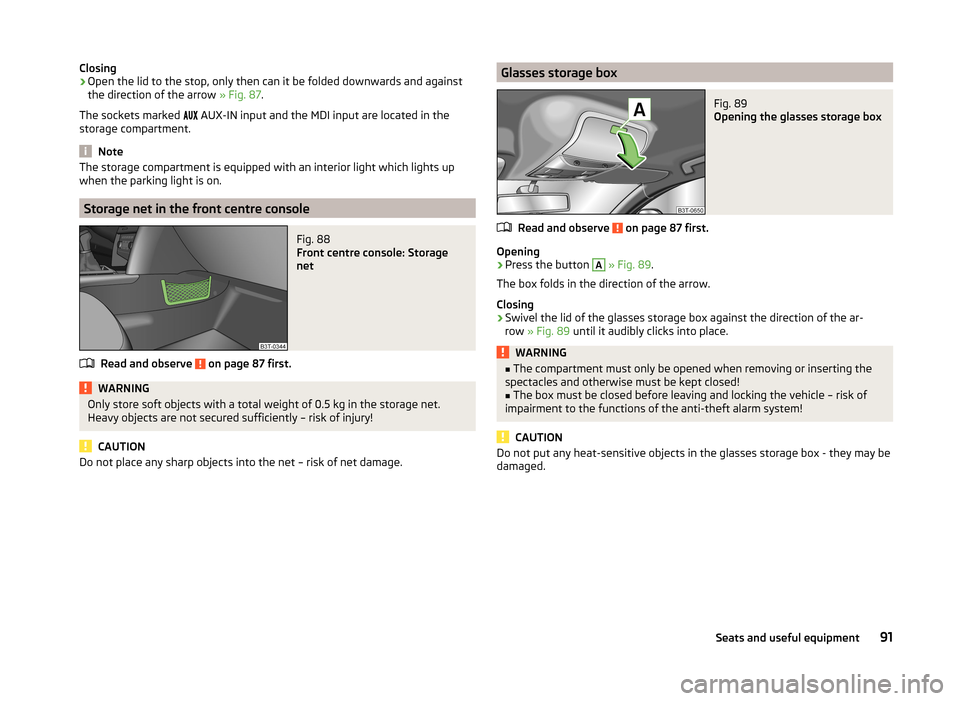
Fig. 88
Front centre console: Storage
net
Read and observe on page 87 first.
WARNINGOnly store soft objects with a total weight of 0.5 kg in the storage net.
Heavy objects are not secured sufficiently – risk of injury!
CAUTION
Do not place any sharp objects into the net – risk of net damage.Glasses storage boxFig. 89
Opening the glasses storage box
Read and observe on page 87 first.
Opening
›
Press the button
A
» Fig. 89 .
The box folds in the direction of the arrow.
Closing
›
Swivel the lid of the glasses storage box against the direction of the ar-
row » Fig. 89 until it audibly clicks into place.
WARNING■
The compartment must only be opened when removing or inserting the
spectacles and otherwise must be kept closed!■
The box must be closed before leaving and locking the vehicle – risk of
impairment to the functions of the anti-theft alarm system!
CAUTION
Do not put any heat-sensitive objects in the glasses storage box - they may be
damaged.91Seats and useful equipment
Page 116 of 246
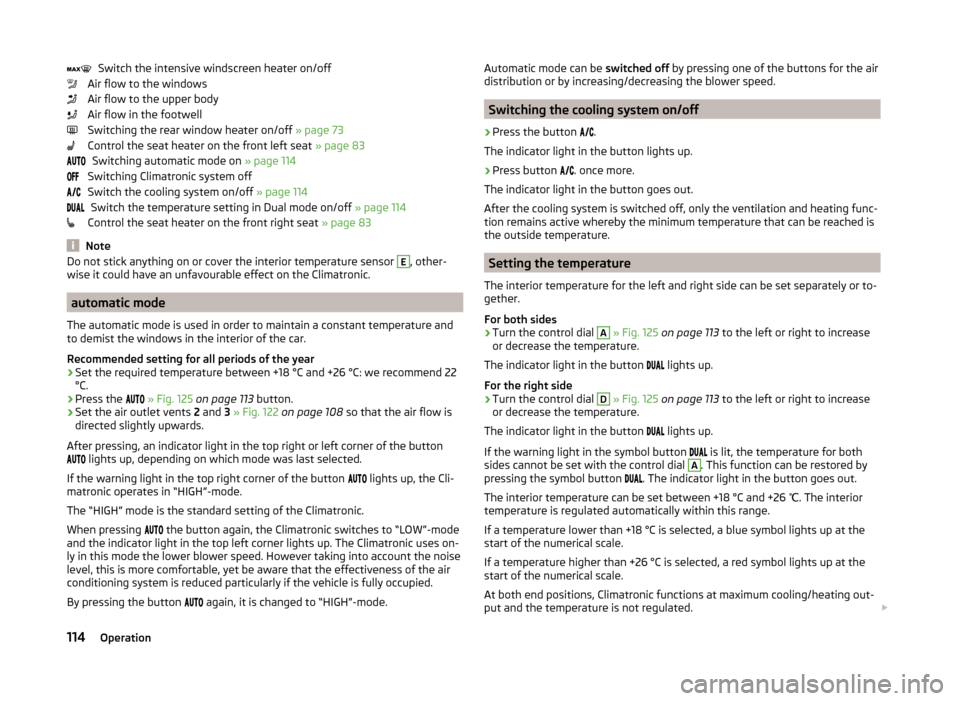
Switch the intensive windscreen heater on/off
Air flow to the windows
Air flow to the upper body
Air flow in the footwell
Switching the rear window heater on/off » page 73
Control the seat heater on the front left seat » page 83
Switching automatic mode on » page 114
Switching Climatronic system off
Switch the cooling system on/off » page 114
Switch the temperature setting in Dual mode on/off » page 114
Control the seat heater on the front right seat » page 83
Note
Do not stick anything on or cover the interior temperature sensor E, other-
wise it could have an unfavourable effect on the Climatronic.
automatic mode
The automatic mode is used in order to maintain a constant temperature and
to demist the windows in the interior of the car.
Recommended setting for all periods of the year
›
Set the required temperature between +18 °C and +26 °C: we recommend 22
°C.
›
Press the
» Fig. 125 on page 113 button.
›
Set the air outlet vents 2 and 3 » Fig. 122 on page 108 so that the air flow is
directed slightly upwards.
After pressing, an indicator light in the top right or left corner of the button
lights up, depending on which mode was last selected.
If the warning light in the top right corner of the button lights up, the Cli-
matronic operates in “HIGH”-mode.
The “HIGH” mode is the standard setting of the Climatronic.
When pressing the button again, the Climatronic switches to “LOW”-mode
and the indicator light in the top left corner lights up. The Climatronic uses on-
ly in this mode the lower blower speed. However taking into account the noise
level, this is more comfortable, yet be aware that the effectiveness of the air
conditioning system is reduced particularly if the vehicle is fully occupied.
By pressing the button again, it is changed to “HIGH”-mode.
Automatic mode can be
switched off by pressing one of the buttons for the air
distribution or by increasing/decreasing the blower speed.
Switching the cooling system on/off
›
Press the button
.
The indicator light in the button lights up.
›
Press button
. once more.
The indicator light in the button goes out.
After the cooling system is switched off, only the ventilation and heating func-
tion remains active whereby the minimum temperature that can be reached is
the outside temperature.
Setting the temperature
The interior temperature for the left and right side can be set separately or to-
gether.
For both sides
›
Turn the control dial
A
» Fig. 125 on page 113 to the left or right to increase
or decrease the temperature.
The indicator light in the button lights up.
For the right side
›
Turn the control dial
D
» Fig. 125 on page 113 to the left or right to increase
or decrease the temperature.
The indicator light in the button lights up.
If the warning light in the symbol button is lit, the temperature for both
sides cannot be set with the control dial
A
. This function can be restored by
pressing the symbol button . The indicator light in the button goes out.
The interior temperature can be set between +18 °C and +26 ℃. The interior
temperature is regulated automatically within this range.
If a temperature lower than +18 °C is selected, a blue symbol lights up at the start of the numerical scale.
If a temperature higher than +26 °C is selected, a red symbol lights up at the
start of the numerical scale.
At both end positions, Climatronic functions at maximum cooling/heating out-
put and the temperature is not regulated.
114Operation
Page 117 of 246
CAUTIONLengthy and uneven distribution of the air flow out of the vents (especially
around the feet) and large differences in temperature, for example, when get-
ting out of the vehicle, can cause susceptible individuals to catch a cold.
Recirculation mode - Version 1
Recirculated air mode prevents polluted air outside the vehicle from getting in-
to the vehicle, for example when driving through a tunnel or when standing in
a traffic jam.
If a considerable increase in concentration of pollutants is recognised by the air quality sensor, recirculated air mode will temporarily be switched off.
If the concentration of pollutants decreases to the normal level, the air distri-
bution control is automatically switched off so that fresh air can be guided into
the vehicle interior.
In recirculated air mode air is sucked out of the interior of the vehicle and then
fed back into the interior.
When the automatic air distribution control is switched on, an air quality sen-
sor measures the concentration of pollutants in the drawn in air.
Switching recirculated air mode on
›
Repeatedly press the button until the indicator light on the
left side of
the button is illuminated.
Switch on automatic air distribution control
›
Repeatedly press the button until the warning light on the
right-hand
side of the button lights up.
Switch off automatic air distribution control temporarily
If the air quality sensor does not switch on automatic recirculated air mode
when there is an unpleasant smell, you can switch it on manually.
›
Press the symbol button .
The indicator light lights up in the button on the left side.
Switching recirculated air mode off
›
Press the button or press the symbol button
again until the warning
lights in the button go out.
WARNINGDo not leave recirculated air mode on over a longer period of time, as
“stale” air can cause fatigue of the driver and passengers, reduce attention
levels and also cause the windows to mist up. The risk of having an acci-
dent increases. Switch off recirculated air mode as soon as the windows
start to mist up.
Note
■ If the windscreen mists up, press the symbol button . Press the button
once the windscreen has demisted.■
The automatic air distribution control operates only if the outside tempera-
ture is higher than approx. 2 °C.
Recirculation mode - Version 2
Recirculated air mode prevents polluted air outside the vehicle from getting in-
to the vehicle, for example when driving through a tunnel or when standing in
a traffic jam.
In recirculated air mode air is sucked out of the interior of the vehicle and then
fed back into the interior.
The air recirculation mode is automatically activated after the ignition is
switched if it was on before the ignition was turned off. The indicator light in the button lights up.
Switch off / on
›
Press the
button.
The indicator light in the button goes out.
›
Press the
button again.
The indicator light in the button lights up.
WARNINGDo not leave recirculated air mode on over a longer period of time, as
“stale” air can cause fatigue of the driver and passengers, reduce attention
levels and also cause the windows to mist up. The risk of having an acci-
dent increases. Switch off recirculated air mode as soon as the windows
start to mist up. 115Air conditioning system
Page 118 of 246
NoteIf the windscreen mists up, press the symbol button . Press the button
once the windscreen has demisted.
Controlling blower
The Climatronic system controls the blower stages automatically in line with
the interior temperature.
However, the blower stages can be manually adapted to suit your particular
needs.
›
Repeatedly pressing the symbol button on the left or right reduces or in-
creases blower speed.
If the blower is switched off, the Climatronic system is switched off.
The set blower speed is displayed above the symbol button when the re-
spective number of indicator lights come on.
WARNING■ “Stale air” may result in fatigue in the driver and occupants, reduce atten-
tion levels and also cause the windows to mist up. The risk of having an ac-
cident increases.■
Do not switch off the Climatronic system for longer than necessary.
■
Switch on the Climatronic system as soon as the windows mist up.
Defrosting windscreen
Switching on
›
Press the
button » Fig. 125 on page 113 .
›
Press the
button » Fig. 125 on page 113 .
Switching off
›
Press the symbol button
again or press the symbol button
.
›
Press the symbol button
again.
More air flows out of the air outlet vents 1 » Fig. 122 on page 108 . The temper-
ature control is controlled automatically.
Auxiliary heating (auxiliary heating and ventilation)
Introduction
This chapter contains information on the following subjects:
Switching on/off
117
Radio remote control
118
Conditions for the functioning of auxiliary heating (Aux. heating and ventila-
tion), hereinafter referred to only as auxiliary heating (Aux. heating).
The charge state of the vehicle battery is sufficient.
The fuel supply is adequate (the warning icon is not lit in the display of
the instrument cluster).
Auxiliary ventilation
The auxiliary ventilation enables fresh air to flow into the vehicle interior by
switching off the engine, whereby the interior temperature is effectively de-
creased (e.g. with the vehicle parked in the sun).
Auxiliary heating (aux. heating)
The auxiliary heating (aux. heating) can be used when stationary, when the
engine is switched off to preheat the vehicle and while driving (e.g. during the
heating phase of the engine).
The auxiliary heating (auxiliary heating) functions in connection with the air-
conditioning system or Climatronic.
The auxiliary heating (aux. heating) also warms up the engine. This is not valid
for vehicles with the 3.6 l/191 kW FSI engine.
The auxiliary heating (parking heating) warms up the coolant by combusting
fuel from the vehicle tank. The coolant heats air flowing into the passenger
compartment (as long as the blower fan speed
B
» Fig. 124 on page 110
or » Fig. 125 on page 113 is not set to zero).
116Operation
Page 119 of 246
WARNING■The auxiliary heating (aux. heating) must never be operated in closed
rooms (e.g. garages) – risk of poisoning!■
The auxiliary heating (aux. heating) must not be allowed to run during re-
fuelling – risk of fire.
■
The exhaust pipe of the auxiliary heating (aux. heating) is located on the
underside of the vehicle. Therefore, if you wish to operate the auxiliary
heating (aux. heating), do not park the vehicle in such a way that the ex-
haust gases can come into contact with highly flammable materials (e.g. dry
grass) or easily inflammable substances (e.g. spilt fuel) – risk of fire.
CAUTION
■ Running auxiliary heating (aux. heating) consumes fuel from the vehicle tank
and automatically controls the filling level. If only a low quantity of fuel is
present in the fuel tank, the auxiliary heating (aux. heating) switches off.■
The exhaust pipe of the auxiliary heating (aux. heating), which is located on
the underside of the vehicle, must not be clogged and the exhaust flow must
not be blocked.
■
If the auxiliary heating (aux. heating) is running, the vehicle battery discharg-
es. If the auxiliary heating and ventilation has been operated several times
over a longer period, the vehicle must be driven a few kilometres in order to
recharge the vehicle battery.
Note
■ The auxiliary heating (aux. heating) switches on the blower B » Fig. 124 on
page 110 or » Fig. 125 on page 113 only if it has achieved a coolant temperature
of approx. 50 °C.■
At low outside temperatures, this can result in a formation of water vapour in
the area of the engine compartment. This is quite normal and is not an operat-
ing problem.
■
The air inlet in front of the windscreen must be free (e.g. of ice, snow or
leaves) to ensure that the auxiliary heating (aux. heating) operates properly.
■
So that warm air can flow into the vehicle interior after switching on the aux-
iliary heating, you must maintain the comfort temperature normally selected
by you, leave the fan switched on and leave the air outlet vents in an open po-
sition. It is recommended to put the air flow in the position
or
.
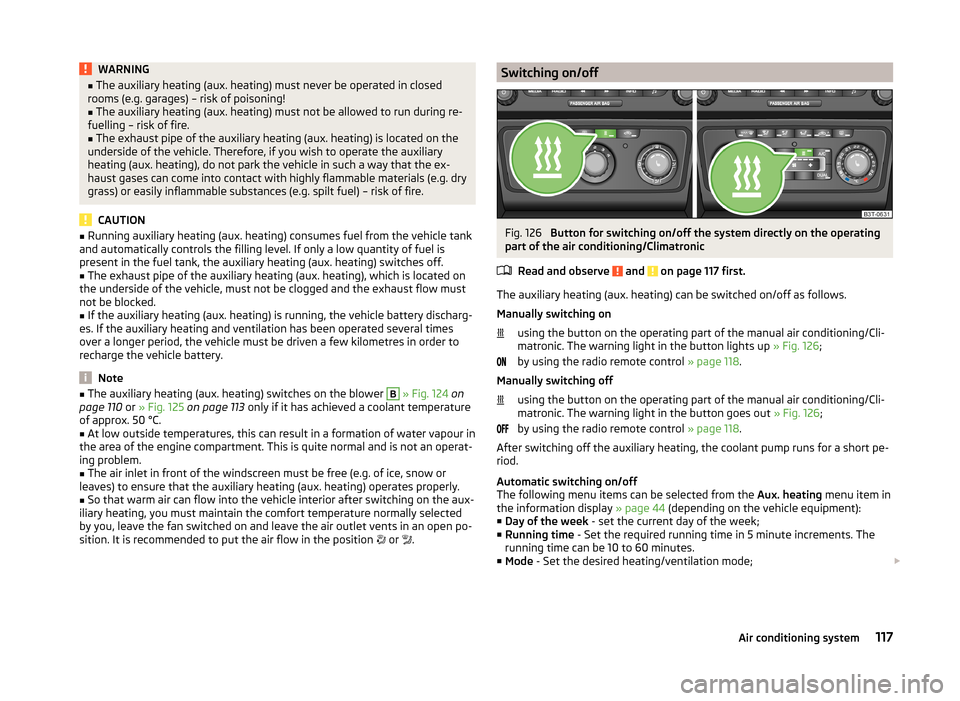
Switching on/offFig. 126
Button for switching on/off the system directly on the operating
part of the air conditioning/Climatronic
Read and observe
and on page 117 first.
The auxiliary heating (aux. heating) can be switched on/off as follows.
Manually switching on using the button on the operating part of the manual air conditioning/Cli-
matronic. The warning light in the button lights up » Fig. 126;
by using the radio remote control » page 118.
Manually switching off using the button on the operating part of the manual air conditioning/Cli-
matronic. The warning light in the button goes out » Fig. 126;
by using the radio remote control » page 118.
After switching off the auxiliary heating, the coolant pump runs for a short pe-
riod.
Automatic switching on/off
The following menu items can be selected from the Aux. heating menu item in
the information display » page 44 (depending on the vehicle equipment):
■ Day of the week - set the current day of the week;
■ Running time - Set the required running time in 5 minute increments. The
running time can be 10 to 60 minutes.
■ Mode - Set the desired heating/ventilation mode;
117Air conditioning system
Page 120 of 246
■Starting time 1 , Starting time 2 , Starting time 3 - for each pre-set time, the
day and the time (hour and minute) can be set for switching on the auxiliary
heating and ventilation. An empty position can be found between Sunday
and Monday when selecting the day. If this empty position is selected, the
activation is performed without taking into account the day.
■ Activate - Activate pre-set mode;
■ Deactivate - Deactivate pre-set mode;
■ Factory setting - Restore factory setting;
■ Back - Return to main menu
Only one programmed pre-set time can be active.
The last programmed pre-set time remains active.
After the auxiliary heating (aux. heating) automatically activates at the set
time, it is necessary to pre-set a time again.
If the menu item Back is selected or no changes are made on the display for
longer than 10 seconds, the set values are stored, but the pre-set time is not
activated.
The system switches itself off at the end of the running time set under the
menu item Running time .
Note
An indicator light on the button » Fig. 126 is illuminated when the system is
running.
Radio remote control
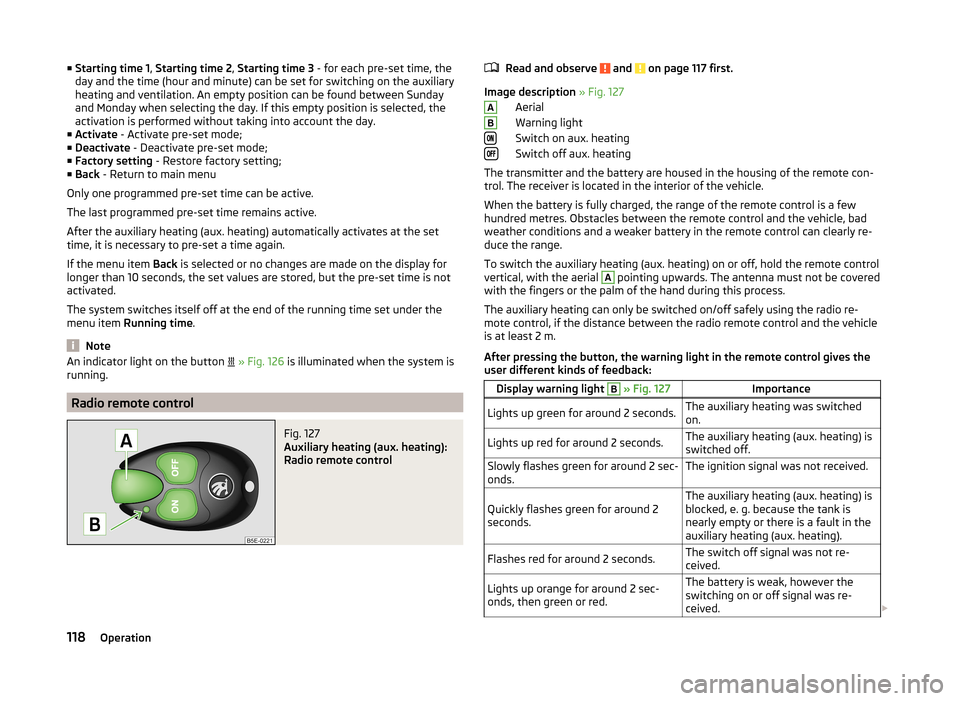
Fig. 127
Auxiliary heating (aux. heating):
Radio remote control
Read and observe and on page 117 first.
Image description » Fig. 127
Aerial
Warning light
Switch on aux. heating
Switch off aux. heating
The transmitter and the battery are housed in the housing of the remote con-
trol. The receiver is located in the interior of the vehicle.
When the battery is fully charged, the range of the remote control is a few
hundred metres. Obstacles between the remote control and the vehicle, bad
weather conditions and a weaker battery in the remote control can clearly re-
duce the range.
To switch the auxiliary heating (aux. heating) on or off, hold the remote control
vertical, with the aerial
A
pointing upwards. The antenna must not be covered
with the fingers or the palm of the hand during this process.
The auxiliary heating can only be switched on/off safely using the radio re-
mote control, if the distance between the radio remote control and the vehicle
is at least 2 m.
After pressing the button, the warning light in the remote control gives the
user different kinds of feedback:
Display warning light B » Fig. 127ImportanceLights up green for around 2 seconds.The auxiliary heating was switched
on.Lights up red for around 2 seconds.The auxiliary heating (aux. heating) is
switched off.Slowly flashes green for around 2 sec-
onds.The ignition signal was not received.Quickly flashes green for around 2
seconds.The auxiliary heating (aux. heating) is
blocked, e. g. because the tank is
nearly empty or there is a fault in the
auxiliary heating (aux. heating).Flashes red for around 2 seconds.The switch off signal was not re-
ceived.Lights up orange for around 2 sec-
onds, then green or red.The battery is weak, however the
switching on or off signal was re-
ceived. AB118Operation
Page 122 of 246
WARNING (Continued)■Never leave a mobile phone on a seat, on the dash panel or in any area
from where it becomes a projectile during a sudden braking manoeuvre, an
accident or a collision — risk of injury.■
Before transport of the vehicle by air, the Bluetooth ®
function must be
switched off by a specialist company.
Universal telephone preinstallation (hands free)
The universal telephone preinstallation (“hands-free system”) includes a con- venience mode for the mobile phone via voice control, the multifunction steer-
ing wheel, the radio or navigation system.
WARNING■ Concentrate fully at all times on your driving! As the driver, you are fully
responsible for the operation of your vehicle.■
Only use the device in such a way that you are in full control of your vehi-
cle in every traffic situation – there is the risk of accidents!
■
The national regulations for using a mobile phone in a vehicle must be
observed.
Note■ We recommend that the installation of mobile phones and two-way radio
systems in a vehicle be carried out by a specialist firm.■
Not all mobile phones that enable Bluetooth ®
communication are compatible
with the universal telephone preinstallation GSM II or GSM III. Ask a ŠKODA Partner whether your phone is compatible with the universal telephone prepa-
ration GSM II or GSM III.
■
The range of the Bluetooth ®
connection to the hands-free system is restric-
ted to the vehicle interior. The range is dependent on local factors, e.g. obsta-
cles between the devices and mutual interferences with other devices. If your
mobile phone is in a jacket pocket, for example, this can lead to difficulties
when establishing a connection with the hands-free-system or transferring
data.
Operating the phone on the multifunction steering wheel
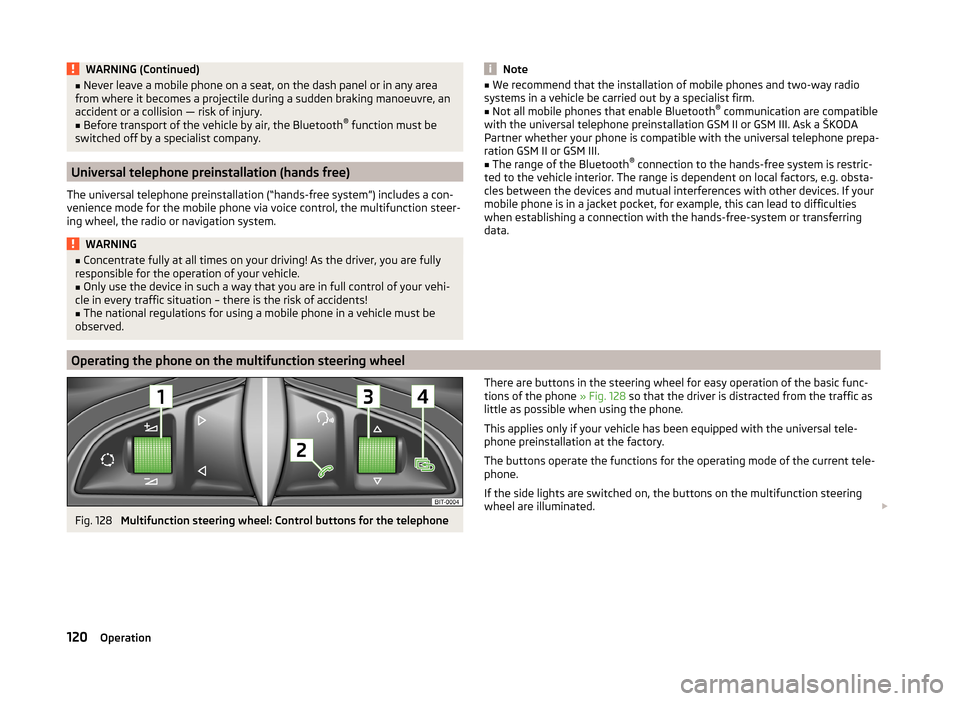
Fig. 128
Multifunction steering wheel: Control buttons for the telephone
There are buttons in the steering wheel for easy operation of the basic func-
tions of the phone » Fig. 128 so that the driver is distracted from the traffic as
little as possible when using the phone.
This applies only if your vehicle has been equipped with the universal tele-
phone preinstallation at the factory.
The buttons operate the functions for the operating mode of the current tele-
phone.
If the side lights are switched on, the buttons on the multifunction steering
wheel are illuminated. 120Operation
Page 218 of 246
CAUTION■“Never repair” fuses or replace them with a fuse of a higher amperage – risk
of fire! This may also cause damage at another part of the electrical system.■
If a newly inserted fuse blows again after a short time, have the electrical
system checked as quickly as possible by a specialist garage.
■
A blown fuses is recognisable by the molten metal strip. Replace the faulty
fuse with a new one of the same amperage.
Note
■
We recommend always carrying replacement fuses in the vehicle. A box of
replacement fuses can be purchased from ŠKODA Original Accessories.■
There can be several power consuming devices for one fuse.
■
Multiple fuses may exist for a single power consuming device.
Fuses in the dash panel
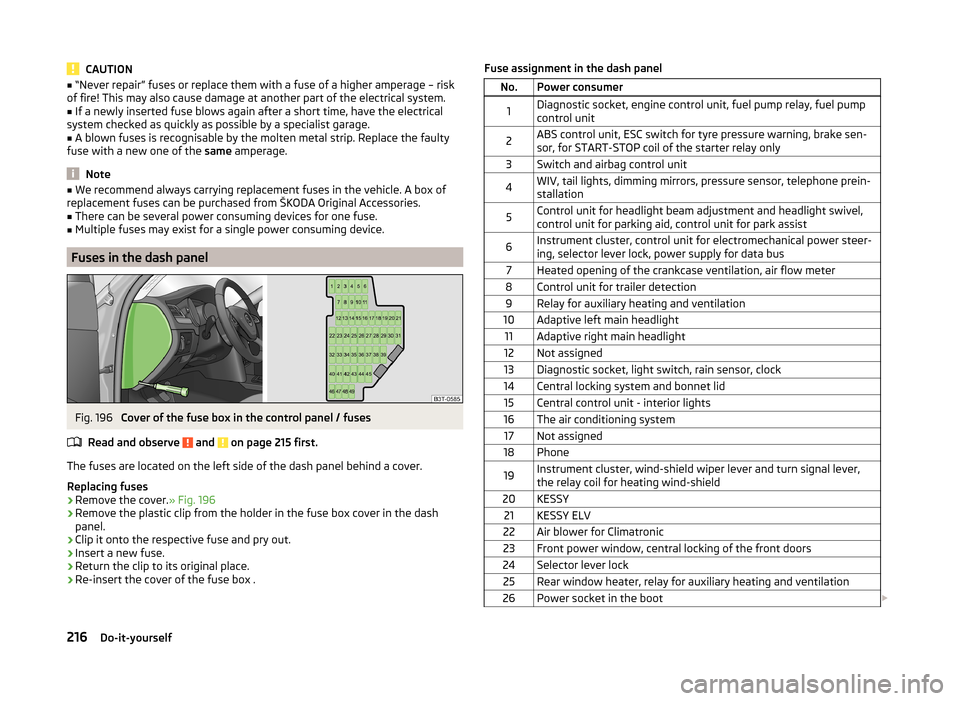
Fig. 196
Cover of the fuse box in the control panel / fuses
Read and observe
and on page 215 first.
The fuses are located on the left side of the dash panel behind a cover.
Replacing fuses
›
Remove the cover. » Fig. 196
›
Remove the plastic clip from the holder in the fuse box cover in the dash
panel.
›
Clip it onto the respective fuse and pry out.
›
Insert a new fuse.
›
Return the clip to its original place.
›
Re-insert the cover of the fuse box .
Fuse assignment in the dash panelNo.Power consumer1Diagnostic socket, engine control unit, fuel pump relay, fuel pump
control unit2ABS control unit, ESC switch for tyre pressure warning, brake sen-
sor, for START-STOP coil of the starter relay only3Switch and airbag control unit4WIV, tail lights, dimming mirrors, pressure sensor, telephone prein-
stallation5Control unit for headlight beam adjustment and headlight swivel,
control unit for parking aid, control unit for park assist6Instrument cluster, control unit for electromechanical power steer-
ing, selector lever lock, power supply for data bus7Heated opening of the crankcase ventilation, air flow meter8Control unit for trailer detection9Relay for auxiliary heating and ventilation10Adaptive left main headlight11Adaptive right main headlight12Not assigned13Diagnostic socket, light switch, rain sensor, clock14Central locking system and bonnet lid15Central control unit - interior lights16The air conditioning system17Not assigned18Phone19Instrument cluster, wind-shield wiper lever and turn signal lever,
the relay coil for heating wind-shield20KESSY21KESSY ELV22Air blower for Climatronic23Front power window, central locking of the front doors24Selector lever lock25Rear window heater, relay for auxiliary heating and ventilation26Power socket in the boot 216Do-it-yourself
Page 234 of 246
Index
A
Abroad Driving abroad
150
Unleaded petrol150
ABS Operation
152
Warning light36
Accessories169
Adaptive headlights (AFS)68
Adjust Auxiliary heating (auxiliary heating and ventila-tion)
117
Adjusting Belt height
13
Exterior mirrors78
Head restraints81
Interior mirror77
Manual air conditioning112
Seats79, 80
Steering wheel8
Adjusting the seats7, 79
Adjustment Headlight beam
66
Aerial173
See windows175
AFS68
Warning light36
Airbag14
Deactivating19
Deactivating the front passenger airbag20
Deployment14
Front airbag15
Head airbag18
Indicator light38
Knee airbag16
Modifications and damage to the airbag system 171 Side airbag
17
Airbag system14
Air conditioning system108
Air outlets108
Climatronic113
Manual air conditioning system110
Air outlets108
Air recirculation Climatronic
115
Alarm Switching off
54
Triggering54
Anti-theft alarm system Activating/deactivating
54
Trailer168
Antilock brake system (ABS)152
Armrest front
85
rear85, 94
Artificial leather178
Ashtray89
ASR Warning light
35
Assist systems151
ABS36, 152
ASR35
Cruise Control System158
DSR152
EDL152
ESC35, 151
HBA152
HHC153
Park assist154
Parking aid153
START-STOP159
TCS152
Auto Check Control31
Automatic driving lamp control68
Automatic gearbox142
Selector lever-emergency unlocking213
Starting-off and driving144
Tiptronic143
Using the selector lever142
Automatic gearbox modes142
Automatic load deactivation193
Automatic retractable cargo cover (Superb Combi))
99
Automatic transmission Kickdown
144
Malfunction144
Selector lever lock143
AUX Installation in the storage compartment
90
Auxiliary heating (auxiliary heating and ventila- tion)
116
Adjust117
Radio remote control118
Switching on/off117
Avoiding damage to the vehicle Driving through water
149
Avoiding damage to your vehicle149
B
Ball head Check fitting
165
Fitting164
Ready position164
Removing165
Battery In the remote control key
211
iReplace the remote control of the auxiliary heater (parking heater)
211
Belts10
Belt tensioners13
Bonnet Closing
183
Opening183
Warning light34
Boot Automatic retraction (Superb Combi)
99
Extending variable loading floor103
232Index
Page 237 of 246
Unlocking the driver's door212
Unlocking the tailgate212
Emergency equipment Fire extinguisher
200
First aid kit200
Jack201
Vehicle tool kit201
Warning triangle200
Emissions225
Engine Running in
145
Engine compartment182
Brake fluid189
Coolant188
Overview184
Vehicle battery189
Engine number224
Engine oil185
Capacity185
Changing187
Checking186
Information message34
Replenishing187
Specifications185
Engine oil level Warning light
35
Engine oil pressure Warning light
34
Entry lighting73
Environment146
Environmental compatibility148
Environmentally friendly driving146
EPC Warning light
37
ESC Function
151
Warning light35
Exhaust inspection system Warning light
36
Extending variable loading flooPartial extension103
Extending variable loading floor103
Divide boot103
Movable lashing eyes105
Extrending variable loading floor Fixing set
104
F
Fastening elements
97
Fatigue detection162
Function162
Information messages162
Films175
Fire extinguisher200
First aid kit200
Floor covering Fixing
98
Fog lights69
Warning light39
Fog lights with CORNER function69
Folding hook97
Fold in passenger's mirror78
Footmats142
see footmats142
Force limit Electric boot lid (Superb Combi)
57
Power windows61
Sliding/tilting roof62
Sliding/tilting roof (Superb Combi)64
Front airbag15
Front door warning light72
Front interior light71
Fuel179
Diesel181
Fuel gauge30
refer to Fuel179
Refuelling180
Unleaded petrol180
Fuel consumption146, 225
Fuel reserve Warning light
37
Fuses Assignment
215
Colour coding215
Fuse assignment in the engine compartment218
Replacing215
G
Gearbox Warning messages
31
Gear change Gear recommendation
40
Information on the selected gear40
Gear changing Gear stick
141
General view Cockpit
27
Generator Indicator light
33
Glasses storage box91
Glow plug system Warning light
36
GSM122, 124
H
Handbrake
141
Warning light33
Hands-free system Voice control
129
Hazard warning light system70
HBA152
Head airbag18
Headlight cleaning system Headlight cleaning system
77
235Index