ABS SKODA SUPERB 2015 3.G / (B8/3V) User Guide
[x] Cancel search | Manufacturer: SKODA, Model Year: 2015, Model line: SUPERB, Model: SKODA SUPERB 2015 3.G / (B8/3V)Pages: 276, PDF Size: 42.14 MB
Page 236 of 276

CAUTION■We recommend having faulty rechargeable batteries or batteries replaced by
a ŠKODA service partner.■
The replacement battery or the replacement rechargeable battery should
have the specifications of the original battery or original rechargeable battery.
■
Pay attention to the correct polarity when changing the rechargeable batter-
ies.
Note
If a key has an affixed decorative cover, this will be destroyed when the bat-
tery is replaced. A replacement cover can be purchased from a ŠKODA Partner.
Replacing the battery in the remote control key
Fig. 254
Remote control key: Remove cover/take out battery
Read and observe
on page 234 first.
Remote control key
›
Flip out the key.
›
Press off the battery cover
A
» Fig. 254 with your thumb or by using a flat
screwdriver in region
B
.
›
Open the battery in the direction of the arrow
1
.
›
Remove the discharged battery in the direction of arrow
2.›
Insert the new battery.
›
Insert the battery cover
A
and press it down until it clicks audibly into place.
Replace battery in KESSY keyFig. 255
KESSY key
Fig. 256
Replacing the battery
Read and observe
on page 234 first.
KESSY key
›
Remove retainer tabs
A
in the direction of arrow
1
» Fig. 255 .
›
Remove the emergency key
B
in the direction of the arrow
2
.
›
Slide a 3 mm wide slot screwdriver approximately 12 mm into the key body in
the direction of arrow
3
» Fig. 256 .
›
Turn the screwdriver in the direction of arrow
4
.
›
Slide the battery in the direction of the arrow
5
.
›
Remove the discharged battery in the direction of arrow
6.›
Insert the new battery.
›
Insert the battery cover and press it down until it clicks into place.
234Do-it-yourself
Page 241 of 276
WARNINGAlways read and observe the warnings before completing any work in the
engine compartment » page 206.
CAUTION
■
“Never repair” fuses, and do not replace them with fuses of a higher amper-
age – risk of fire! This may also cause damage at another part of the electrical
system.■
If a newly inserted fuse blows again after a short time, have the electrical
system checked as quickly as possible by a specialist garage.
■
A blown fuses is recognisable by the molten metal strip. Replace the faulty
fuse with a new one of the same amperage.
Note
■
We recommend always carrying replacement fuses in the vehicle. A box of
replacement fuses and bulbs can be purchased from ŠKODA Genuine Accesso-
ries.■
There can be several power consuming devices for one fuse.
■
Multiple fuses may exist for a single power consuming device.
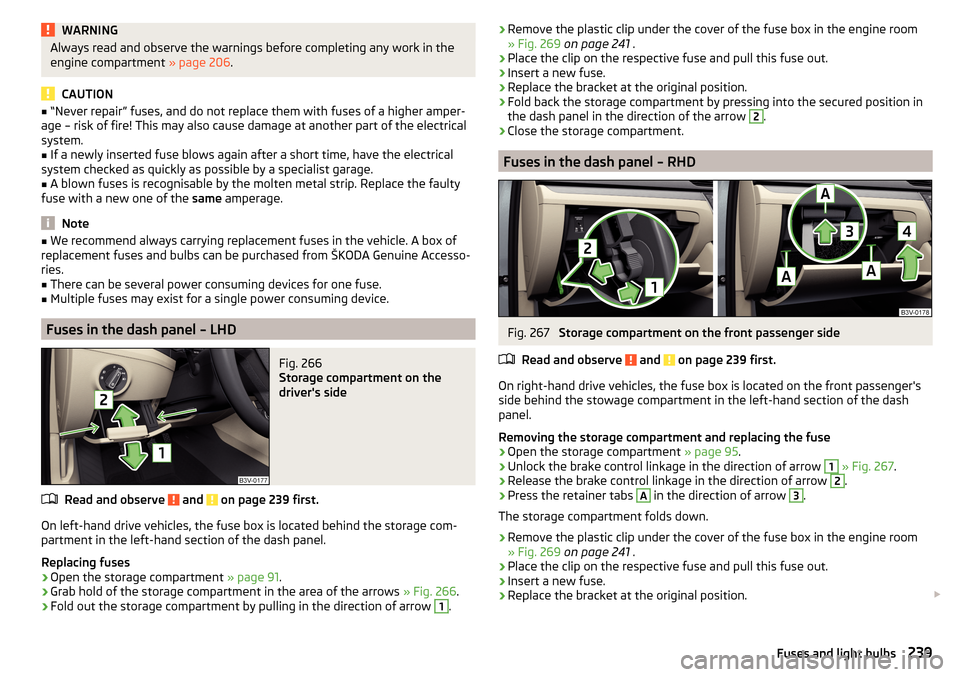
Fuses in the dash panel – LHD
Fig. 266
Storage compartment on the
driver's side
Read and observe and on page 239 first.
On left-hand drive vehicles, the fuse box is located behind the storage com- partment in the left-hand section of the dash panel.
Replacing fuses
›
Open the storage compartment » page 91.
›
Grab hold of the storage compartment in the area of the arrows » Fig. 266.
›
Fold out the storage compartment by pulling in the direction of arrow
1
.
›Remove the plastic clip under the cover of the fuse box in the engine room
» Fig. 269 on page 241 .›
Place the clip on the respective fuse and pull this fuse out.
›
Insert a new fuse.
›
Replace the bracket at the original position.
›
Fold back the storage compartment by pressing into the secured position in
the dash panel in the direction of the arrow
2
.
›
Close the storage compartment.
Fuses in the dash panel – RHD
Fig. 267
Storage compartment on the front passenger side
Read and observe
and on page 239 first.
On right-hand drive vehicles, the fuse box is located on the front passenger's side behind the stowage compartment in the left-hand section of the dash
panel.
Removing the storage compartment and replacing the fuse
›
Open the storage compartment » page 95.
›
Unlock the brake control linkage in the direction of arrow
1
» Fig. 267 .
›
Release the brake control linkage in the direction of arrow
2
.
›
Press the retainer tabs
A
in the direction of arrow
3
.
The storage compartment folds down.
›
Remove the plastic clip under the cover of the fuse box in the engine room
» Fig. 269 on page 241 .
›
Place the clip on the respective fuse and pull this fuse out.
›
Insert a new fuse.
›
Replace the bracket at the original position.
239Fuses and light bulbs
Page 242 of 276
Installing the storage compartment›Raise the storage compartment in the direction of the arrow 4.›
Overcome the resistance of the detents
A
.
›
Insert the brake control linkage in the opposite direction to arrow
2
.
›
Lock the brake control linkage in the opposite direction to arrow
1
.
›
Close the storage compartment.
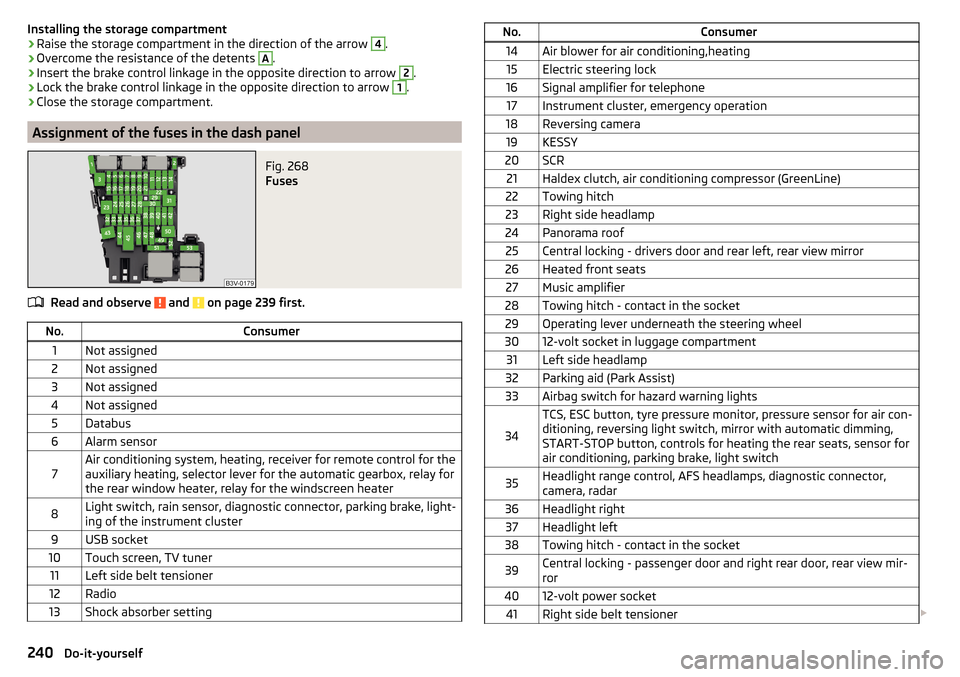
Assignment of the fuses in the dash panel
Fig. 268
Fuses
Read and observe and on page 239 first.
No.Consumer1Not assigned2Not assigned3Not assigned4Not assigned5Databus6Alarm sensor7Air conditioning system, heating, receiver for remote control for the
auxiliary heating, selector lever for the automatic gearbox, relay for
the rear window heater, relay for the windscreen heater8Light switch, rain sensor, diagnostic connector, parking brake, light-
ing of the instrument cluster9USB socket10Touch screen, TV tuner11Left side belt tensioner12Radio13Shock absorber settingNo.Consumer14Air blower for air conditioning,heating15Electric steering lock16Signal amplifier for telephone17Instrument cluster, emergency operation18Reversing camera19KESSY20SCR21Haldex clutch, air conditioning compressor (GreenLine)22Towing hitch23Right side headlamp24Panorama roof25Central locking - drivers door and rear left, rear view mirror26Heated front seats27Music amplifier28Towing hitch - contact in the socket29Operating lever underneath the steering wheel3012-volt socket in luggage compartment31Left side headlamp32Parking aid (Park Assist)33Airbag switch for hazard warning lights
34
TCS, ESC button, tyre pressure monitor, pressure sensor for air con-
ditioning, reversing light switch, mirror with automatic dimming,
START-STOP button, controls for heating the rear seats, sensor for
air conditioning, parking brake, light switch35Headlight range control, AFS headlamps, diagnostic connector,
camera, radar36Headlight right37Headlight left38Towing hitch - contact in the socket39Central locking - passenger door and right rear door, rear view mir-
ror4012-volt power socket41Right side belt tensioner 240Do-it-yourself
Page 258 of 276
Index
A
abroad lead-free petrol
202
Abroad Headlights
72
ABS Operation
144
Warning light34
ACC163
Acceptance and recycling of used vehicles193
Accessories190
Adaptive chassis control Warning light
41
Adaptive Chassis Control171
Adaptive cruise control automatic stop-start
165
Information messages168
Operation164
Operation Overview165
Set/change the desired speed166
special driving conditions167
Start control166
Stop/resume control166
Adaptive Cruise Control163
Radar sensor143
Set the clearance level167
Adaptive headlight see xenon headlight
69
AdBlue204, 205
refilling204
replenish205
Warning light39
Adjust Auxiliary heating (auxiliary heating and ventila- tion)
124
AdjustingExterior mirrors80
Steering wheel9
Adjusting the seats8
Adjustment Front seats
81
Headlight beam67
Headrests87
Seats82
Advance warning / emergency braking Warning light
41
AHL see xenon headlight
69
Air-conditioning system Air outlet vents
122
Airbag14
Deactivating19
Deactivating the front passenger airbag19
Deployment15
Front airbag15
Head airbag18
Knee airbag17
Modifications and damage to the airbag system 192
Side airbag
17
Warning light35
Airbag system14
Air conditioning118
Air distribution control122
Climatronic120
Manual air conditioning119
Air distribution control122
Air outlet vents122
Alarm Enable/disable
57
Switch off57
Trailer189
Triggering57
Alcantara cleaning
199
Anodized partsRefer to vehicle maintenance196
Anti-lock braking system (ABS)144
Anti-theft alarm system Enable/disable
57
Trailer189
Anti-theft wheel bolts225
Armrest Front
85
rear98
Rear86
artificial leather199
Ashtray103
removal104
Assistant for blind spot monitoring177
Activation / deactivation178
Driving conditions and warnings178
Information messages179
Operation177
Assistant for emergencies179
Operating conditions180
Operation180
Assist systems142
Auto-check control41
Auto Hold146
Warning light37
Auto Hold function146
Warning light37
Automatic Distance Control Warning light
33
Warning lights40
Automatic driving lamp control69
Automatic gearbox Selector lever-emergency unlocking
237
Selector lever lock137
Starting-off and driving138
Tiptronic137
Using the selector lever136
Automatic gearbox modes136
Automatic load deactivation216
256Index