steering wheel SKODA SUPERB 2015 3.G / (B8/3V) User Guide
[x] Cancel search | Manufacturer: SKODA, Model Year: 2015, Model line: SUPERB, Model: SKODA SUPERB 2015 3.G / (B8/3V)Pages: 276, PDF Size: 42.14 MB
Page 37 of 276
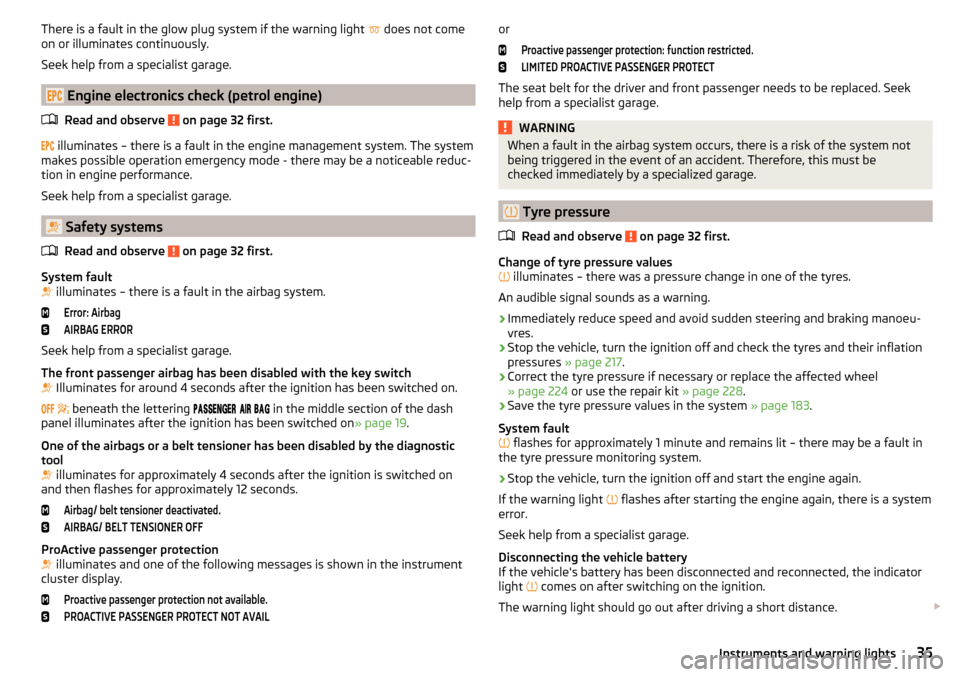
There is a fault in the glow plug system if the warning light does not come
on or illuminates continuously.
Seek help from a specialist garage.
Engine electronics check (petrol engine)
Read and observe
on page 32 first.
illuminates – there is a fault in the engine management system. The system
makes possible operation emergency mode - there may be a noticeable reduc-
tion in engine performance.
Seek help from a specialist garage.
Safety systems
Read and observe
on page 32 first.
System fault
illuminates – there is a fault in the airbag system.
Error: AirbagAIRBAG ERROR
Seek help from a specialist garage.
The front passenger airbag has been disabled with the key switch
Illuminates for around 4 seconds after the ignition has been switched on.
beneath the lettering
in the middle section of the dash
panel illuminates after the ignition has been switched on » page 19.
One of the airbags or a belt tensioner has been disabled by the diagnostic
tool
illuminates for approximately 4 seconds after the ignition is switched on
and then flashes for approximately 12 seconds.
Airbag/ belt tensioner deactivated.AIRBAG/ BELT TENSIONER OFF
ProActive passenger protection
illuminates and one of the following messages is shown in the instrument
cluster display.
Proactive passenger protection not available.PROACTIVE PASSENGER PROTECT NOT AVAILorProactive passenger protection: function restricted.LIMITED PROACTIVE PASSENGER PROTECT
The seat belt for the driver and front passenger needs to be replaced. Seek
help from a specialist garage.
WARNINGWhen a fault in the airbag system occurs, there is a risk of the system not
being triggered in the event of an accident. Therefore, this must be
checked immediately by a specialized garage.
Tyre pressure
Read and observe
on page 32 first.
Change of tyre pressure values
illuminates – there was a pressure change in one of the tyres.
An audible signal sounds as a warning.
›
Immediately reduce speed and avoid sudden steering and braking manoeu-
vres.
›
Stop the vehicle, turn the ignition off and check the tyres and their inflation
pressures » page 217 .
›
Correct the tyre pressure if necessary or replace the affected wheel
» page 224 or use the repair kit » page 228.
›
Save the tyre pressure values in the system » page 183.
System fault
flashes for approximately 1 minute and remains lit – there may be a fault in
the tyre pressure monitoring system.
›
Stop the vehicle, turn the ignition off and start the engine again.
If the warning light flashes after starting the engine again, there is a system
error.
Seek help from a specialist garage.
Disconnecting the vehicle battery
If the vehicle's battery has been disconnected and reconnected, the indicator
light comes on after switching on the ignition.
The warning light should go out after driving a short distance.
35Instruments and warning lights
Page 45 of 276
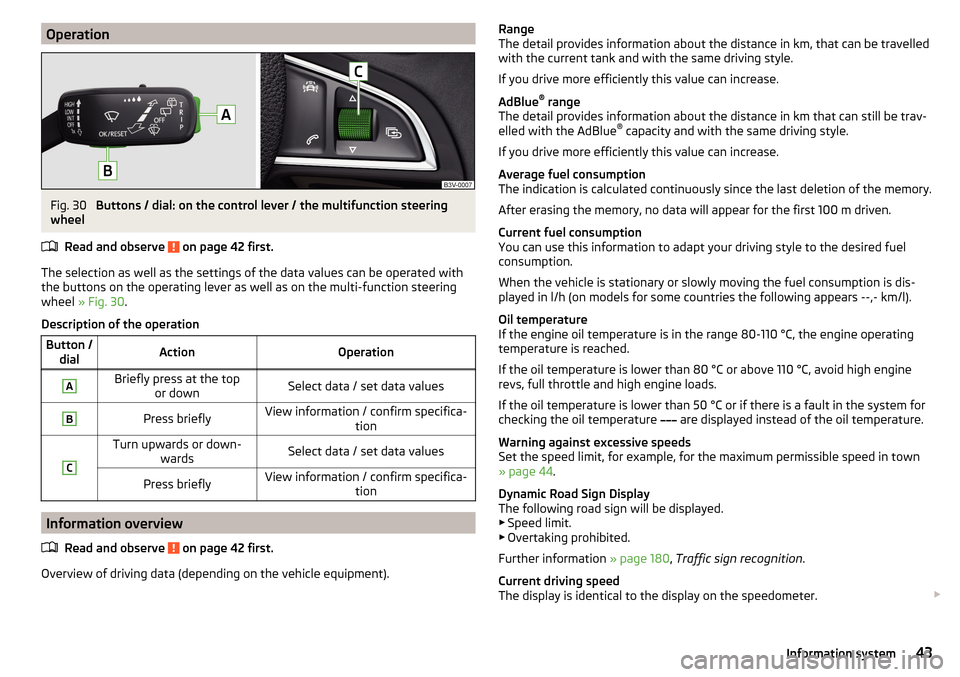
OperationFig. 30
Buttons / dial: on the control lever / the multifunction steering
wheel
Read and observe
on page 42 first.
The selection as well as the settings of the data values can be operated with
the buttons on the operating lever as well as on the multi-function steering
wheel » Fig. 30 .
Description of the operation
Button / dialActionOperationABriefly press at the top or downSelect data / set data valuesBPress brieflyView information / confirm specifica- tionCTurn upwards or down-wardsSelect data / set data valuesPress brieflyView information / confirm specifica- tion
Information overview
Read and observe
on page 42 first.
Overview of driving data (depending on the vehicle equipment).
Range
The detail provides information about the distance in km, that can be travelled
with the current tank and with the same driving style.
If you drive more efficiently this value can increase.
AdBlue ®
range
The detail provides information about the distance in km that can still be trav-
elled with the AdBlue ®
capacity and with the same driving style.
If you drive more efficiently this value can increase.
Average fuel consumption
The indication is calculated continuously since the last deletion of the memory.
After erasing the memory, no data will appear for the first 100 m driven.
Current fuel consumption
You can use this information to adapt your driving style to the desired fuel
consumption.
When the vehicle is stationary or slowly moving the fuel consumption is dis-
played in l/h (on models for some countries the following appears --,- km/l).
Oil temperature
If the engine oil temperature is in the range 80-110 °C, the engine operating
temperature is reached.
If the oil temperature is lower than 80 °C or above 110 °C, avoid high engine
revs, full throttle and high engine loads.
If the oil temperature is lower than 50 °C or if there is a fault in the system for
checking the oil temperature are displayed instead of the oil temperature.
Warning against excessive speeds
Set the speed limit, for example, for the maximum permissible speed in town
» page 44 .
Dynamic Road Sign Display
The following road sign will be displayed. ▶ Speed limit.
▶ Overtaking prohibited.
Further information » page 180, Traffic sign recognition .
Current driving speed
The display is identical to the display on the speedometer. 43Information system
Page 47 of 276

Long-term ( ) And “2” ( )
The memory gathers driving information from any number of individual jour-
neys up to a total of 99 hours and 59 minutes driving or 9,999 kilometres driv-
en.
The indicator is automatically set back to zero if one of the indicated values is
exceeded.Since refuel
(
) or “3” (
)
The memory gathers driving information since the last refuelling.
The memory is erased automatically the next time you fill up.
Select memory
▶ Select the driving data information desired.
▶ Confirm details again to select the desired memory.
Resetting ▶ Select the driving data information desired.
▶ Select the desired memory.
▶ Reset the selected memory with a long acknowledgement (holding pressed).
Note
Disconnecting the vehicle battery will delete all memory data.
MAXI DOT display
Introduction
This chapter contains information on the following subjects:
Main menu
45
Operation using the operating lever
46
Operation using the multifunction steering wheel
46
Menu item
Navigation47
Menu item
Audio47
Menu item
Telephone47
Menu item
Assist systems48
Compass point display
48
Eco-tips
49
The MAXI DOT display (following as display) is a user interface which, depend-
ing on the equipment configuration, delivers information about the Infotain-
ment, the multifunction display, the assistance systems etc.
WARNINGConcentrate fully at all times on your driving! As the driver you are fully re-
sponsible for the operation of your vehicle.
Main menu
Read and observe
on page 45 first.
Call up the main menu
›
Press and hold the button
A
on the operating lever » Fig. 32 on page 46 .
or
›
Press and hold the dial
G
on the multifunction steering wheel » Fig. 33 on
page 46 .
Main menu items (depending on vehicle equipment) ■
Driving data
» page 42
■
Assist systems
» page 48
■
Navigation
» page 47
■
Audio
» page 47
■
Telephone
» page 47 ;
■
Vehicle
» page 41 , Auto-check control
The menus can be opened using the buttons on the control lever » Fig. 32 on
page 46 or on the multi-function steering wheel » Fig. 33 on page 46 .
Note
■
If warning messages are displayed, these messages must first be confirmed
to access the main menu.■
The travel mode can be set in the Infotainment » Owner´s Manual Infotain-
ment , chapter Vehicle settings (SETUP button) .
45Information system
Page 48 of 276

Operation using the operating leverFig. 32
Buttons: on the operating lever
Read and observe on page 45 first.
Description of the operation by means of the buttons on the operating lever
ButtonActionOperationABriefly press at the topor downSwitch between menu items / menusPress and hold at the top or downDisplay main menuBPress brieflyConfirm menu item / menu
Operation using the multifunction steering wheel
Fig. 33
Buttons / dials: on the multifunction steering wheel
Read and observe on page 45 first.
Description of the operation by means of the buttons on the multi-function
steering wheel
Button / dialActionOperationA
Press brieflyVoice control on/off / Sound off /on
(applies to vehicles without voice con- trol)Press and hold buttonActivate voice control for
theSmartLink a)
function (if supported
by the connected device)BPress brieflySwitch sound on/off / Switch track playback on/offTurn upIncrease volumeTurn downDecrease volumeCPress brieflyTo the next Radio /TV channel orchange to the playback trackPress and hold buttonFast forward within the trackDPress brieflySwitch to the previous radio /TV chan- nel or to the playback track b)Press and hold buttonFast reverse within the trackEPress brieflySelect menu item Assist systems
» page 48
F
Press brieflyTake the call / end the call / Menu Tel-ephone
display / display call list / call
the selected contactPress and hold buttonReject call / Redial last call 46Using the system
Page 49 of 276

Button /dialActionOperationG
Press brieflyConfirm menu item / menu / Repeat
the last navigation announcement or clarify / interrupt traffic report
Turn up
Previous menu item / track b)
/ Show
available list (e.g. list of available
channels, list of the last destinations, call list)Turn downNext menu item / track / View availa-
ble list (e.g. List of available channels, list the last destinations, call list)HPress brieflyReturn to a previous level in the menuPress and hold buttonDisplay main menua)
» Infotainment Owner's Manual
b)
Valid for pressing within about 4 s from the beginning of the given track. Pressing after about 4 seconds
from the beginning of the track, starts the playback from the beginning of the track.
Note
Depending on equipment not all functions may be available. The system indi-
cates this through a text message on the display.
Menu item
Navigation
Read and observe on page 45 first.
Select menu item
Navigation›
Select and confirm
Navigation
in the main menu.
Route guidance takes place
Graphical driving recommendations and other route and destination informa-
tion are displayed after selection.
No route guidance is carried out
A compass/vehicle symbol is shown to display the current vehicle position in
relation to the compass after selection.
Then turn dial
G
» Fig. 33 on page 46 on the multifunction steering wheel to
display the
Last destinations
menu.
The menu shows the
Home address
menu item and a list of recent destinations.
When you select one of the menu items, the destination name and the follow-
ing items are displayed.
■OK
- Start navigation
■
Cancel
- Return to the Navigation menu – the compass/vehicle symbol will be
displayed
If the home address is not defined when the menu item
Home address
is selec-
ted, the following message appears:
Please enter the home address on the infotain-ment system.
Menu item
Audio
Read and observe on page 45 first.
Select menu item
Audio›
Select and confirm
Audio
in the main menu.
The following information can be displayed in the display.
■ Radio
■ Currently played station (name/frequency)
■ The selected frequency range (e.g. FM) optionally with the number of the
station button (e.g. FM3), if the station is stored in the memory list
■ List of available station (if more than 5 stations can be received)
■ TP traffic announcements.
■ Media
■ Name of the track being played, if necessary, further information regarding
title (e.g. artist, album name), if this information is stored as a so called ID3
tag on the audio source.
Menu item
Telephone
Read and observe on page 45 first.
Select menu item
Telephone›
Select and confirm
Telephone
in the main menu.
›
Turn dial
G
» Fig. 33 on page 46 .
The system displays a call list.
If the call list includes no entries, the following message appears
No entries avail-able.
47Information system
Page 50 of 276

The following symbols are displayed next to each entry in the call list.Incoming call
Outgoing call
Missed call
Outgoing call
■ Cancel
- Ends the call
Incoming call
■
Answer
– Answer incoming call
■
Reject
– Reject incoming call
■
Ignore
- Mute the ringer (this option is only available if there is no other call)
Ongoing conversation or conference call
■
Hang up
- End a call
■
Hold
– Hold a call
■
Continue
– Continue held call
■
Mic. off
– Microphone off
■
Mic. on
– Microphone on
■
Private
– Switch the call to the telephone
■
Hands-free
– Toggles the call to the device
Ongoing and held call ■
Hang up
– End an ongoing call
■
Call wait.
– Switch to a held call
■
Conference
– Make a conference call 1)
■
Mic. off
– Microphone off
■
Mic. on
– Microphone on
■
Private
– Switch ongoing call to the telephone
■
Hands-free
– Switch ongoing call to the device
Symbols in the display Charge status of the telephone battery 1)
Signal strength 1)
A telephone is connected to the unit
Missed calls (if there are several missed calls, the number of calls is shown
next to the symbol)
Switch-off microphone
Menu itemAssist systems
Read and observe on page 45 first.
Select menu item
Assist systems›
Select and confirm
Assist systems
in the main menu.
or
›
Press the button on the
multi-function steering wheel .
In the menu
Assist systems
the systems Front Assist, Lane departure warning
(Lane Assist), Rear Traffic Alert and blind spot monitoring can be enabled/disa-
bled.
Compass point display
Fig. 34
Compass display
Read and observe on page 45 first.
Applies to vehicles with factory-installed navigation system.
In the display when the ignition is on, an arrow symbol as well as an abbrevia-
tion for the corresponding direction (in relation to the current direction of trav-
el) are displayed » Fig. 34.
Note
The direction indicator can be displayed at the top or bottom of the screen dis-
played in response to further information.1)
This function is only supported by some mobile phones.
48Using the system
Page 129 of 276
Steering lock locking / unlockingRead and observe
and on page 126 first.
The steering lock (steering lock) deters any attempted theft of your vehicle.
Locking
›
Withdraw the ignition key.
›
Turn the steering wheel to the left or right until the steering lock clicks into
place.
Unlocking
›
Insert the key into the ignition lock.
›
Switch on the ignition » page 127.
The steering lock is unlocked.
If the ignition switch cannot be turned on, then turn the steering wheel back and forth slightly and thereby unlock the steering lock.
Turn ignition on / off and start the engine
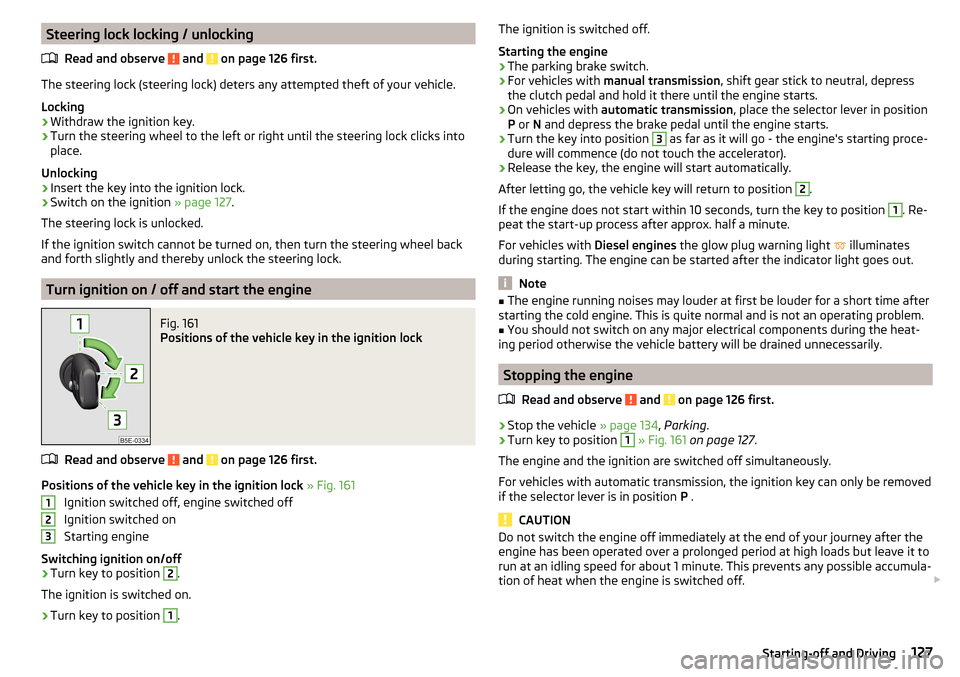
Fig. 161
Positions of the vehicle key in the ignition lock
Read and observe and on page 126 first.
Positions of the vehicle key in the ignition lock » Fig. 161
Ignition switched off, engine switched off
Ignition switched on
Starting engine
Switching ignition on/off
›
Turn key to position
2
.
The ignition is switched on.
›
Turn key to position
1
.
123The ignition is switched off.
Starting the engine›
The parking brake switch.
›
For vehicles with manual transmission , shift gear stick to neutral, depress
the clutch pedal and hold it there until the engine starts.
›
On vehicles with automatic transmission , place the selector lever in position
P or N and depress the brake pedal until the engine starts.
›
Turn the key into position
3
as far as it will go - the engine's starting proce-
dure will commence (do not touch the accelerator).
›
Release the key, the engine will start automatically.
After letting go, the vehicle key will return to position
2
.
If the engine does not start within 10 seconds, turn the key to position
1
. Re-
peat the start-up process after approx. half a minute.
For vehicles with Diesel engines the glow plug warning light
illuminates
during starting. The engine can be started after the indicator light goes out.
Note
■ The engine running noises may louder at first be louder for a short time after
starting the cold engine. This is quite normal and is not an operating problem.■
You should not switch on any major electrical components during the heat-
ing period otherwise the vehicle battery will be drained unnecessarily.
Stopping the engine
Read and observe
and on page 126 first.
›
Stop the vehicle » page 134, Parking .
›
Turn key to position
1
» Fig. 161 on page 127 .
The engine and the ignition are switched off simultaneously.
For vehicles with automatic transmission, the ignition key can only be removed if the selector lever is in position P .
CAUTION
Do not switch the engine off immediately at the end of your journey after the
engine has been operated over a prolonged period at high loads but leave it to
run at an idling speed for about 1 minute. This prevents any possible accumula-
tion of heat when the engine is switched off. 127Starting-off and Driving
Page 130 of 276

NoteAfter switching off the ignition, the radiator fan may intermittently continue to
operate for approx. 10 minutes.
Starting and stopping the engine at the push of the button
Introduction
Fig. 162
Starter button (
)
This chapter contains information on the following subjects:
Steering column lock locking / unlocking
128
Switch ignition on / off
129
Starting the engine
129
Switching off the engine
129
Problems starting the engine
130
The ignition can be switched on and off and the engine can be started / stop-
ped with the starter button » Fig. 162.
The key must be in the vehicle to unlock the steering wheel, start the vehicle
and drive.
WARNING■ Never leave the key in the vehicle when you exit the vehicle. Unauthor-
ized persons, such as children, for example, could lock the car, turn on the
ignition or start the engine - there is a danger of injury, accidents and dam-
age!■
Never leave the vehicle unattended with the engine running - there is a
risk of theft, accident etc.!
■
Never switch off the engine before the vehicle is stationary – risk of acci-
dent!
WARNINGNever (e.g. in garages) run the engine in a closed place - there is the danger
of poisoning and death!
CAUTION
■ The system can recognize the valid key, even if it has been accidentally left
on the vehicle roof - there is danger of loss or damage to the key!■
Only start the engine when the engine and the vehicle are stationary - there
is a danger of starter and engine damage!
■
Do not push-start the engine – risk of damaging the engine and the catalytic
converter. The battery from another vehicle can be used as a jump-start aid
» page 230 .
Note
■
Do not warm up the engine while the vehicle is stationary. If possible, start
your journey as soon as the engine has started. Through this, the engine rea-
ches its operating temperature faster.■
The system is protected against inadvertently switching off the engine while
driving, this means that the engine can only be switched off in an emergency
» page 129 .
Steering column lock locking / unlocking
Read and observe
and on page 128 first.
The steering lock (steering lock) deters any attempted theft of your vehicle.
Locking
›
Switch off the engine.
›
Open the driver door.
The steering lock is locked automatically.
If the driver's door is opened and the ignition is switched off afterwards, the
steering is only locked after the vehicle has been locked.
Unlocking
›
Open the driver's door and get into the vehicle.
›
Close the driver's door.
The steering is locked automatically.
128Driving
Page 139 of 276
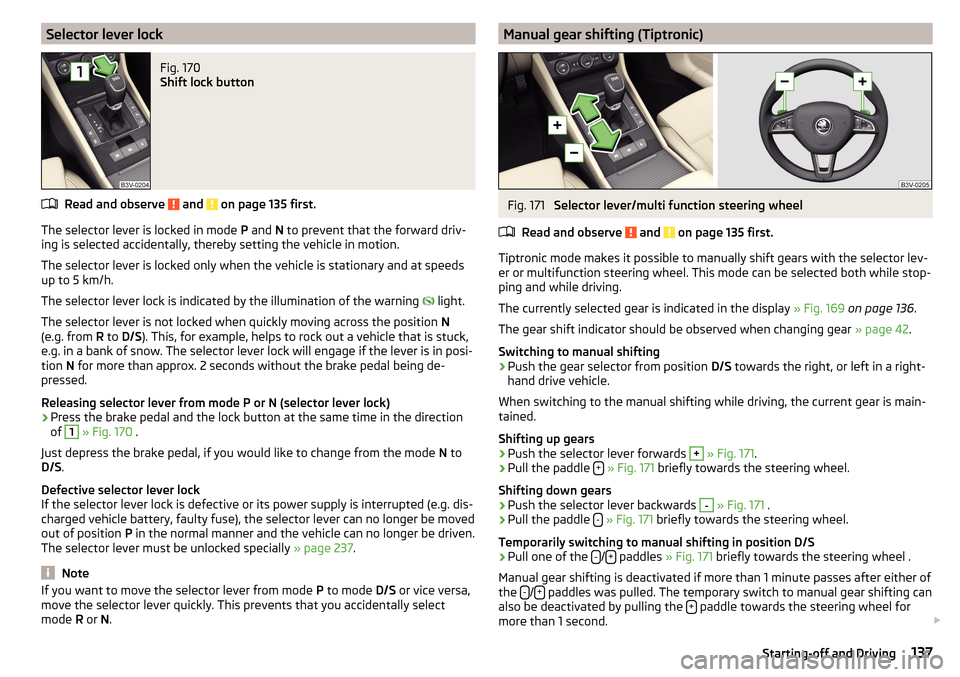
Selector lever lockFig. 170
Shift lock button
Read and observe and on page 135 first.
The selector lever is locked in mode P and N to prevent that the forward driv-
ing is selected accidentally, thereby setting the vehicle in motion.
The selector lever is locked only when the vehicle is stationary and at speeds
up to 5 km/h.
The selector lever lock is indicated by the illumination of the warning light.
The selector lever is not locked when quickly moving across the position N
(e.g. from R to D/S ). This, for example, helps to rock out a vehicle that is stuck,
e.g. in a bank of snow. The selector lever lock will engage if the lever is in posi-
tion N for more than approx. 2 seconds without the brake pedal being de-
pressed.
Releasing selector lever from mode P or N (selector lever lock)
›
Press the brake pedal and the lock button at the same time in the direction
of
1
» Fig. 170 .
Just depress the brake pedal, if you would like to change from the mode N to
D/S .
Defective selector lever lock
If the selector lever lock is defective or its power supply is interrupted (e.g. dis-
charged vehicle battery, faulty fuse), the selector lever can no longer be moved
out of position P in the normal manner and the vehicle can no longer be driven.
The selector lever must be unlocked specially » page 237.
Note
If you want to move the selector lever from mode P to mode D/S or vice versa,
move the selector lever quickly. This prevents that you accidentally select
mode R or N.Manual gear shifting (Tiptronic)Fig. 171
Selector lever/multi function steering wheel
Read and observe
and on page 135 first.
Tiptronic mode makes it possible to manually shift gears with the selector lev-
er or multifunction steering wheel. This mode can be selected both while stop-
ping and while driving.
The currently selected gear is indicated in the display » Fig. 169 on page 136 .
The gear shift indicator should be observed when changing gear » page 42.
Switching to manual shifting
›
Push the gear selector from position D/S towards the right, or left in a right-
hand drive vehicle.
When switching to the manual shifting while driving, the current gear is main-
tained.
Shifting up gears
›
Push the selector lever forwards
+
» Fig. 171 .
›
Pull the paddle +
» Fig. 171 briefly towards the steering wheel.
Shifting down gears
›
Push the selector lever backwards
-
» Fig. 171 .
›
Pull the paddle -
» Fig. 171 briefly towards the steering wheel.
Temporarily switching to manual shifting in position D/S
›
Pull one of the -/+ paddles
» Fig. 171 briefly towards the steering wheel .
Manual gear shifting is deactivated if more than 1 minute passes after either of
the -
/+ paddles was pulled. The temporary switch to manual gear shifting can
also be deactivated by pulling the + paddle towards the steering wheel for
more than 1 second.
137Starting-off and Driving
Page 140 of 276

Note■It may be beneficial, for example, when travelling downhill, to use manual
shifting of gears. Shifting to a lower gear reduces the load on the brakes and
hence the wear of the brakes » page 132.■
When accelerating, the gearbox automatically shifts up into the higher gear
just before the maximum permissible engine speed is reached.
■
If a lower gear is selected, the gearbox does not shift down until there is no
risk of the engine over revving.
Starting-off and driving
Read and observe
and on page 135 first.
Starting off
›
Start the engine.
›
Firmly depress and hold the brake pedal.
›
Press the lock button in the direction of
1
» Fig. 170 on page 137 and hold.
›
Move the selector lever into the desired position » page 136 and then release
the lock button.
›
Release the brake pedal and accelerate.
Stopping (while the car is moving)
›
Depress the brake pedal and bring the vehicle to a stop.
›
Keep holding the brake pedal until driving is resumed.
The selector lever position N does not have to be selected when stopping for a
short time, such as at a cross roads.
Kick down
The kick down function allows you to achieve the maximum acceleration of
your vehicle while driving.
When the accelerator pedal is fully depressed, the kick down function is activa-
ted in any forward driving mode.
The gearbox shifts down one or more gears depending on the vehicle speed
and engine speed, and the vehicle accelerates.
The gearbox does not shift up into the highest gear until the engine has
reached its maximum revolutions for this gear range.
Driving in neutral position in mode E (free-wheel)
›
Move the selector lever into the position D/S.
›Select the driving mode Eco or Individual (Drive - Eco)
» page 171, Selection
of the driving mode(Driving Mode Selection) .›
Remove your foot from the accelerator pedal (the speed is higher than 20
km/h).
The vehicle moves without the braking effect of the engine.
The gear is selected again automatically, when you briefly depress the acceler- ator brake pedal or pull the left rocker switch -
towards the steering wheel
» page 137 , Manual gear shifting (Tiptronic) .
This function is not available when towing a trailer or when another accessory
is connected to the trailer socket.
Launch control 1)
The launch control function allows the vehicle in mode S or Tiptronic to reach
its maximum acceleration when starting off.
›
Disable the TCS » page 143, Braking and stabilisation systems .
›
START STOP deactivate » page 132, Manually deactivating/activating the
system .
›
Fully depress and hold the brake pedal with your left foot.
›
Fully depress the accelerator pedal with your right foot.
›
Release the brake pedal.
The vehicle starts off with maximum acceleration.
›
Reactivate the TCS and START STOP when the desired speed has been
reached.
WARNINGRapid acceleration, particularly on slippery roads, can lead to loss of control
of the vehicle – risk of accident!
Running-in and economical driving
Introduction
This chapter contains information on the following subjects:
Running-in
139
Tips for economical driving
139
1)
This function is only valid for some engines.
138Driving