turn signal SKODA YETI 2010 1.G / 5L User Guide
[x] Cancel search | Manufacturer: SKODA, Model Year: 2010, Model line: YETI, Model: SKODA YETI 2010 1.G / 5LPages: 271, PDF Size: 14.71 MB
Page 58 of 271
Lights and Visibility57
Using the system
Safety
Driving Tips
General Maintenance
Breakdown assistance
Technical Data
The warning light
lights up in the instrument cluste
r when the fog lights are switched
on page 28.
Fog lights with turning light “CORNER”* function
The fog lights with the function “COR NER” are designed for a better illu-
mination of the surrounding area near the vehicle when corning,
parking etc.The fog lights with the function “CORNER” ar e adjusted according to the steering angle
or after switching on the turn signal light
8) in the following circumstances:
the vehicle is stationary and the engine is running or it moves with a speed of
maximum 40 km/h;
the daylight driving lights are not switched on;
the low beam is switched on or th e light switch is in the position
and the
intensity of the ambient light causes the low beam to be switched on;
the fog lights are not switched on;
no reverse gear is engaged.Note
If you engage the reverse gear during the active function “CORNER”, both fog lights
illuminate.Rear fog light
Switching on the rear fog light– First of all turn the light switch into position
or page 56, fig. 39 .
– Pull the switch into position .
The warning light
lights up in the instrument cluster when the rear fog light is
switched on page 28. Only the rear fog light of the trailer lights
up automatically when you are towing a trailer
using a factory-fitted towing device from Škoda original accessories which is
fitted with the rear fog light.
The rear fog light is located in the rear light array on the driver's side.
Caution
The rear fog light should only be switched on if visibility is particularly poor (conform
with any varying legal provisions) to avoi d dazzling vehicles behind your vehicle.Instrument lighting*
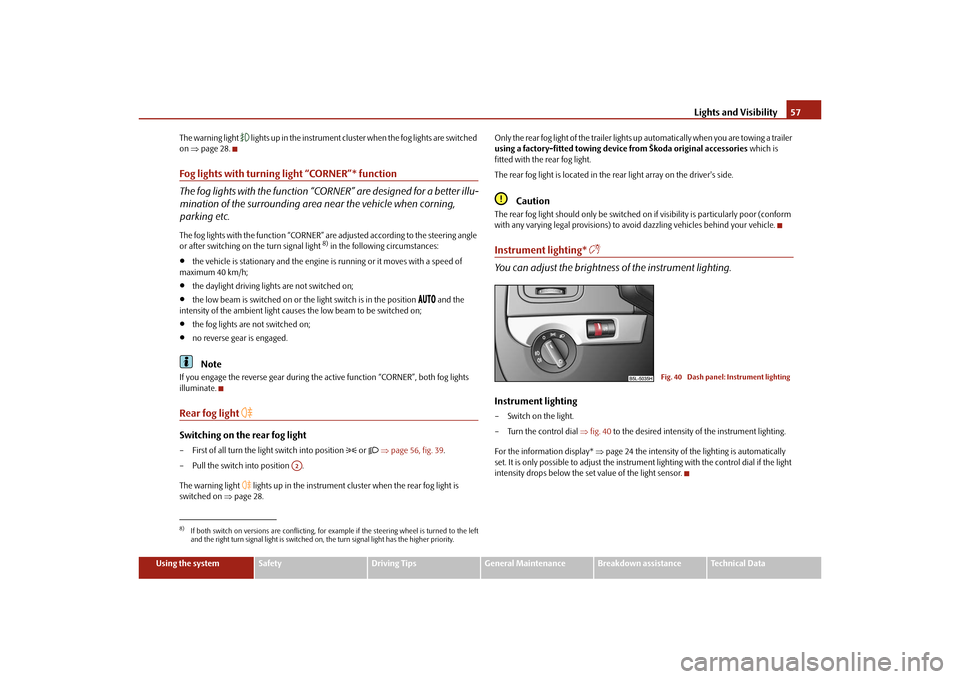
You can adjust the brightness of the instrument lighting.Instrument lighting– Switch on the light.
– Turn the control dial fig. 40 to the desired intensity of the instrument lighting.
For the information display* page 24 the intensity of the lighting is automatically
set. It is only possible to adjust the instrume nt lighting with the control dial if the light
intensity drops below the set value of the light sensor.
8)If both switch on versions are conflicting, for ex ample if the steering wheel is turned to the left
and the right turn signal light is switched on, the turn signal light has the higher priority.
A2
Fig. 40 Dash panel: Instrument lighting
s2ug.6.book Page 57 Friday, April 9, 2010 2:24 PM
Page 59 of 271
Lights and Visibility
58
Headlamp range adjustment
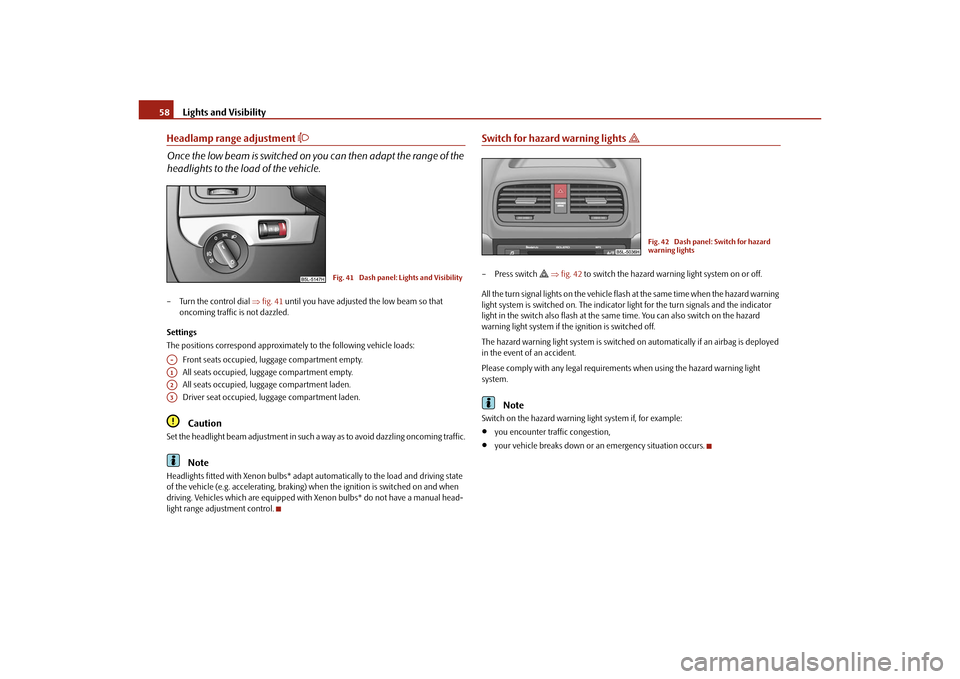
Once the low beam is switched on you can then adapt the range of the
headlights to the lo ad of the vehicle.– Turn the control dial fig. 41 until you have adjusted the low beam so that
oncoming traffic is not dazzled.
Settings
The positions correspond approximately to the following vehicle loads:
Front seats occupied, luggage compartment empty.
All seats occupied, luggage compartment empty.
All seats occupied, luggage compartment laden.
Driver seat occupied, lu ggage compartment laden.
Caution
Set the headlight beam adjustment in such a way as to avoid dazzling oncoming traffic.
Note
Headlights fitted with Xenon bulbs* adapt automatically to the load and driving state
of the vehicle (e.g. accelerating, braking) wh en the ignition is switched on and when
driving. Vehicles which are equipped with Xenon bulbs* do not have a manual head-
light range adjustment control.
Switch for hazard warning lights
– Press switch
fig. 42 to switch the hazard warning light system on or off.
All the turn signal lights on the vehicle flas h at the same time when the hazard warning
light system is switched on. The indicator light for the turn signals and the indicator
light in the switch also flash at the same time. You can also switch on the hazard
warning light system if the ignition is switched off.
The hazard warning light system is switched on automatically if an airbag is deployed
in the event of an accident.
Please comply with any legal requirements when using the hazard warning light
system.
Note
Switch on the hazard warning light system if, for example:
you encounter traffic congestion,
your vehicle breaks down or an emergency situation occurs.
Fig. 41 Dash panel: Lights and Visibility
A-A1A2A3
Fig. 42 Dash panel: Switch for hazard
warning lights
s2ug.6.book Page 58 Friday, April 9, 2010 2:24 PM
Page 60 of 271
Lights and Visibility59
Using the system
Safety
Driving Tips
General Maintenance
Breakdown assistance
Technical Data
The turn signal
and main beam lever
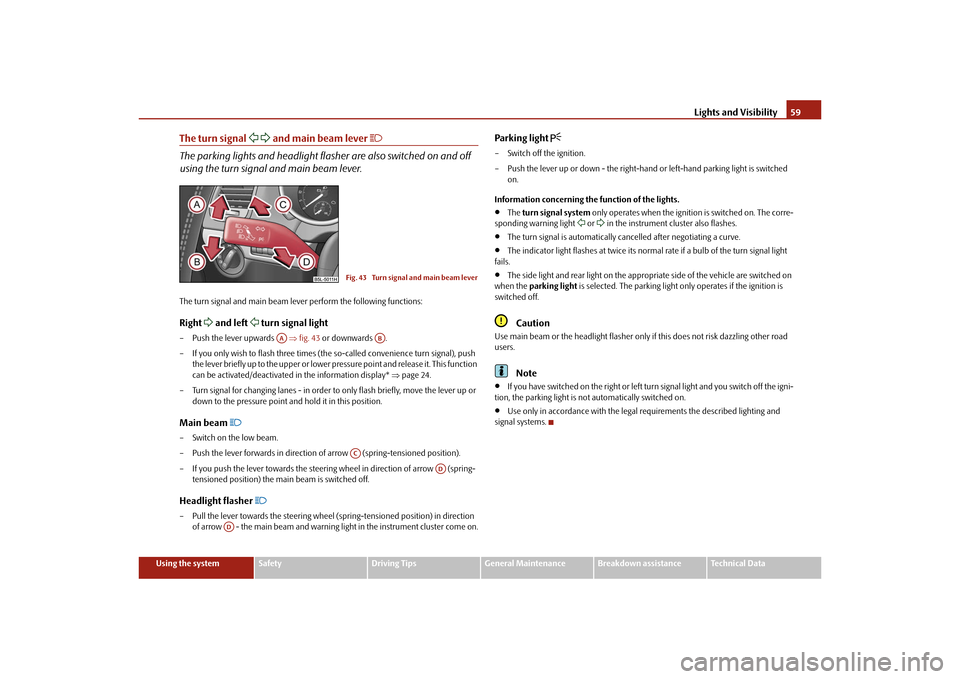
The parking lights and headlight flas her are also switched on and off
using the turn signal and main beam lever.The turn signal and main beam le ver perform the following functions:Right
and left
turn signal light
– Push the lever upwards fig. 43 or downwards .
– If you only wish to flash three times (the so-called convenience turn signal), push
the lever briefly up to the upper or lower pr essure point and release it. This function
can be activated/deactivated in the information display* page 24.
– Turn signal for changing lanes - in order to only flash briefly, move the lever up or
down to the pressure point and hold it in this position.Main beam
– Switch on the low beam.
– Push the lever forwards in direction of arrow (spring-tensioned position).
– If you push the lever towards the steering wheel in direction of arrow (spring-
tensioned position) the main beam is switched off.Headlight flasher
– Pull the lever towards the steering wheel (spring-tensioned position) in direction
of arrow - the main beam and warning light in the instrument cluster come on.
Parking light
– Switch off the ignition.
– Push the lever up or down - the right-hand or left-hand parking light is switched
on.
Information concerning the function of the lights.
The turn signal system only operates when the ignition is switched on. The corre-
sponding warning light
or in the instrument cluster also flashes.
The turn signal is automatically cancelled after negotiating a curve.
The indicator light flashes at twice its normal rate if a bulb of the turn signal light
fails.
The side light and rear light on the appropriate side of the vehicle are switched on
when the parking light is selected. The parking light only operates if the ignition is
switched off.Caution
Use main beam or the headlight flasher only if this does not risk dazzling other road
users.
Note
If you have switched on the right or left turn signal light and you switch off the igni-
tion, the parking light is not automatically switched on.
Use only in accordance with the legal requirements the described lighting and
signal systems.
Fig. 43 Turn signal and main beam lever
AA
AB
AC
AD
AD
s2ug.6.book Page 59 Friday, April 9, 2010 2:24 PM
Page 72 of 271
Seats and Stowage71
Using the system
Safety
Driving Tips
General Maintenance
Breakdown assistance
Technical Data
The seat backrests must not be angled too far back when driving otherwise
this will affect proper operation of the se at belts and of the airbag system - risk
of injury!Note
If the movement of the seat is inadverten tly interrupted during an adjustment, once
again press the switch in the appropriate di rection and continue with the adjustment
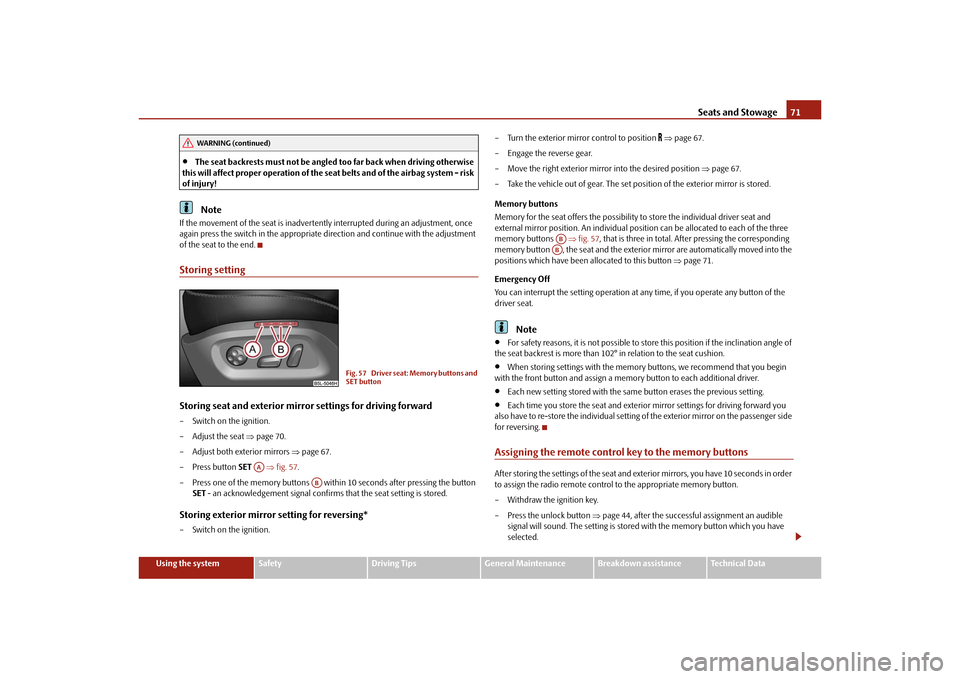
of the seat to the end.Storing settingStoring seat and exterior mirror settings for driving forward– Switch on the ignition.
– Adjust the seat page 70.
– Adjust both exterior mirrors page 67.
– Press button SET fig. 57 .
– Press one of the memory buttons with in 10 seconds after pressing the button
SET - an acknowledgement signal confirms that the seat setting is stored.Storing exterior mirror setting for reversing*– Switch on the ignition. – Turn the exterior mirror control to position
page 67.
– Engage the reverse gear.
– Move the right exterior mirror into the desired position page 67.
– Take the vehicle out of gear. The set posi tion of the exterior mirror is stored.
Memory buttons
Memory for the seat offers the possibility to store the individual driver seat and
external mirror position. An individual posi tion can be allocated to each of the three
memory buttons fig. 57, that is three in total. Af ter pressing the corresponding
memory button , the seat and the exterior mirror are automatically moved into the
positions which have been allocated to this button page 71.
Emergency Off
You can interrupt the setting operation at any time, if you operate any button of the
driver seat.
Note
For safety reasons, it is not possible to store this position if the inclination angle of
the seat backrest is more than 102° in relation to the seat cushion.
When storing settings with the memory buttons, we recommend that you begin
with the front button and assign a memory button to each additional driver.
Each new setting stored with the same button erases the previous setting.
Each time you store the seat and exterior mirror settings for driving forward you
also have to re-store the individual setting of the exterior mirror on the passenger side
for reversing.
Assigning the remote control key to the memory buttonsAfter storing the settings of the seat and exterior mirrors, you have 10 seconds in order
to assign the radio remote control to the appropriate memory button.
– Withdraw the ignition key.
– Press the unlock button page 44, after the successful assignment an audible
signal will sound. The setting is stored with the memory button which you have
selected.
WARNING (continued)
Fig. 57 Driver seat: Memory buttons and
SET button
AA
AB
ABAB
s2ug.6.book Page 71 Friday, April 9, 2010 2:24 PM
Page 73 of 271
Seats and Stowage
72
If you wish to be able to retrieve the settings which are stored in the memory by also
using the radio remote control, you have to assign the radio remote control to a
memory button in each case.
If you wish, you can obtain an additional remote control key from a specialist garage
and then assign the remote control key to another memory button.
Note
If the radio remote control had previous ly been assigned to another memory
button, this setting is then erased by the new assignment.
If you assign the radio remote control to a memory button which has already been
assigned to a radio remote control, the ol d assignment is also replaced by a new
assignment in this case.
The assignment of the radio remote co ntrol to a memory button is retained,
however, after reassigning the seats and exterior mirrors.
After the successful assignment, the turn si gnal lights flash and an audible signal
will sound as a confirmation. The setting is stored with the memory button which you
have selected.
Retrieving settings of the seat and mirrors
You can retrieve the stored settings either with the memory buttons or
with the remote control*.Retrieving settings with memory buttons– In order to retrieve the stored setting, you have two possibilities:
– By pressing briefly: briefly press the desired memory button page 71,
fig. 57 . The seat and exterior mirror are move d automatically into the stored posi-
tions (this applies only if the ignition is switched on and the speed is less than 5
km/h).
– By pressing for a long period of time: press and hold the desired memory button
pressed long enough until the seat and the exterior mirrors are moved into the
stored positions.
Retrieving settings with remote control– If the driver door is closed and the ignition is switched off, briefly press the unlock button of the radio remote control page 44 and then open the driver door.
– The seat and exterior mirrors now move automatically into the stored positions.Retrieving setting of exterior mirror for reversing*– Turn the rotary knob for the exterior mirror setting into the position
page 67
before engaging the reverse gear.
The mirror returns into its initial position , after the rotary knob is moved out of the
position
and put into another position or if the speed is more than 15 km/h.
Emergency Off
You can interrupt the setting operation at any time, if you operate any button of the
driver seat.
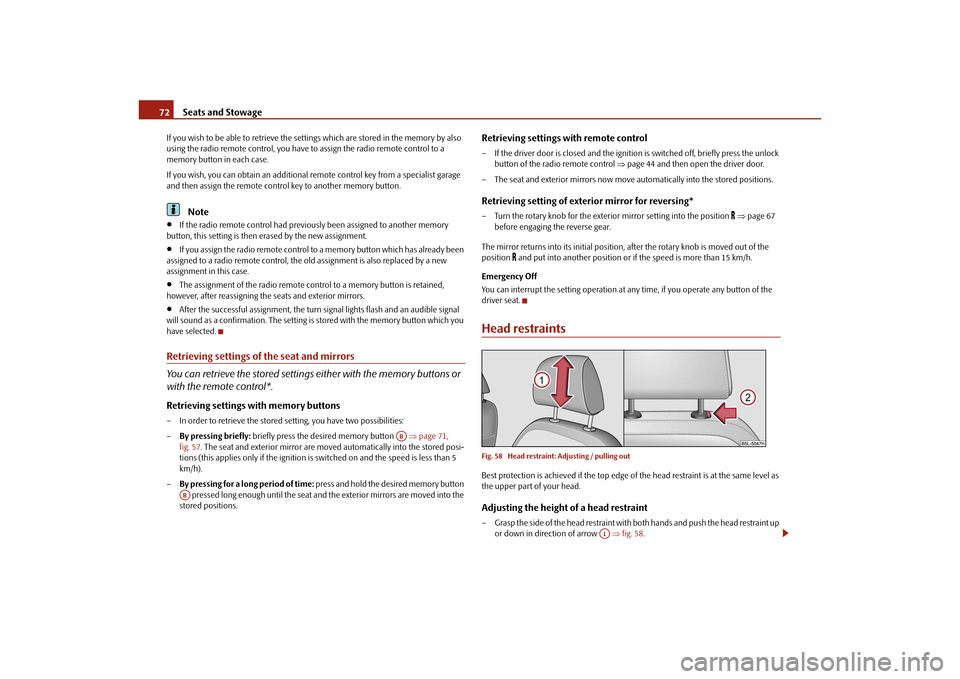
Head restraintsFig. 58 Head restraint: Adjusting / pulling outBest protection is achieved if the top edge of the head restraint is at the same level as
the upper part of your head.Adjusting the height of a head restraint– Grasp the side of the head restraint with both hands and push the head restraint up or down in direction of arrow fig. 58 .
AB
AB
A1
s2ug.6.book Page 72 Friday, April 9, 2010 2:24 PM
Page 114 of 271
Starting-off and Driving113
Using the system
Safety
Driving Tips
General Maintenance
Breakdown assistance
Technical Data
Activating
The parking aid is activated automatically when
reverse gear is engaged and the igni-
tion is turned on. This is confirmed by a brief acknowledgement signal.
Deactivating
The parking aid is deactivated by removing the reverse gear.
WARNING
The parking aid is not a substitute for the driver paying proper attention and
it is always the driver's re sponsibility to take care when parking the vehicle or
carrying out similar manoeuvres.
You should therefore satisfy yourself, befo re reversing, that there is no small
obstacle, such as a rock, thin post, trailer drawbar etc., behind your vehicle.
Such an obstacle might not be within the range detected by the sensors.
Under certain circumstances, surfaces of certain objects and types of
clothing cannot reflect the signal of the parking aid. Thus, these objects or
people who wear such clothing are not recognised by the sensors of the parking
aid.Note
The parking aid does not operate if you are towing a trailer (applies to models
which feature a factory-fitted towing device*).
If a warning signal sounds for about 3 seconds after switching the ignition on and
engaging reverse gear, and there is no obstac le close to your vehicle, this indicates a
system fault. Have the fault rectified by a specialist workshop.
The sensors must be kept clean and free of ice to enable the parking aid to operate
properly.
Front and rear parking aid*The parking aid provides a warning of obstacles in front and behind the
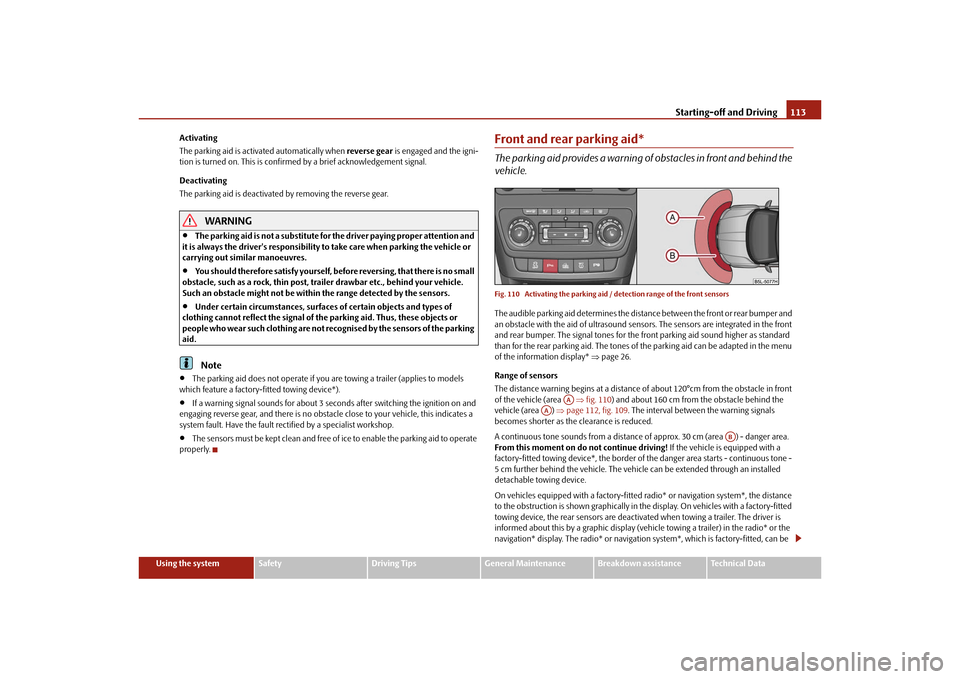
vehicle.Fig. 110 Activating the parking aid / detection range of the front sensorsThe audible parking aid determines the distan ce between the front or rear bumper and
an obstacle with the aid of ultrasound sensors. The sensors are integrated in the front
and rear bumper. The signal tones for the fr ont parking aid sound higher as standard
than for the rear parking aid. The tones of the parking aid can be adapted in the menu
of the information display* page 26.
Range of sensors
The distance warning begins at a distance of about 120°cm from the obstacle in front
of the vehicle (area fig. 110 ) and about 160 cm from the obstacle behind the
vehicle (area ) page 112, fig. 109 . The interval between the warning signals
becomes shorter as the clearance is reduced.
A continuous tone sounds from a distance of approx. 30 cm (area ) - danger area.
From this moment on do not continue driving! If the vehicle is equipped with a
factory-fitted towing device*, the border of the danger area starts - continuous tone -
5 cm further behind the vehicle. The vehicle can be extended through an installed
detachable towing device.
On vehicles equipped with a factory-fitted radio* or navigation system*, the distance
to the obstruction is shown graphically in the display. On vehicles with a factory-fitted
towing device, the rear sensors are deactivated when towing a trailer. The driver is
informed about this by a graphic display (vehic le towing a trailer) in the radio* or the
navigation* display. The radio* or navigation system*, which is factory-fitted, can be
AA
AA
AB
s2ug.6.book Page 113 Friday, April 9, 2010 2:24 PM
Page 115 of 271
Starting-off and Driving
114
set so that the play function volume decr eases when activating the parking aid, see
Owner's Manual radio* or na vigation system*. This improves the audibility of the
parking aid.
Activating
The parking aid is activated when the reverse gear is engaged and the ignition is
turned on or by pressing the button page 113, fig. 110 - the symbol lights up in
the button. The activation is confirmed by a brief acknowledgement signal.
Deactivating
The parking aid is deactivated after pressing the button° page 113, fig. 110 or at
a speed of more than 10 km/h - the symbol
in the button is no longer illuminated.
WARNING
The parking aid is not a substitute for the driver paying proper attention and
it is always the driver's responsibility to take care when reversing the vehicle or
carrying out similar manoeuvres.
You should therefore satisfy yourself, befo re reversing, that there is no small
obstacle, such as a rock, thin post, trailer drawbar etc., in front or behind your
vehicle. Such an obstacle might not be within the range detected by the sensors.
Under certain circumstances, surfaces of certain objects and types of
clothing cannot reflect the signal of the parking aid. Thus, these objects or
people who wear such clothing are not recognised by the sensors of the parking
aid.Note
Only the front parking aid operates if yo u are towing a trailer (applies only to
models which feature a factory-fitted towing device*).
If a warning signal sounds for about 3 seco nds after activating the system and there
is no obstacle close to your vehicle, this indicates a system fault. The fault is confirmed
additionally when the symbol flashes in the button page 113, fig. 110 . Have the
fault rectified by a specialist workshop.
The sensors must be kept clean and free of ice to enable the parking aid to operate
properly.
If the parking aid is activated and the sele ctor lever of the automatic gearbox is in
the position , warning signal indicates inte rruption (vehicle can no longer move).
Park Assist*Description and important informationThe park assist assists you when parking in a suitable parallel parking space between
two vehicles or behind a vehicle.
The park assist automatically searches for suitable parking spaces after switching on
the ignition and when driving up to 30 km/h.
During the parking procedure the park assist only takes over the steering movements,
the pedals continue to be operated by the driver.
Function of the system is based on:
Length and depth measurement of the parking spaces when driving
Evaluation of the size of the parking space
Definition of the correct position of the vehicle for parking
Calculating the line on which the vehicle drives backwards into the parking space
Actuation of the steering force assistance, automatic spinning of the wheels of the
front axle when parking.
WARNING
The park assist does not take away th e responsability from the driver when
parking.
Pay particular attention to small children and animals as they would not be
recognised by the sensors of the parking aid.
Under certain circumstances, surfaces of certain objects and types of
clothing cannot reflect the signal of the park assist or the parking aid. Thus,
these objects or people who wear such clothing are not recognised by the
sensors of the parking aid.
AP
s2ug.6.book Page 114 Friday, April 9, 2010 2:24 PM
Page 116 of 271
Starting-off and Driving115
Using the system
Safety
Driving Tips
General Maintenance
Breakdown assistance
Technical Data
The external sound source of the park assist and the parking aid can be
disruptively influenced and under unfavourable conditions, objects or people
cannot be recognised by the sensors of the parking aid.Caution
If other vehicles are parked behind or on the kurb, the park assist guides your
ve hicle be yond the kurb or onto it. Make s ure that the whee ls or the whe el rims of yo ur
vehicle are not damaged and if necessary intervene in time.
You should satisfy yourself before parking that there is no small obstacle, such as a
rock, thin post, trailer drawbar etc., in front or behind your vehicle. Such an obstacle
might not be within the range detected by the sensors.
Under certain circumstances, surfaces or st ructures of certain objects such as wire
mesh fences, powder snow etc..., ca nnot be recognised by the system.
The evaluation of the parking space and the parking procedure depends on the
circumference of the wheels. The system does not function correctly if your vehicle is
mounted with wheels of non-permissible size, snow chains or a temporary spare
wheel (in order to reach the nearest workshop). If the tyres other than those excepted
by the manufacturer are mounted, the resulting position of the vehicle in the parking
space can differ slightly. The parking assistant system automatically performs the
correction of the wheel circumference when driving.
The accuracy of the evaluation for the parking space can be influenced by the
incorrectly determined outside temperature if the later is influenced by the thermal
radiation of the engine i.e for stop and go in a traffic jam.
In order to avoid damaging th e sensors while cleaning with high-pressure cleaners
or steam jets, the sensors must only be directly sprayed for short periods while a
minimum distance of 10 cm must be observed.Note
A component of the park assist is the front and rear parking aid*.
The electronic stability programme (ESP*) must always be switched on for the
parking procedure.
Only the front parking aid operates if you are towing a trailer (applies only to
models which feature a factory-fitted towing device*). This is why it is not possible to
park backwards with the help of the park assist when towing a trailer.
The sensors must be kept clean and free of ice to enable the parking aid to operate
properly.
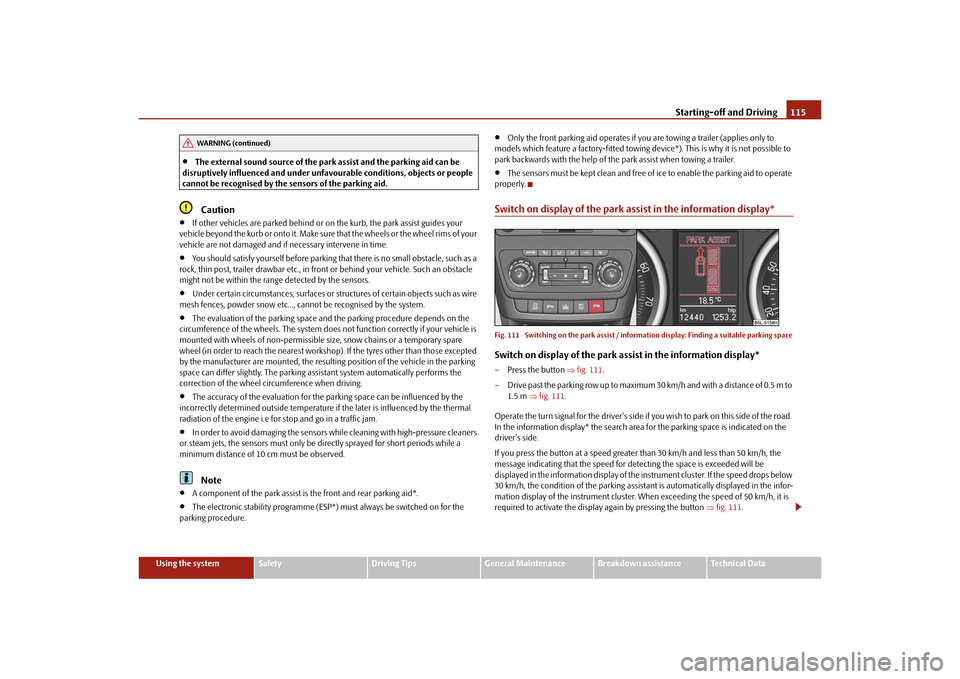
Switch on display of the park a ssist in the information display*Fig. 111 Switching on the park assist / inform ation display: Finding a suitable parking spaceSwitch on display of the park assist in the information display*– Press the button fig. 111 .
– Drive past the parking row up to maximum 30 km/h and with a distance of 0.5 m to 1.5 m fig. 111 .
Operate the turn signal for the driver's side if you wish to park on this side of the road.
In the information display* the search area for the parking space is indicated on the
driver's side.
If you press the button at a speed greate r than 30 km/h and less than 50 km/h, the
message indicating that the speed for detecting the space is exceeded will be
displayed in the information display of the in strument cluster. If the speed drops below
30 km/h, the condition of the parking assistant is automatically displayed in the infor-
mation display of the instrument cluster. When exceeding the speed of 50 km/h, it is
required to activate the displa y again by pressing the button fig. 111 .
WARNING (continued)
s2ug.6.book Page 115 Friday, April 9, 2010 2:24 PM
Page 133 of 271
Communication
132
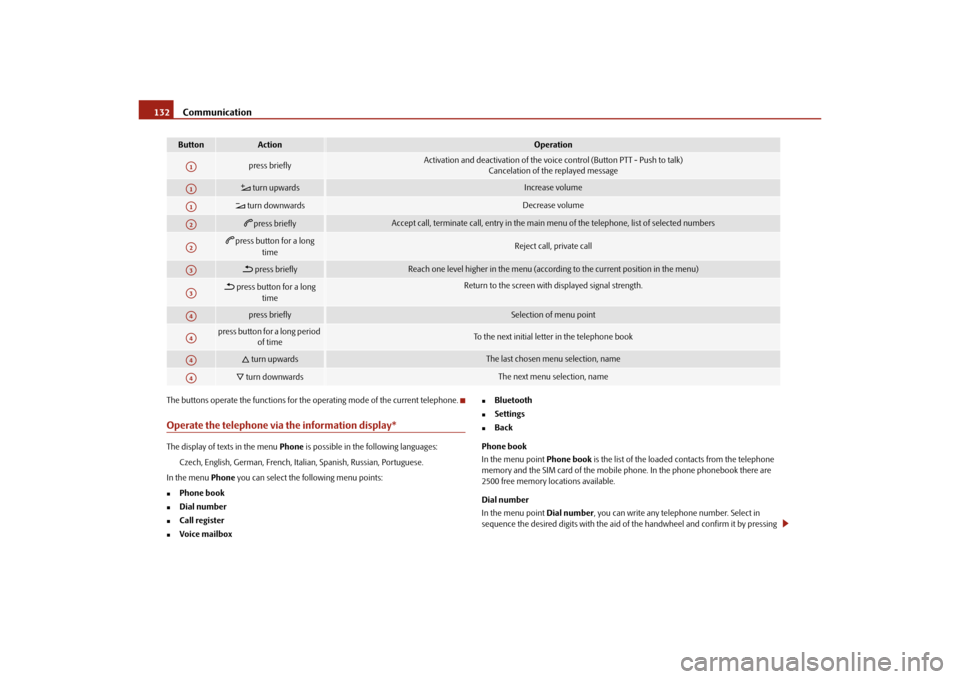
The buttons operate the functions for the operating mode of the current telephone.Operate the telephone via the information display*The display of texts in the menu Phone is possible in the following languages:
Czech, English, German, French, Italia n, Spanish, Russian, Portuguese.
In the menu Phone you can select the following menu points:
Phone book
Dial number
Call register
Voice mailbox
Bluetooth
Settings
Back
Phone book
In the menu point Phone book is the list of the loaded contacts from the telephone
memory and the SIM card of the mobile phone. In the phone phonebook there are
2500 free memory locations available.
Dial number
In the menu point Dial number, you can write any telephone number. Select in
sequence the desired digits with the aid of the handwheel and confirm it by pressing
Button
Action
Operation
press briefly
Activation and deactivation of the voice control (Button PTT - Push to talk)
Cancelation of the replayed message
turn upwards
Increase volume
turn downwards
Decrease volume
press briefly
Accept call, terminate call, entry in the main menu of the telephone, list of selected numbers
press button for a long
time
Reject call, private call
press briefly
Reach one level higher in the menu (according to the current position in the menu)
press button for a long time
Return to the screen with displayed signal strength.
press briefly
Selection of menu point
press button for a long period of time
To the next initial letter in the telephone book
turn upwards
The last chosen me nu selection, name
turn downwards
The next menu selection, name
A1A1A1A2A2A3A3A4A4A4A4
s2ug.6.book Page 132 Friday, April 9, 2010 2:24 PM
Page 139 of 271
Passive Safety
138
Ensure that the lighting and the turn signal system are functioning properly.
Inspect the tyre inflation pressure.
Ensure that all the windows offer a good visibility to the outside.
Safely attach the items of luggage page 78, “Loading the luggage compartment”.
Ensure that no objects can obstruct the pedal.
Adjust the mirror, the front seat and the head restraint to match your body size.
Point out to your occupants that the head restraints must be adjusted to match
their body size.
Protect the children in suitable child seats with correctly fastened seat belts
page 156, “Transporting children safely”.
Adopt the correct seated position page 138, “Correct seated position”. Also
inform your occupants to adopt the correct seated position.
Fasten the seat belt correctly. Also inform your occupants to properly fasten the
seat belts page 143, “How are seat belts correctly fastened?”.
What influences the driving safety?
The driving safety is primarily determined by the style of driving and the
personal behaviour of all the occupants.The driver is fully responsible for himself an d his occupants. If your driving safety is
effected, you place yourself and the oncomi ng traffic at risk. Please refer to the
following guidelines.
Do not get distracted from concentrating on the traffic situation, e.g. by your occu-
pants or mobile phone calls.
Never drive when your driving ability is impaired, e.g. through medication, alcohol,
drugs.
Keep to the traffic regulations and the permissible speed limit.
Adjust the driving speed at all times to the road condition as well as to the traffic
and weather conditions.
Take regular breaks on long journe ys - at the latest every two hours.
Correct seated positionCorrect seated position for the driver
Correct seated position for the driver is important for safe and relaxed
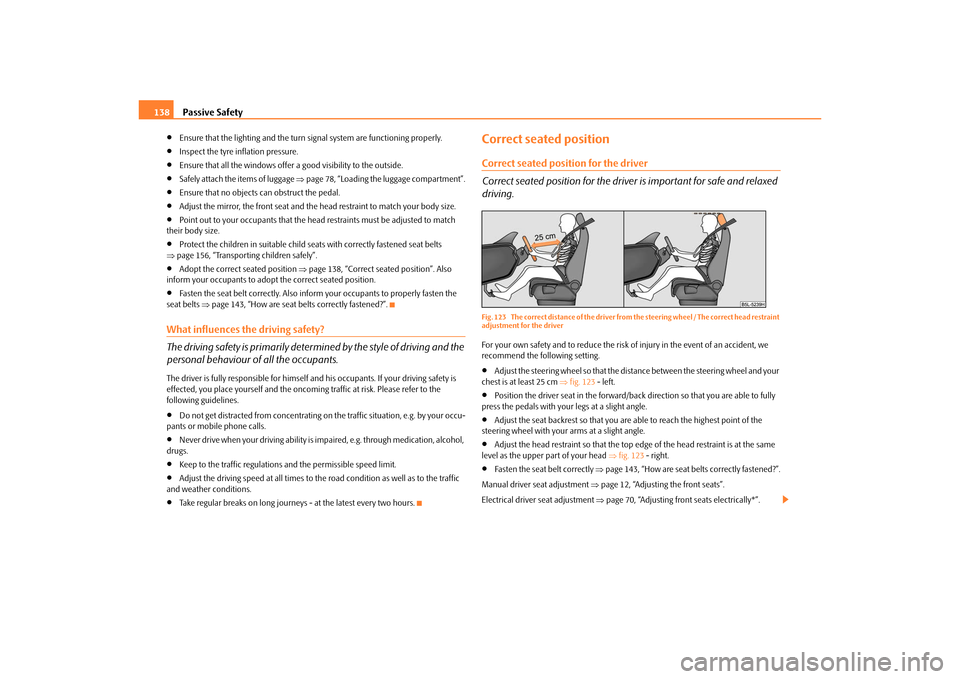
driving.Fig. 123 The correct distance of the driver from the steering wheel / The correct head restraint
adjustment for the driverFor your own safety and to reduce the risk of injury in the event of an accident, we
recommend the following setting.
Adjust the steering wheel so that the distance between the steering wheel and your
chest is at least 25 cm fig. 123 - left.
Position the driver seat in the forward/back direction so that you are able to fully
press the pedals with your legs at a slight angle.
Adjust the seat backrest so that you are able to reach the highest point of the
steering wheel with your arms at a slight angle.
Adjust the head restraint so that the top edge of the head restraint is at the same
level as the upper part of your head fig. 123 - right.
Fasten the seat belt correctly page 143, “How are seat belts correctly fastened?”.
Manual driver se at adjustment page 12, “Adjusting the front seats”.
Electrical driver seat adjustment page 70, “Adjusting front seats electrically*”.
s2ug.6.book Page 138 Friday, April 9, 2010 2:24 PM