boot SKODA YETI 2012 1.G / 5L Owner's Manual
[x] Cancel search | Manufacturer: SKODA, Model Year: 2012, Model line: YETI, Model: SKODA YETI 2012 1.G / 5LPages: 225, PDF Size: 5.47 MB
Page 5 of 225
Table of Contents
Abbreviations
Using the system
Cockpit 7
Overview 6
Instruments and Indicator Lights 8
Instrument Cluster 8
Multifunction display (onboard computer) 12
MAXI DOT (information display) 15
Indicator lights 18
Unlocking and locking 26
Vehicle key 26
Child safety lock 27
Central locking system 27
Remote control 30
Anti-theft alarm system 31
Boot lid 33
Electric power windows 34
Panoramic sliding roof 36
Lights and visibility 39
Lights 39
Interior light 46
Visibility 47
Windscreen wipers and washers 48
Rear window 52
Seats and Stowage 55
Front seats 55
Head restraints 59
Rear seats 60
Boot 62
Variable loading floor in the boot 66Variable loading floor with spare wheel 68
Roof rack system 68
Cup holder 69
Ashtray 70
Cigarette lighter, 12-volt power socket 71
Storage compartments 72
Through-loading bag 78
Clothes hooks 78
Parking ticket holder 79
Heating and air conditioning system 80
Heating and air conditioning system 80
Air outlet vents 81
Heating 82
Air conditioning system (manual air conditioning
system) 83
Climatronic (automatic air conditioning
system) 86
Auxiliary heating (auxiliary heating and
ventilation) 88
Starting-off and Driving 92
Starting and stopping the engine 92
Brakes and brake assist systems 94
OFF ROAD mode 98
Shifting (manual gearbox) 100
Pedals 100
Parking aid 100
Park assist 101
Cruise control system (CCS) 104
START/STOP 106
Fatigue detection system (break
recommendation) 107
Automatic gearbox 109
Automatic gearbox 109
Communication 114
Mobile phones and two-way radio systems 114
Operating the phone on the multifunction
steering wheel 115Symbols in the information display 116
Phone Phonebook 116
Universal telephone preinstallation GSM II 116
Universal telephone preinstallation GSM IIl 119
Voice control 123
Multimedia 125
Safety
Passive Safety 128
General information 128
Correct seated position 129
Seat belts 132
Seat belts 132
Airbag system 137
Description of the airbag system 137
Front airbags 138
Driver’s knee airbag 139
Side airbags 140
Head airbags 141
Deactivating airbags 141
Transporting children safely 143
Child seat 143
Driving Tips
Driving and the Environment 146
The first 1 500 km 146
Catalytic converter 146
Economical and environmentally friendly
driving 147
Environmental compatibility 149
Driving abroad 150
Avoiding damage to your vehicle 150
3
Table of Contents
Page 17 of 225
Adjusting the speed limit while the vehicle is moving
›
With the button A
» Fig. 6
on page 13 or the adjustment wheel D
, select the
menu item Warning against excessive speeds .
› Drive at the desired speed, e.g. 50 km/h.
› Press the button B
or the adjustment wheel D
to accept the current speed as
the speed limit (the value flashes).
If you wish to change the set speed limit, it is changed in 5
km/h intervals (e.g. the
accepted speed of 47 km/h increases to 50 km/h or decreases to 45 km/h).
› Press again the button B
or the adjustment wheel D
to confirm the speed
limit, or wait approx. 5 seconds and the setting is saved automatically (the value
stops flashing).
Change or delete speed limit
› With the button A
» Fig. 6
on page
13 or the adjustment wheel D
, select the
menu item Warning against excessive speeds .
› Pressing the button B
or the adjustment wheel D
deletes the speed limit.
› Pressing the button B
or the adjustment wheel D
again activates change
mode for the speed limit.
If the set speed limit is exceeded, an audible signal will sound as a warning. At
the same time the message Warning against excessive speeds appears on the
display with the set limit value.
The set speed limit value remains stored even after switching off the ignition. ÐMAXI DOT (information display)
ä
Introduction
This chapter contains information on the following subjects:
Main menu 15
Settings 16
Door, boot lid and bonnet warning 17
Auto Check Control 17
The information display provides you with information on the current operating
state of your vehicle . The information system also provides you with data (de-
pending on the equipment installed in the vehicle) relating to the radio, mobile
phone, multi-functional indicator, navigation system, the unit connected to the
MDI input and the automatic gearbox » page 109. WARNING
Concentrate fully at all times on your driving! As the driver you are fully re-
sponsible for the operation of your vehicle. CAUTION
Pull out the ignition key if coming in contact with the display (e.g. when cleaning)
to prevent any possible damage. Ð Main menu
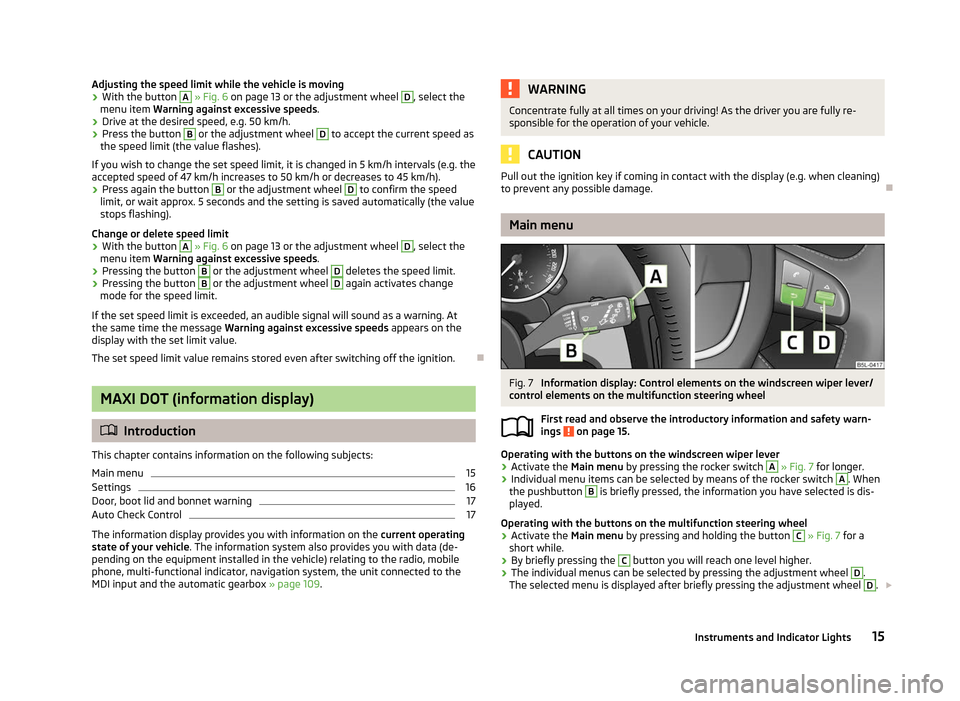
Fig. 7
Information display: Control elements on the windscreen wiper lever/
control elements on the multifunction steering wheel
First read and observe the introductory information and safety warn-
ings on page 15.
Operating with the buttons on the windscreen wiper lever
›
Activate the Main menu
by pressing the rocker switch A
» Fig. 7 for longer.
› Individual menu items can be selected by means of the rocker switch A
. When
the pushbutton B
is briefly pressed, the information you have selected is dis-
played.
Operating with the buttons on the multifunction steering wheel
› Activate the Main menu
by pressing and holding the button C
» Fig. 7
for a
short while.
› By briefly pressing the C
button you will reach one level higher.
› The individual menus can be selected by pressing the adjustment wheel D
.
The selected menu is displayed after briefly pressing the adjustment wheel D
.
£
ä
15
Instruments and Indicator Lights
Page 19 of 225
Mirror adjust.
Switch on/off the function for left and right exterior
mirror setting simultaneously.
Factory setting Restore the Convenience factory setting.a)
This function is only available on vehicles with a rain sensor.
b) This function is only available on vehicles with an electrically adjustable driver seat.
Lights and visibility
This is where the following functions can be activated, deactivated or adjusted:
Coming Home Switch on/off and adjust the light duration of the Com-
ing Home function.
Leaving Home Switch on/off and adjust the light duration of the Com-
ing Home function.
Dayl. dri. light Switch on/off the “DAY LIGHT” function.
Rear wiper Switch on/off the function for automatic rear window
wiping.
Lane ch. flash Switch on/off the convenience flashing function.
Travel mode Switch on/off the travel model function.
Factory setting Restore the factory setting for the lighting.Time
The time, time format (12 or 24 hour indicator) and the changeover between sum-
mer/winter time can be set here.
Winter tyres
Here, you can set the speed at which an audible signal should sound. This func-
tion is, for example, used for winter tyres where the maximum permissible speed
is lower than the maximum speed of the vehicle.
When exceeding the speed, the following is shown on the information display:
Winter tyres:
max. speed ... km/h
Units of measurement
The units for the temperature, consumption and distance driven can be set here.
Assistants
The tones of the audible signals for the parking aid can be adjusted here. Second speed
The display of the second speed in mph or in km/h can be switched on here.
Service
Here you can have the remaining kilometres and days until the next service inter-
val displayed, and reset the Service Interval Display.
Factory setting
After selecting the menu Factory setting
the factory setting of the information
display is restored. Ð Door, boot lid and bonnet warning
First read and observe the introductory information and safety warn-
ings on page 15.
If at least one door is open, or the boot or bonnet is open, the information display
indicates the relevant
open door or boot/bonnet.
An audible signal also sounds if the vehicle is travelling at more than 6
km/h.Ð Auto Check Control
First read and observe the introductory information and safety warn-
ings on page 15.
Vehicle condition
Certain functions and conditions of individual vehicle systems are checked contin-
uously when the ignition is switched on and also while driving.
Some error messages and other information are displayed in the information dis-
play. The messages are displayed at the same time as the symbols in the informa-
tion display or the indicator lights in the instrument cluster » page 18.
If there is at least one error message, the menu item Vehicle status is displayed
in the menu. After selecting this menu the first of the error messages is dis-
played. Several error messages are shown on the display under the message e.g.
1/3. This indicates that the first of a total of three error messages is being dis-
played. £
ä
ä
17
Instruments and Indicator Lights
Page 20 of 225
Warning symbols
Engine oil pressure too low
» page 21
Clutches of the automatic gearbox DSG are
too hot » page 18
Check engine oil level,
engine oil sensor faulty
» page 172
Problem with engine oil pressure
» page 18Clutches of the automatic gearbox are too hot
A symbol in the information display indicates that the temperature of the
clutches of the automatic gearbox is too high.
The following is displayed in the information display: Gearbox overheated. Stop! Owner's man.!
Stop the vehicle, switch off the engine, and wait until the symbol disappears -
risk of gearbox damage! You can continue your journey as soon as the symbol dis-
appears.
Problem with the engine oil pressure
If the symbol is shown in the information display, you must have your vehicle
checked immediately by a
ŠKODA specialist garage. The information about the
maximum permissible engine speed is displayed together with this symbol. WARNING
If you have to stop for technical reasons, then park the vehicle at a safe dis-
tance from the traffic, switch off the engine and activate the hazard warning
light system » page 44. Note
■ If warning messages are shown in the information display, these messages
must be confirmed with the button B
or with the adjustment wheel D
» Fig. 7
on page 15 to open the main menu. ■ As long as the operational faults are not rectified, the symbols are always indi-
cated again. After they are displayed for the first time, the symbols continue to be
indicated without any extra messages for the driver. Ð Indicator lights
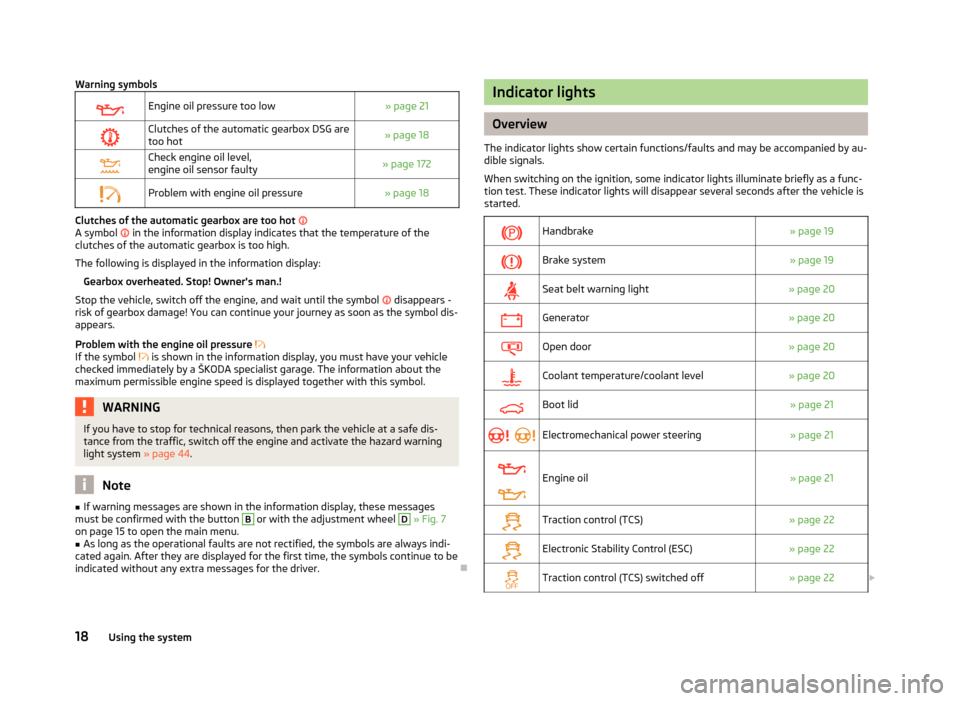
Overview
The indicator lights show certain functions/faults and may be accompanied by au-
dible signals.
When switching on the ignition, some indicator lights illuminate briefly as a func-
tion test. These indicator lights will disappear several seconds after the vehicle is
started.
Handbrake
» page 19
Brake system
» page 19
Seat belt warning light
» page 20
Generator
» page 20
Open door
» page 20
Coolant temperature/coolant level
» page 20
Boot lid
» page 21
Electromechanical power steering
» page 21
Engine oil
» page 21
Traction control (TCS)
» page 22
Electronic Stability Control (ESC)
» page 22
Traction control (TCS) switched off
» page 22£18
Using the system
Page 23 of 225
WARNING
■ If you have to stop for technical reasons, then park the vehicle at a safe dis-
tance from the traffic, switch off the engine and activate the hazard warning
light system » page 44.
■ Carefully open the coolant expansion bottle. If the engine is hot, the cooling
system is pressurized - risk of scalding! It is therefore best to allow the engine
to cool down before removing the cap.
■ Do not touch the radiator fan. The radiator fan may switch itself on auto-
matically even if the ignition is off. ÐBoot lid
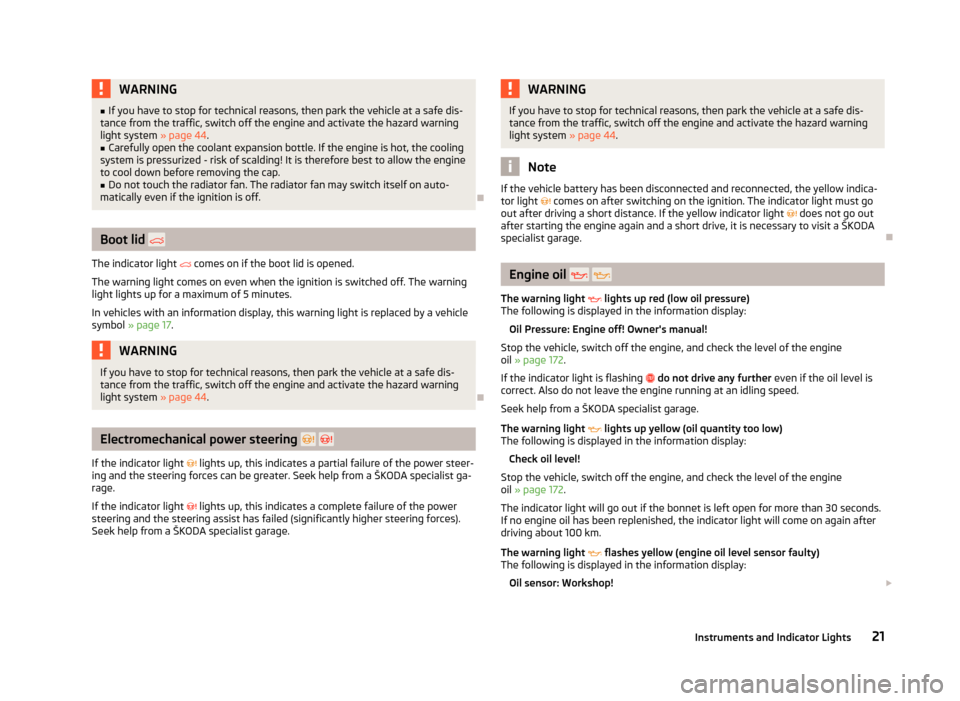
The indicator light comes on if the boot lid is opened.
The warning light comes on even when the ignition is switched off. The warning
light lights up for a maximum of 5 minutes.
In vehicles with an information display, this warning light is replaced by a vehicle
symbol » page 17. WARNING
If you have to stop for technical reasons, then park the vehicle at a safe dis-
tance from the traffic, switch off the engine and activate the hazard warning
light system » page 44. ÐElectromechanical power steering
If the indicator light lights up, this indicates a partial failure of the power steer-
ing and the steering forces can be greater. Seek help from a ŠKODA specialist ga-
rage.
If the indicator light lights up, this indicates a complete failure of the power
steering and the steering assist has failed (significantly higher steering forces).
Seek help from a ŠKODA specialist garage. WARNING
If you have to stop for technical reasons, then park the vehicle at a safe dis-
tance from the traffic, switch off the engine and activate the hazard warning
light system » page 44. Note
If the vehicle battery has been disconnected and reconnected, the yellow indica-
tor light comes on after switching on the ignition. The indicator light must go
out after driving a short distance. If the yellow indicator light does not go out
after starting the engine again and a short drive, it is necessary to visit a
ŠKODA
specialist garage. Ð Engine oil
The warning light lights up red (low oil pressure)
The following is displayed in the information display:
Oil Pressure: Engine off! Owner's manual!
Stop the vehicle, switch off the engine, and check the level of the engine
oil » page 172 .
If the indicator light is flashing do not drive any further even if the oil level is
correct. Also do not leave the engine running at an idling speed.
Seek help from a
ŠKODA specialist garage.
The warning light lights up yellow (oil quantity too low)
The following is displayed in the information display:
Check oil level!
Stop the vehicle, switch off the engine, and check the level of the engine
oil » page 172 .
The indicator light will go out if the bonnet is left open for more than 30 seconds.
If no engine oil has been replenished, the indicator light will come on again after
driving about 100 km.
The warning light flashes yellow (engine oil level sensor faulty)
The following is displayed in the information display:
Oil sensor: Workshop! £
21
Instruments and Indicator Lights
Page 29 of 225
CAUTION
■ Pay attention to the correct polarity when changing the battery.
■ The replacement battery must have the same specification as the original bat-
tery. For the sake of the environment
Dispose of the used battery in accordance with national legal provisions. Note
■ Please approach a ŠKODA Service Partner if you lose a key as they can obtain a
new one for you. ■ The system has to be synchronised, if the vehicle cannot be unlocked or locked
with the remote control key after replacing the battery » page 31. ÐChild safety lock
Fig. 10
Child safety locks on the rear
doors
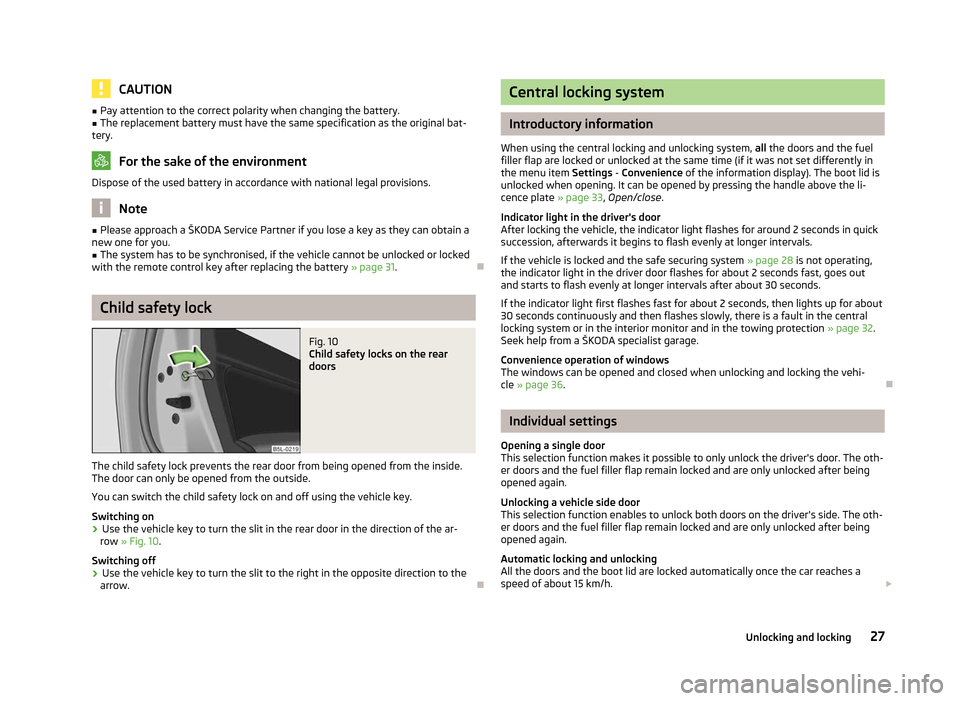
The child safety lock prevents the rear door from being opened from the inside.
The door can only be opened from the outside.
You can switch the child safety lock on and off using the vehicle key.
Switching on
› Use the vehicle key to turn the slit in the rear door in the direction of the ar-
row » Fig. 10.
Switching off
› Use the vehicle key to turn the slit to the right in the opposite direction to the
arrow. Ð Central locking system
Introductory information
When using the central locking and unlocking system, all the doors and the fuel
filler flap are locked or unlocked at the same time (if it was not set differently in
the menu item Settings - Convenience
of the information display). The boot lid is
unlocked when opening. It can be opened by pressing the handle above the li-
cence plate » page 33, Open/close.
Indicator light in the driver's door
After locking the vehicle, the indicator light flashes for around 2 seconds in quick
succession, afterwards it begins to flash evenly at longer intervals.
If the vehicle is locked and the safe securing system » page 28 is not operating,
the indicator light in the driver door flashes for about 2 seconds fast, goes out
and starts to flash evenly at longer intervals after about 30 seconds.
If the indicator light first flashes fast for about 2 seconds, then lights up for about
30 seconds continuously and then flashes slowly, there is a fault in the central
locking system or in the interior monitor and in the towing protection » page 32.
Seek help from a ŠKODA specialist garage.
Convenience operation of windows
The windows can be opened and closed when unlocking and locking the vehi-
cle » page 36. Ð Individual settings
Opening a single door
This selection function makes it possible to only unlock the driver's door. The oth-
er doors and the fuel filler flap remain locked and are only unlocked after being
opened again.
Unlocking a vehicle side door
This selection function enables to unlock both doors on the driver's side. The oth-
er doors and the fuel filler flap remain locked and are only unlocked after being
opened again.
Automatic locking and unlocking
All the doors and the boot lid are locked automatically once the car reaches a
speed of about 15 km/h. £
27
Unlocking and locking
Page 30 of 225
If the ignition key is withdrawn, the car is then automatically unlocked again. In
addition, it is possible for the driver or front passenger to unlock the car by press-
ing the central locking button » page 29.
The doors can be unlocked and opened from the inside by a single pull on the
opening lever of the respective door. WARNING
Locked doors prevent unwanted entry into the vehicle from outside, for exam-
ple at road crossings. Locked doors do, however, make it more difficult for res-
cuers to get into the vehicle in an emergency - danger to life! Note
■ You can have the individual settings activated by a ŠKODA Service Partner or
you can activate them yourself with the help of the information display » page 16,
Settings. ■ In the event of an accident in which the airbags are deployed, the locked doors
are automatically unlocked in order to enable rescuers to gain access to the vehi-
cle. ■ Only the driver's door can be unlocked or locked using the key if the central
locking system fails » page 28. The other doors and the boot lid can be manually
locked or unlocked. ■ Emergency locking of the door » page 32.
■ Emergency unlocking of the boot lid » page 34. ÐSafe securing system
The central locking system is equipped with a safe securing system. The door
locks are blocked automatically if the vehicle is locked from the outside. The indi-
cator light flashes for around 2 seconds in quick succession, afterwards it begins
to flash evenly at longer intervals. It is not possible to open the doors with the
door handle either from the inside or from the outside. This acts as an effective
deterrent for attempts to break into your vehicle.
The safe securing system can be deactivated within 2
seconds by double locking
the vehicle.
If the safe securing system is not operating, the warning light in the driver door
flashes for about 2 seconds fast, goes out and starts to flash evenly at longer in-
tervals after about 30 seconds. The safe securing system is activated again the next time the vehicle is unlocked
and locked.
If the vehicle is locked and the safe securing system is deactivated, the door can
be opened from the inside by a single pull on opening lever of the respective
door.
WARNING
If the vehicle is locked from the outside and the safe securing system is acti-
vated, there must not be any person in the vehicle as it is then no longer pos-
sible to open either a door or a window from the inside. The locked doors
make it more difficult for rescuers to get into the vehicle in an emergency -
hazard! Note
■ The anti-theft alarm system is activated when the vehicle is locked even if the
safe securing system is deactivated. The interior monitor is however not activa-
ted. ■ After locking the vehicle, you will be informed that the safe securing system is
activated by means of the message CHECK DEADLOCK on the instrument cluster
display. On vehicles that are equipped with an information display, the following
message will appear Check deadlock! Owner's manual! appears.Ð Unlocking the vehicle using the key
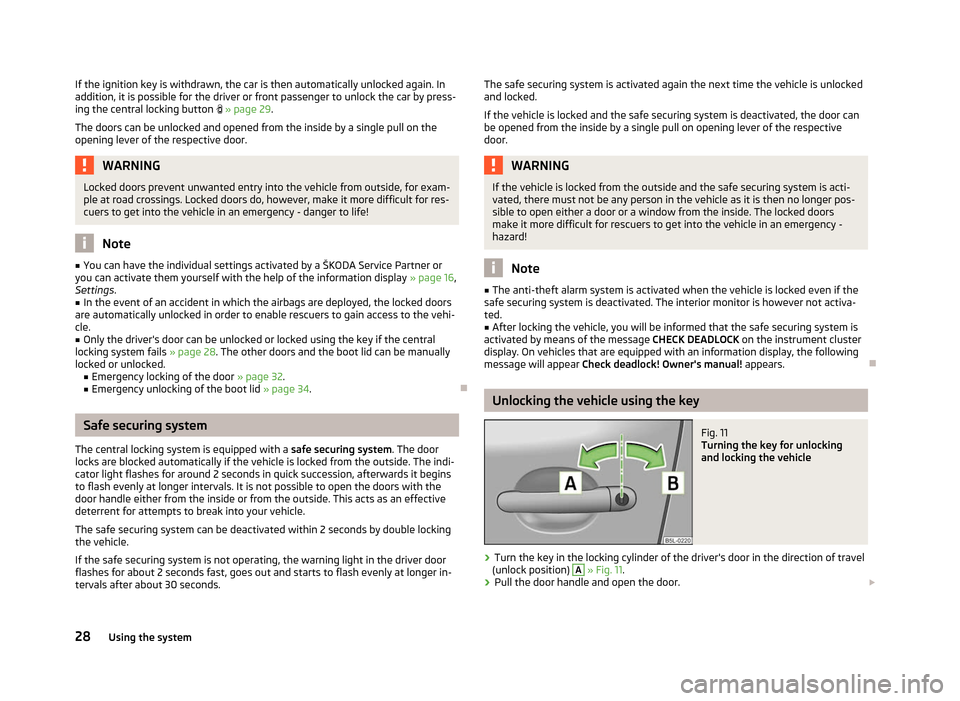
Fig. 11
Turning the key for unlocking
and locking the vehicle
› Turn the key in the locking cylinder of the driver's door in the direction of travel
(unlock position) A
» Fig. 11.
› Pull the door handle and open the door.
£
28 Using the system
Page 31 of 225
›
All the doors (only the driver's door on vehicles with anti-theft alarm system)
and the fuel filler flap are unlocked.
› The boot lid is then unlocked.
› The switched on interior lights come on over the door contact.
› The safe securing system is deactivated.
› The windows open while the key
is held in the unlock position.
› The indicator light in the driver door stops flashing if the car is not fitted with an
anti-theft alarm system » page 31.Note
If the vehicle is equipped with an anti-theft alarm system, you must insert the key
into the ignition lock and switch the ignition on within 15 seconds after unlocking
the door in order to deactivate the anti-theft alarm system. The alarm is trig-
gered if the ignition is not switched on within 15 seconds. ÐLocking the vehicle with the key
› Turn the key in the locking cylinder of the driver's door in the opposite direction
of travel (lock position) B
» Fig. 11
on page 28.
› The doors, the boot lid and the fuel filler flap are locked.
› The switched on interior lights will switch off over the door contact.
› The windows and the panoramic sliding roof close while the key
is held in the
lock position.
› The safe securing system is immediately activated.
› The indicator light in the driver door begins flashing. Note
If the driver's door has been opened, the vehicle cannot be locked. Ð Vehicle locking/unlocking from the inside
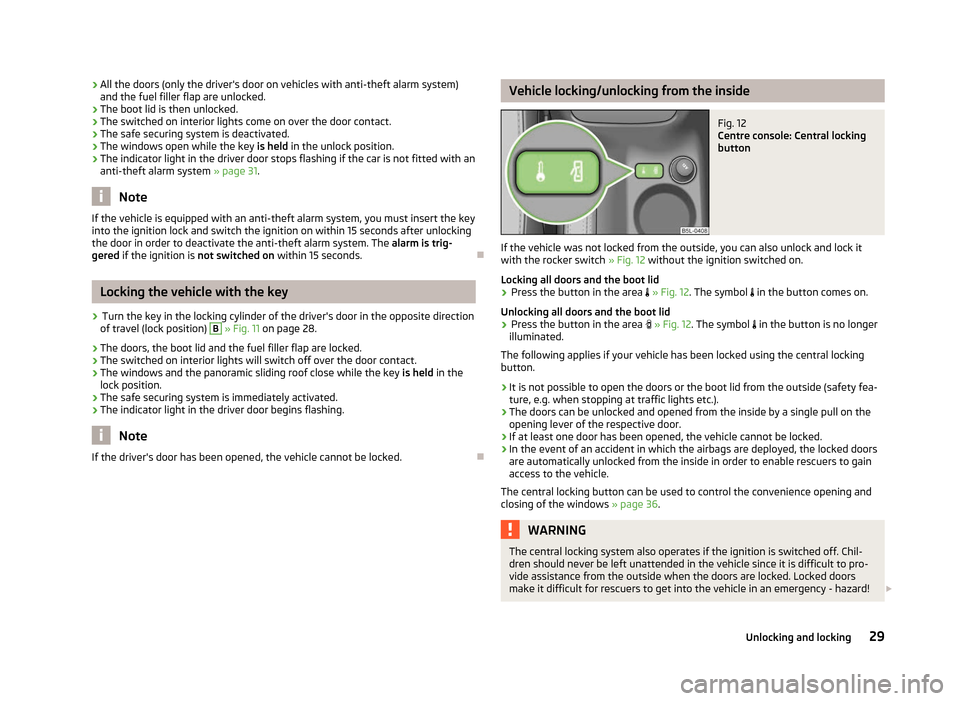
Fig. 12
Centre console: Central locking
button
If the vehicle was not locked from the outside, you can also unlock and lock it
with the rocker switch » Fig. 12 without the ignition switched on.
Locking all doors and the boot lid › Press the button in the area
» Fig. 12. The symbol in the button comes on.
Unlocking all doors and the boot lid
› Press the button in the area
» Fig. 12. The symbol in the button is no longer
illuminated.
The following applies if your vehicle has been locked using the central locking
button.
› It is not possible to open the doors or the boot lid from the outside (safety fea-
ture, e.g. when stopping at traffic lights etc.).
› The doors can be unlocked and opened from the inside by a single pull on the
opening lever of the respective door.
› If at least one door has been opened, the vehicle cannot be locked.
› In the event of an accident in which the airbags are deployed, the locked doors
are automatically unlocked from the inside in order to enable rescuers to gain
access to the vehicle.
The central locking button can be used to control the convenience opening and
closing of the windows » page 36. WARNING
The central locking system also operates if the ignition is switched off. Chil-
dren should never be left unattended in the vehicle since it is difficult to pro-
vide assistance from the outside when the doors are locked. Locked doors
make it difficult for rescuers to get into the vehicle in an emergency - hazard! £
29
Unlocking and locking
Page 32 of 225
Note
If the safe securing system is activated » page 28, the door opening lever and the
central locking buttons do not operate. ÐRemote control
Introductory information
You can use the remote control key to:
› unlock and lock the vehicle,
› unlocking boot lid;
› open and close the windows
» page 36, Window convenience operation .
The transmitter with the battery is housed in the handle of the remote control
key. The receiver is located in the interior of the vehicle. The operating range of
the remote control key is approx. 30 m. But this range of the remote control can
be reduced if the batteries are weak.
The key has a fold-open key bit which can be used for unlocking and locking the
car manually and also for starting the engine.
If a lost key is replaced or if the receiver unit has been repaired or replaced, the
system must be initialised by a ŠKODA Service Partner. Only then can the remote
control key be used again. Note
■ The remote control is automatically deactivated when the ignition is switched
on. ■ The operation of the remote control may temporarily be affected by interfer-
ence from transmitters close to the car and which operate in the same frequency
range (e.g. mobile phone, TV transmitter).
■ The battery must be replaced if the central locking or anti-theft alarm system
does react to the remote control at less than 3 metres away » page 26.
■ If the driver door is open, the vehicle cannot be locked using the remote control
key. Ð Locking/unlocking
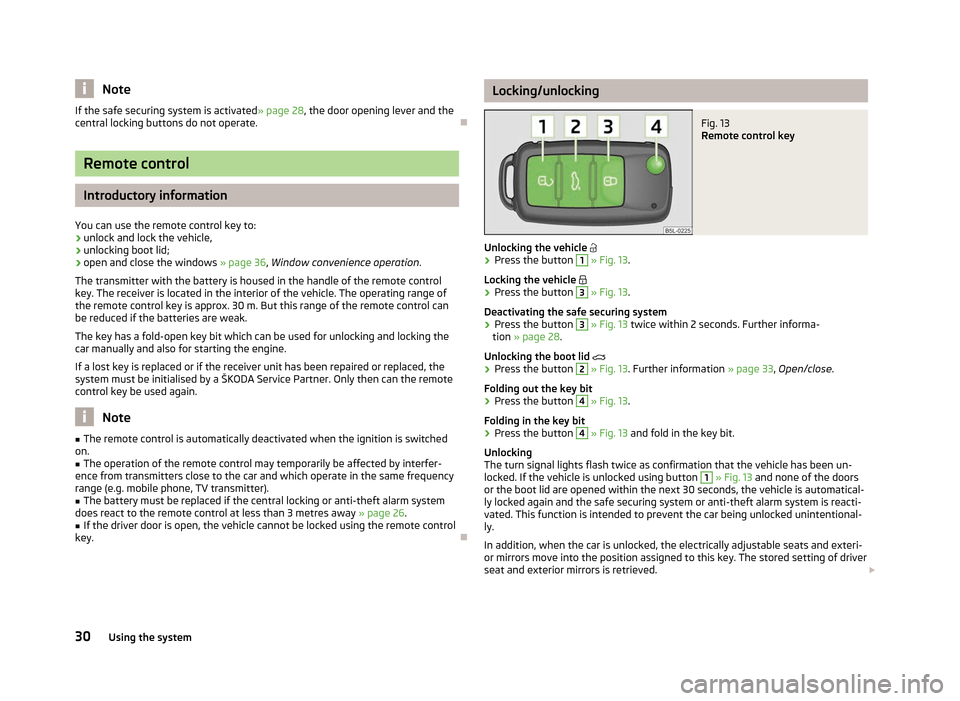
Fig. 13
Remote control key
Unlocking the vehicle
› Press the button 1
» Fig. 13.
Locking the vehicle
› Press the button 3
» Fig. 13.
Deactivating the safe securing system
› Press the button 3
» Fig. 13
twice within 2 seconds. Further informa-
tion » page 28.
Unlocking the boot lid
› Press the button 2
» Fig. 13. Further information
» page 33, Open/close.
Folding out the key bit
› Press the button 4
» Fig. 13.
Folding in the key bit
› Press the button 4
» Fig. 13
and fold in the key bit.
Unlocking
The turn signal lights flash twice as confirmation that the vehicle has been un-
locked. If the vehicle is unlocked using button 1
» Fig. 13 and none of the doors
or the boot lid are opened within the next 30 seconds, the vehicle is automatical-
ly locked again and the safe securing system or anti-theft alarm system is reacti-
vated. This function is intended to prevent the car being unlocked unintentional-
ly.
In addition, when the car is unlocked, the electrically adjustable seats and exteri-
or mirrors move into the position assigned to this key. The stored setting of driver
seat and exterior mirrors is retrieved. £
30 Using the system
Page 33 of 225
Locking
The turn signal lights flash once to confirm that the vehicle has been correctly
locked.
If the doors or the boot lid remain open after the vehicle has been locked, the
turn signal lights do not flash until they have been closed.
WARNING
If the car is locked from the outside and the safe securing system is activated,
there must not be any person in the car as it is then not possible to open ei-
ther a door or a window from the inside. The locked doors make it more diffi-
cult for rescuers to get into the vehicle in an emergency - hazard! Note
■ Only operate the remote control when the doors and boot lid are closed and the
vehicle is in your line of sight. ■ To avoid the car being locked inadvertently once in the car, the lock button of the remote control must not be pressed before the key is inserted into the ig-
nition lock. Should this happen, press the unlock button
of the remote control.
ÐSynchronisation
If the vehicle cannot be unlocked by actuating the remote control system then it
is possible that the code in the key and the control unit in the vehicle are no lon-
ger synchronised. This can occur when the buttons on the radio-operated key are
actuated a number of times outside of the operative range of the equipment or
the battery on the remote control was replaced.
This means it is necessary to synchronise the code as follows:
› press any button on the remote control key;
› pressing of the button means that the door will unlock with the key within 1 mi-
nute. Ð Anti-theft alarm system
Introductory information
The anti-theft alarm system increases the level of protection against people
seeking to break into the vehicle. The system triggers audible and visual warning
signals if an attempt is made to break into the vehicle.
How is the alarm system activated?
The anti-theft alarm system is activated when the vehicle is locked with the radio
remote control or the key in the driver's door . It is activated 30 seconds after
locking the door.
How is the alarm system deactivated?
The alarm system is deactivated by pressing the unlock button on the radio re-
mote control. The anti-theft alarm system is reactivated if the vehicle is not
opened within 30 seconds after transmitting the radio signal.
The alarm system is also deactivated if you unlock the driver door using the key
within 45 seconds of locking the vehicle.
If the vehicle is unlocked by inserting the key into the driver door, the key must
be inserted into the ignition lock and the ignition switched on within 15
seconds
of unlocking the door to deactivate the alarm system. The alarm is triggered if
the ignition is not switched on within 15 seconds.
When is the alarm triggered?
The following security areas of the locked vehicle are monitored: › bonnet;
› boot lid;
› doors;
› ignition lock;
› Vehicle inclination
» page 32;
› Interior of the vehicle
» page 32;
› A drop in voltage of the on-board power supply;
› Socket of the factory-fitted towing device.
An alarm is immediately triggered if either of the two battery terminals is discon-
nected while the anti-theft alarm system is activated.
How is the alarm switched off?
The alarm is switched off by unlocking the vehicle with the radio remote control
or switching on the ignition. £
31
Unlocking and locking