AV sys SKODA YETI 2013 1.G / 5L Amundsen Navigation System Manual
[x] Cancel search | Manufacturer: SKODA, Model Year: 2013, Model line: YETI, Model: SKODA YETI 2013 1.G / 5LPages: 30, PDF Size: 2.46 MB
Page 16 of 30
PHONE mode
Pairing mobile phone or Bluetooth®
device with
device
To operate a mobile phone or other Bluetooth ®
device from the device, a one-off
connection of both devices is required.
Active connection
When the connection is active, the mobile telephone search is launched from the
device.
Enable Bluetooth ®
on your mobile phone.
Press the button PHONE
→ SETUP.
■ Bluetooth settings
- Settings for the Bluetooth ®
- function
■ Search for devices - Search for external devices with an activated Bluetooth ®
function
The search can take around 15 to 20 seconds. When the process is complete, the
names of the located mobile telephones are shown on the screen.
The mobile phone you want to connect can be selected directly by pressing the
function key with the name of the mobile phone or by turning the menu knob
15
and then pressing the button Connect.
Confirm the connection on the mobile phone. Depending on the type of mobile
phone, either an auto-generated 6-digit PIN code is displayed, which must be
confirmed according to the instructions on the screen of the mobile phone and
the device, or a 4-digit PIN code displayed on the device screen must be entered
manually.
If the PIN was entered correctly, a message appears on the screen indicating that the connection was successful.
Passive connection
When the connection is passive, the device search is launched from the mobile
telephone.
Enable Bluetooth ®
on your mobile phone.
Press the button PHONE
→ SETUP.
■
Bluetooth settings - Settings for the Bluetooth ®
- function
■ Set Bluetooth visibility - Activates visibility of the device on other devices with
the Bluetooth ®
function
Launch the search for Bluetooth ®
audio accessories on the mobile phone. The
search can take around 15 to 20 seconds. Once the search is complete, the device name is displayed on the mobile phone as SKODA_BT.
Using the mobile phone to establish the connection. Depending on the type of mobile phone, either an auto-generated 6-digit PIN code is displayed, which must
be confirmed according to the instructions on the screen of the mobile phone and
the device, or a 4-digit PIN code displayed on the device screen must be entered
manually.
If the PIN was entered correctly, a message appears on the screen indicating that
the connection was successful.
Deleting connected devices
A maximum of 4 mobile phones or Bluetooth ®
devices can be connected with the
device. To connect an additional device, a mobile phone or Bluetooth ®
device
must be deleted first.
Press the button PHONE
→ SETUP.
■ Bluetooth settings
- Settings for the Bluetooth ®
- function
■ Paired device list - List of devices connected to the device
■ Delete - Deletes the selected connected mobile phone or Bluetooth ®
device.
Main menu TELEPHONE
Main menu TELEPHONE
Press the button TELEPHONE
.
Individual functions in the menu TELEPHONE may depend on the equipment and the properties of the connected mobile phone.
The PHONE
mode can only be activated while the ignition is switched on.
When the device is switched on, it automatically connects with the mobile phone with which it was last connected. If it is not possible to connect with this mobile
phone, the system automatically attempts to establish the connection to the next
mobile phone which is in the list of the connected devices.
14PHONE mode
Page 17 of 30
Function keys in the main menu TELEPHONE
■ Press the button TELEPHONE.
■ - Switches on voice operation, only with GSM II telephone preinstallation.
Further information on how to operate the voice control can be found in the
operating instructions of your vehicle.
■ SOS
- emergency setup only with the GSM III telephone preinstallation via the
rSAP profile. Further information on how to operate the GSM III telephone pre-
installation can be found in the operating instructions of your vehicle.
■
- Accept a call, dial the entered number. After pressing, the call list is dis-
played in the main menu TELEPHONE.
■
- End or reject call - only active during a call
■ - Dial number
■ Delete - Delete numbers
■ - Dial number
■ - Open phonebook
■ Find - Open the input screen for search in the phonebook
■ Details - Display information relating to a telephone book entry
■ - Open the list of missed calls
■ Edit - Edit number
■ - Dial number
■ - Open list of dialled numbers
■ Edit - Edit number
■ - Dial number
■ - Open list of received calls
■ Edit - Edit number
■ - Dial number
■ - Mobile box (the mobile box number must have been config-
ured) » page 16 , Settings in PHONE mode
WARNINGConcentrate fully at all times on your driving! As the driver you are fully re-
sponsible for road safety. Only use the system so that you are in full control of
your vehicle in every traffic situation - risk of accident!
Telephone calls and functions during a call
Calls can be received even if the device is switched off.
If you have started the process of connecting to a call number or accepted a call, the main menu TELEPHONE will change to the Phone conversation display.
Outgoing call
You can use the device to start a phone conversation directly by entering a tele-
phone number or by selecting a number from the phonebook, the list of selected
phone numbers or the list of received calls » page 15, Function keys in the main
menu TELEPHONE .
If your vehicle is fitted with the GSM II telephone preinstallation, you can also
start a phone conversation using voice operation using the function key
» page 15 , Function keys in the main menu TELEPHONE .
Incoming call ■
- accept call
■ - reject call
Additional functions during the phone conversation
■ Extras
- opens a list of additional functions
■ Mute - switches the microphone on/off during the conversation. A conversa-
tion in the vehicle is not picked up by the microphone and so cannot be heard by the other party.
■ Hands-free
- switches the hands-free system on/off The conversation is not
broadcast to the vehicle through the speakers but only via the phone speaker
(private call).
■ Hold call
- “holds” the call (the following appears: “ Holding...”). The connection
remains but the call is not transmitted. Resume call - call is resumed
■ Conference - Conference call involving all call participants » page 15, Carrying
out an additional phone conversation
■ Enter numbers
- opens the input screen for DTMF key tones
- end call
Carrying out an additional phone conversation
Press the button TELEPHONE
.
Select another phone number or a stored phone number. ■ Extras
- opens a list of additional functions
■ Swap call - switch between calls
■ Conference - Conference call involving all call participants
DTMF key tones
A particular DTMF key tone is assigned to each key of a mobile phone. DTMF key
tones are used, for example, for the input of a password via the mobile phone or
for choosing functions in a “call centre”.
15PHONE mode
Page 18 of 30
If a DTMF key tone has to be entered during a conversation, open the keypadfield by pressing the function key Extras
→ Enter numbers and follow the instruc-
tions (for example: “For a private conversation with one of our co-workers, please
press 3
”).
Settings in PHONE mode
Press the button PHONE
→ SETUP.
■ Bluetooth settings
1)
- Settings for the Bluetooth ®
- function
■ Paired device list
- opens a list of all connected devices
■ Search for devices - Search for external devices with an activated Bluetooth ®
function
■ Set Bluetooth visibility
- Activates visibility of the device on other devices with
the Bluetooth ®
function
■ Enter passkey
- Change the 4 digit code for connecting devices
■ Enter mobile box number - Enter the mobile box number for the mobile phone
■ Delete call lists2)
- Deletes all call lists from the memory of the phone unit
■ Switch off telephone2)3)
- switches off the phone unit (the mobile phone remains
paired)
■ Load telephone book
- loads the phonebook from the mobile phone to the memory
of the radio navigation system. This procedure can take a few minutes.
■ Factory settings
- resets device to factory settings- deletes user profiles
1)
This feature is not available if the mobile phone is connected by means of the GSM III telephone pre-
installation. Bluetooth ®
settings for the GSM III telephone preinstallation can be found in your vehi-
cle's Owners manual.
2)
This feature is not available if the mobile phone is connected by means of the GSM III telephone pre-
installation.
3)
This function is not active if the mobile phone is connected using the GSM III telephone preinstalla-
tion via the HFP profile.
16PHONE mode
Page 19 of 30
NAV mode (Navigation)
Introductory information
The route is recalculated each time if you ignore driving recommendations or
change the route. This process takes only a few seconds. Driving recommenda-
tions can only then be re-transmitted.
In regions that are not or only partially digitised and are therefore not included in the navigation data, the device will continue to try to provide guidance to the
destination. It should be noted that under these circumstances the guidance to
the destination may not be completely correct if, for example, one-way streets
and road categories (motorway, country road, etc.) are not or only partially inclu-
ded in the navigation data used.
When entering an address (city, street), only those letters or symbols which make up a logical entry will be presented. A list of possible names will be shown. Do not
forget to enter the blank space in names made up of more than one word, such
as High Wycombe.
The last voice output can be repeated by pressing the menu button
15
. The vol-
ume can be changed while you listen to the travel recommendation.
The GPS satellites will not be able to reach the aerial once you are in a tunnel or
underground garage. In these cases, the unit uses only the vehicle's sensors and
an internal gyroscope for navigation.
WARNING■ Please concentrate fully at all times on your driving! Driver inattention can
lead to accidents and injuries. As the driver you are fully responsible for road
safety. Only use the functions of the device in such a way that you are always
in full control of your vehicle in all traffic situations!■
The following must always have priority over the driving recommendations: ■ the road traffic legislation, even if the driving recommendations contradict
the StVO,
■ the actual acknowledgement of traffic signs, light signals or signs placed
by the police at the relevant location,
■ the facts and circumstances prevailing at the relevant location.
■
Please observe the respective traffic regulations when driving.
WARNING (Continued)■Traffic signs and traffic regulations always have priority over the driving rec-
ommendations provided by the navigation system.■
Route guidance is subject to constant changes, particularly to information
relating to one-way streets, pedestrian zones etc. stored in the navigation da-
ta. Information on traffic lights, stop and right of way signs, parking and stop-
ping restrictions as well as lane constrictions and speed restrictions is not tak-
en into account by the device.
■
Always adjust the driving speed to the road, traffic and weather conditions.
Do not let the device to tempt you to drive too fast in the fog, for example –
risk of accident!
■
The device and its various functions should only be used when traffic condi-
tions permit safe use.
■
The driving recommendations provided may vary from current situations,
e.g. due to road works or out of date navigation data. In such a case, always
observe the traffic regulations and ignore the driving recommendations.
■
Adjust the volume to ensure that acoustic signals from outside the vehicle,
e.g. sirens from vehicles to give way to, such as the police, ambulance and fire
brigade, can be heard at all times.
Note
■ It is not necessary to enter the destinations (country, city, road, point of interest
names) including all country-specific (or language-specific for points of interest)
special characters.■
Depending on the country, some functions of the device can no longer be selec-
ted on the screen at certain speeds. This is not a malfunction, but corresponds to
the legal requirements of the particular country.
Navigation data and the SD memory card
The navigation data is already available in the device memory when the device is switched on for the first time, and can be used immediately for navigation.
Update navigation data
›
Remove the mechanical copy protection from the SD memory card.
›
Insert the SD memory card » page 11, SD memory card .
The following appears automatically after you insert the SD memory card: Assign
-
assigns the SD memory card to the device. For licensing reasons, the SD memory
card is assigned to your device and cannot be used with a different device.
17NAV mode (Navigation)
Page 20 of 30
■Use SD - Using the navigation data directly from the SD memory card. If you
want to use navigation data from other regions that differs from the data stor- ed in the memory of the device, you can also use data directly from the SD
memory card for guidance. This means you have two different sets of naviga-
tion data at your disposal. It is not necessary therefore to copy the navigation data from the SD memory card to the memory of the radio navigation system.
■ Install
- Copies the navigation data from the SD memory card to the internal de-
vice memory. The “old” navigation data in the internal device memory is deleted.
Data cannot be recovered once deleted »
.
No navigation data is available during copying. The copy process takes around 2
hours.
Do not remove the SD memory card during the process of copying data from the
SD memory card to the internal memory of the radio navigation system! You can
damage the memory card!
Manual copying
If you insert the SD memory card with valid navigation data but the copy process
does not start automatically, you can start it manually.
Press the button NAV
→ SETUP.
■ Navigation data basis
- displays the options for the navigation data
■ Install/use SD data - installs/uses the navigation data from the SD memory card
CAUTION
If the navigation data in the internal device memory is overwritten by a different
version, this data cannot be restored !
Note
You can obtain an SD memory card with the latest navigation data or with data
for other countries from ŠKODA Original Accessories.
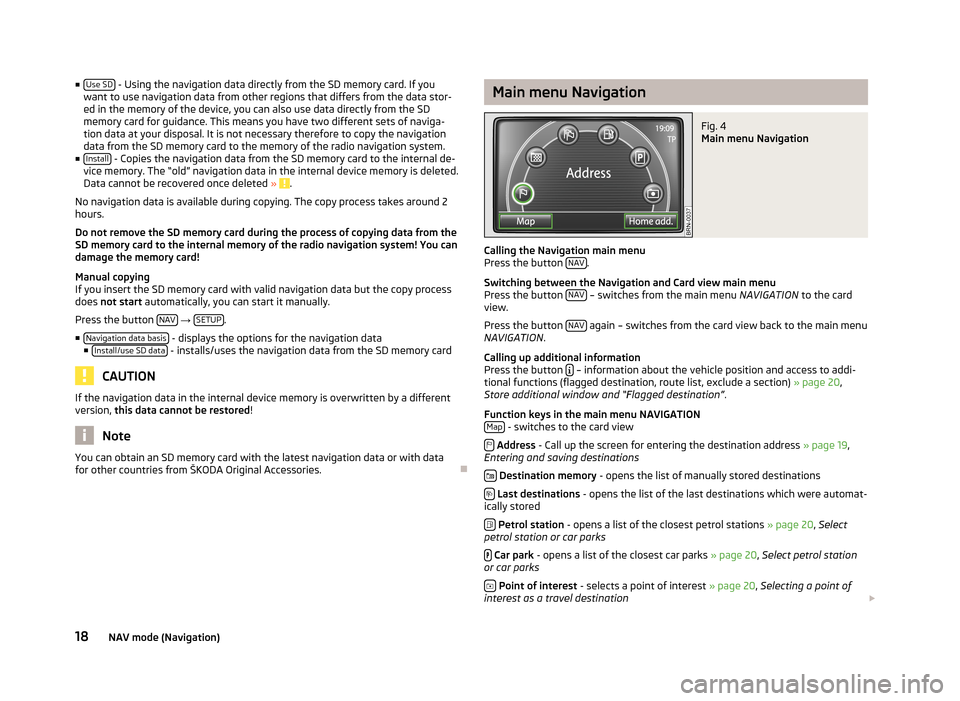
Main menu NavigationFig. 4
Main menu Navigation
Calling the Navigation main menu
Press the button NAV.
Switching between the Navigation and Card view main menu
Press the button NAV
– switches from the main menu
NAVIGATION to the card
view.
Press the button NAV
again – switches from the card view back to the main menu
NAVIGATION .
Calling up additional information
Press the button
– information about the vehicle position and access to addi-
tional functions (flagged destination, route list, exclude a section) » page 20,
Store additional window and “Flagged destination” .
Function keys in the main menu NAVIGATION Map
- switches to the card view
Address - Call up the screen for entering the destination address » page 19,
Entering and saving destinations
Destination memory - opens the list of manually stored destinations
Last destinations - opens the list of the last destinations which were automat-
ically stored
Petrol station - opens a list of the closest petrol stations » page 20, Select
petrol station or car parks
Car park - opens a list of the closest car parks » page 20, Select petrol station
or car parks
Point of interest - selects a point of interest » page 20, Selecting a point of
interest as a travel destination
18NAV mode (Navigation)
Page 21 of 30
Home add. - Starting a route guidance to a stored Home address. During route
guidance, the function key Stop appears here.
Objectives of the SD memory card
By using a web application that can be found on ŠKODA's web site, it is possible to create destinations as business cards or pictures. These destinations can then
easily be imported into the device via the SD card.
Settings in the (NAV) Navigation mode
Press the button NAV
→ SETUP.
Function keys in the menu°-°Navigation
■ Route options
- setting for route options
■ Route criteria - specify the criteria for calculating the route
■ Fast - calculates the fastest route to the destination, even if a detour is nec-
essary.
■ Economical
- calculates the quickest route possible over the shortest route
■ Short - shortest route to the destination even if a longer driving time is re-
quired. The route guidance may include unusual sections, such as dirt roads.
■ Dynamic route
- switches on/off the usage of TMC traffic notifications for route
guidance » page 22 , Dynamic route guidance with TMC use
■ Avoid motorways
- switches on/off the use of motorways in the route calcula-
tion
■ Avoid toll roads
- switches on/off the use of toll roads in the route calculation
■ Avoid ferries - switches on/off the use of ferries in the route calculation If no
other route is available (e.g. an island can only reached by a ferry), this route type is included in the route calculation despite being excluded before.
■ Avoid toll Avoid toll sticker routes
- opens a list of countries where toll stickers are
mandatory. A check means that all streets in the selected country for which a
toll sticker is mandatory are excluded.
■ Announcement volume
- Setting the volume of the navigation announcements.
■ Day/Night - switches between the day/night and auto map display modes. Auto-
matic display depends on switching the low beam on or off.
■ POIs on map
- shows points of interest in the map view (car parks, petrol stations
and ŠKODA Partners only)
■ Autozoom
- changes the map scale automatically depending on the speed and
the driven route (Motorway trip: small map scale - City centre: large map scale)
■ Traffic sign display
- switches display of speed restrictions on/off in the current
route section (top left on the screen)
■ Time display - switches between the following information during route guidance
■ ETA - displays the expected time to destination
■ Travel time - displays the expected remaining trip time to the destination
■ Time display to - switch to the arrival time at:
■ destination - displays the expected arrival time at the final destination
■ stopover - displays the expected arrival time at the stopover destina-
tion » page 20 , Entering a stopover destination
■ Enter home address
- Enter your home address
■ Position - saves the current position as a home address
■ Address - enter or change an address as your home address
■ Demo mode - switches on/off the demo mode. If the demo mode is selected, you
can specify at the start of route guidance whether route guidance should be carried out in normal mode (“real” route guidance) or in Demo mode (virtual
route guidance). If you are using the route guidance in Demo mode, you will only
travel along the route virtually. Virtual route guidance will be repeated after reaching the fictitious travel destination.
■ Demo mode starting point
- Entering a fictive (invented) starting point in the demo
mode.
■ Delete destination memory
- Deleting the destination memory or the list of the last
destinations. ■ All
- deletes all destinations from the memory
■ Last destins. - deletes all destinations from the list of last destinations
■ Navigation data basis - displays information about the navigation data stored in
the radio navigation system or on the SD memory card or when using navigation
data directly from the SD memory card » page 17, Navigation data and the SD
memory card .
Destinations
Entering and saving destinations
Manually entering and saving destinations
Press the button NAV
→ .
When entering the address, first choose the country, then the city or the postal
code. Afterwards it is possible to specify the address in more detail by entering
the street and house number or an intersection. This address information is
specified in the following input screens.
If the entries are sufficient for the route guidance, the function key Status
will ap-
pear. You can now begin route guidance or you can enter additional details for
the destination.
19NAV mode (Navigation)
Page 22 of 30
■Store - opens screen for entering the name of the destination
■ Delete - Change name of destination
■ OK - saves the name of the destination
■ Start - starts route guidance
Destination memory
Press the button NAV
→ - displays a list of the manually-saved destinations
(guidance can be started by pressing the function button with a displayed desti-
nation).
Turn the menu knob
15
to select a destination that you want to rename, edit or
delete.
■ SD destinations
- displays the list of destinations stored on the SD memory card
■ Import - imports destinations from the SD memory card into the unit's memory
■ All - selects all destinations on the SD memory card
■ Import - import selected destinations from the SD memory card into the
unit's memory
■ Details
- displays additional information about the destination
■ Import - selects displayed destinations to import
■ Start - starts route guidance
■ Details - shows additional information about the destination (name of the desti-
nation, country, city, etc.). The displayed information can be changed. ■ Delete
- deletes the selected destination
■ Start - starts route guidance
Store last destinations
Press the button NAV
→ - the list of the last automatically saved destinations
is displayed.
After you confirm one of the displayed destinations, the device switches to the
map view and route guidance begins automatically.
■ Details
- displays details about the destination
■ Store - enters and saves the destination name
■ Delete - deletes name of destination
■ OK - confirms and saves the name of the destination
■ Start - starts route guidance
Entering a stopover destination
An additional destination and one stopover destination can be entered during the
route guidance. You reach the entered stopover destination before the route
guidance is resumed to the final destination. The final destination is the destina- tion for which was route guidance was initially started. Always make sure wheth-
er you enter a stopover or the final destination when entering a destination.
During route guidance, press the button NAV - switches to the main menu of
Navigation.
Enter a new address or select a previously saved address. StopoverStopover
- choose a newly-entered destination as the stopover
New destin.
- end the current route guidance and choose a new destination as the
final destination
Select petrol station or car parks
Press the button NAV
→ -
Petrol Station or -
Car Park - The system will
search for petrol stations or car parks in the vicinity of the current location.
■ Store
- saves in the destination memory
■ Details - displays details about the destination
■ Store - saves in the destination memory
■ Start - starts route guidance
Selecting a point of interest as a travel destination Press the key NAV
→ -
POI .
■ Town
- search in the centre of a place of your choice
■ Here - search in the vicinity of the current location
A search screen opens for selecting the point of interest by means of entering a
“keyword” or a word which is part of the name for the point of interest. The point
of interest is searched for within a surrounding area of 75 km.
“Key words” which can be entered include words such as hotel, stadium, ŠKODA,
or a part of the name of a destination, e.g. lake, or words such as hunger, thirsty,
shop, relax, etc.
Pay attention to the correct entry of the “key word” (including special characters). ■ Delete
- deletes the entered characters
■ Find - search based on the parameters entered
■ Store - saves in the destination memory
■ Details - displays details about the destination
■ Store - saves in the destination memory
■ Start - starts route guidance
Store additional window and “Flagged destination” Press the button
- opens pop-up window.
If route guidance is not active, a pop-up window appears containing details about
the current position with the following info:
20NAV mode (Navigation)
Page 24 of 30
■Congestion ahead - turn the menu button 15 to select the length of the stretch to
be blocked from the current position. The length of the currently blocked stretch of the journey is shown in the lower line of the screen. When reachingthe maximum blockable length, the word “ (Max)” will appear next to the length
entry.
■ OK
- confirms the length of the blocked stretch
To cancel the blocking of the stretch ahead, press the button
→ Route.
■ Lift cong. excl.
- manually remove blocked stretch
Blocking stretches of the journey using the route list
Press the button
→ Route.
■ Route list
- List of route sections
■ Exclude - select the start of the stretch to be blocked
■ Exclude to - select the end of the stretch to be blocked
To cancel the blocking of the stretch ahead, press the button
→ Route.
■ Lift cong. excl.
- remove the blocked stretch
Displaying stretches of the journey
Pop-ups during route guidance
Press the button
→ Route.
■ The list of the points (street names, street descriptions and stretches of the
road) still to be driven, is displayed in the Route list
.
■ Details - shows details of the selected stretch of the journey.
Dynamic route guidance with TMC use
Requirements for a dynamic route guidance
TMC (Traffic Message Channel) is a digital radio data service for continuous trans-
mission of traffic information.
If a TMC traffic radio station is available for current location, the TMC traffic re-
ports are updated continuously in the background. Received TMC traffic reports are shown in a list » page 23, Displaying TMC traffic reports .
The quality of the transmitted traffic reports depends on the traffic editing car-
ried out by the radio station. The reception of the TMC traffic reports cannot be
switched on or off.
The station you are listening to does not have to be a TMC station.
When the function Dynamic Route » page 19
, Settings in the (NAV) Navigation
mode is activated and the radio navigation system calculates a time advantage
for driving around the traffic disruption along the route, an alternative route is
calculated automatically.
TMC traffic reports can only be evaluated and displayed by the unit if the naviga-
tion data for the currently driven area is stored in the unit's memory or can be re-
trieved from an inserted SD memory card.
The current TMC traffic reports can be displayed by pressing the range selector
key TMC
.
Traffic problems received via TMC which affect the route are displayed in the map
by means of a coloured symbol. Traffic problems, which do not affect the route,
are displayed in the map by means of a grey symbol. The positioning of the TMC
symbol shows the beginning of a traffic disruption and the direction, when the
TMC traffic report is able to clearly define both.
When the function Dynamic Route » page 19, Settings in the (NAV) Navigation
mode is activated and the radio navigation system calculates a time advantage
for driving around the traffic disruption along the route, an alternative route is
calculated automatically.
When recalculating the route, a corresponding navigation announcement is out-
put. The same announcement is made when there was a traffic disruption in the
original route calculation which has since been removed.
Note
■ Making a diversion from a traffic jam based on TMC traffic reports may not al-
ways offer a time advantage, e.g. if the diversion route is also congested.■
If a traffic disruption was not yet entered via the TMC traffic reports, route dis-
ruptions can also be entered manually » page 21, Manually blocking a stretch of
the route .
22NAV mode (Navigation)
Page 25 of 30
TMC mode
Displaying TMC traffic reports
TMC traffic reports are used to optimise the route during route guidance when
there are traffic disruptions » page 22, Dynamic route guidance with TMC use
You can browse through all the traffic reports received in the detailed display in
sequence by using the function keys.
Press the button TMC
- displays a list of current traffic reports
■ Details
- display the details for a selected traffic report
Press the button
- displays the name of the TMC station currently being re-
ceived.
Traffic problems are illustrated in the detailed display and in the map by a corre-
sponding symbol. The direction, in which the traffic problem is found in the map,
is displayed in colour. A traffic problem which is located on the route (in direction
of travel) is marked in red, a traffic problem in the opposite direction is marked in grey.
Note
■ If a TMC traffic radio station is available for current location, the TMC traffic re-
ports are updated continuously in the background. The station you are listening
to does not have to be a TMC station.■
TMC traffic reports can only be evaluated and saved by the radio navigation sys-
tem when navigation data are available for the driven area.
■
The accuracy of the dynamic route guidance depends on the transmitted traffic
reports. The radio stations broadcasting this information are responsible for the content.
■
TMC traffic reports are necessary for the dynamic route guidance.
■
Making a diversion from a traffic jam based on TMC traffic reports may not al-
ways offer a time advantage, e.g. if the diversion route is also congested.
TP traffic program and TMC traffic reports settings
Press the button TMC
→ SETUP.
■
Traffic program (TP) - switches traffic programme on/off
■ Dynamic route - activates/deactivates the usage of TMC traffic reports for route
guidance » page 22 , Dynamic route guidance with TMC use .
23TMC mode
Page 26 of 30
Display of optical park assist
Display of visual parking system (OPS)
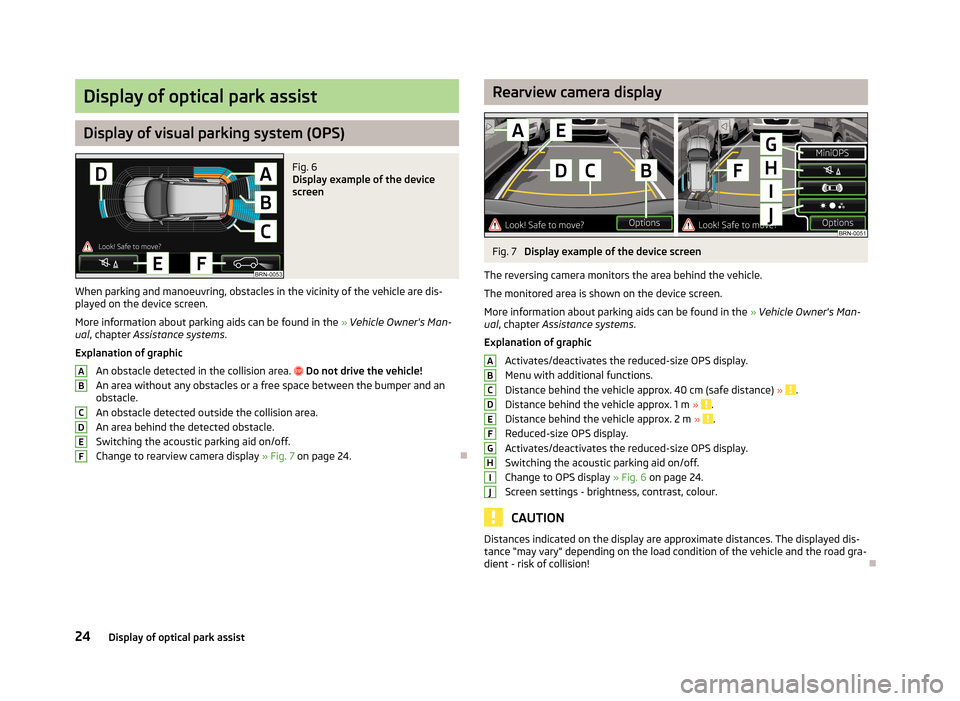
Fig. 6
Display example of the device
screen
When parking and manoeuvring, obstacles in the vicinity of the vehicle are dis- played on the device screen.
More information about parking aids can be found in the » Vehicle Owner's Man-
ual , chapter Assistance systems .
Explanation of graphic
An obstacle detected in the collision area.
Do not drive the vehicle!
An area without any obstacles or a free space between the bumper and an
obstacle.
An obstacle detected outside the collision area. An area behind the detected obstacle.
Switching the acoustic parking aid on/off.
Change to rearview camera display » Fig. 7 on page 24.
ABCDEFRearview camera displayFig. 7
Display example of the device screen
The reversing camera monitors the area behind the vehicle.
The monitored area is shown on the device screen.
More information about parking aids can be found in the » Vehicle Owner's Man-
ual , chapter Assistance systems .
Explanation of graphic
Activates/deactivates the reduced-size OPS display.
Menu with additional functions.
Distance behind the vehicle approx. 40 cm (safe distance) »
.
Distance behind the vehicle approx. 1 m » .
Distance behind the vehicle approx. 2 m » .
Reduced-size OPS display.
Activates/deactivates the reduced-size OPS display.
Switching the acoustic parking aid on/off.
Change to OPS display » Fig. 6 on page 24.
Screen settings - brightness, contrast, colour.
CAUTION
Distances indicated on the display are approximate distances. The displayed dis-
tance “may vary” depending on the load condition of the vehicle and the road gra-
dient - risk of collision!ABCDEFGHIJ24Display of optical park assist