clutch SKODA YETI 2013 1.G / 5L User Guide
[x] Cancel search | Manufacturer: SKODA, Model Year: 2013, Model line: YETI, Model: SKODA YETI 2013 1.G / 5LPages: 266, PDF Size: 26.71 MB
Page 149 of 266
If any of the above events occurs, the following warning message is dis-
played. » page 146 .
Manoeuvring out of a parallel parking space
First read and observe the introductory information and safety warn-
ings
on page 143.
Manoeuvring out
›
Press the symbol button
» Fig. 122 on page 144 once.
›
Activate the turn signal for side of the vehicle where the parking space is out of
which you wish to manoeuvre.
›
Select reverse gear or move the selector lever into position R.
›
As soon as the following message is shown in the display:
Steering interv. ac-
tive. Monitor area around veh.! , let go of the steering wheel. The steering will
be taken over by the system.
›
Observe the direct vicinity of the vehicle and reverse carefully.
›
Follow the system instructions shown in the display.
As soon as the parking procedure is completed, an audible signal sounds and the
following message appears in the information display:
Take over steering and continue driving
Automatic termination
The system terminates the manoeuvring procedure if one of the following cases
arises.
› Speed of more than 7 km/h exceeded during the manoeuvring procedure.
› System button pressed.
› Engagement of the ASR system.
› TCS system switched off.
› Intervention of the driver in the automatic steering procedure (stops the steer-
ing wheel).
› There is a system fault (system temporarily not available).
› Automatic braking for damage limitation.
If any of the above events occurs, the following warning message is dis-
played. » page 146 .
Automatic brake assist
First read and observe the introductory information and safety warn-
ings
on page 143.
The system provides assistance to the driver with automatic brake assist. The au-
tomatic brake assist does not exempt the driver from his/her responsibility for
the accelerator, brake and clutch.
Automatic braking for preventing cancellations caused by excessive speeds
To prevent the speed from exceeding 7 km/h and to subsequently prevent can-
cellation of the parking procedure, automatic brake support is initiated. The park-
ing procedure can be resumed after automatic braking.
Automatic braking takes place only once per parking procedure.
Automatic braking for damage limitation
The system detects an imminent collision based on the driving speed and the dis-
tance from the obstacle, automatic brake support is initiated.
The system function is ended after this automatic brake assist for damage limita-
tion.
WARNING■ Automatic brake assist only works as an element of the assist function. The
driver must always be ready to brake the vehicle him/herself.■
Automatic brake assist is ended after around 1.5 seconds. Depress the brak-
ing pedal so that the vehicle does not start moving by itself.
Information messages
First read and observe the introductory information and safety warn-
ings
on page 143.
Park Assist Brake interv. Speed too high
If a speed of 50 km / h is exceeded while searching for a parking space, the sys-
tem with the key symbol is must be reactivated.
Speed too high. Please take over steering!
The parking procedure was ended because the speed was exceeded. Park with a
max. speed of 7 km/h.
146Driving
Page 151 of 266
■The cruise control system cannot be activated when the selector lever is in po-
sitions P, N or R (vehicles with automatic transmission).■
The cruise control system may automatically switch off when some brake assist
systems (e.g. ESC) intervene, when the maximum permissible engine speed is ex- ceeded, etc.
Activating/deactivating
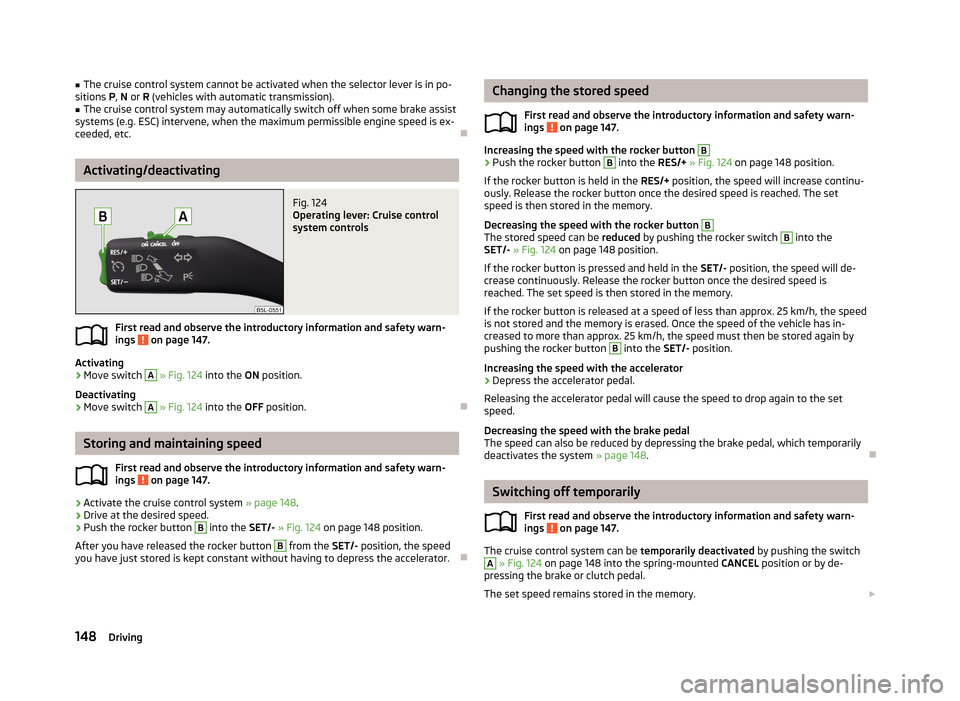
Fig. 124
Operating lever: Cruise control
system controls
First read and observe the introductory information and safety warn-
ings on page 147.
Activating
›
Move switch
A
» Fig. 124 into the ON position.
Deactivating
›
Move switch
A
» Fig. 124 into the OFF position.
Storing and maintaining speed
First read and observe the introductory information and safety warn-
ings
on page 147.
›
Activate the cruise control system » page 148.
›
Drive at the desired speed.
›
Push the rocker button
B
into the SET/- » Fig. 124 on page 148 position.
After you have released the rocker button
B
from the SET/- position, the speed
you have just stored is kept constant without having to depress the accelerator.
Changing the stored speed
First read and observe the introductory information and safety warn-
ings
on page 147.
Increasing the speed with the rocker button
B›
Push the rocker button
B
into the RES/+ » Fig. 124 on page 148 position.
If the rocker button is held in the RES/+ position, the speed will increase continu-
ously. Release the rocker button once the desired speed is reached. The set
speed is then stored in the memory.
Decreasing the speed with the rocker button
B
The stored speed can be reduced by pushing the rocker switch
B
into the
SET/- » Fig. 124 on page 148 position.
If the rocker button is pressed and held in the SET/- position, the speed will de-
crease continuously. Release the rocker button once the desired speed is
reached. The set speed is then stored in the memory.
If the rocker button is released at a speed of less than approx. 25 km/h, the speedis not stored and the memory is erased. Once the speed of the vehicle has in-
creased to more than approx. 25 km/h, the speed must then be stored again by
pushing the rocker button
B
into the SET/- position.
Increasing the speed with the accelerator
›
Depress the accelerator pedal.
Releasing the accelerator pedal will cause the speed to drop again to the set
speed.
Decreasing the speed with the brake pedal
The speed can also be reduced by depressing the brake pedal, which temporarily
deactivates the system » page 148.
Switching off temporarily
First read and observe the introductory information and safety warn-
ings
on page 147.
The cruise control system can be temporarily deactivated by pushing the switch
A
» Fig. 124 on page 148 into the spring-mounted CANCEL position or by de-
pressing the brake or clutch pedal.
The set speed remains stored in the memory.
148Driving
Page 152 of 266
Briefly push the rocker button B into the RES/+ position in order to resume the
stored speed after the clutch or brake pedal is released.
START-STOP
Introduction
This chapter contains information on the following subjects:
Starting/shutting down the engine
149
Operating conditions of the system
150
Manually activating/deactivating the system
150
Information messages
151
The START-STOP system helps you to save fuel while at the same time reducing
harmful exhaust emissions and CO 2 emissions.
The function is automatically activated each time the ignition is switched on. In the start-stop mode, the engine automatically switches to the vehicle's idle phase, e.g. when stopped at traffic lights. The engine restarts automatically
where necessary.
The system can work only if the following basic conditions are met. The driver's door is closed.
The driver has fastened the seat belt.
The bonnet is closed.The driving speed was higher than 4 km.h after the last stop.
No trailer is coupled.
WARNING■ The brake servo unit and power steering only operate if the engine is run-
ning.■
Never let the vehicle roll with the engine switched off.
CAUTION
Always deactivate the START-STOP system before driving through wa-
ter » page 134 .Note■
If the driver's seat belt is removed for more than approx. 30 seconds or the driv-
er's door is opened during stop mode on vehicles with manual transmission or au- tomatic transmission (when the selector lever in position P), the engine must be
started manually » page 120.■
After manually starting the engine on vehicles with manual transmission, auto-
matic engine shut down is not possible until the vehicle has travelled the re-
quired minimum distance for START-STOPP mode.
■
If, on vehicles with automatic transmission, the selector lever positions D, S or N
are selected after driving in reverse, the vehicle will first need to achieve a speed
of over 10 km/h before automatic engine shut down can take place again.
■
Changes to the outdoor temperature can have an effect on the internal temper-
ature of the vehicle battery even after several hours. If the vehicle remains out- doors for a long time in minus temperatures or in direct sunlight, it can take sev-
eral hours until the internal temperature of the vehicle battery reaches a suitable
temperature for proper operation of the START STOP system.
■
If the Climatronic is running in automatic mode, it is possible that under certain
conditions the engine may not switch off automatically.
Starting/shutting down the engine
First read and observe the introductory information and safety warn-ings
on page 149.
Vehicles with manual transmission
›
Stop the vehicle (where necessary, apply the handbrake).
›
Put the gear stick into Neutral.
›
Release the clutch pedal.
Automatic engine shut down (STOP phase) takes place. The warning symbol
appears in the instrument cluster display.
›
Depress the clutch pedal.
The automatic start procedure takes place again (START phase). The warning
symbol
goes out.
Vehicles with automatic transmission
›
Bring the vehicle to a stop and depress the brake pedal.
Automatic engine shut down takes place. The warning symbol
appears in the
instrument cluster display.
›
Release the brake pedal.
149Assist systems
Page 164 of 266
What influences driving safety?First read and observe the introductory information and safety warn-
ings
on page 160.
The driver is fully responsible for himself and his occupants. If your driving safety is effected, you place yourself and the oncoming traffic at risk.
The following guidelines must therefore be observed. › Do not become distracted from concentrating on the traffic situation, e.g. by
your passengers or mobile phone calls.
› Never drive when your driving ability is impaired, e.g. due to medication, alcohol
or drugs.
› Keep to the traffic regulations and the permissible speed limit.
› Always adjust the driving speed to the road, traffic and weather conditions.
› Take regular breaks on long journeys – at least every two hours.
Correct seated position
Introduction
This chapter contains information on the following subjects:
Correct seated position for the driver
162
Correct seated position for the front passenger
162
Correct seated position for the passengers in the rear seats
162
Examples of an incorrect seating position
162WARNINGGeneral information■The front seats and head restraints must be adjusted to match the body
size at all times and the seat belt must always be fastened properly to provide the most effective levels of protection to the passengers.■
If the occupant adopts an incorrect seated position, he is exposed to life-
threatening injuries, in case he is hit by a deployed airbag.
■
If the occupants on the rear seats are not sitting upright, the risk of injury is
increased due to incorrect routing of the seat belt.
■
The seat backrests must not be tilted too far back when driving, as this will
impair the function of the seat belts and of the airbag system – risk of injury!
WARNINGInformation for the driver■Always assume the correct seated position before setting off and do not
change this position while driving. Also advise your passengers to adopt the
correct seated position and not to change this position while the car is mov-
ing.■
Maintain a distance of at least 25 cm from the steering wheel, and a dis-
tance of at least 10 cm between the legs and the dash panel at the height of
the knee airbag. Not maintaining this minimum distance will mean that the airbag system will not be able to properly protect you - hazard!
■
When driving, hold the steering wheel with both hands firmly on the outer
edge in the 9 o'clock and 3 o'clock position. Never hold the steering wheel in
the 12 o'clock position or in any other way (e.g. in the middle or inner edge of the steering wheel). In such cases, you could severely injure the arms, hands
and head when the driver airbag is deployed.
■
Ensure that there are no objects in the driver's footwell, as these may get
caught in the pedal apparatus when driving or braking. You would then no
longer be able to operate the clutch, brake or acceleration pedals.
WARNINGInformation for the front passenger■Maintain a distance of at least 25 cm to the dash panel. Not maintaining this
minimum distance will mean that the airbag system will not be able to proper-
ly protect you – hazard!■
Always keep your feet in the footwell when the car is being driven – never
place your feet on the instrument panel, out of the window or on the surfaces of the seats. You will be exposed to increased risk of injury if it becomes nec-
essary to apply the brake or in the event of an accident. If an airbag is de-
ployed, you may suffer fatal injuries when adopting an incorrect seated posi- tion!
161Passive Safety
Page 231 of 266
Negative cable - colour coding in the majority of cases is black.
Jump-starting in vehicles with the START-STOP system
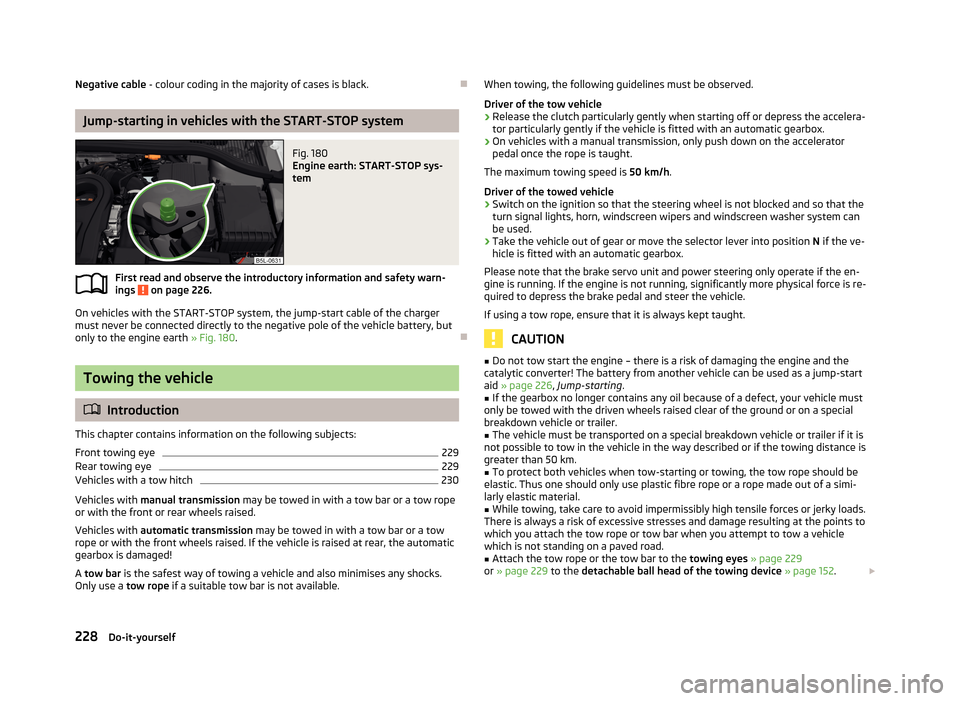
Fig. 180
Engine earth: START-STOP sys-
tem
First read and observe the introductory information and safety warn- ings on page 226.
On vehicles with the START-STOP system, the jump-start cable of the charger
must never be connected directly to the negative pole of the vehicle battery, but
only to the engine earth » Fig. 180.
Towing the vehicle
Introduction
This chapter contains information on the following subjects:
Front towing eye
229
Rear towing eye
229
Vehicles with a tow hitch
230
Vehicles with manual transmission may be towed in with a tow bar or a tow rope
or with the front or rear wheels raised.
Vehicles with automatic transmission may be towed in with a tow bar or a tow
rope or with the front wheels raised. If the vehicle is raised at rear, the automatic
gearbox is damaged!
A tow bar is the safest way of towing a vehicle and also minimises any shocks.
Only use a tow rope if a suitable tow bar is not available.
When towing, the following guidelines must be observed.
Driver of the tow vehicle›
Release the clutch particularly gently when starting off or depress the accelera-
tor particularly gently if the vehicle is fitted with an automatic gearbox.
›
On vehicles with a manual transmission, only push down on the accelerator pedal once the rope is taught.
The maximum towing speed is 50 km/h.
Driver of the towed vehicle
›
Switch on the ignition so that the steering wheel is not blocked and so that the
turn signal lights, horn, windscreen wipers and windscreen washer system can be used.
›
Take the vehicle out of gear or move the selector lever into position N if the ve-
hicle is fitted with an automatic gearbox.
Please note that the brake servo unit and power steering only operate if the en-
gine is running. If the engine is not running, significantly more physical force is re- quired to depress the brake pedal and steer the vehicle.
If using a tow rope, ensure that it is always kept taught.
CAUTION
■ Do not tow start the engine – there is a risk of damaging the engine and the
catalytic converter! The battery from another vehicle can be used as a jump-start aid » page 226 , Jump-starting .■
If the gearbox no longer contains any oil because of a defect, your vehicle must
only be towed with the driven wheels raised clear of the ground or on a special
breakdown vehicle or trailer.
■
The vehicle must be transported on a special breakdown vehicle or trailer if it is
not possible to tow in the vehicle in the way described or if the towing distance is
greater than 50 km.
■
To protect both vehicles when tow-starting or towing, the tow rope should be
elastic. Thus one should only use plastic fibre rope or a rope made out of a simi-
larly elastic material.
■
While towing, take care to avoid impermissibly high tensile forces or jerky loads.
There is always a risk of excessive stresses and damage resulting at the points to which you attach the tow rope or tow bar when you attempt to tow a vehicle
which is not standing on a paved road.
■
Attach the tow rope or the tow bar to the towing eyes » page 229
or » page 229 to the detachable ball head of the towing device » page 152 .
228Do-it-yourself
Page 241 of 266
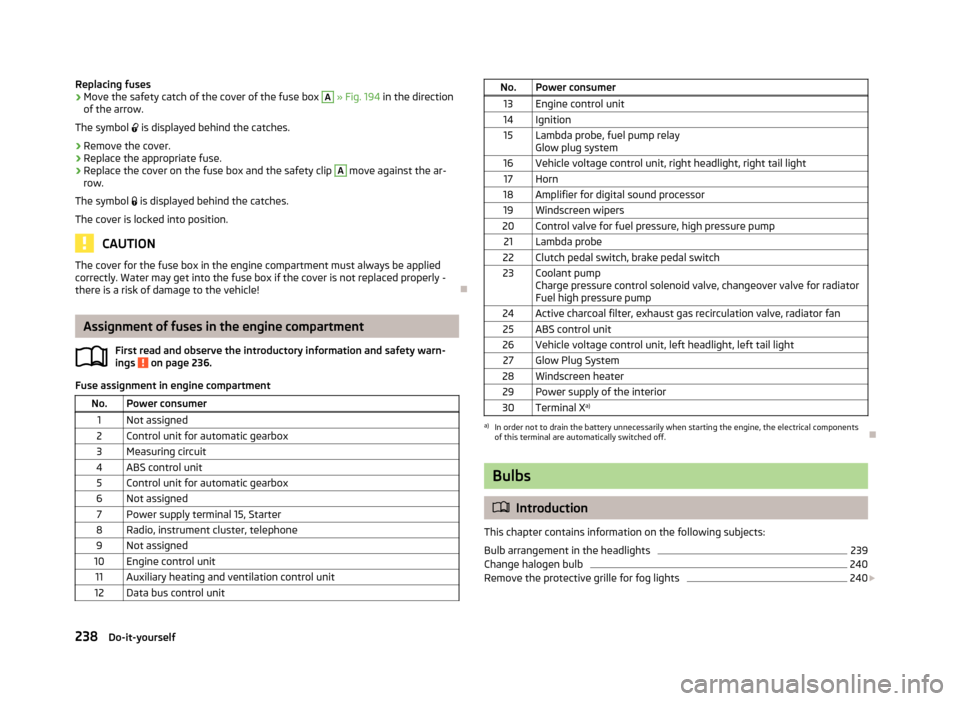
Replacing fuses›Move the safety catch of the cover of the fuse box A » Fig. 194 in the direction
of the arrow.
The symbol is displayed behind the catches.›
Remove the cover.
›
Replace the appropriate fuse.
›
Replace the cover on the fuse box and the safety clip
A
move against the ar-
row.
The symbol is displayed behind the catches.
The cover is locked into position.
CAUTION
The cover for the fuse box in the engine compartment must always be applied
correctly. Water may get into the fuse box if the cover is not replaced properly -
there is a risk of damage to the vehicle!
Assignment of fuses in the engine compartment
First read and observe the introductory information and safety warn-ings
on page 236.
Fuse assignment in engine compartment
No.Power consumer1Not assigned2Control unit for automatic gearbox3Measuring circuit4ABS control unit5Control unit for automatic gearbox6Not assigned7Power supply terminal 15, Starter8Radio, instrument cluster, telephone9Not assigned10Engine control unit11Auxiliary heating and ventilation control unit12Data bus control unitNo.Power consumer13Engine control unit14Ignition15Lambda probe, fuel pump relay
Glow plug system16Vehicle voltage control unit, right headlight, right tail light17Horn18Amplifier for digital sound processor19Windscreen wipers20Control valve for fuel pressure, high pressure pump21Lambda probe22Clutch pedal switch, brake pedal switch23Coolant pump
Charge pressure control solenoid valve, changeover valve for radiator
Fuel high pressure pump24Active charcoal filter, exhaust gas recirculation valve, radiator fan25ABS control unit26Vehicle voltage control unit, left headlight, left tail light27Glow Plug System28Windscreen heater29Power supply of the interior30Terminal X a)a)
In order not to drain the battery unnecessarily when starting the engine, the electrical components
of this terminal are automatically switched off.
Bulbs
Introduction
This chapter contains information on the following subjects:
Bulb arrangement in the headlights
239
Change halogen bulb
240
Remove the protective grille for fog lights
240
238Do-it-yourself