AUX SKODA YETI 2017 Owner´s Manual
[x] Cancel search | Manufacturer: SKODA, Model Year: 2017, Model line: YETI, Model: SKODA YETI 2017Pages: 200, PDF Size: 28.93 MB
Page 148 of 200
CAUTION■The oil level must never be below range A » Fig. 161 – risk of damage to the
engine as well as to the exhaust system.■
If a top up with oil is not possible or the oil level is above range
A
,
Stop
driving! Switch off the engine and seek assistance from a specialist garage.
Note
Too low engine oil level is shown in the instrument cluster by the warning
light illuminating and also indicated by the message » page 33. Nevertheless,
we recommend checking the oil level on a regular basis using the dipstick.
Coolant
Introduction
This chapter contains information on the following subjects:
Checking and refilling
146
The coolant helps to keep the engine temperature down, and consists of wa- ter and coolant additive (with additives that protect the cooling system against
corrosion and prevent furring).
The proportion of coolant additive in the coolant must be 40 to 60 %.
The correct mix of water and coolant additive should be checked and if neces-
sary corrected by a specialist garage.
WARNING■ The following instructions must be followed at all times when working on
the engine compartment » page 142.■
Never open the end cover of the coolant expansion reservoir while the
engine is still warm. The cooling system is pressurised -There is a risk of
scalding or injury from splashes of coolant!
■
To protect against the coolant splashing, cover the cap with a cloth when
opening.
■
Coolant and coolant fumes are harmful - avoid contact with the coolant. If
the coolant comes into contact with the eye or skin, wash the affected area
with plenty of water for several minutes, and where appropriate seek medi-
cal help.
CAUTIONDo not cover the radiator and install any parts (e.g auxiliary lights.) in front of
the air intakes - There is a risk of the engine overheating.
Checking and refilling
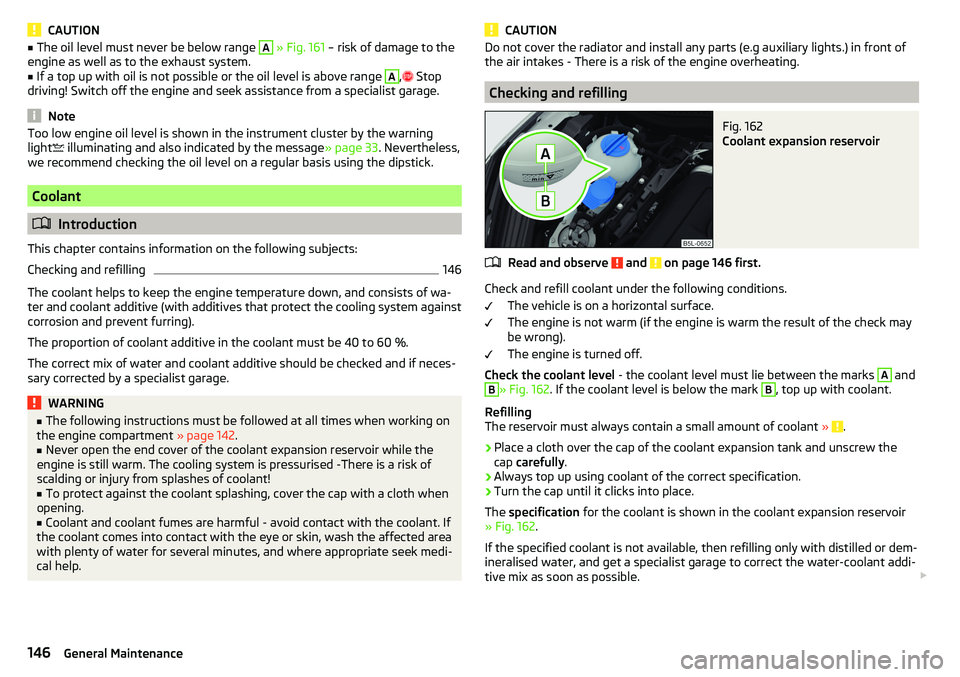
Fig. 162
Coolant expansion reservoir
Read and observe and on page 146 first.
Check and refill coolant under the following conditions.
The vehicle is on a horizontal surface.
The engine is not warm (if the engine is warm the result of the check may
be wrong).
The engine is turned off.
Check the coolant level - the coolant level must lie between the marks
A
and
B
» Fig. 162. If the coolant level is below the mark
B
, top up with coolant.
Refilling
The reservoir must always contain a small amount of coolant »
.
›
Place a cloth over the cap of the coolant expansion tank and unscrew the
cap carefully .
›
Always top up using coolant of the correct specification.
›
Turn the cap until it clicks into place.
The specification for the coolant is shown in the coolant expansion reservoir
» Fig. 162 .
If the specified coolant is not available, then refilling only with distilled or dem-
ineralised water, and get a specialist garage to correct the water-coolant addi-
tive mix as soon as possible.
146General Maintenance
Page 151 of 200
Battery discharge
If frequent short journeys are made, the vehicle battery does not recharge suf-
ficiently.
The battery capacity decreases at low temperatures.
If the vehicle is not used for longer than 3 to 4 weeks, disconnect the negative
terminal
of the battery or charge the battery completely with a very low
charging current.
Charging
Read and observe
and on page 148 first.
Only charge the battery when the ignition and all consumers are switched off.
Refer to the instructions of the charger manufacturer.
Charging
›
For vehicles withthe START-STOPsystem or aux. heating, connect the
ter-
minal of the charger on the battery’s pole, the
terminal of the charger to
the earth point of the engine » page 161.
›
For vehicles without the START-STOPsystem or aux. heating, connect the
charger terminals to the corresponding battery poles ( to
,
to
).
›
Plug the mains cable of the charger into the power socket and switch on the
device.
›
After charging has been successful: Switch off the charger and remove the
mains cable from the power socket.
›
Disconnect the terminals of the charger from the vehicle battery.
A charging current of 0.1 multiple of the total vehicle battery capacity (or low-
er) must be used until full charging is achieved.
WARNING■ When charging the vehicle battery, hydrogen is released - risk of explo-
sion. An explosion can be caused through sparking while unclamping or
loosening the cable plug.■
So-called“quick-charging” of the vehicle battery is dangerous and re-
quires a special charger and specialist knowledge. Therefore, have“Quick
loading” carried out by a specialist garage.
Disconnect/reconnect and change
Read and observe
and on page 148 first.
The new vehicle battery must have the same capacity, voltage, current and the
same size as the original Battery.
We recommend you have the battery replaced by a specialist garage.
›
To disconnect , switch off the ignition and disconnect the negative terminal
first
, then disconnect the positive terminal
.
›
When reconnecting the battery, reconnect the positive terminal
first, then
connect the negative terminal
.
After disconnecting and re-connecting the vehicle battery, the following func- tions or devices are partially or completely inoperative.
Function / deviceOperating measureWindows» page 55Panorama sliding/tilting roof» page 57Sun screen» page 57Time settings» page 39
CAUTION
■ Disconnect the battery only with the ignition and consumers turned off -
There is a risk of damaging the electrical system of the vehicle.■
Before disconnecting the battery, always close the electric windows and the
tilt/slide sunroof - otherwise the fitting units for these may malfunction.
■
Under no circumstances mix up the charging cables – There is a risk of fire.
Note
After disconnecting and reconnecting the vehicle battery, we recommend hav-
ing the vehicle checked by a specialist to ensure that the full functionality of
the vehicle is guaranteed.149Inspecting and replenishing
Page 166 of 200

Remote control and removable light - replacing thebattery/batteries
Introduction
This chapter contains information on the following subjects:
Key with fold-out key bit
164
Remote control of the auxiliary heating
164
Removable light
164
CAUTION
■ The replacement battery/batteries must comply with the original specifica-
tion.■
Pay attention to the correct polarity when changing the rechargeable batter-
ies.
Note
■ We recommend having the faulty battery/batteries replaced by a specialist
garage.■
If a key has an affixed decorative cover, this will be destroyed when the bat-
tery is replaced. A replacement cover can be purchased from a ŠKODA Partner.
Key with fold-out key bit
Fig. 182
Remove cover/take out battery
Read and observe
on page 164 first.
›
Pop out the key bit.
›
Press off the battery cover
A
» Fig. 182 with your thumb or by using a
screwdriver in the area of arrow
1
.
› Remove the discharged battery in the direction of arrow 2 and install a new
battery.›
Insert the battery cover
A
and press it down until it clicks audibly into place.
Remote control of the auxiliary heating
Fig. 183
Radio remote control: Battery
cover
Read and observe on page 164 first.
›
Insert a flat, blunt object, such as a coin, into the gap of the battery cov-
er » Fig. 183 .
›
Turn the cover away from the marked arrow direction up to the mark
A
to
open the cover.
›
Replace the battery and reinstall the battery cover.
›
Rotate the cover in the direction of the arrow marked up to the mark
B
to
close the cover.
Removable light
Fig. 184
Locking clip on the battery cover
Read and observe on page 164 first.
›
Take out the light in the direction of arrow » Fig. 184.
164Do-it-yourself
Page 170 of 200

Fuses in the dashboardFig. 193
Distribution board cover.
Read and observe and on page 167 first.
The fuses are located on the left side of the dash panel behind a cover.
Replacing fuses
›
Remove the ignition key, turn off the lights and all electrical consumers.
›
Insert a screwdriver into the opening in the cover in the direction of the ar-
row » Fig. 193 .
›
Remove the cover of the fuse box and remove.
›
Remove the plastic clip from the holder in the fuse box cover in the dash
panel.
›
Use the clip to pull the fuse out, then insert a new fuse.
›
Re-insert the cover of the fuse box .
›
Replace the bracket at the original position.
Fuse arrangement in the dashboard
Fig. 194
Fuses
Read and observe and on page 167 first.No.Consumer1Heating of the gearbox vent (diesel engine)
Automatic gearbox2Towing hitch - left light3Trailer device - electrical outlet4Instrument cluster control lever under the steering wheel, camera5Air blower for heating, radiator fan, air conditioning system, Clima-
tronic6Rear window wiper7emergency call8Towing hitch - right light9Interior lighting, rear fog light10Rain sensor, light switch, diagnostic socket11Left side front headlight12Right side front headlight13Radio14Central control system, engine management system15Light switch16All-wheel drive17KESSY, steering lock18Diagnostic connector, engine control system, brake sensor, four-
wheel drive, START-STOP19ABS, ESP, switch for tyre air pressure control, parking aid, switch for
OFF ROAD mode, START STOP button20Airbag21Variable Service Interval - WIV, reversing lamps, dimmable mirrors,
pressure sensor, telephone preparation, air mass meter, headlamp
levelling and swivelling headlights22Instrument cluster, electromechanical power steering, databus23Central locking, boot lid24Electric windows - Rear25Rear window heater, auxiliary heating and ventilation26Power socket in the boot 168Do-it-yourself
Page 171 of 200

No.Consumer27Panoramic tilt / slide sunroof, electric operation of sun blinds28Fuel pump, injectors, AdBlue®
heating29Electric windows - front, outside mirror - Heating, fold-in function,
Adjusting the mirror surface3012 volt power outlet - front and rear31Headlight cleaning system32Heated front seats33Heating, air conditioning, Climatronic, remote control for auxiliary
heating34Car alarm, reserve horn35Automatic gearbox36Tow hitch
Fuses in the engine compartment
Fig. 195
Distribution board cover.
Read and observe and on page 167 first.
With some equipment, the battery cover must be opened before removing the
cover for the fuse box » page 148.
Replacing fuses
›
Turn the securing bracket
A
» Fig. 195 in direction of the arrow. The symbol
is displayed behind the catches. .
›
Remove the cover.
›
Replace the appropriate fuse.
›
Replace the cover on the fuse box and the safety clip
A
move against the
arrow. The symbol is displayed behind the catches .
CAUTIONThe cover of the fuse box in the engine compartment must always be used
correctly, otherwise water may penetrate into the fuse box – there is a risk of
damage to the vehicle!
Fuse arrangement in the engine compartment
Fig. 196
Fuses
Read and observe and on page 167 first.
No.Consumer1Not assigned2Automatic gearbox, AdBlue control system3Battery data module4ABS5Automatic gearbox6Not assigned7Power supply for terminal 15, starter8Radio, instrument cluster, telephone9Not assigned10Engine control system11Aux. heating and ventilation12Databus13Engine control system14Ignition15Lambda probe, fuel pump, glow plug system16Right headlight, right taillight17Horn 169Fuses and light bulbs
Page 186 of 200
Index
A
ABS Operation
110
Warning light34
Acceptance and recycling of used vehicles
133
Accessories131
Adaptive headlight see xenon headlight
60
AdBlue141
Check level141
indicator light30
refill142
Adjusting Steering wheel
11
Adjusting seats manually68
Adjusting the seats10
Advice on tyre/wheel usage150
AFS Display messages
34
Warning light34
AHL see xenon headlight
60
Air-conditioning system Air outlet vents
96
Airbag
16
Adjustments and impairments to the airbag system
132
Deactivation19
Deployment17
Warning light36
Airbag system16
Air conditioning93
Air distribution control96
Climatronic94
Manual air conditioning94
Air distribution control96
Air outlet vents96
Alarm51
Trailer130
All-year tyres152
Alternator Warning light
32
Anti-lock braking system (ABS)110
Anti-theft alarm system51
Trailer130
Anti-theft wheel bolts157
Armrest Front
71
Ashtray78
Assist systems110
Auto Check Control30
Automatic drive Selector lever
106
Automatic driving light control60
Automatic gearbox Kickdown
108
Selector lever-emergency unlocking166
Selector lever lock107
Starting-off and driving108
Tiptronic107
Automatic shutdown of consumers147
Automatic transmission106
Selector lever lock107
AUX77
Auxiliary heating (auxiliary heating and ventila- tion)
97
Avoiding damage to your vehicle109
B
Bar with sliding hook
88
Battery Changing batteries for the removable light
164
Changing in key164
Replace the battery in the remote control in the auxiliary heating
164
Belts13
Belt tensioners15
Bluetooth See Owner's Manual Infotainment
6
Bonnet Closing
143
Opening143
Boot Class N1 vehicles
91
See boot lid53
Boot lid Automatic locking
53
Open/Close53
Warning light32
Brake Assist (HBA)111
Brake booster103
Brake fluid147
Check147
specification147
Brake pads New
103
Brake pedal (automatic transmission) Warning light
37
Brakes Brake booster
103
Brake fluid147
Braking and stabilisation systems110
Handbrake104
Information on braking103
Warning lights32
Brake system110
Breakdown kit159
Breakdown service see Help in an emergency
8
Bulbs Replacing
170
Buttons in the door Electric window
54
184Index
Page 190 of 200
LockIndividual settings50
Key48
Locking Central locking button
49
in case of emergency165
KESSY49
Remote control48
Lock steering lock100
Low tyre pressure warning refer to the tyre pressure monitoring
123
Luggage compartment Cover
89
Fastening elements87
Fastening with sliding hook88
Fixing nets87
Flexible storage compartment88
Floor covering on both sides88
Net partition89
Side compartments90
unlock manually165
Unlock the boot lid165
Variable loading floor91
Luggage compartment cover89
Luggage compartment lid52
Luggage Storage86
lighting90
removable lamp90
M
Main beam
59
Warning light37
Manual air conditioning Air distribution control
96
Controls94
Manual gear changing see gear changing
105
Materials defect liability4
MAXI DOT See MAXI DOT display
42
MAXI DOT displayMain menu42
Menu item assist systems43
Menu item Audio43
Menu item navigation42
Menu item phone43
Operation40
Settings43
Mechanical window Open and close
54
Media AUX
77
See Owner's Manual Infotainment6
USB77
Memory42
Memory Function for the seat69
MFD See multifunction display
41
Mirror66
Vanity64
mobility warranty5
Modes of the automatic transmission106
Modifications and technical alterations131
MSR110
Multifunction display Functions
41
Information41
Memory42
Multifunction pocket87
Multifunction steering wheel40
Multimedia holder80
N
N1
91
Nameplate175
Navigation See Owner's Manual Infotainment
6
Net partition89
Nets87
O
OFF ROAD
112
ABS113
EDS113
hill descent assistant113
operation112
Start-Off Assistant114
TCS113
OFF ROAD mode warning light
37
OFF ROAD Mode112
oil See engine oil
145
Oil Information messages
33
Oil changing Engine oil
144
Oil pressure Information messages
33
On-board computer See multifunction display
41
Operating weight176
Original accessories132
Overview Cockpit
27
Engine compartment144
Fuses167
Warning lights31
P
Park assist Departing from a parallel parking space
120
Parking120
Park Assist118
Automatic brake assist121
Malfunctions121
Operation118
Parking space search119
188Index
Page 191 of 200
Parking105
Park Assist118
Parking aid114
Reversing camera116
Parking aid114
Function114
Parking assistance Activation / deactivation
116
Display in the Infotainment display115
Parking lights58
Parking the vehicle See Parking
105
ParkPilot114
Parts replacement131
Passive safety Before setting off
10
Driving safety10
Passive Safety10
Pedals106
Footmats106
Petrol140
Phone See Owner's Manual Infotainment
6
Pocket in the luggage compartment87
Pockets83
Power limit Tilt / slide sunroof
56
Power steering33
Power windows Button in the front passenger door
54
Practical equipment storage net in the front centre console
81
Practical features Pockets
83
Storage compartment for umbrella82
Waste container80
Preheating unit35
R
Radio See Owner's Manual Infotainment/Radio
6
Raising the vehicle158
Rear fog light60
Warning light34
Rear seats71
Rear view camera Function keys
117
Orientation lines117
Rear View Camera Operation
117
Rear view mirror66
Rear window - heating63
refilling AdBlue
142
Refilling Coolant
146
Engine oil145
Windscreen washer fluid144
Reflective vest154
Refuelling139
Fuel139
Regulation Headlight beam
58
Remote Synchronization process
51
Remote control Aux. heating (aux. heating and ventilation)
99
Changing battery164
Unlocking/locking the vehicle48
Removable lamp90
Removable light Changing batteries
164
Removable through-loading bag84
Repairs and technical alterations131
Replace Battery
164
Replacing Bulbs170
Fuses167
Windscreen wiper blades166
Rev counter28
Reversing camera116
Rims150
Roof Load
93
Roof rack93
Running in Brake pads
103
Engine108
Tyres150
S
SafeLock
50
Safety10
Airbag16
Child safety21
Child safety seats21
Correct seated position10
Headrests73
ISOFIX24
TOP TETHER25
Safety belts rear middle seat
15
SAFE, SAFELOCK See SafeLock
50
Saving electrical energy108
Saving fuel108
SD-Card See Owner's Manual Infotainment
6
Seat belt height adjustment
14
Seat belts13
Belt tensioners15
fastening and unfastening14
189Index
Page 192 of 200
SeatbeltsInertia reels15
Seat belts Warning light
32
Seat electrical adjustment69
Seats Electrical adjustment
69
Folding front passenger seat70
front68
Front armrest71
Headrests73
Heating74
Manually adjusting68
Memory Function of the electrically adjustable seat
69
Rear71
Setting68
Storing in memory of remote control key70
Seats and head restraint68
Selector lever106
Selector lever control106
Selector lever lock Warning light
37
Service131
Service interval display44
Service intervals133, 134
Service Plan135
Setting Aux. heating (aux. heating and ventilation)
98
Headrests73
Mirror66, 67
Seat belt height14
Seats68
Setting the Clock
39
Shifting Tiptronic
107
Sliding/tilting roof Activating operation of the sunshade
57
Sunshade57
SmartGate Connection via Wi-Fi46
introductory information45
Password/PIN code change47
Setting47
Wi-Fi direct connection46
SmartLink See Owner's Manual Infotainment
6
SMS See Owner's Manual Infotainment
6
Snow chains153
Sockets 12-volt socket in the interior
79
12-volt socket in the luggage compartment79
Sound See Owner's Manual Infotainment
6
Spare wheel152
Removing / stowing156
Speed symbol152
Spoiler132
Stabilisation system110
Stability Control (ESC)110
START-STOP102
Jump-starting161
Manually deactivating/activating the system103
operation102
START-STOP system102
Start engine immobiliser
100
Starter button Lock / unlock the steering lock
100
Problems with the engine start102
Starting / stopping the engine101
Switch on/off ignition101
Starting engine Jump-starting
161
Starting the engine Jump-starting
161
Key101
Starter button101
Steering lock (KESSY system) Warning light33
Steering wheel Buttons
40
Correct posture11
setting11
Stopping See Parking
105
Stopping the engine Key
101
Starter button101
Storage75
Storage box90
Storage compartment Glasses compartment
81
in the front centre console76
in the rear centre console83
on the dash panel76
on the front passenger side82
under the front arm rest81
Storage compartments75
storage net in the front centre console81
Storing seats
69
Stowage compartments in the doors
76
Sunshade of the sliding/tilting roof57
Sun visors64
Switch Car battery
149
Switching the lights on and off58
Switch off Alarm
52
Switch off ignition101
Key101
Switch off TCS Warning light
34
Switch on ignition101
Key101
190Index