ECO mode SKODA YETI 2017 Owner´s Manual
[x] Cancel search | Manufacturer: SKODA, Model Year: 2017, Model line: YETI, Model: SKODA YETI 2017Pages: 200, PDF Size: 28.93 MB
Page 67 of 200
Note■Each time the ignition switches off for the third time, the position of the
windscreen wipers changes. This counteracts an early fatigue of the wiper rub-
bers.■
The windscreen washer nozzles for the windscreen are heated when the en-
gine is running and the outside temperature is less than +10 °C.
Windscreen wipers and washers
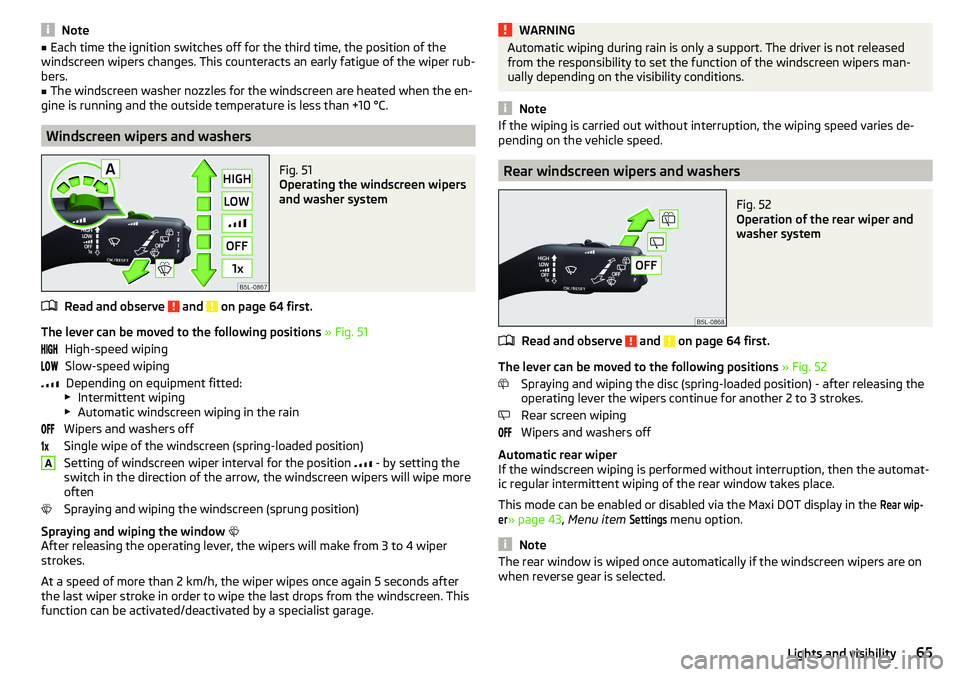
Fig. 51
Operating the windscreen wipers
and washer system
Read and observe and on page 64 first.
The lever can be moved to the following positions » Fig. 51
High-speed wiping Slow-speed wiping Depending on equipment fitted:
▶ Intermittent wiping
▶ Automatic windscreen wiping in the rain
Wipers and washers off
Single wipe of the windscreen (spring-loaded position)
Setting of windscreen wiper interval for the position
- by setting the
switch in the direction of the arrow, the windscreen wipers will wipe more
often
Spraying and wiping the windscreen (sprung position)
Spraying and wiping the window
After releasing the operating lever, the wipers will make from 3 to 4 wiper
strokes.
At a speed of more than 2 km/h, the wiper wipes once again 5 seconds after
the last wiper stroke in order to wipe the last drops from the windscreen. This
function can be activated/deactivated by a specialist garage.
AWARNINGAutomatic wiping during rain is only a support. The driver is not released
from the responsibility to set the function of the windscreen wipers man-
ually depending on the visibility conditions.
Note
If the wiping is carried out without interruption, the wiping speed varies de-
pending on the vehicle speed.
Rear windscreen wipers and washers
Fig. 52
Operation of the rear wiper and
washer system
Read and observe and on page 64 first.
The lever can be moved to the following positions » Fig. 52
Spraying and wiping the disc (spring-loaded position) - after releasing the
operating lever the wipers continue for another 2 to 3 strokes.
Rear screen wiping
Wipers and washers off
Automatic rear wiper
If the windscreen wiping is performed without interruption, then the automat-
ic regular intermittent wiping of the rear window takes place.
This mode can be enabled or disabled via the Maxi DOT display in the
Rear wip-er
» page 43 , Menu item
Settings
menu option.
Note
The rear window is wiped once automatically if the windscreen wipers are on
when reverse gear is selected.65Lights and visibility
Page 98 of 200

Air distribution controlRead and observe
on page 94 first.
The recirculation mode prevents contaminated outside air getting into the in-
terior of the vehicle. In recirculated air mode air is sucked out of the interior of
the vehicle and then fed back into the interior.
Heating and manual air conditioning system
›
To switch on press the
button.
›
To switch off , press the
button again.
If the air distribution control is set to position
when the recirculation modes
is switched on, the recirculated-air mode is switched off.
By pressing the button, the air recirculation also in this position can be
switched on again.
Climatronic (automatic air conditioning)
›
To turn the recirculation mode on, press the Symbol key
repeatedly until
the indicator light is lit on the left side of the button.
›
To activate the automatic recirculation mode, press the Symbol key
re-
peatedly until the indicator light is lit on the right side of the button.
The Climatronic can have a sensor that measures the air recirculation mode
and automatically turns on if there is an increased concentration of pollutants
in the incoming air.
When the pollutant concentration decreases to the normal level, the recircula-
ted air mode is automatically switched off.
If the air quality sensor does not automatically switch on the recirculated air mode, you can switch it on yourself by pressing the button . The indicator
light lights up in the button on the left side.
To turn off the air recirculation or to deactivate the automatic air recircula-
tion , press the
button of press the
symbol button repeatedly until the
warning lights in the button go out.
WARNINGThe recirculation system cannot be switched on for a longer period of time,
because no fresh air is fed through from the outside. “Stale air” may result
in fatigue in the driver and occupants, reduce attention levels and also
cause the windows to mist up. As soon as windows mist up, turn on the re-
circulation system immediately - There is a risk of accident!CAUTIONWe recommend not smoking in the vehicle when the recirculating air operation
is switched on. The smoke sucked from the interior is deposited on the evapo-
rator of the air conditioner. This produces a permanent odour when the air
conditioning system is operating which can only be eliminated through consid-
erable effort and expense (replacement of compressor).
Note
The Climatronic automatic air distribution control operates only if the outside
temperature is higher than approx. 2 °C.
Air outlet vents
Fig. 117
Air vents at the front
96Using the system
Page 100 of 200
Note■The aux. heating only switches the blower on, if it has achieved a coolant
temperature of approx. 50 °C.■
In the engine compartment, water vapour may form during the operation of
the aux. heating.
Switch on / off
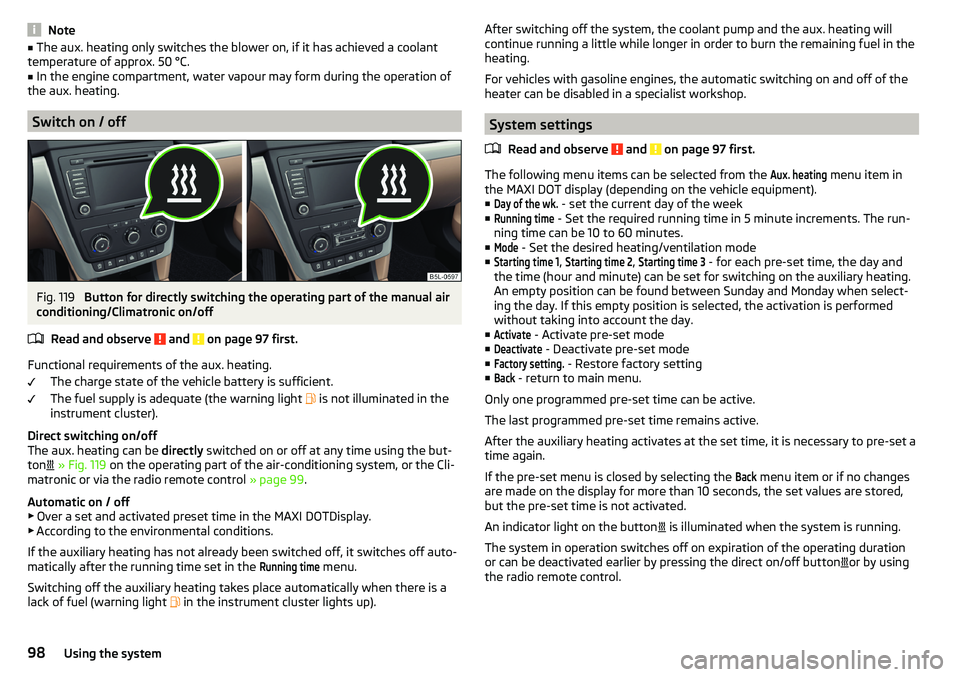
Fig. 119
Button for directly switching the operating part of the manual air
conditioning/Climatronic on/off
Read and observe
and on page 97 first.
Functional requirements of the aux. heating. The charge state of the vehicle battery is sufficient.
The fuel supply is adequate (the warning light is not illuminated in the
instrument cluster).
Direct switching on/off
The aux. heating can be directly switched on or off at any time using the but-
ton
» Fig. 119 on the operating part of the air-conditioning system, or the Cli-
matronic or via the radio remote control » page 99.
Automatic on / off ▶ Over a set and activated preset time in the MAXI DOTDisplay.
▶ According to the environmental conditions.
If the auxiliary heating has not already been switched off, it switches off auto-
matically after the running time set in the
Running time
menu.
Switching off the auxiliary heating takes place automatically when there is a
lack of fuel (warning light in the instrument cluster lights up).
After switching off the system, the coolant pump and the aux. heating will
continue running a little while longer in order to burn the remaining fuel in the
heating.
For vehicles with gasoline engines, the automatic switching on and off of the
heater can be disabled in a specialist workshop.
System settings
Read and observe
and on page 97 first.
The following menu items can be selected from the
Aux. heating
menu item in
the MAXI DOT display (depending on the vehicle equipment). ■
Day of the wk.
- set the current day of the week
■
Running time
- Set the required running time in 5 minute increments. The run-
ning time can be 10 to 60 minutes.
■
Mode
- Set the desired heating/ventilation mode
■
Starting time 1
,
Starting time 2
,
Starting time 3
- for each pre-set time, the day and
the time (hour and minute) can be set for switching on the auxiliary heating.
An empty position can be found between Sunday and Monday when select-
ing the day. If this empty position is selected, the activation is performed
without taking into account the day.
■
Activate
- Activate pre-set mode
■
Deactivate
- Deactivate pre-set mode
■
Factory setting.
- Restore factory setting
■
Back
- return to main menu.
Only one programmed pre-set time can be active.
The last programmed pre-set time remains active.
After the auxiliary heating activates at the set time, it is necessary to pre-set a time again.
If the pre-set menu is closed by selecting the
Back
menu item or if no changes
are made on the display for more than 10 seconds, the set values are stored,
but the pre-set time is not activated.
An indicator light on the button is illuminated when the system is running.
The system in operation switches off on expiration of the operating duration
or can be deactivated earlier by pressing the direct on/off button or by using
the radio remote control.
98Using the system
Page 103 of 200
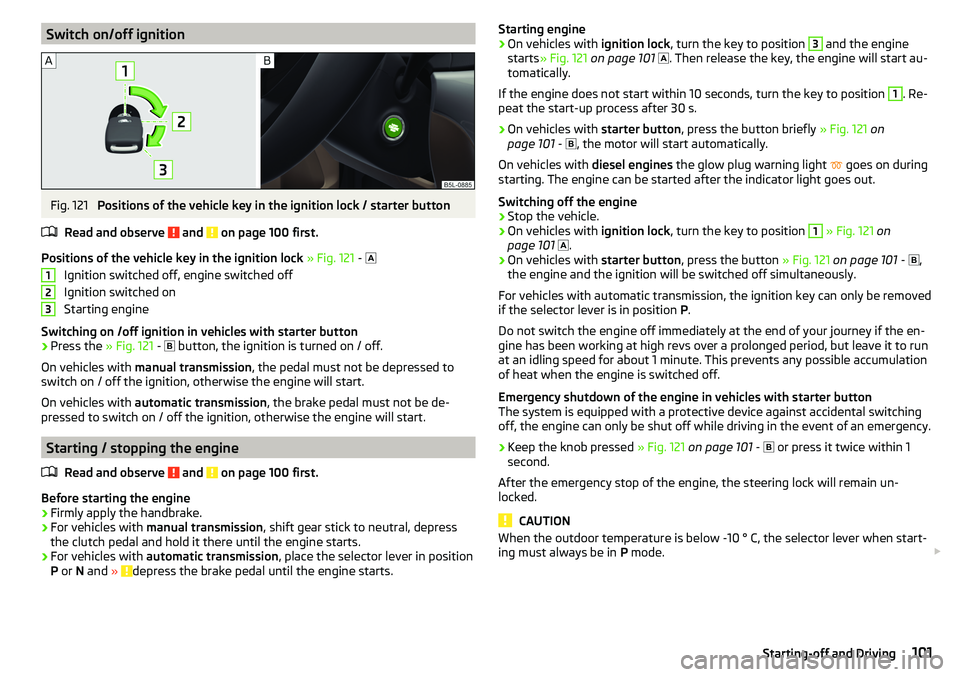
Switch on/off ignitionFig. 121
Positions of the vehicle key in the ignition lock / starter button
Read and observe
and on page 100 first.
Positions of the vehicle key in the ignition lock » Fig. 121 -
Ignition switched off, engine switched off
Ignition switched on
Starting engine
Switching on /off ignition in vehicles with starter button
›
Press the » Fig. 121 -
button, the ignition is turned on / off.
On vehicles with manual transmission , the pedal must not be depressed to
switch on / off the ignition, otherwise the engine will start.
On vehicles with automatic transmission , the brake pedal must not be de-
pressed to switch on / off the ignition, otherwise the engine will start.
Starting / stopping the engine
Read and observe
and on page 100 first.
Before starting the engine
›
Firmly apply the handbrake.
›
For vehicles with manual transmission , shift gear stick to neutral, depress
the clutch pedal and hold it there until the engine starts.
›
For vehicles with automatic transmission , place the selector lever in position
P or N and » depress the brake pedal until the engine starts.
123Starting engine›On vehicles with ignition lock, turn the key to position 3 and the engine
starts » Fig. 121 on page 101
. Then release the key, the engine will start au-
tomatically.
If the engine does not start within 10 seconds, turn the key to position 1
. Re-
peat the start-up process after 30 s.
›
On vehicles with starter button, press the button briefly » Fig. 121 on
page 101 -
, the motor will start automatically.
On vehicles with diesel engines the glow plug warning light
goes on during
starting. The engine can be started after the indicator light goes out.
Switching off the engine
›
Stop the vehicle.
›
On vehicles with ignition lock, turn the key to position
1
» Fig. 121 on
page 101
.
›
On vehicles with
starter button, press the button » Fig. 121 on page 101 -
,
the engine and the ignition will be switched off simultaneously.
For vehicles with automatic transmission, the ignition key can only be removed
if the selector lever is in position P.
Do not switch the engine off immediately at the end of your journey if the en-
gine has been working at high revs over a prolonged period, but leave it to run
at an idling speed for about 1 minute. This prevents any possible accumulation
of heat when the engine is switched off.
Emergency shutdown of the engine in vehicles with starter button
The system is equipped with a protective device against accidental switching
off, the engine can only be shut off while driving in the event of an emergency.
›
Keep the knob pressed » Fig. 121 on page 101 -
or press it twice within 1
second.
After the emergency stop of the engine, the steering lock will remain un-
locked.
CAUTION
When the outdoor temperature is below -10 ° C, the selector lever when start-
ing must always be in P mode. 101Starting-off and Driving
Page 109 of 200
Driving forwards - In mode D, the forward gears are automatically
changed according to the engine load, accelerator pedal actuation and
driving speed
Sports mode - the gear change takes place in the position S at higher en-
gine speeds than in mode D
Before changing to mode S from mode D, press the lock button in the di-
rection of arrow 1
» Fig. 128 on page 107 .
Selector lever lock
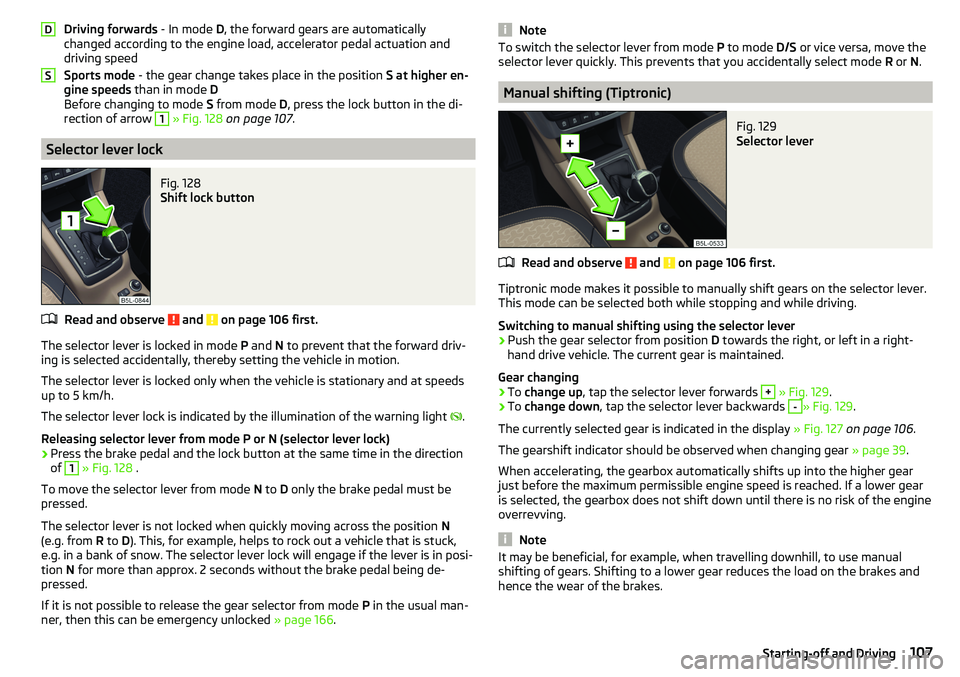
Fig. 128
Shift lock button
Read and observe and on page 106 first.
The selector lever is locked in mode P and N to prevent that the forward driv-
ing is selected accidentally, thereby setting the vehicle in motion.
The selector lever is locked only when the vehicle is stationary and at speeds
up to 5 km/h.
The selector lever lock is indicated by the illumination of the warning light .
Releasing selector lever from mode P or N (selector lever lock)
›
Press the brake pedal and the lock button at the same time in the direction
of
1
» Fig. 128 .
To move the selector lever from mode N to D only the brake pedal must be
pressed.
The selector lever is not locked when quickly moving across the position N
(e.g. from R to D). This, for example, helps to rock out a vehicle that is stuck,
e.g. in a bank of snow. The selector lever lock will engage if the lever is in posi-
tion N for more than approx. 2 seconds without the brake pedal being de-
pressed.
If it is not possible to release the gear selector from mode P in the usual man-
ner, then this can be emergency unlocked » page 166.
DSNoteTo switch the selector lever from mode P to mode D/S or vice versa, move the
selector lever quickly. This prevents that you accidentally select mode R or N.
Manual shifting (Tiptronic)
Fig. 129
Selector lever
Read and observe and on page 106 first.
Tiptronic mode makes it possible to manually shift gears on the selector lever.
This mode can be selected both while stopping and while driving.
Switching to manual shifting using the selector lever
›
Push the gear selector from position D towards the right, or left in a right-
hand drive vehicle. The current gear is maintained.
Gear changing
›
To change up , tap the selector lever forwards
+
» Fig. 129 .
›
To change down , tap the selector lever backwards
-
» Fig. 129.
The currently selected gear is indicated in the display » Fig. 127 on page 106 .
The gearshift indicator should be observed when changing gear » page 39.
When accelerating, the gearbox automatically shifts up into the higher gear
just before the maximum permissible engine speed is reached. If a lower gear
is selected, the gearbox does not shift down until there is no risk of the engine
overrevving.
Note
It may be beneficial, for example, when travelling downhill, to use manual
shifting of gears. Shifting to a lower gear reduces the load on the brakes and
hence the wear of the brakes.107Starting-off and Driving
Page 110 of 200
Starting-off and drivingRead and observe
and on page 106 first.
Moving off and pausing temporarily
›
Firmly depress and hold the brake pedal.
›
Start the engine.
›
Press the locking button and move the selector lever to the desired position
» page 106 .
›
Release the brake pedal and accelerate.
The selector lever position N does not have to be selected when stopping for a
short time (e.g. at a crossroads). However, the brake pedal should be de-
pressed, in order to prevent the vehicle from rolling.
Accelerating at maximum speed during the journey (kickdown function)
If the accelerator pedal is depressed while the vehicle is in forward drive mode,
the kick-down function is turned on.
The gear change is adjusted accordingly to achieve maximum acceleration.
Driving in neutral (“coasting”) 1)
When releasing the accelerator pedal, the vehicle moves without the braking
effect of the engine.
Operating conditions
▶ The selector lever is in the D position.
▶ In the MAXI DOT display in the menu
Settings
activate the menu item
Coasting
» page 42 .
▶ The vehicle is travelling at more than 20 km/h.
▶ No trailer or other accessory is connected to the trailer socket.
The gear is automatically inserted again by depressing either the accelerator
or brake pedal.
WARNINGRapid acceleration ( e.g. on slippery roads) can lead to a loss of control over
the vehicle – There is a risk of an accident!Running in and economical driving
Introduction
This chapter contains information on the following subjects:
Running in the engine
108
Tips on economical driving
108
Running in the engine
During the first 1 500 km, the driving style is decisive for successful the run-
ning in process is.
During the first 1 000 km , the engine should not be charged with more than
3/4 of the maximum permitted engine revs and without the trailer.
From about 1 000 to 1 500 km , the engine can be pushed up to the maximum
permitted engine speed.
Tips on economical driving
Fuel consumption depends on the driving style, road and weather conditions,
and similar such factors.
For an economical driving style, the following instructions must be observed. ▶ Avoid unnecessary acceleration and braking.
▶ Engage the recommended gear » page 39.
▶ Avoid full throttle and high speeds.
▶ Reduce idling.
▶ Avoid short distances.
▶ Ensure the correct tyre inflation pressure is maintained » page 151.
▶ Avoid unnecessary ballast.
▶ Remove the roof rack before driving if it is not needed.
▶ Only turn on electrical consumers (e.g. seat heating) for as long as necessary.
▶ Briefly ventilate before turning on the cooling system, do not use the cooling
system with the windows open.
▶ Do not leave windows open at high speeds.
1)
This function is only valid for some engines.
108Driving
Page 111 of 200
Avoiding damage to your vehicle
Introduction
This chapter contains information on the following subjects:
Driving Tips
109
Driving through water
109
Driving Tips
Only drive on roads and terrain that are appropriate to the vehicle parameters
» page 175 , Technical data .
The driver is always responsible for deciding whether the vehicle can cope
with the conditions and the terrain.
When travelling off paved roads, we recommend activating the OFF ROAD
mode » page 112 .
WARNING■
Adjust the speed and driving style to the current visibility, weather, road
and traffic conditions. Too high a speed or an erroneous manoeuvre may
cause serious injury and damage to the vehicle.■
Combustible objects such as dry leaves or twigs caught under the base of
the vehicle could ignite on hot vehicle parts - risk of fire!
CAUTION
■ Pay attention to the ground clearance of the vehicle! When driving over ob-
jects which are larger than the ground clearance, the vehicle can get damaged.■
Any objects that get trapped under the vehicle floor must be removed as
soon as possible. These items can cause damage to the vehicle (e.g. to parts of
the fuel or brake system).
Driving through waterFig. 130
Maximum permissible water lev-
el when driving through water
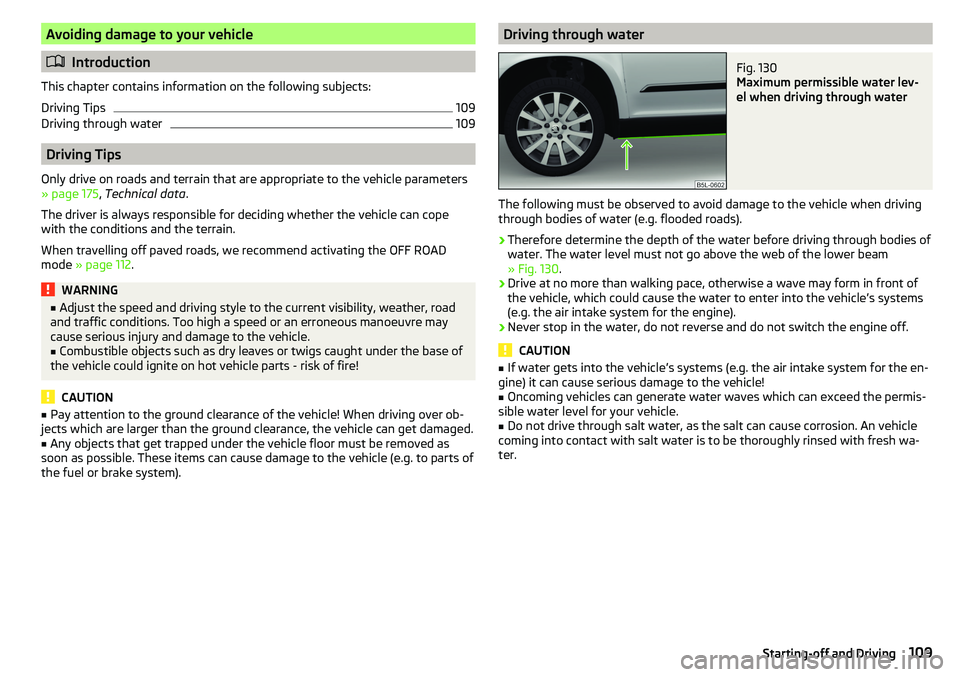
The following must be observed to avoid damage to the vehicle when driving
through bodies of water (e.g. flooded roads).
›
Therefore determine the depth of the water before driving through bodies of
water. The water level must not go above the web of the lower beam
» Fig. 130 .
›
Drive at no more than walking pace, otherwise a wave may form in front of
the vehicle, which could cause the water to enter into the vehicle’s systems
(e.g. the air intake system for the engine).
›
Never stop in the water, do not reverse and do not switch the engine off.
CAUTION
■ If water gets into the vehicle’s systems (e.g. the air intake system for the en-
gine) it can cause serious damage to the vehicle!■
Oncoming vehicles can generate water waves which can exceed the permis-
sible water level for your vehicle.
■
Do not drive through salt water, as the salt can cause corrosion. An vehicle
coming into contact with salt water is to be thoroughly rinsed with fresh wa-
ter.
109Starting-off and Driving
Page 114 of 200
The HHC is active on gradients upwards up 5% if the driver door is closed. HHC
is only ever active on slopes when in forward or reverse start off.
Trailer stabilization system (TSA)
Read and observe
on page 110 first.
The TSA helps the combination stable in situations where the trailer sways
and then the whole trailer combination.
TSA brakes the individual wheels of the towing vehicle in order to damp the rocking motion of the entire vehicle combination.
The following conditions are required for the correct TSA function. The trailer was shipped from the factory or purchased from the ŠKODA
genuine accessories.
The trailer is electrically connected to the towing vehicle via the trailer
socket.
The TCS is activated.
The speed is greater than 60 km/h.
Further information » page 124, Towing device and trailer .
OFF ROAD Mode
Introduction
This chapter contains information on the following subjects:
Operation
112
Hill Descent Assistant
113
TCSOFF ROAD
113
EDS OFF ROAD
113
ABS OFF ROAD
113
Start-Off Assistant
114
The OFF ROAD mode includes several features that help to overcome difficult
navigable routes when travelling on non-paved roads.
But even with OFF ROAD mode activated, your vehicle is never a true SUV.
WARNING■ The general information relating to the use of assistance systems must
be observed » page 110, in section General information .■
A lack of fuel can cause irregular engine running or cause the engine to
shut down. This would lead the OFF ROAD mode to lose its effectiveness -
risk of accident!
CAUTION
■ The OFF ROAD mode is not designed for the use on common roads.■All four wheels must be fitted with the same tyres approved by the
ŠKODA AUTO to ensure theOFF ROAD mode operates correctly.
Operation
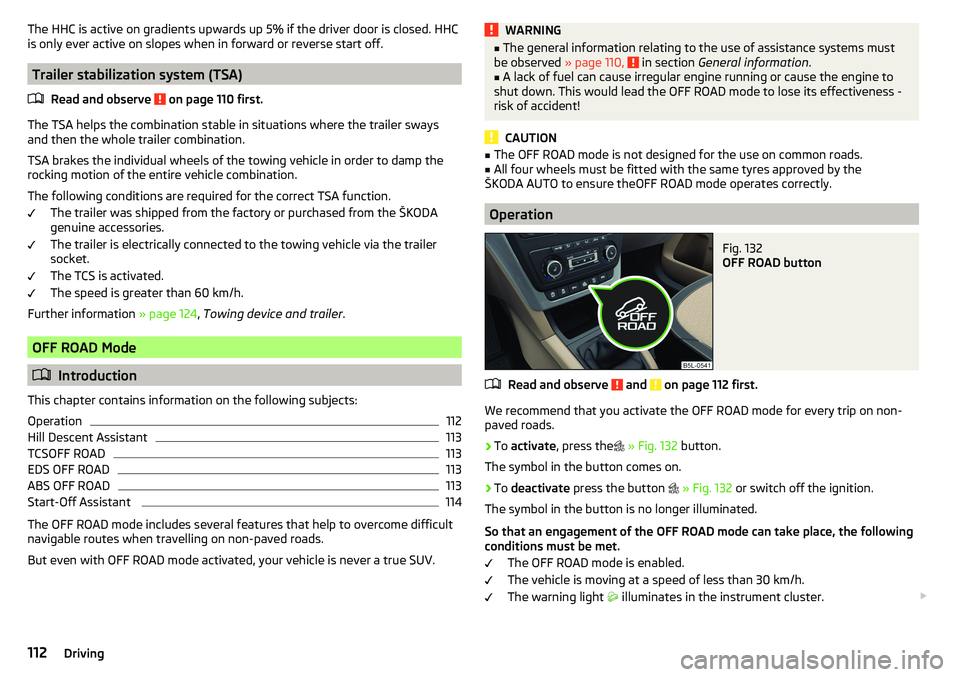
Fig. 132
OFF ROAD button
Read and observe and on page 112 first.
We recommend that you activate the OFF ROAD mode for every trip on non- paved roads.
›
To activate , press the
» Fig. 132 button.
The symbol in the button comes on.
›
To deactivate press the button
» Fig. 132 or switch off the ignition.
The symbol in the button is no longer illuminated.
So that an engagement of the OFF ROAD mode can take place, the following conditions must be met.
The OFF ROAD mode is enabled.
The vehicle is moving at a speed of less than 30 km/h. The warning light
illuminates in the instrument cluster.
112Driving
Page 115 of 200
The following functions are integrated in the OFF ROAD mode.
▶ Downhill Drive Support » page 113.
▶ TCS OFF ROAD » page 113.
▶ EDL OFF ROAD » page 113.
▶ ABS OFF ROAD » page 113.
▶ Start-Off Assistant » page 114.
Note
If the engine stalls while driving and is started again within 30 seconds, then
OFF ROAD mode will be automatically activated.
Hill Descent Assistant
Read and observe
and on page 112 first.
The hill descent assistant (hereinafter referred to as assistant), with its auto-
matic braking action on all wheels, ensures a constant speed is maintained on
a steep slope when driving forwards and reversing.
During an intervention of the Assistants, the warning light flashes in the in-
strument cluster.
The assistant is automatically engaged under the following conditions. The engine is running.
For vehicles with Manual transmission the shift lever is in the neutral po-
sition and or the 1st, 2nd, 3rd gear, or reverse gear is engaged.
On vehicles with an automatic transmission , the selector lever is in the R,
N, D, S position or in the Tiptronic position.
The downhill gradient is at least 10 % (when driving over sleepers, the lim-
it can briefly drop to 8 %).
Neither the accelerator nor the brake pedal is operated.
Driving speed
Initiate the downhill decent at a reasonable speed up to 30 km / h the hill de-
scent assist maintains this speed when driving downhill constant.
The assistant can maintain constant speed of about 2 - 30 km / h.
If a forwards or reverse gear is engaged for vehicles with Manual transmis-
sion , the speed must be high enough to avoid stalling the engine.
By pressing the accelerator or brake pedal, the speed can be increased or re-
duced. This is true even if the shift lever is in the neutral position and the se-
lector lever in the N position. The engagement of the assistant is resumed af-
ter the pedal is released.WARNINGFor the correct operation of the assistant the road surface must be suffi-
ciently adherent. The assistant cannot properly fulfil its function on slushy
soil due to physical reasons (e.g. ice or mud). - there is a risk of an accident!
Note
During an active intervention of the assistant, the brake lights do not light up.
TCSOFF ROAD
Read and observe
and on page 112 first.
The ASR OFF ROAD makes starting and driving on an unpaved surface easier
as it partially allows wheel-spin.
Note
When disabled, the TCS » page 111 OFF ROAD mode works without the support
of the TCS OFF ROAD.
EDS OFF ROAD
Read and observe
and on page 112 first.
The EDS supports OFF ROAD vehicle traction when driving on a surface withdifferent grip under the drive wheels or when driving over bumps.
A spinning wheel or wheels are braked earlier and with more force than with
the intervention of the standard EDS system.
ABS OFF ROAD
Read and observe
and on page 112 first.
The ABS OFF ROAD supports the driver when braking on an unpaved surface
such as gravel, snow, etc.
The system generated by a controlled locking of the wheels braked wheel be-
fore a “wedge” of piled material, which shortens the braking distance.
113Assist systems
Page 119 of 200
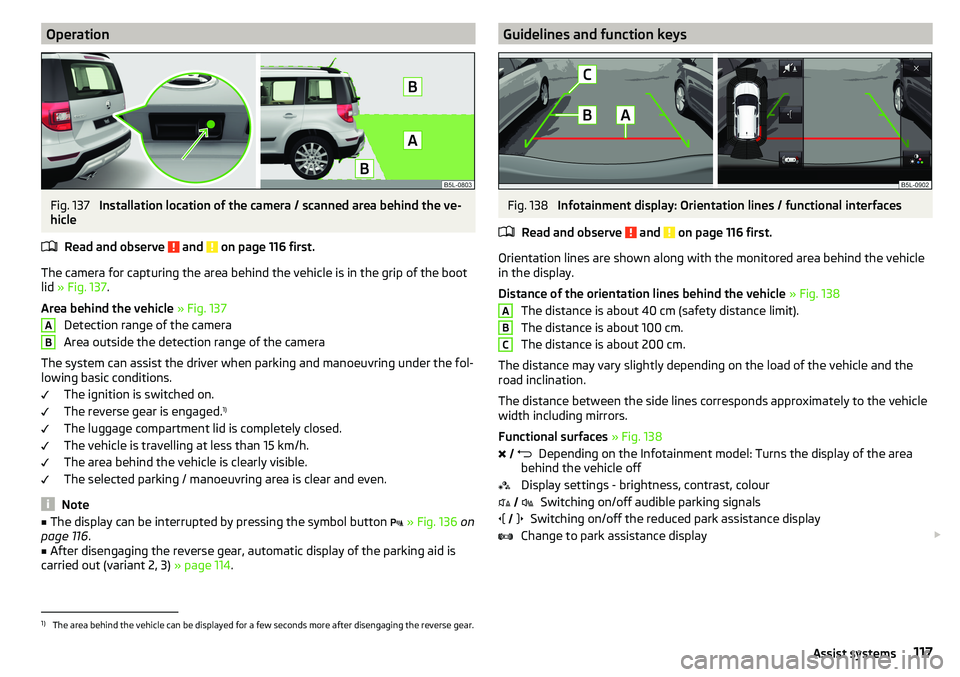
OperationFig. 137
Installation location of the camera / scanned area behind the ve-
hicle
Read and observe
and on page 116 first.
The camera for capturing the area behind the vehicle is in the grip of the boot
lid » Fig. 137 .
Area behind the vehicle » Fig. 137
Detection range of the camera
Area outside the detection range of the camera
The system can assist the driver when parking and manoeuvring under the fol- lowing basic conditions.
The ignition is switched on.
The reverse gear is engaged. 1)
The luggage compartment lid is completely closed.
The vehicle is travelling at less than 15 km/h.
The area behind the vehicle is clearly visible.
The selected parking / manoeuvring area is clear and even.
Note
■ The display can be interrupted by pressing the symbol button » Fig. 136 on
page 116 .■
After disengaging the reverse gear, automatic display of the parking aid is
carried out (variant 2, 3) » page 114.
ABGuidelines and function keysFig. 138
Infotainment display: Orientation lines / functional interfaces
Read and observe
and on page 116 first.
Orientation lines are shown along with the monitored area behind the vehicle
in the display.
Distance of the orientation lines behind the vehicle » Fig. 138
The distance is about 40 cm (safety distance limit).
The distance is about 100 cm.
The distance is about 200 cm.
The distance may vary slightly depending on the load of the vehicle and the
road inclination.
The distance between the side lines corresponds approximately to the vehicle
width including mirrors.
Functional surfaces » Fig. 138
Depending on the Infotainment model: Turns the display of the area
behind the vehicle off
Display settings - brightness, contrast, colour Switching on/off audible parking signals
Switching on/off the reduced park assistance display
Change to park assistance display
ABC
1)
The area behind the vehicle can be displayed for a few seconds more after disengaging the reverse gear.
117Assist systems