infotainment SKODA YETI 2017 Owner´s Manual
[x] Cancel search | Manufacturer: SKODA, Model Year: 2017, Model line: YETI, Model: SKODA YETI 2017Pages: 200, PDF Size: 28.93 MB
Page 117 of 200

Fig. 134
Sampled areas and range of the
sensors
Read and observe and on page 114 first.
The system uses ultrasound waves to calculate the distance between the
bumper and an obstacle. The ultrasonic sensors are, depending on vehicle
equipment, located in the back or in the front bumper » Fig. 133.
Depending on the equipment, the following system variants are possible
» Fig. 134 .
▶ Variant 1: warns of obstacles in the areas
C
,
D
.
▶ Variant 2: warns of obstacles in the areas
A
,
B
,
C
,
D
.
▶ Variant 3: warns of obstacles in the areas
A
,
B
,
C
,
D
,
E
.
Approximate range of sensors (in cm)
Area » Fig. 134Variant 1
(4 sensors)Variant 2
(8 sensors)Variant 3
(12 sensors)A-120120B-6060C160160160D606060E--60
Audible signals
The interval between the acoustic signals becomes shorter as the clearance is
reduced. At a distance of approx. 30 cm, a continuous tone starts to sound -
danger zone. From this moment do not continue to move towards the obsta-
cle!
Towing a trailer
When towing, or when another accessory is connected to the trailer socket on-
ly the areas
A
and
B
» Fig. 134 are active in the system.
Note■
If with Version 3 vehicles not all fields around the vehicle are active after ac-
tivation the vehicle should be moved forwards or backwards.■
The signal tones for front obstacle recognition are factory-set to be higher
than for rear obstacle recognition.
■
The sound of the park-assist can be adjusted via the MAXI DOT display in the
Assistants
menu option » page 43.
Display in the Infotainment display
Fig. 135
Display
Read and observe and on page 114 first.
Functional interfaces and obstacle warning » Fig. 135
Change to rear-view camera display .
Switching off park assistant display. Switching audible parking signals on/off.
Message:
Look! Safe to move?
An area without detected obstacles is shown as a transparent segment.
An obstacle which is currently outside of the collision area is shown by the
yellow segment.
An obstacle in the collision zone is shown as an orange-coloured segment.
Stop moving in the direction of the obstacle!
ABC115Assist systems
Page 119 of 200
OperationFig. 137
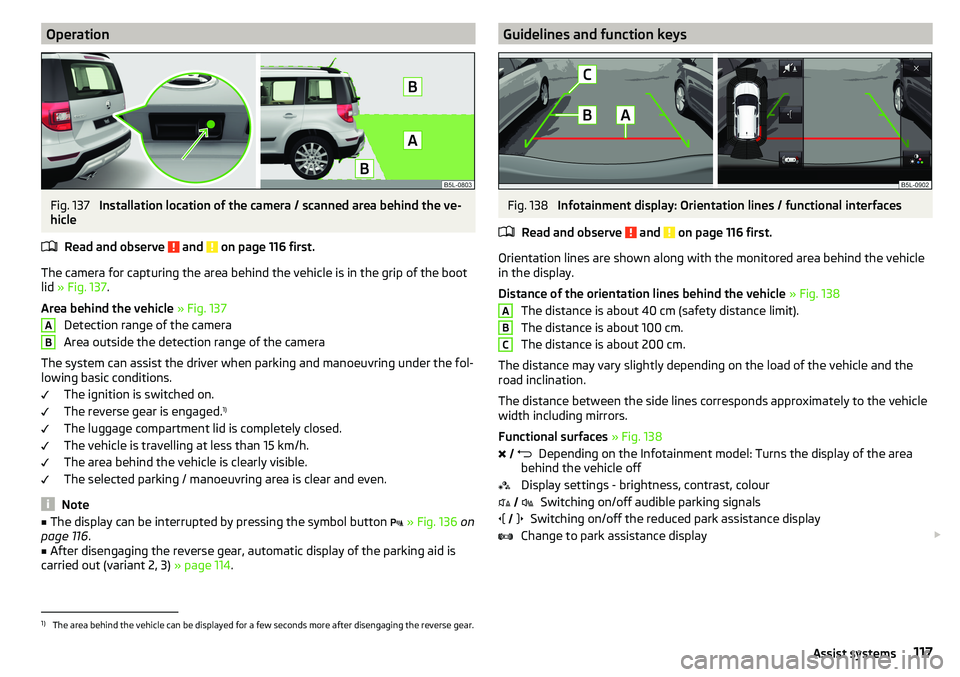
Installation location of the camera / scanned area behind the ve-
hicle
Read and observe
and on page 116 first.
The camera for capturing the area behind the vehicle is in the grip of the boot
lid » Fig. 137 .
Area behind the vehicle » Fig. 137
Detection range of the camera
Area outside the detection range of the camera
The system can assist the driver when parking and manoeuvring under the fol- lowing basic conditions.
The ignition is switched on.
The reverse gear is engaged. 1)
The luggage compartment lid is completely closed.
The vehicle is travelling at less than 15 km/h.
The area behind the vehicle is clearly visible.
The selected parking / manoeuvring area is clear and even.
Note
■ The display can be interrupted by pressing the symbol button » Fig. 136 on
page 116 .■
After disengaging the reverse gear, automatic display of the parking aid is
carried out (variant 2, 3) » page 114.
ABGuidelines and function keysFig. 138
Infotainment display: Orientation lines / functional interfaces
Read and observe
and on page 116 first.
Orientation lines are shown along with the monitored area behind the vehicle
in the display.
Distance of the orientation lines behind the vehicle » Fig. 138
The distance is about 40 cm (safety distance limit).
The distance is about 100 cm.
The distance is about 200 cm.
The distance may vary slightly depending on the load of the vehicle and the
road inclination.
The distance between the side lines corresponds approximately to the vehicle
width including mirrors.
Functional surfaces » Fig. 138
Depending on the Infotainment model: Turns the display of the area
behind the vehicle off
Display settings - brightness, contrast, colour Switching on/off audible parking signals
Switching on/off the reduced park assistance display
Change to park assistance display
ABC
1)
The area behind the vehicle can be displayed for a few seconds more after disengaging the reverse gear.
117Assist systems
Page 186 of 200
Index
A
ABS Operation
110
Warning light34
Acceptance and recycling of used vehicles
133
Accessories131
Adaptive headlight see xenon headlight
60
AdBlue141
Check level141
indicator light30
refill142
Adjusting Steering wheel
11
Adjusting seats manually68
Adjusting the seats10
Advice on tyre/wheel usage150
AFS Display messages
34
Warning light34
AHL see xenon headlight
60
Air-conditioning system Air outlet vents
96
Airbag
16
Adjustments and impairments to the airbag system
132
Deactivation19
Deployment17
Warning light36
Airbag system16
Air conditioning93
Air distribution control96
Climatronic94
Manual air conditioning94
Air distribution control96
Air outlet vents96
Alarm51
Trailer130
All-year tyres152
Alternator Warning light
32
Anti-lock braking system (ABS)110
Anti-theft alarm system51
Trailer130
Anti-theft wheel bolts157
Armrest Front
71
Ashtray78
Assist systems110
Auto Check Control30
Automatic drive Selector lever
106
Automatic driving light control60
Automatic gearbox Kickdown
108
Selector lever-emergency unlocking166
Selector lever lock107
Starting-off and driving108
Tiptronic107
Automatic shutdown of consumers147
Automatic transmission106
Selector lever lock107
AUX77
Auxiliary heating (auxiliary heating and ventila- tion)
97
Avoiding damage to your vehicle109
B
Bar with sliding hook
88
Battery Changing batteries for the removable light
164
Changing in key164
Replace the battery in the remote control in the auxiliary heating
164
Belts13
Belt tensioners15
Bluetooth See Owner's Manual Infotainment
6
Bonnet Closing
143
Opening143
Boot Class N1 vehicles
91
See boot lid53
Boot lid Automatic locking
53
Open/Close53
Warning light32
Brake Assist (HBA)111
Brake booster103
Brake fluid147
Check147
specification147
Brake pads New
103
Brake pedal (automatic transmission) Warning light
37
Brakes Brake booster
103
Brake fluid147
Braking and stabilisation systems110
Handbrake104
Information on braking103
Warning lights32
Brake system110
Breakdown kit159
Breakdown service see Help in an emergency
8
Bulbs Replacing
170
Buttons in the door Electric window
54
184Index
Page 189 of 200
G
Gear change Gear recommendation
39
Information on the selected gear39
Gear changing Gear stick
105
Genuine parts132
Glasses compartment81
GPS See Owner's Manual Infotainment
6
gradeability179
H
Handbrake
104
Warning light32
Hazard warning light system61
HBA111
Headrests73
Heating93
Air distribution control96
Controls94
Mirrors67
Seats74
Windscreen and rear window63
Help in an emergency8
HHC111
Hill Start Assist (HHC)111
Hitch124
Horn27
I
Ignition lock
101
Images See Owner's Manual Infotainment
6
Immobiliser100
In an emergency Changing a wheel
155
incline179
Inertia reel15
Information about the towing process162
Information system38
Door alarm38
Gear recommendation39
MAXI DOT display42
Multifunction display41
Service interval display44
Infotainment6
Instrument cluster28
Auto Check Control30
Display of the second speedometer39
see instrument cluster28
Warning lights31
instrument lighting29
interior light62
Interior lighting63
Interior monitor52
iPad holder84
ISOFIX24
J
Jack
155
- fit158
Jump-starting161
K
KESSY Unlocking/locking
49
key Switch on/off ignition
101
Key Changing battery
164
Lock48
Starting / stopping the engine101
Unlock48
L
Lamp failure Warning light
34
Lamps Warning light
34
LEAVING HOME61
lever Turn signal/main beam
59
Lever Cruise control
122
Operation of the information system40
Windscreen wipers65
light Flash
59
instruments29
Light Automatic driving light control
60
COMING HOME / LEAVING HOME61
Driving abroad62
Fog lights/rear fog light60
Fog lights with the CORNER function61
Headlight cleaning system66
Replacing bulbs170
Turn signal/main beam59
Xenon headlight60
lighting Luggage Storage
90
Lighting Interior lighting
62
Lights58
Cockpit62
Daylight running59
Dipped beam58
Hazard warning light system61
Headlight range control58
Parking lights58, 61
Switching on and off58
Warning lights31
Load176
187Index
Page 190 of 200
LockIndividual settings50
Key48
Locking Central locking button
49
in case of emergency165
KESSY49
Remote control48
Lock steering lock100
Low tyre pressure warning refer to the tyre pressure monitoring
123
Luggage compartment Cover
89
Fastening elements87
Fastening with sliding hook88
Fixing nets87
Flexible storage compartment88
Floor covering on both sides88
Net partition89
Side compartments90
unlock manually165
Unlock the boot lid165
Variable loading floor91
Luggage compartment cover89
Luggage compartment lid52
Luggage Storage86
lighting90
removable lamp90
M
Main beam
59
Warning light37
Manual air conditioning Air distribution control
96
Controls94
Manual gear changing see gear changing
105
Materials defect liability4
MAXI DOT See MAXI DOT display
42
MAXI DOT displayMain menu42
Menu item assist systems43
Menu item Audio43
Menu item navigation42
Menu item phone43
Operation40
Settings43
Mechanical window Open and close
54
Media AUX
77
See Owner's Manual Infotainment6
USB77
Memory42
Memory Function for the seat69
MFD See multifunction display
41
Mirror66
Vanity64
mobility warranty5
Modes of the automatic transmission106
Modifications and technical alterations131
MSR110
Multifunction display Functions
41
Information41
Memory42
Multifunction pocket87
Multifunction steering wheel40
Multimedia holder80
N
N1
91
Nameplate175
Navigation See Owner's Manual Infotainment
6
Net partition89
Nets87
O
OFF ROAD
112
ABS113
EDS113
hill descent assistant113
operation112
Start-Off Assistant114
TCS113
OFF ROAD mode warning light
37
OFF ROAD Mode112
oil See engine oil
145
Oil Information messages
33
Oil changing Engine oil
144
Oil pressure Information messages
33
On-board computer See multifunction display
41
Operating weight176
Original accessories132
Overview Cockpit
27
Engine compartment144
Fuses167
Warning lights31
P
Park assist Departing from a parallel parking space
120
Parking120
Park Assist118
Automatic brake assist121
Malfunctions121
Operation118
Parking space search119
188Index
Page 191 of 200
Parking105
Park Assist118
Parking aid114
Reversing camera116
Parking aid114
Function114
Parking assistance Activation / deactivation
116
Display in the Infotainment display115
Parking lights58
Parking the vehicle See Parking
105
ParkPilot114
Parts replacement131
Passive safety Before setting off
10
Driving safety10
Passive Safety10
Pedals106
Footmats106
Petrol140
Phone See Owner's Manual Infotainment
6
Pocket in the luggage compartment87
Pockets83
Power limit Tilt / slide sunroof
56
Power steering33
Power windows Button in the front passenger door
54
Practical equipment storage net in the front centre console
81
Practical features Pockets
83
Storage compartment for umbrella82
Waste container80
Preheating unit35
R
Radio See Owner's Manual Infotainment/Radio
6
Raising the vehicle158
Rear fog light60
Warning light34
Rear seats71
Rear view camera Function keys
117
Orientation lines117
Rear View Camera Operation
117
Rear view mirror66
Rear window - heating63
refilling AdBlue
142
Refilling Coolant
146
Engine oil145
Windscreen washer fluid144
Reflective vest154
Refuelling139
Fuel139
Regulation Headlight beam
58
Remote Synchronization process
51
Remote control Aux. heating (aux. heating and ventilation)
99
Changing battery164
Unlocking/locking the vehicle48
Removable lamp90
Removable light Changing batteries
164
Removable through-loading bag84
Repairs and technical alterations131
Replace Battery
164
Replacing Bulbs170
Fuses167
Windscreen wiper blades166
Rev counter28
Reversing camera116
Rims150
Roof Load
93
Roof rack93
Running in Brake pads
103
Engine108
Tyres150
S
SafeLock
50
Safety10
Airbag16
Child safety21
Child safety seats21
Correct seated position10
Headrests73
ISOFIX24
TOP TETHER25
Safety belts rear middle seat
15
SAFE, SAFELOCK See SafeLock
50
Saving electrical energy108
Saving fuel108
SD-Card See Owner's Manual Infotainment
6
Seat belt height adjustment
14
Seat belts13
Belt tensioners15
fastening and unfastening14
189Index
Page 192 of 200
SeatbeltsInertia reels15
Seat belts Warning light
32
Seat electrical adjustment69
Seats Electrical adjustment
69
Folding front passenger seat70
front68
Front armrest71
Headrests73
Heating74
Manually adjusting68
Memory Function of the electrically adjustable seat
69
Rear71
Setting68
Storing in memory of remote control key70
Seats and head restraint68
Selector lever106
Selector lever control106
Selector lever lock Warning light
37
Service131
Service interval display44
Service intervals133, 134
Service Plan135
Setting Aux. heating (aux. heating and ventilation)
98
Headrests73
Mirror66, 67
Seat belt height14
Seats68
Setting the Clock
39
Shifting Tiptronic
107
Sliding/tilting roof Activating operation of the sunshade
57
Sunshade57
SmartGate Connection via Wi-Fi46
introductory information45
Password/PIN code change47
Setting47
Wi-Fi direct connection46
SmartLink See Owner's Manual Infotainment
6
SMS See Owner's Manual Infotainment
6
Snow chains153
Sockets 12-volt socket in the interior
79
12-volt socket in the luggage compartment79
Sound See Owner's Manual Infotainment
6
Spare wheel152
Removing / stowing156
Speed symbol152
Spoiler132
Stabilisation system110
Stability Control (ESC)110
START-STOP102
Jump-starting161
Manually deactivating/activating the system103
operation102
START-STOP system102
Start engine immobiliser
100
Starter button Lock / unlock the steering lock
100
Problems with the engine start102
Starting / stopping the engine101
Switch on/off ignition101
Starting engine Jump-starting
161
Starting the engine Jump-starting
161
Key101
Starter button101
Steering lock (KESSY system) Warning light33
Steering wheel Buttons
40
Correct posture11
setting11
Stopping See Parking
105
Stopping the engine Key
101
Starter button101
Storage75
Storage box90
Storage compartment Glasses compartment
81
in the front centre console76
in the rear centre console83
on the dash panel76
on the front passenger side82
under the front arm rest81
Storage compartments75
storage net in the front centre console81
Storing seats
69
Stowage compartments in the doors
76
Sunshade of the sliding/tilting roof57
Sun visors64
Switch Car battery
149
Switching the lights on and off58
Switch off Alarm
52
Switch off ignition101
Key101
Switch off TCS Warning light
34
Switch on ignition101
Key101
190Index
Page 194 of 200
Vehicle length178
Vehicle tool kit155
Vehicle width178
Vest154
VIN Vehicle Identification Number
175
Visibility63
Visors64
Voice Operation See Owner's Manual Infotainment
6
W
Warning lights
31
MAXI DOT display30
Warning of a low temperature37
Warning symbols MAXI DOT display
30
see Warning lights31
Warning triangle154
warning when speeding41
Warranty4
Waste container80
Water in the fuel filter30
Weather conditions131
Weights175, 176
Wheel bolts Anti-theft wheel bolts
157
Caps157
Loosening and tightening158
Wheels150
Full trim156
Load Index152
Snow chains153
Speed symbol152
Tyre age150
Tyre damage150
Tyre pressure151
Tyre storage150
unidirectional tyres150
Winter tyres152
Wi-Fi46
See Owner's Manual Infotainment6
Wi-Fi direct46
Window operation
53
Window operation53
Windscreen - heating63
Windscreen and rear window heating63
Windscreen washer fluid Refilling
144
Warning light37
Windscreen washer system64
Windscreen wipers and washers64
Activation65
Add fluid144
Automatic rear window wiper65
Operation65
Replacing the windscreen wiper blade167
Replacing the windscreen wiper blades166
Service position of the windscreen wiper arms 166
Winter operation
152
All-year tyres152
Car battery148
Diesel fuel140
Snow chains153
Winter tyres152
Winter tyres152
Wipers and washer Warning light for windscreen washer fluid level 37
Wiping interval
65
WLAN See Owner's Manual Infotainment
6
X
Xenon headlight
60
Xenon headlights Warning light
34
192Index