warning lights SKODA YETI 2017 Owner´s Manual
[x] Cancel search | Manufacturer: SKODA, Model Year: 2017, Model line: YETI, Model: SKODA YETI 2017Pages: 200, PDF Size: 28.93 MB
Page 65 of 200
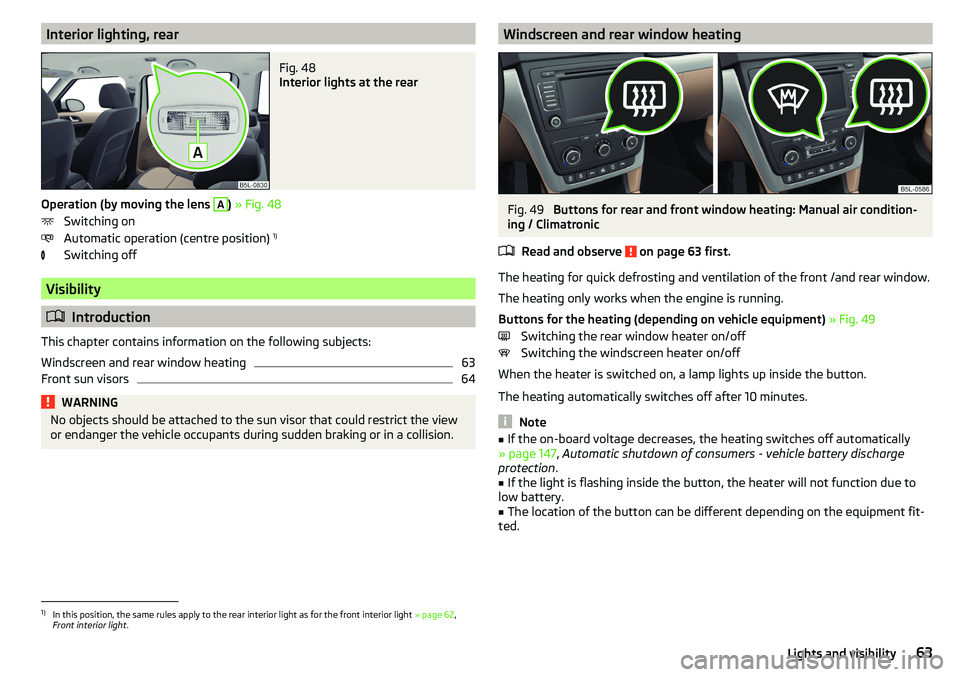
Interior lighting, rearFig. 48
Interior lights at the rear
Operation (by moving the lens
A
) » Fig. 48
Switching on
Automatic operation (centre position) 1)
Switching off
Visibility
Introduction
This chapter contains information on the following subjects:
Windscreen and rear window heating
63
Front sun visors
64WARNINGNo objects should be attached to the sun visor that could restrict the view
or endanger the vehicle occupants during sudden braking or in a collision.Windscreen and rear window heatingFig. 49
Buttons for rear and front window heating: Manual air condition-
ing / Climatronic
Read and observe
on page 63 first.
The heating for quick defrosting and ventilation of the front /and rear window.
The heating only works when the engine is running.
Buttons for the heating (depending on vehicle equipment) » Fig. 49
Switching the rear window heater on/off Switching the windscreen heater on/off
When the heater is switched on, a lamp lights up inside the button.
The heating automatically switches off after 10 minutes.
Note
■ If the on-board voltage decreases, the heating switches off automatically
» page 147 , Automatic shutdown of consumers - vehicle battery discharge
protection .■
If the light is flashing inside the button, the heater will not function due to
low battery.
■
The location of the button can be different depending on the equipment fit-
ted.
1)
In this position, the same rules apply to the rear interior light as for the front interior light » page 62,
Front interior light .
63Lights and visibility
Page 67 of 200
Note■Each time the ignition switches off for the third time, the position of the
windscreen wipers changes. This counteracts an early fatigue of the wiper rub-
bers.■
The windscreen washer nozzles for the windscreen are heated when the en-
gine is running and the outside temperature is less than +10 °C.
Windscreen wipers and washers
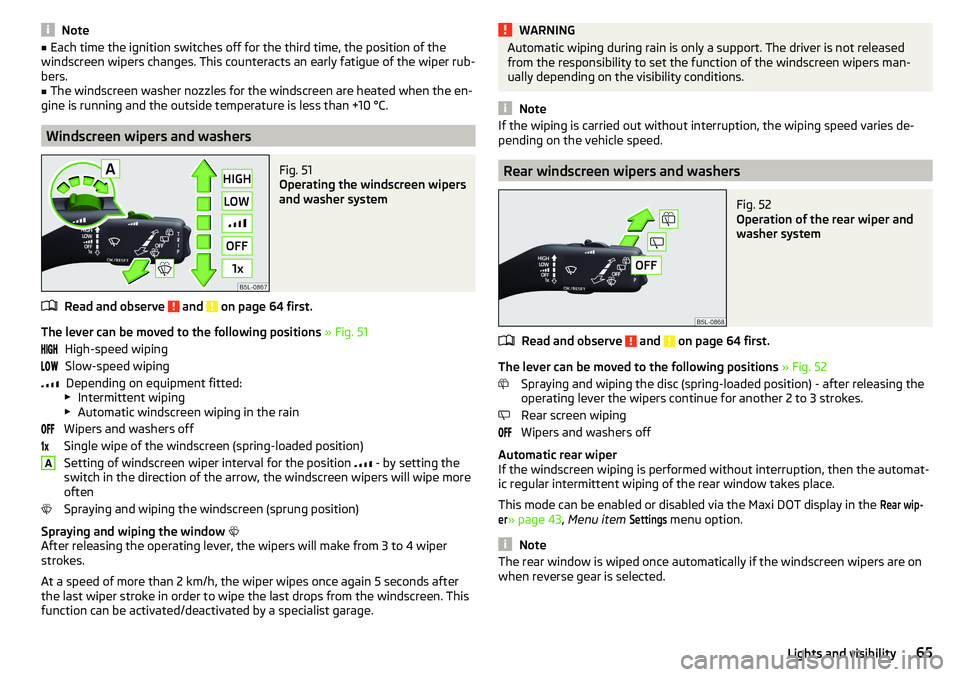
Fig. 51
Operating the windscreen wipers
and washer system
Read and observe and on page 64 first.
The lever can be moved to the following positions » Fig. 51
High-speed wiping Slow-speed wiping Depending on equipment fitted:
▶ Intermittent wiping
▶ Automatic windscreen wiping in the rain
Wipers and washers off
Single wipe of the windscreen (spring-loaded position)
Setting of windscreen wiper interval for the position
- by setting the
switch in the direction of the arrow, the windscreen wipers will wipe more
often
Spraying and wiping the windscreen (sprung position)
Spraying and wiping the window
After releasing the operating lever, the wipers will make from 3 to 4 wiper
strokes.
At a speed of more than 2 km/h, the wiper wipes once again 5 seconds after
the last wiper stroke in order to wipe the last drops from the windscreen. This
function can be activated/deactivated by a specialist garage.
AWARNINGAutomatic wiping during rain is only a support. The driver is not released
from the responsibility to set the function of the windscreen wipers man-
ually depending on the visibility conditions.
Note
If the wiping is carried out without interruption, the wiping speed varies de-
pending on the vehicle speed.
Rear windscreen wipers and washers
Fig. 52
Operation of the rear wiper and
washer system
Read and observe and on page 64 first.
The lever can be moved to the following positions » Fig. 52
Spraying and wiping the disc (spring-loaded position) - after releasing the
operating lever the wipers continue for another 2 to 3 strokes.
Rear screen wiping
Wipers and washers off
Automatic rear wiper
If the windscreen wiping is performed without interruption, then the automat-
ic regular intermittent wiping of the rear window takes place.
This mode can be enabled or disabled via the Maxi DOT display in the
Rear wip-er
» page 43 , Menu item
Settings
menu option.
Note
The rear window is wiped once automatically if the windscreen wipers are on
when reverse gear is selected.65Lights and visibility
Page 68 of 200
Headlight cleaning systemRead and observe
and on page 64 first.
The headlights are cleaned with every first and after every fifth spraying of the
windscreen under the following conditions.
The ignition is switched on.
The low beam is switched on.
The outside temperature is about -12° C to +39° C.
To ensure the correct functioning of the system, even in winter, this needs to be regularly cleared of snow and ice (e.g. using the de-icing spray).
Rear view mirror
Introduction
This chapter contains information on the following subjects:
Interior mirror dimming
66
Mirrors
67WARNINGExterior mirrors increase the field of view, however, they make objects ap-
pear smaller and further away. Therefore, use the interior mirror whenever
possible, for assessing the distances to the vehicles following behind.WARNING■ The mirrors with automatic dimming contain electrolyte fluid which may
leak if the mirror glass is broken - this can irritate skin, eyes and the respi-
ratory system.■
If your eyes or skin come into contact with the electrolytic fluid, immedi-
ately wash the affected area for a few minutes long with a lot of water. If
necessary get medical assistance.
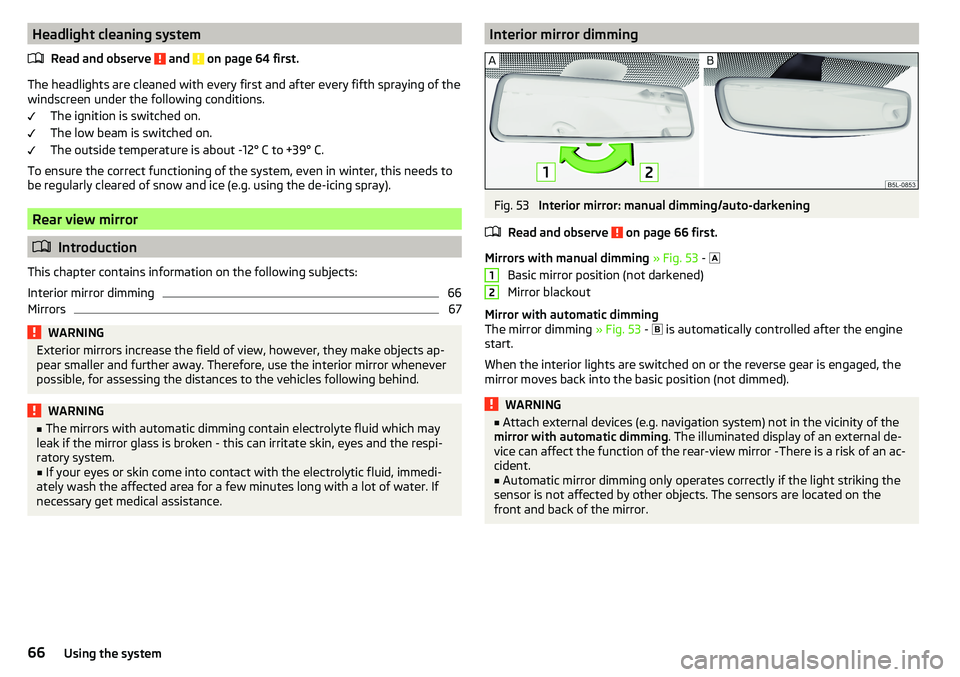
Interior mirror dimmingFig. 53
Interior mirror: manual dimming/auto-darkening
Read and observe
on page 66 first.
Mirrors with manual dimming » Fig. 53 -
Basic mirror position (not darkened)
Mirror blackout
Mirror with automatic dimming
The mirror dimming » Fig. 53 -
is automatically controlled after the engine
start.
When the interior lights are switched on or the reverse gear is engaged, the
mirror moves back into the basic position (not dimmed).
WARNING■ Attach external devices (e.g. navigation system) not in the vicinity of the
mirror with automatic dimming . The illuminated display of an external de-
vice can affect the function of the rear-view mirror -There is a risk of an ac-
cident.■
Automatic mirror dimming only operates correctly if the light striking the
sensor is not affected by other objects. The sensors are located on the
front and back of the mirror.
1266Using the system
Page 69 of 200
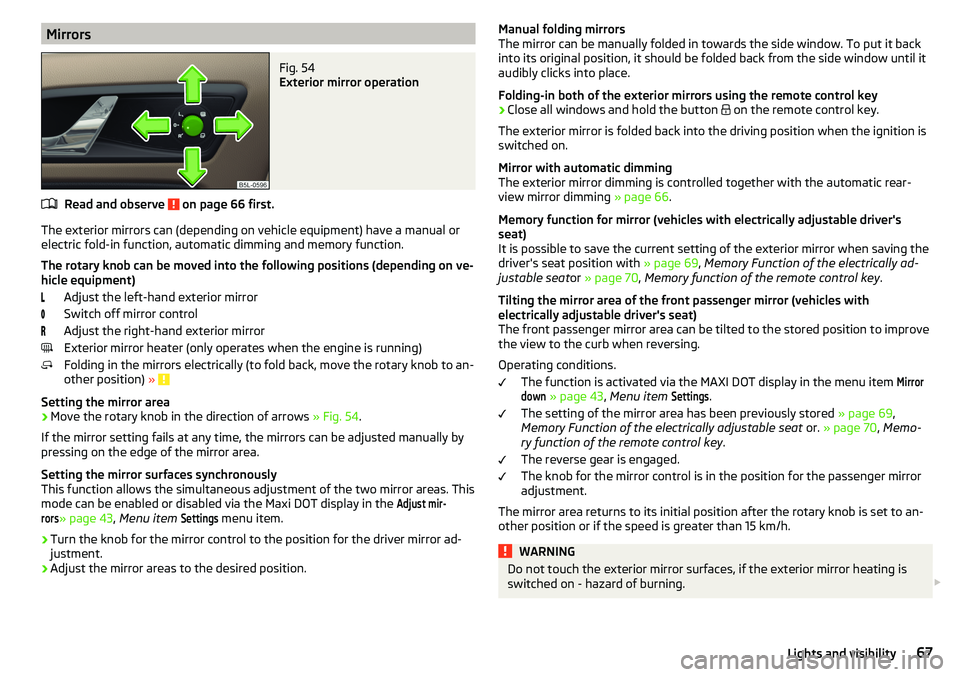
MirrorsFig. 54
Exterior mirror operation
Read and observe on page 66 first.
The exterior mirrors can (depending on vehicle equipment) have a manual orelectric fold-in function, automatic dimming and memory function.
The rotary knob can be moved into the following positions (depending on ve- hicle equipment)
Adjust the left-hand exterior mirror
Switch off mirror control
Adjust the right-hand exterior mirror
Exterior mirror heater (only operates when the engine is running)
Folding in the mirrors electrically (to fold back, move the rotary knob to an-
other position) »
Setting the mirror area
›
Move the rotary knob in the direction of arrows » Fig. 54.
If the mirror setting fails at any time, the mirrors can be adjusted manually by
pressing on the edge of the mirror area.
Setting the mirror surfaces synchronously
This function allows the simultaneous adjustment of the two mirror areas. This
mode can be enabled or disabled via the Maxi DOT display in the
Adjust mir-rors
» page 43 , Menu item
Settings
menu item.
›
Turn the knob for the mirror control to the position for the driver mirror ad-
justment.
›
Adjust the mirror areas to the desired position.
Manual folding mirrors
The mirror can be manually folded in towards the side window. To put it back
into its original position, it should be folded back from the side window until it
audibly clicks into place.
Folding-in both of the exterior mirrors using the remote control key›
Close all windows and hold the button
on the remote control key.
The exterior mirror is folded back into the driving position when the ignition is
switched on.
Mirror with automatic dimming
The exterior mirror dimming is controlled together with the automatic rear-
view mirror dimming » page 66.
Memory function for mirror (vehicles with electrically adjustable driver's
seat)
It is possible to save the current setting of the exterior mirror when saving the
driver's seat position with » page 69, Memory Function of the electrically ad-
justable seat or » page 70 , Memory function of the remote control key .
Tilting the mirror area of the front passenger mirror (vehicles with
electrically adjustable driver's seat)
The front passenger mirror area can be tilted to the stored position to improve the view to the curb when reversing.
Operating conditions. The function is activated via the MAXI DOT display in the menu item
Mirrordown
» page 43 , Menu item
Settings
.
The setting of the mirror area has been previously stored » page 69,
Memory Function of the electrically adjustable seat or. » page 70 , Memo-
ry function of the remote control key .
The reverse gear is engaged.
The knob for the mirror control is in the position for the passenger mirror
adjustment.
The mirror area returns to its initial position after the rotary knob is set to an-
other position or if the speed is greater than 15 km/h.
WARNINGDo not touch the exterior mirror surfaces, if the exterior mirror heating is
switched on - hazard of burning. 67Lights and visibility
Page 76 of 200

Removing/installingFig. 68
Removing/installing the headrest
›
To remove the headrest, pull it out of the seat backrest up to the latch.
›
Press locking button
A
in the direction of arrow
1,
and pull out the head re-
straint in the direction of arrow
2
» Fig. 68 .
›
To insert the headrest, push the headrest into the seat backrest in the direc-
tion of arrow
3
until the locking button clicks into place.
Front seat heating
Fig. 69
Buttons for heating the front
seats
The seat backrests and seats can be heated electrically.
Seat heating buttons » Fig. 69
Left seat heating
Right seat heating
›
To turn on the heating with maximum heat , press the key
or
button.
By repeatedly pressing the button, the heat is turned down until it is com-
pletely switched off . The level of the seat heating is indicated by the number
of illuminated warning lights in the switch.
The seat heating only operates when the engine is running.WARNINGIf you are sensitive to pain and/or temperature, e.g. through medication,
paralysis or because of chronic illness (e.g. diabetes), we recommend not to
use the seat heating. If the seat heating is used, we recommend to make
regular breaks in your journey when driving long distances, so that the
body can recuperate from the stress of the journey. Please consult your
doctor, who can evaluate your specific condition.
CAUTION
The following instructions should be observed to avoid damage to the seats.■Do not kneel on the seats or otherwise apply concentrated pressure to them.■
Do not switch on the heating for unoccupied seats.
■
Do not switch on the heating for seats which have objects on them (e.g. a
child seat, bag or similar).
■
Do not switch on the heating for seats which have seat covers or protective
covers on them.
Note
If the on-board voltage decreases, the seat heating switches off automatically
» page 147 , Automatic shutdown of consumers - vehicle battery discharge
protection .74Using the system
Page 96 of 200

WARNING■The blower should always be on to prevent the windows from misting.
Otherwise there is a risk of accident.■
Under certain circumstances, air at a temperature of about 5 °C can flow
out of the vents when the cooling system is switched on.
Note
■ The air inlet in front of the windscreen must be free of e.g. ice, snow or
leaves to ensure that the heating and cooling system operates properly.■
After switching on the cooling Condensation from the evaporator of the air
conditioning may drip down and form a puddle below the vehicle. This is not a
leak!
■
If the coolant temperature is too high, the cooling system is switched off to
ensure that the engine cools down.
Heating and manual air conditioning
Fig. 115
Controls of the heating / air conditioning
Read and observe
on page 94 first.
Individual functions can be set or switched on by turning the dial or pressing
the corresponding button » Fig. 115.
Set the temperature
▶ Reduce the temperature /
Increase the temperature
Setting the fan speed (level 0: Fan off, level 4: high-speed)
Set the direction of the air outlet » page 96
Switching the cooling system on/off
Switch on/off the rear window heater » page 63
ABCSwitch the aux. heating and ventilation on/off » page 98
Switch recirculation on/off » page 96
When the function is switched on, the indicator light in the button lights up.
Information on cooling system
After pressing the button
the indicator light on the button lights up, even if
not all the conditions for the cooling system have been met. The cooling sys-
tem starts to work as soon as the following conditions have been met
» page 93 .
Note
To ensure adequate thermal comfort, during operation of the manual air condi-
tioning there could be an increase in the engine idle speed in some circum-
stances.
Climatronic (automatic air conditioning)
Fig. 116
Controls the Climatronic
Read and observe
on page 94 first.
Individual functions can be set or switched on by turning the dial or pressing
the corresponding button » Fig. 116.
Adjust the temperature for the left side (or for both sides)
▶ Reduce the temperature /
Increase the temperature
Interior temperature sensor
Depending on equipment fitted:
▶ Switching the windscreen heater on/off
» page 63
▶ Switch the aux. heating and ventilation on/off
» page 98
Adjust the temperature for the right side ▶ Reduce the temperature /
Increase the temperature
ABCD94Using the system
Page 97 of 200

Adjust the blower speed
▶ Increase speed
▶ Decrease speed
Switching the airflow to the windscreen on and off
Air flow to the windows
Air flow to the upper body
Air flow in the footwell Switch the automatic recirculation on/off » page 96
Switch on/off the rear window heater » page 63
Switching automatic mode on » page 95
Switch the Climatronic system off
Switching the cooling system on/off Switch the temperature setting in Dual mode on/off
When the function is switched on, the indicator light in the button lights up.
After the cooling system is switched off, only the ventilation function remains
active whereby the minimum temperature that can be reached is the outside
temperature.
Setting temperature
The interior temperature for the left and right side can be set separately or to-
gether.
The temperature for both sides, is set by turning the knob A
» Fig. 116 (the
indicator light in the button is not illuminated).
The temperature for the right side is adjusted by turning the knob
D
(the in-
dicator light in the button is lit).
The temperature for the left side is adjusted by turning the knob
A
(the indi-
cator light in the button is lit).
At a temperature setting below 18 ° C at the start of the numerical scale, the
symbol will illuminate, Climatronic is using
Maximum cooling performance.
At a temperature setting above 26 ° C at the end of the numerical scale, the
symbol will illuminate, Climatronic is using
maximum heat output.
There is no automatic temperature control in the two end positions. In the
range between 18 °C to 26 °C, an automatic temperature control takes place.
Controlling blower
The Climatronic system controls the blower stages automatically in line with
the interior temperature. However, the blower stages can be manually adap-
ted to suit your particular needs.
If the blower speed is reduced to a minimum, Climatronic is switched off.
The set blower speed is displayed above the button
when the respective
number of indicator lights come on.
CAUTION
Do not cover the interior temperature sensor H » Fig. 116 - the function of the
Climatronic could be impaired.
Note
■ If the windscreen mists up, press the button . Press the button once
the windscreen has demisted.■
In order to ensure adequate thermal comfort, there may be an increase in en-
gine idle speed during operation of the Climatronic in some circumstances.
Climatronic - automatic operation
Read and observe
on page 94 first.
The automatic mode is used in order to maintain a constant temperature and
to demist the windows in the interior of the car.
If the warning light in the top right corner of the button
lights up, the Cli-
matronic operates in “HIGH”-mode.
Upon pressing the
button again, the Climatronic switches to “LOW”-mode
and the indicator light in the top left corner lights up. The Climatronic uses on-
ly in this mode the lower blower speed. However taking into account the noise
level, this is more comfortable, yet be aware that the effectiveness of the air
conditioning system is reduced particularly if the vehicle is fully occupied.
By pressing the button
again, it is changed to “HIGH”-mode.
Automatic mode can be switched off by pressing one of the buttons for the air
distribution or by increasing/decreasing the blower speed. The temperature
regulation is continued.
Note
Climatronic is set to the “HIGH” mode at the factory.95Heating and ventilation
Page 98 of 200

Air distribution controlRead and observe
on page 94 first.
The recirculation mode prevents contaminated outside air getting into the in-
terior of the vehicle. In recirculated air mode air is sucked out of the interior of
the vehicle and then fed back into the interior.
Heating and manual air conditioning system
›
To switch on press the
button.
›
To switch off , press the
button again.
If the air distribution control is set to position
when the recirculation modes
is switched on, the recirculated-air mode is switched off.
By pressing the button, the air recirculation also in this position can be
switched on again.
Climatronic (automatic air conditioning)
›
To turn the recirculation mode on, press the Symbol key
repeatedly until
the indicator light is lit on the left side of the button.
›
To activate the automatic recirculation mode, press the Symbol key
re-
peatedly until the indicator light is lit on the right side of the button.
The Climatronic can have a sensor that measures the air recirculation mode
and automatically turns on if there is an increased concentration of pollutants
in the incoming air.
When the pollutant concentration decreases to the normal level, the recircula-
ted air mode is automatically switched off.
If the air quality sensor does not automatically switch on the recirculated air mode, you can switch it on yourself by pressing the button . The indicator
light lights up in the button on the left side.
To turn off the air recirculation or to deactivate the automatic air recircula-
tion , press the
button of press the
symbol button repeatedly until the
warning lights in the button go out.
WARNINGThe recirculation system cannot be switched on for a longer period of time,
because no fresh air is fed through from the outside. “Stale air” may result
in fatigue in the driver and occupants, reduce attention levels and also
cause the windows to mist up. As soon as windows mist up, turn on the re-
circulation system immediately - There is a risk of accident!CAUTIONWe recommend not smoking in the vehicle when the recirculating air operation
is switched on. The smoke sucked from the interior is deposited on the evapo-
rator of the air conditioner. This produces a permanent odour when the air
conditioning system is operating which can only be eliminated through consid-
erable effort and expense (replacement of compressor).
Note
The Climatronic automatic air distribution control operates only if the outside
temperature is higher than approx. 2 °C.
Air outlet vents
Fig. 117
Air vents at the front
96Using the system
Page 100 of 200
Note■The aux. heating only switches the blower on, if it has achieved a coolant
temperature of approx. 50 °C.■
In the engine compartment, water vapour may form during the operation of
the aux. heating.
Switch on / off
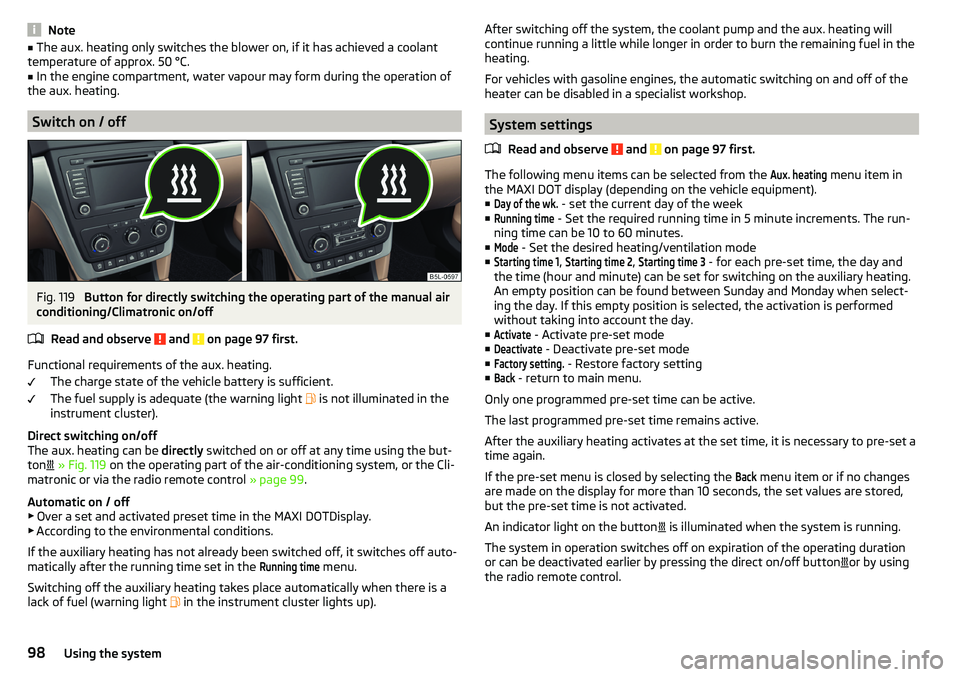
Fig. 119
Button for directly switching the operating part of the manual air
conditioning/Climatronic on/off
Read and observe
and on page 97 first.
Functional requirements of the aux. heating. The charge state of the vehicle battery is sufficient.
The fuel supply is adequate (the warning light is not illuminated in the
instrument cluster).
Direct switching on/off
The aux. heating can be directly switched on or off at any time using the but-
ton
» Fig. 119 on the operating part of the air-conditioning system, or the Cli-
matronic or via the radio remote control » page 99.
Automatic on / off ▶ Over a set and activated preset time in the MAXI DOTDisplay.
▶ According to the environmental conditions.
If the auxiliary heating has not already been switched off, it switches off auto-
matically after the running time set in the
Running time
menu.
Switching off the auxiliary heating takes place automatically when there is a
lack of fuel (warning light in the instrument cluster lights up).
After switching off the system, the coolant pump and the aux. heating will
continue running a little while longer in order to burn the remaining fuel in the
heating.
For vehicles with gasoline engines, the automatic switching on and off of the
heater can be disabled in a specialist workshop.
System settings
Read and observe
and on page 97 first.
The following menu items can be selected from the
Aux. heating
menu item in
the MAXI DOT display (depending on the vehicle equipment). ■
Day of the wk.
- set the current day of the week
■
Running time
- Set the required running time in 5 minute increments. The run-
ning time can be 10 to 60 minutes.
■
Mode
- Set the desired heating/ventilation mode
■
Starting time 1
,
Starting time 2
,
Starting time 3
- for each pre-set time, the day and
the time (hour and minute) can be set for switching on the auxiliary heating.
An empty position can be found between Sunday and Monday when select-
ing the day. If this empty position is selected, the activation is performed
without taking into account the day.
■
Activate
- Activate pre-set mode
■
Deactivate
- Deactivate pre-set mode
■
Factory setting.
- Restore factory setting
■
Back
- return to main menu.
Only one programmed pre-set time can be active.
The last programmed pre-set time remains active.
After the auxiliary heating activates at the set time, it is necessary to pre-set a time again.
If the pre-set menu is closed by selecting the
Back
menu item or if no changes
are made on the display for more than 10 seconds, the set values are stored,
but the pre-set time is not activated.
An indicator light on the button is illuminated when the system is running.
The system in operation switches off on expiration of the operating duration
or can be deactivated earlier by pressing the direct on/off button or by using
the radio remote control.
98Using the system
Page 101 of 200
Remote controlFig. 120
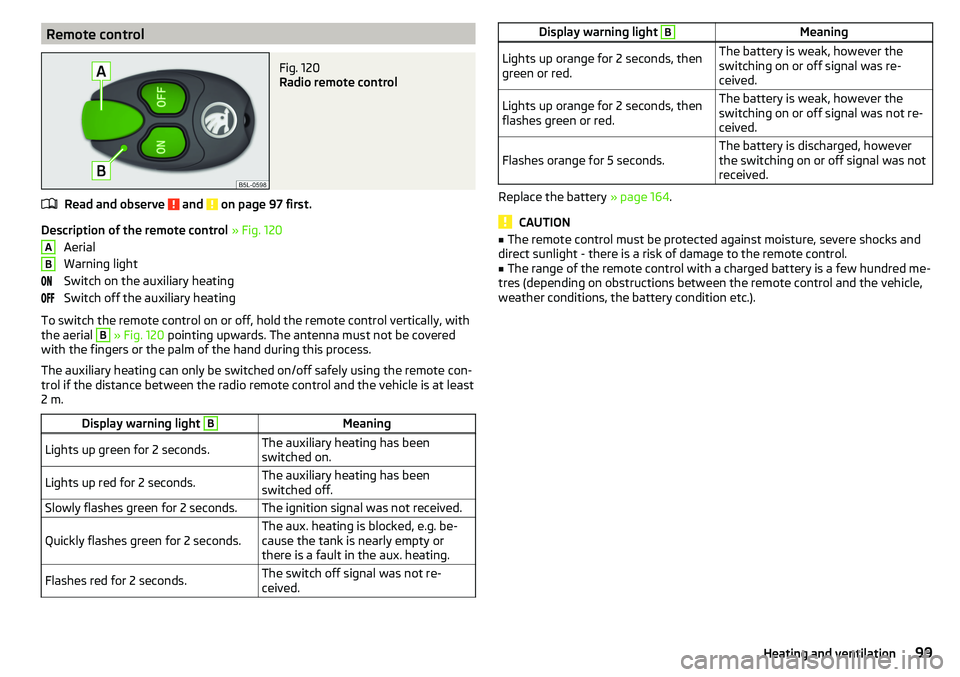
Radio remote control
Read and observe and on page 97 first.
Description of the remote control » Fig. 120
Aerial
Warning light
Switch on the auxiliary heating
Switch off the auxiliary heating
To switch the remote control on or off, hold the remote control vertically, with
the aerial
B
» Fig. 120 pointing upwards. The antenna must not be covered
with the fingers or the palm of the hand during this process.
The auxiliary heating can only be switched on/off safely using the remote con-
trol if the distance between the radio remote control and the vehicle is at least
2 m.
Display warning light BMeaningLights up green for 2 seconds.The auxiliary heating has been
switched on.Lights up red for 2 seconds.The auxiliary heating has been
switched off.Slowly flashes green for 2 seconds.The ignition signal was not received.Quickly flashes green for 2 seconds.The aux. heating is blocked, e.g. be-
cause the tank is nearly empty or
there is a fault in the aux. heating.Flashes red for 2 seconds.The switch off signal was not re-
ceived.ABDisplay warning light BMeaningLights up orange for 2 seconds, then
green or red.The battery is weak, however the
switching on or off signal was re-
ceived.Lights up orange for 2 seconds, then
flashes green or red.The battery is weak, however the
switching on or off signal was not re-
ceived.Flashes orange for 5 seconds.The battery is discharged, however
the switching on or off signal was not
received.
Replace the battery » page 164.
CAUTION
■
The remote control must be protected against moisture, severe shocks and
direct sunlight - there is a risk of damage to the remote control.■
The range of the remote control with a charged battery is a few hundred me-
tres (depending on obstructions between the remote control and the vehicle,
weather conditions, the battery condition etc.).
99Heating and ventilation