ignition SKODA YETI 2017 Owner´s Manual
[x] Cancel search | Manufacturer: SKODA, Model Year: 2017, Model line: YETI, Model: SKODA YETI 2017Pages: 200, PDF Size: 28.93 MB
Page 169 of 200
Attaching the windscreen wiper blade›Slide the windscreen wiper blade in the opposite direction to arrow 3 until it
locks into place. Check that the windscreen wiper blade is correctly attached.›
Fold the windscreen wiper arm back to the windscreen.
›
Turn on the ignition and press the lever in the direction of the arrow
» Fig. 189 .
The windscreen wiper arms move into the home position.
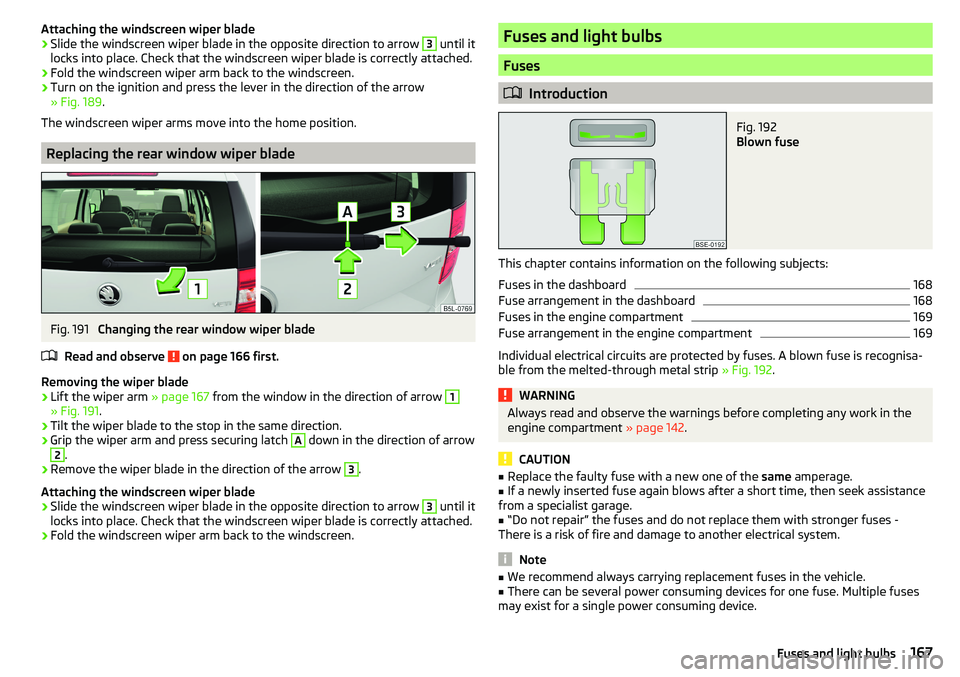
Replacing the rear window wiper blade
Fig. 191
Changing the rear window wiper blade
Read and observe
on page 166 first.
Removing the wiper blade
›
Lift the wiper arm » page 167 from the window in the direction of arrow
1
» Fig. 191.
›
Tilt the wiper blade to the stop in the same direction.
›
Grip the wiper arm and press securing latch
A
down in the direction of arrow
2
.
›
Remove the wiper blade in the direction of the arrow
3
.
Attaching the windscreen wiper blade
›
Slide the windscreen wiper blade in the opposite direction to arrow
3
until it
locks into place. Check that the windscreen wiper blade is correctly attached.
›
Fold the windscreen wiper arm back to the windscreen.
Fuses and light bulbs
Fuses
Introduction
Fig. 192
Blown fuse
This chapter contains information on the following subjects:
Fuses in the dashboard
168
Fuse arrangement in the dashboard
168
Fuses in the engine compartment
169
Fuse arrangement in the engine compartment
169
Individual electrical circuits are protected by fuses. A blown fuse is recognisa-
ble from the melted-through metal strip » Fig. 192.
WARNINGAlways read and observe the warnings before completing any work in the
engine compartment » page 142.
CAUTION
■
Replace the faulty fuse with a new one of the same amperage.■If a newly inserted fuse again blows after a short time, then seek assistance
from a specialist garage.■
“Do not repair” the fuses and do not replace them with stronger fuses -
There is a risk of fire and damage to another electrical system.
Note
■ We recommend always carrying replacement fuses in the vehicle.■There can be several power consuming devices for one fuse. Multiple fuses
may exist for a single power consuming device.167Fuses and light bulbs
Page 170 of 200

Fuses in the dashboardFig. 193
Distribution board cover.
Read and observe and on page 167 first.
The fuses are located on the left side of the dash panel behind a cover.
Replacing fuses
›
Remove the ignition key, turn off the lights and all electrical consumers.
›
Insert a screwdriver into the opening in the cover in the direction of the ar-
row » Fig. 193 .
›
Remove the cover of the fuse box and remove.
›
Remove the plastic clip from the holder in the fuse box cover in the dash
panel.
›
Use the clip to pull the fuse out, then insert a new fuse.
›
Re-insert the cover of the fuse box .
›
Replace the bracket at the original position.
Fuse arrangement in the dashboard
Fig. 194
Fuses
Read and observe and on page 167 first.No.Consumer1Heating of the gearbox vent (diesel engine)
Automatic gearbox2Towing hitch - left light3Trailer device - electrical outlet4Instrument cluster control lever under the steering wheel, camera5Air blower for heating, radiator fan, air conditioning system, Clima-
tronic6Rear window wiper7emergency call8Towing hitch - right light9Interior lighting, rear fog light10Rain sensor, light switch, diagnostic socket11Left side front headlight12Right side front headlight13Radio14Central control system, engine management system15Light switch16All-wheel drive17KESSY, steering lock18Diagnostic connector, engine control system, brake sensor, four-
wheel drive, START-STOP19ABS, ESP, switch for tyre air pressure control, parking aid, switch for
OFF ROAD mode, START STOP button20Airbag21Variable Service Interval - WIV, reversing lamps, dimmable mirrors,
pressure sensor, telephone preparation, air mass meter, headlamp
levelling and swivelling headlights22Instrument cluster, electromechanical power steering, databus23Central locking, boot lid24Electric windows - Rear25Rear window heater, auxiliary heating and ventilation26Power socket in the boot 168Do-it-yourself
Page 171 of 200

No.Consumer27Panoramic tilt / slide sunroof, electric operation of sun blinds28Fuel pump, injectors, AdBlue®
heating29Electric windows - front, outside mirror - Heating, fold-in function,
Adjusting the mirror surface3012 volt power outlet - front and rear31Headlight cleaning system32Heated front seats33Heating, air conditioning, Climatronic, remote control for auxiliary
heating34Car alarm, reserve horn35Automatic gearbox36Tow hitch
Fuses in the engine compartment
Fig. 195
Distribution board cover.
Read and observe and on page 167 first.
With some equipment, the battery cover must be opened before removing the
cover for the fuse box » page 148.
Replacing fuses
›
Turn the securing bracket
A
» Fig. 195 in direction of the arrow. The symbol
is displayed behind the catches. .
›
Remove the cover.
›
Replace the appropriate fuse.
›
Replace the cover on the fuse box and the safety clip
A
move against the
arrow. The symbol is displayed behind the catches .
CAUTIONThe cover of the fuse box in the engine compartment must always be used
correctly, otherwise water may penetrate into the fuse box – there is a risk of
damage to the vehicle!
Fuse arrangement in the engine compartment
Fig. 196
Fuses
Read and observe and on page 167 first.
No.Consumer1Not assigned2Automatic gearbox, AdBlue control system3Battery data module4ABS5Automatic gearbox6Not assigned7Power supply for terminal 15, starter8Radio, instrument cluster, telephone9Not assigned10Engine control system11Aux. heating and ventilation12Databus13Engine control system14Ignition15Lambda probe, fuel pump, glow plug system16Right headlight, right taillight17Horn 169Fuses and light bulbs
Page 172 of 200

No.Consumer18Music amplifier19Windscreen wipers20Control valve for fuel pressure, high pressure pump21Lambda probe22Clutch pedal switch, brake pedal switch23Coolant pump, loading pressure control valve, switchover valve for
radiator, fuel pump24Active charcoal filter, exhaust gas recirculation valve, radiator fan25ABS26Left front headlight, left taillight27Glow plug system28Windscreen heater29Power to the internal fuse carrier (fuses no. 24,27,31,32), electrically
adjustable seats30Terminal X a)a)
In order not to drain the battery unnecessarily when starting the engine, the electrical components of
this terminal are automatically switched off.
Bulbs
Introduction
This chapter contains information on the following subjects:
Bulb arrangement in the front headlights
171
Changing bulbs for low and main beam (Halogen headlights)
171
Remove protective guard for foglights
171
Protective grille for removing fog lights- plug for Park Assist sensor
172
Changing light bulbs for fog lights
172
Changing the bulb for the licence plate light
173
Removing/installing taillights
173
Replacing the bulbs in the taillight assembly
174
We recommend having bulbs replaced by a specialist garage or seeking other
expert help in the event of any uncertainties.
▶ Switch off the ignition and all of the lights before replacing a bulb.
▶ Faulty bulbs must only be replaced with the same type of bulbs. The designa-
tion is located on the light socket or the glass bulb.
We recommend having the headlight settings checked by a specialist garage after replacing a bulb in the low, high or fog beam.
In the case of failure of a Xenon gas discharge bulb or an LED diode, visit a
specialist garage.WARNING■ Always read and observe the warnings before completing any work in the
engine compartment » page 142.■
Accidents can be caused if the road in front of the vehicle is not suffi-
ciently illuminated and the vehicle cannot or can only be seen with difficul-
ty by other road users.
■
Bulbs H7 and H4 are pressurised and may burst when changed - there is a
risk of injury. We therefore recommended wearing gloves and safety
glasses when changing a bulb.
■
Do not carry out any work on the Xenon gas discharge lamps - risk of
death!
CAUTION
Do not take hold of the glass bulb with naked fingers (even the smallest
amount of dirt reduces the working life of the light bulb). Use a clean cloth,
napkin, or similar.
Note
■ This Owner's Manual only describes the replacement of bulbs where it is pos-
sible to replace the bulbs on your own without any complications arising. Other
bulbs must be replaced by a specialist garage.■
We recommend that a box of replacement bulbs always be carried in the ve-
hicle.
170Do-it-yourself
Page 189 of 200
G
Gear change Gear recommendation
39
Information on the selected gear39
Gear changing Gear stick
105
Genuine parts132
Glasses compartment81
GPS See Owner's Manual Infotainment
6
gradeability179
H
Handbrake
104
Warning light32
Hazard warning light system61
HBA111
Headrests73
Heating93
Air distribution control96
Controls94
Mirrors67
Seats74
Windscreen and rear window63
Help in an emergency8
HHC111
Hill Start Assist (HHC)111
Hitch124
Horn27
I
Ignition lock
101
Images See Owner's Manual Infotainment
6
Immobiliser100
In an emergency Changing a wheel
155
incline179
Inertia reel15
Information about the towing process162
Information system38
Door alarm38
Gear recommendation39
MAXI DOT display42
Multifunction display41
Service interval display44
Infotainment6
Instrument cluster28
Auto Check Control30
Display of the second speedometer39
see instrument cluster28
Warning lights31
instrument lighting29
interior light62
Interior lighting63
Interior monitor52
iPad holder84
ISOFIX24
J
Jack
155
- fit158
Jump-starting161
K
KESSY Unlocking/locking
49
key Switch on/off ignition
101
Key Changing battery
164
Lock48
Starting / stopping the engine101
Unlock48
L
Lamp failure Warning light
34
Lamps Warning light
34
LEAVING HOME61
lever Turn signal/main beam
59
Lever Cruise control
122
Operation of the information system40
Windscreen wipers65
light Flash
59
instruments29
Light Automatic driving light control
60
COMING HOME / LEAVING HOME61
Driving abroad62
Fog lights/rear fog light60
Fog lights with the CORNER function61
Headlight cleaning system66
Replacing bulbs170
Turn signal/main beam59
Xenon headlight60
lighting Luggage Storage
90
Lighting Interior lighting
62
Lights58
Cockpit62
Daylight running59
Dipped beam58
Hazard warning light system61
Headlight range control58
Parking lights58, 61
Switching on and off58
Warning lights31
Load176
187Index
Page 192 of 200
SeatbeltsInertia reels15
Seat belts Warning light
32
Seat electrical adjustment69
Seats Electrical adjustment
69
Folding front passenger seat70
front68
Front armrest71
Headrests73
Heating74
Manually adjusting68
Memory Function of the electrically adjustable seat
69
Rear71
Setting68
Storing in memory of remote control key70
Seats and head restraint68
Selector lever106
Selector lever control106
Selector lever lock Warning light
37
Service131
Service interval display44
Service intervals133, 134
Service Plan135
Setting Aux. heating (aux. heating and ventilation)
98
Headrests73
Mirror66, 67
Seat belt height14
Seats68
Setting the Clock
39
Shifting Tiptronic
107
Sliding/tilting roof Activating operation of the sunshade
57
Sunshade57
SmartGate Connection via Wi-Fi46
introductory information45
Password/PIN code change47
Setting47
Wi-Fi direct connection46
SmartLink See Owner's Manual Infotainment
6
SMS See Owner's Manual Infotainment
6
Snow chains153
Sockets 12-volt socket in the interior
79
12-volt socket in the luggage compartment79
Sound See Owner's Manual Infotainment
6
Spare wheel152
Removing / stowing156
Speed symbol152
Spoiler132
Stabilisation system110
Stability Control (ESC)110
START-STOP102
Jump-starting161
Manually deactivating/activating the system103
operation102
START-STOP system102
Start engine immobiliser
100
Starter button Lock / unlock the steering lock
100
Problems with the engine start102
Starting / stopping the engine101
Switch on/off ignition101
Starting engine Jump-starting
161
Starting the engine Jump-starting
161
Key101
Starter button101
Steering lock (KESSY system) Warning light33
Steering wheel Buttons
40
Correct posture11
setting11
Stopping See Parking
105
Stopping the engine Key
101
Starter button101
Storage75
Storage box90
Storage compartment Glasses compartment
81
in the front centre console76
in the rear centre console83
on the dash panel76
on the front passenger side82
under the front arm rest81
Storage compartments75
storage net in the front centre console81
Storing seats
69
Stowage compartments in the doors
76
Sunshade of the sliding/tilting roof57
Sun visors64
Switch Car battery
149
Switching the lights on and off58
Switch off Alarm
52
Switch off ignition101
Key101
Switch off TCS Warning light
34
Switch on ignition101
Key101
190Index