ignition SKODA YETI 2017 Owner´s Manual
[x] Cancel search | Manufacturer: SKODA, Model Year: 2017, Model line: YETI, Model: SKODA YETI 2017Pages: 200, PDF Size: 28.93 MB
Page 103 of 200
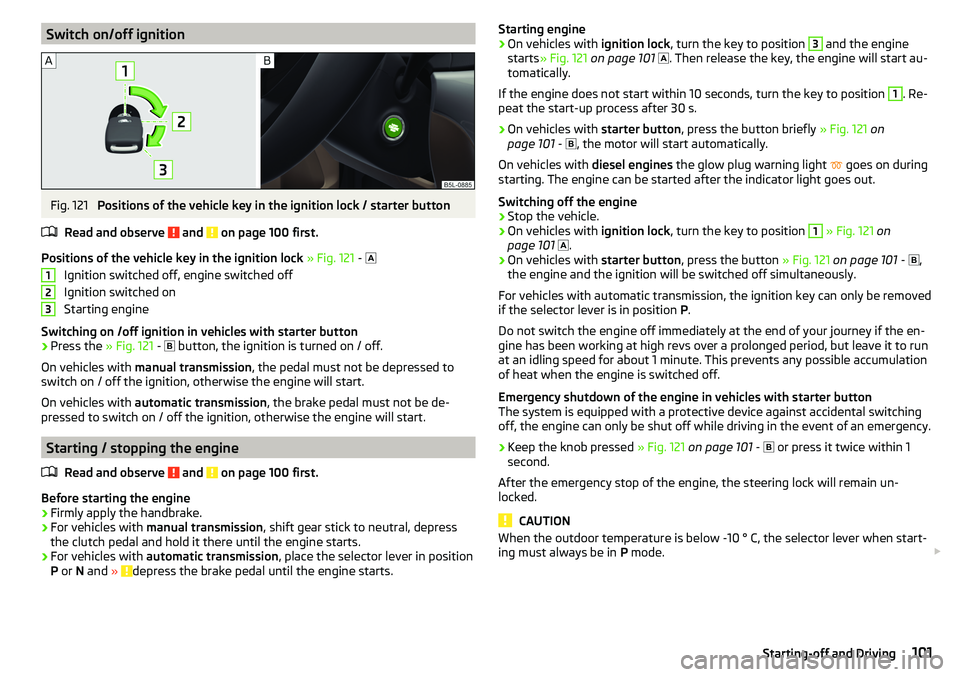
Switch on/off ignitionFig. 121
Positions of the vehicle key in the ignition lock / starter button
Read and observe
and on page 100 first.
Positions of the vehicle key in the ignition lock » Fig. 121 -
Ignition switched off, engine switched off
Ignition switched on
Starting engine
Switching on /off ignition in vehicles with starter button
›
Press the » Fig. 121 -
button, the ignition is turned on / off.
On vehicles with manual transmission , the pedal must not be depressed to
switch on / off the ignition, otherwise the engine will start.
On vehicles with automatic transmission , the brake pedal must not be de-
pressed to switch on / off the ignition, otherwise the engine will start.
Starting / stopping the engine
Read and observe
and on page 100 first.
Before starting the engine
›
Firmly apply the handbrake.
›
For vehicles with manual transmission , shift gear stick to neutral, depress
the clutch pedal and hold it there until the engine starts.
›
For vehicles with automatic transmission , place the selector lever in position
P or N and » depress the brake pedal until the engine starts.
123Starting engine›On vehicles with ignition lock, turn the key to position 3 and the engine
starts » Fig. 121 on page 101
. Then release the key, the engine will start au-
tomatically.
If the engine does not start within 10 seconds, turn the key to position 1
. Re-
peat the start-up process after 30 s.
›
On vehicles with starter button, press the button briefly » Fig. 121 on
page 101 -
, the motor will start automatically.
On vehicles with diesel engines the glow plug warning light
goes on during
starting. The engine can be started after the indicator light goes out.
Switching off the engine
›
Stop the vehicle.
›
On vehicles with ignition lock, turn the key to position
1
» Fig. 121 on
page 101
.
›
On vehicles with
starter button, press the button » Fig. 121 on page 101 -
,
the engine and the ignition will be switched off simultaneously.
For vehicles with automatic transmission, the ignition key can only be removed
if the selector lever is in position P.
Do not switch the engine off immediately at the end of your journey if the en-
gine has been working at high revs over a prolonged period, but leave it to run
at an idling speed for about 1 minute. This prevents any possible accumulation
of heat when the engine is switched off.
Emergency shutdown of the engine in vehicles with starter button
The system is equipped with a protective device against accidental switching
off, the engine can only be shut off while driving in the event of an emergency.
›
Keep the knob pressed » Fig. 121 on page 101 -
or press it twice within 1
second.
After the emergency stop of the engine, the steering lock will remain un-
locked.
CAUTION
When the outdoor temperature is below -10 ° C, the selector lever when start-
ing must always be in P mode. 101Starting-off and Driving
Page 104 of 200
Note■The engine running noises may be louder at first for a short time after start-
ing the cold engine.■
You should not switch on any major electrical components during the heat-
ing period, otherwise the vehicle battery will be drained unnecessarily.
■
After switching off the ignition, the radiator fan may (also intermittently)
continue to operate for approx. 10 minutes.
Problems with the engine start - vehicles with starter button
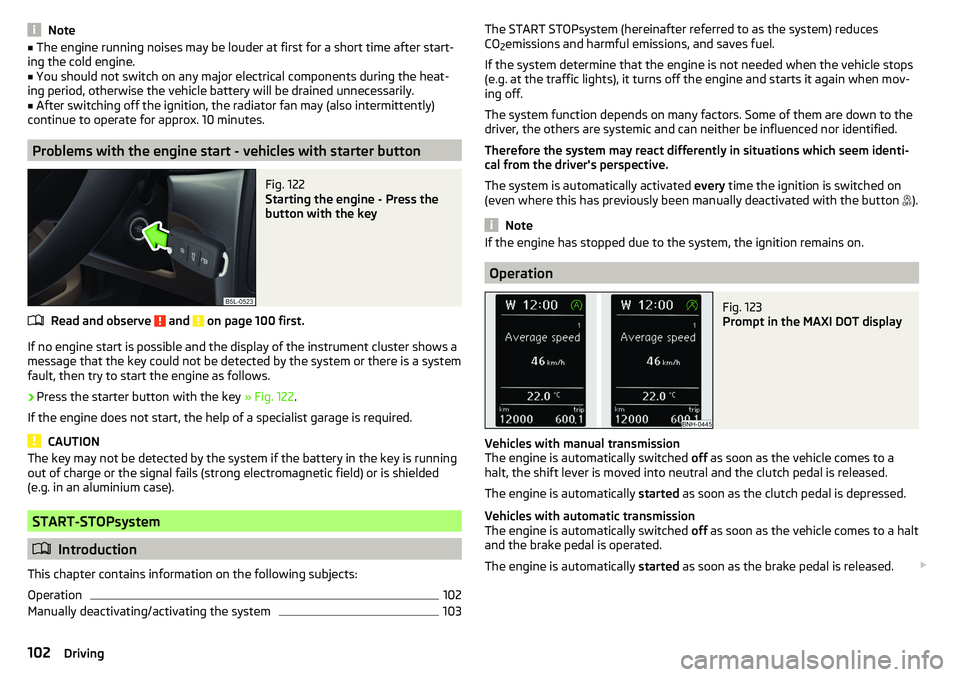
Fig. 122
Starting the engine - Press the
button with the key
Read and observe and on page 100 first.
If no engine start is possible and the display of the instrument cluster shows a message that the key could not be detected by the system or there is a system
fault, then try to start the engine as follows.
›
Press the starter button with the key » Fig. 122.
If the engine does not start, the help of a specialist garage is required.
CAUTION
The key may not be detected by the system if the battery in the key is running
out of charge or the signal fails (strong electromagnetic field) or is shielded
(e.g. in an aluminium case).
START-STOPsystem
Introduction
This chapter contains information on the following subjects:
Operation
102
Manually deactivating/activating the system
103The START STOPsystem (hereinafter referred to as the system) reduces
CO 2emissions and harmful emissions, and saves fuel.
If the system determine that the engine is not needed when the vehicle stops
(e.g. at the traffic lights), it turns off the engine and starts it again when mov-
ing off.
The system function depends on many factors. Some of them are down to the
driver, the others are systemic and can neither be influenced nor identified.
Therefore the system may react differently in situations which seem identi-
cal from the driver's perspective.
The system is automatically activated every time the ignition is switched on
(even where this has previously been manually deactivated with the button ).
Note
If the engine has stopped due to the system, the ignition remains on.
Operation
Fig. 123
Prompt in the MAXI DOT display
Vehicles with manual transmission
The engine is automatically switched off as soon as the vehicle comes to a
halt, the shift lever is moved into neutral and the clutch pedal is released.
The engine is automatically started as soon as the clutch pedal is depressed.
Vehicles with automatic transmission
The engine is automatically switched off as soon as the vehicle comes to a halt
and the brake pedal is operated.
The engine is automatically started as soon as the brake pedal is released.
102Driving
Page 105 of 200
Requirements for the system to function correctly
The following conditions must be met for the system to function correctly.
The driver's door is closed.
The driver has fastened the seat belt.
The driving speed was higher than 4 km.h after the last stop.
No trailer or other accessory is connected to the trailer socket.
System status
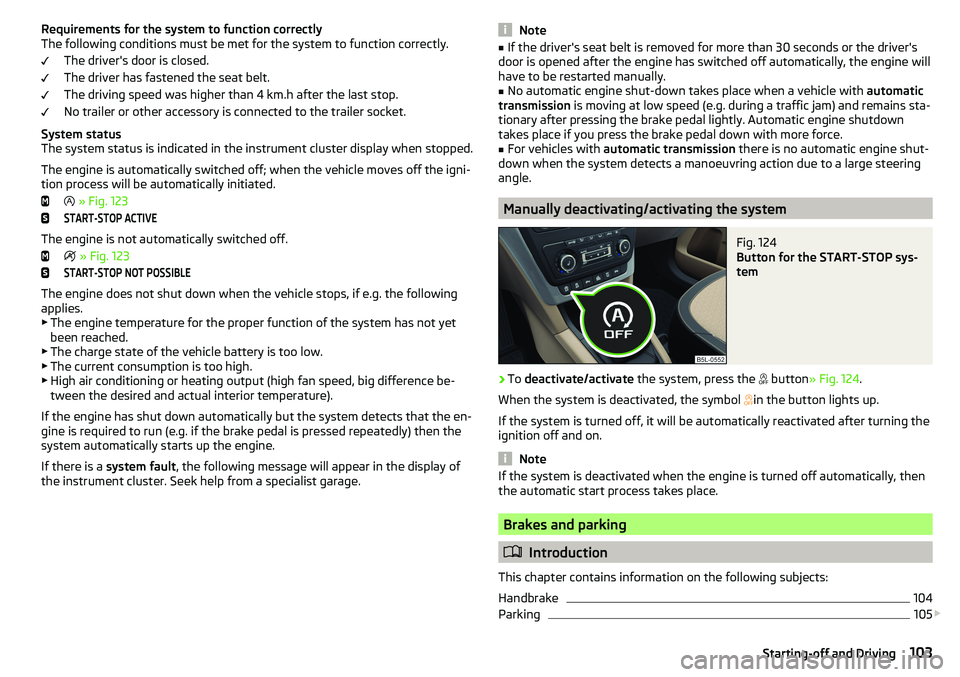
The system status is indicated in the instrument cluster display when stopped.
The engine is automatically switched off; when the vehicle moves off the igni-
tion process will be automatically initiated.
» Fig. 123START-STOP ACTIVE
The engine is not automatically switched off.
» Fig. 123
START-STOP NOT POSSIBLE
The engine does not shut down when the vehicle stops, if e.g. the following
applies.
▶ The engine temperature for the proper function of the system has not yet
been reached.
▶ The charge state of the vehicle battery is too low.
▶ The current consumption is too high.
▶ High air conditioning or heating output (high fan speed, big difference be-
tween the desired and actual interior temperature).
If the engine has shut down automatically but the system detects that the en- gine is required to run (e.g. if the brake pedal is pressed repeatedly) then the
system automatically starts up the engine.
If there is a system fault , the following message will appear in the display of
the instrument cluster. Seek help from a specialist garage.
Note■ If the driver's seat belt is removed for more than 30 seconds or the driver's
door is opened after the engine has switched off automatically, the engine will
have to be restarted manually.■
No automatic engine shut-down takes place when a vehicle with automatic
transmission is moving at low speed (e.g. during a traffic jam) and remains sta-
tionary after pressing the brake pedal lightly. Automatic engine shutdown
takes place if you press the brake pedal down with more force.
■
For vehicles with automatic transmission there is no automatic engine shut-
down when the system detects a manoeuvring action due to a large steering
angle.
Manually deactivating/activating the system
Fig. 124
Button for the START-STOP sys-
tem
›
To deactivate/activate the system, press the
button » Fig. 124 .
When the system is deactivated, the symbol
in the button lights up.
If the system is turned off, it will be automatically reactivated after turning the
ignition off and on.
Note
If the system is deactivated when the engine is turned off automatically, then
the automatic start process takes place.
Brakes and parking
Introduction
This chapter contains information on the following subjects:
Handbrake
104
Parking
105
103Starting-off and Driving
Page 106 of 200
The wear and tear on the brake pads is dependent on the operating condi-
tions and driving style. In difficult conditions (e.g. urban, sporty driving), the
condition of the brakes should be checked between services by a specialist ga-
rage.
Brake response can be slower if the brakes are covered in moisture or, in win-
ter, have a layer of ice or salt on them . The brakes should be cleaned and
dried by applying the brakes many times over »
.
Corrosion on the brake discs and dirt on the brake pads can occur if the vehicle
has been parked for a long period and if you do not make much use of the
braking system. The brakes are cleaned by applying the brakes several times
over »
.
Before negotiating a long or steep gradient , reduce speed and shift down a
gear. As a result, the braking effect of the engine will be used, reducing the
load on the brakes. If, nevertheless, there is a need for additional braking, it
should be carried out at intervals.
Emergency braking warning - if it is necessary to brake hard, the system may
cause the brake lights to automatically flash, to alert the traffic behind.
New brake pads must first be “run in” because these do not initially have the
best possible braking effect. Drive especially carefully for the first 200 km or
so.
If the brake fluid level is too low, it can cause faults in the braking system ;
the warning light will light up in the instrument cluster
» page 32,
Braking
system . If the warning light does not light up, yet the stopping distance is per-
ceived to be longer than before, the driving style should be adapted in view of
the unknown cause of the problem, and braking kept to a minimum - seek the
help of a specialist garage without delay.
The brake booster increases the pressure generated with the brake pedal. The
brake booster only operates when the engine is running.
WARNING■ Greater physical effort is required for braking when the engine is switch-
ed off – risk of accident!■
During the braking procedure on a vehicle with manual transmission,
when the vehicle is in gear and at low revs, press the clutch pedal. Other-
wise, the functionality of the brake system may be impaired – risk of acci-
dent!
WARNING (Continued)■ Do not depress the brake pedal if there is no requirement to slow down.
This causes the brakes to overheat and can also result in a longer braking
distance and excessive wear - There is a risk of an accident!■
Only brake for the purpose of drying and cleaning the brake discs if the
traffic conditions permit this. Do not place any other road users in jeopardy.
■
Recommendations for new brake pads should be followed.
■
When stopping and parking, the parking brake should always be applied
firmly, otherwise the vehicle could move off - There is risk of an accident!
■
If a front spoiler, full wheel trim, etc. is mounted retrospectively, it must
be ensured that the air supply to the front wheel brakes is not reduced.
Otherwise, the front brakes could be in danger of overheating – There is
risk of an accident!
Handbrake
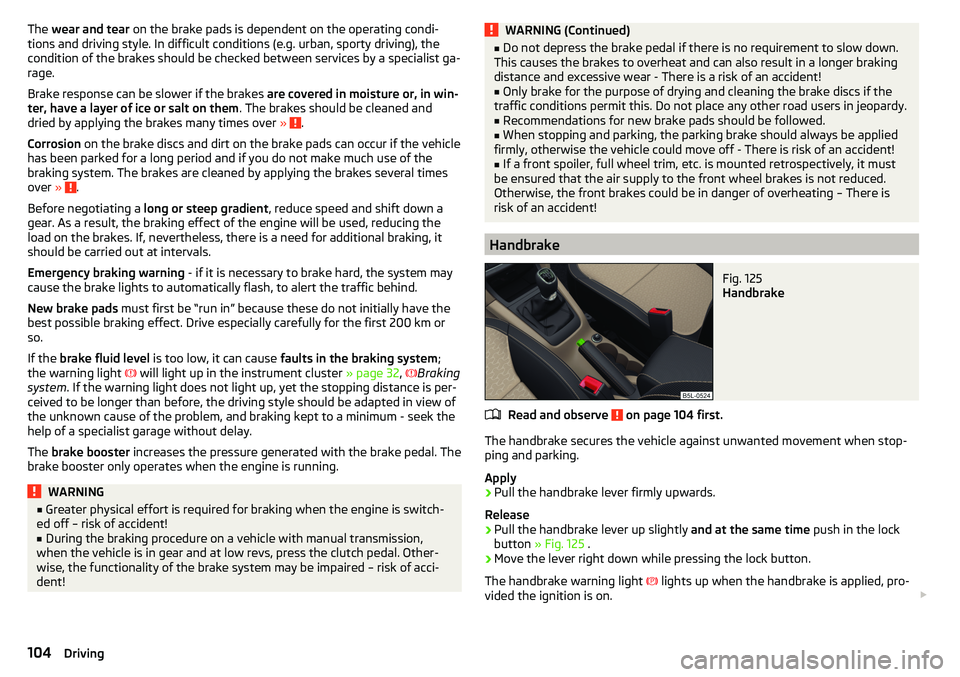
Fig. 125
Handbrake
Read and observe on page 104 first.
The handbrake secures the vehicle against unwanted movement when stop-
ping and parking.
Apply
›
Pull the handbrake lever firmly upwards.
Release
›
Pull the handbrake lever up slightly and at the same time push in the lock
button » Fig. 125 .
›
Move the lever right down while pressing the lock button.
The handbrake warning light
lights up when the handbrake is applied, pro-
vided the ignition is on.
104Driving
Page 107 of 200
A warning signal sounds if the vehicle is inadvertently driven off with the
handbrake applied. The handbrake warning is activated if the vehicle is driven
at a speed of over 5 km/h for more than 3 seconds.WARNINGDisengage the handbrake completely. A handbrake which is only partially
disengaged can result in the rear brakes overheating. This can have a nega-
tive effect on the operation of the brake system – risk of accident!
Note
Push the armrest cover all the way back to the stop before applying the hand-
brake » page 71 .
Parking
Read and observe
on page 104 first.
When stopping and parking, look for a place with a suitable surface » .
Only carry out the activities while parking in the specified order.
›
Bring the vehicle to a stop and depress the brake pedal.
›
Firmly apply the handbrake.
›
On vehicles with automatic transmission place the selector lever in the P po-
sition.
›
Switch off the engine.
›
For vehicles with Manual transmission select the 1st gear or the Reverse
gear R .
›
Release the brake pedal.
WARNING■
The exhaust system components can become very hot. Therefore, never
stop the vehicle in places where the underside of your vehicle could come
into contact with flammable materials (e.g. dry grass, leaves, spilled fuel or
the like). - Risk of fire and serious injury can occur!■
When leaving the vehicle, never leave people unattended in the car who
could, for example, lock the vehicle or release the brake - There is a risk of
accidents and injury!
Manual gear changing and pedals
Introduction
This chapter contains information on the following subjects:
Manual gear changing
105
Pedals
106
Manual gear changing
Fig. 126
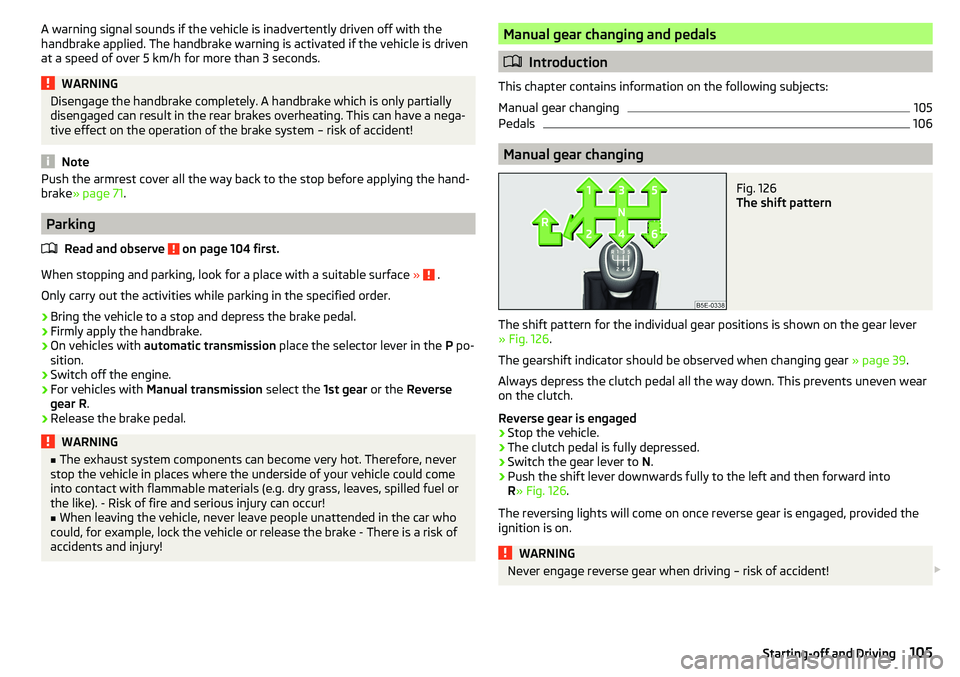
The shift pattern
The shift pattern for the individual gear positions is shown on the gear lever » Fig. 126 .
The gearshift indicator should be observed when changing gear » page 39.
Always depress the clutch pedal all the way down. This prevents uneven wear
on the clutch.
Reverse gear is engaged
›
Stop the vehicle.
›
The clutch pedal is fully depressed.
›
Switch the gear lever to N.
›
Push the shift lever downwards fully to the left and then forward into
R » Fig. 126 .
The reversing lights will come on once reverse gear is engaged, provided the ignition is on.
WARNINGNever engage reverse gear when driving – risk of accident! 105Starting-off and Driving
Page 108 of 200
CAUTIONIf not in the process of changing gear, do not leave your hand on the gearshift
lever while driving. The pressure from the hand can cause the gearshift mech-
anism to wear excessively.
Pedals
The operation of the pedals must not be hindered under any circumstances!
Only a floor mat (ex-factory or from the ŠKODA Original Accessories range)
which can be secured to the attachment points should be used in the driver's
footwell.
WARNINGThere should be no objects in the driver's footwell, otherwise the pedal op-
eration can be impeded -There is a risk of an accident!
Automatic transmission
Introduction
This chapter contains information on the following subjects:
Select selector lever position
106
Selector lever lock
107
Manual shifting (Tiptronic)
107
Starting-off and driving
108
The automatic transmission performs an automatic gear change irrespective of
the engine load, the operation of the accelerator, the vehicle speed and the
selected driving mode.
The modes of the automatic transmission can be adjusted by the driver by
means of the selector lever.
WARNING■ Do not accelerate when selecting drive mode prior to moving off - There
is a risk of an accident!■
Never move the selector lever to mode R or P when driving – There is a
risk of an accident!
WARNING (Continued)■ If the vehicle stalls, with engine running, in the D, S , R or Tiptronic mode,
the vehicle must be prevented from rolling away by means of the brake
pedal or the parking brake. Even when the engine is idling, the power
transmission is never completely interrupted – the vehicle creeps.■
When leaving the vehicle, the selector lever must always be set to P. Oth-
erwise, the vehicle could be set in motion - risk of accident!
CAUTION
If you want to move the selector lever from position N to position D / S whilst
driving, the engine must be running at idling speed.
Select selector lever position
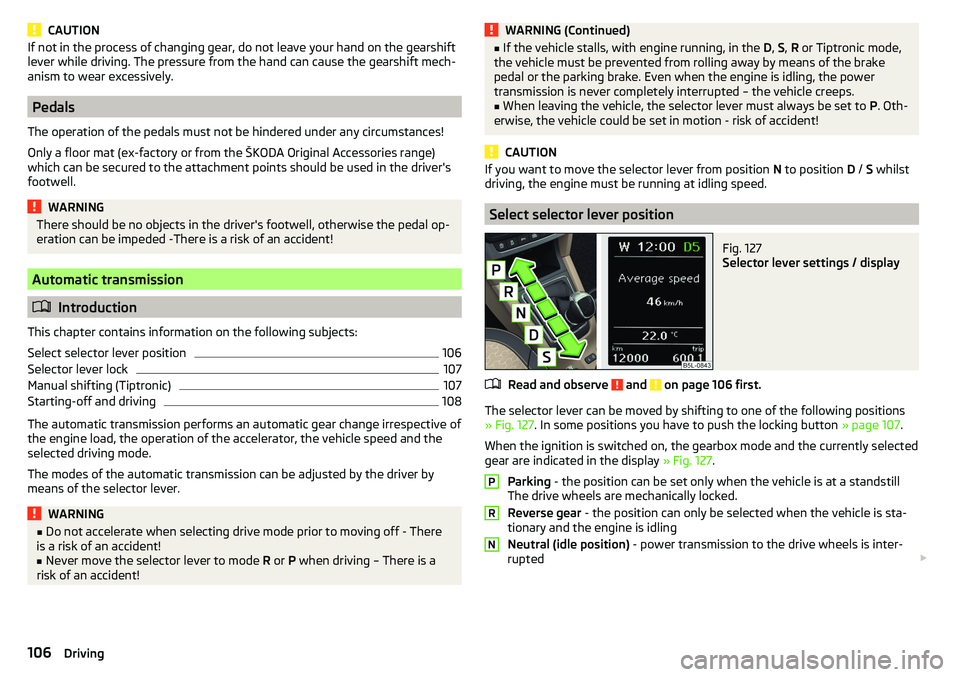
Fig. 127
Selector lever settings / display
Read and observe and on page 106 first.
The selector lever can be moved by shifting to one of the following positions » Fig. 127 . In some positions you have to push the locking button » page 107.
When the ignition is switched on, the gearbox mode and the currently selected
gear are indicated in the display » Fig. 127.
Parking - the position can be set only when the vehicle is at a standstill
The drive wheels are mechanically locked.
Reverse gear - the position can only be selected when the vehicle is sta-
tionary and the engine is idling
Neutral (idle position) - power transmission to the drive wheels is inter-
rupted
PRN106Driving
Page 112 of 200
Assist systems
General information
WARNING■The assistance systems only serve to support and do not relieve the driv-
er of the responsibility for driving the vehicle.■
The increased safety provision, as well as the increased occupant protec-
tion provided by the assistance systems must not tempt you to take risks -
risk of accident!
■
Adjust the speed and driving style to the current visibility, weather, road
and traffic conditions.
■
The assistance systems have physical and system-related limitations. For
this reason, the driver may experience some undesired or delayed system
responses in certain situations. You should therefore always be alert and
ready to intervene!
■
Only activate, deactivate or set the assistance systems so that you have
the car fully under control in every traffic situation - risk of accident!
Braking and stabilisation systems
Introduction
This chapter contains information on the following subjects:
Stability Control (ESC)
110
Anti-lock braking system (ABS)
110
Engine drag torque control (MSR)
110
Traction control (TCS)
111
Electronic Differential Lock (EDL)
111
Driver Steering Recommendation (DSR)
111
Brake Assist (HBA)
111
Hill Start Assist (HHC)
111
Trailer stabilization system (TSA)
112
The brake and stabilization systems are automatically activated each time the
ignition is switched on, unless otherwise indicated.
The error display is in Chapter » page 31, Warning lights .
WARNINGThe general information relating to the use of assistance systems must be
observed » page 110, in section General information .
Stability Control (ESC)
Read and observe
on page 110 first.
The ESC improves vehicle stability when driving at the limit (e.g. if the vehiclestarts to skid) by braking individual wheels to maintain the desired direction.
If there is a TCS intervention, the warning light flashes in the instrument
cluster.
Anti-lock braking system (ABS)
Read and observe
on page 110 first.
ABS prevents the wheels locking when braking. Thus helping the driver to
maintain control of the vehicle.
The intervention of the ABS is noticeable from the pulsating movements of
the brake pedal which is accompanied by noises.
When the ABS system is active, do not brake periodically or reduce the pres-
sure on the brake pedal.
Engine drag torque control (MSR)
Read and observe
on page 110 first.
MSR counteracts the tendency of the drive wheels to lock during downshifts
or sudden deceleration (e.g. on icy or an otherwise slippery road surface).
If the drive wheels should lock, then the engine speed is automatically in-
creased. This reduces the braking effect of the engine and the wheels can ro-
tate freely again.
110Driving
Page 114 of 200
The HHC is active on gradients upwards up 5% if the driver door is closed. HHC
is only ever active on slopes when in forward or reverse start off.
Trailer stabilization system (TSA)
Read and observe
on page 110 first.
The TSA helps the combination stable in situations where the trailer sways
and then the whole trailer combination.
TSA brakes the individual wheels of the towing vehicle in order to damp the rocking motion of the entire vehicle combination.
The following conditions are required for the correct TSA function. The trailer was shipped from the factory or purchased from the ŠKODA
genuine accessories.
The trailer is electrically connected to the towing vehicle via the trailer
socket.
The TCS is activated.
The speed is greater than 60 km/h.
Further information » page 124, Towing device and trailer .
OFF ROAD Mode
Introduction
This chapter contains information on the following subjects:
Operation
112
Hill Descent Assistant
113
TCSOFF ROAD
113
EDS OFF ROAD
113
ABS OFF ROAD
113
Start-Off Assistant
114
The OFF ROAD mode includes several features that help to overcome difficult
navigable routes when travelling on non-paved roads.
But even with OFF ROAD mode activated, your vehicle is never a true SUV.
WARNING■ The general information relating to the use of assistance systems must
be observed » page 110, in section General information .■
A lack of fuel can cause irregular engine running or cause the engine to
shut down. This would lead the OFF ROAD mode to lose its effectiveness -
risk of accident!
CAUTION
■ The OFF ROAD mode is not designed for the use on common roads.■All four wheels must be fitted with the same tyres approved by the
ŠKODA AUTO to ensure theOFF ROAD mode operates correctly.
Operation
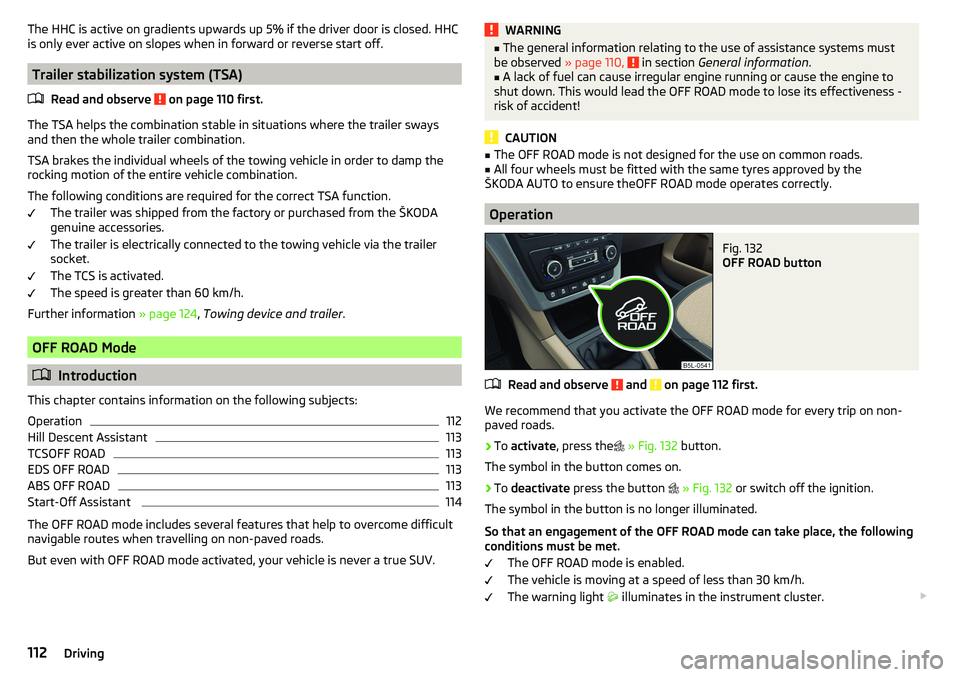
Fig. 132
OFF ROAD button
Read and observe and on page 112 first.
We recommend that you activate the OFF ROAD mode for every trip on non- paved roads.
›
To activate , press the
» Fig. 132 button.
The symbol in the button comes on.
›
To deactivate press the button
» Fig. 132 or switch off the ignition.
The symbol in the button is no longer illuminated.
So that an engagement of the OFF ROAD mode can take place, the following conditions must be met.
The OFF ROAD mode is enabled.
The vehicle is moving at a speed of less than 30 km/h. The warning light
illuminates in the instrument cluster.
112Driving
Page 119 of 200
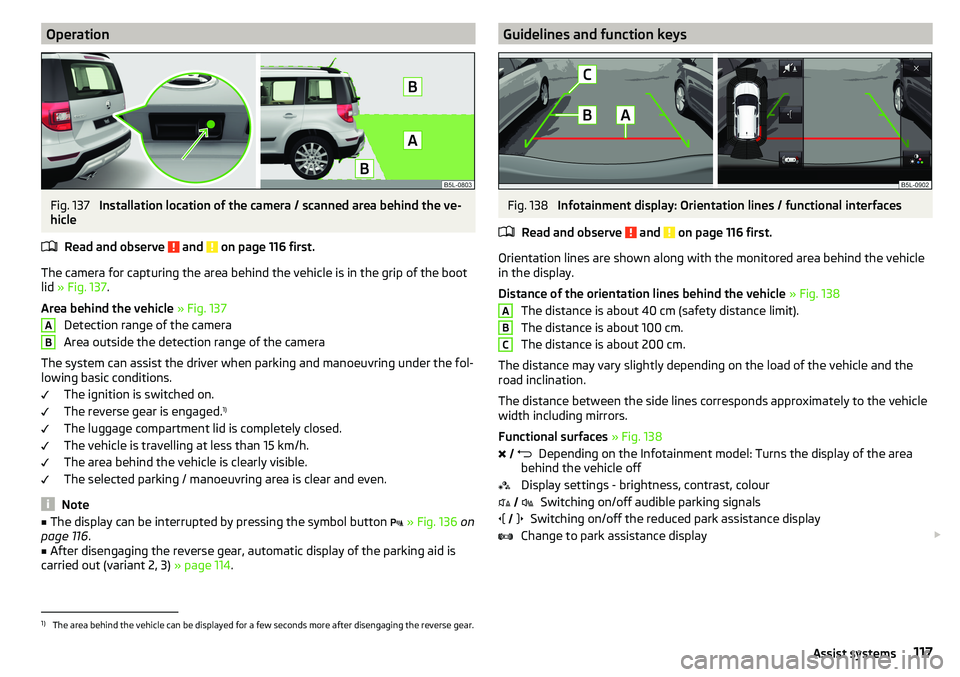
OperationFig. 137
Installation location of the camera / scanned area behind the ve-
hicle
Read and observe
and on page 116 first.
The camera for capturing the area behind the vehicle is in the grip of the boot
lid » Fig. 137 .
Area behind the vehicle » Fig. 137
Detection range of the camera
Area outside the detection range of the camera
The system can assist the driver when parking and manoeuvring under the fol- lowing basic conditions.
The ignition is switched on.
The reverse gear is engaged. 1)
The luggage compartment lid is completely closed.
The vehicle is travelling at less than 15 km/h.
The area behind the vehicle is clearly visible.
The selected parking / manoeuvring area is clear and even.
Note
■ The display can be interrupted by pressing the symbol button » Fig. 136 on
page 116 .■
After disengaging the reverse gear, automatic display of the parking aid is
carried out (variant 2, 3) » page 114.
ABGuidelines and function keysFig. 138
Infotainment display: Orientation lines / functional interfaces
Read and observe
and on page 116 first.
Orientation lines are shown along with the monitored area behind the vehicle
in the display.
Distance of the orientation lines behind the vehicle » Fig. 138
The distance is about 40 cm (safety distance limit).
The distance is about 100 cm.
The distance is about 200 cm.
The distance may vary slightly depending on the load of the vehicle and the
road inclination.
The distance between the side lines corresponds approximately to the vehicle
width including mirrors.
Functional surfaces » Fig. 138
Depending on the Infotainment model: Turns the display of the area
behind the vehicle off
Display settings - brightness, contrast, colour Switching on/off audible parking signals
Switching on/off the reduced park assistance display
Change to park assistance display
ABC
1)
The area behind the vehicle can be displayed for a few seconds more after disengaging the reverse gear.
117Assist systems
Page 124 of 200
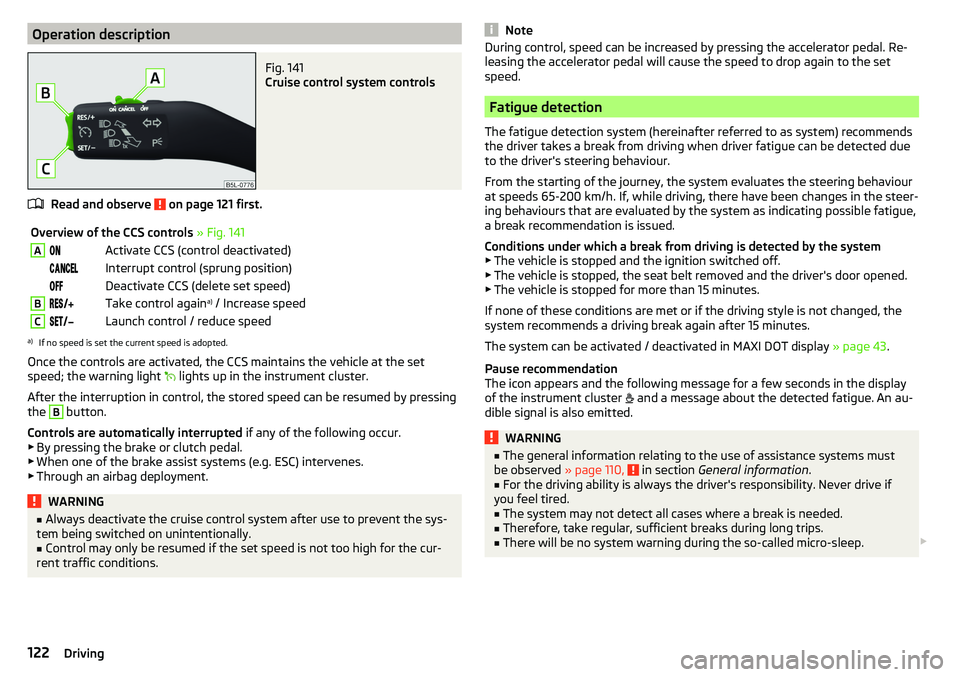
Operation descriptionFig. 141
Cruise control system controls
Read and observe on page 121 first.
Overview of the CCS controls » Fig. 141AActivate CCS (control deactivated) Interrupt control (sprung position) Deactivate CCS (delete set speed)BTake control again a)
/ Increase speedCLaunch control / reduce speeda)
If no speed is set the current speed is adopted.
Once the controls are activated, the CCS maintains the vehicle at the set
speed; the warning light lights up in the instrument cluster.
After the interruption in control, the stored speed can be resumed by pressing
the
B
button.
Controls are automatically interrupted if any of the following occur.
▶ By pressing the brake or clutch pedal.
▶ When one of the brake assist systems (e.g. ESC) intervenes.
▶ Through an airbag deployment.
WARNING■ Always deactivate the cruise control system after use to prevent the sys-
tem being switched on unintentionally.■
Control may only be resumed if the set speed is not too high for the cur-
rent traffic conditions.
NoteDuring control, speed can be increased by pressing the accelerator pedal. Re-
leasing the accelerator pedal will cause the speed to drop again to the set
speed.
Fatigue detection
The fatigue detection system (hereinafter referred to as system) recommends
the driver takes a break from driving when driver fatigue can be detected due
to the driver's steering behaviour.
From the starting of the journey, the system evaluates the steering behaviour
at speeds 65-200 km/h. If, while driving, there have been changes in the steer-
ing behaviours that are evaluated by the system as indicating possible fatigue,
a break recommendation is issued.
Conditions under which a break from driving is detected by the system ▶ The vehicle is stopped and the ignition switched off.
▶ The vehicle is stopped, the seat belt removed and the driver's door opened.
▶ The vehicle is stopped for more than 15 minutes.
If none of these conditions are met or if the driving style is not changed, the
system recommends a driving break again after 15 minutes.
The system can be activated / deactivated in MAXI DOT display » page 43.
Pause recommendation
The icon appears and the following message for a few seconds in the display
of the instrument cluster and a message about the detected fatigue. An au-
dible signal is also emitted.
WARNING■ The general information relating to the use of assistance systems must
be observed » page 110, in section General information .■
For the driving ability is always the driver's responsibility. Never drive if
you feel tired.
■
The system may not detect all cases where a break is needed.
■
Therefore, take regular, sufficient breaks during long trips.
■
There will be no system warning during the so-called micro-sleep.
122Driving