brake SMART FORTWO 2016 User Guide
[x] Cancel search | Manufacturer: SMART, Model Year: 2016, Model line: FORTWO, Model: SMART FORTWO 2016Pages: 214, PDF Size: 4.93 MB
Page 26 of 214
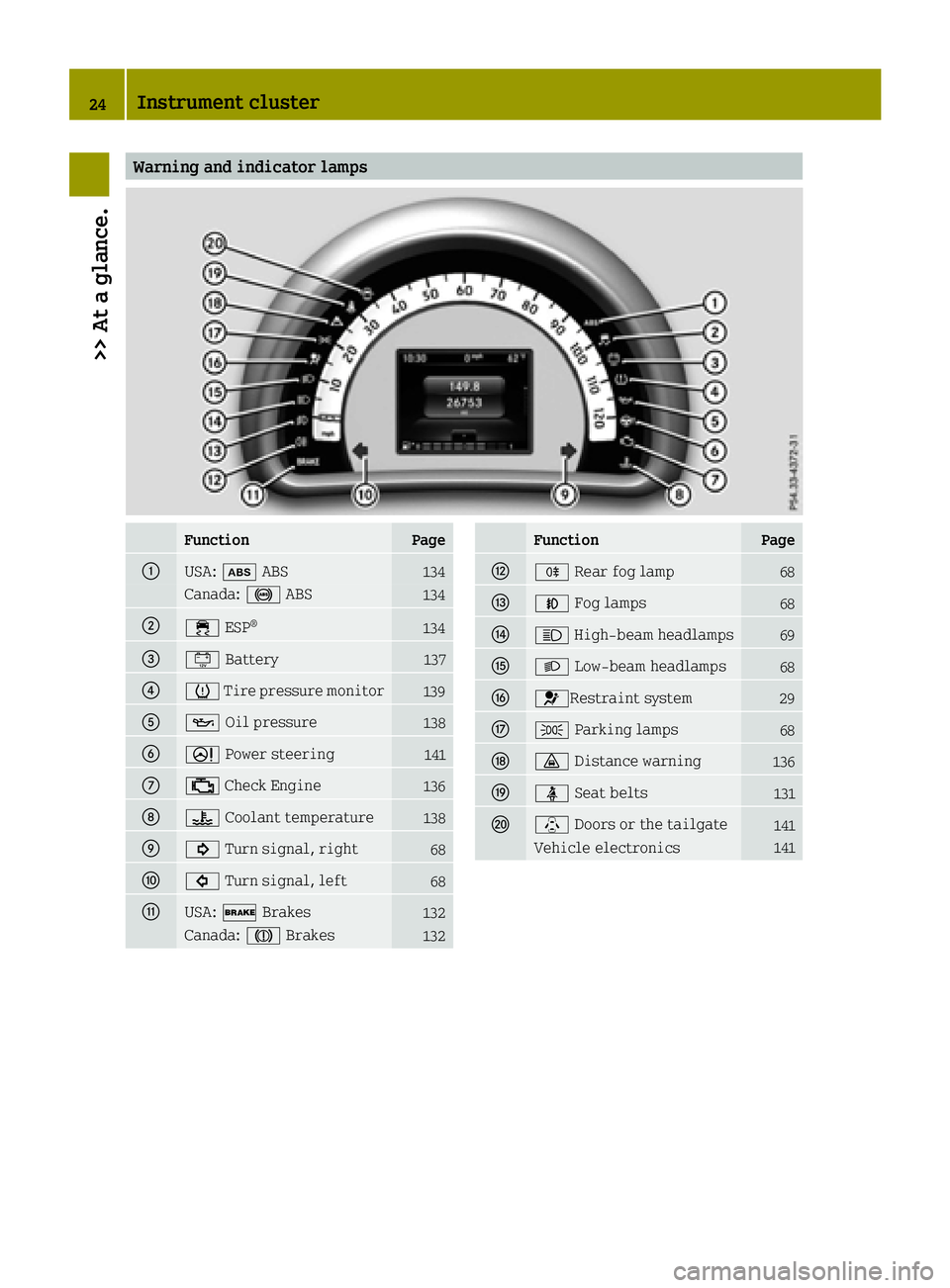
Warning and indicator lamps
FunctionPage
0043USA:00DF ABS134
Canada: 0025ABS134
004400E5ESP®134
008700EFBattery137
00850077Tire pressure monitor139
008300B3 Oil pressure138
00840052Power steering141
006B00B9Check Engine136
006C00AC Coolant temperature138
006D003DTurn signal, right68
006E003ETurn signal, left68
006FUSA:0027 Brakes132
Canada: 004DBrakes132
FunctionPage
0070005ERear fog lamp68
0071005AFog lamps68
00720057High-beam headlamps69
00730058 Low-beam headlamps68
00740075Restraint system29
00750060Parking lamps68
007600BADistance warning136
007700E9Seat belts131
0078\Doors or the tailgate141
Vehicle electronics141
24Instrument cluster
>> At a glance.
Page 28 of 214
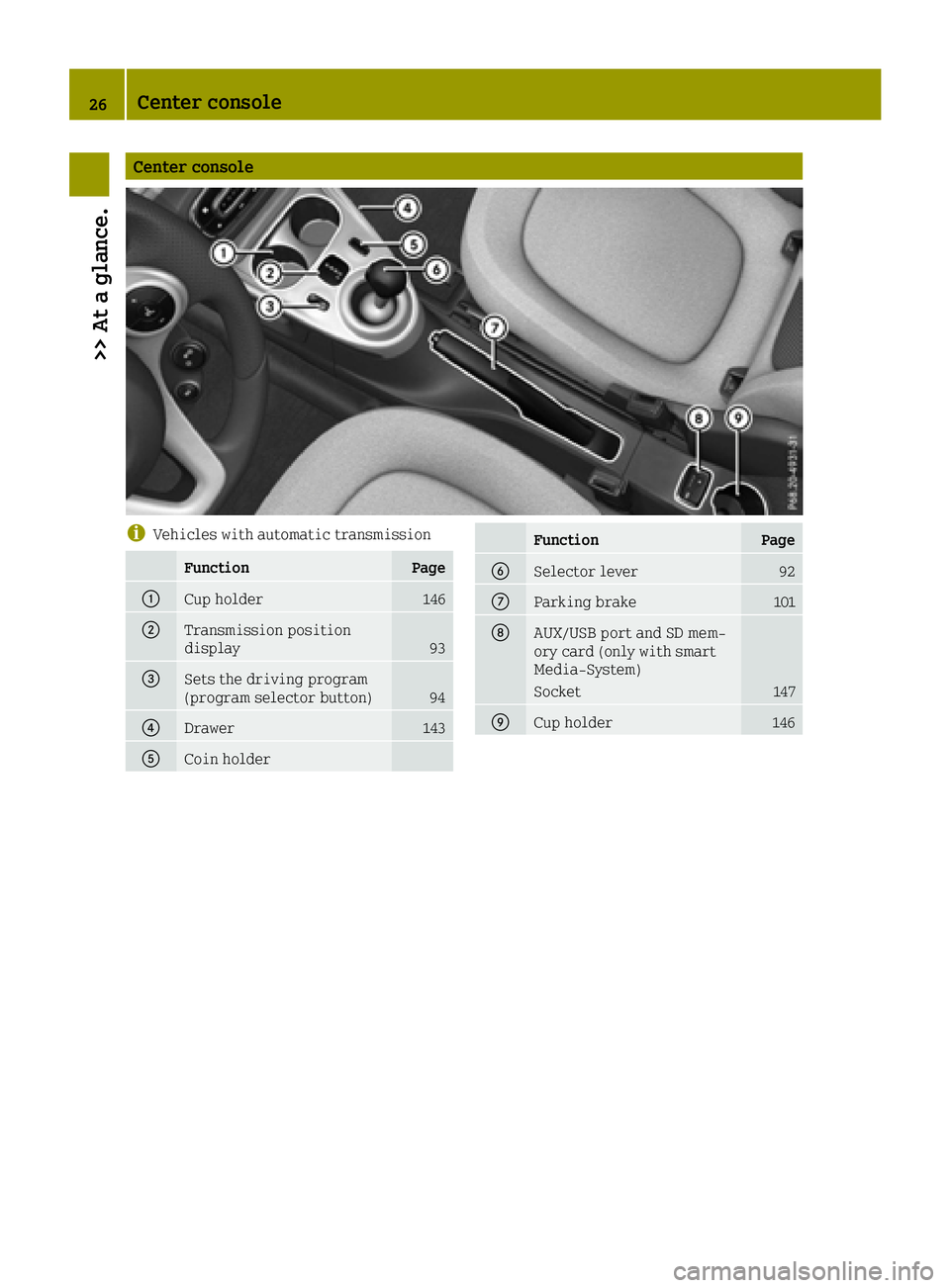
Center console
iVehicles with automatic transmission
FunctionPage
0043Cup holder146
0044Transmission position
display93
0087Sets the driving program
(program selector button)94
0085Drawer143
0083Coin holder
FunctionPage
0084Selector lever92
006BParking brake101
006CAUX/USB port and SD mem-
ory card (only with smart
Media-System)
Socket147
006DCup holder146
26Center console
>> At a glance.
Page 44 of 214
Rthe deformation characteristics of the
vehicle
Rthe characteristics of the object with
which the vehicle has collided
Factors which can only be seen and measured
after a collision has occurred do not play a
decisive role in the deployment of an air bag.
Nor do they provide an indication of air bag
deployment.
The vehicle can be deformed considerably,
without an air bag being deployed. This is the
case if only parts which are relatively easily deformed are affected and the rate of decel-
eration is not high. Conversely, air bags may
be deployed even though the vehicle suffers
only minor deformation. This is the case if,
for example, very rigid vehicle parts such as longitudinal body members are hit, and suf-
ficient deceleration occurs as a result.
If the control unit of the restraint system
detects a side impact or a vehicle rollover,
the relevant components of the restraint sys-
tem are activated separately depending on
the anticipated type of accident.
RThorax/pelvis air bag on the side of
impact, independently of the Emergency
Tensioning Device and the use of the seat
belt
The thorax/pelvis air bag on the front-
passenger side deploys under the following
conditions:
-the OCS system detects that the front-
passenger seat is occupied or
-the belt tongue is engaged in the belt
buckle of the front-passenger seat
RWindow curtain air bag on the side of
impact, independently of the use of the seat
belt and independently of whether the
front-passenger seat is occupied
RWindow curtain air bags on the driver's andfront-passenger side in certain situations
when the vehicle rolls over, if the system
determines that deployment can offer
additional protection to that provided by
the seat belt
REmergency Tensioning Devices, if the sys-
tem determines that deployment can offer
additional protection in this situation
iNot all air bags are deployed in an acci-
dent. The differ ent air bag systems work
independently of each other. How the air bag system works is determined
by the severity of the accident detected,
especially the vehicle deceleration or
acceleration and the apparent type of acci-
dent:
RFrontal collision
RSide impact
RRollover
Children in the vehicle
Important safety notes
If a child younger than 12 years and under 5 ft
(1.50 m) in height is traveling in the vehicle:
Ralways secure the child in a child restraint
system suitable for Mercedes-Benz vehi-
cles. The child restraint system must be
appropriate to the age, weight and size of
the child
Rbe sure to observe the instructions and
safety notes in this section in addition to
the child restraint system manufacturer's
installation instructions
Rbe sure to observe the instructions and
safety notes in "Occupant classification
system (OCS)" (
Ypage 36)
GWARNING
If you leave children unsupervised in the
vehicle, they could set it in motion by, for example:
Rrelease the parking brake.
Rshift the automatic transmission out of
park position Por shift manual trans-
mission into neutral.
Rstart the engine.
In addition, they may operate vehicle
equipment and become trapped. There is a
risk of an accident and injury.
When leaving the vehicle, always take the
SmartKey with you and lock the vehicle.
Never leave children unsupervised in the
vehicle.
GWARNING
If persons, particularly children are sub-
jected to prolonged exposure to extreme
42Children in the vehicle
>> Safety.
Page 49 of 214
Switching off the alarm
XTo switch off the alarm:press the0036
button on the key.
The alarm is switched off.
or
XSwitch on the ignition.
The alarm is switched off.
The alarm is not switched off, even if you
close the open door that triggered it, for
example.
Driving safety systems
Overview of driving safety systems
In this section, you will find information
about the following driving safety systems:
RABS (Anti-lock BrakingSystem)
(Ypage 47)
RDistance warning function (Ypage 48)
Resp®(Electronic StabilityProgram)
(Ypage 49)
REBD (Electronic Brake forceDistribution)
(Ypage 50)
Important safety notes
If you fail to adapt your driving style or
become distracted, the driving safety sys-
tems can neither reduce the risk of accident
nor override the laws of physics. Driving
safety systems are merely aids designed to
assist driving. You are responsible for the
distance to the vehicle in front, for vehicle
speed and for braking in good time. Always
adapt your driving style to suit the prevail-
ing road, weather and traffic conditions and
maintain a safe distance from the vehicle in
front. Drive carefully.
The driving safety systems described only
work as effectively as possible when there is
adequate contact between the tires and the
road surface. Please pay special attention to
the notes on tires, recommended minimum
tire tread depths, etc. (
Ypage 177).
In wintry driving conditions, always use win-
ter tires (M+S tires) and if necessary, snow
chains. Only in this way will the driving
safety systems described in this section work
as effectively as possible. For safety reasons, smart recommends that you
only use snow chains that have been specially
approved for your vehicle by smart, or fine-
link snow chains that are of a corresponding
standard of quality. For more information,
please contact a qualified specialist work-
shop.
ABS (Anti-lock Braking System)
General information
ABS regulates brake pressure in such a way
that the wheels do not lock when you brake.
This allows you to continue steering the vehi-
cle when braking.
The 0025 (Canada only) or 00DF(USA only) abs
warning lamp in the instrument cluster lights up when the ignition is switched on. It goes
out when the engine is running.
Important safety notes
iObserve the "Important safety notes" sec-
tion for driving safety systems (Ypage 47).
When ABS is malfunctioning, other systems,
including driving safety systems, will also
become inoperative. Observe the information
on the ABS warning lamp (
Ypage 132) and
display messages which may be shown in the
instrument cluster (
Ypage 121).
GWARNING
If ABS is faulty, the wheels could lock when
braking. The steerability and braking
characteristics may be severely impaired.
Additionally, further driving safety sys-
tems are deactivated. There is an increased
danger of skidding and accidents.
Drive on carefully. Have ABS checked imme-
diately at a qualified specialist workshop.
abs works from a speed of about 4 mph (6 km/h),
regardless of road-surface conditions. ABS
works on slippery surfaces, even if you only
brake gently.
Driving safety systems47
>> Safety.
Z
Page 50 of 214
Braking
XIf ABS intervenes:continue to depress the
brake pedal vigorously until the braking
situation is over.
XTo make a full brake application: depress
the brake pedal with full force.
If abs intervenes when braking, you will feel
a pulsing in the brake pedal.
The pulsating brake pedal can be an indica-
tion of hazardous road conditions, and func-
tions as a reminder to take extra care while
driving.
Forward collision warning
General information
The distance warning function can help you to
minimize the risk of a collision with a vehi-
cle ahead or reduce the effects of such an
accident. If the distance warning function
detects that there is a risk of a collision, you
will be warned visually and acoustically.
Starting the engine also switches on the dis-
tance warning function.
Important safety notes
GWARNING
The distance warning function does not
react:
Rto people or animals
Rto oncoming vehicles
Rto crossing traffic
Rwhen cornering
Thus, the distance warning function cannot
provide a warning in all critical situa-
tions. There is a risk of an accident.
Always pay careful attention to the traffic
situation and be ready to brake.
GWARNING
The distance warning function cannot
always clearly identify objects and com-
plex traffic situations.
In such cases, the distance warning func-
tion may:
Rgive an unnecessary warning
Rnot give a warning
There is a risk of an accident.
Always pay careful attention to the traffic
situation and do not rely solely on the dis-
tance warning function.
Observe the "Important safety notes" section for driving safety systems (
Ypage 47).
In particular, the detection of obstacles can
be impaired if:
Rthere is dirt on the sensors or anything else
covering the sensors.
Rsnow or heavy rain
Rinterference by other radar sources
Rthe possibility of strong radar reflec-
tions, for example in parking garages
Ra narrow vehicle traveling in front, e.g. a
motorbike
Ra vehicle traveling in front on a different
line
Rnew vehicles or after a service on the dis-
tance warning system
Please observe the information in the sec-
tion on running-in the vehicle
(
Ypage 86).
Following damage to the front end of the vehi-
cle, have the configuration and operation of
the radar sensor checked at a qualified spe-
cialist workshop. This also applies to colli-
sions at low speeds where there is no visible
damage to the front of the vehicle.
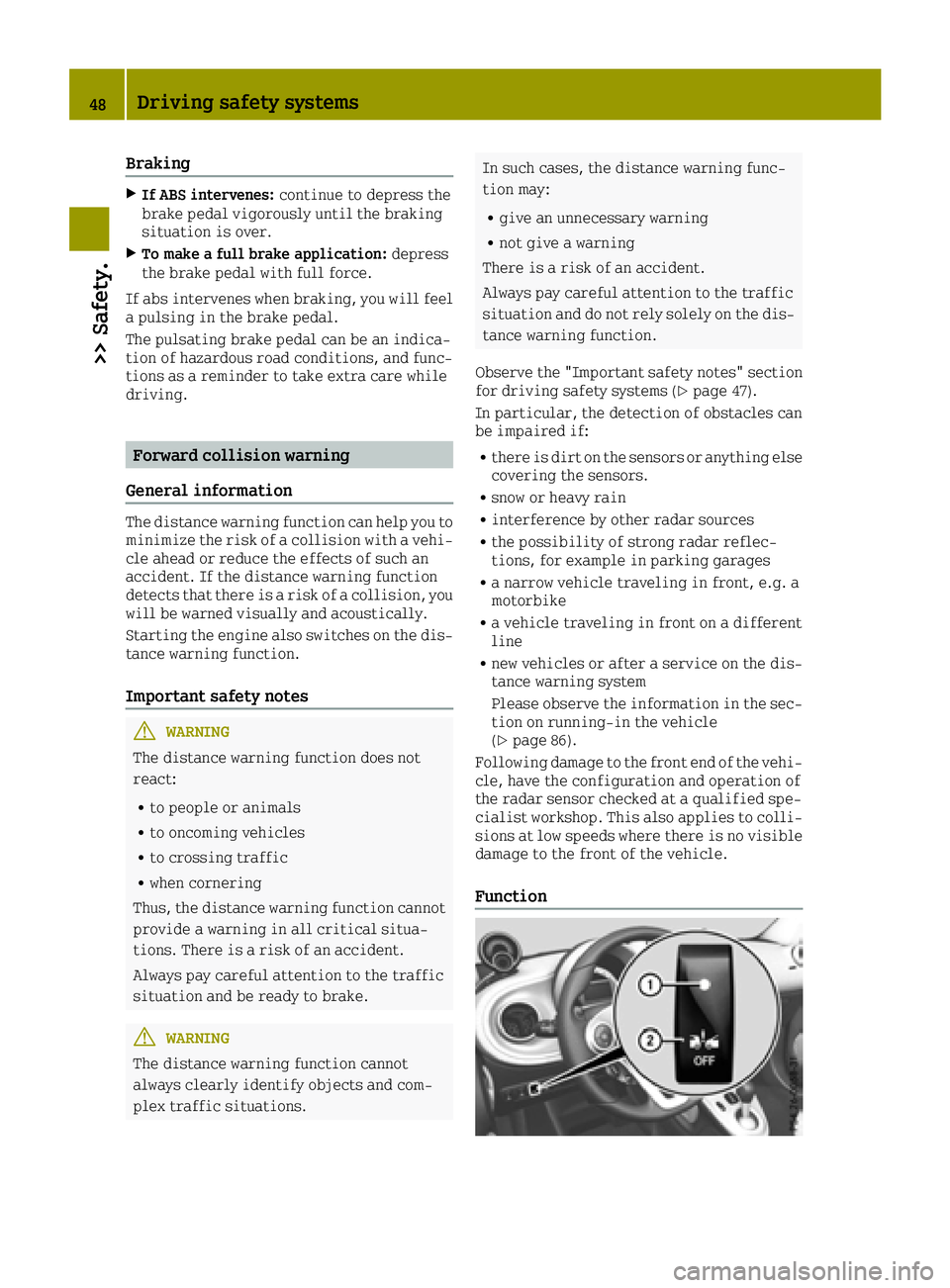
Function
48Driving safety systems
>> Safety.
Page 51 of 214
XTo switch off:press button0044.
Indicator lamp 0043lights up.
XTo switch on: press button0044.
Indicator lamp 0043goes out.
Starting at a speed of around 4 mph (7 km/h),
the distance warning function warns you if
you rapidly approach a vehicle in front. An
intermittent warning tone will then sound
and the 00BAdistance warning lamp will
light up in the instrument cluster.
XBrake immediately in order to increase the distance from the vehicle in front.
or
XTake evasive action, provided it is safe to
do so.
Due to the nature of the system, particularly
complicated but non-critical driving condi-
tions may also cause the system to display a
warning.
With the help of the radar sensor system, the
distance warning function can detect obsta-
cles that are in the path of your vehicle for an
extended period of time.
Up to a speed of around 45 mph (70 km/h), the
distance warning function can also react to
stationary obstacles, such as stopped or
parked vehicles.
ESP®(Electronic Stability Program)
General notes
iObserve the "Important safety notes" sec-
tion (Ypage 47).
esp
®monitors driving stability and traction,
i.e. power transmission between the tires and the road surface.
If esp
®detects that the vehicle is deviating
from the direction desired by the driver, one
or more wheels are braked to stabilize the
vehicle. The engine output is also modified
to keep the vehicle on the desired course
within physical limits. esp
®assists the
driver when pulling away on wet or slippery
roads. esp
®can also stabilize the vehicle
during braking.
ETS (Electronic Traction System)
iObserve the "Important safety notes" sec-
tion (Ypage 47).
ETS traction control is part of esp
®.
ETS brakes the drive wheels individually if
they spin. This enables you to pull away and
accelerate on slippery surfaces, for example if the road surface is slippery on one side. In
addition, more drive torque is transferred to
the wheel with traction.
Important safety notes
GWARNING
If ESP
®is malfunctioning, ESP®is unable to
stabilize the vehicle. Additionally, fur-
ther driving safety systems are deactiva-
ted. This increases the risk of skidding and
an accident.
Drive on carefully. Have ESP
®checked at a
qualified specialist workshop.
!If you test the parking brake using a brake
dynamometer, switch the ignition off.
Application of the brakes by ESP
®may oth-
erwise destroy the brake system.
When towing the vehicle with the rear axle
raised, observe the notes on esp
®
(Ypage 171).
If the 00E5esp®warning lamp lights up per-
manently, esp®or hill start assist are
unavailable due to a malfunction.
Observe the information on warning lamps
(
Ypage 134) and display messages which may
be shown in the instrument cluster
(
Ypage 121).
iOnly use wheels with the recommended
tire sizes. Only then will esp®function
properly.
Characteristics of ESP®
General information
If the 00E5esp®warning lamp goes out before
the journey begins, esp®is automatically
active.
If esp
®intervenes, the 00E5esp®warning
lamp flashes in the instrument cluster.
Driving safety systems49
>> Safety.
Z
Page 52 of 214
If esp®intervenes:
XOnly depress the accelerator pedal as far as
necessary when pulling away.
XAdapt your driving style to suit the pre-
vailing road and weather conditions.
Crosswind Assist
General information
Strong crosswinds can cause your vehicle to
deviate from a straight course. The crosswind
driving assistance function integrated into
esp
®significantly reduces these effects.
esp®intervenes automatically according to
the direction and intensity of the crosswinds
affecting your vehicle.
esp
®intervenes with stabilizing braking to
assist you in keeping the vehicle in the lane.
crosswind assist is active at vehicle speeds
above 45 mph (70 km/h )when driving straight
ahead or cornering gently.
Important safety notes
crosswind assist does not work if esp®is dis-
abled because of a malfunction.
EBD (electronic brake force distribu-
tion)
General information
EBD monitors and controls the brake pressure
on the rear wheels to improve driving sta-
bility while braking.
Important safety notes
iObserve the "Important safety notes" sec-
tion (Ypage 47).
GWARNING
If EBD is malfunctioning, the rear wheels
can lock, e.g. under full braking. This
increases the risk of skidding and an acci-
dent.
You should therefore adapt your driving
style to the different handling character-
istics. Have the brake system checked at a
qualified specialist workshop. Observe information regarding indicator
and warning lamps (
Ypage 134) as well as
display messages (Ypage 120).
50Driving safety systems
>> Safety.
Page 53 of 214
Useful information
i
This Operator's Manual describes all
models and all standard and optional
equipment of your vehicle available at the
time of publication of the Operator's Man- ual. Country-specific differences are pos-
sible. Bear in mind that your vehicle may
not feature all functions described here.
This also applies to safety-relevant sys-
tems and functions.
iRead the information on qualified spe-
cialist workshops: (Ypage 20).
SmartKey
Important safety notes
GWARNING
If children are left unsupervised in the
vehicle, they could:
Ropen the doors, thus endangering other
people or road users.
Rget out and disrupt traffic.
Roperate the vehicle's equipment.
Additionally, children could set the vehi-
cle in motion if, for example, they:
Rrelease the parking brake.
Rshift the automatic transmission out of
park position P or shift manual trans-
mission into neutral.
Rstart the engine.
There is a risk of an accident and injury.
When leaving the vehicle, always take the
SmartKey with you and lock the vehicle.
Never leave children or animals unattended
in the vehicle. Always keep the SmartKey
out of reach of children.
GWARNING
If you attach heavy or large objects to the
SmartKey, the SmartKey could be uninten-
tionally turned in the ignition lock. This
could cause the engine to be switched off.
There is a risk of an accident.
Do not attach any heavy or large objects to
the SmartKey. Remove any bulky key rings
before inserting the SmartKey into the
ignition lock.
!Keep the SmartKey away from strong mag-
netic fields. Otherwise, the remote control
function could be affected.
Strong magnetic fields can occur in the
vicinity of powerful electrical installa-
tions.
Do not keep the SmartKey:
Rwith electronic devices, e.g. a mobile
phone or another SmartKey
Rwith metallic objects, e.g. coins or metal
foil
Rinside metallic objects, e.g. a metal case
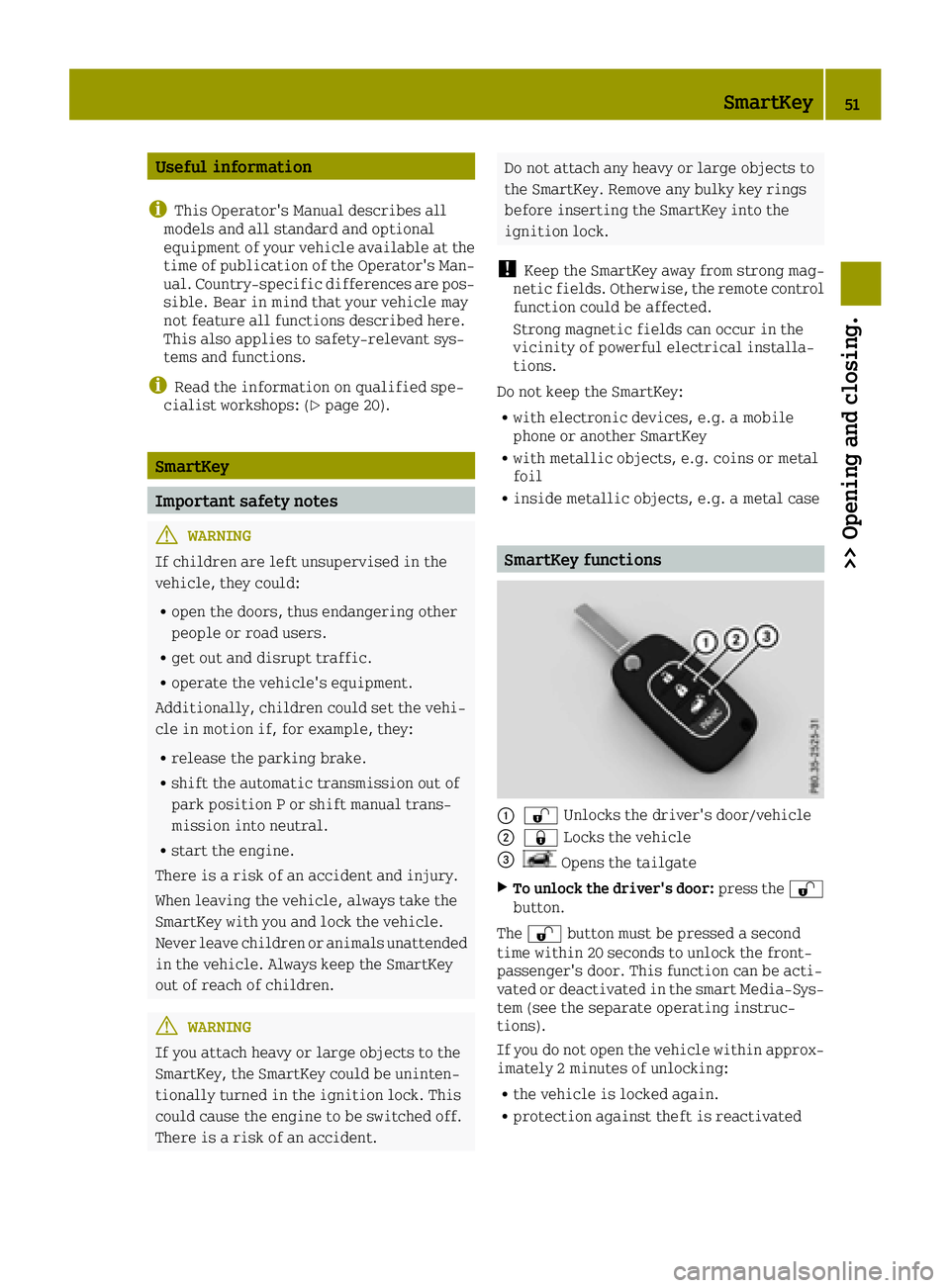
SmartKey functions
00430036 Unlocks the driver's door/vehicle
00440037Locks the vehicle
0087Opens the tailgate
XTo unlock the driver's door: press the0036
button.
The 0036 button must be pressed a second
time within 20 seconds to unlock the front-
passenger's door. This function can be acti-
vated or deactivated in the smart Media-Sys-
tem (see the separate operating instruc-
tions).
If you do not open the vehicle within approx-
imately 2 minutes of unlocking:
Rthe vehicle is locked again.
Rprotection against theft is reactivated
SmartKey51
>> Opening and closing.
Z
Page 56 of 214
Doors
Important safety notes
GWARNING
If children are left unsupervised in the
vehicle, they could:
Ropen the doors, thus endangering other
people or road users.
Rget out and disrupt traffic.
Roperate the vehicle's equipment.
Additionally, children could set the vehi-
cle in motion if, for example, they:
Rrelease the parking brake.
Rshift the automatic transmission out of
park position P or shift manual trans-
mission into neutral.
Rstart the engine.
There is a risk of an accident and injury.
When leaving the vehicle, always take the
SmartKey with you and lock the vehicle.
Never leave children or animals unattended
in the vehicle. Always keep the SmartKey
out of reach of children.
Preferably stow luggage or loads in the lug-
gage compartment. Observe the loading
guidelines (
Ypage 142).
Unlocking and opening doors from the
inside
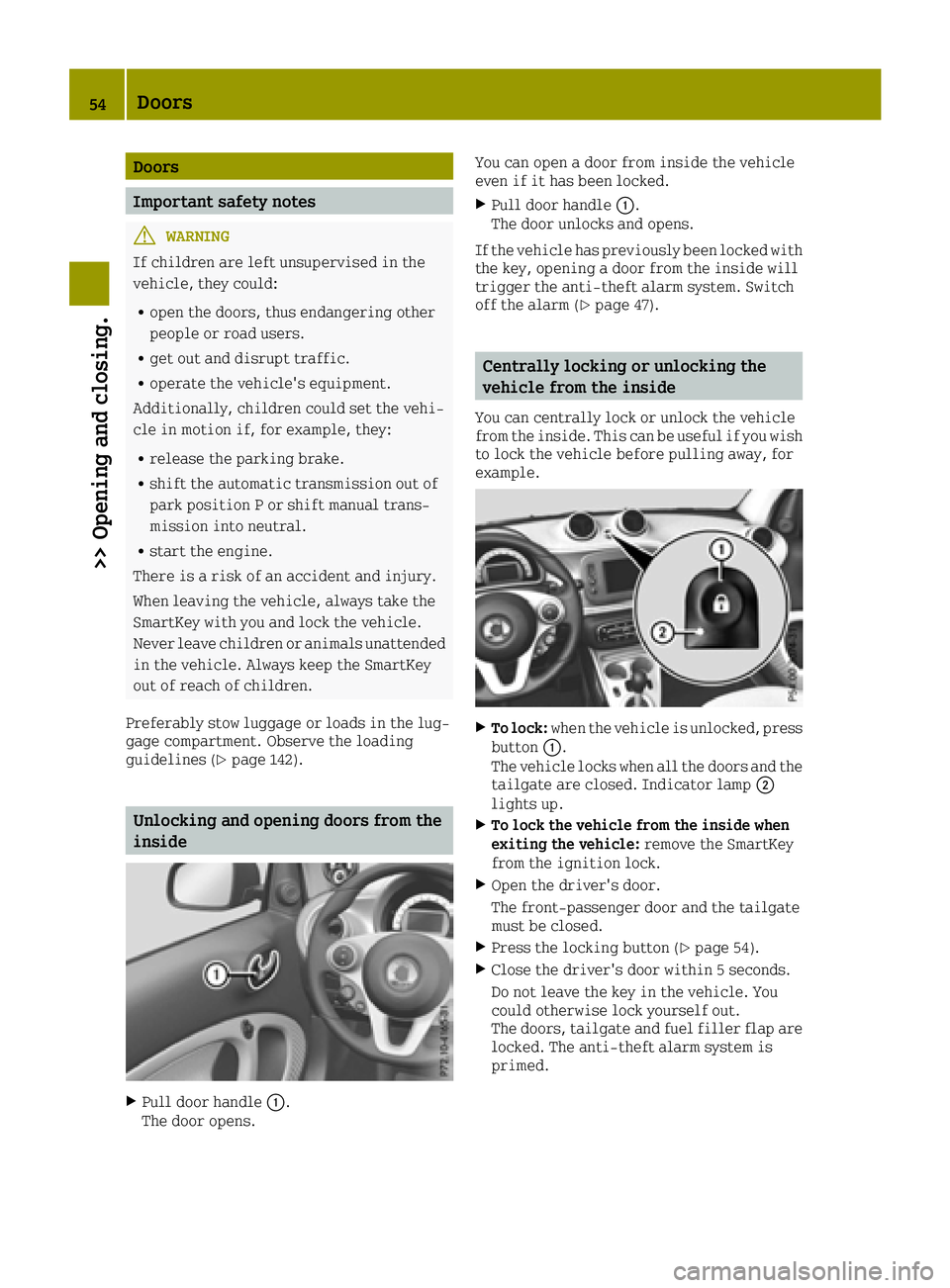
XPull door handle 0043.
The door opens. You can open a door from inside the vehicle
even if it has been locked.
XPull door handle
0043.
The door unlocks and opens.
If the vehicle has previously been locked with
the key, opening a door from the inside will
trigger the anti-theft alarm system. Switch
off the alarm (
Ypage 47).
Centrally locking or unlocking the
vehicle from the inside
You can centrally lock or unlock the vehicle
from the inside. This can be useful if you wish
to lock the vehicle before pulling away, for
example.
XTo lock: when the vehicle is unlocked, press
button 0043.
The vehicle locks when all the doors and the tailgate are closed. Indicator lamp 0044
lights up.
XTo lock the vehicle from the inside when
exiting the vehicle: remove the SmartKey
from the ignition lock.
XOpen the driver's door.
The front-passenger door and the tailgate
must be closed.
XPress the locking button (Ypage 54).
XClose the driver's door within 5 seconds.
Do not leave the key in the vehicle. You
could otherwise lock yourself out.
The doors, tailgate and fuel filler flap are
locked. The anti-theft alarm system is
primed.
54Doors
>> Opening and closing.
Page 71 of 214
Switching on the high-beam headlamps
and headlamp flasher
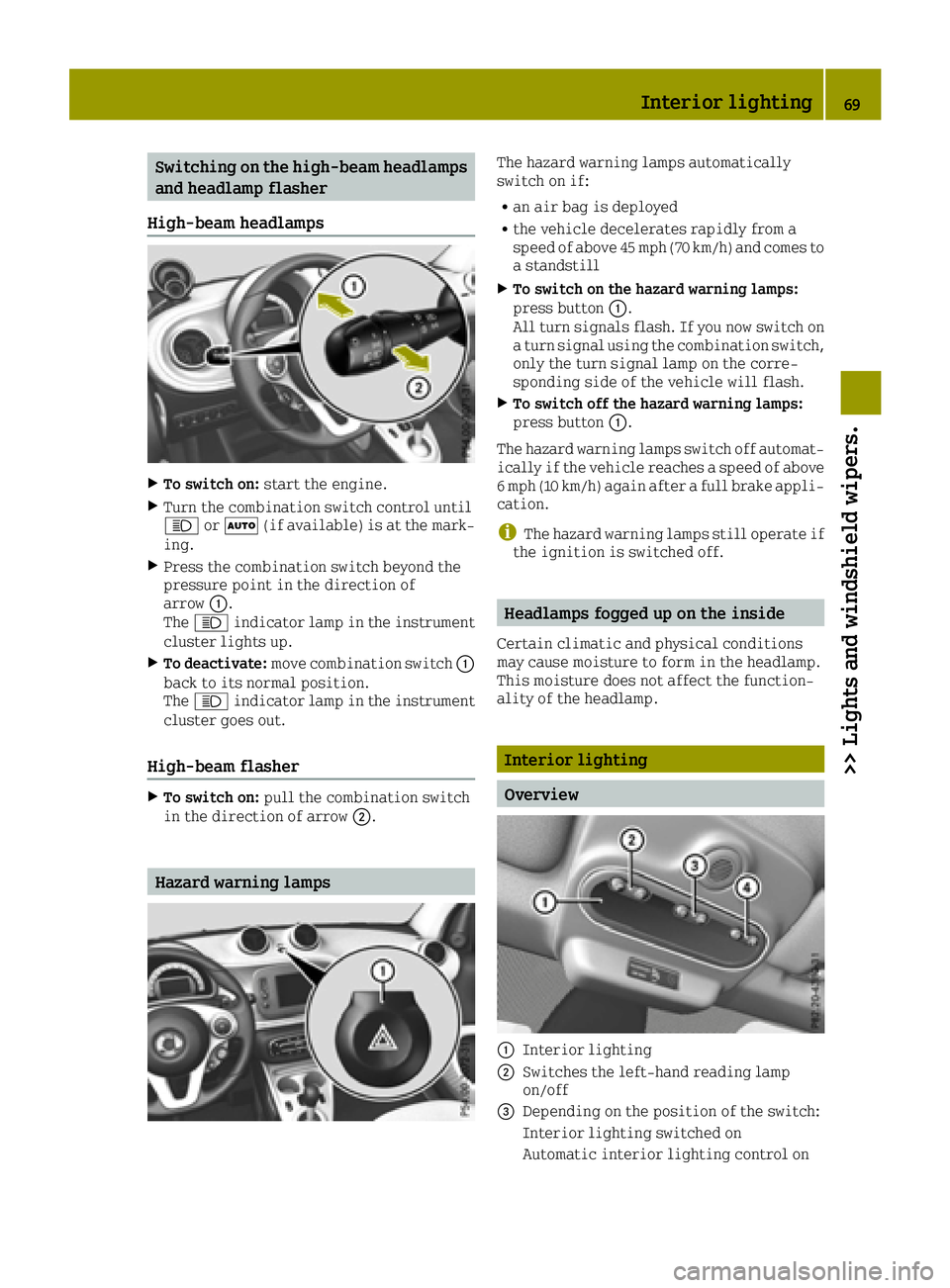
High-beam headlamps
XTo switch on: start the engine.
XTurn the combination switch control until
0057or0058 (if available) is at the mark-
ing.
XPress the combination switch beyond the
pressure point in the direction of
arrow 0043.
The 0057 indicator lamp in the instrument
cluster lights up.
XTo deactivate: move combination switch 0043
back to its normal position.
The 0057 indicator lamp in the instrument
cluster goes out.
High-beam flasher
XTo switch on: pull the combination switch
in the direction of arrow 0044.
Hazard warning lamps
The hazard warning lamps automatically
switch on if:
Ran air bag is deployed
Rthe vehicle decelerates rapidly from a
speed of above 45 mph (70 km/h) and comes to
a standstill
XTo switch on the hazard warning lamps:
press button0043.
All turn signals flash. If you now switch on
a turn signal using the combination switch,
only the turn signal lamp on the corre-
sponding side of the vehicle will flash.
XTo switch off the hazard warning lamps:
press button 0043.
The hazard warning lamps switch off automat- ically if the vehicle reaches a speed of above
6 mph (10 km/h) again after a full brake appli-
cation.
iThe hazard warning lamps still operate if
the ignition is switched off.
Headlamps fogged up on the inside
Certain climatic and physical conditions
may cause moisture to form in the headlamp.
This moisture does not affect the function-
ality of the headlamp.
Interior lighting
Overview
0043Interior lighting
0044Switches the left-hand reading lamp
on/off
0087Depending on the position of the switch:
Interior lighting switched on
Automatic interior lighting control on
Interior lighting69
>> Lights and windshield wipers.
Z