bulb SMART FORTWO 2016 User Guide
[x] Cancel search | Manufacturer: SMART, Model Year: 2016, Model line: FORTWO, Model: SMART FORTWO 2016Pages: 214, PDF Size: 4.93 MB
Page 73 of 214
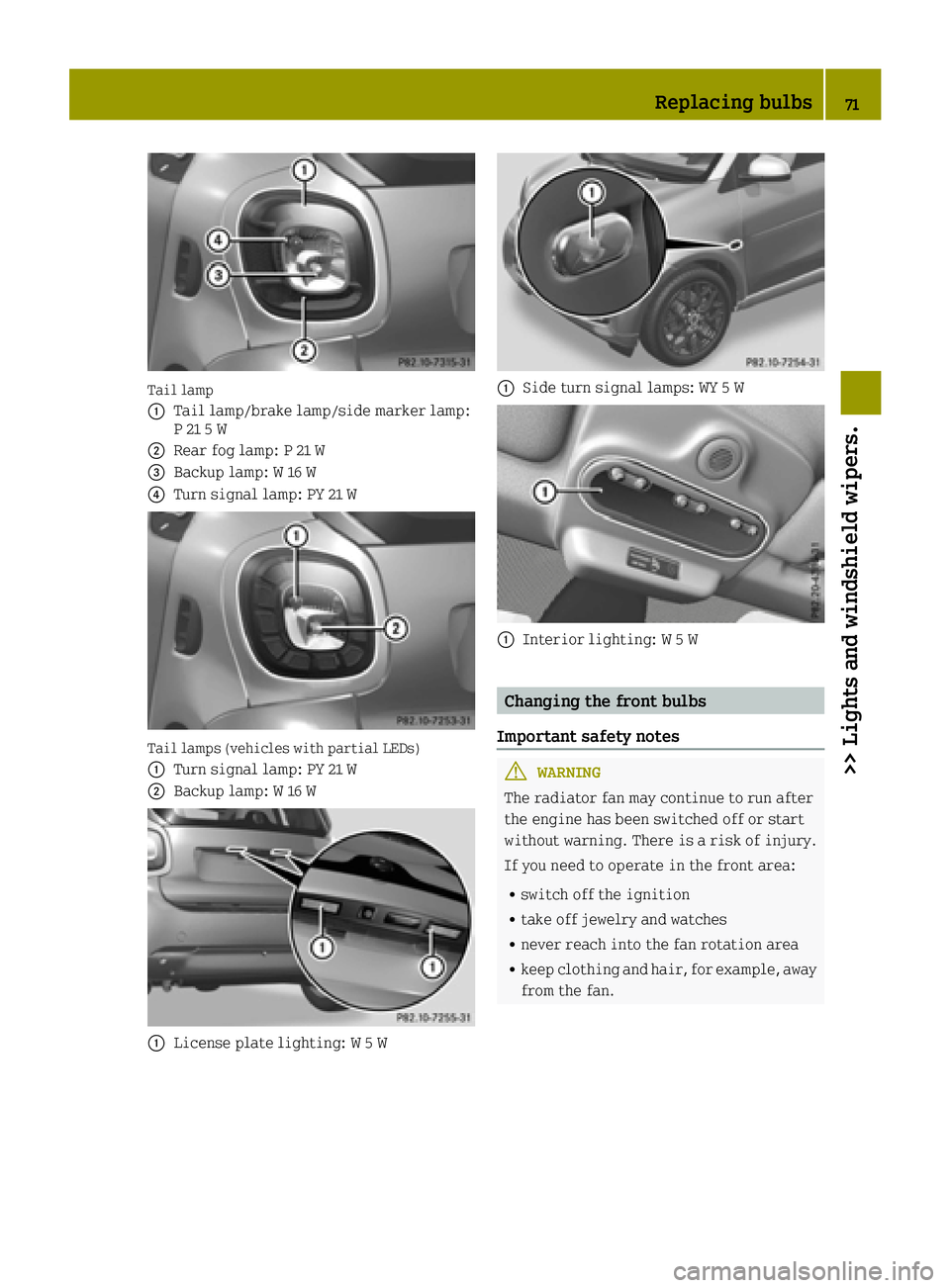
Tail lamp
0043
Tail lamp/brake lamp/side marker lamp:
P 21 5 W
0044Rear fog lamp: P 21 W
0087Backup lamp: W 16 W
0085Turn signal lamp: PY 21 W
Tail lamps (vehicles with partial LEDs)
0043
Turn signal lamp: PY 21 W
0044Backup lamp: W 16 W
0043License plate lighting: W 5 W
0043Side turn signal lamps: WY 5 W
0043Interior lighting: W 5 W
Changing the front bulbs
Important safety notes
GWARNING
The radiator fan may continue to run after
the engine has been switched off or start
without warning. There is a risk of injury.
If you need to operate in the front area:
Rswitch off the ignition
Rtake off jewelry and watches
Rnever reach into the fan rotation area
Rkeep clothing and hair, for example, away
from the fan.
Replacing bulbs71
>> Lights and windshield wipers.
Z
Page 74 of 214
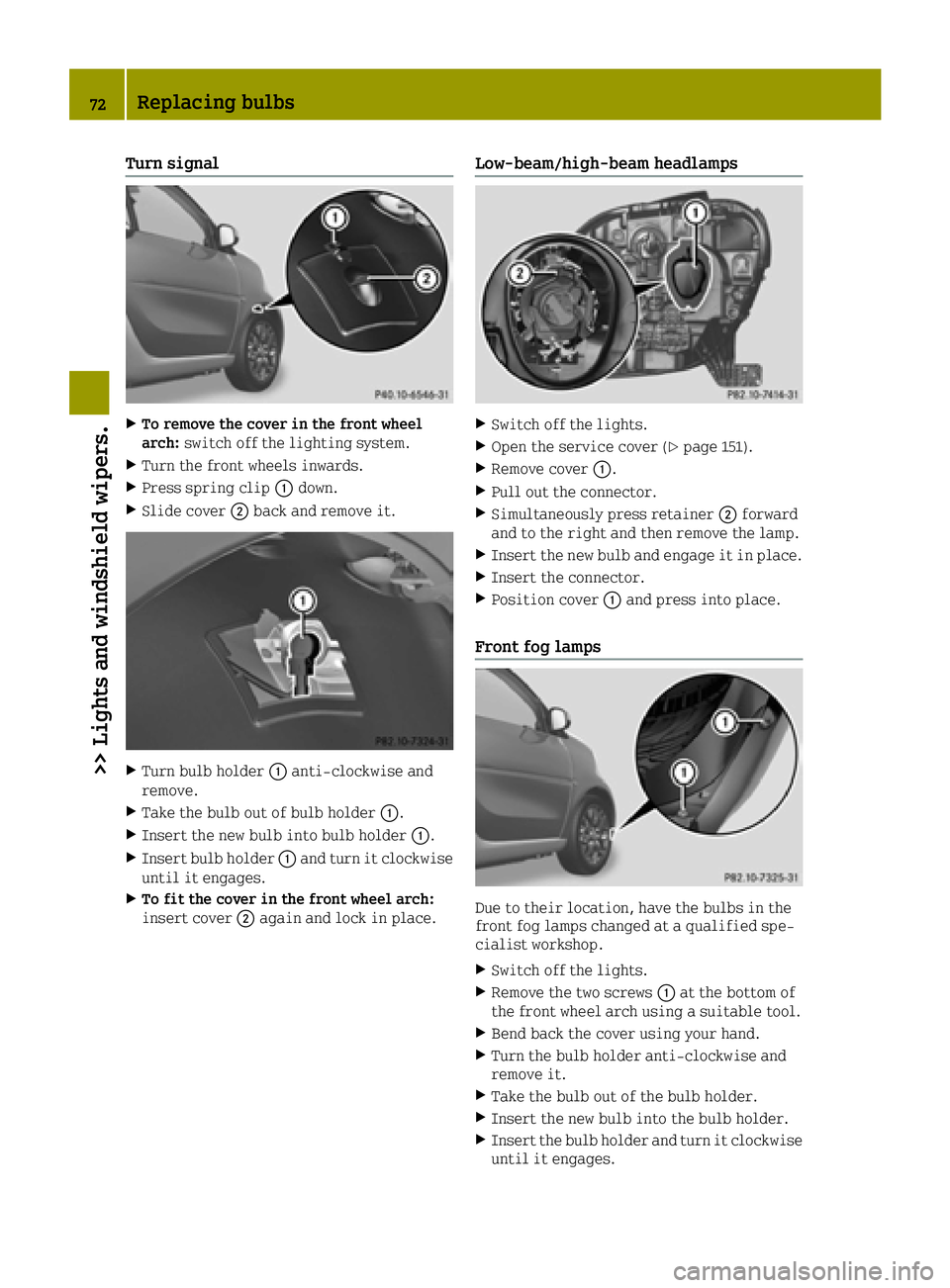
Turn signal
XTo remove the cover in the front wheel
arch:switch off the lighting system.
XTurn the front wheels inwards.
XPress spring clip 0043down.
XSlide cover 0044back and remove it.
XTurn bulb holder 0043anti-clockwise and
remove.
XTake the bulb out of bulb holder 0043.
XInsert the new bulb into bulb holder 0043.
XInsert bulb holder0043and turn it clockwise
until it engages.
XTo fit the cover in the front wheel arch:
insert cover 0044again and lock in place.
Low-beam/high-beam headlamps
XSwitch off the lights.
XOpen the service cover (Ypage 151).
XRemove cover 0043.
XPull out the connector.
XSimultaneously press retainer 0044forward
and to the right and then remove the lamp.
XInsert the new bulb and engage it in place.
XInsert the connector.
XPosition cover 0043and press into place.
Front fog lamps
Due to their location, have the bulbs in the
front fog lamps changed at a qualified spe-
cialist workshop.
XSwitch off the lights.
XRemove the two screws 0043at the bottom of
the front wheel arch using a suitable tool.
XBend back the cover using your hand.
XTurn the bulb holder anti-clockwise and
remove it.
XTake the bulb out of the bulb holder.
XInsert the new bulb into the bulb holder.
XInsert the bulb holder and turn it clockwise until it engages.
72Replacing bulbs
>> Lights and windshield wipers.
Page 75 of 214
XBend the cover back into position.
XTighten the two screws0043again.
Side turn signal lamps
XInsert a flat tool into recess 0043and lever
side turn signal lamp 0044forwards and out.
XRemove the bulb holder from side turn sig-
nal lamp 0044by turning it a quarter turn
anti-clockwise.
XPull the bulb out of the bulb holder.
XInsert the new bulb into the bulb holder.
XInsert the bulb holder into side turn signal
lamp 0044and turn it a quarter turn clock-
wise.
XInsert side turn signal lamp 0044.
Changing the rear bulbs
Tail lamp
XSwitch off the lights.
XTo remove: open the upper and lower tail-
gate (Ypage 57).
XRemove two screws 0043on the tail lamp using
a suitable slotted screwdriver.
XCarefully take out the lamp.
XTo release the connector: insert a suitable
slotted screwdriver under the plastic
hanger, lift a small plastic piece upwards
and remove the connector.
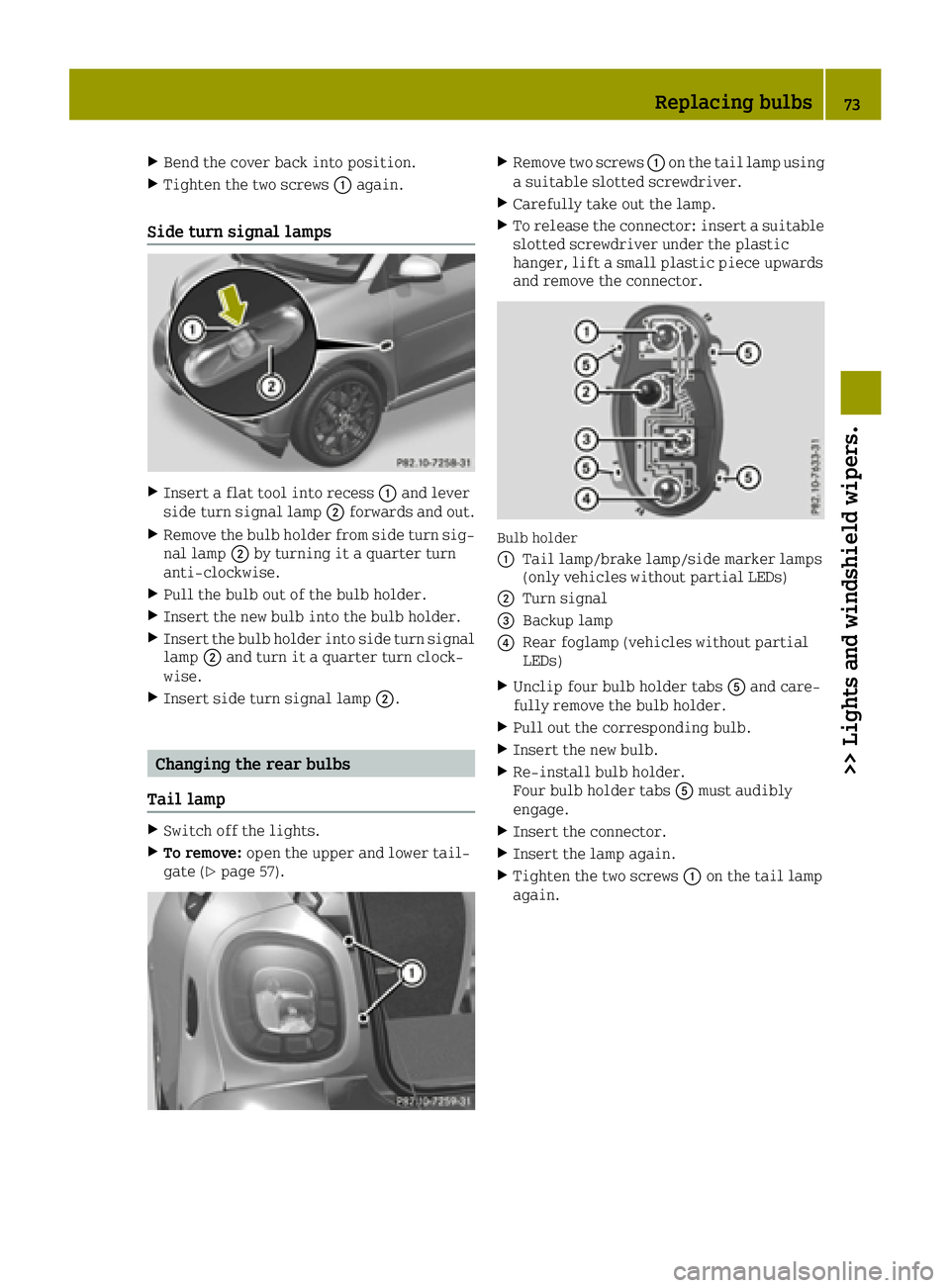
Bulb holder
0043
Tail lamp/brake lamp/side marker lamps
(only vehicles without partial LEDs)
0044Turn signal
0087Backup lamp
0085Rear foglamp (vehicles without partial
LEDs)
XUnclip four bulb holder tabs 0083and care-
fully remove the bulb holder.
XPull out the corresponding bulb.
XInsert the new bulb.
XRe-install bulb holder.
Four bulb holder tabs 0083must audibly
engage.
XInsert the connector.
XInsert the lamp again.
XTighten the two screws 0043on the tail lamp
again.
Replacing bulbs73
>> Lights and windshield wipers.
Z
Page 76 of 214
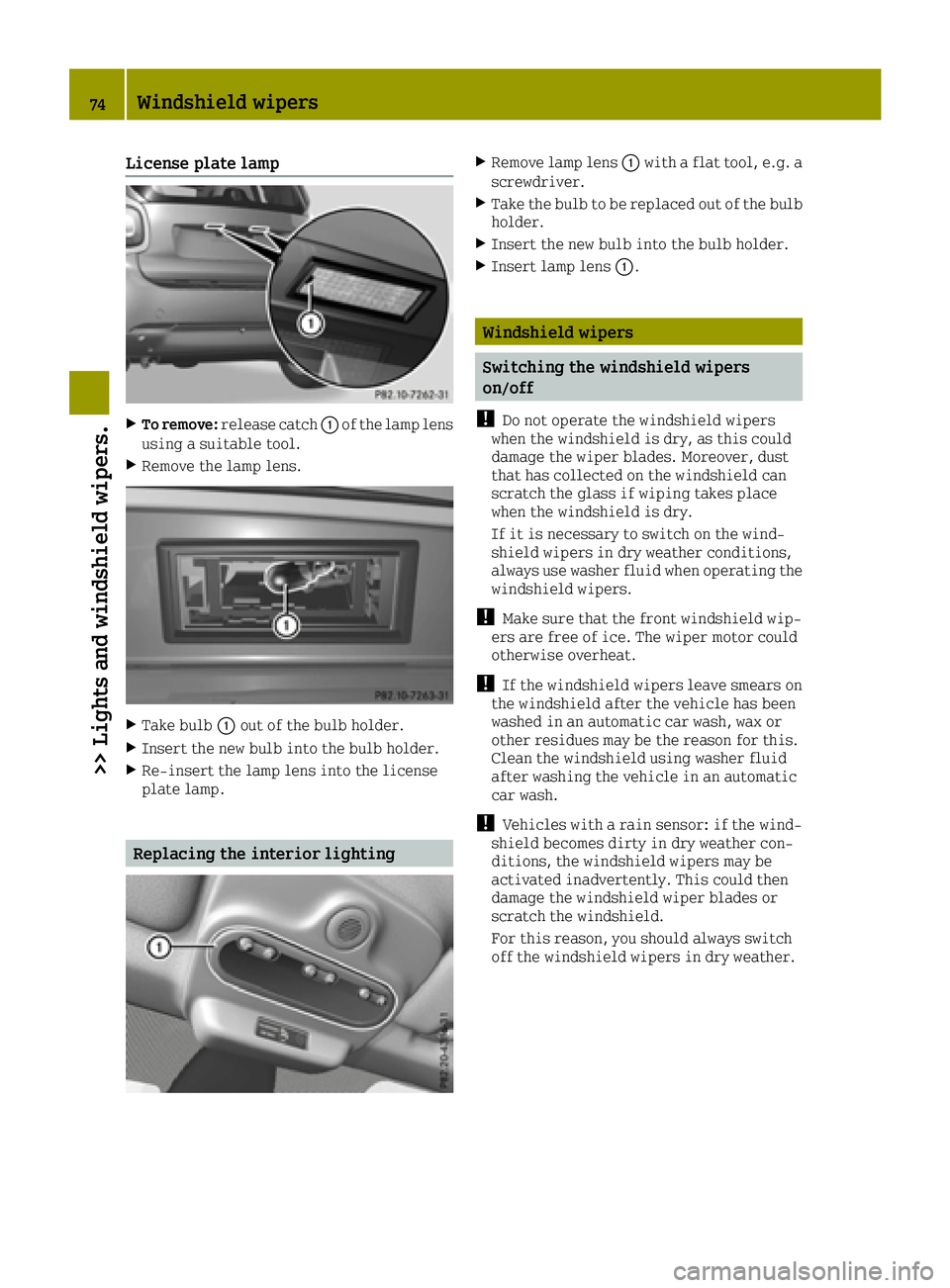
License plate lamp
XTo remove:release catch 0043of the lamp lens
using a suitable tool.
XRemove the lamp lens.
XTake bulb 0043out of the bulb holder.
XInsert the new bulb into the bulb holder.
XRe-insert the lamp lens into the license
plate lamp.
Replacing the interior lighting
XRemove lamp lens 0043with a flat tool, e.g. a
screwdriver.
XTake the bulb to be replaced out of the bulb
holder.
XInsert the new bulb into the bulb holder.
XInsert lamp lens 0043.
Windshield wipers
Switching the windshield wipers
on/off
!
Do not operate the windshield wipers
when the windshield is dry, as this could
damage the wiper blades. Moreover, dust
that has collected on the windshield can
scratch the glass if wiping takes place
when the windshield is dry.
If it is necessary to switch on the wind-
shield wipers in dry weather conditions,
always use washer fluid when operating the
windshield wipers.
!Make sure that the front windshield wip-
ers are free of ice. The wiper motor could
otherwise overheat.
!If the windshield wipers leave smears on
the windshield after the vehicle has been
washed in an automatic car wash, wax or
other residues may be the reason for this.
Clean the windshield using washer fluid
after washing the vehicle in an automatic
car wash.
!Vehicles with a rain sensor: if the wind-
shield becomes dirty in dry weather con-
ditions, the windshield wipers may be
activated inadvertently. This could then
damage the windshield wiper blades or
scratch the windshield.
For this reason, you should always switch
off the windshield wipers in dry weather.
74Windshield wipers
>> Lights and windshield wipers.
Page 130 of 214
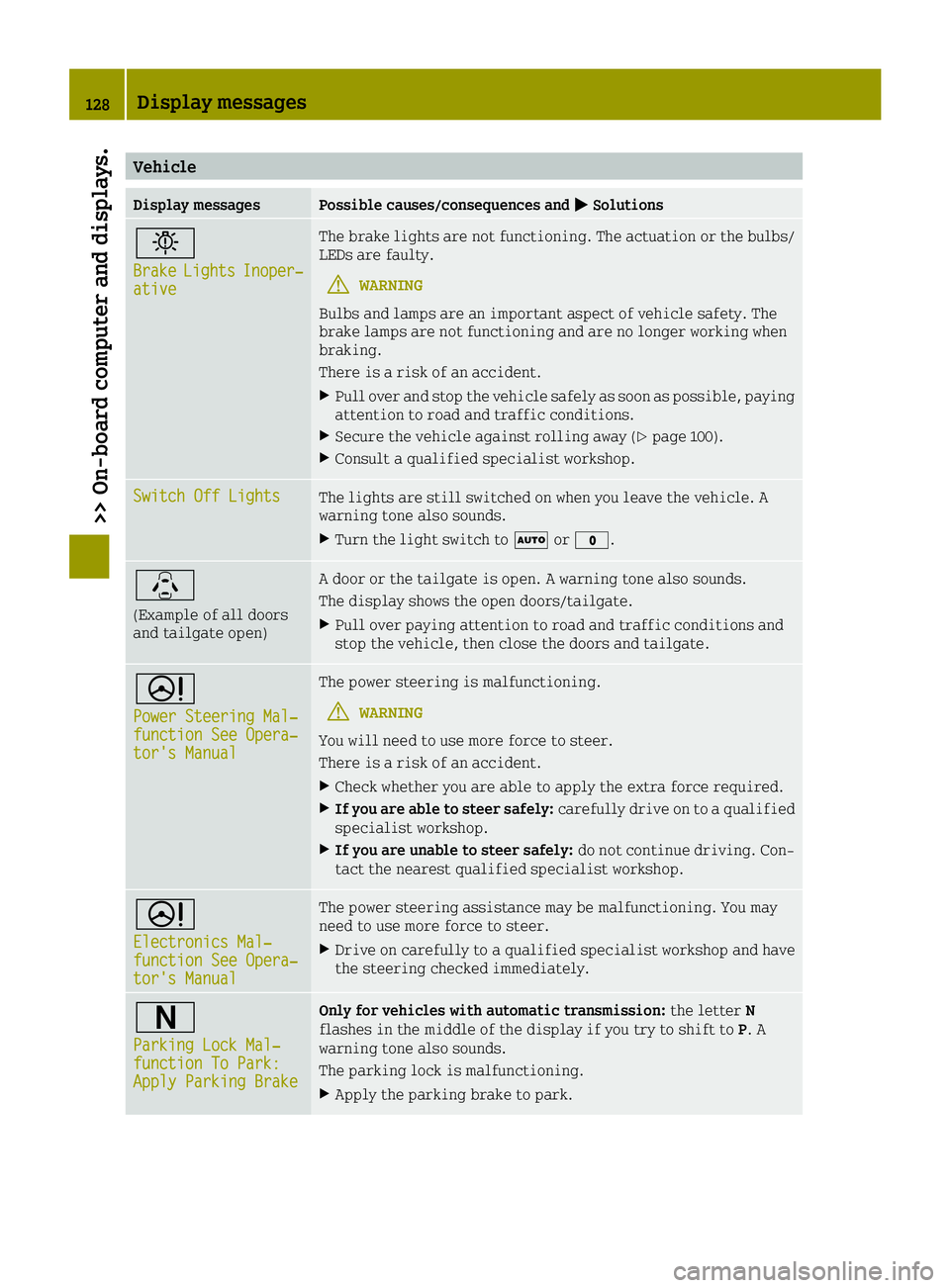
Vehicle
Display messagesPossible causes/consequences and0050Solutions
0049
BrakeLightsInoper‐ative
The brake lights are not functioning. The actuation or the bulbs/
LEDs are faulty.
GWARNING
Bulbs and lamps are an important aspect of vehicle safety. The
brake lamps are not functioning and are no longer working when
braking.
There is a risk of an accident.
XPull over and stop the vehicle safely as soon as possible, paying
attention to road and traffic conditions.
XSecure the vehicle against rolling away (Ypage 100).
XConsult a qualified specialist workshop.
Switch Off LightsThe lights are still switched on when you leave the vehicle. A
warning tone also sounds.
XTurn the light switch to 0058or003F.
\
(Example of all doors
and tailgate open)
A door or the tailgate is open. A warning tone also sounds.
The display shows the open doors/tailgate.
XPull over paying attention to road and traffic conditions and
stop the vehicle, then close the doors and tailgate.
0052
Power Steering Mal‐function See Opera‐tor's Manual
The power steering is malfunctioning.
GWARNING
You will need to use more force to steer.
There is a risk of an accident.
XCheck whether you are able to apply the extra force required.
XIf you are able to steer safely: carefully drive on to a qualified
specialist workshop.
XIf you are unable to steer safely: do not continue driving. Con-
tact the nearest qualified specialist workshop.
0052
Electronics Mal‐function See Opera‐tor's Manual
The power steering assistance may be malfunctioning. You may
need to use more force to steer.
XDrive on carefully to a qualified specialist workshop and have
the steering checked immediately.
0044
Parking Lock Mal‐function To Park:Apply Parking Brake
Only for vehicles with automatic transmission: the letterN
flashes in the middle of the display if you try to shift to P. A
warning tone also sounds.
The parking lock is malfunctioning.
XApply the parking brake to park.
128Display messages
>> On-board computer and displays.