sensor SMART FORTWO 2016 User Guide
[x] Cancel search | Manufacturer: SMART, Model Year: 2016, Model line: FORTWO, Model: SMART FORTWO 2016Pages: 214, PDF Size: 4.93 MB
Page 77 of 214
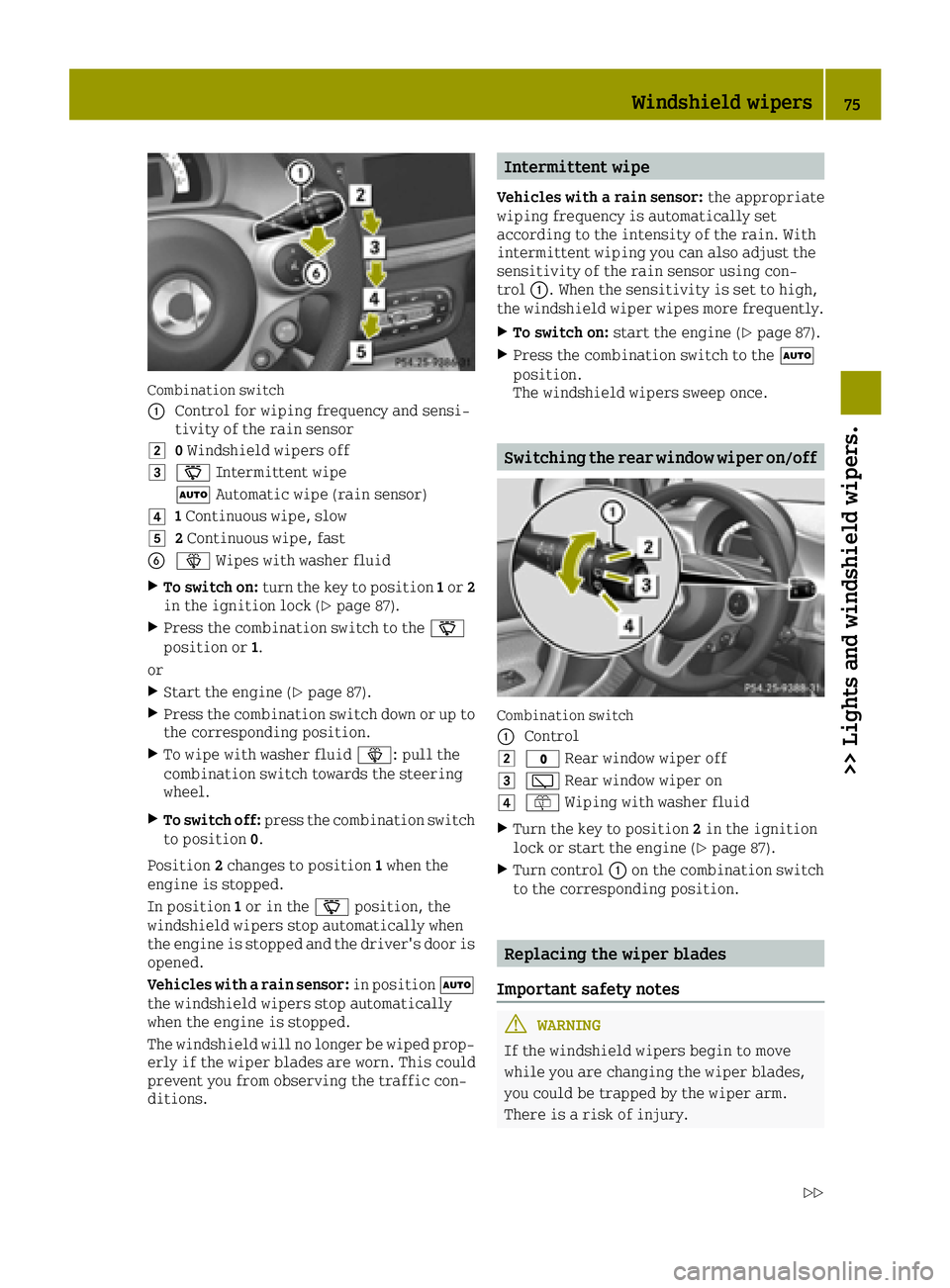
Combination switch
0043
Control for wiping frequency and sensi-
tivity of the rain sensor
00480Windshield wipers off
004900AE Intermittent wipe
0058 Automatic wipe (rain sensor)
004A1Continuous wipe, slow
004B2 Continuous wipe, fast
008400D4 Wipes with washer fluid
XTo switch on: turn the key to position 1or 2
in the ignition lock (Ypage 87).
XPress the combination switch to the 00AE
position or 1.
or
XStart the engine (Ypage 87).
XPress the combination switch down or up to
the corresponding position.
XTo wipe with washer fluid 00D4: pull the
combination switch towards the steering
wheel.
XTo switch off: press the combination switch
to position 0.
Position 2changes to position 1when the
engine is stopped.
In position 1or in the 00AEposition, the
windshield wipers stop automatically when
the engine is stopped and the driver's door is
opened.
Vehicles with a rain sensor: in position0058
the windshield wipers stop automatically
when the engine is stopped.
The windshield will no longer be wiped prop- erly if the wiper blades are worn. This could
prevent you from observing the traffic con-
ditions.
Intermittent wipe
Vehicles with a rain sensor: the appropriate
wiping frequency is automatically set
according to the intensity of the rain. With
intermittent wiping you can also adjust the
sensitivity of the rain sensor using con-
trol 0043. When the sensitivity is set to high,
the windshield wiper wipes more frequently.
XTo switch on: start the engine (Ypage 87).
XPress the combination switch to the 0058
position.
The windshield wipers sweep once.
Switching the rear window wiper on/off
Combination switch
0043
Control
0048003F Rear window wiper off
004900C5Rear window wiper on
004A00E2Wiping with washer fluid
XTurn the key to position 2in the ignition
lock or start the engine (Ypage 87).
XTurn control 0043on the combination switch
to the corresponding position.
Replacing the wiper blades
Important safety notes
GWARNING
If the windshield wipers begin to move
while you are changing the wiper blades,
you could be trapped by the wiper arm.
There is a risk of injury.
Windshield wipers75
>> Lights and windshield wipers.
Z
Page 80 of 214
Problems with the windshield wipers
ProblemPossible causes/consequences and0050Solutions
The windshield wipers
do not stop or continue
wiping with the same
speed regardless of a
change in position.The combination switch or rain sensor is malfunctioning.
XStop the vehicle, paying attention to traffic conditions as you
do so and switch off the engine.
XFor safety reasons, you should remove the key from the ignition
lock and open the driver's door.
XTurn the key to position1in the ignition lock. Then try to start
the engine again.
XHave the windshield wipers checked at a qualified specialist
workshop.
The windshield wipers
are jammed.Leaves or snow, for example, may be obstructing the windshield
wiper movement. The wiper motor has been deactivated.
XStop the vehicle, paying attention to traffic conditions as you
do so and switch off the engine.
XFor safety reasons, you should remove the Smart Key from the
ignition lock.
XRemove the cause of the obstruction.
XSwitch the windshield wipers on again after 30 seconds.
The windshield wiper
has stopped in the mid-
dle of the windshield.The windshield wiper drive has stopped for safety reasons.
XHave the windshield wipers checked at a qualified specialist
workshop.
The windshield wipers
fail completely.The windshield wiper drive is malfunctioning.
XSelect another wiper speed on the combination switch.
XHave the windshield wipers checked at a qualified specialist
workshop.
78Windshield wipers
>> Lights and windshield wipers.
Page 88 of 214
Useful information
i
This Operator's Manual describes all
models and all standard and optional
equipment of your vehicle available at the
time of publication of the Operator's Man- ual. Country-specific differences are pos-
sible. Bear in mind that your vehicle may
not feature all functions described here.
This also applies to safety-relevant sys-
tems and functions.
iRead the information on qualified spe-
cialist workshops: (Ypage 20).
Notes on breaking-in a new vehicle
Important safety notes
In certain driving and driving safety sys-
tems, the sensors adjust automatically while
a certain distance is being driven after the
vehicle has been delivered or after repairs.
Full system effectiveness is not reached until
the end of this teach-in procedure.
New and replaced brake pads and discs only
reach their optimum braking effect after sev-
eral hundred kilometers of driving. Compen-
sate for this by applying greater force to the brake pedal.
The first 1000 miles (1500 km)
The more you look after the engine when it is
new, the more satisfied you will be with its
performance in the future.
RYou should therefore drive at varying vehi-
cle and engine speeds for the first
1000 miles (1500 km).
RAvoid heavy loads, e.g. driving at full
throttle, during this period.
RChange gear in good time, before the tach-ometer needle is 00C3of the way to the red
area of the tachometer.
RDo not manually shift to a lower gear to
brake the vehicle.
RVehicles with automatic transmission: if
possible, do not depress the accelerator pedal beyond the pressure point (kick-
down).
RVehicles with automatic transmission:
ideally, for the first 1000 miles(1500 km),
drive in program
E(Comfort).
After 1000 miles (1500 km), you can increase
the engine speed gradually and bring the
vehicle to full speed.
You should also observe these notes on run-
ning-in if the engine or parts of the drive
train on your vehicle have been replaced.
Observe the maximum permissible speed.
Driving
Important safety notes
GWARNING
Objects in the driver's footwell can
restrict the pedal travel or obstruct a
depressed pedal. The operating and road
safety of the vehicle is jeopardized. There
is a risk of an accident.
Make sure that all objects in the vehicle are
stowed correctly, and that they cannot enter
the driver's footwell. Install the floormats securely and as specified in order to
ensure sufficient clearance for the pedals.
Do not use loose floormats and do not place
floormats on top of one another.
GWARNING
Unsuitable footwear can hinder correct
usage of the pedals, e.g.:
Rshoes with thick soles
Rshoes with high heels
Rslippers
There is a risk of an accident.
Wear suitable footwear to ensure correct
usage of the pedals.
GWARNING
If you switch off the ignition while driv-
ing, safety-relevant functions are only
available with limitations, or not at all.
This could affect, for example, the power
86Driving
>> Driving and parking.
Page 109 of 214
R®: increases the speed
R−: decreases the speed
XPress switch0044(®) or (−) repeatedly
until the desired speed is reached.
The speed is gradually increased or
reduced.
or
XPress and hold switch 0044(®) or (−) until
the desired speed is reached.
XRelease the switch.
The new speed is stored.
Interrupting cruise control
When cruise control is switched on, you can
cancel cruise control at any time and call up
the stored speed again later.
iWhen you switch off the engine, the last
speed stored is cleared.
XPress button 0085± and release it.
or
XBrake.
Cruise control is interrupted.
Cruise control is also canceled when:
Ryou engage the parking brake
Ryou depress the clutch
Resp®intervenes
Deactivating cruise control
XPress switch 0043(OFF).
Cruise control is deactivated.
The 0085 symbol goes out in the multifunc-
tion display.
Parking aid
General notes
The rear parking aid uses an acoustic signal
to indicate the distance between your vehicle
and an obstacle. If you engage reverse gear
while the engine is running, the parking aid is activated automatically.
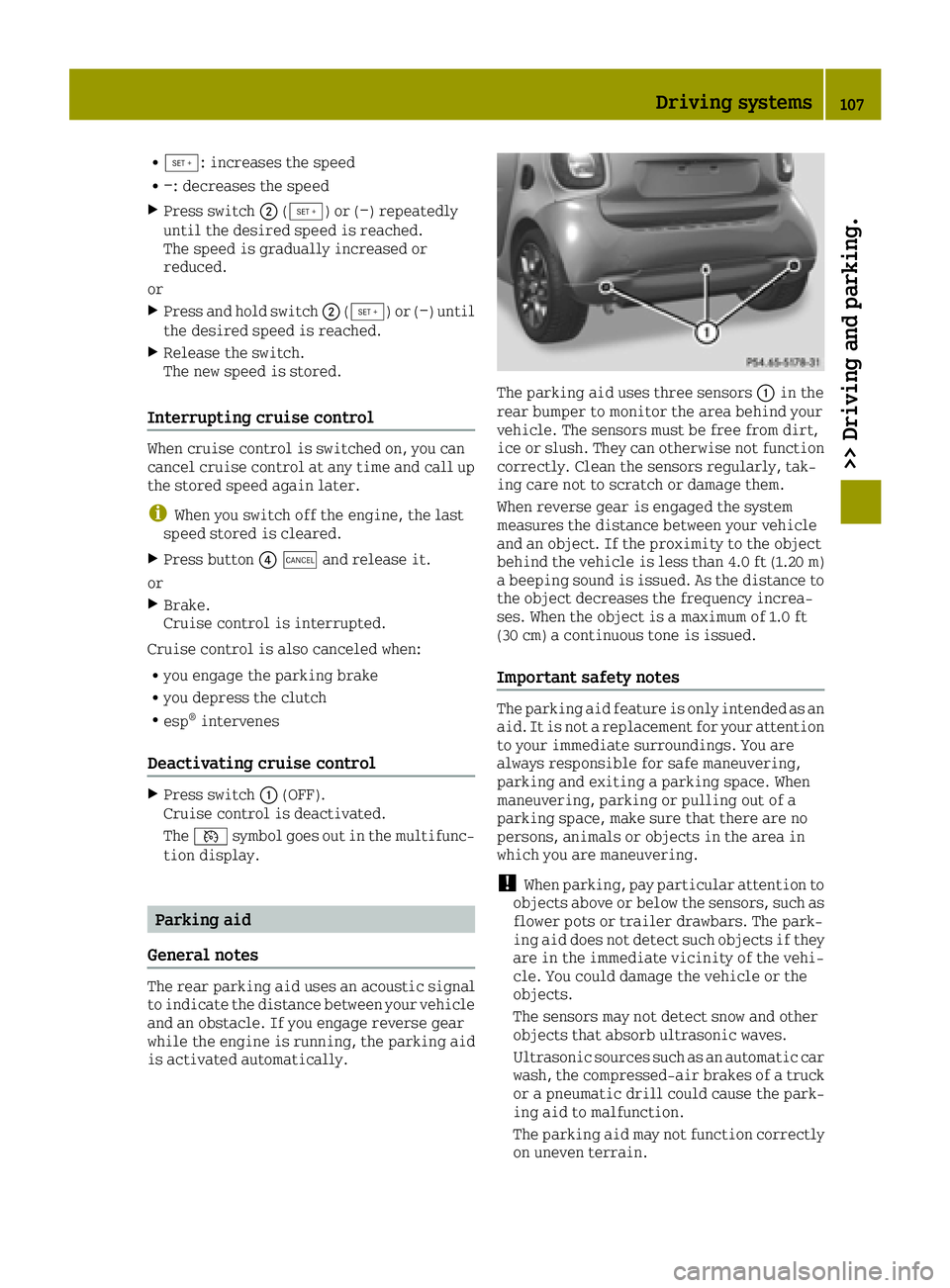
The parking aid uses three sensors 0043in the
rear bumper to monitor the area behind your
vehicle. The sensors must be free from dirt,
ice or slush. They can otherwise not function
correctly. Clean the sensors regularly, tak-
ing care not to scratch or damage them.
When reverse gear is engaged the system
measures the distance between your vehicle
and an object. If the proximity to the object
behind the vehicle is less than 4.0 ft (1.20 m)
a beeping sound is issued. As the distance to
the object decreases the frequency increa-
ses. When the object is a maximum of 1.0 ft
(30 cm) a continuous tone is issued.
Important safety notes
The parking aid feature is only intended as an
aid. It is not a replacement for your attention
to your immediate surroundings. You are
always responsible for safe maneuvering,
parking and exiting a parking space. When
maneuvering, parking or pulling out of a
parking space, make sure that there are no
persons, animals or objects in the area in
which you are maneuvering.
!When parking, pay particular attention to
objects above or below the sensors, such as
flower pots or trailer drawbars. The park-
ing aid does not detect such objects if they
are in the immediate vicinity of the vehi-
cle. You could damage the vehicle or the
objects.
The sensors may not detect snow and other
objects that absorb ultrasonic waves.
Ultrasonic sources such as an automatic car
wash, the compressed-air brakes of a truck
or a pneumatic drill could cause the park-
ing aid to malfunction.
The parking aid may not function correctly
on uneven terrain.
Driving systems107
>> Driving and parking.
Z
Page 125 of 214
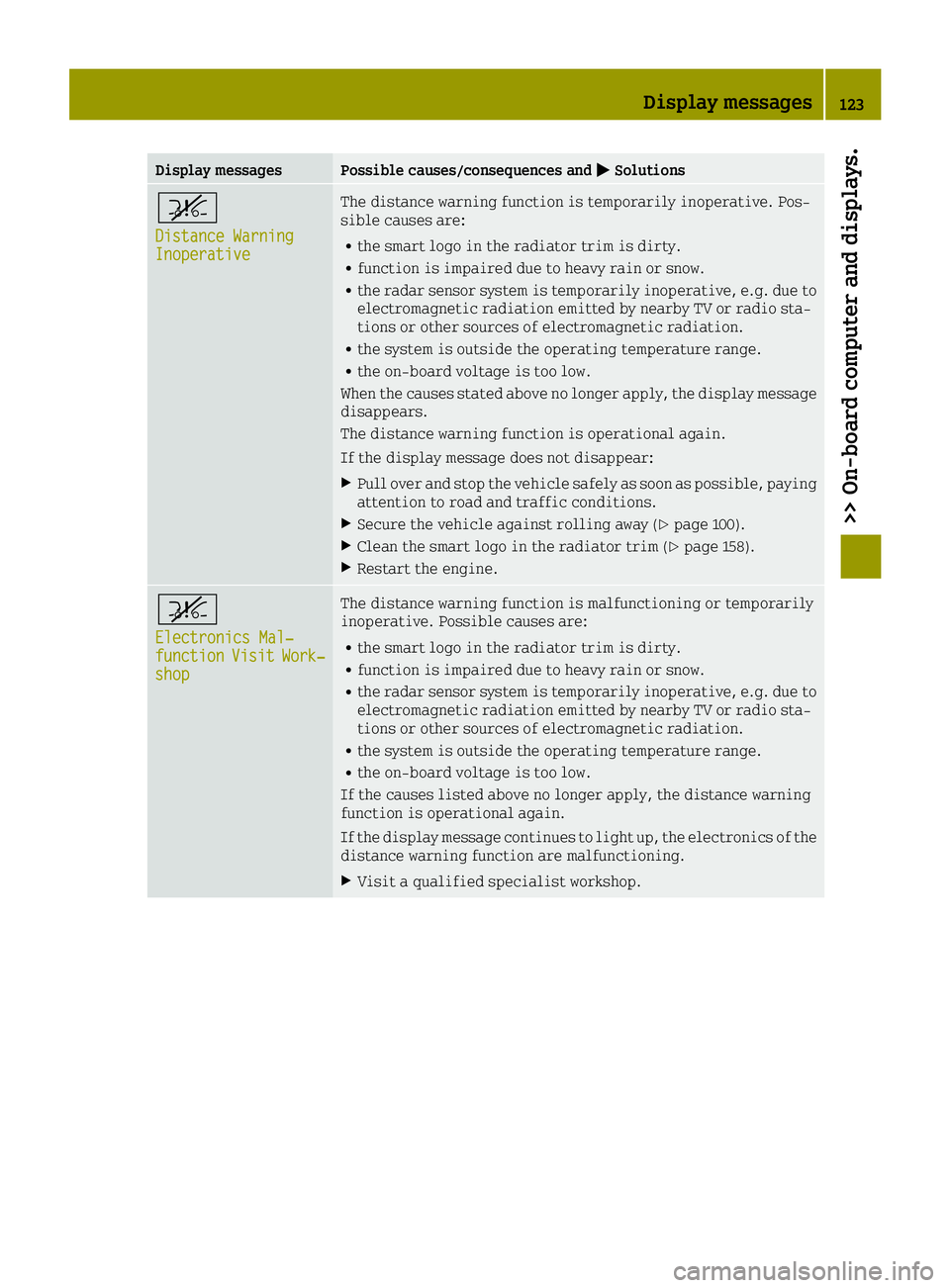
Display messagesPossible causes/consequences and0050Solutions
^
Distance WarningInoperative
The distance warning function is temporarily inoperative. Pos-
sible causes are:
Rthe smart logo in the radiator trim is dirty.
Rfunction is impaired due to heavy rain or snow.
Rthe radar sensor system is temporarily inoperative, e.g. due to
electromagnetic radiation emitted by nearby TV or radio sta-
tions or other sources of electromagnetic radiation.
Rthe system is outside the operating temperature range.
Rthe on-board voltage is too low.
When the causes stated above no longer apply, the display message
disappears.
The distance warning function is operational again.
If the display message does not disappear:
XPull over and stop the vehicle safely as soon as possible, paying
attention to road and traffic conditions.
XSecure the vehicle against rolling away (Ypage 100).
XClean the smart logo in the radiator trim (Ypage 158).
XRestart the engine.
^
Electronics Mal‐functionVisitWork‐shop
The distance warning function is malfunctioning or temporarily
inoperative. Possible causes are:
Rthe smart logo in the radiator trim is dirty.
Rfunction is impaired due to heavy rain or snow.
Rthe radar sensor system is temporarily inoperative, e.g. due to
electromagnetic radiation emitted by nearby TV or radio sta-
tions or other sources of electromagnetic radiation.
Rthe system is outside the operating temperature range.
Rthe on-board voltage is too low.
If the causes listed above no longer apply, the distance warning
function is operational again.
If the display message continues to light up, the electronics of the
distance warning function are malfunctioning.
XVisit a qualified specialist workshop.
Display messages123
>> On-board computer and displays.
Z
Page 129 of 214
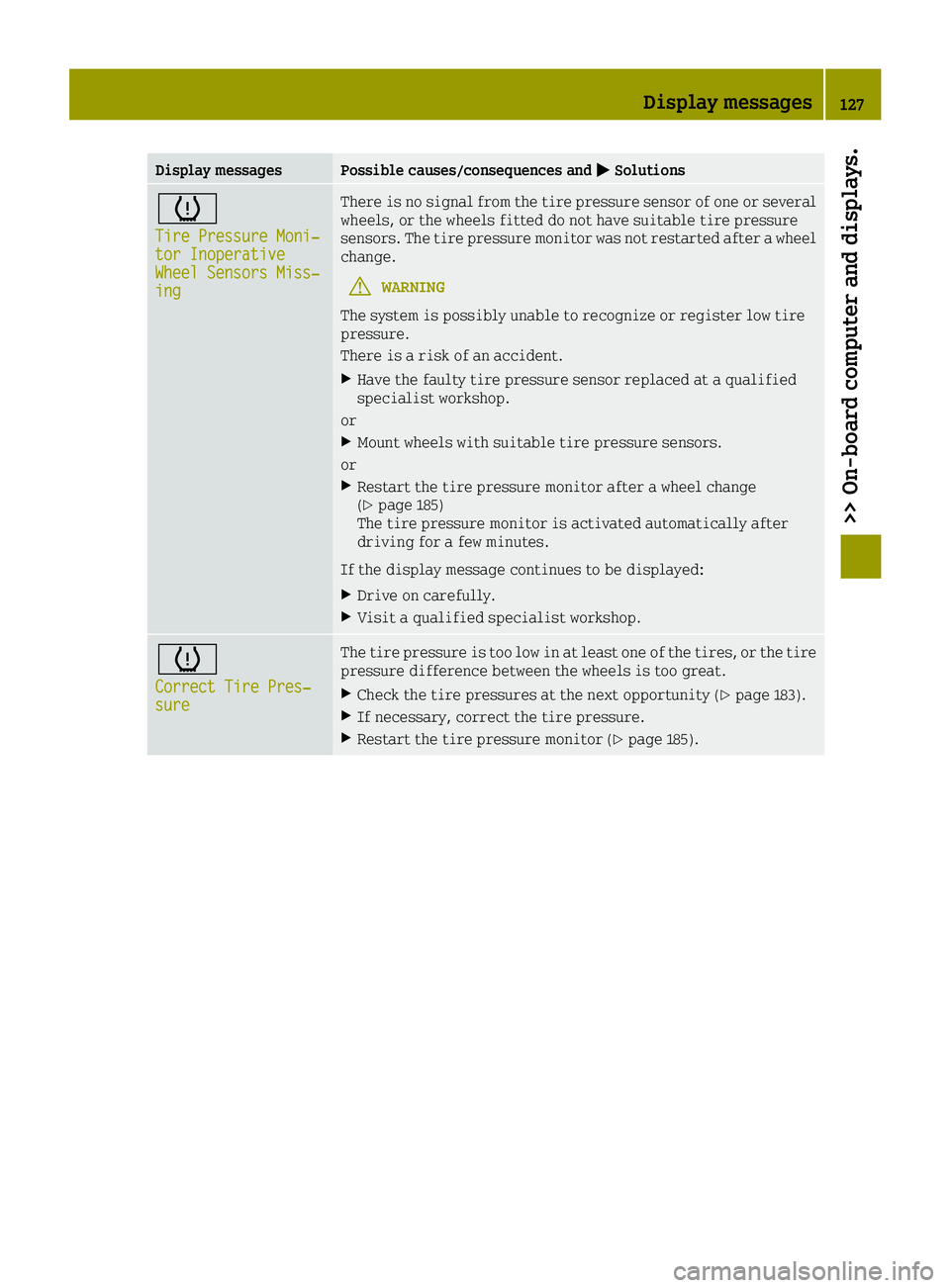
Display messagesPossible causes/consequences and0050Solutions
0077
Tire Pressure Moni‐tor InoperativeWheel Sensors Miss‐ing
There is no signal from the tire pressure sensor of one or several
wheels, or the wheels fitted do not have suitable tire pressure
sensors. The tire pressure monitor was not restarted after a wheel
change.
GWARNING
The system is possibly unable to recognize or register low tire
pressure.
There is a risk of an accident.
XHave the faulty tire pressure sensor replaced at a qualified
specialist workshop.
or
XMount wheels with suitable tire pressure sensors.
or
XRestart the tire pressure monitor after a wheel change
(Ypage 185)
The tire pressure monitor is activated automatically after
driving for a few minutes.
If the display message continues to be displayed:
XDrive on carefully.
XVisit a qualified specialist workshop.
0077
Correct Tire Pres‐sure
The tire pressure is too low in at least one of the tires, or the tire
pressure difference between the wheels is too great.
XCheck the tire pressures at the next opportunity (Ypage 183).
XIf necessary, correct the tire pressure.
XRestart the tire pressure monitor (Ypage 185).
Display messages127
>> On-board computer and displays.
Z
Page 132 of 214
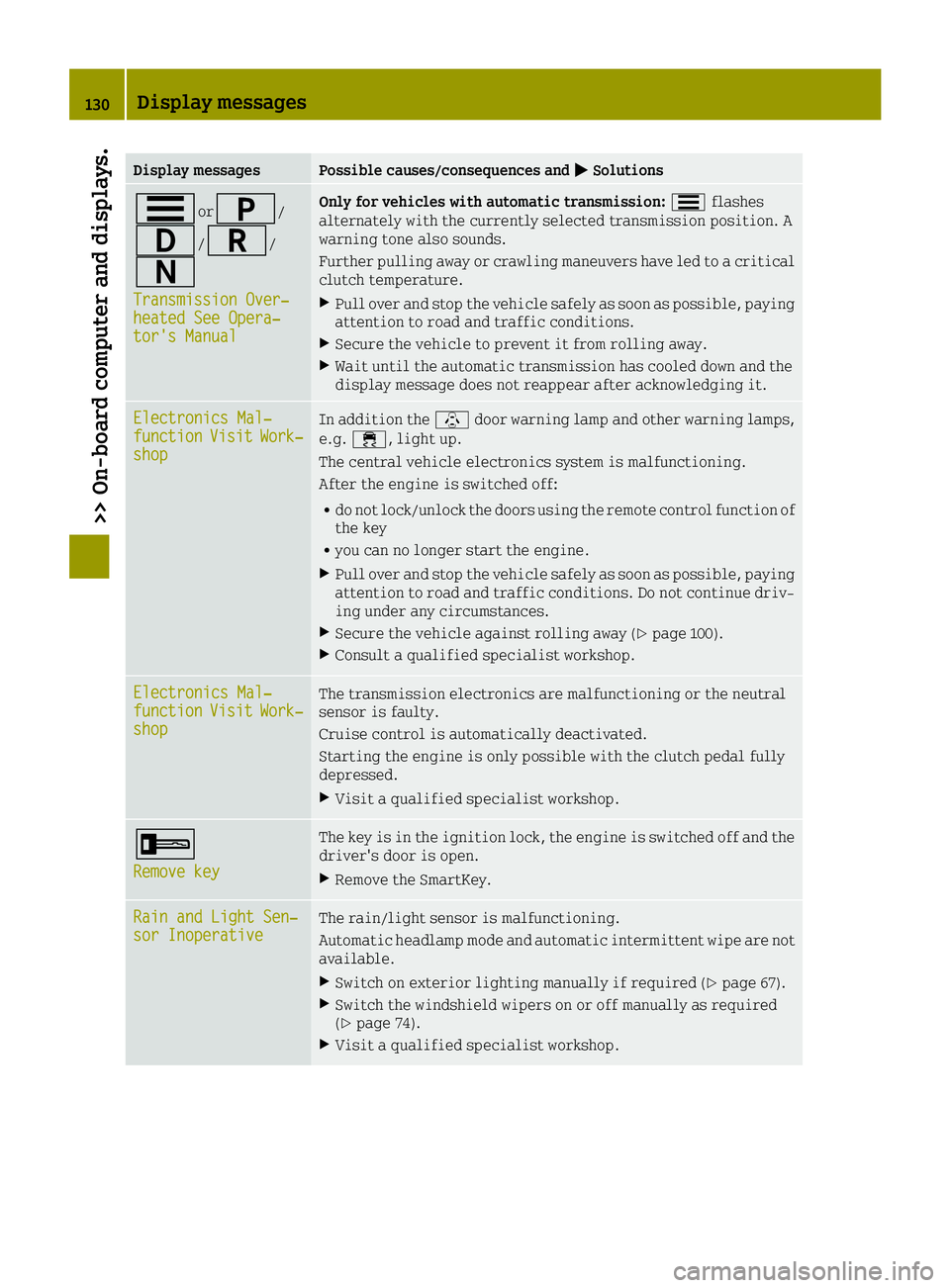
Display messagesPossible causes/consequences and0050Solutions
0079or0045/
003A/0046/
0044
Transmission Over‐heated See Opera‐tor's Manual
Only for vehicles with automatic transmission: 0079flashes
alternately with the currently selected transmission position. A
warning tone also sounds.
Further pulling away or crawling maneuvers have led to a critical
clutch temperature.
XPull over and stop the vehicle safely as soon as possible, paying
attention to road and traffic conditions.
XSecure the vehicle to prevent it from rolling away.
XWait until the automatic transmission has cooled down and the
display message does not reappear after acknowledging it.
Electronics Mal‐functionVisitWork‐shop
In addition the \door warning lamp and other warning lamps,
e.g. 00E5, light up.
The central vehicle electronics system is malfunctioning.
After the engine is switched off:
Rdo not lock/unlock the doors using the remote control function of
the key
Ryou can no longer start the engine.
XPull over and stop the vehicle safely as soon as possible, paying
attention to road and traffic conditions. Do not continue driv-
ing under any circumstances.
XSecure the vehicle against rolling away (Ypage 100).
XConsult a qualified specialist workshop.
Electronics Mal‐functionVisitWork‐shop
The transmission electronics are malfunctioning or the neutral
sensor is faulty.
Cruise control is automatically deactivated.
Starting the engine is only possible with the clutch pedal fully
depressed.
XVisit a qualified specialist workshop.
0039
Remove key
The key is in the ignition lock, the engine is switched off and the
driver's door is open.
XRemove the SmartKey.
Rain and Light Sen‐sor InoperativeThe rain/light sensor is malfunctioning.
Automatic headlamp mode and automatic intermittent wipe are not
available.
XSwitch on exterior lighting manually if required (Ypage 67).
XSwitch the windshield wipers on or off manually as required
(Ypage 74).
XVisit a qualified specialist workshop.
130Display messages
>> On-board computer and displays.
Page 138 of 214
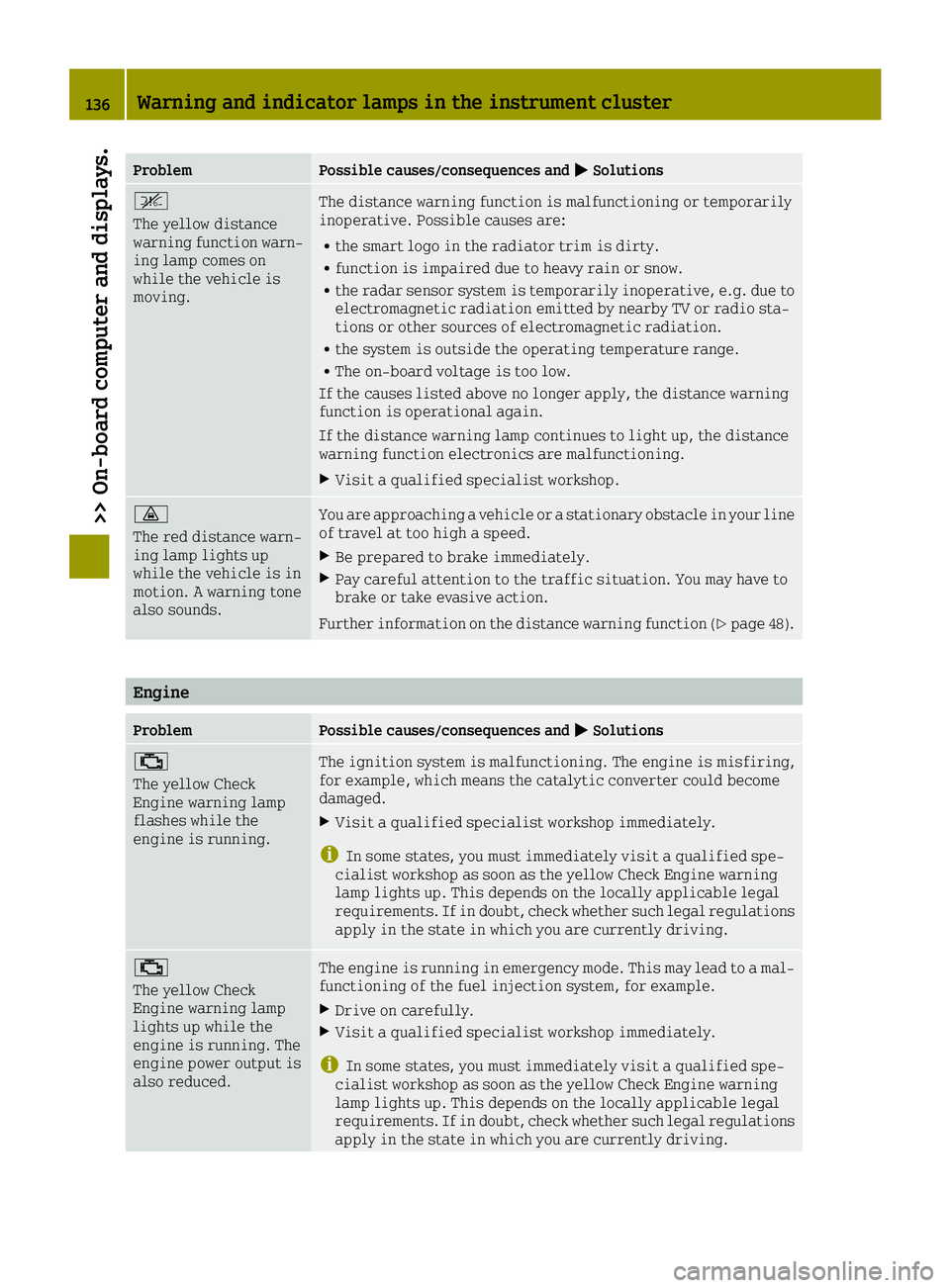
ProblemPossible causes/consequences and0050Solutions
^
The yellow distance
warning function warn-
ing lamp comes on
while the vehicle is
moving.The distance warning function is malfunctioning or temporarily
inoperative. Possible causes are:
Rthe smart logo in the radiator trim is dirty.
Rfunction is impaired due to heavy rain or snow.
Rthe radar sensor system is temporarily inoperative, e.g. due to
electromagnetic radiation emitted by nearby TV or radio sta-
tions or other sources of electromagnetic radiation.
Rthe system is outside the operating temperature range.
RThe on-board voltage is too low.
If the causes listed above no longer apply, the distance warning
function is operational again.
If the distance warning lamp continues to light up, the distance
warning function electronics are malfunctioning.
XVisit a qualified specialist workshop.
00BA
The red distance warn-
ing lamp lights up
while the vehicle is in
motion. A warning tone
also sounds.You are approaching a vehicle or a stationary obstacle in your line
of travel at too high a speed.
XBe prepared to brake immediately.
XPay careful attention to the traffic situation. You may have to
brake or take evasive action.
Further information on the distance warning function (
Ypage 48).
Engine
ProblemPossible causes/consequences and 0050Solutions
00B9
The yellow Check
Engine warning lamp
flashes while the
engine is running.The ignition system is malfunctioning. The engine is misfiring,
for example, which means the catalytic converter could become
damaged.
XVisit a qualified specialist workshop immediately.
iIn some states, you must immediately visit a qualified spe-
cialist workshop as soon as the yellow Check Engine warning
lamp lights up. This depends on the locally applicable legal
requirements. If in doubt, check whether such legal regulations
apply in the state in which you are currently driving.
00B9
The yellow Check
Engine warning lamp
lights up while the
engine is running. The
engine power output is
also reduced.The engine is running in emergency mode. This may lead to a mal-
functioning of the fuel injection system, for example.
XDrive on carefully.
XVisit a qualified specialist workshop immediately.
iIn some states, you must immediately visit a qualified spe-
cialist workshop as soon as the yellow Check Engine warning
lamp lights up. This depends on the locally applicable legal
requirements. If in doubt, check whether such legal regulations
apply in the state in which you are currently driving.
136Warning and indicator lamps in the instrument cluster
>> On-board computer and displays.
Page 139 of 214
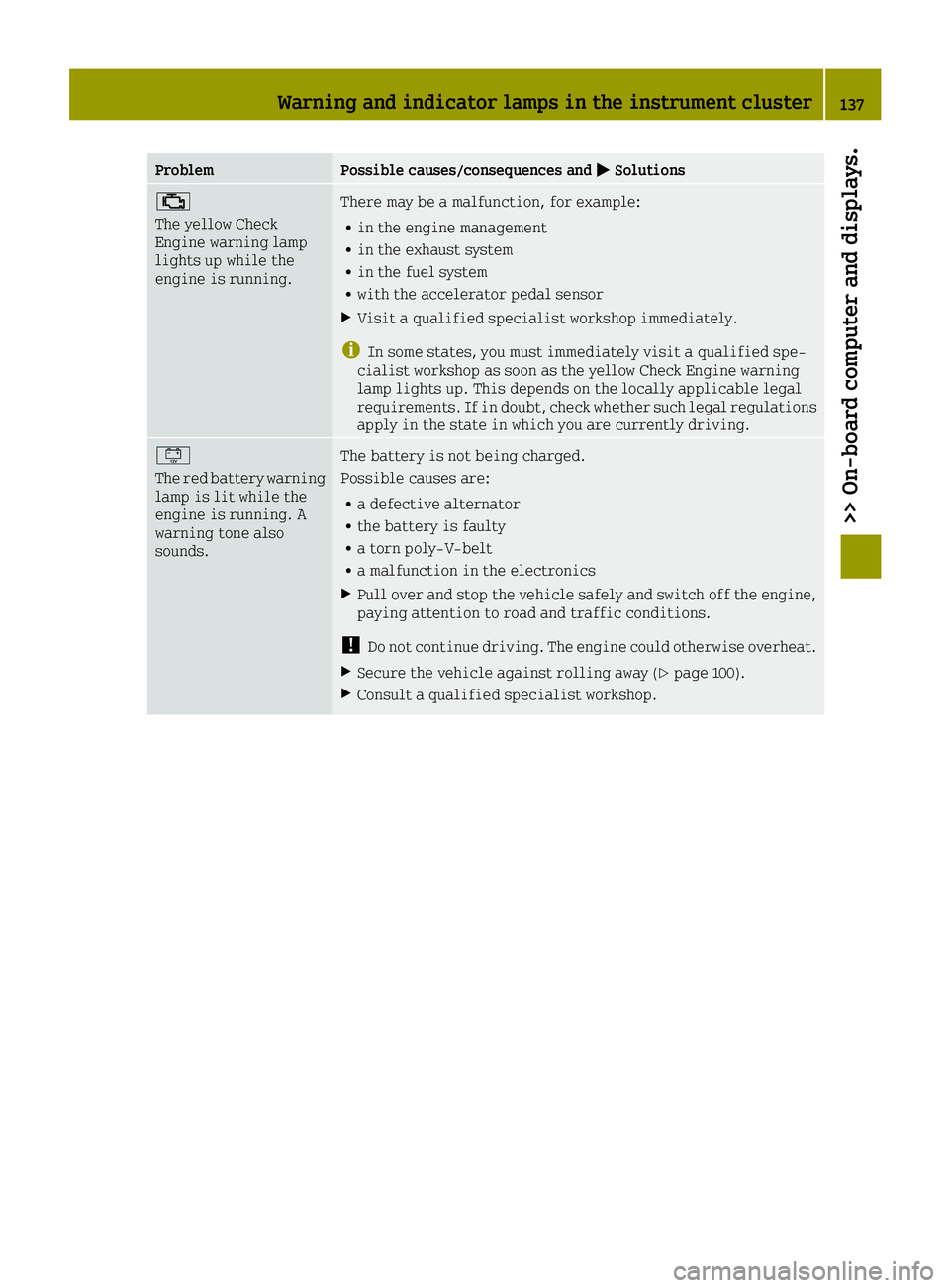
ProblemPossible causes/consequences and0050Solutions
00B9
The yellow Check
Engine warning lamp
lights up while the
engine is running.There may be a malfunction, for example:
Rin the engine management
Rin the exhaust system
Rin the fuel system
Rwith the accelerator pedal sensor
XVisit a qualified specialist workshop immediately.
iIn some states, you must immediately visit a qualified spe-
cialist workshop as soon as the yellow Check Engine warning
lamp lights up. This depends on the locally applicable legal
requirements. If in doubt, check whether such legal regulations
apply in the state in which you are currently driving.
00EF
The red battery warning
lamp is lit while the
engine is running. A
warning tone also
sounds.The battery is not being charged.
Possible causes are:
Ra defective alternator
Rthe battery is faulty
Ra torn poly-V-belt
Ra malfunction in the electronics
XPull over and stop the vehicle safely and switch off the engine,
paying attention to road and traffic conditions.
!Do not continue driving. The engine could otherwise overheat.
XSecure the vehicle against rolling away (Ypage 100).
XConsult a qualified specialist workshop.
Warning and indicator lamps in the instrument cluster137
>> On-board computer and displays.
Z
Page 142 of 214
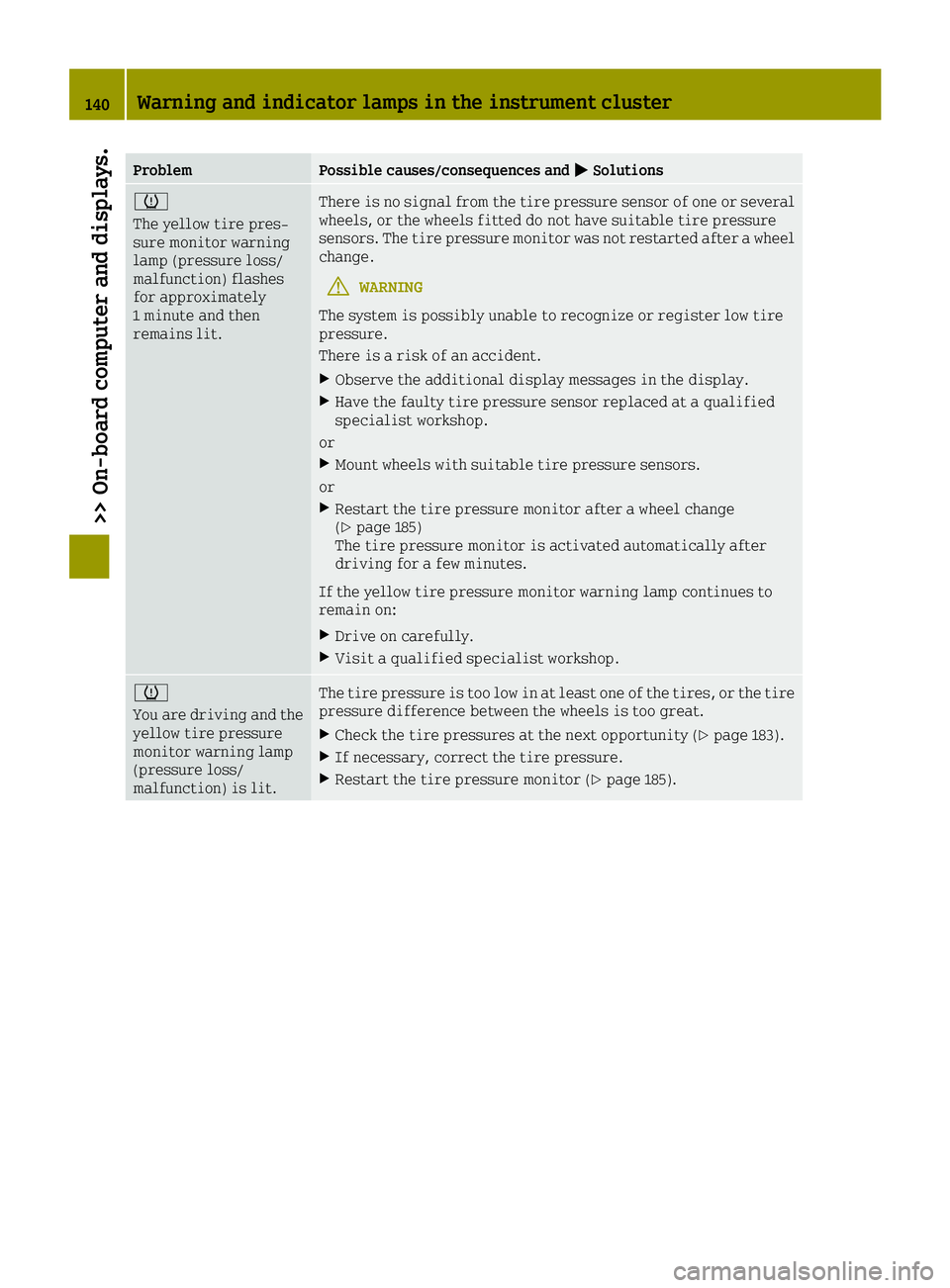
ProblemPossible causes/consequences and0050Solutions
0077
The yellow tire pres-
sure monitor warning
lamp (pressure loss/
malfunction) flashes
for approximately
1 minute and then
remains lit.There is no signal from the tire pressure sensor of one or several
wheels, or the wheels fitted do not have suitable tire pressure
sensors. The tire pressure monitor was not restarted after a wheel
change.
GWARNING
The system is possibly unable to recognize or register low tire
pressure.
There is a risk of an accident.
XObserve the additional display messages in the display.
XHave the faulty tire pressure sensor replaced at a qualified
specialist workshop.
or
XMount wheels with suitable tire pressure sensors.
or
XRestart the tire pressure monitor after a wheel change
(Ypage 185)
The tire pressure monitor is activated automatically after
driving for a few minutes.
If the yellow tire pressure monitor warning lamp continues to
remain on:
XDrive on carefully.
XVisit a qualified specialist workshop.
0077
You are driving and the
yellow tire pressure
monitor warning lamp
(pressure loss/
malfunction) is lit.The tire pressure is too low in at least one of the tires, or the tire
pressure difference between the wheels is too great.
XCheck the tire pressures at the next opportunity (Ypage 183).
XIf necessary, correct the tire pressure.
XRestart the tire pressure monitor (Ypage 185).
140Warning and indicator lamps in the instrument cluster
>> On-board computer and displays.