lights SMART FORTWO 2016 Owner's Manual
[x] Cancel search | Manufacturer: SMART, Model Year: 2016, Model line: FORTWO, Model: SMART FORTWO 2016Pages: 214, PDF Size: 4.93 MB
Page 74 of 214
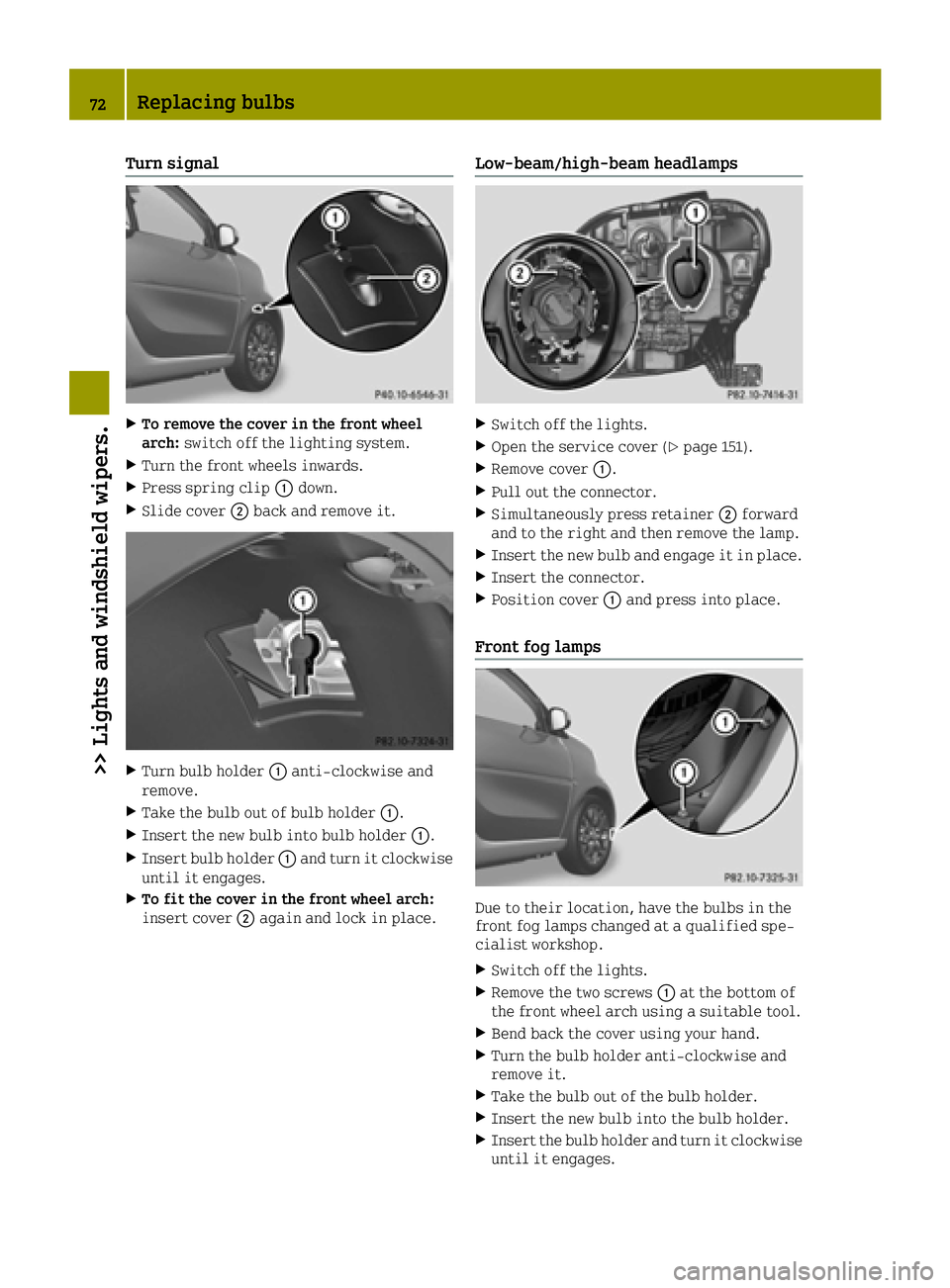
Turn signal
XTo remove the cover in the front wheel
arch:switch off the lighting system.
XTurn the front wheels inwards.
XPress spring clip 0043down.
XSlide cover 0044back and remove it.
XTurn bulb holder 0043anti-clockwise and
remove.
XTake the bulb out of bulb holder 0043.
XInsert the new bulb into bulb holder 0043.
XInsert bulb holder0043and turn it clockwise
until it engages.
XTo fit the cover in the front wheel arch:
insert cover 0044again and lock in place.
Low-beam/high-beam headlamps
XSwitch off the lights.
XOpen the service cover (Ypage 151).
XRemove cover 0043.
XPull out the connector.
XSimultaneously press retainer 0044forward
and to the right and then remove the lamp.
XInsert the new bulb and engage it in place.
XInsert the connector.
XPosition cover 0043and press into place.
Front fog lamps
Due to their location, have the bulbs in the
front fog lamps changed at a qualified spe-
cialist workshop.
XSwitch off the lights.
XRemove the two screws 0043at the bottom of
the front wheel arch using a suitable tool.
XBend back the cover using your hand.
XTurn the bulb holder anti-clockwise and
remove it.
XTake the bulb out of the bulb holder.
XInsert the new bulb into the bulb holder.
XInsert the bulb holder and turn it clockwise until it engages.
72Replacing bulbs
>> Lights and windshield wipers.
Page 75 of 214
XBend the cover back into position.
XTighten the two screws0043again.
Side turn signal lamps
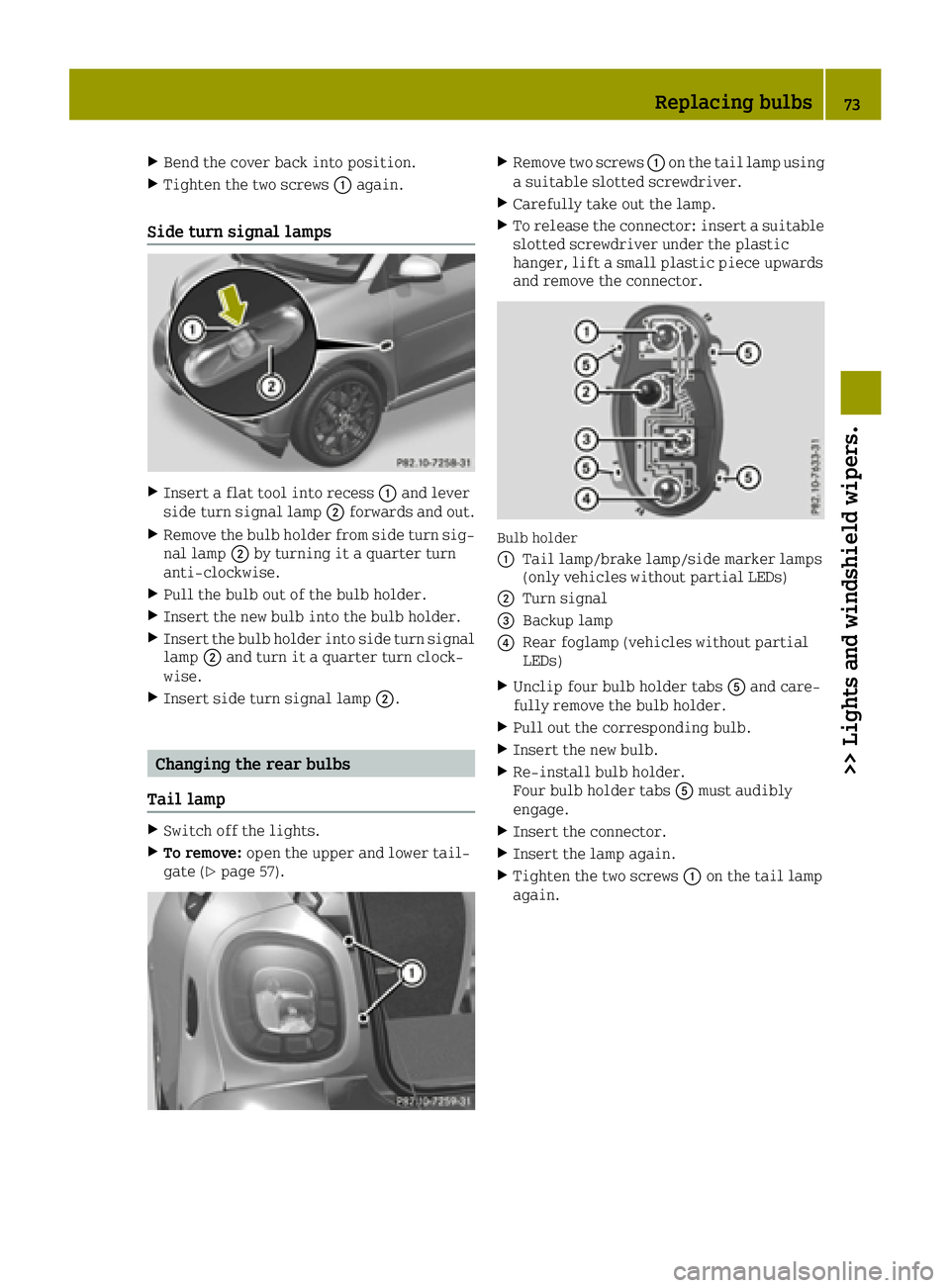
XInsert a flat tool into recess 0043and lever
side turn signal lamp 0044forwards and out.
XRemove the bulb holder from side turn sig-
nal lamp 0044by turning it a quarter turn
anti-clockwise.
XPull the bulb out of the bulb holder.
XInsert the new bulb into the bulb holder.
XInsert the bulb holder into side turn signal
lamp 0044and turn it a quarter turn clock-
wise.
XInsert side turn signal lamp 0044.
Changing the rear bulbs
Tail lamp
XSwitch off the lights.
XTo remove: open the upper and lower tail-
gate (Ypage 57).
XRemove two screws 0043on the tail lamp using
a suitable slotted screwdriver.
XCarefully take out the lamp.
XTo release the connector: insert a suitable
slotted screwdriver under the plastic
hanger, lift a small plastic piece upwards
and remove the connector.
Bulb holder
0043
Tail lamp/brake lamp/side marker lamps
(only vehicles without partial LEDs)
0044Turn signal
0087Backup lamp
0085Rear foglamp (vehicles without partial
LEDs)
XUnclip four bulb holder tabs 0083and care-
fully remove the bulb holder.
XPull out the corresponding bulb.
XInsert the new bulb.
XRe-install bulb holder.
Four bulb holder tabs 0083must audibly
engage.
XInsert the connector.
XInsert the lamp again.
XTighten the two screws 0043on the tail lamp
again.
Replacing bulbs73
>> Lights and windshield wipers.
Z
Page 76 of 214
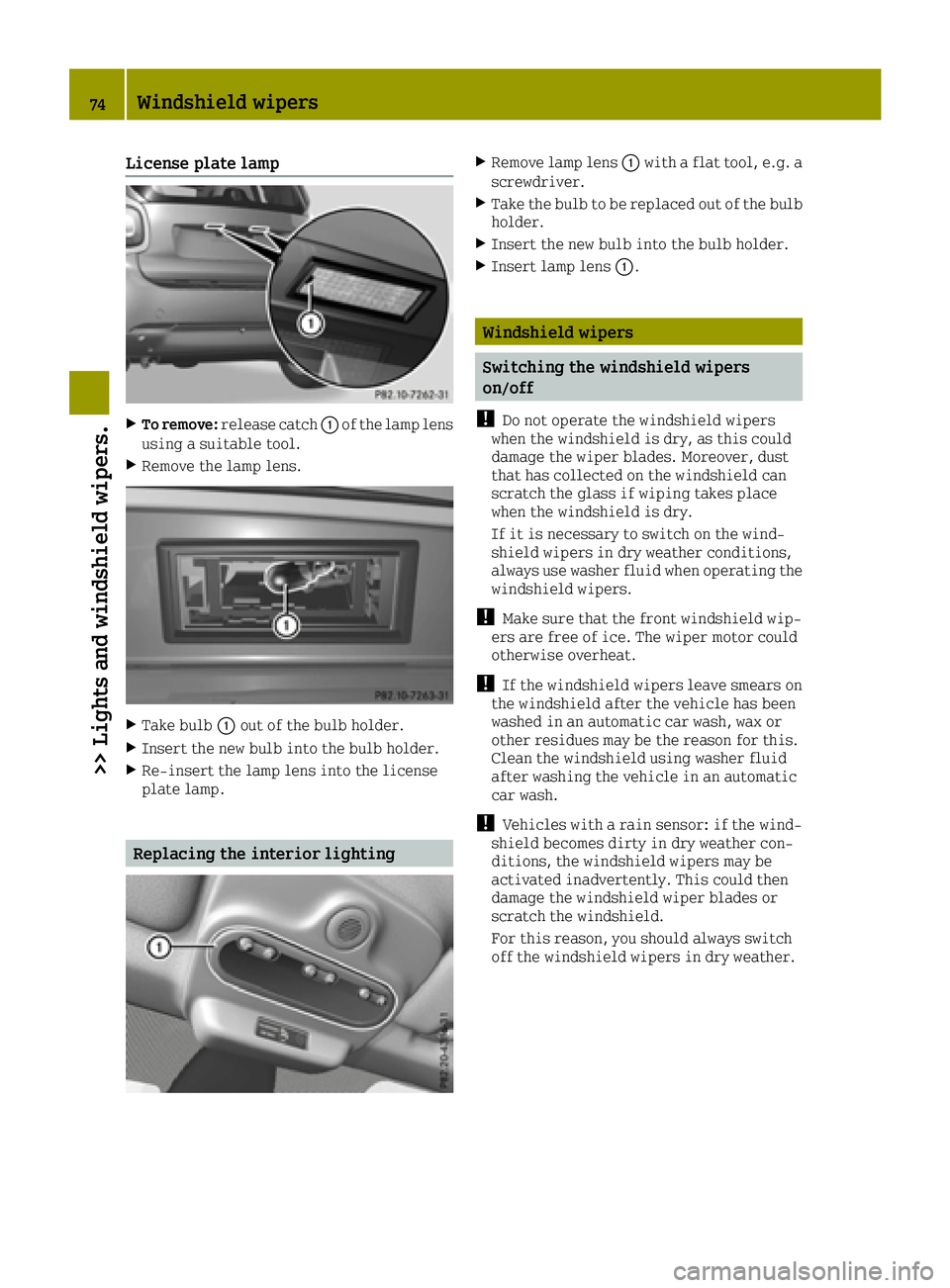
License plate lamp
XTo remove:release catch 0043of the lamp lens
using a suitable tool.
XRemove the lamp lens.
XTake bulb 0043out of the bulb holder.
XInsert the new bulb into the bulb holder.
XRe-insert the lamp lens into the license
plate lamp.
Replacing the interior lighting
XRemove lamp lens 0043with a flat tool, e.g. a
screwdriver.
XTake the bulb to be replaced out of the bulb
holder.
XInsert the new bulb into the bulb holder.
XInsert lamp lens 0043.
Windshield wipers
Switching the windshield wipers
on/off
!
Do not operate the windshield wipers
when the windshield is dry, as this could
damage the wiper blades. Moreover, dust
that has collected on the windshield can
scratch the glass if wiping takes place
when the windshield is dry.
If it is necessary to switch on the wind-
shield wipers in dry weather conditions,
always use washer fluid when operating the
windshield wipers.
!Make sure that the front windshield wip-
ers are free of ice. The wiper motor could
otherwise overheat.
!If the windshield wipers leave smears on
the windshield after the vehicle has been
washed in an automatic car wash, wax or
other residues may be the reason for this.
Clean the windshield using washer fluid
after washing the vehicle in an automatic
car wash.
!Vehicles with a rain sensor: if the wind-
shield becomes dirty in dry weather con-
ditions, the windshield wipers may be
activated inadvertently. This could then
damage the windshield wiper blades or
scratch the windshield.
For this reason, you should always switch
off the windshield wipers in dry weather.
74Windshield wipers
>> Lights and windshield wipers.
Page 77 of 214
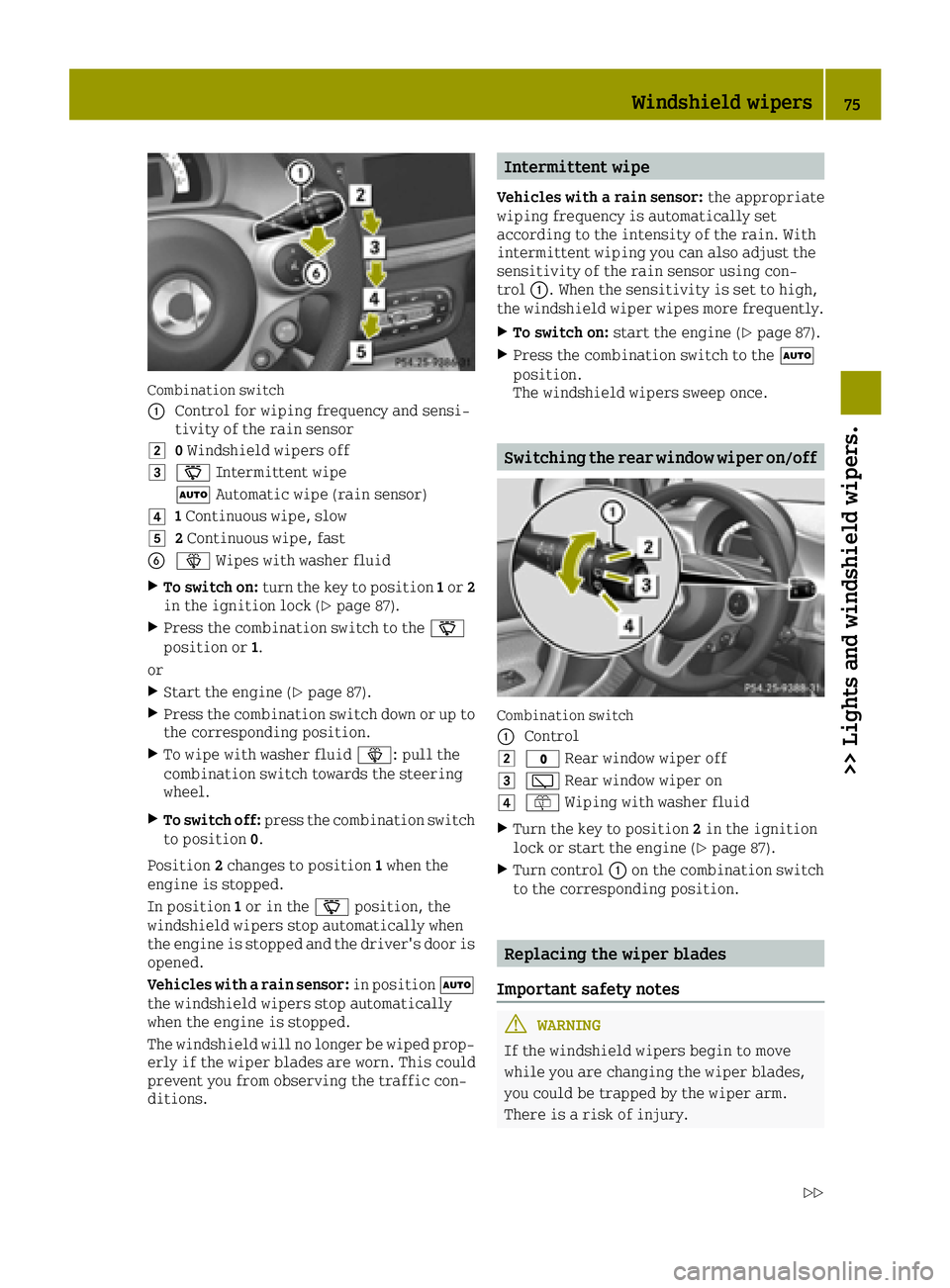
Combination switch
0043
Control for wiping frequency and sensi-
tivity of the rain sensor
00480Windshield wipers off
004900AE Intermittent wipe
0058 Automatic wipe (rain sensor)
004A1Continuous wipe, slow
004B2 Continuous wipe, fast
008400D4 Wipes with washer fluid
XTo switch on: turn the key to position 1or 2
in the ignition lock (Ypage 87).
XPress the combination switch to the 00AE
position or 1.
or
XStart the engine (Ypage 87).
XPress the combination switch down or up to
the corresponding position.
XTo wipe with washer fluid 00D4: pull the
combination switch towards the steering
wheel.
XTo switch off: press the combination switch
to position 0.
Position 2changes to position 1when the
engine is stopped.
In position 1or in the 00AEposition, the
windshield wipers stop automatically when
the engine is stopped and the driver's door is
opened.
Vehicles with a rain sensor: in position0058
the windshield wipers stop automatically
when the engine is stopped.
The windshield will no longer be wiped prop- erly if the wiper blades are worn. This could
prevent you from observing the traffic con-
ditions.
Intermittent wipe
Vehicles with a rain sensor: the appropriate
wiping frequency is automatically set
according to the intensity of the rain. With
intermittent wiping you can also adjust the
sensitivity of the rain sensor using con-
trol 0043. When the sensitivity is set to high,
the windshield wiper wipes more frequently.
XTo switch on: start the engine (Ypage 87).
XPress the combination switch to the 0058
position.
The windshield wipers sweep once.
Switching the rear window wiper on/off
Combination switch
0043
Control
0048003F Rear window wiper off
004900C5Rear window wiper on
004A00E2Wiping with washer fluid
XTurn the key to position 2in the ignition
lock or start the engine (Ypage 87).
XTurn control 0043on the combination switch
to the corresponding position.
Replacing the wiper blades
Important safety notes
GWARNING
If the windshield wipers begin to move
while you are changing the wiper blades,
you could be trapped by the wiper arm.
There is a risk of injury.
Windshield wipers75
>> Lights and windshield wipers.
Z
Page 78 of 214
Always switch off the windshield wipers
and ignition before changing the wiper
blades.
!To avoid damaging the wiper blades, make
sure that you touch only the wiper arm of the
wiper.
!Never open the service cover/tailgate if a
windshield wiper arm has been folded away
from the windshield/rear window.
Never fold a windshield wiper arm without
a wiper blade back onto the windshield/
rear window.
Hold the windshield wiper arm firmly when
you change the wiper blade. If you release
the wiper arm without a wiper blade and it
falls onto the windshield/rear window, the
windshield/rear window may be damaged by
the force of the impact.
smart recommends that you have the wiper
blades changed at a qualified specialist
workshop.
Changing the windshield wiper blades
Removing the wiper blades
XTurn the key to position 1or 2in the igni-
tion lock (Ypage 87).
XPress the combination switch to the 004B
position (Ypage 74).
The wiper arms move slowly upwards.
XWhen the wiper arms are vertical in rela-
tion to the service cover, turn the key to
position 0and remove it from the ignition
lock.
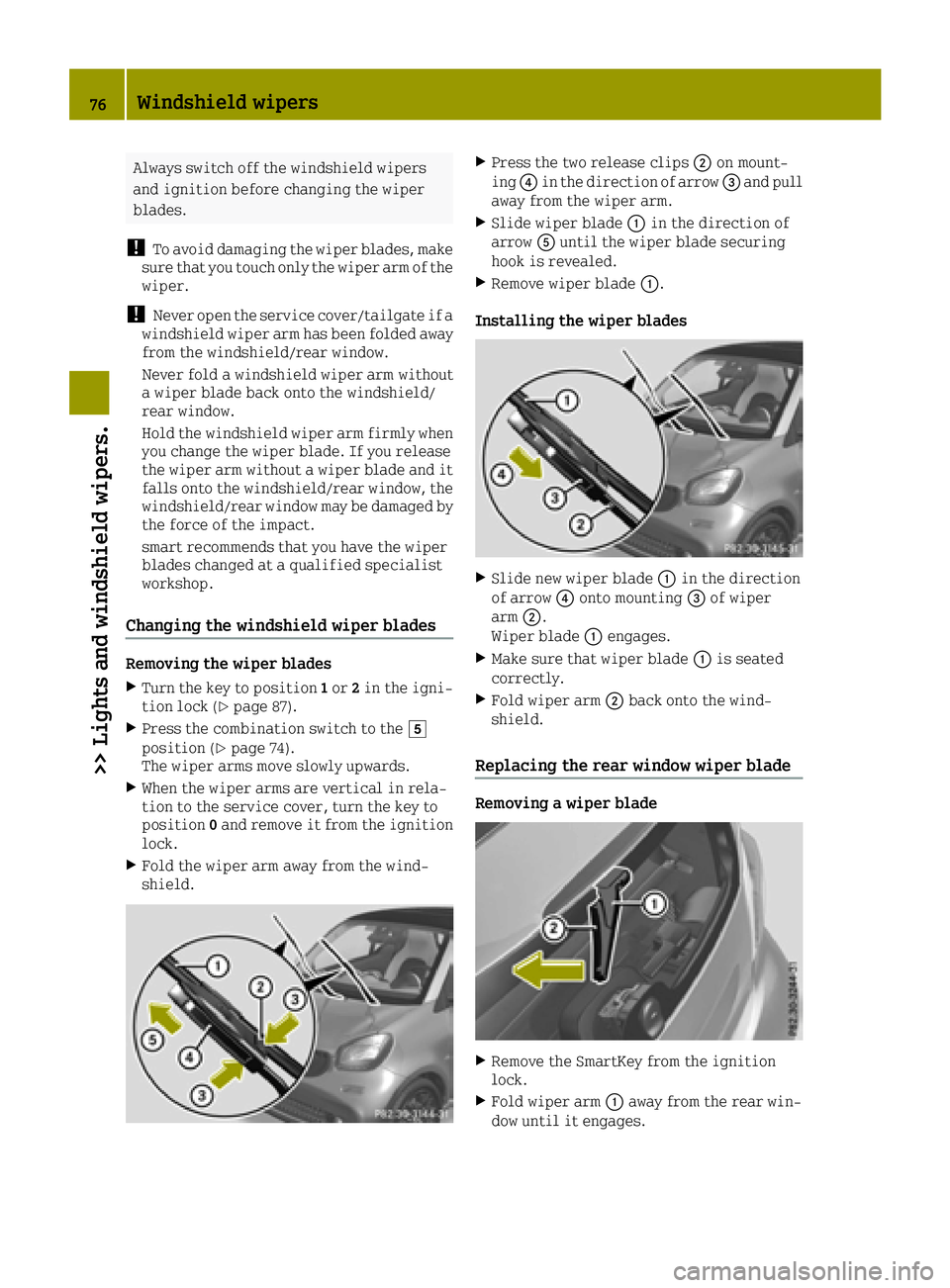
XFold the wiper arm away from the wind-
shield.
XPress the two release clips 0044on mount-
ing 0085in the direction of arrow 0087and pull
away from the wiper arm.
XSlide wiper blade 0043in the direction of
arrow 0083until the wiper blade securing
hook is revealed.
XRemove wiper blade 0043.
Installing the wiper blades
XSlide new wiper blade 0043in the direction
of arrow 0085onto mounting 0087of wiper
arm 0044.
Wiper blade 0043engages.
XMake sure that wiper blade 0043is seated
correctly.
XFold wiper arm 0044back onto the wind-
shield.
Replacing the rear window wiper blade
Removing a wiper blade
XRemove the SmartKey from the ignition
lock.
XFold wiper arm 0043away from the rear win-
dow until it engages.
76Windshield wipers
>> Lights and windshield wipers.
Page 79 of 214
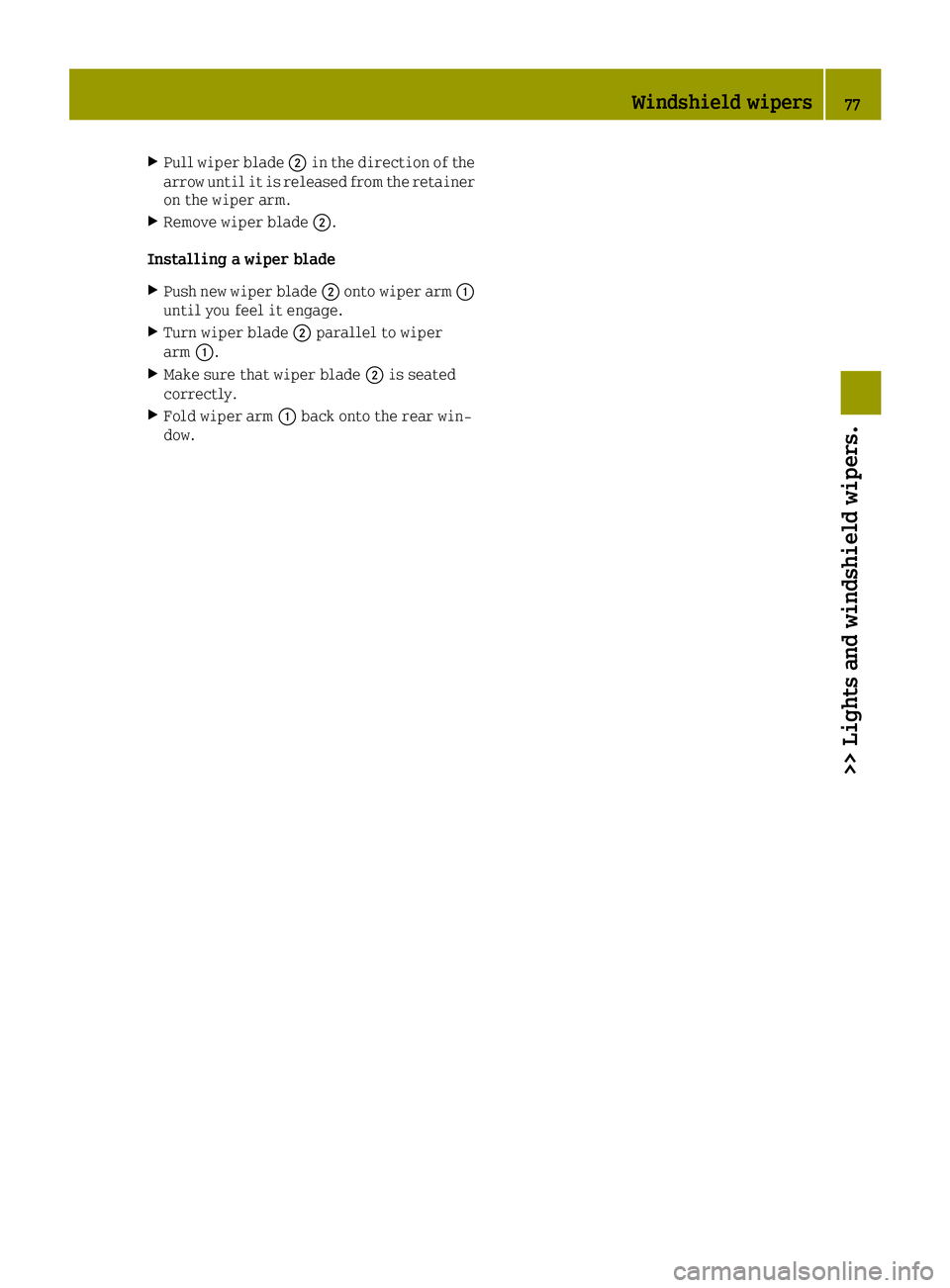
XPull wiper blade0044in the direction of the
arrow until it is released from the retainer
on the wiper arm.
XRemove wiper blade 0044.
Installing a wiper blade
XPush new wiper blade 0044onto wiper arm 0043
until you feel it engage.
XTurn wiper blade 0044parallel to wiper
arm 0043.
XMake sure that wiper blade 0044is seated
correctly.
XFold wiper arm 0043back onto the rear win-
dow.
Windshield wipers77
>> Lights and windshield wipers.
Z
Page 80 of 214
Problems with the windshield wipers
ProblemPossible causes/consequences and0050Solutions
The windshield wipers
do not stop or continue
wiping with the same
speed regardless of a
change in position.The combination switch or rain sensor is malfunctioning.
XStop the vehicle, paying attention to traffic conditions as you
do so and switch off the engine.
XFor safety reasons, you should remove the key from the ignition
lock and open the driver's door.
XTurn the key to position1in the ignition lock. Then try to start
the engine again.
XHave the windshield wipers checked at a qualified specialist
workshop.
The windshield wipers
are jammed.Leaves or snow, for example, may be obstructing the windshield
wiper movement. The wiper motor has been deactivated.
XStop the vehicle, paying attention to traffic conditions as you
do so and switch off the engine.
XFor safety reasons, you should remove the Smart Key from the
ignition lock.
XRemove the cause of the obstruction.
XSwitch the windshield wipers on again after 30 seconds.
The windshield wiper
has stopped in the mid-
dle of the windshield.The windshield wiper drive has stopped for safety reasons.
XHave the windshield wipers checked at a qualified specialist
workshop.
The windshield wipers
fail completely.The windshield wiper drive is malfunctioning.
XSelect another wiper speed on the combination switch.
XHave the windshield wipers checked at a qualified specialist
workshop.
78Windshield wipers
>> Lights and windshield wipers.
Page 82 of 214
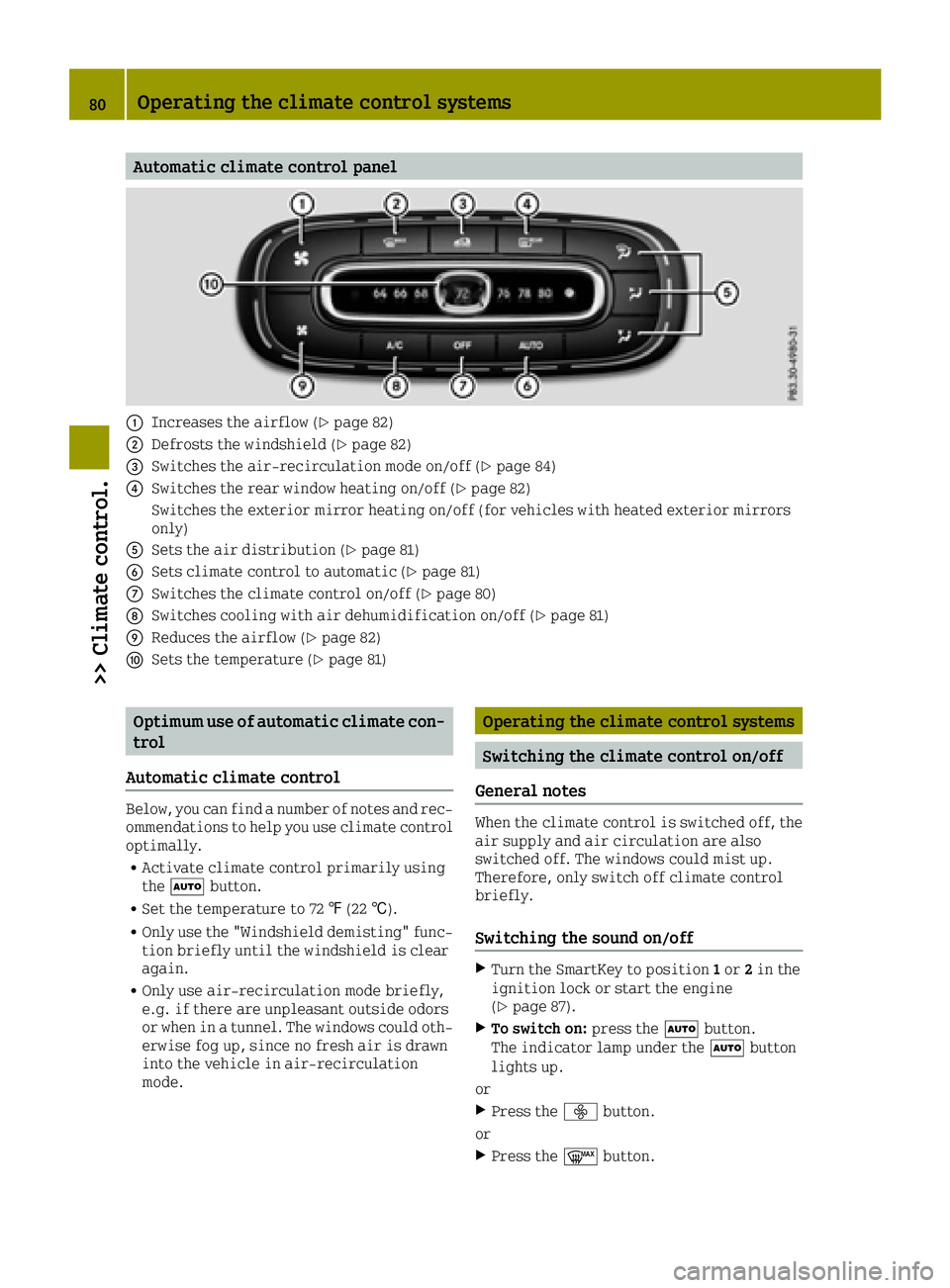
Automatic climate control panel
0043Increases the airflow (Ypage 82)
0044Defrosts the windshield (Ypage 82)
0087Switches the air-recirculation mode on/off (Ypage 84)
0085Switches the rear window heating on/off (Ypage 82)
Switches the exterior mirror heating on/off (for vehicles with heated exterior mirrors
only)
0083Sets the air distribution (Ypage 81)
0084Sets climate control to automatic (Ypage 81)
006BSwitches the climate control on/off (Ypage 80)
006CSwitches cooling with air dehumidification on/off (Ypage 81)
006DReduces the airflow (Ypage 82)
006ESets the temperature (Ypage 81)
Optimum use of automatic climate con-
trol
Automatic climate control
Below, you can find a number of notes and rec-
ommendations to help you use climate control optimally.
RActivate climate control primarily using
the 0058 button.
RSet the temperature to 72 ‡(22 †).
ROnly use the "Windshield demisting" func-
tion briefly until the windshield is clear
again.
ROnly use air-recirculation mode briefly,
e.g. if there are unpleasant outside odors
or when in a tunnel. The windows could oth-
erwise fog up, since no fresh air is drawn
into the vehicle in air-recirculation
mode.
Operating the climate control systems
Switching the climate control on/off
General notes
When the climate control is switched off, the air supply and air circulation are also
switched off. The windows could mist up.
Therefore, only switch off climate control
briefly.
Switching the sound on/off
XTurn the SmartKey to position 1or 2in the
ignition lock or start the engine
(
Ypage 87).
XTo switch on: press the0058button.
The indicator lamp under the 0058button
lights up.
or
XPress the 00F2button.
or
XPress the 0064button.
80Operating the climate control systems
>> Climate control.
Page 83 of 214
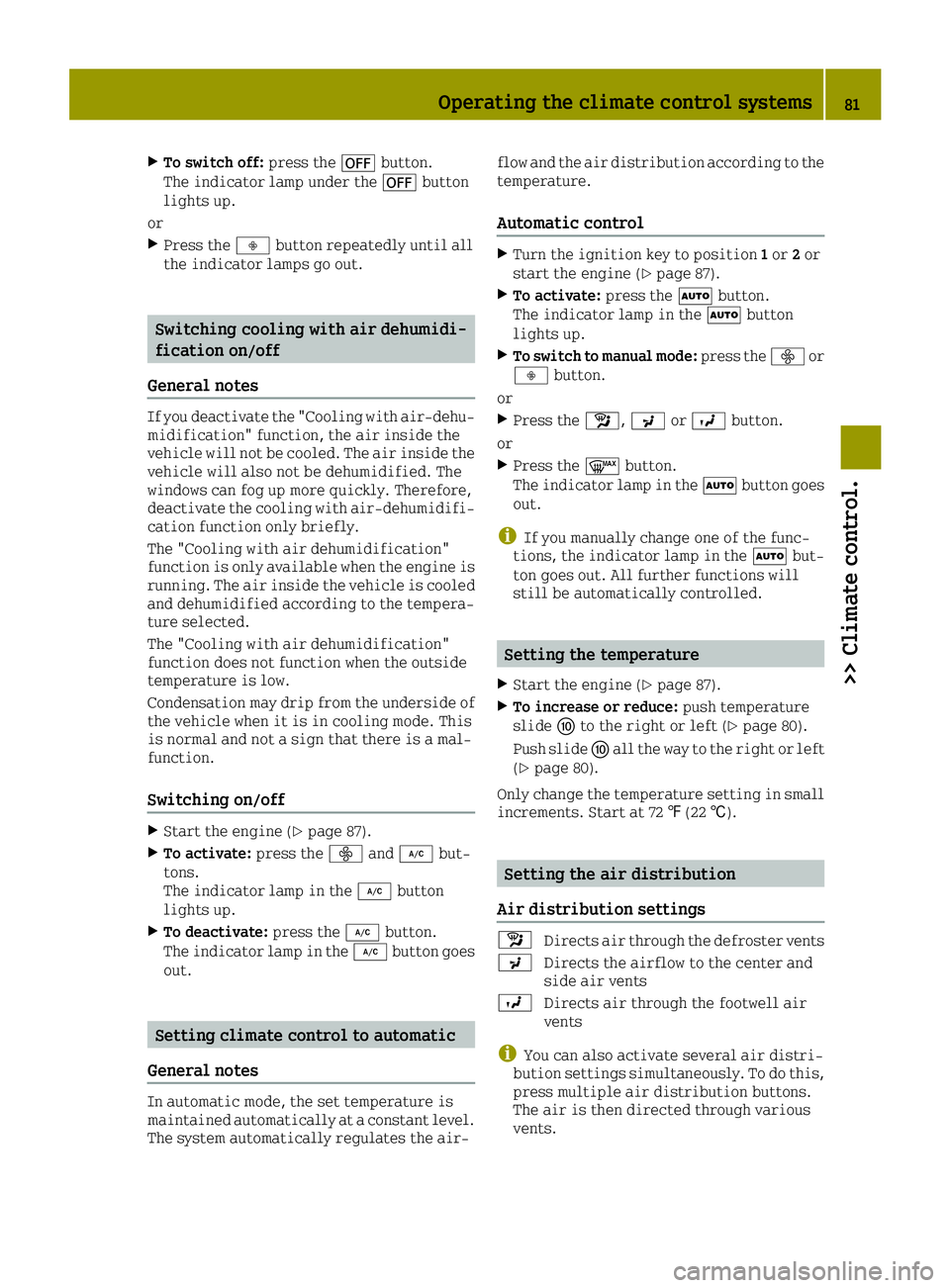
XTo switch off:press the0078button.
The indicator lamp under the 0078button
lights up.
or
XPress the 00F3button repeatedly until all
the indicator lamps go out.
Switching cooling with air dehumidi-
fication on/off
General notes
If you deactivate the "Cooling with air-dehu-
midification" function, the air inside the
vehicle will not be cooled. The air inside the
vehicle will also not be dehumidified. The
windows can fog up more quickly. Therefore,
deactivate the cooling with air-dehumidifi-
cation function only briefly.
The "Cooling with air dehumidification"
function is only available when the engine is
running. The air inside the vehicle is cooled
and dehumidified according to the tempera-
ture selected.
The "Cooling with air dehumidification"
function does not function when the outside
temperature is low.
Condensation may drip from the underside of
the vehicle when it is in cooling mode. This
is normal and not a sign that there is a mal-
function.
Switching on/off
XStart the engine (Ypage 87).
XTo activate: press the00F2and005A but-
tons.
The indicator lamp in the 005Abutton
lights up.
XTo deactivate: press the005Abutton.
The indicator lamp in the 005Abutton goes
out.
Setting climate control to automatic
General notes
In automatic mode, the set temperature is
maintained automatically at a constant level. The system automatically regulates the air- flow and the air distribution according to the
temperature.
Automatic control
XTurn the ignition key to position
1or 2or
start the engine (Ypage 87).
XTo activate: press the0058button.
The indicator lamp in the 0058button
lights up.
XTo switch to manual mode: press the00F2or
00F3 button.
or
XPress the Á,009Cor009B button.
or
XPress the 0064button.
The indicator lamp in the 0058button goes
out.
iIf you manually change one of the func-
tions, the indicator lamp in the 0058but-
ton goes out. All further functions will
still be automatically controlled.
Setting the temperature
XStart the engine (Ypage 87).
XTo increase or reduce: push temperature
slide 006Eto the right or left (Ypage 80).
Push slide 006Eall the way to the right or left
(
Ypage 80).
Only change the temperature setting in small
increments. Start at 72 ‡(22 †).
Setting the air distribution
Air distribution settings
Á Directs air through the defroster vents
009C Directs the airflow to the center and
side air vents
009B Directs air through the footwell air
vents
iYou can also activate several air distri-
bution settings simultaneously. To do this,
press multiple air distribution buttons.
The air is then directed through various
vents.
Operating the climate control systems81
>> Climate control.
Page 84 of 214
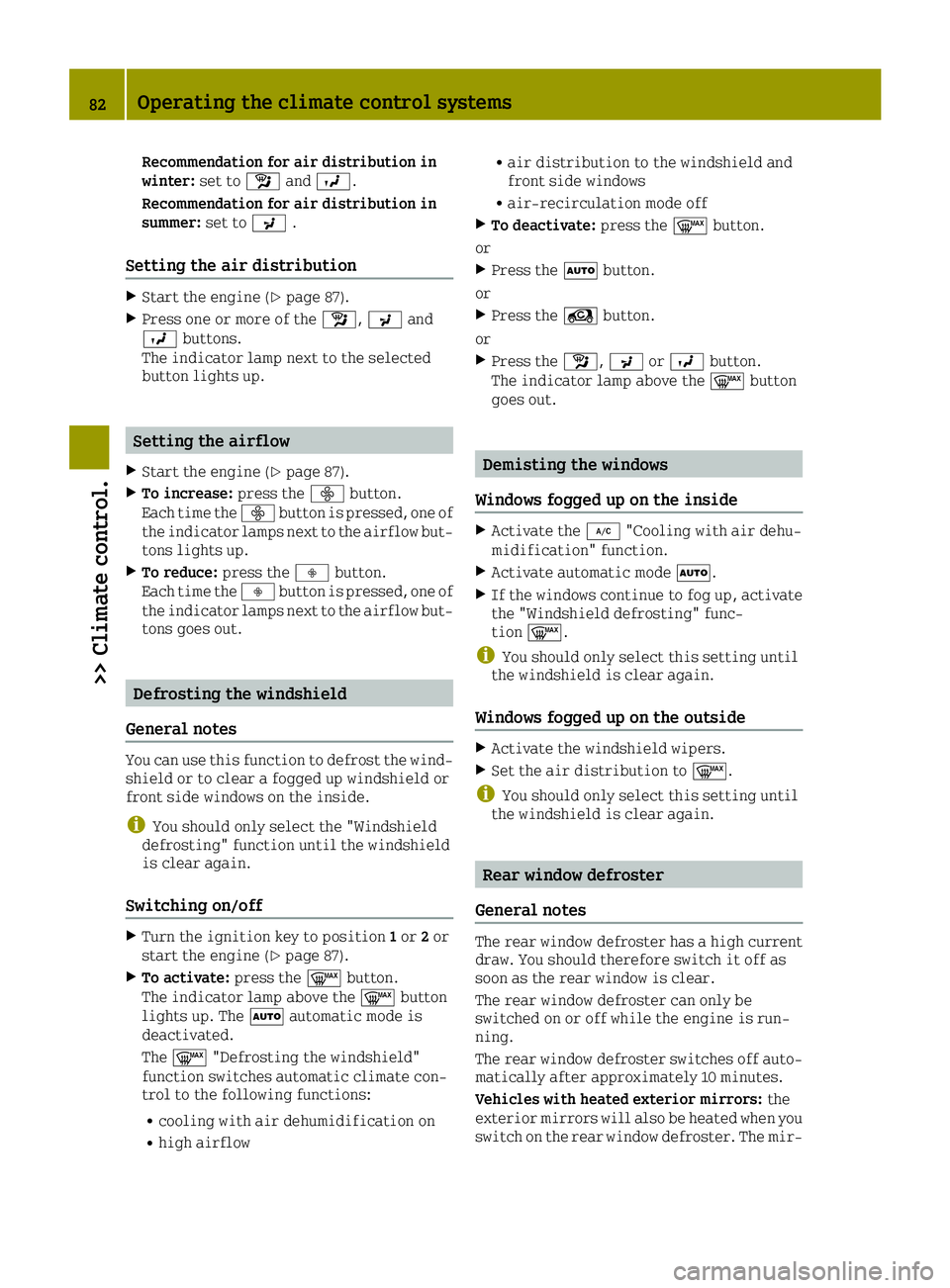
Recommendation for air distribution in
winter:set toÁand009B.
Recommendation for air distribution in
summer: set to009C.
Setting the air distribution
XStart the engine (Ypage 87).
XPress one or more of the Á,009Cand
009B buttons.
The indicator lamp next to the selected
button lights up.
Setting the airflow
XStart the engine (Ypage 87).
XTo increase: press the00F2button.
Each time the 00F2button is pressed, one of
the indicator lamps next to the airflow but-
tons lights up.
XTo reduce: press the00F3button.
Each time the 00F3button is pressed, one of
the indicator lamps next to the airflow but-
tons goes out.
Defrosting the windshield
General notes
You can use this function to defrost the wind-
shield or to clear a fogged up windshield or
front side windows on the inside.
iYou should only select the "Windshield
defrosting" function until the windshield
is clear again.
Switching on/off
XTurn the ignition key to position 1or 2or
start the engine (Ypage 87).
XTo activate: press the0064button.
The indicator lamp above the 0064button
lights up. The 0058automatic mode is
deactivated.
The 0064 "Defrosting the windshield"
function switches automatic climate con-
trol to the following functions:
Rcooling with air dehumidification on
Rhigh airflow
Rair distribution to the windshield and
front side windows
Rair-recirculation mode off
XTo deactivate: press the0064button.
or
XPress the 0058button.
or
XPress the Àbutton.
or
XPress the Á,009Cor009B button.
The indicator lamp above the 0064button
goes out.
Demisting the windows
Windows fogged up on the inside
XActivate the 005A"Cooling with air dehu-
midification" function.
XActivate automatic mode 0058.
XIf the windows continue to fog up, activate
the "Windshield defrosting" func-
tion 0064.
iYou should only select this setting until
the windshield is clear again.
Windows fogged up on the outside
XActivate the windshield wipers.
XSet the air distribution to 0064.
iYou should only select this setting until
the windshield is clear again.
Rear window defroster
General notes
The rear window defroster has a high current
draw. You should therefore switch it off as
soon as the rear window is clear.
The rear window defroster can only be
switched on or off while the engine is run-
ning.
The rear window defroster switches off auto-
matically after approximately 10 minutes.
Vehicles with heated exterior mirrors: the
exterior mirrors will also be heated when you
switch on the rear window defroster. The mir-
82Operating the climate control systems
>> Climate control.