service SMART FORTWO 2016 Owner's Manual
[x] Cancel search | Manufacturer: SMART, Model Year: 2016, Model line: FORTWO, Model: SMART FORTWO 2016Pages: 214, PDF Size: 4.93 MB
Page 114 of 214
Depending on the vehicle equipment, you can
call up the following menus one after the
other:
RDistancemenu (Ypage 112)
Rfrom Starttrip computer menu
(Ypage 112)
Rfrom Resettrip computer menu
(Ypage 112)
RFuel consumptionmenu (Ypage 112)
RCoolant Temperaturemenu (Ypage 113)
RMessages and Servicemenu (Ypage 113)
RSettingsmenu (Ypage 114)
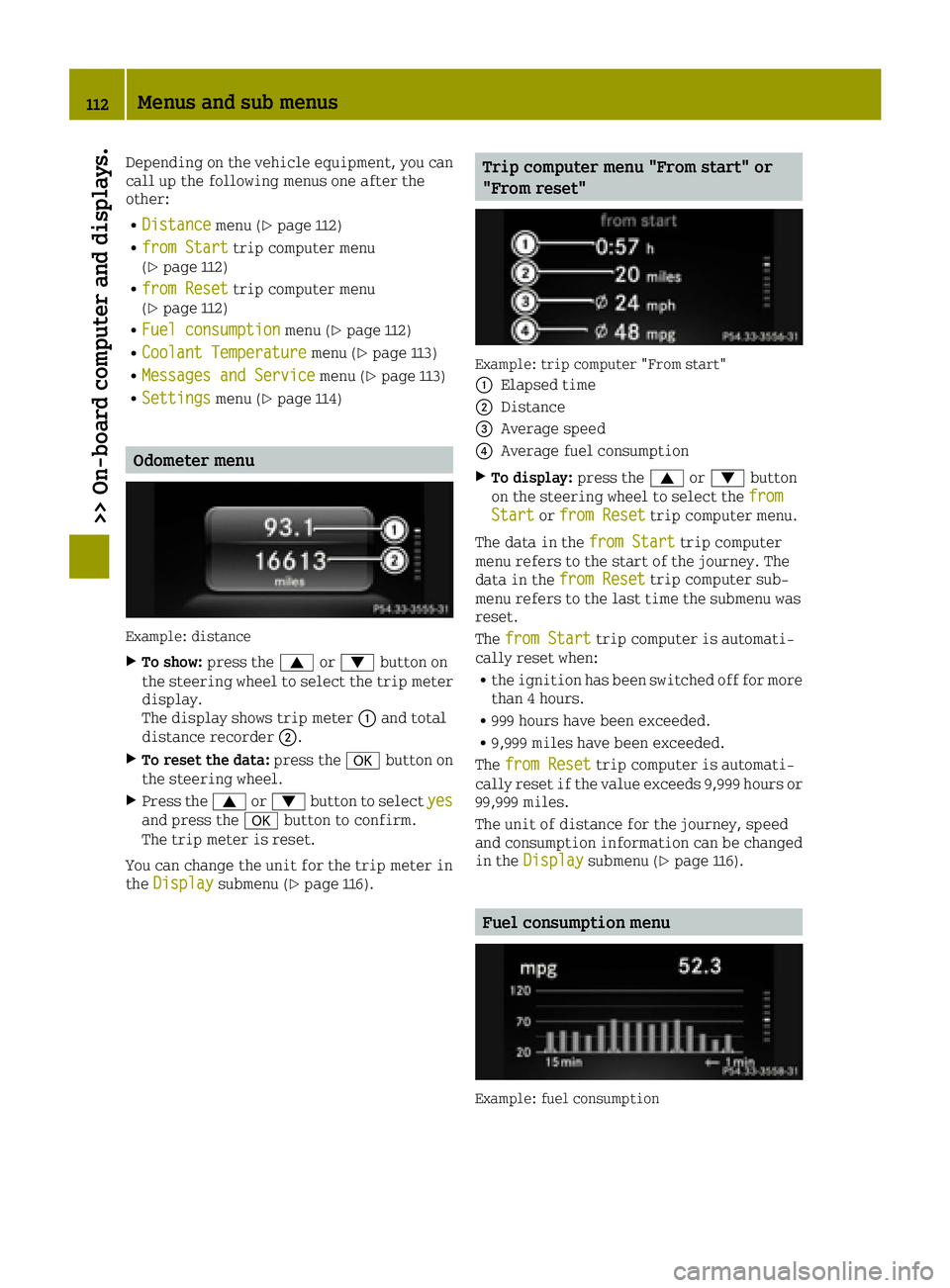
Odometer menu
Example: distance
XTo show: press the 0063or0064 button on
the steering wheel to select the trip meter display.
The display shows trip meter 0043and total
distance recorder 0044.
XTo reset the data:press the0076button on
the steering wheel.
XPress the 0063or0064 button to select yesand press the0076button to confirm.
The trip meter is reset.
You can change the unit for the trip meter in
the Display
submenu (Ypage 116).
Trip computer menu "From start" or
"From reset"
Example: trip computer "From start"
0043
Elapsed time
0044Distance
0087Average speed
0085Average fuel consumption
XTo display: press the0063or0064 button
on the steering wheel to select the from
Startorfrom Resettrip computer menu.
The data in the from Start
trip computer
menu refers to the start of the journey. The
data in the from Reset
trip computer sub-
menu refers to the last time the submenu was
reset.
The from Start
trip computer is automati-
cally reset when:
Rthe ignition has been switched off for more
than 4 hours.
R999 hours have been exceeded.
R9,999 miles have been exceeded.
The from Reset
trip computer is automati-
cally reset if the value exceeds 9,999 hours or 99,999 miles.
The unit of distance for the journey, speed
and consumption information can be changed
in the Display
submenu (Ypage 116).
Fuel consumption menu
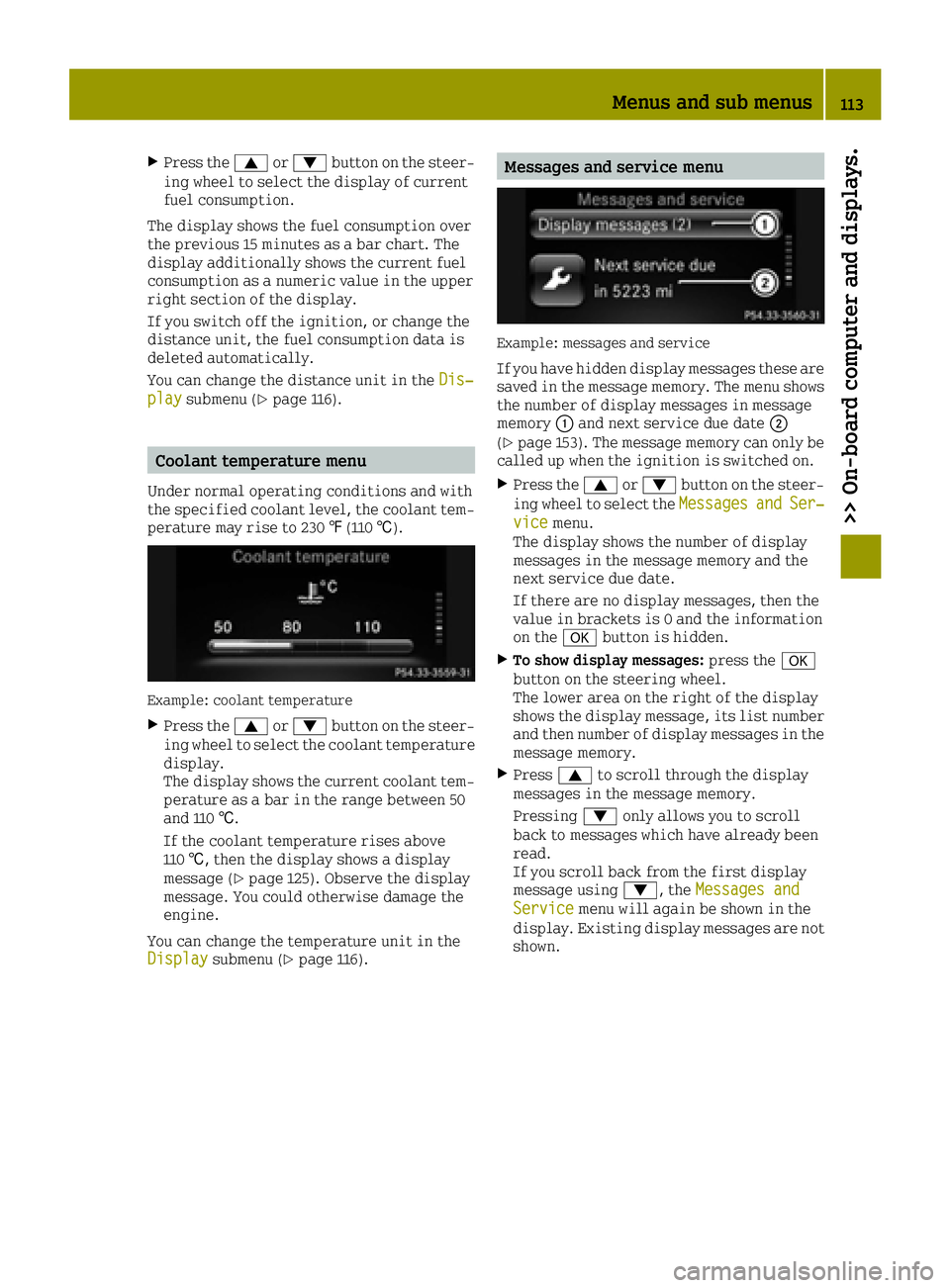
Example: fuel consumption
112Menus and sub menus
>> On-board computer and displays.
Page 115 of 214
XPress the0063or0064 button on the steer-
ing wheel to select the display of current
fuel consumption.
The display shows the fuel consumption over
the previous 15 minutes as a bar chart. The
display additionally shows the current fuel
consumption as a numeric value in the upper
right section of the display.
If you switch off the ignition, or change the
distance unit, the fuel consumption data is
deleted automatically.
You can change the distance unit in the Dis‐
playsubmenu (Ypage 116).
Coolant temperature menu
Under normal operating conditions and with
the specified coolant level, the coolant tem-
perature may rise to 230‡(110 †).
Example: coolant temperature
XPress the 0063or0064 button on the steer-
ing wheel to select the coolant temperature
display.
The display shows the current coolant tem-
perature as a bar in the range between 50
and 110 †.
If the coolant temperature rises above
110 †, then the display shows a display
message (
Ypage 125). Observe the display
message. You could otherwise damage the
engine.
You can change the temperature unit in the
Display
submenu (Ypage 116).
Messages and service menu
Example: messages and service
If you have hidden display messages these are
saved in the message memory. The menu shows
the number of display messages in message
memory 0043and next service due date 0044
(
Ypage 153). The message memory can only be
called up when the ignition is switched on.
XPress the 0063or0064 button on the steer-
ing wheel to select the MessagesandSer‐vicemenu.
The display shows the number of display
messages in the message memory and the
next service due date.
If there are no display messages, then the
value in brackets is 0 and the information
on the 0076button is hidden.
XTo show display messages: press the0076
button on the steering wheel.
The lower area on the right of the display
shows the display message, its list number
and then number of display messages in the
message memory.
XPress 0063to scroll through the display
messages in the message memory.
Pressing 0064only allows you to scroll
back to messages which have already been
read.
If you scroll back from the first display
message using 0064, theMessages and
Servicemenu will again be shown in the
display. Existing display messages are not
shown.
Menus and sub menus113
>> On-board computer and displays.
Z
Page 118 of 214
XTo leave the submenu:press the0063
or 0064 button to select the backfunction
and confirm with 0076.
The display shows the Display
submenu.
iIf you press and hold0063or0064, you
change directly to the backfunction.
Setting the unit of measurement for dis-
tance
If you change the unit of measurement for
distance, the values in the:
Rtrip computer "From start" or "From reset"
(Ypage 112)
RFuel consumption (Ypage 112)
menus are also reset automatically.
You can only set the unit of measurement for
distance when the vehicle is stationary.
XPress the 0063or0064 button on the steer-
ing wheel to select the Settingsmenu and
press 0076on the steering wheel to con-
firm.
XPress the 0063or0064 button to select the
Displaysubmenu and confirm with 0076.
XPress the0063or0064 button to select
Units of Distanceand press the 0076
button to confirm.
XPress the 0063or0064 button to select
Kilometersor Milesas the unit of meas-
urement for distance and press 0076to
confirm.
The display shows the Display
submenu.
The selected unit of measurement for dis-
tance applies as the basis for:
Rthe trip computer
Rthe service display
Rthe fuel consumption display
Rthe total distance recorder and the trip
meter display
Rthe cruise control speed display
Setting the temperature unit
You can switch the display of the outside tem-
perature and the coolant temperature between
† and ‡.
XPress the 0063or0064 button on the steer-
ing wheel to select the Settingsmenu andpress
0076on the steering wheel to con-
firm.
XPress the 0063or0064 button to select the
Displaysubmenu and confirm with 0076.
XPress the0063or0064 button to select
UnitsofTemperatureand press the 0076
button to confirm.
XPress the 0063or0064 button to select the
unit of temperature °Cor°Fand confirm
with 0076.
The display shows the Display
submenu.
Ambient lighting submenu
Introduction
In theAmbient Lightingsubmenu you have
the following options:
Rswitching the ambient lighting on/off
Rsetting the brightness of the ambient
lighting to different levels
XTo leave the submenu: press the0063
or 0064 button on the steering wheel to
select the back
function and press 0076on
the steering wheel to confirm.
The display shows the Settings
menu.
iIf you press and hold0063or0064, you
change directly to the backfunction.
Switching the ambient lighting on/off
XPress the0063or0064 button on the steer-
ing wheel to select the Settingsmenu and
press 0076on the steering wheel to con-
firm.
XPress the 0063or0064 button to select the
AmbientLightingsubmenu and confirm by
pressing the 0076button.
XPress the 0063or0064 button to select the
onfunction.
XActivate or deactivate the onfunction by
pressing the 0076button.
When the function is highlighted it is
activated and the ambient lighting is
switched on.
To set the brightness
You can set the brightness of the ambient
lighting to different levels.
XPress the 0063or0064 button on the steer-
ing wheel to select the Settingsmenu and
116Menus and sub menus
>> On-board computer and displays.
Page 131 of 214
Display messagesPossible causes/consequences and0050Solutions
To Start Engine:Shift to P or N
Vehicles with automatic transmission only: the currently selected
transmission position is shown in the middle of the display.
You have attempted to start the engine with the transmission in
position Dor R.
XShift to Por Nto start.
To Start Engine:Shift to N.
Vehicles with automatic transmission only: the currently selected
transmission position is shown in the middle of the display.
The engine switches off while the vehicle is in motion.
XShift to Nto start.
0044
To Start Engine:Apply Brake
Vehicles with automatic transmission only: N is shown in the
middle of the display.
You have tried to start the engine in transmission position N
without depressing the brake pedal.
XDepress the brake pedal.
TransmissionNotinP Risk of VehicleRolling Away
Vehicles with automatic transmission only: a warning tone also
sounds.
The driver's door is open/not fully closed and the gear lever is in
position R,Nor D.
GWARNING
The vehicle may roll away.
There is a risk of an accident.
XShift the selector lever to position P.
XSecure the vehicle to prevent it from rolling away.
XFully close the driver's door.
0079
Transmission Mal‐functionVisitWork‐shop
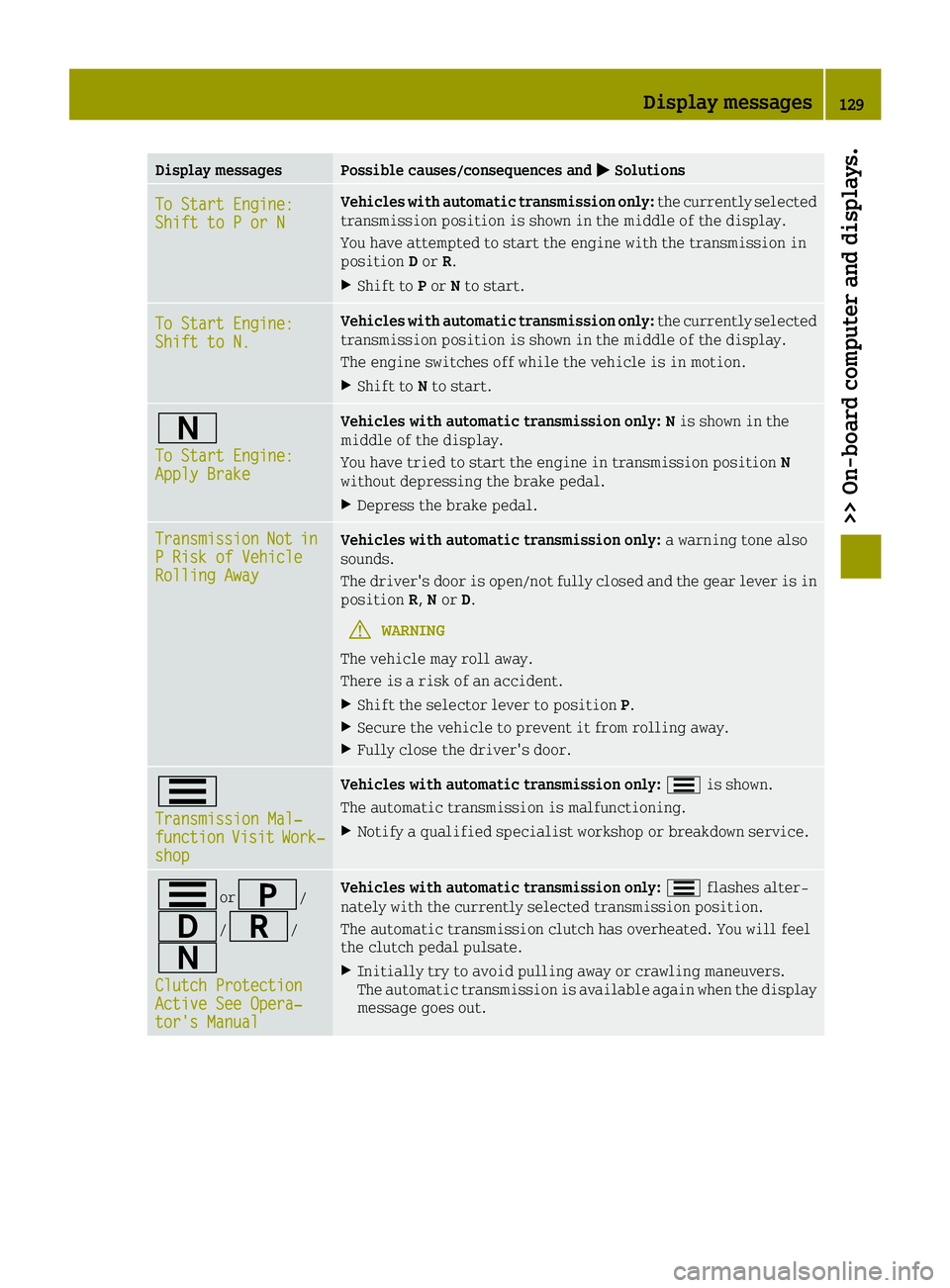
Vehicles with automatic transmission only: 0079is shown.
The automatic transmission is malfunctioning.
XNotify a qualified specialist workshop or breakdown service.
0079or0045/
003A/0046/
0044
Clutch ProtectionActive See Opera‐tor's Manual
Vehicles with automatic transmission only: 0079flashes alter-
nately with the currently selected transmission position.
The automatic transmission clutch has overheated. You will feel
the clutch pedal pulsate.
XInitially try to avoid pulling away or crawling maneuvers.
The automatic transmission is available again when the display
message goes out.
Display messages129
>> On-board computer and displays.
Z
Page 151 of 214
Useful information
i
This Operator's Manual describes all
models and all standard and optional
equipment of your vehicle available at the
time of publication of the Operator's Man- ual. Country-specific differences are pos-
sible. Bear in mind that your vehicle may
not feature all functions described here.
This also applies to safety-relevant sys-
tems and functions.
iRead the information on qualified spe-
cialist workshops: (Ypage 20).
Checking service products
Engine compartment (rear)
Engine compartment cover
GWARNING
The engine compartment cover may become
very hot. If you remove the cover to do work on the engine compartment, there is a risk
of injury!
Allow the engine to cool down and then
remove the engine compartment cover after
cooling has taken place.
GWARNING
Combustion engines emit poisonous
exhaust gases such as carbon monoxide. If
the engine compartment cover has not been installed correctly, when the engine is
running, particularly if the vehicle is
moving, exhaust fumes could enter the
passenger compartment. There is a risk of
poisoning.
Always switch off the engine before remov-
ing the engine compartment cover. Make
sure that the engine compartment cover has
been installed correctly.
XTo open: apply the parking brake.
XSelect a gear.
XSwitch the ignition off.
XRemove the SmartKey from the ignition
lock.
XOpen the upper and lower tailgate
(Ypage 57).
XFor vehicles with the subwoofer: remove the
subwoofer (Ypage 149).
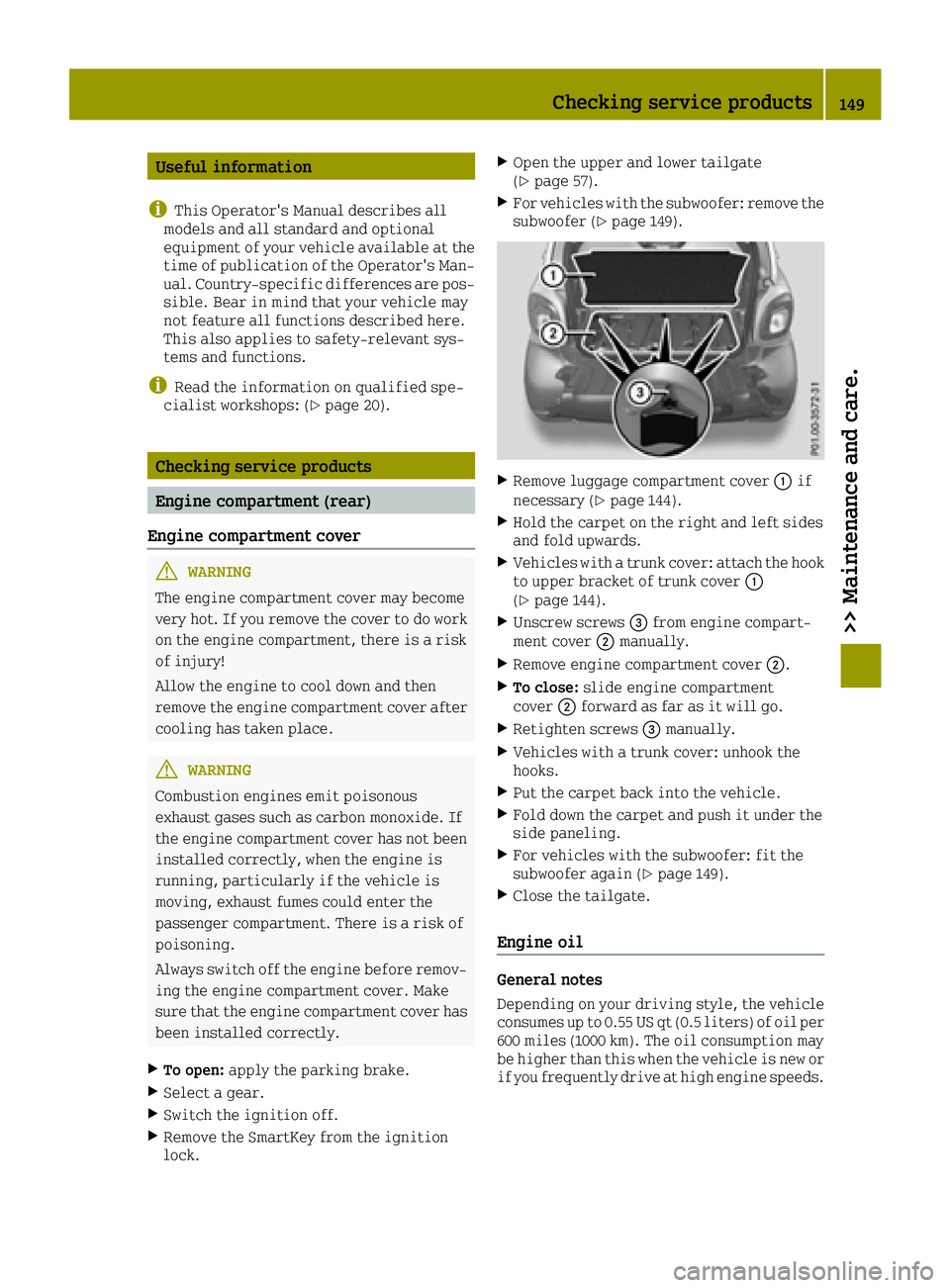
XRemove luggage compartment cover 0043if
necessary (Ypage 144).
XHold the carpet on the right and left sides
and fold upwards.
XVehicles with a trunk cover: attach the hook to upper bracket of trunk cover 0043
(
Ypage 144).
XUnscrew screws 0087from engine compart-
ment cover 0044manually.
XRemove engine compartment cover 0044.
XTo close:slide engine compartment
cover 0044forward as far as it will go.
XRetighten screws 0087manually.
XVehicles with a trunk cover: unhook the
hooks.
XPut the carpet back into the vehicle.
XFold down the carpet and push it under the
side paneling.
XFor vehicles with the subwoofer: fit the
subwoofer again (Ypage 149).
XClose the tailgate.
Engine oil
General notes
Depending on your driving style, the vehicle
consumes up to 0.55 US qt (0.5 liters) of oil per
600 miles (1000 km). The oil consumption may
be higher than this when the vehicle is new or
if you frequently drive at high engine speeds.
Checking service products149
>> Maintenance and care.
Z
Page 152 of 214
When checking the oil level:
Rpark the vehicle on a level surface.
Rthe engine should be switched off for
approximately 5 minutes if the engine is at
normal operating temperature
Rif the engine is not at normal operating
temperature, e.g. if the engine was only
started briefly, wait approximately
30 minutes before carrying out the meas-
urement
Checking the oil level using the oil dip-
stick
GWARNING
Certain components in the engine compart- ment, such as the engine, radiator and parts
of the exhaust system, can become very hot.
Working in the engine compartment poses a risk of injury.
Where possible, let the engine cool down
and touch only the components described in
the following.
GWARNING
Opening the hood when the engine is over-
heated or when there is a fire in the engine
compartment could expose you to hot gases
or other service products. There is a risk of injury.
Let an overheated engine cool down before
opening the hood. If there is a fire in the
engine compartment, keep the hood closed
and contact the fire department.
GWARNING
The engine compartment contains moving
components. Certain components, such as
the radiator fan, may continue to run or
start again suddenly when the ignition is
off. There is a risk of injury.
If you need to do any work inside the engine compartment:
Rswitch off the ignition
Rnever reach into the area where there is a
risk of danger from moving components,
such as the fan rotation area
Rremove jewelry and watches
Rkeep items of clothing and hair, for
example, away from moving parts
XOpen the engine compartment cover
(Ypage 149).
Example
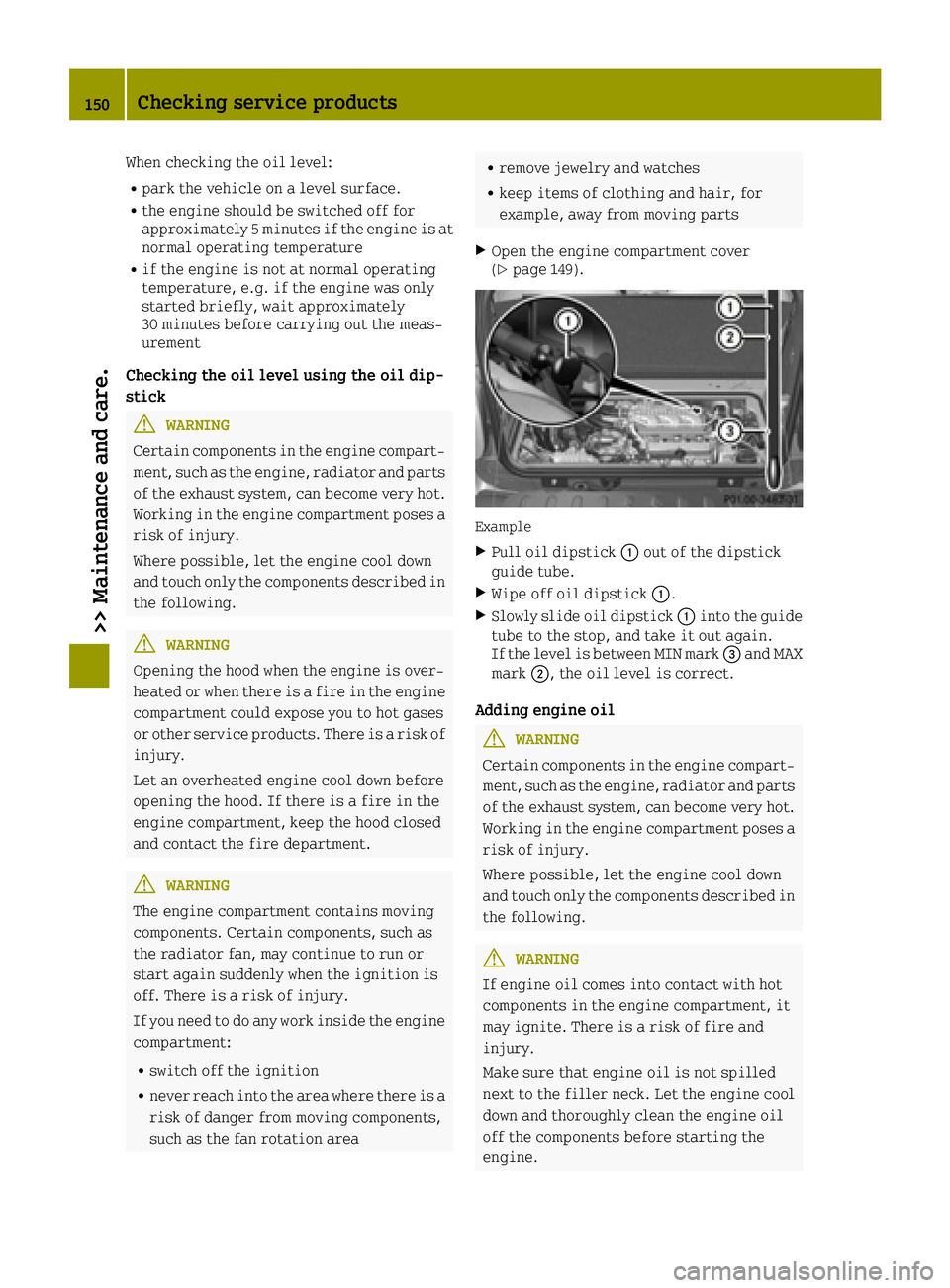
XPull oil dipstick 0043out of the dipstick
guide tube.
XWipe off oil dipstick 0043.
XSlowly slide oil dipstick 0043into the guide
tube to the stop, and take it out again.
If the level is between MIN mark 0087and MAX
mark 0044, the oil level is correct.
Adding engine oil
GWARNING
Certain components in the engine compart- ment, such as the engine, radiator and parts
of the exhaust system, can become very hot.
Working in the engine compartment poses a risk of injury.
Where possible, let the engine cool down
and touch only the components described in
the following.
GWARNING
If engine oil comes into contact with hot
components in the engine compartment, it
may ignite. There is a risk of fire and
injury.
Make sure that engine oil is not spilled
next to the filler neck. Let the engine cool down and thoroughly clean the engine oil
off the components before starting the
engine.
150Checking service products
>> Maintenance and care.
Page 153 of 214
HEnvironmental note
When adding oil, take care not to spill any.
If oil enters the soil or waterways, it is
harmful to the environment.
!Do not add too much oil. adding too much
engine oil can result in damage to the
engine or to the catalytic converter. Have
excess engine oil siphoned off.
You will find further information on engine
oils you can use in the "Technical data" sec-
tion (
Ypage 209).
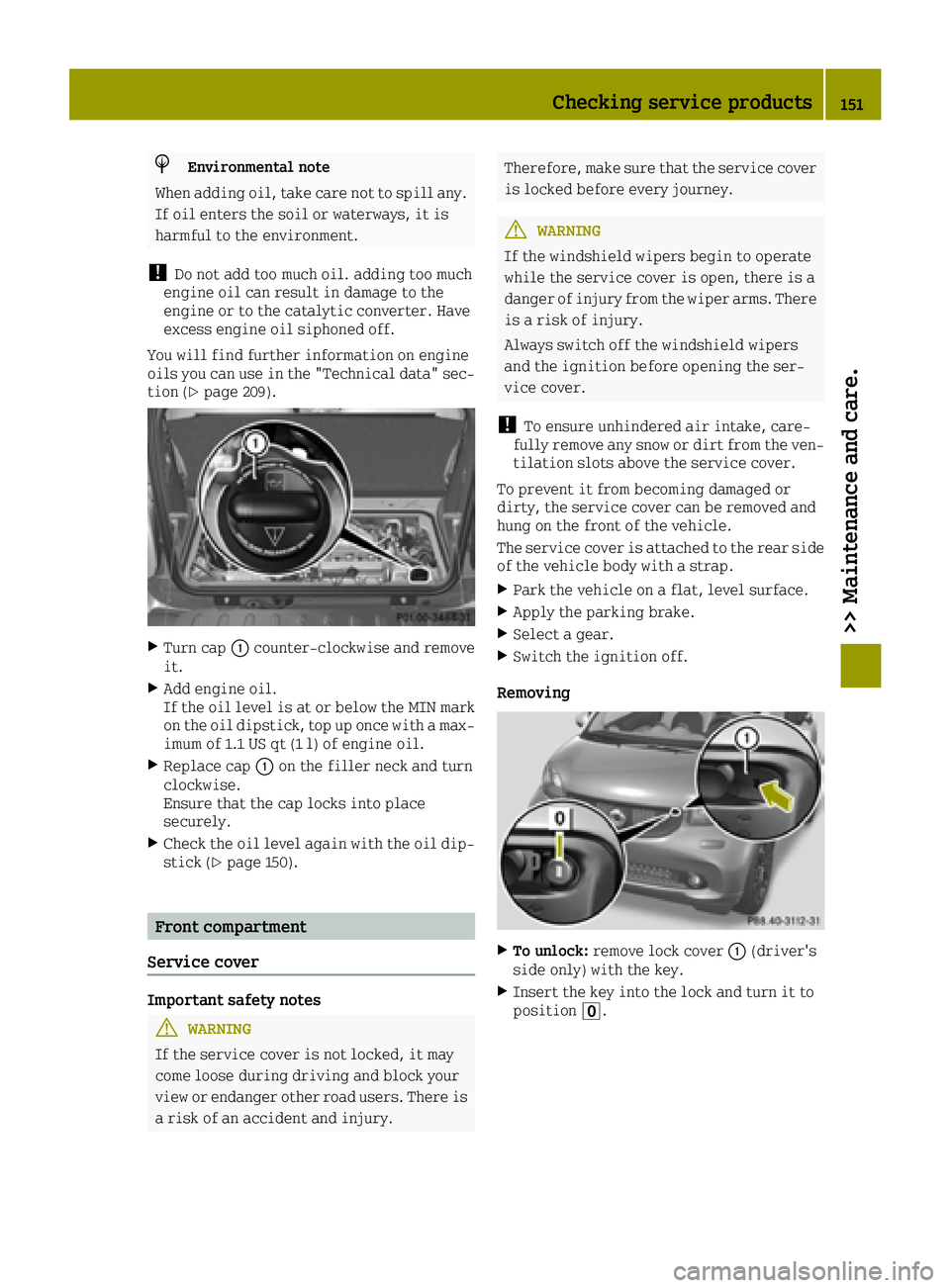
XTurn cap 0043counter-clockwise and remove
it.
XAdd engine oil.
If the oil level is at or below the MIN mark on the oil dipstick, top up once with a max-
imum of 1.1 US qt (1 l) of engine oil.
XReplace cap 0043on the filler neck and turn
clockwise.
Ensure that the cap locks into place
securely.
XCheck the oil level again with the oil dip- stick (Ypage 150).
Front compartment
Service cover
Important safety notes
GWARNING
If the service cover is not locked, it may
come loose during driving and block your
view or endanger other road users. There is
a risk of an accident and injury.
Therefore, make sure that the service cover
is locked before every journey.
GWARNING
If the windshield wipers begin to operate
while the service cover is open, there is a
danger of injury from the wiper arms. There
is a risk of injury.
Always switch off the windshield wipers
and the ignition before opening the ser-
vice cover.
!To ensure unhindered air intake, care-
fully remove any snow or dirt from the ven- tilation slots above the service cover.
To prevent it from becoming damaged or
dirty, the service cover can be removed and
hung on the front of the vehicle.
The service cover is attached to the rear side
of the vehicle body with a strap.
XPark the vehicle on a flat, level surface.
XApply the parking brake.
XSelect a gear.
XSwitch the ignition off.
Removing
XTo unlock: remove lock cover 0043(driver's
side only) with the key.
XInsert the key into the lock and turn it to
position 0092.
Checking service products151
>> Maintenance and care.
Z
Page 154 of 214
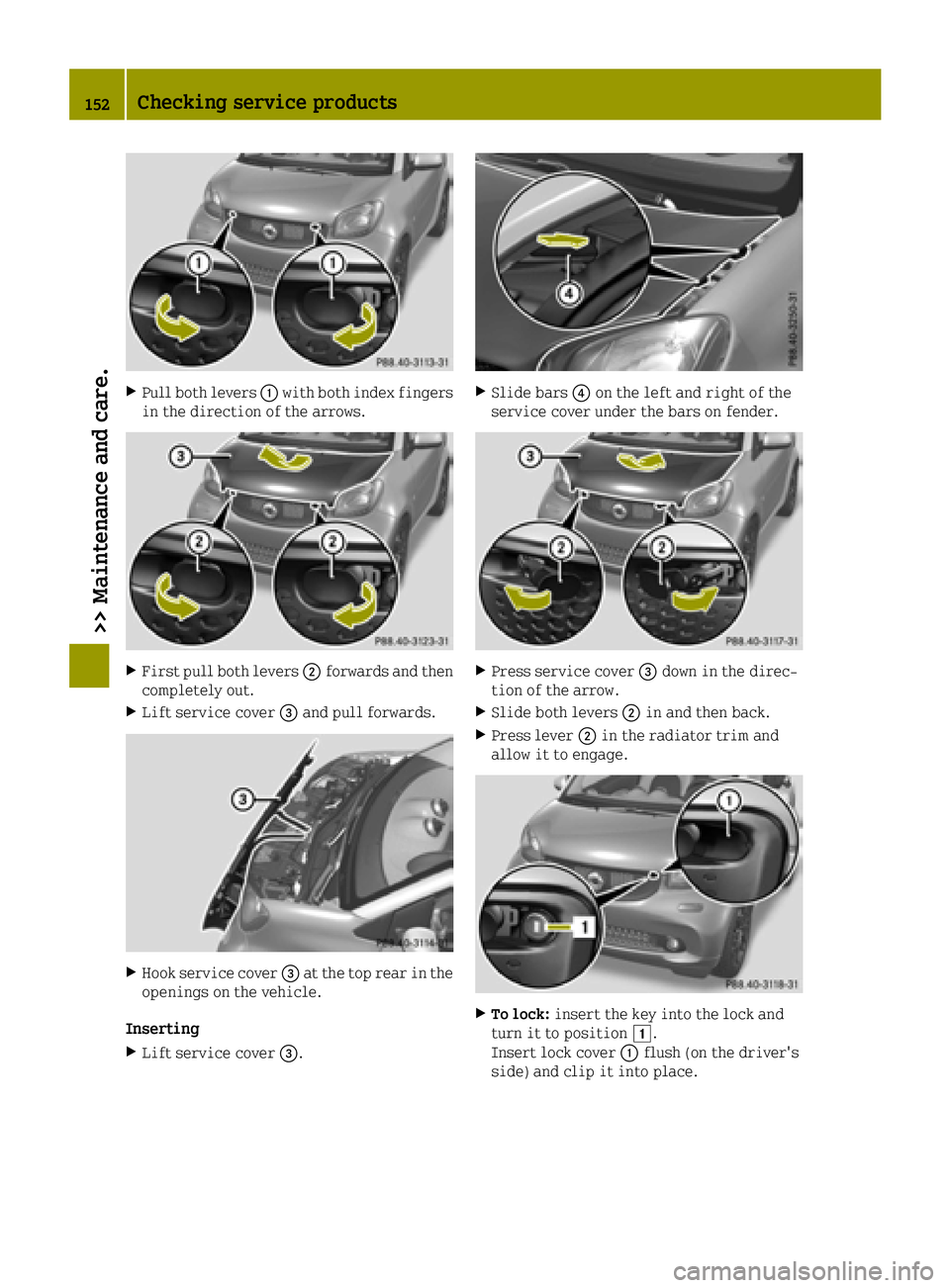
XPull both levers0043with both index fingers
in the direction of the arrows.
XFirst pull both levers 0044forwards and then
completely out.
XLift service cover 0087and pull forwards.
XHook service cover 0087at the top rear in the
openings on the vehicle.
Inserting
XLift service cover 0087.
XSlide bars0085on the left and right of the
service cover under the bars on fender.
XPress service cover 0087down in the direc-
tion of the arrow.
XSlide both levers 0044in and then back.
XPress lever 0044in the radiator trim and
allow it to engage.
XTo lock: insert the key into the lock and
turn it to position 0047.
Insert lock cover 0043flush (on the driver's
side) and clip it into place.
152Checking service products
>> Maintenance and care.
Page 155 of 214
Coolant
Important safety notes
GWARNING
The cooling system is pressurized, partic- ularly when the motor is warm. If you open
the cap, you could be scalded if hot coolant
sprays out. There is a risk of injury.
Let the engine cool down before you open
the cap. Wear gloves and eye protection.
Slowly open the cap to relieve pressure.
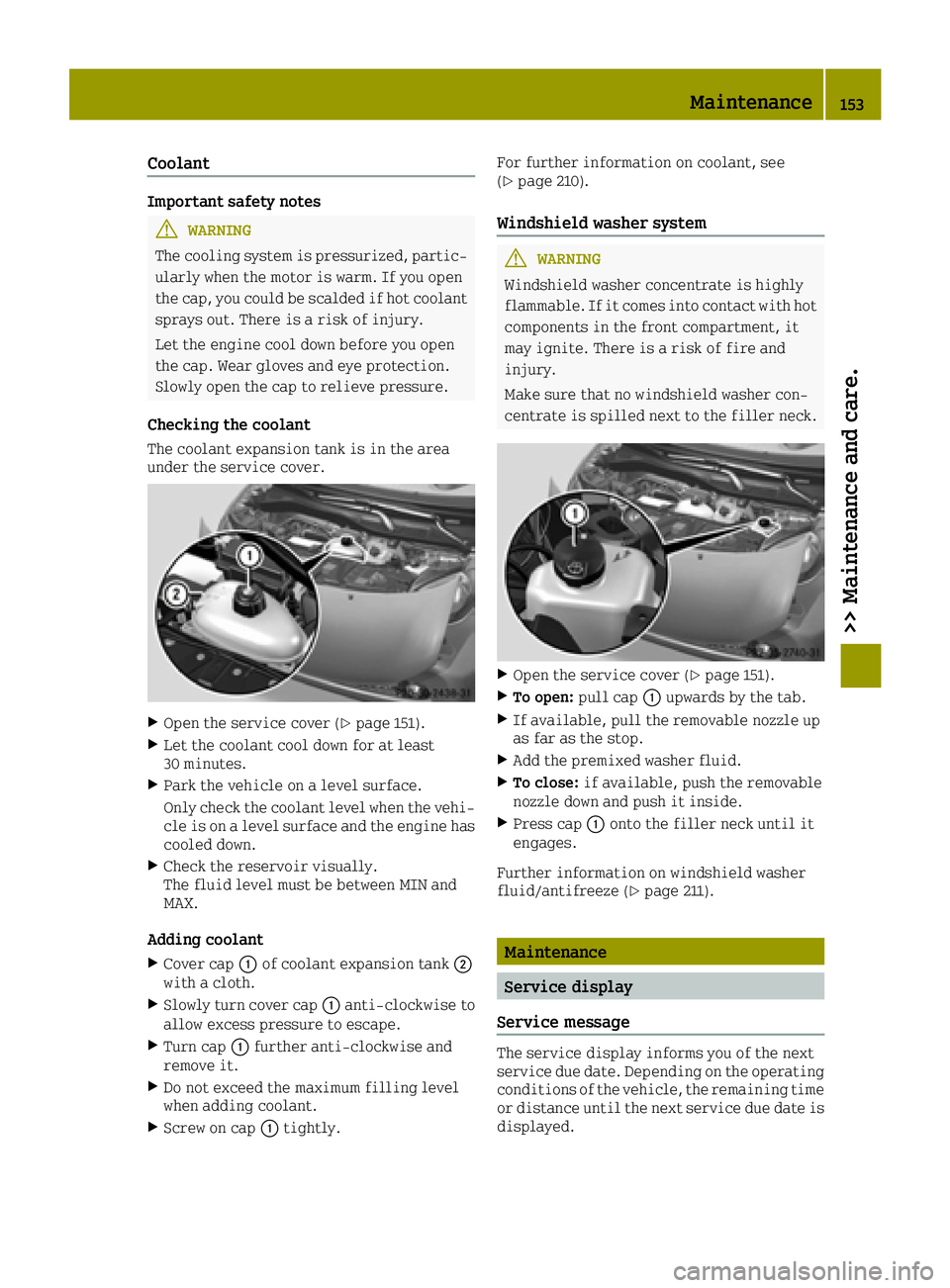
Checking the coolant
The coolant expansion tank is in the area
under the service cover.
XOpen the service cover (Ypage 151).
XLet the coolant cool down for at least
30 minutes.
XPark the vehicle on a level surface.
Only check the coolant level when the vehi-cle is on a level surface and the engine has
cooled down.
XCheck the reservoir visually.
The fluid level must be between MIN and
MAX.
Adding coolant
XCover cap 0043of coolant expansion tank 0044
with a cloth.
XSlowly turn cover cap 0043anti-clockwise to
allow excess pressure to escape.
XTurn cap 0043further anti-clockwise and
remove it.
XDo not exceed the maximum filling level
when adding coolant.
XScrew on cap 0043tightly. For further information on coolant, see
(
Ypage 210).
Windshield washer system
GWARNING
Windshield washer concentrate is highly
flammable. If it comes into contact with hot
components in the front compartment, it
may ignite. There is a risk of fire and
injury.
Make sure that no windshield washer con-
centrate is spilled next to the filler neck.
XOpen the service cover (Ypage 151).
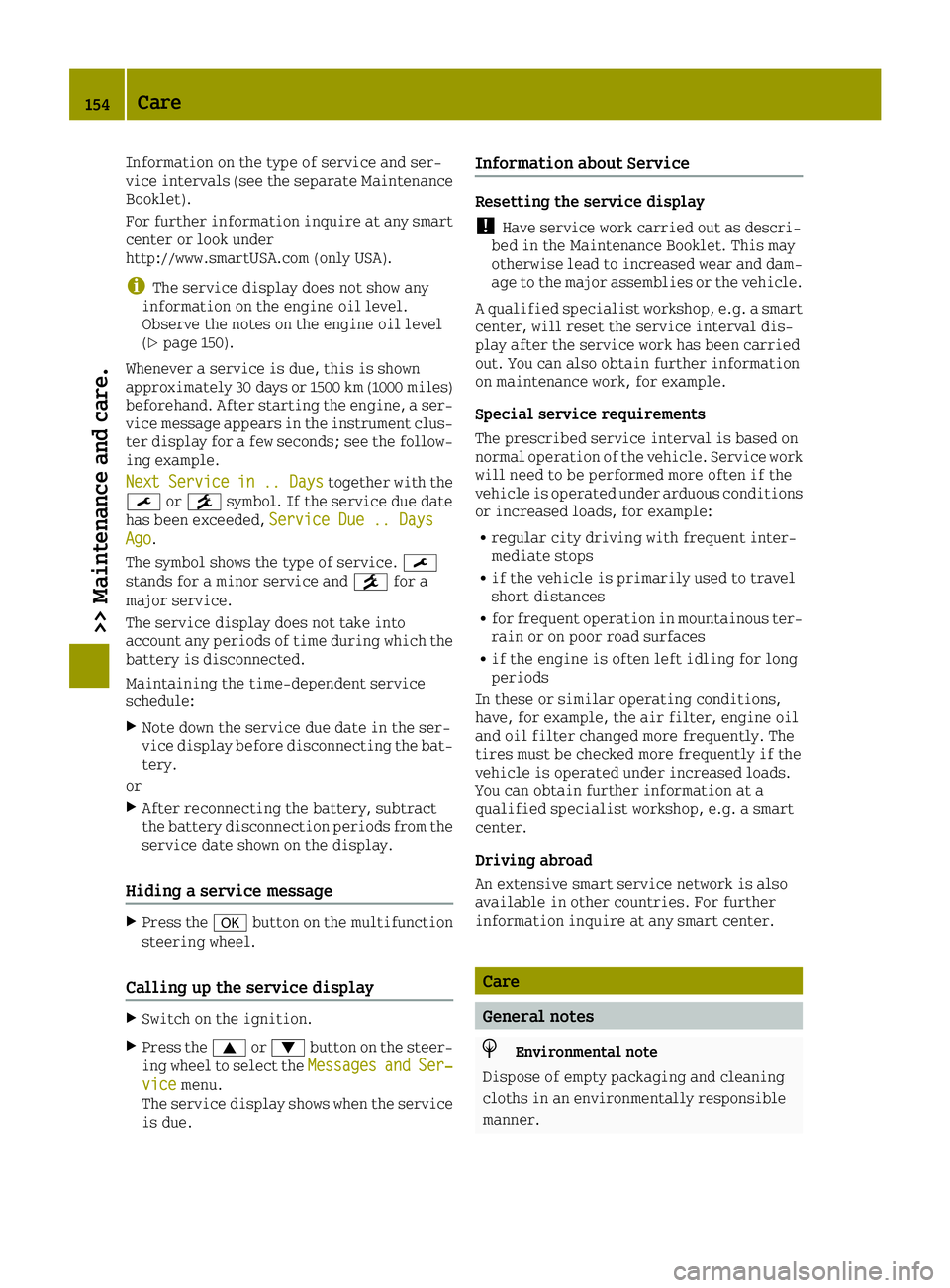
XTo open: pull cap0043upwards by the tab.
XIf available, pull the removable nozzle up
as far as the stop.
XAdd the premixed washer fluid.
XTo close: if available, push the removable
nozzle down and push it inside.
XPress cap 0043onto the filler neck until it
engages.
Further information on windshield washer
fluid/antifreeze (
Ypage 211).
Maintenance
Service display
Service message
The service display informs you of the next
service due date. Depending on the operating
conditions of the vehicle, the remaining time
or distance until the next service due date is displayed.
Maintenance153
>> Maintenance and care.
Z
Page 156 of 214
Information on the type of service and ser-
vice intervals (see the separate Maintenance
Booklet).
For further information inquire at any smart
center or look under
http://www.smartUSA.com (only USA).
iThe service display does not show any
information on the engine oil level.
Observe the notes on the engine oil level
(
Ypage 150).
Whenever a service is due, this is shown
approximately 30 days or 1500 km (1000 miles)
beforehand. After starting the engine, a ser-
vice message appears in the instrument clus-
ter display for a few seconds; see the follow-
ing example.
Next
Servicein.. Daystogether with the
0099 or009A symbol. If the service due date
has been exceeded, Service Due .. Days
Ago.
The symbol shows the type of service. 0099
stands for a minor service and 009Afor a
major service.
The service display does not take into
account any periods of time during which the
battery is disconnected.
Maintaining the time-dependent service
schedule:
XNote down the service due date in the ser-
vice display before disconnecting the bat-
tery.
or
XAfter reconnecting the battery, subtract
the battery disconnection periods from the
service date shown on the display.
Hiding a service message
XPress the 0076button on the multifunction
steering wheel.
Calling up the service display
XSwitch on the ignition.
XPress the 0063or0064 button on the steer-
ing wheel to select the MessagesandSer‐vicemenu.
The service display shows when the service
is due.
Information about Service
Resetting the service display
!Have service work carried out as descri-
bed in the Maintenance Booklet. This may
otherwise lead to increased wear and dam-
age to the major assemblies or the vehicle.
A qualified specialist workshop, e.g. a smart center, will reset the service interval dis-
play after the service work has been carried
out. You can also obtain further information
on maintenance work, for example.
Special service requirements
The prescribed service interval is based on
normal operation of the vehicle. Service work
will need to be performed more often if the
vehicle is operated under arduous conditions
or increased loads, for example:
Rregular city driving with frequent inter-
mediate stops
Rif the vehicle is primarily used to travel
short distances
Rfor frequent operation in mountainous ter-
rain or on poor road surfaces
Rif the engine is often left idling for long
periods
In these or similar operating conditions,
have, for example, the air filter, engine oil
and oil filter changed more frequently. The
tires must be checked more frequently if the
vehicle is operated under increased loads.
You can obtain further information at a
qualified specialist workshop, e.g. a smart
center.
Driving abroad
An extensive smart service network is also
available in other countries. For further
information inquire at any smart center.
Care
General notes
HEnvironmental note
Dispose of empty packaging and cleaning
cloths in an environmentally responsible
manner.
154Care
>> Maintenance and care.