service SMART FORTWO 2016 User Guide
[x] Cancel search | Manufacturer: SMART, Model Year: 2016, Model line: FORTWO, Model: SMART FORTWO 2016Pages: 214, PDF Size: 4.93 MB
Page 22 of 214
requirements of the next emissions test dur-
ing the main inspection.
Qualified specialist workshop
A smart center is a qualified specialist
workshop. It has the necessary specialist
knowledge, tools and qualifications to cor-
rectly carry out the work required on your
vehicle. This is especially the case for work
relevant to safety.
Observe the notes in the Maintenance Book-
let.
Always have the following work carried out at
a smart center:
Rwork relevant to safety
Rservice and maintenance work
Rrepair work
Ralterations, installation work and modifi-
cations
Rwork on electronic components
Correct use
If you remove any warning stickers, you or
others could fail to recognize certain dan-
gers. Leave warning stickers in position.
Observe the following information when
driving your vehicle:
Rthe safety notes in this manual
Rthe Technical Data section in this manual
Rtraffic rules and regulations
Rlaws and safety standards pertaining to
motor vehicles
Problems with your vehicle
If you should experience a problem with your
vehicle, particularly one that you believe
may affect its safe operation, we urge you to
immediately contact an authorized smart
center to have the problem diagnosed and
corrected if required. Do not drive the vehi-
cle if you believe it may not be safely oper-
ated. If the matter is not handled to your sat-
isfaction, please discuss the problem with
the smart center management, or if necessarycontact us at one of the following addresses:
In the USA Mercedes-Benz USA, LLC
One Mercedes Drive
Montvale, NJ 07645
In Canada
Customer Relations Department
98 Vanderhoof Avenue
Mercedes-Benz Canada, Inc.
Toronto, Ontario M4G 4C9
QR codes for rescue card
The QR codes are secured in the fuel filler
flap and on the opposite side on the B-pillar.
In the event of an accident, rescue services
can use the QR code to quickly find the appro-
priate rescue card for your vehicle. The cur-
rent rescue card contains the most important
information about your vehicle in a compact
form, e.g. the routing of the electric cables.
You can find more information under http://
portal.aftersales.i.daimler.com/public/
content/asportal/en/communication/
informationen_fuer/QRCode.html.
Data stored in the vehicle
Data recording
This vehicle is capable of recording diag-
nostic information relating to vehicle oper-
ation, malfunctions, and user settings. This
may include information about the perform-
ance or status of various systems, including
but not limited to, engine, throttle, steering
or brake systems, that is stored and can be
read out with suitable devices, particularly
when the vehicle is serviced. The data
obtained is used to properly diagnose and
service your vehicle or to further optimize
and develop vehicle functions.
Event data recorders
This vehicle is equipped with an event data
recorder (EDR). The main purpose of an EDR is
to record data that will assist in understand-
ing how a vehicle’s systems performed in cer-
tain crash or near crash-like situations, such
as during air bag deployment or when hitting
a road obstacle. The EDR is designed to record
20>> Introduction.
Page 48 of 214
Pets in the vehicle
GWARNING
If you leave animals unattended or unse-
cured in the vehicle, they could press but-
tons or switches, for example.
As a result, they could:
Ractivate vehicle equipment and become
trapped, for example
Ractivate or deactivate systems, thereby
endangering other road users
Unsecured animals could also be flung
around the vehicle in the event of an acci- dent or sudden steering or braking, thereby
injuring vehicle occupants. There is a risk
of an accident and injury.
Never leave animals unattended in the
vehicle. Always secure animals properly
during the journey, e.g. use a suitable ani-
mal transport box.
Protection against theft
Immobilizer
The immobilizer prevents your vehicle from
being started without the correct Smart Key.
XTo activate: remove the Smart Key from the
ignition lock.
XTo deactivate: switch on the ignition.
When leaving the vehicle, always take the
Smart Key with you and lock the vehicle. The
engine can be started by anyone with a valid
Smart Key that is left inside the vehicle.
iThe immobilizer is always deactivated
when you start the engine.
In the event that the engine cannot be star-
ted when the starter battery is fully
charged, the immobilizer may be faulty.
Contact an authorized Mercedes-Benz Cen-
ter or call 1-800-367-6372 (in USA) or
1-800-387-0100 (in Canada).
Anti-theft alarm system
Switching on
XMake sure that:
Rthe side windows are closed.
Rno objects, such as mascots, are hanging
from the rear-view mirror or grab han-
dles.
This will prevent false alarms.
XMake sure that:
Rthe doors are closed.
Rthe tailgate is closed
Rthe service cover is closed.
XPress the 0037button on the key.
The alarm system is primed after approx-
imately 30 seconds.
iIf the service cover is open or is not
properly closed, the vehicle will be
locked. The anti-theft alarm system is
primed. To remind you that the service
cover is not secured, a warning tone sounds
for 30 seconds. Ensure that the service
cover is properly closed. Only then is the
anti-theft alarm system correctly primed
and the service cover properly secured.
Switching off
XPress the 0036button on the key.
or
XUnlock the vehicle by using the key in the
emergency lock.
and
Switch on the ignition.
Examples for triggering the alarm
A visual and audible alarm is triggered if the
alarm system is armed and you open:
Rthe vehicle by using the key in the emer-
gency lock
Ra door
Rthe tailgate
Rthe service cover
46Protection against theft
>> Safety.
Page 50 of 214
Braking
XIf ABS intervenes:continue to depress the
brake pedal vigorously until the braking
situation is over.
XTo make a full brake application: depress
the brake pedal with full force.
If abs intervenes when braking, you will feel
a pulsing in the brake pedal.
The pulsating brake pedal can be an indica-
tion of hazardous road conditions, and func-
tions as a reminder to take extra care while
driving.
Forward collision warning
General information
The distance warning function can help you to
minimize the risk of a collision with a vehi-
cle ahead or reduce the effects of such an
accident. If the distance warning function
detects that there is a risk of a collision, you
will be warned visually and acoustically.
Starting the engine also switches on the dis-
tance warning function.
Important safety notes
GWARNING
The distance warning function does not
react:
Rto people or animals
Rto oncoming vehicles
Rto crossing traffic
Rwhen cornering
Thus, the distance warning function cannot
provide a warning in all critical situa-
tions. There is a risk of an accident.
Always pay careful attention to the traffic
situation and be ready to brake.
GWARNING
The distance warning function cannot
always clearly identify objects and com-
plex traffic situations.
In such cases, the distance warning func-
tion may:
Rgive an unnecessary warning
Rnot give a warning
There is a risk of an accident.
Always pay careful attention to the traffic
situation and do not rely solely on the dis-
tance warning function.
Observe the "Important safety notes" section for driving safety systems (
Ypage 47).
In particular, the detection of obstacles can
be impaired if:
Rthere is dirt on the sensors or anything else
covering the sensors.
Rsnow or heavy rain
Rinterference by other radar sources
Rthe possibility of strong radar reflec-
tions, for example in parking garages
Ra narrow vehicle traveling in front, e.g. a
motorbike
Ra vehicle traveling in front on a different
line
Rnew vehicles or after a service on the dis-
tance warning system
Please observe the information in the sec-
tion on running-in the vehicle
(
Ypage 86).
Following damage to the front end of the vehi-
cle, have the configuration and operation of
the radar sensor checked at a qualified spe-
cialist workshop. This also applies to colli-
sions at low speeds where there is no visible
damage to the front of the vehicle.
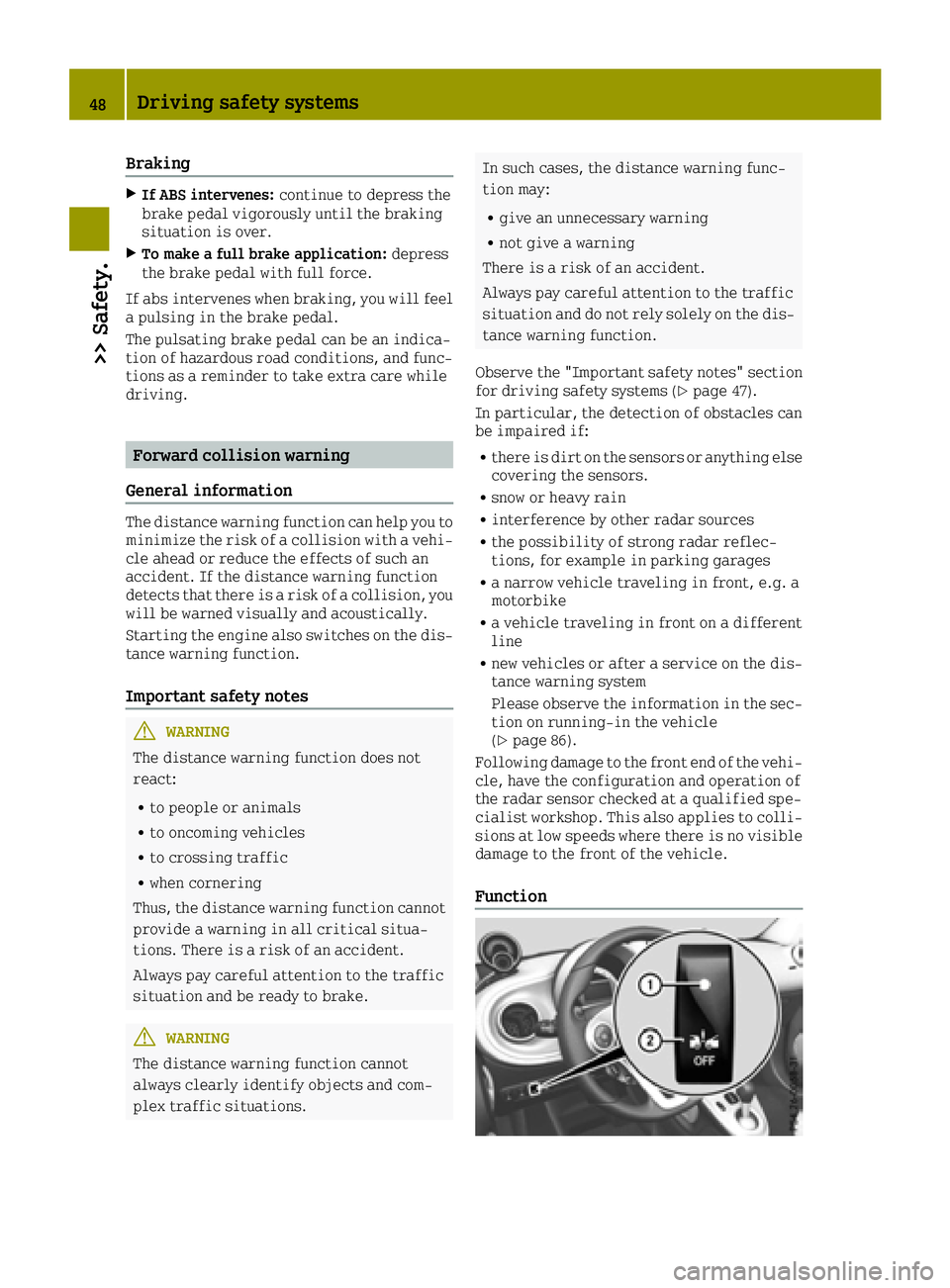
Function
48Driving safety systems
>> Safety.
Page 72 of 214
Interior lighting switched off
0085Switches the right-hand reading lamp on/
off
The interior lighting is switched on when a
door is open: if the corresponding door is
closed correctly the interior lighting goes
out.
Interior lighting control
If the doors are unlocked with the remote con-
trol, the interval timer for the interior
lighting is triggered. The interval timer
restarts when a door is opened.
The front interior lighting and the luggage
compartment light go out gradually.
The interior lighting interval timer is
switched off:
Rif a door remains open, the interior light-
ing switches off after 15 minutes without
dimming
Rif all doors (with additional locking mech-
anism) are closed, the interior lighting
switches off after 15 seconds
Rif all doors (without locking mechanism)
are closed, the interior lighting switches
off after 3 to 4 minutes
Ras soon as the engine is started and for as
long as the engine is running
Replacing bulbs
Important safety notes
GWARNING
Bulbs, lamps and connectors can get very
hot when operating. If you change a bulb,
you could burn yourself on these compo-
nents. There is a risk of injury.
Allow these components to cool down before changing a bulb.
Do not use a bulb that has been dropped or if
its glass tube has been scratched.
The bulb may explode if:
Ryou touch it
Rit is hot
Ryou drop it
Ryou scratch it
Only operate bulbs in enclosed lamps
designed for that purpose. Only fit spare
bulbs of the same type and the specified volt-
age.
Marks on the glass tube reduce the service
life of the bulbs. Do not touch the glass tube
with your bare hands. If necessary, clean the
glass tube when cold with alcohol or spirit
and rub it off with a lint-free cloth.
Protect bulbs from moisture during opera-
tion. Do not allow bulbs to come into contact
with liquids.
Replace only the bulbs listed (
Ypage 70).
If you require assistance replacing bulbs,
consult a qualified specialist workshop.
If the new bulb still does not light up, consult
a qualified specialist workshop.
The daytime driving lights and part of the
rear light clusters of your vehicle are equip-
ped with LED light bulbs. Do not replace these
bulbs yourself. Contact a qualified special-
ist workshop which has the necessary spe-
cialist knowledge and tools to carry out the
work required.
Headlamps and lamps are an important aspect
of vehicle safety. You must therefore make
sure that these function correctly at all
times. Have the headlamp setting checked
regularly.
Overview: changing bulbs/bulb types
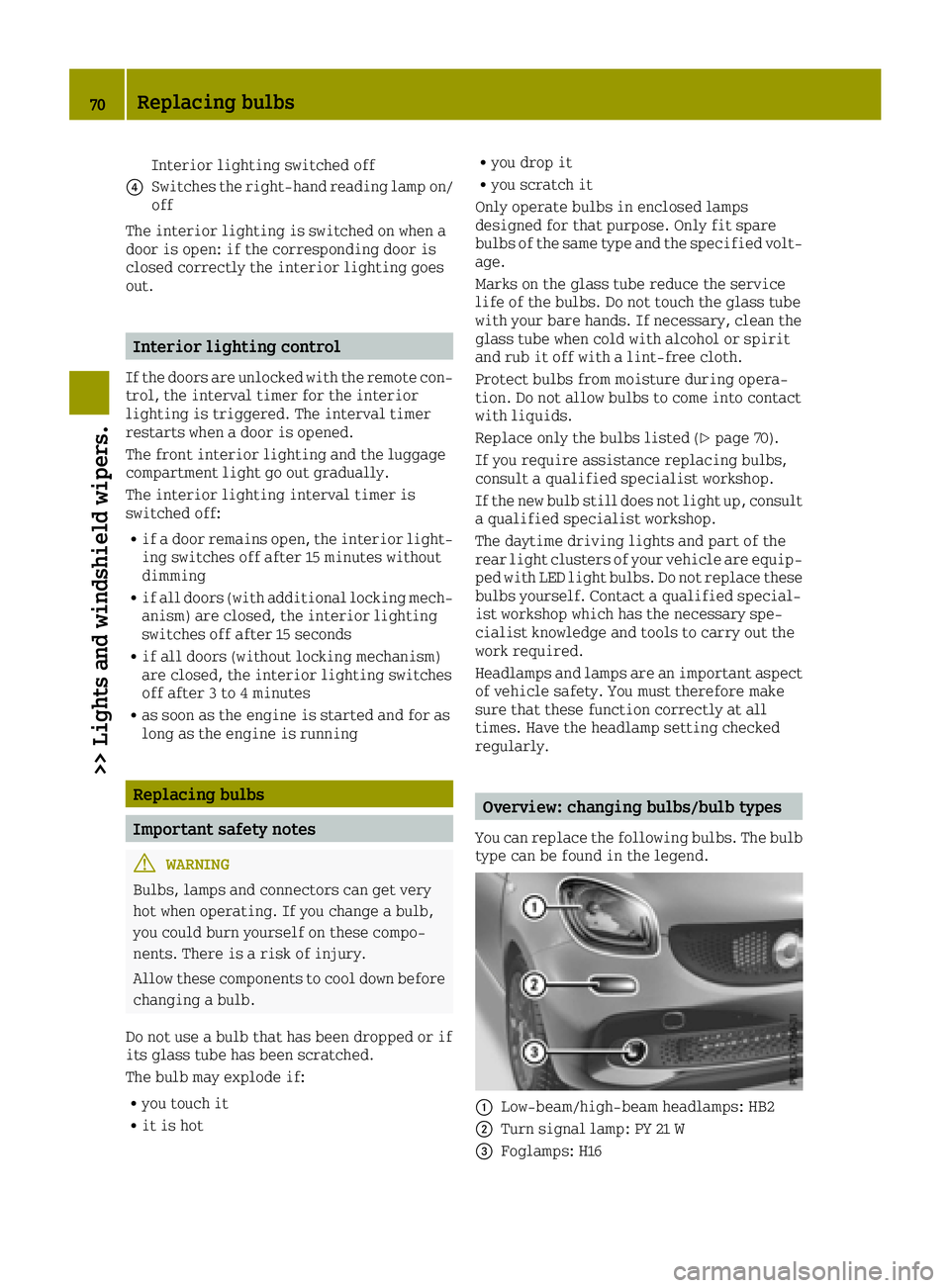
You can replace the following bulbs. The bulb
type can be found in the legend.
0043Low-beam/high-beam headlamps: HB2
0044Turn signal lamp: PY 21 W
0087Foglamps: H16
70Replacing bulbs
>> Lights and windshield wipers.
Page 74 of 214
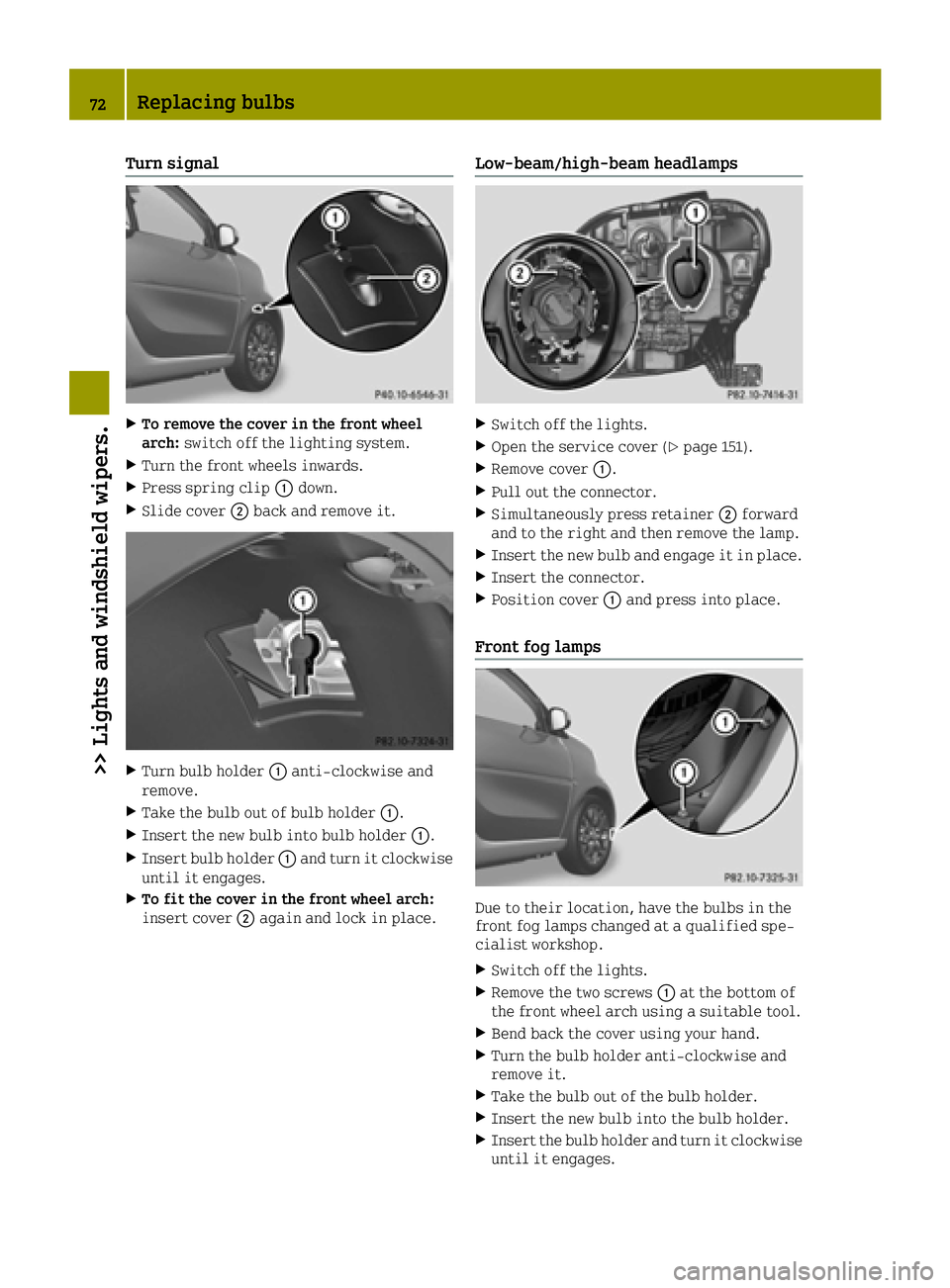
Turn signal
XTo remove the cover in the front wheel
arch:switch off the lighting system.
XTurn the front wheels inwards.
XPress spring clip 0043down.
XSlide cover 0044back and remove it.
XTurn bulb holder 0043anti-clockwise and
remove.
XTake the bulb out of bulb holder 0043.
XInsert the new bulb into bulb holder 0043.
XInsert bulb holder0043and turn it clockwise
until it engages.
XTo fit the cover in the front wheel arch:
insert cover 0044again and lock in place.
Low-beam/high-beam headlamps
XSwitch off the lights.
XOpen the service cover (Ypage 151).
XRemove cover 0043.
XPull out the connector.
XSimultaneously press retainer 0044forward
and to the right and then remove the lamp.
XInsert the new bulb and engage it in place.
XInsert the connector.
XPosition cover 0043and press into place.
Front fog lamps
Due to their location, have the bulbs in the
front fog lamps changed at a qualified spe-
cialist workshop.
XSwitch off the lights.
XRemove the two screws 0043at the bottom of
the front wheel arch using a suitable tool.
XBend back the cover using your hand.
XTurn the bulb holder anti-clockwise and
remove it.
XTake the bulb out of the bulb holder.
XInsert the new bulb into the bulb holder.
XInsert the bulb holder and turn it clockwise until it engages.
72Replacing bulbs
>> Lights and windshield wipers.
Page 78 of 214
Always switch off the windshield wipers
and ignition before changing the wiper
blades.
!To avoid damaging the wiper blades, make
sure that you touch only the wiper arm of the
wiper.
!Never open the service cover/tailgate if a
windshield wiper arm has been folded away
from the windshield/rear window.
Never fold a windshield wiper arm without
a wiper blade back onto the windshield/
rear window.
Hold the windshield wiper arm firmly when
you change the wiper blade. If you release
the wiper arm without a wiper blade and it
falls onto the windshield/rear window, the
windshield/rear window may be damaged by
the force of the impact.
smart recommends that you have the wiper
blades changed at a qualified specialist
workshop.
Changing the windshield wiper blades
Removing the wiper blades
XTurn the key to position 1or 2in the igni-
tion lock (Ypage 87).
XPress the combination switch to the 004B
position (Ypage 74).
The wiper arms move slowly upwards.
XWhen the wiper arms are vertical in rela-
tion to the service cover, turn the key to
position 0and remove it from the ignition
lock.
XFold the wiper arm away from the wind-
shield.
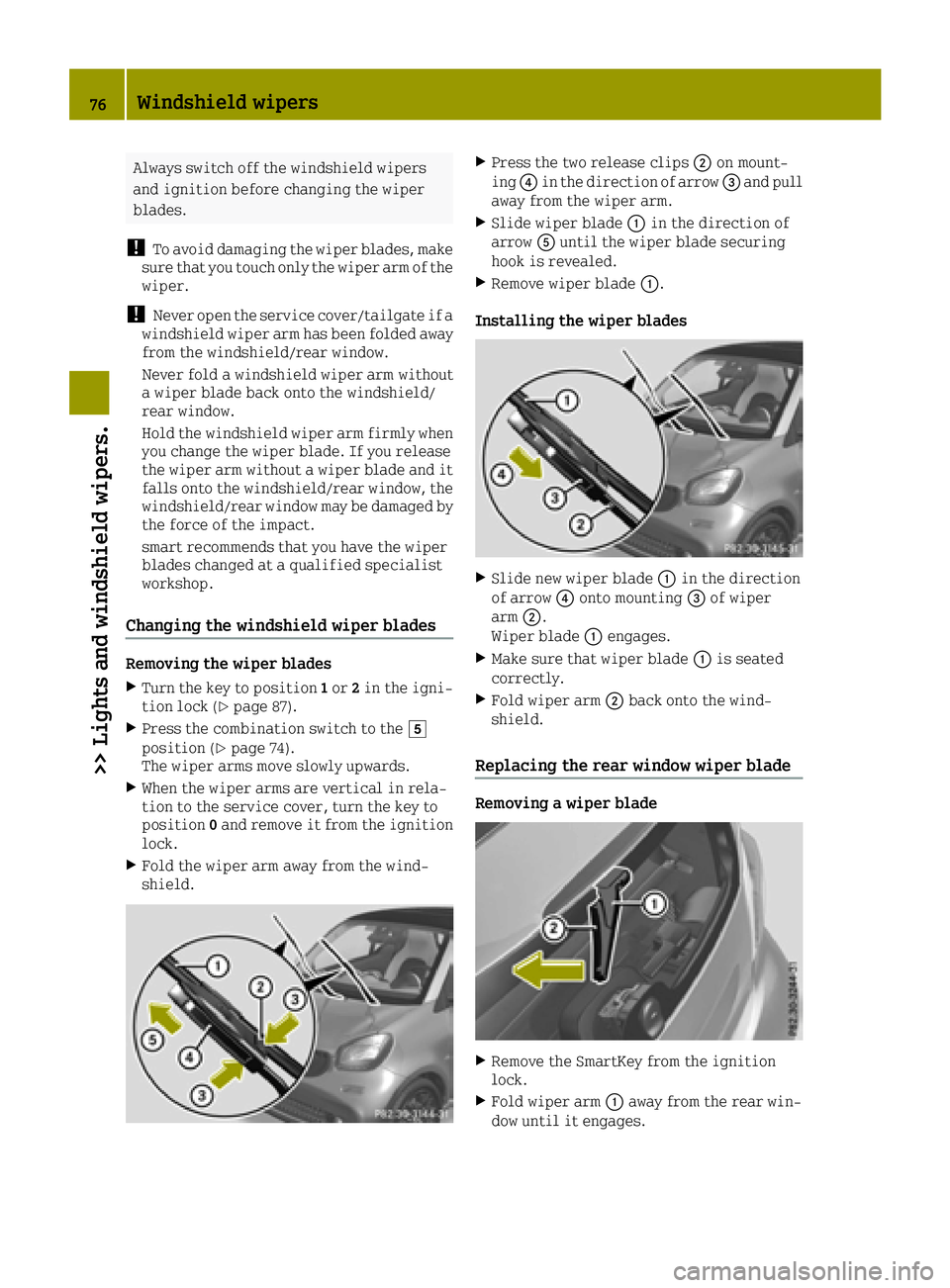
XPress the two release clips 0044on mount-
ing 0085in the direction of arrow 0087and pull
away from the wiper arm.
XSlide wiper blade 0043in the direction of
arrow 0083until the wiper blade securing
hook is revealed.
XRemove wiper blade 0043.
Installing the wiper blades
XSlide new wiper blade 0043in the direction
of arrow 0085onto mounting 0087of wiper
arm 0044.
Wiper blade 0043engages.
XMake sure that wiper blade 0043is seated
correctly.
XFold wiper arm 0044back onto the wind-
shield.
Replacing the rear window wiper blade
Removing a wiper blade
XRemove the SmartKey from the ignition
lock.
XFold wiper arm 0043away from the rear win-
dow until it engages.
76Windshield wipers
>> Lights and windshield wipers.
Page 86 of 214

Problems with the rear window defroster
ProblemPossible causes/consequences and0050Solutions
The rear window
defroster has deacti-
vated prematurely or
cannot be activated.The battery has not been sufficiently charged.
XSwitch off any consumers that are not required, e.g. reading
lamps, interior lighting or the seat heating.
When the battery is sufficiently charged, the rear window
defroster can be activated again.
Switching the air-recirculation mode
on/off
General notes
You can deactivate the flow of fresh air tem-
porarily if unpleasant odors are entering the
vehicle from outside or if you are driving
through a tunnel. The air already inside the
vehicle will then be recirculated.
If you switch on air-recirculation mode, the
windows can fog up more quickly, in partic-
ular at low temperatures. Only use air-recir-
culation mode briefly to prevent the windows
from fogging up.
Switching on/off
XStart the engine (Ypage 87).
XTo activate: press theÀbutton.
The indicator lamp above the Àbutton
lights up.
XTo deactivate: press theÀbutton.
or
XPress the 0064button.
or
XPress the 0058button.
The indicator lamp above the Àbutton
goes out.
Setting the air vents
Important safety notes
GWARNING
Very hot or very cold air can flow from the
air vents. This could result in burns or
frostbite in the immediate vicinity of the
air vents. There is a risk of injury.
Make sure that all vehicle occupants always
maintain a sufficient distance to the air
outlets. If necessary, redirect the airflow
to another area of the vehicle interior.
GWARNING
If you spray cleaning products or disin-
fectant into the ventilation system of the
vehicle, this could ignite. There is a risk
of fire.
Never spray these or any other substances
into the ventilation system. Always have
work on the ventilation system carried out
at a qualified specialist workshop.
In order to ensure the direct flow of fresh air
through the air vents into the vehicle inte-
rior, please observe the following notes:
Rkeep the air inlet between the service
cover and the windshield free of blockages,
such as ice, snow or leaves.
Rnever cover the air vents or air intake
grilles in the vehicle interior.
iFor optimum climate control in the vehi-
cle, open the air vents fully.
84Setting the air vents
>> Climate control.
Page 103 of 214
To ensure that the vehicle is secured against
rolling away unintentionally:
Rthe parking brake must be applied.
Ra gear must be engaged on vehicles with
manual transmission.
Rthe selector lever must be in positionPon
vehicles with automatic transmission.
Rthe SmartKey must be removed from the
ignition lock.
Ron uphill or downhill gradients, the front
wheels must be turned towards the curb.
Switching off the engine
Important safety notes
GWARNING
The automatic transmission switches to
neutral position Nwhen you switch off the
engine. The vehicle may roll away. There is a risk of an accident.
After switching off the engine, always
switch to parking position P. Prevent the
parked vehicle from rolling away by apply-
ing the parking brake.
Vehicles with manual transmission
XSelect a gear.
XTurn the key to position 0in the ignition
lock and remove it.
The immobilizer is activated.
XApply the parking brake.
Vehicles with automatic transmission
XApply the parking brake.
XShift the transmission to position P.
XTurn the key to position0in the ignition
lock and remove it.
The immobilizer is activated.
The key can only be removed if the trans-
mission is in position P.
Parking brake
General notes
GWARNING
If you must brake the vehicle with the park-
ing brake, the braking distance is consid-
erably longer and the wheels could lock.
There is an increased danger of skidding
and accidents.
Only use the parking brake to brake the
vehicle when the service brake is faulty. Do
not apply the parking brake too firmly. If
the wheels lock, release the parking brake
until the wheels begin turning again.
GWARNING
If you leave children unsupervised in the
vehicle, they could set it in motion by, for example:
Rrelease the parking brake.
Rshift the automatic transmission out of
park position Por shift manual trans-
mission into neutral.
Rstart the engine.
In addition, they may operate vehicle
equipment and become trapped. There is a
risk of an accident and injury.
When leaving the vehicle, always take the
SmartKey with you and lock the vehicle.
Never leave children unsupervised in the
vehicle.
If you brake the vehicle with the parking
brake, the brake lamps will not light up.
Parking101
>> Driving and parking.
Z
Page 104 of 214
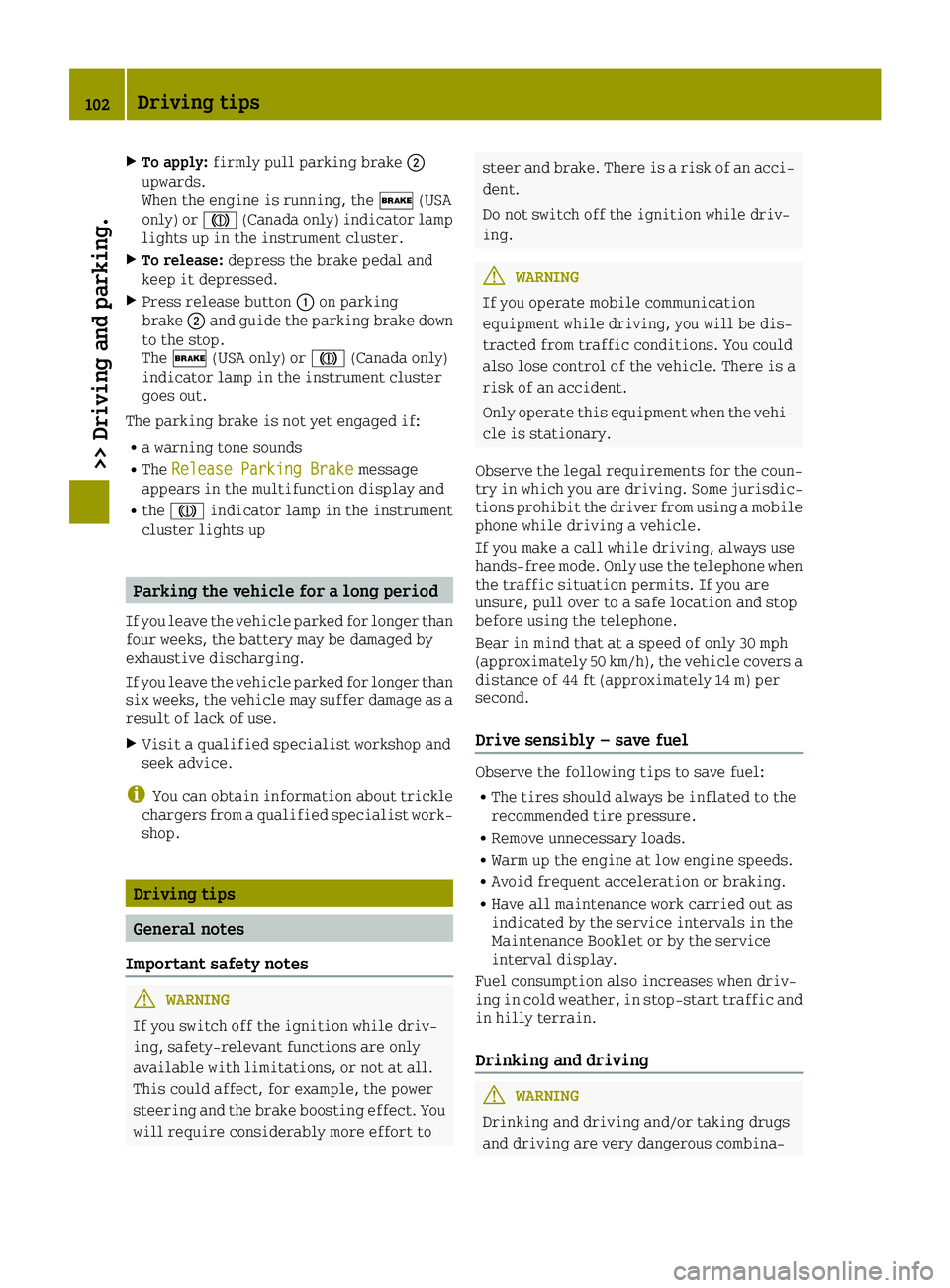
XTo apply:firmly pull parking brake 0044
upwards.
When the engine is running, the 0027(USA
only) or 004D(Canada only) indicator lamp
lights up in the instrument cluster.
XTo release: depress the brake pedal and
keep it depressed.
XPress release button 0043on parking
brake 0044and guide the parking brake down
to the stop.
The 0027 (USA only) or 004D(Canada only)
indicator lamp in the instrument cluster
goes out.
The parking brake is not yet engaged if:
Ra warning tone sounds
RThe Release Parking Brakemessage
appears in the multifunction display and
Rthe 004D indicator lamp in the instrument
cluster lights up
Parking the vehicle for a long period
If you leave the vehicle parked for longer than
four weeks, the battery may be damaged by
exhaustive discharging.
If you leave the vehicle parked for longer than
six weeks, the vehicle may suffer damage as a
result of lack of use.
XVisit a qualified specialist workshop and
seek advice.
iYou can obtain information about trickle
chargers from a qualified specialist work-
shop.
Driving tips
General notes
Important safety notes
GWARNING
If you switch off the ignition while driv-
ing, safety-relevant functions are only
available with limitations, or not at all.
This could affect, for example, the power
steering and the brake boosting effect. You will require considerably more effort to
steer and brake. There is a risk of an acci-dent.
Do not switch off the ignition while driv-
ing.
GWARNING
If you operate mobile communication
equipment while driving, you will be dis-
tracted from traffic conditions. You could
also lose control of the vehicle. There is a
risk of an accident.
Only operate this equipment when the vehi- cle is stationary.
Observe the legal requirements for the coun-
try in which you are driving. Some jurisdic-
tions prohibit the driver from using a mobile
phone while driving a vehicle.
If you make a call while driving, always use
hands-free mode. Only use the telephone when
the traffic situation permits. If you are
unsure, pull over to a safe location and stop
before using the telephone.
Bear in mind that at a speed of only 30 mph
(approximately 50 km/h), the vehicle covers a
distance of 44 ft (approximately 14 m) per
second.
Drive sensibly – save fuel
Observe the following tips to save fuel:
RThe tires should always be inflated to the
recommended tire pressure.
RRemove unnecessary loads.
RWarm up the engine at low engine speeds.
RAvoid frequent acceleration or braking.
RHave all maintenance work carried out as
indicated by the service intervals in the
Maintenance Booklet or by the service
interval display.
Fuel consumption also increases when driv-
ing in cold weather, in stop-start traffic and
in hilly terrain.
Drinking and driving
GWARNING
Drinking and driving and/or taking drugs
and driving are very dangerous combina-
102Driving tips
>> Driving and parking.
Page 105 of 214
tions. Even a small amount of alcohol or
drugs can affect your reflexes, perceptions
and judgment.
The possibility of a serious or even fatal
accident is greatly increased when you
drink or take drugs and drive.
Do not drink or take drugs and drive or
allow anyone to drive who has been drinkingor taking drugs.
Emission control
GWARNING
Combustion engines emit poisonous
exhaust gases such as carbon monoxide.
Inhaling these exhaust gases leads to poi-
soning. There is a risk of fatal injury.
Therefore never leave the engine running
in enclosed spaces without sufficient ven- tilation.
Certain engine systems are designed to keep
the level of poisonous components in exhaust
fumes within legal limits.
These systems only work at peak efficiency if
they are serviced exactly in accordance with
the manufacturer's specifications. There-
fore, only allow qualified and authorized
technicians to perform work on the engine.
The engine settings must not be changed
under any circumstances. Furthermore, all
specific service work must be performed at
regular intervals and in accordance with
smart service requirements. Details can be
found in the Maintenance Booklet.
Braking
Important safety notes
GWARNING
If you shift down on a slippery road surface
in an attempt to increase the engine's
braking effect, the drive wheels could lose
their grip. There is an increased danger of
skidding and accidents.
Do not shift down for additional engine
braking on a slippery road surface.
Downhill gradients
!On long and steep gradients, you must
reduce the load on the brakes by shifting to
a lower gear in good time. This allows you
to take advantage of the engine's braking
effect. This helps you to avoid overheating
the brakes and wearing them out exces-
sively.
When you take advantage of the engine's
braking effect, a drive wheel may not turn
for some time, e.g. on a slippery road sur-
face. This could cause damage to the drive
train, which is not covered by the smart
warranty.
Heavy and light loads
GWARNING
If you rest your foot on the brake pedal
while driving, the braking system can
overheat. This increases the stopping dis-
tance and can even cause the braking system
to fail. There is a risk of an accident.
Never use the brake pedal as a footrest.
Never depress the brake pedal and the
accelerator pedal at the same time.
!Depressing the brake pedal constantly
results in excessive and premature wear to
the brake pads.
If the brakes have been subjected to a heavy
load, do not stop the vehicle immediately.
Drive on for a short while. This allows the
airflow to cool the brakes more quickly.
Wet roads
If you have driven for a long time in heavy
rain without braking, there may be a delayed
reaction from the brakes when braking for the
first time. This may also occur after the vehi-
cle has been washed or driven through deep
water.
You then have to depress the brake pedal more
firmly. Maintain a greater distance from the
vehicle in front.
After driving on a wet road or having the
vehicle washed, brake firmly while paying
attention to the traffic conditions. This will warm up the brake discs, thereby drying them
Driving tips103
>> Driving and parking.
Z