smart key SMART FORTWO 2016 Owner's Manual
[x] Cancel search | Manufacturer: SMART, Model Year: 2016, Model line: FORTWO, Model: SMART FORTWO 2016Pages: 214, PDF Size: 4.93 MB
Page 64 of 214
When leaving the vehicle, always take the
SmartKey with you and lock the vehicle.
Never leave children unsupervised in the
vehicle.
GWARNING
If the driver's seat is not engaged, it could move unexpectedly while the vehicle is in
motion. This could cause you to lose control
of the vehicle. There is a risk of an acci-
dent.
Always make sure that the driver's seat is
engaged before starting the vehicle.
GWARNING
You could lose control of your vehicle if you
do the following while driving:
Radjust the driver's seat, steering wheel
or mirrors
Rfasten the seat belt
There is a risk of an accident.
Adjust the driver's seat, steering wheel or
mirrors and fasten your seat belt before
starting the engine.
GWARNING
When you adjust a seat, you or other vehicle occupants could become trapped, e.g. on the
seat guide rail. There is a risk of injury.
Make sure when adjusting a seat that no one
has any body parts in the sweep of the seat.
GWARNING
The seat belt does not offer the intended
level of protection if you have not moved
the backrest to an almost vertical position.
When braking or in the event of an accident,
you could slide underneath the seat belt and
sustain abdomen or neck injuries, for
example. This poses an increased risk of
injury or even fatal injury.
Adjust the seat properly before beginning
your journey. Always ensure that the back-
rest is in an almost vertical position and
that the shoulder section of your seat belt
is routed across the center of your shoul-
der.
Observe the safety notes on "Airbags"
(
Ypage 34) and "Children in the vehicle"
(Ypage 42).
!To avoid damage to the seats and the seat
heating, observe the following informa-
tion:
Rkeep liquids from spilling on the seats.
If liquid is spilled on the seats, dry them
as soon as possible.
Rif the seat covers are damp or wet, do not
switch on the seat heating. The seat heat- ing should also not be used to dry the
seats.
Rclean the seat covers as recommended;
see the "Interior care" section.
Rdo not transport heavy loads on the seats.
Do not place sharp objects on the seat
cushions, e.g. knives, nails or tools. The seats should only be occupied by passen-
gers, if possible.
Rwhen the seat heating is in operation, do
not cover the seats with insulating mate-
rials, e.g. blankets, coats, bags, seat
covers, child seats or booster seats.
!Make sure that there are no objects in the
footwell under or behind the seats when
moving the seats back. There is a risk that
the seats and/or the objects could be dam-
aged.
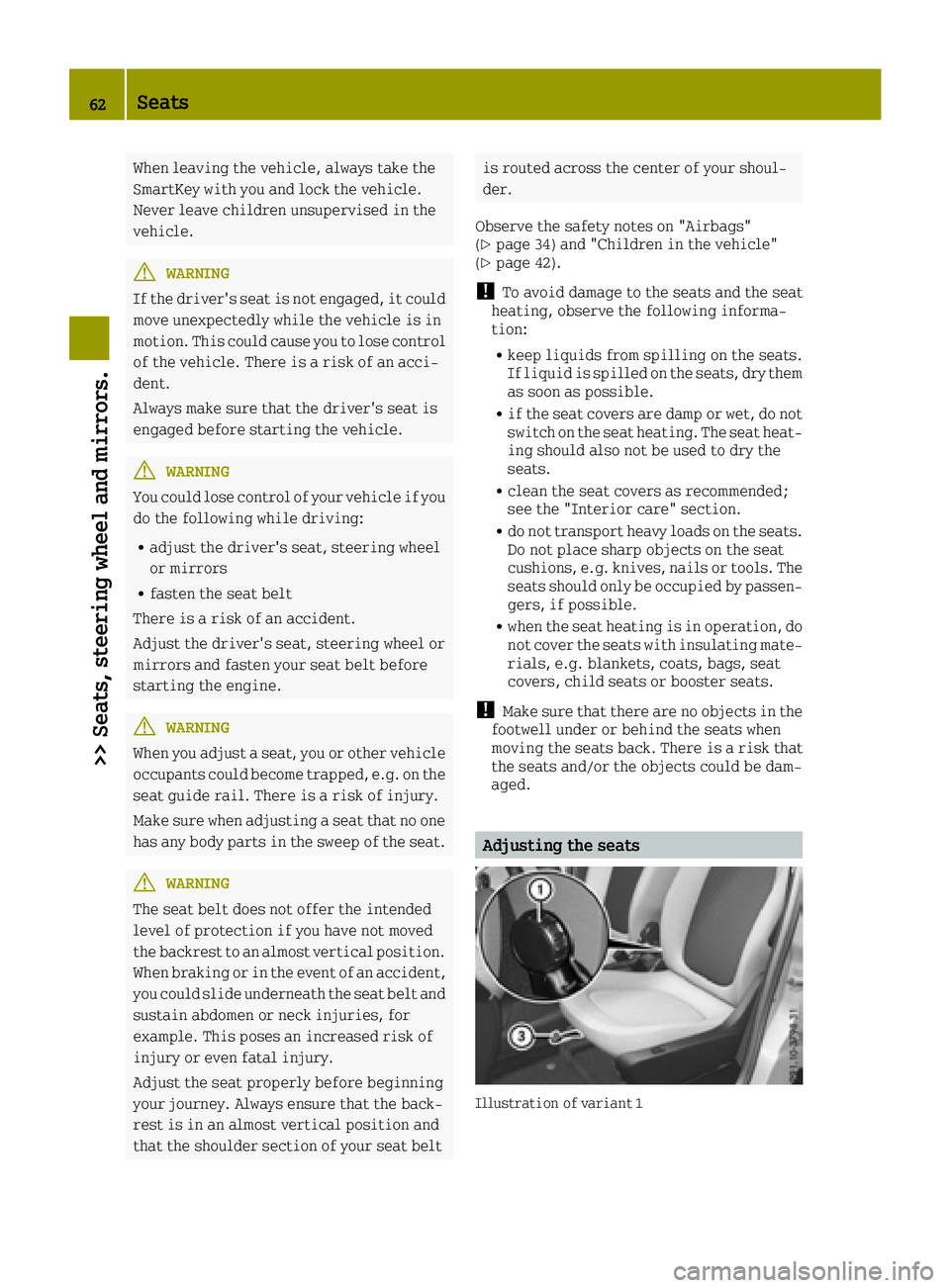
Adjusting the seats
Illustration of variant 1
62Seats
>> Seats, steering wheel and mirrors.
Page 66 of 214
Folding back
GWARNING
If the seat backrest is not engaged, it may
fold forwards, e.g. during braking or in the event of an accident.
RAs a result, a backrest which is not
engaged would press you into the seat
belt. The seat belt can no longer offer the
intended level of protection and can even
cause injuries.
RThe backrest cannot restrain objects or
loads in the trunk.
There is an increased risk of injury.
Before every journey, make sure that the
backrest is engaged as described.
Variant 1:
XTurn handwheel 0043back until the desired
seat backrest position is achieved
Variant 2:
XPull release lever 0043.
The backrest is released.
XFold the backrest backwards.
XEnsure that the seat backrest is engaged
again.
Switching the seat heating on/off
Activating/deactivating
GWARNING
Repeatedly switching on the seat heating
can cause the seat cushion and backrest
pads to become very hot. The health of per- sons with limited temperature sensitivity
or a limited ability to react to excessively
high temperatures may be affected or they
may even suffer burn-like injuries. There
is a risk of injury.
Therefore, do not switch the seat heating on
repeatedly.
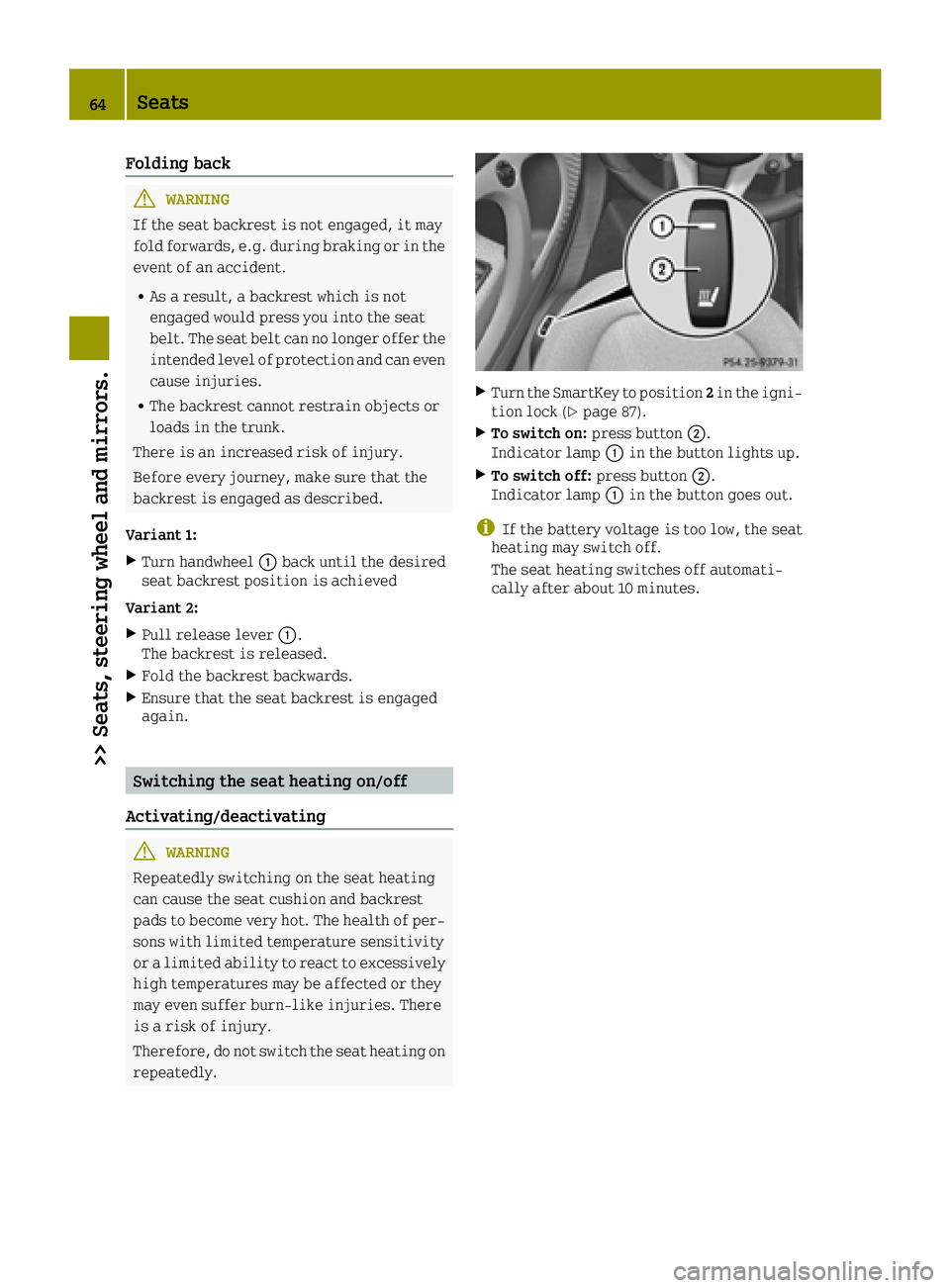
XTurn the SmartKey to position 2in the igni-
tion lock (Ypage 87).
XTo switch on: press button0044.
Indicator lamp 0043in the button lights up.
XTo switch off: press button0044.
Indicator lamp 0043in the button goes out.
iIf the battery voltage is too low, the seat
heating may switch off.
The seat heating switches off automati-
cally after about 10 minutes.
64Seats
>> Seats, steering wheel and mirrors.
Page 67 of 214
Problems with the seat heating
ProblemPossible causes/consequences and0050Solutions
The seat heating has
switched off prema-
turely or cannot be
switched on.The on-board voltage is too low because too many electrical con-
sumers are switched on.
XSwitch off electrical consumers that you do not need, such as the
rear window defroster or interior lighting.
Once the battery is sufficiently charged, the seat heating will
switch back on automatically.
Steering wheel
Important safety notes
GWARNING
You could lose control of your vehicle if you
do the following while driving:
Radjust the driver's seat, steering wheel
or mirrors
Rfasten the seat belt
There is a risk of an accident.
Adjust the driver's seat, steering wheel or
mirrors and fasten your seat belt before
starting the engine.
GWARNING
Children could injure themselves if they
adjust the steering wheel. There is a risk of
injury.
When leaving the vehicle, always take the
SmartKey with you and lock the vehicle.
Never leave children unsupervised in the
vehicle.
Adjusting the steering wheel
GWARNING
If the steering wheel is unlocked while the
vehicle is in motion, it could change posi-
tion unexpectedly. This could cause you to
lose control of the vehicle. There is a risk
of an accident.
Before starting off, make sure the steering wheel is locked. Never unlock the steering
wheel while the vehicle is in motion.
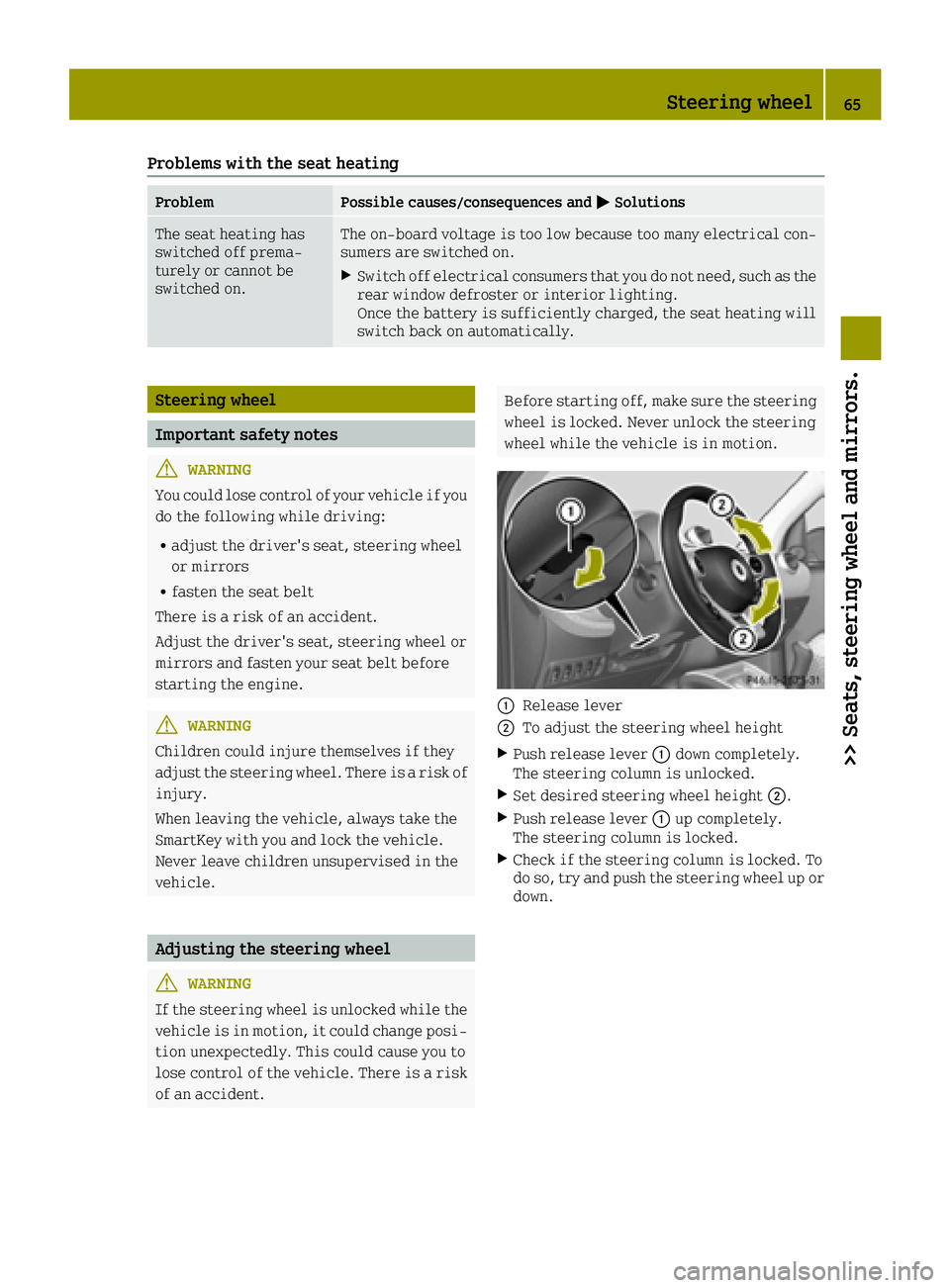
0043Release lever
0044To adjust the steering wheel height
XPush release lever 0043down completely.
The steering column is unlocked.
XSet desired steering wheel height 0044.
XPush release lever0043up completely.
The steering column is locked.
XCheck if the steering column is locked. To
do so, try and push the steering wheel up or down.
Steering wheel65
>> Seats, steering wheel and mirrors.
Z
Page 68 of 214
Mirrors
Rear-view mirror
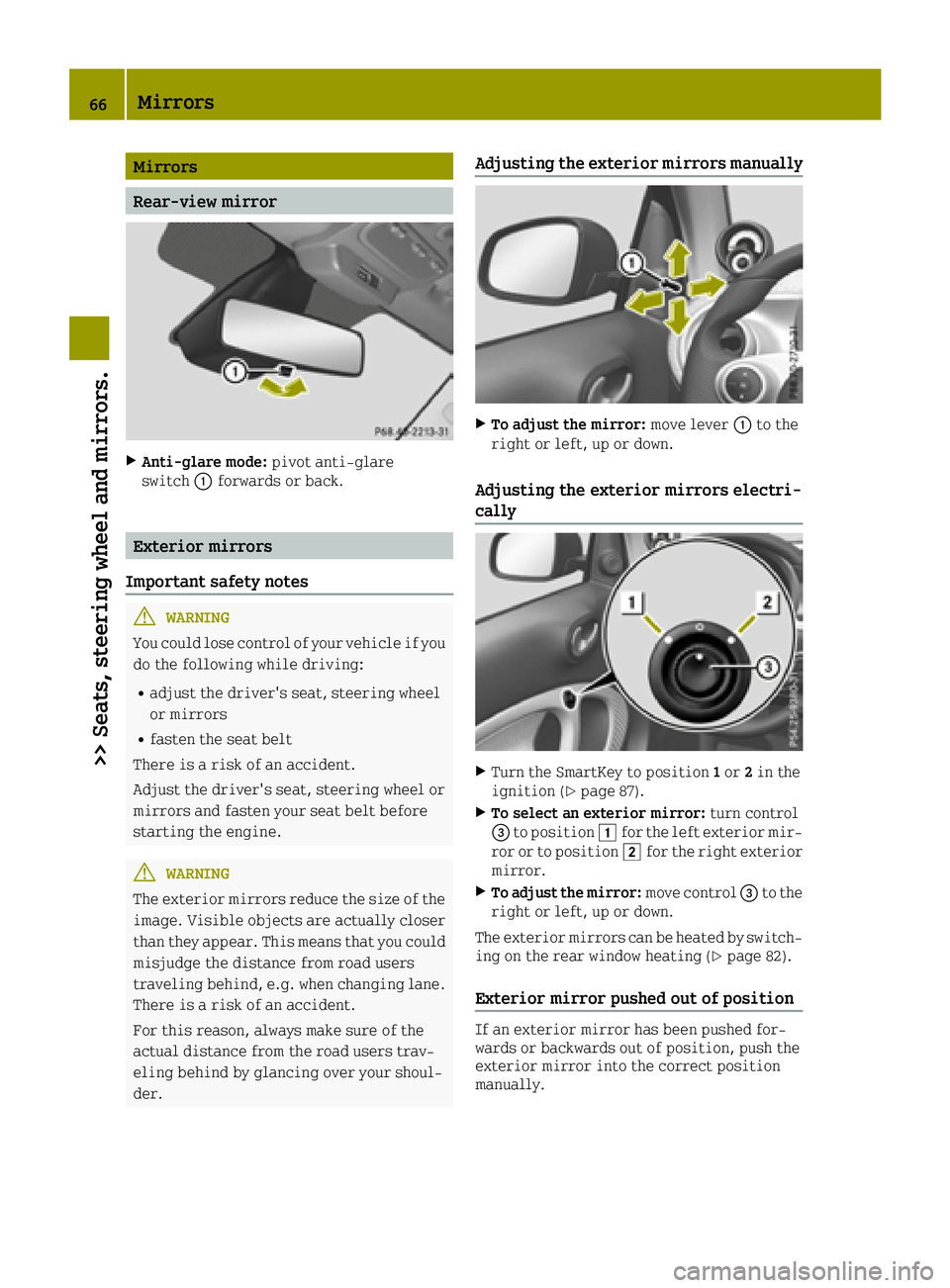
XAnti-glare mode:pivot anti-glare
switch 0043forwards or back.
Exterior mirrors
Important safety notes
GWARNING
You could lose control of your vehicle if you
do the following while driving:
Radjust the driver's seat, steering wheel
or mirrors
Rfasten the seat belt
There is a risk of an accident.
Adjust the driver's seat, steering wheel or
mirrors and fasten your seat belt before
starting the engine.
GWARNING
The exterior mirrors reduce the size of the
image. Visible objects are actually closer
than they appear. This means that you could
misjudge the distance from road users
traveling behind, e.g. when changing lane.
There is a risk of an accident.
For this reason, always make sure of the
actual distance from the road users trav-
eling behind by glancing over your shoul-
der.
Adjusting the exterior mirrors manually
XTo adjust the mirror: move lever0043to the
right or left, up or down.
Adjusting the exterior mirrors electri-
cally
XTurn the SmartKey to position 1or 2in the
ignition (Ypage 87).
XTo select an exterior mirror: turn control
0087 to position 0047for the left exterior mir-
ror or to position 0048for the right exterior
mirror.
XTo adjust the mirror: move control0087to the
right or left, up or down.
The exterior mirrors can be heated by switch- ing on the rear window heating (
Ypage 82).
Exterior mirror pushed out of position
If an exterior mirror has been pushed for-
wards or backwards out of position, push the
exterior mirror into the correct position
manually.
66Mirrors
>> Seats, steering wheel and mirrors.
Page 78 of 214
Always switch off the windshield wipers
and ignition before changing the wiper
blades.
!To avoid damaging the wiper blades, make
sure that you touch only the wiper arm of the
wiper.
!Never open the service cover/tailgate if a
windshield wiper arm has been folded away
from the windshield/rear window.
Never fold a windshield wiper arm without
a wiper blade back onto the windshield/
rear window.
Hold the windshield wiper arm firmly when
you change the wiper blade. If you release
the wiper arm without a wiper blade and it
falls onto the windshield/rear window, the
windshield/rear window may be damaged by
the force of the impact.
smart recommends that you have the wiper
blades changed at a qualified specialist
workshop.
Changing the windshield wiper blades
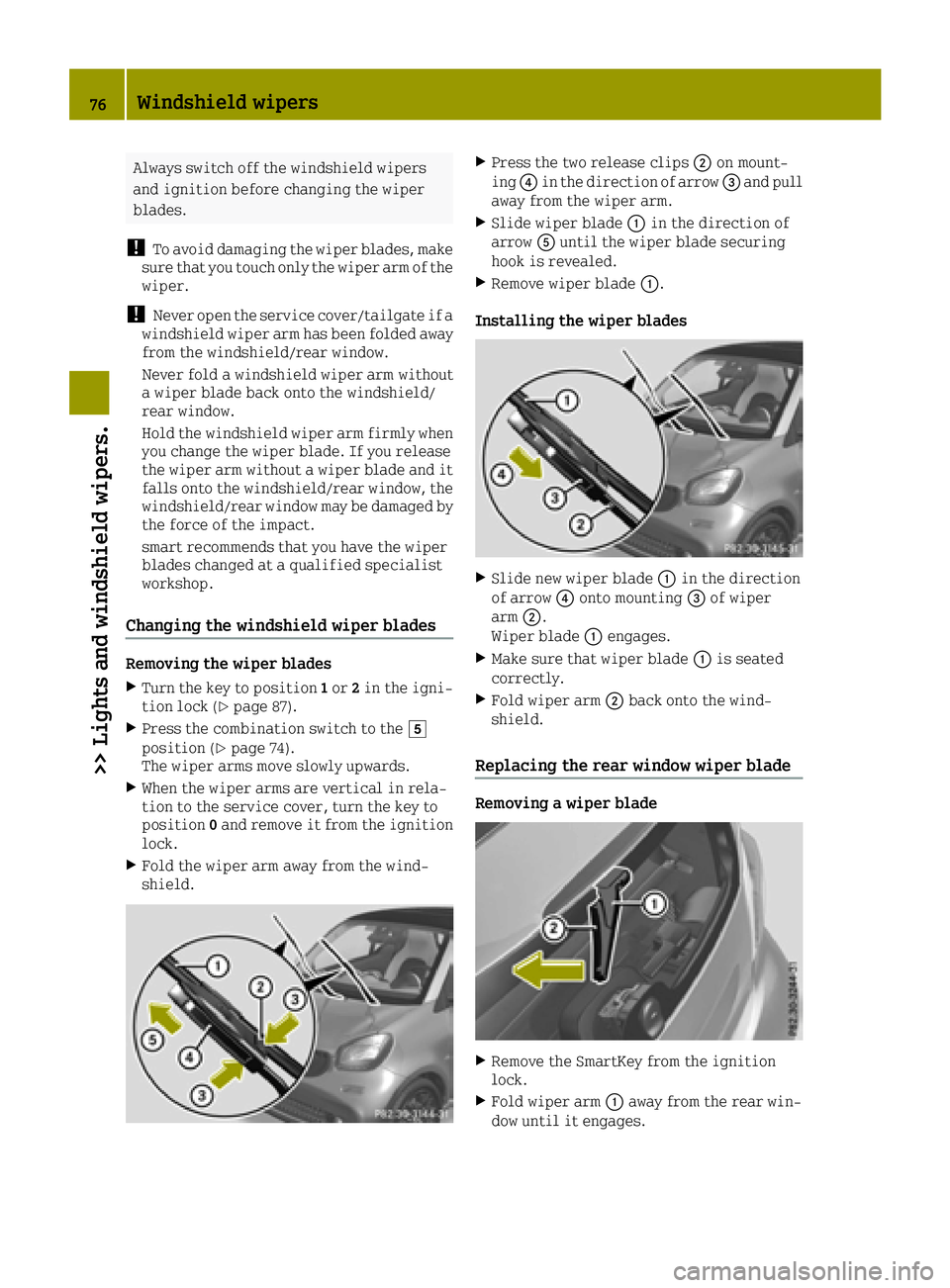
Removing the wiper blades
XTurn the key to position 1or 2in the igni-
tion lock (Ypage 87).
XPress the combination switch to the 004B
position (Ypage 74).
The wiper arms move slowly upwards.
XWhen the wiper arms are vertical in rela-
tion to the service cover, turn the key to
position 0and remove it from the ignition
lock.
XFold the wiper arm away from the wind-
shield.
XPress the two release clips 0044on mount-
ing 0085in the direction of arrow 0087and pull
away from the wiper arm.
XSlide wiper blade 0043in the direction of
arrow 0083until the wiper blade securing
hook is revealed.
XRemove wiper blade 0043.
Installing the wiper blades
XSlide new wiper blade 0043in the direction
of arrow 0085onto mounting 0087of wiper
arm 0044.
Wiper blade 0043engages.
XMake sure that wiper blade 0043is seated
correctly.
XFold wiper arm 0044back onto the wind-
shield.
Replacing the rear window wiper blade
Removing a wiper blade
XRemove the SmartKey from the ignition
lock.
XFold wiper arm 0043away from the rear win-
dow until it engages.
76Windshield wipers
>> Lights and windshield wipers.
Page 80 of 214
Problems with the windshield wipers
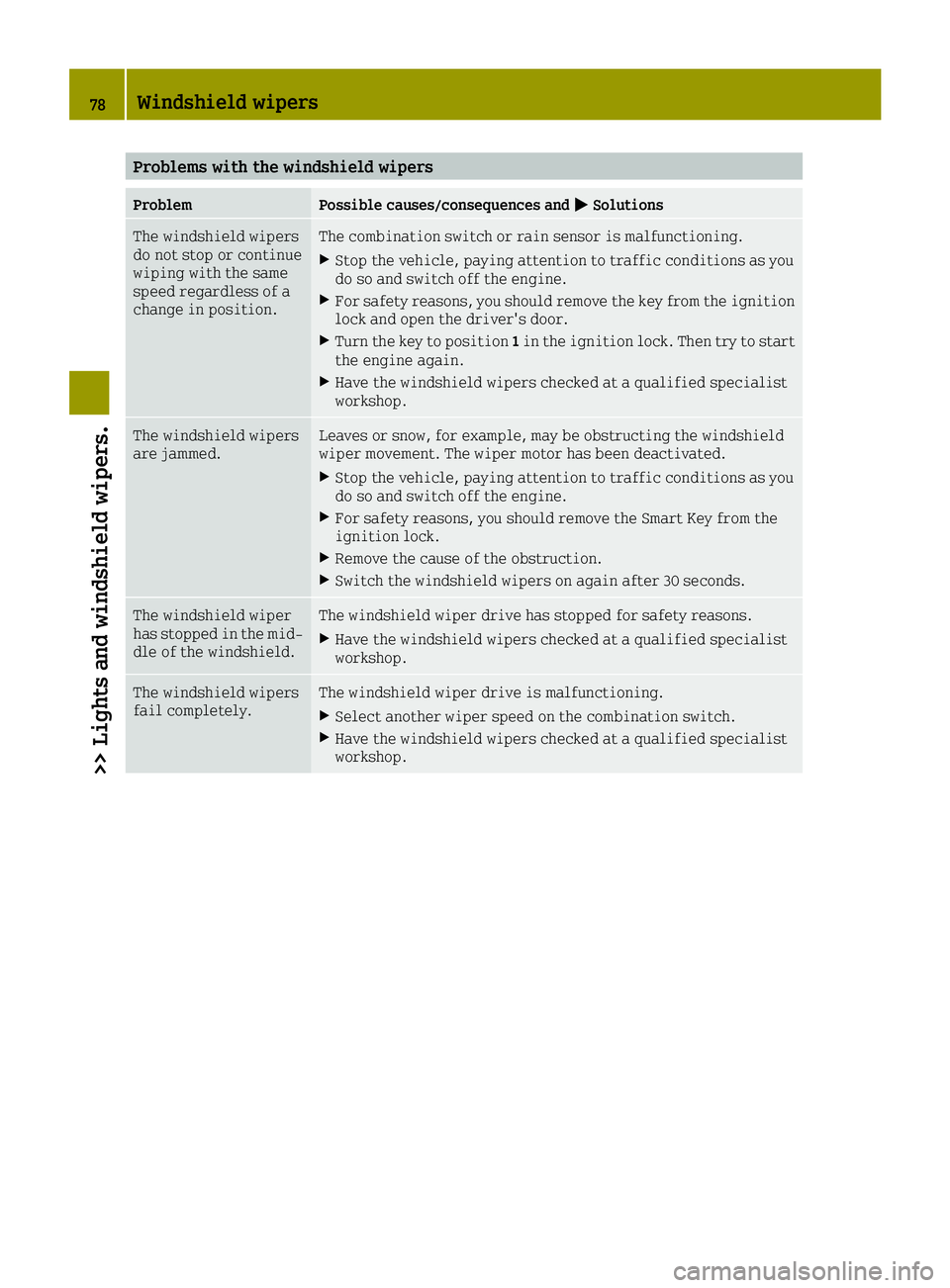
ProblemPossible causes/consequences and0050Solutions
The windshield wipers
do not stop or continue
wiping with the same
speed regardless of a
change in position.The combination switch or rain sensor is malfunctioning.
XStop the vehicle, paying attention to traffic conditions as you
do so and switch off the engine.
XFor safety reasons, you should remove the key from the ignition
lock and open the driver's door.
XTurn the key to position1in the ignition lock. Then try to start
the engine again.
XHave the windshield wipers checked at a qualified specialist
workshop.
The windshield wipers
are jammed.Leaves or snow, for example, may be obstructing the windshield
wiper movement. The wiper motor has been deactivated.
XStop the vehicle, paying attention to traffic conditions as you
do so and switch off the engine.
XFor safety reasons, you should remove the Smart Key from the
ignition lock.
XRemove the cause of the obstruction.
XSwitch the windshield wipers on again after 30 seconds.
The windshield wiper
has stopped in the mid-
dle of the windshield.The windshield wiper drive has stopped for safety reasons.
XHave the windshield wipers checked at a qualified specialist
workshop.
The windshield wipers
fail completely.The windshield wiper drive is malfunctioning.
XSelect another wiper speed on the combination switch.
XHave the windshield wipers checked at a qualified specialist
workshop.
78Windshield wipers
>> Lights and windshield wipers.
Page 82 of 214
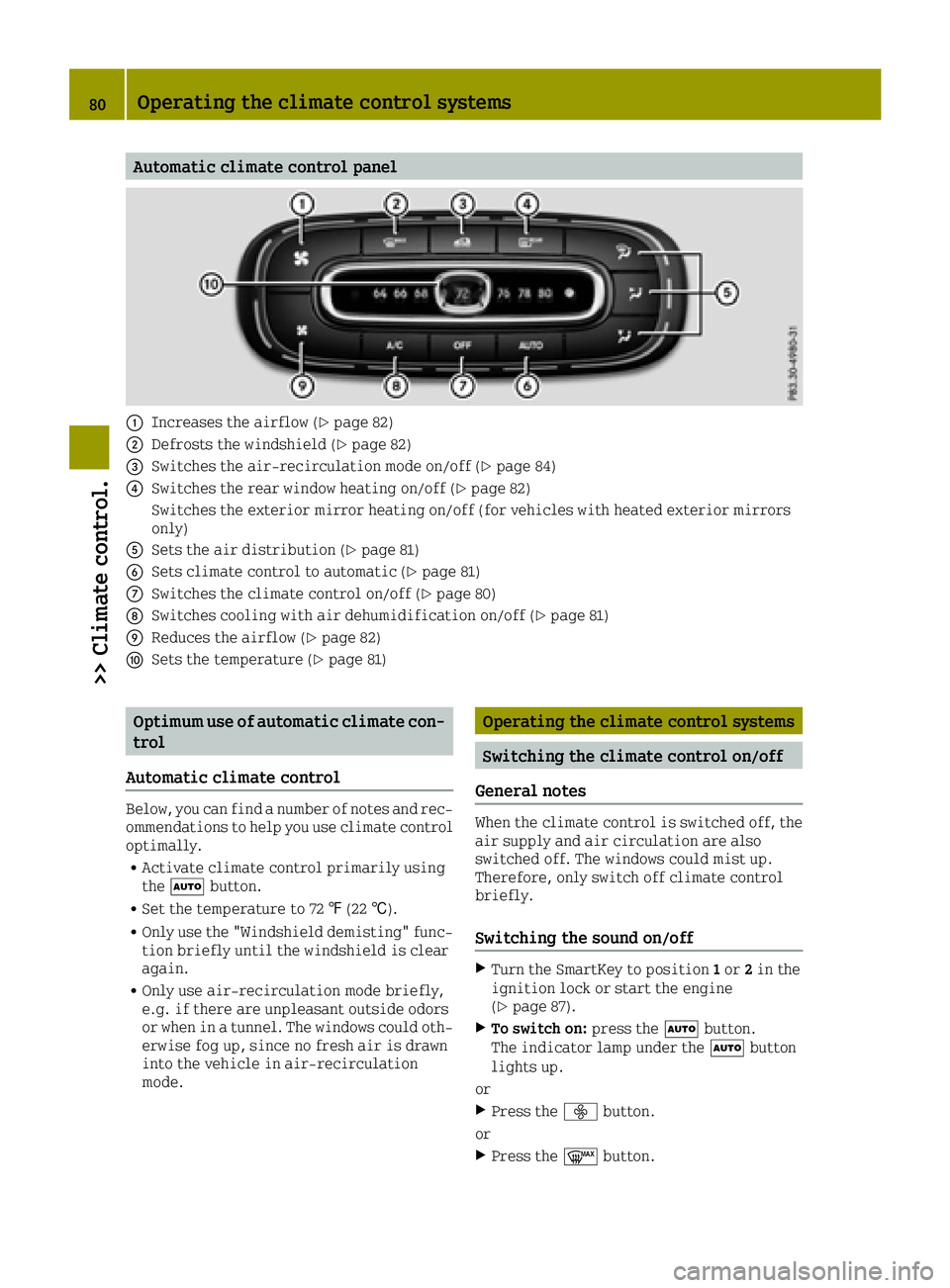
Automatic climate control panel
0043Increases the airflow (Ypage 82)
0044Defrosts the windshield (Ypage 82)
0087Switches the air-recirculation mode on/off (Ypage 84)
0085Switches the rear window heating on/off (Ypage 82)
Switches the exterior mirror heating on/off (for vehicles with heated exterior mirrors
only)
0083Sets the air distribution (Ypage 81)
0084Sets climate control to automatic (Ypage 81)
006BSwitches the climate control on/off (Ypage 80)
006CSwitches cooling with air dehumidification on/off (Ypage 81)
006DReduces the airflow (Ypage 82)
006ESets the temperature (Ypage 81)
Optimum use of automatic climate con-
trol
Automatic climate control
Below, you can find a number of notes and rec-
ommendations to help you use climate control optimally.
RActivate climate control primarily using
the 0058 button.
RSet the temperature to 72 ‡(22 †).
ROnly use the "Windshield demisting" func-
tion briefly until the windshield is clear
again.
ROnly use air-recirculation mode briefly,
e.g. if there are unpleasant outside odors
or when in a tunnel. The windows could oth-
erwise fog up, since no fresh air is drawn
into the vehicle in air-recirculation
mode.
Operating the climate control systems
Switching the climate control on/off
General notes
When the climate control is switched off, the air supply and air circulation are also
switched off. The windows could mist up.
Therefore, only switch off climate control
briefly.
Switching the sound on/off
XTurn the SmartKey to position 1or 2in the
ignition lock or start the engine
(
Ypage 87).
XTo switch on: press the0058button.
The indicator lamp under the 0058button
lights up.
or
XPress the 00F2button.
or
XPress the 0064button.
80Operating the climate control systems
>> Climate control.
Page 89 of 214
steering and the brake boosting effect. Youwill require considerably more effort to
steer and brake. There is a risk of an acci-
dent.
Do not switch off the ignition while driv-
ing.
GWARNING
If the parking brake has not been fully
released when driving, the parking brake
can:
Roverheat and cause a fire
Rlose its hold function.
There is a risk of fire and an accident.
Release the parking brake fully before
driving off.
!Do not warm up the engine with the vehicle
stationary. Drive off immediately. Avoid
high engine speeds and driving at full
throttle until the engine has reached its
operating temperature.
Only shift the automatic transmission to
the desired drive position when the vehi-
cle is stationary.
Where possible, avoid spinning the drive
wheels when pulling away on slippery
roads. You could otherwise damage the
drive train.
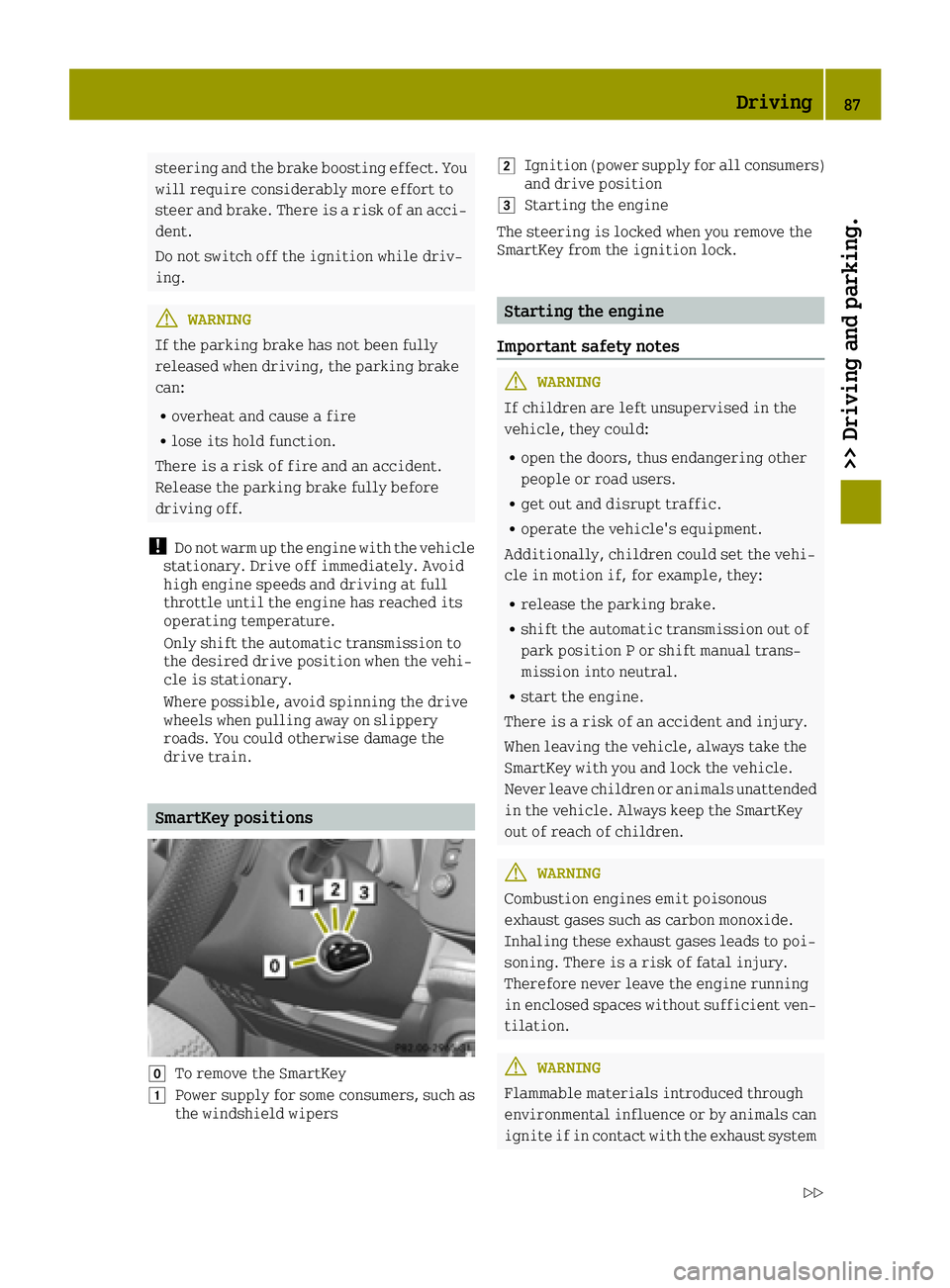
SmartKey positions
005ATo remove the SmartKey
0047Power supply for some consumers, such as
the windshield wipers
0048Ignition (power supply for all consumers)
and drive position
0049Starting the engine
The steering is locked when you remove the
SmartKey from the ignition lock.
Starting the engine
Important safety notes
GWARNING
If children are left unsupervised in the
vehicle, they could:
Ropen the doors, thus endangering other
people or road users.
Rget out and disrupt traffic.
Roperate the vehicle's equipment.
Additionally, children could set the vehi-
cle in motion if, for example, they:
Rrelease the parking brake.
Rshift the automatic transmission out of
park position P or shift manual trans-
mission into neutral.
Rstart the engine.
There is a risk of an accident and injury.
When leaving the vehicle, always take the
SmartKey with you and lock the vehicle.
Never leave children or animals unattended
in the vehicle. Always keep the SmartKey
out of reach of children.
GWARNING
Combustion engines emit poisonous
exhaust gases such as carbon monoxide.
Inhaling these exhaust gases leads to poi-
soning. There is a risk of fatal injury.
Therefore never leave the engine running
in enclosed spaces without sufficient ven- tilation.
GWARNING
Flammable materials introduced through
environmental influence or by animals can
ignite if in contact with the exhaust system
Driving87
>> Driving and parking.
Z
Page 95 of 214
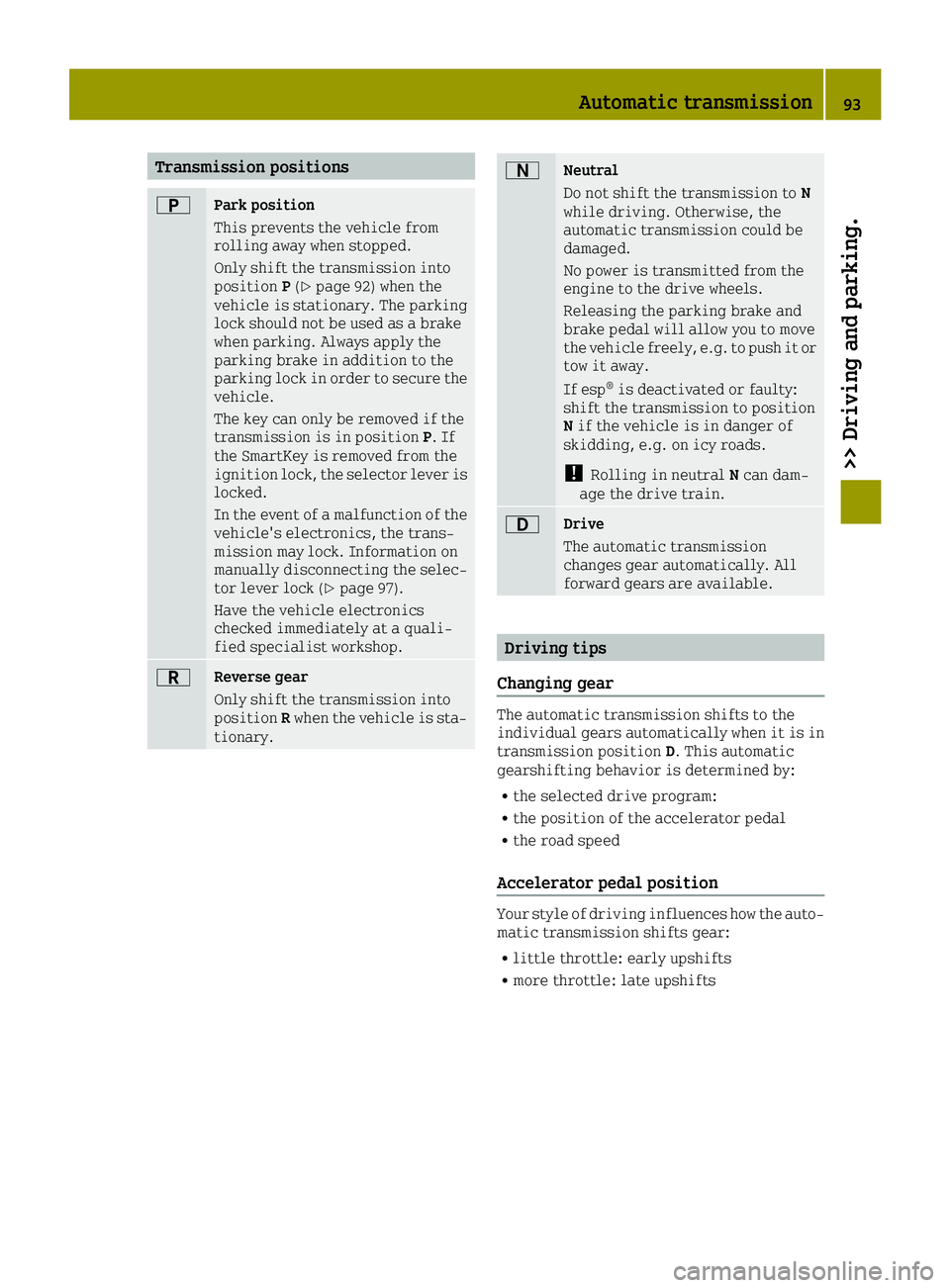
Transmission positions
0045Park position
This prevents the vehicle from
rolling away when stopped.
Only shift the transmission into
positionP(
Ypage 92) when the
vehicle is stationary. The parking
lock should not be used as a brake
when parking. Always apply the
parking brake in addition to the
parking lock in order to secure the
vehicle.
The key can only be removed if the
transmission is in position P. If
the SmartKey is removed from the
ignition lock, the selector lever is
locked.
In the event of a malfunction of the
vehicle's electronics, the trans-
mission may lock. Information on
manually disconnecting the selec-
tor lever lock (
Ypage 97).
Have the vehicle electronics
checked immediately at a quali-
fied specialist workshop.
0046Reverse gear
Only shift the transmission into
position Rwhen the vehicle is sta-
tionary.
0044Neutral
Do not shift the transmission to N
while driving. Otherwise, the
automatic transmission could be
damaged.
No power is transmitted from the
engine to the drive wheels.
Releasing the parking brake and
brake pedal will allow you to move
the vehicle freely, e.g. to push it or
tow it away.
If esp
®is deactivated or faulty:
shift the transmission to position
N if the vehicle is in danger of
skidding, e.g. on icy roads.
!Rolling in neutral Ncan dam-
age the drive train.
003ADrive
The automatic transmission
changes gear automatically. All
forward gears are available.
Driving tips
Changing gear
The automatic transmission shifts to the
individual gears automatically when it is in
transmission position D. This automatic
gearshifting behavior is determined by:
Rthe selected drive program:
Rthe position of the accelerator pedal
Rthe road speed
Accelerator pedal position
Your style of driving influences how the auto-
matic transmission shifts gear:
Rlittle throttle: early upshifts
Rmore throttle: late upshifts
Automatic transmission93
>> Driving and parking.
Z
Page 100 of 214
GWARNING
Fuel is poisonous and hazardous to health.
There is a risk of injury.
You must make sure that fuel does not come
into contact with your skin, eyes or cloth-
ing and that it is not swallowed. Do not
inhale fuel vapors. Keep fuel away from
children.
If you or others come into contact with fuel,
observe the following:
RWash away fuel from skin immediately
using soap and water.
RIf fuel comes into contact with your eyes,
immediately rinse them thoroughly with
clean water. Seek medical assistance
without delay.
RIf fuel is swallowed, seek medical assis-
tance without delay. Do not induce vom-
iting.
RImmediately change out of clothing
which has come into contact with fuel.
GWARNING
Electrostatic buildup can create sparks
and ignite fuel vapors. There is a risk of
fire and explosion.
Always touch the vehicle body before open-
ing the fuel filler flap or touching the fuel
pump nozzle. Any existing electrostatic
buildup is thereby discharged.
Do not get into the vehicle again during the
refueling process. Otherwise, electrostatic
charge could build up again.
!Do not use diesel to refuel vehicles with a
gasoline engine. Do not switch on the igni-
tion if you accidentally refuel with the
wrong fuel. Otherwise, the fuel will enter
the fuel system. Even small amounts of the
wrong fuel could result in damage to the
fuel system and the engine. Notify a quali- fied specialist workshop and have the fuel
tank and fuel lines drained completely.
!Overfilling the fuel tank could damage
the fuel system.
!Take care not to spill any fuel on painted
surfaces. You could otherwise damage the
paintwork.
!Use a filter when refueling from a fuel
can. Otherwise, the fuel lines and/or
injection system could be blocked by par-
ticles from the fuel can.
If you overfill the fuel tank, fuel could spray
out when the fuel pump nozzle is removed.
For further information on fuel and fuel qual-
ity (
Ypage 207).
Refueling
General information
The fuel filler flap is unlocked or locked
automatically when you lock or unlock the
vehicle with the key.
The position of the fuel filler cap is dis-
played 00B6in the instrument cluster. The
arrow next to the filling pump indicates the
side of the vehicle.
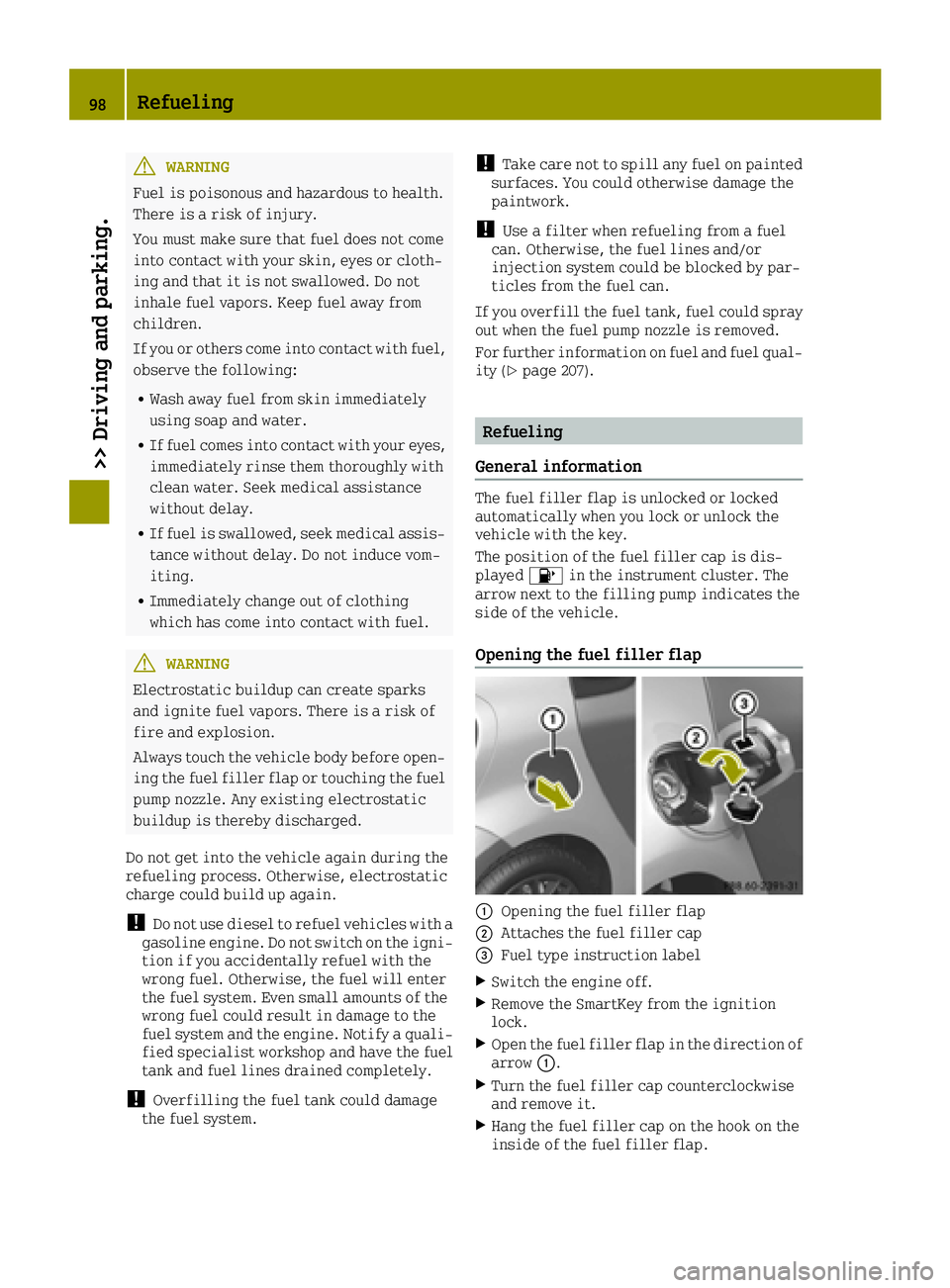
Opening the fuel filler flap
0043Opening the fuel filler flap
0044Attaches the fuel filler cap
0087Fuel type instruction label
XSwitch the engine off.
XRemove the SmartKey from the ignition
lock.
XOpen the fuel filler flap in the direction of
arrow 0043.
XTurn the fuel filler cap counterclockwise
and remove it.
XHang the fuel filler cap on the hook on the
inside of the fuel filler flap.
98Refueling
>> Driving and parking.