warning SMART FORTWO COUPE 2010 Repair Manual
[x] Cancel search | Manufacturer: SMART, Model Year: 2010, Model line: FORTWO COUPE, Model: SMART FORTWO COUPE 2010Pages: 216, PDF Size: 9.7 MB
Page 86 of 216

XRestart the engine
Three bars instead of P appear in the
multifunction display.XWait at least 30 seconds.
The transmission is taught in.
When teaching-in was successful:
P appears in the multifunction display
again and normal transmission operating
is restored.
XContinue to drive.
After an unsuccessful teaching-in:
Three bars instead of P appear in the
multifunction display.
XDo not continue to drive.XTurn off the engine.XEngage the parking brake when leaving
the vehicle.XContact Roadside Assistance or an
authorized smart center.
Instrument cluster
Multifunction display
The following displays and indicators
appear in the multifunction display:
Multifunction display (U.S. vehicles)
0046Main odometer display, or when active,
days or distance to next maintenance
service0047Transmission position indicator008ADigital clock0088Outside temperature display0086Fuel level display0087Status indicator with:• Trip odometer display• Reserve fuel indicator006ESymbol for type of maintenance service
Multifunction display (Canada vehicles)
0046Main odometer display, or when active,
days or distance to next maintenance
service0047Transmission position indicator008ADigital clock0088Outside temperature display0086Freeze warning0087Fuel level display006EStatus indicator with:• Trip odometer display• Reserve fuel indicator006FSymbol for type of maintenance serviceGWarning!
No messages will be displayed if either the
instrument cluster or the multifunction
display is inoperative.
As a result, you will not be able to see
information about your driving
conditions, such as speed, outside
temperature, or warning/indicator lamps.
Driving characteristics may be impaired.
If you must continue to drive, please do so
with added caution. Visit an authorized
smart center as soon as possible.
84Instrument cluster>> Controls.
451_AKB; 3; 22, en-USd2ureepe,Version: 2.11.8.12009-07-27T09:36:34+02:00 - Seite 84
Page 88 of 216
DisplayFunction4Fourth gear engaged5Fifth gear engaged
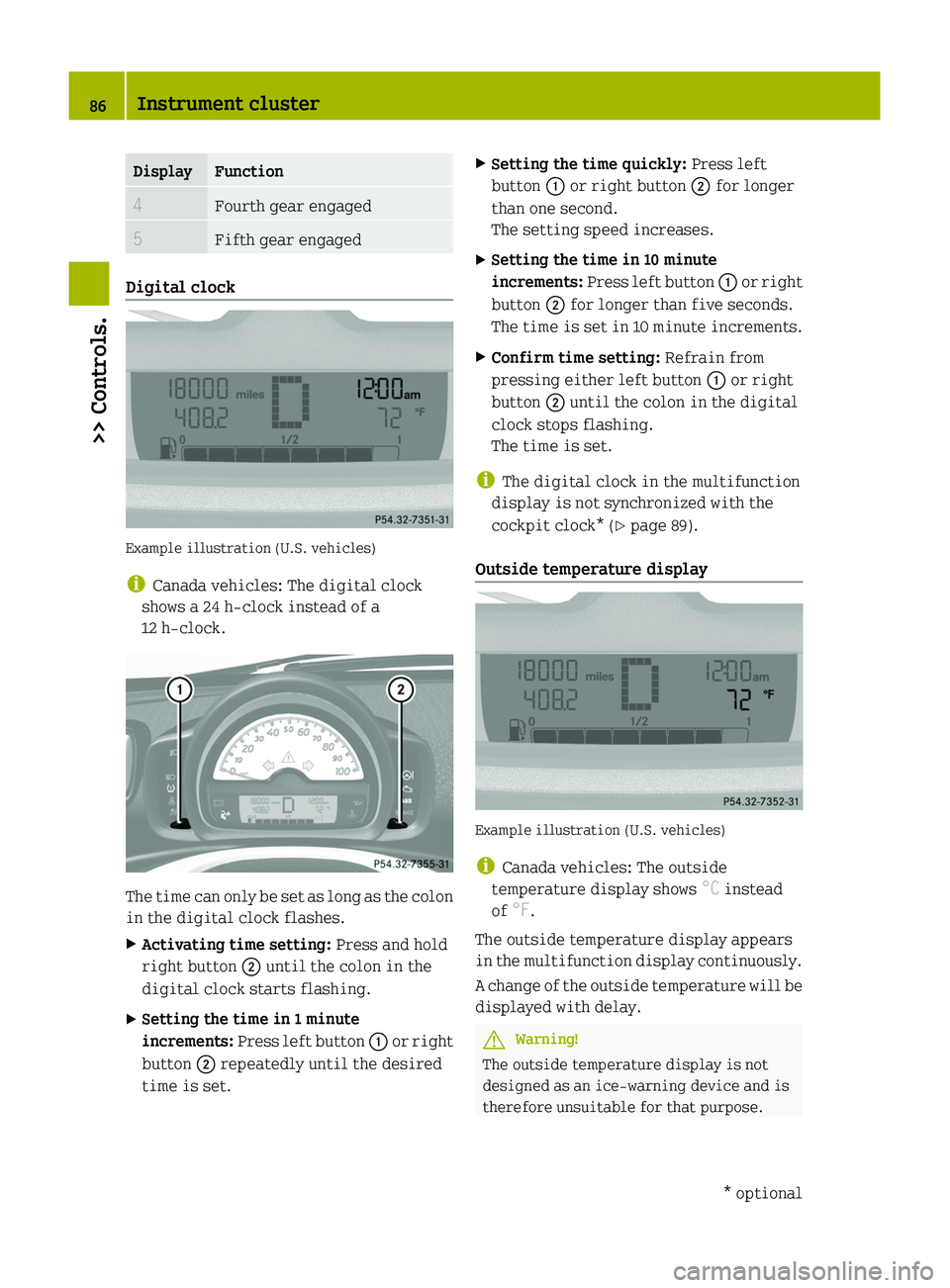
Digital clock
Example illustration (U.S. vehicles)
i Canada vehicles: The digital clock
shows a 24 h-clock instead of a
12 h-clock.
The time can only be set as long as the colon
in the digital clock flashes.
XActivating time setting: Press and hold
right button 0047 until the colon in the
digital clock starts flashing.XSetting the time in 1 minute
increments: Press left button 0046 or right
button 0047 repeatedly until the desired
time is set.XSetting the time quickly: Press left
button 0046 or right button 0047 for longer
than one second.
The setting speed increases.XSetting the time in 10 minute
increments: Press left button 0046 or right
button 0047 for longer than five seconds.
The time is set in 10 minute increments.XConfirm time setting: Refrain from
pressing either left button 0046 or right
button 0047 until the colon in the digital
clock stops flashing.
The time is set.
i The digital clock in the multifunction
display is not synchronized with the
cockpit clock* ( Y page 89).
Outside temperature display
Example illustration (U.S. vehicles)
i Canada vehicles: The outside
temperature display shows °C instead
of °F.
The outside temperature display appears
in the multifunction display continuously.
A change of the outside temperature will be
displayed with delay.
GWarning!
The outside temperature display is not
designed as an ice-warning device and is
therefore unsuitable for that purpose.
86Instrument cluster>> Controls.* optional451_AKB; 3; 22, en-USd2ureepe,Version: 2.11.8.12009-07-27T09:36:34+02:00 - Seite 86
Page 89 of 216

Indicated temperatures just above the
freezing point do not guarantee that the
road surface is free of ice. The road may
still be icy, especially in wooded areas or
on bridges. Your vehicle could start to skid
if you do not adjust your driving style
accordingly.
Therefore, always adjust your driving style
to the prevailing road and weather
conditions.
Freeze warning (Canada vehicles only)
When the outside temperature falls below
3 ¥ , the multifunction display makes you
aware of the fact that the road may be icy.
An additional freeze warning, i.e. an ice
crystal symbol, in the multifunction
display flashes. After 60 seconds, the
freeze warning stops flashing but
continues to be displayed. When the
outside temperature rises above 3 ¥, the
freeze warning goes out.
Fuel level display
Example illustration (U.S. vehicles)
The fuel level display shows the tank’s fuel
level with the aid of eight segments. The
number of dark segments indicates the fuel
level in the tank. If all eight segments are
dark, the tank is full.
You are driving on reserve fuel if there are
no more than 1.0 US gal (3.78 l) of fuel in the
tank.
If this occurs,
R the fuel pump symbol in the fuel level
display flashes
R the reserve fuel indicator shows the fuel
level in the tank in 0.1 US gal (0.5 l)
increments
For selecting the reserve fuel indicator to
be displayed in the status indicator, see
“Reserve fuel indicator” ( Y page 88).
Selecting display for status indicator
You can select the information to be
displayed in the status indicator:
R Trip odometer display ( Y page 88)
R Maintenance service interval display
( Y page 88)
R Reserve fuel indicator ( Y page 88)
0046Selecting display for status indicator,
setting the clock, activating
maintenance service interval display0047Setting the clock, adjusting instrument
cluster illuminationInstrument cluster87>> Controls.451_AKB; 3; 22, en-USd2ureepe,Version: 2.11.8.12009-07-27T09:36:34+02:00 - Seite 87Z
Page 92 of 216
XMake sure the key is in starter switch
position 1.XSwitch on the parking lamps.XTo brighten or dim illumination: Press
right button 0047 (Y page 87) repeatedly
until the desired setting is reached.
The current setting is stored.
Audio system*
GWarning!
In order to avoid distraction which could
lead to an accident, the driver should enter
system settings with the vehicle at a
standstill and operate the system only when
road and traffic conditions permit. Always
pay full attention to traffic conditions
first before operating system controls
while driving.
Bear in mind that at a speed of just 30 mph
(approximately 50 km/h), your vehicle is
covering a distance of 44 feet
(approximately 14 m) every second.
GWarning!
Always select a volume that allows you to
still hear ambient sound in your immediate
vicinity (e.g. horns, emergency rescue
vehicles, police vehicles, etc.). You could
otherwise cause an accident.
GWarning!
If you wish to have a radio other than an
original smart radio fitted in your
vehicle, please always have the necessary
work performed at an authorized smart
center.
This is particularly important if your
vehicle is fitted with a radio
preinstallation. Improper connection can
result in the failure of important vehicle
functions, thereby endangering the
operating safety of your vehicle and thus
your own safety and that of other people.
The following pages contain a brief
description of the audio systems available
for the coupé and cabriolet.
The devices are described with their full
complement of equipment, including radio
mode and CD changer* mode. The
description for your individual equipment
specification applies.
Please refer to the separate operating
instructions for detailed functions.
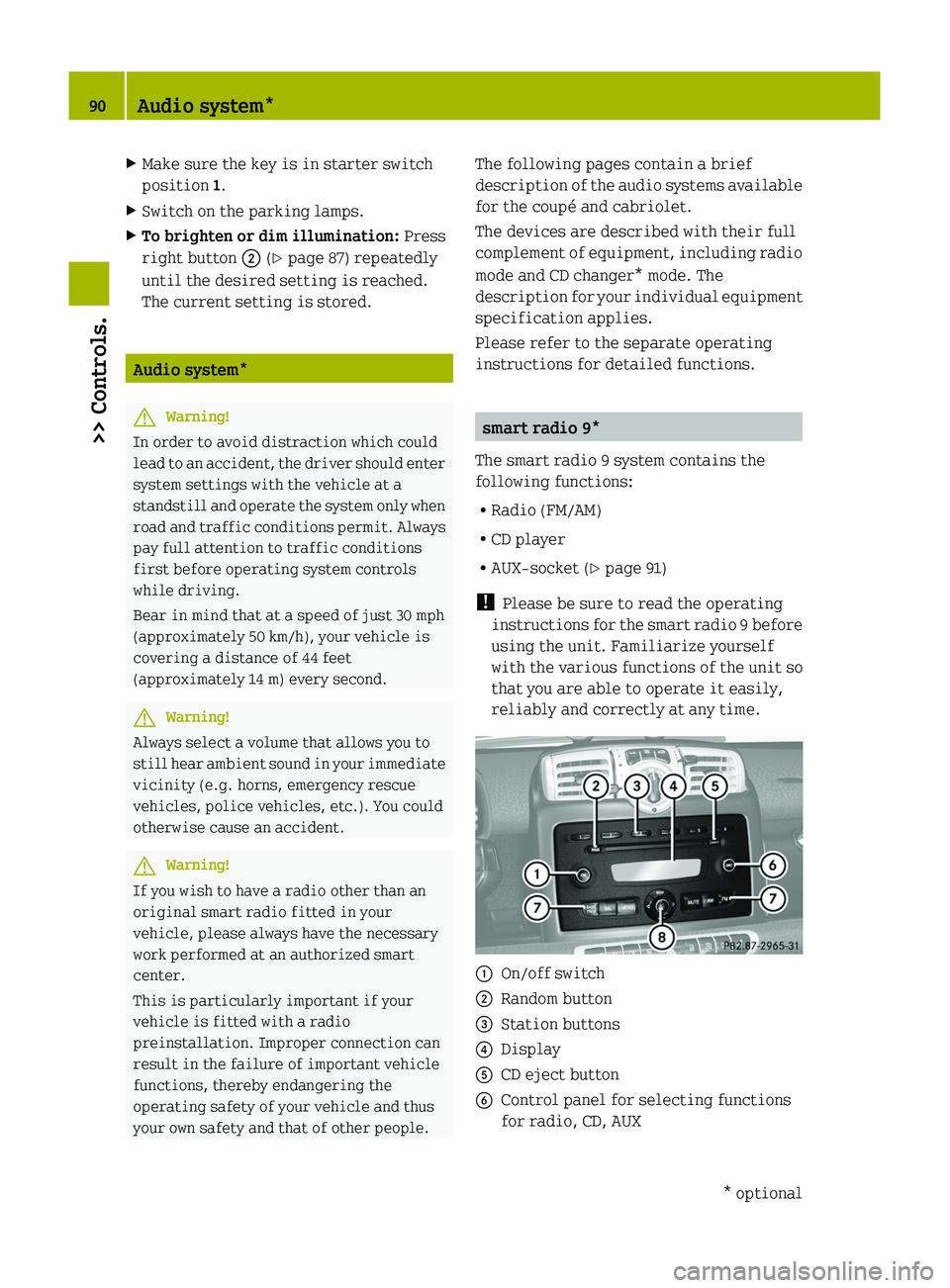
smart radio 9*
The smart radio 9 system contains the
following functions:
R Radio (FM/AM)
R CD player
R AUX-socket ( Y page 91)
! Please be sure to read the operating
instructions for the smart radio 9 before
using the unit. Familiarize yourself
with the various functions of the unit so
that you are able to operate it easily,
reliably and correctly at any time.
0046On/off switch0047Random button008AStation buttons0088Display0086CD eject button0087Control panel for selecting functions
for radio, CD, AUX90Audio system*>> Controls.* optional451_AKB; 3; 22, en-USd2ureepe,Version: 2.11.8.12009-07-27T09:36:34+02:00 - Seite 90
Page 93 of 216
006EControl panels for selecting functions
for tone settings, menu, frequency band006FVolume
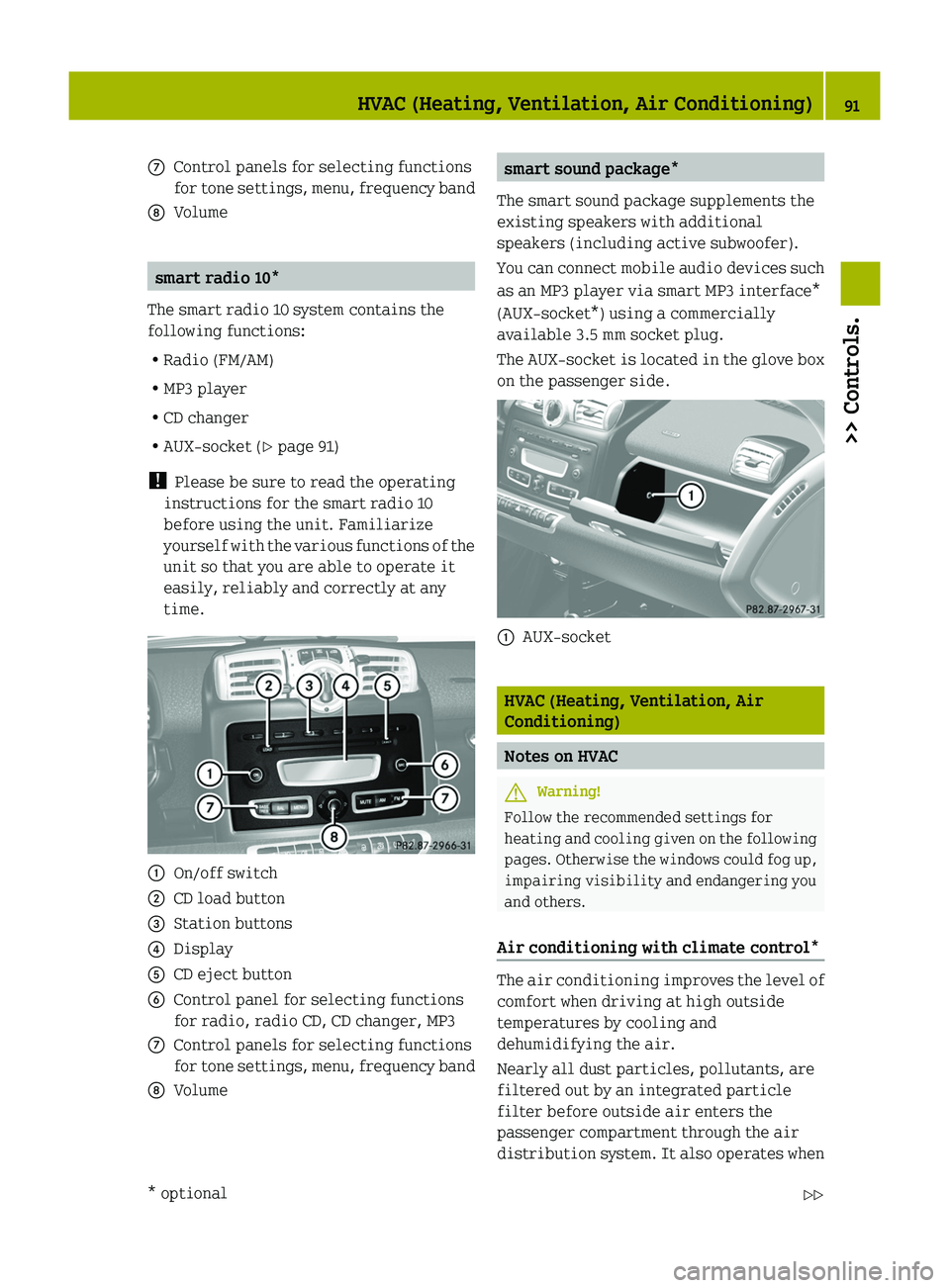
smart radio 10*
The smart radio 10 system contains the
following functions:
R Radio (FM/AM)
R MP3 player
R CD changer
R AUX-socket ( Y page 91)
! Please be sure to read the operating
instructions for the smart radio 10
before using the unit. Familiarize
yourself with the various functions of the
unit so that you are able to operate it
easily, reliably and correctly at any
time.
0046On/off switch0047CD load button008AStation buttons0088Display0086CD eject button0087Control panel for selecting functions
for radio, radio CD, CD changer, MP3006EControl panels for selecting functions
for tone settings, menu, frequency band006FVolumesmart sound package*
The smart sound package supplements the
existing speakers with additional
speakers (including active subwoofer).
You can connect mobile audio devices such
as an MP3 player via smart MP3 interface*
(AUX-socket*) using a commercially
available 3.5 mm socket plug.
The AUX-socket is located in the glove box
on the passenger side.0046AUX-socket
HVAC (Heating, Ventilation, Air
Conditioning)
Notes on HVAC
GWarning!
Follow the recommended settings for
heating and cooling given on the following
pages. Otherwise the windows could fog up,
impairing visibility and endangering you
and others.
Air conditioning with climate control*
The air conditioning improves the level of
comfort when driving at high outside
temperatures by cooling and
dehumidifying the air.
Nearly all dust particles, pollutants, are
filtered out by an integrated particle
filter before outside air enters the
passenger compartment through the air
distribution system. It also operates when
HVAC (Heating, Ventilation, Air Conditioning)91>> Controls.* optional451_AKB; 3; 22, en-USd2ureepe,Version: 2.11.8.12009-07-27T09:36:34+02:00 - Seite 91Z
Page 95 of 216
Switching HVAC on/off
Heating
Control panel ( Y page 92).
XSwitching on: Make sure the key is in
starter switch position 1.XPush temperature control 0088 up.XSwitching off: Push temperature
control 0088 fully down.
Air conditioning with climate control*
Control panel ( Y page 92).
XMake sure the engine is running.XSwitching on: Push air volume
control 0046 to level 1 or higher.XPress air conditioning switch 0047.
The indicator lamp in air conditioning
switch 0047 comes on.XSwitching off: Press air conditioning
switch 0047 once more.
The indicator lamp in air conditioning
switch 0047 goes out.
i
The stored status is restored, if you
switch on the ignition again.
i The air condition will be suspended
temporarily:
R if the engine speed is too low
R when driving off
The air condition is switched off:
R at a coolant temperature of more than
239 ¦ (115 ¥)
R at outside temperatures below 38 ¦
(3 ¥ )
Setting the temperature
Heating
Control panel ( Y page 92).
i You should raise or lower the
temperature setting in small
increments.
XIncreasing or decreasing: Push
temperature control 0088 up or down.
Rapid cooling
XPush air volume control 0046 fully up.XTurn air distribution control 008A to
position 009E.XPush temperature control 0088 fully down.XAdjust the air vents as desired.
Rapid heating
XPush air volume control 0046 to level 3.XTurn air distribution control 008A to a
position between 0087 and 009D .XPush temperature control 0088 fully up.XAdjust the air vents towards the
occupants.
Air conditioning with climate control*
Control panel ( Y page 92).
i You should raise or lower the
temperature setting in small
increments, preferably starting at 70 ¦
(21 ¥).
XIncreasing or decreasing: Push
temperature control 0086 up or down.
Adjusting air vents
GWarning!
When operating the heating or air
conditioning with climate control*, the
air that enters the passenger compartment
HVAC (Heating, Ventilation, Air Conditioning)93>> Controls.* optional451_AKB; 3; 22, en-USd2ureepe,Version: 2.11.8.12009-07-27T09:36:34+02:00 - Seite 93Z
Page 97 of 216
iYou can also turn the air distribution
control to a position between two
symbols.
Heating
Control panel ( Y page 92).
XTurn air distribution control 008A to the
desired symbol.
The air distribution is controlled
depending on the position of the air
distribution control.
Air conditioning with climate control
Control panel ( Y page 92).
XTurn air distribution control 0087 to the
desired symbol.
The air distribution is controlled
depending on the position of the air
distribution control.
Adjusting air volume
The air volume is controlled depending on
the blower speed selected. Five blower
speeds are available.
0Off1Slow2Medium3High/defrosting4MaximumXIncreasing or decreasing: Push air
volume control 0046 up or down.
Defrosting
GWarning!
Never drive with iced up or fogged
windows. Visibility will be significantly
impaired. Impaired visibility could
endanger yourself and others. This may
prevent you from observing the traffic
conditions, thereby causing an accident.
The best defrosting of windows is achieved
if the ice is completely removed from the
windows manually with an ice scraper
before starting the engine.
Heating
Control panel ( Y page 92).
XSwitching on: Push air volume
control 0046 to level 3.XTurn air distribution control 008A to
position 0087.XPush temperature control 0088 fully up.
Air conditioning with climate control
Control panel ( Y page 92).
XSwitching on: Push air volume
control 0046 to level 3.XTurn air distribution control 0087 to
position 0087.XPush temperature control 0086 fully up.
Rear window defroster
The rear window defroster serves to de-ice
the rear window quickly and clear the view
if the rear window is fogged.
The rear window defroster uses a large
amount of power. To keep battery drain to a
minimum, switch off the rear window
defroster as soon as the rear window is
clear. The rear window defroster is
automatically deactivated after
approximately 10 minutes of operation.
HVAC (Heating, Ventilation, Air Conditioning)95>> Controls.451_AKB; 3; 22, en-USd2ureepe,Version: 2.11.8.12009-07-27T09:36:34+02:00 - Seite 95Z
Page 98 of 216
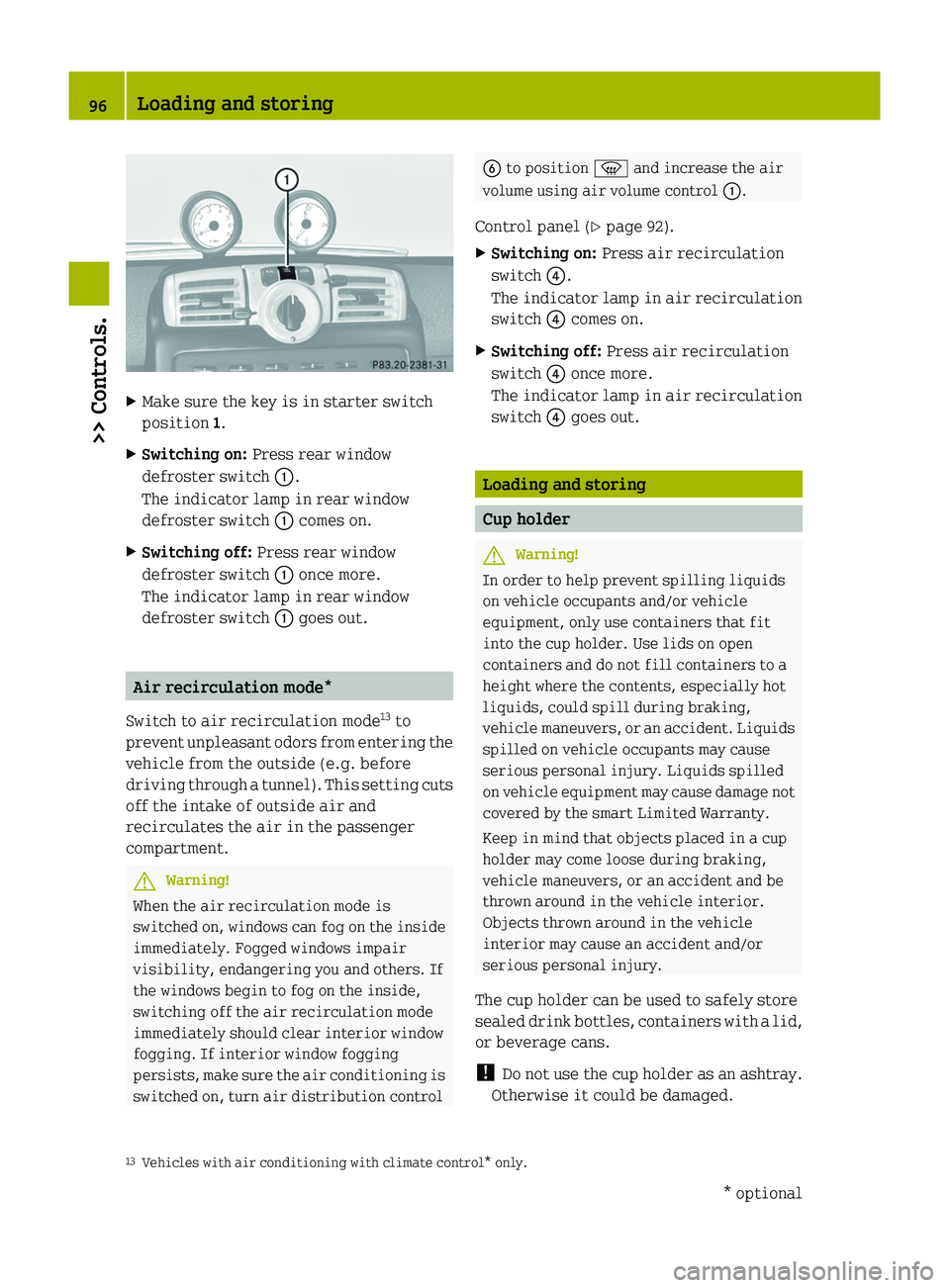
XMake sure the key is in starter switch
position 1.XSwitching on: Press rear window
defroster switch 0046.
The indicator lamp in rear window
defroster switch 0046 comes on.XSwitching off: Press rear window
defroster switch 0046 once more.
The indicator lamp in rear window
defroster switch 0046 goes out.
Air recirculation mode*
Switch to air recirculation mode 13
to
prevent unpleasant odors from entering the
vehicle from the outside (e.g. before
driving through a tunnel). This setting cuts
off the intake of outside air and
recirculates the air in the passenger
compartment.
GWarning!
When the air recirculation mode is
switched on, windows can fog on the inside
immediately. Fogged windows impair
visibility, endangering you and others. If
the windows begin to fog on the inside,
switching off the air recirculation mode
immediately should clear interior window
fogging. If interior window fogging
persists, make sure the air conditioning is
switched on, turn air distribution control
0087 to position 0087 and increase the air
volume using air volume control 0046.
Control panel ( Y page 92).XSwitching on: Press air recirculation
switch 0088.
The indicator lamp in air recirculation
switch 0088 comes on.XSwitching off: Press air recirculation
switch 0088 once more.
The indicator lamp in air recirculation
switch 0088 goes out.
Loading and storing
Cup holder
GWarning!
In order to help prevent spilling liquids
on vehicle occupants and/or vehicle
equipment, only use containers that fit
into the cup holder. Use lids on open
containers and do not fill containers to a
height where the contents, especially hot
liquids, could spill during braking,
vehicle maneuvers, or an accident. Liquids
spilled on vehicle occupants may cause
serious personal injury. Liquids spilled
on vehicle equipment may cause damage not
covered by the smart Limited Warranty.
Keep in mind that objects placed in a cup
holder may come loose during braking,
vehicle maneuvers, or an accident and be
thrown around in the vehicle interior.
Objects thrown around in the vehicle
interior may cause an accident and/or
serious personal injury.
The cup holder can be used to safely store
sealed drink bottles, containers with a lid,
or beverage cans.
! Do not use the cup holder as an ashtray.
Otherwise it could be damaged.
13 Vehicles with air conditioning with climate control* only.96Loading and storing>> Controls.* optional451_AKB; 3; 22, en-USd2ureepe,Version: 2.11.8.12009-07-27T09:36:34+02:00 - Seite 96
Page 99 of 216
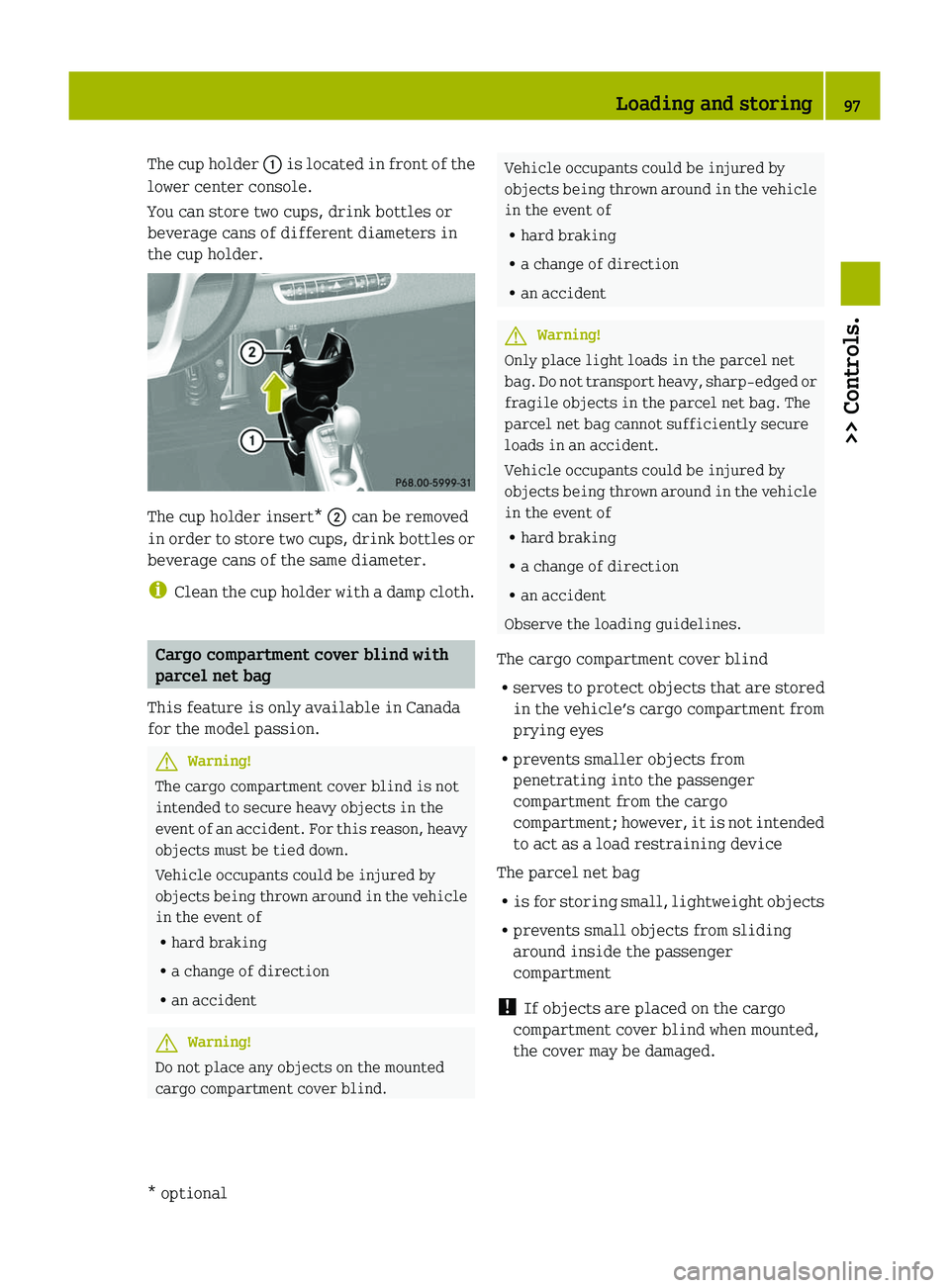
The cup holder 0046 is located in front of the
lower center console.
You can store two cups, drink bottles or
beverage cans of different diameters in
the cup holder.
The cup holder insert* 0047 can be removed
in order to store two cups, drink bottles or
beverage cans of the same diameter.
i Clean the cup holder with a damp cloth.
Cargo compartment cover blind with
parcel net bag
This feature is only available in Canada
for the model passion.
GWarning!
The cargo compartment cover blind is not
intended to secure heavy objects in the
event of an accident. For this reason, heavy
objects must be tied down.
Vehicle occupants could be injured by
objects being thrown around in the vehicle
in the event of
R hard braking
R a change of direction
R an accident
GWarning!
Do not place any objects on the mounted
cargo compartment cover blind.
Vehicle occupants could be injured by
objects being thrown around in the vehicle
in the event of
R hard braking
R a change of direction
R an accidentGWarning!
Only place light loads in the parcel net
bag. Do not transport heavy, sharp-edged or
fragile objects in the parcel net bag. The
parcel net bag cannot sufficiently secure
loads in an accident.
Vehicle occupants could be injured by
objects being thrown around in the vehicle
in the event of
R hard braking
R a change of direction
R an accident
Observe the loading guidelines.
The cargo compartment cover blind
R serves to protect objects that are stored
in the vehicle’s cargo compartment from
prying eyes
R prevents smaller objects from
penetrating into the passenger
compartment from the cargo
compartment; however, it is not intended
to act as a load restraining device
The parcel net bag
R is for storing small, lightweight objects
R prevents small objects from sliding
around inside the passenger
compartment
! If objects are placed on the cargo
compartment cover blind when mounted,
the cover may be damaged.
Loading and storing97>> Controls.* optional451_AKB; 3; 22, en-USd2ureepe,Version: 2.11.8.12009-07-27T09:36:34+02:00 - Seite 97Z
Page 101 of 216
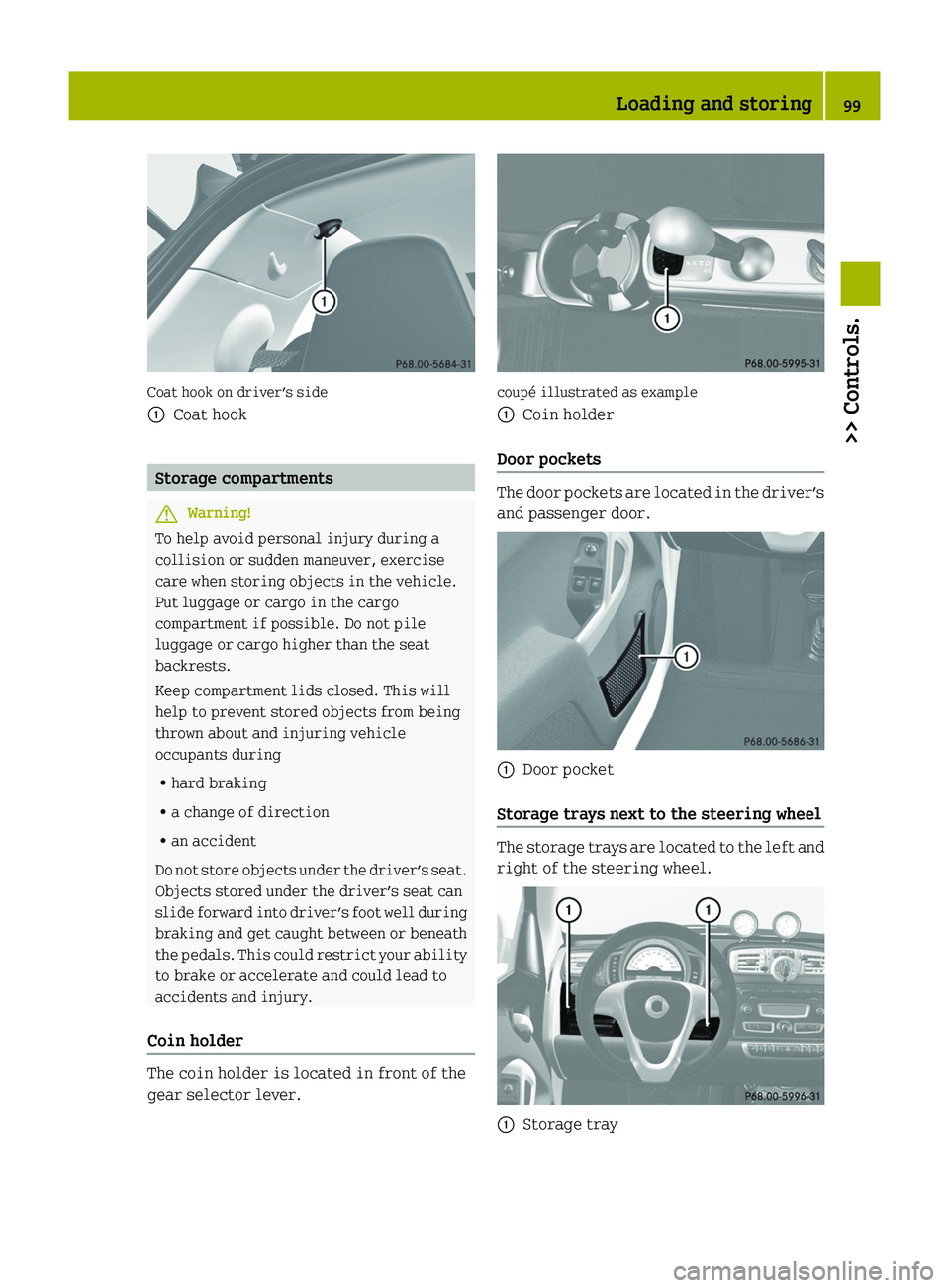
Coat hook on driver’s side
0046Coat hook
Storage compartments
GWarning!
To help avoid personal injury during a
collision or sudden maneuver, exercise
care when storing objects in the vehicle.
Put luggage or cargo in the cargo
compartment if possible. Do not pile
luggage or cargo higher than the seat
backrests.
Keep compartment lids closed. This will
help to prevent stored objects from being
thrown about and injuring vehicle
occupants during
R hard braking
R a change of direction
R an accident
Do not store objects under the driver’s seat.
Objects stored under the driver’s seat can
slide forward into driver’s foot well during
braking and get caught between or beneath
the pedals. This could restrict your ability
to brake or accelerate and could lead to
accidents and injury.
Coin holder
The coin holder is located in front of the
gear selector lever.
coupé illustrated as example
0046Coin holder
Door pockets
The door pockets are located in the driver’s
and passenger door.
0046Door pocket
Storage trays next to the steering wheel
The storage trays are located to the left and
right of the steering wheel.
0046Storage trayLoading and storing99>> Controls.451_AKB; 3; 22, en-USd2ureepe,Version: 2.11.8.12009-07-27T09:36:34+02:00 - Seite 99Z