service interval SMART FORTWO COUPE 2010 Owners Manual
[x] Cancel search | Manufacturer: SMART, Model Year: 2010, Model line: FORTWO COUPE, Model: SMART FORTWO COUPE 2010Pages: 216, PDF Size: 9.7 MB
Page 10 of 216
L
Labels ........................................ 198
Emission control information .....198
Lamps, exterior
Exterior lamp switch ..................62
Switching on/off ....................... 62
Lamps, indicator and warning
ABS ....................................... 149
Battery .................................. 154
Brakes ................................... 150
Coolant temperature .................156
Engine malfunction ...................157
EPS ........................................ 153
ESP ®
...................................... 153
Fog lamps ................................ 65
Fuel cap ................................. 156
High-beam headlamps ...............155
Low-beam headlamps .................155
Low tire pressure/TPMS
malfunction telltale .................158
Oil pressure ............................ 157
Passenger front air bag off ....37, 159
Seat belt telltale ..................... 151
SRS ........................................ 151
Turn signals ............................ 155
License plate lamps ....................... 166
Lighter see Cigarette lighter
Lighting ...................................... 62
Coming home function ................65
Daytime running lamp mode .........64
Exterior .................................. 62
Interior .................................. 66
Loading
see Vehicle loading
Locking the vehicle ........................ 50
Manually ................................ 162
Loss of
Key ........................................ 160
Service and Warranty
Information booklet ..................196
Low-beam headlamps ................. 63, 165
Exterior lamp switch ..................62
Indicator lamp ........................ 155
Switching on ............................ 63M
Main odometer display .................... 85
Maintenance .................................. 14
Service interval display .............88
Malfunction
Electronic immobilizer .............149
Shifting system ....................... 149
Manual headlamp mode (Low-beam
headlamps) ................................... 63
Maximum engine speed see Vehicle specification
Maximum loaded vehicle weight ....... 131
Maximum load rating (tires) ............ 131
Maximum permissible tire
inflation pressure ........................ 131
Mirrors
Exterior rear view mirrors ..........59
Interior rear view mirror ...........60
MON (Motor Octane Number) ............. 208
Motor Octane Number see MON
MP3 interface ................................ 91
MP3 player, smart radio 10 ................ 91
Multifunction display ..................... 84
N
Normal occupant weight .................. 131
Number, vehicle identification
(VIN) .......................................... 199
O
Occupant Classification System see OCS (Occupant
Classification System)
Occupant distribution ................... 131
Occupant safety
Air bags .................................. 33
Children and air bags ................33
Children in the vehicle ..............41
Infant and child restraint
systems ................................... 41
Introduction ............................ 30
OCS (Occupant Classification
System) .................................... 37
8Keywords451_AKB; 3; 22, en-USd2ureepe,Version: 2.11.8.12009-07-27T09:36:34+02:00 - Seite 8
Page 12 of 216
S
Safety
Driving safety systems ...............44
Occupant safety ......................... 30
Reporting defects ......................16
Safety belts
see Seat belts
Seat belt force limiter .................... 33
Seat belts ..................................... 31
Children in the vehicle ..............41
Fastening ................................ 60
Proper use of ............................ 31
Safety guidelines ......................35
Safety notes .............................. 31
Telltale .................................. 151
Seating capacity ........................... 121
Seats ........................................... 56
Adjustment ............................... 57
Armrest ................................... 57
Heating ................................... 58
Passenger seat .......................... 58
Self-test
OCS (Occupant Classification
System) ................................... 40
SRS ......................................... 30
Service
see Maintenance
Service, parts .............................. 196
Service and warranty
Booklet .................................. 196
Service flap ................................. 110
Service interval display .................. 88
Service life (tires) ....................... 123
Side marker lamps ......................... 165
Sidewall (tires) ............................ 131
Side windows
Operation ................................ 74
Signs and labels ........................... 198
smart radio 10 ............................... 91
smart radio 9 ................................ 90
smart sound package ....................... 91
Snow chains ................................. 133
Snow tires see Winter tires
Soft top system .............................. 69
Cleaning the soft top fabric .......145Locking rear soft top manually ....162
Mounting the side rails ..............73
Opening and closing the rear
soft top ............................... 55, 71
Opening and closing the
retractable soft top ...............54, 70
Removing the side rails ..............72
Storing the side rails ................73
Sound package ............................... 91
SRS (Supplemental Restraint System)
Indicator lamp ......................... 151
Standing water, driving through ...... 139
Starter switch positions .................. 55
Starting the engine ........................ 75
Steering wheel gearshift control ...... 26
Storage compartments ..................... 99
in the tailgate ........................ 100
Storing tires ............................... 124
Sun screen ................................... 102
Sun visors ................................... 101
T
Tailgate
Closing ............................... 53, 55
Opening .............................. 52, 54
Tail lamps ................................... 166
Technical data
Air conditioning refrigerant .....207
Brake fluid ............................. 207
Coolant .................................. 209
Engine oil additives ................ 207
Engine oils ............................. 206
Fuel requirements ....................208
Gasoline additives ...................208
Identification labels ................198
Premium unleaded gasoline ........207
Rims and tires ......................... 202
Service fluids and capacities ....204
Vehicle specification (model
BRABUS) ................................. 201
Vehicle specification (model
passion) ................................. 200
Vehicle specification (model
pure) ..................................... 199
Windshield/rear window washer
system ............................. 206, 208
10Keywords451_AKB; 3; 22, en-USd2ureepe,Version: 2.11.8.12009-07-27T09:36:34+02:00 - Seite 10
Page 16 of 216

Rsmartmove Assistance (Canada only)
R State Warranty Enforcement Laws (Lemon
Laws, USA only)
Important notice for California retail
buyers and lessees of smart
automobiles
Under California law you may be entitled
to a replacement of your vehicle or a refund
of the purchase price or lease price, if
smart USA Distributor LLC. and/or its
authorized repair or service facilities
fail to fix one or more substantial defects
or malfunctions in the vehicle that are
covered by its express warranty after a
reasonable number of repair attempts.
During the period of 18 months from
original delivery of the vehicle or the
accumulation of 18 000 miles
(approximately 29 000 km) on the odometer
of the vehicle, whichever occurs first, a
reasonable number of repair attempts is
presumed for a retail buyer or lessee if one
or more of the following occurs:
(1)the same substantial defect or
malfunction results in a condition that
is likely to cause death or serious
bodily injury if the vehicle is driven,
that defect or malfunction has been
subject to repair two or more times,
and you have directly notified smart
USA Distributor LLC. in writing of the
need for its repair,(2)the same substantial defect or
malfunction of a less serious nature
than category (1) has been subject to
repair four or more times and you have
directly notified us in writing of the
need for its repair, or(3)the vehicle is out of service by reason
of repair of the same or different
substantial defects or malfunctions
for a cumulative total of more than
30 calendar days.Written notification should not be sent to
a dealer, it should be addressed to:
smart USA Distributor LLC.
Customer Assistance Center
1765 Telegraph Rd.
Bloomfield Hills, MI 48302
Maintenance
The Scheduled Maintenance Guide (USA) and
Service Booklet (Canada) describes all the
necessary maintenance work which should
be performed at regular intervals. It is
important that you service your vehicle in
accordance with the prescribed
maintenance schedule. Failure to do so may
render your vehicle unsafe, it may affect
the durability of the vehicle, and it may
otherwise void the limited, express
warranty.
Always have the Scheduled Maintenance
Guide (USA) or Service Booklet (Canada)
with you when you take the vehicle to your
authorized smart center for service. The
service advisor will record each service in
the booklet for you.
Roadside Assistance
The smartmove Assistance (Canada) and
smart 1 service (USA) Program provides
factory trained technical help in the event
of a breakdown. Calls to the toll-free
Roadside Assistance number
1-800-762-7887 (in the USA)
1-877-627-8004 (in Canada)
will be answered by smart Customer
Assistance Representatives 24 hours a day,
365 days a year.
Roadside Assistance will be provided in
accordance with standard program
guidelines which include providing
service to the vehicle up to a reasonable
distance from a paved roadway. We will
make every effort to assist in a breakdown
situation, however, the accessibility of
14>> Introduction.451_AKB; 3; 22, en-USd2ureepe,Version: 2.11.8.12009-07-27T09:36:34+02:00 - Seite 14
Page 87 of 216
Multifunction display illumination
The multifunction display illumination
comes on when the starter switch is in
position 1. It goes out after approximately
30 seconds when the starter switch is in
position 0.
For adjusting the multifunction display
illumination, see “Adjusting instrument
cluster illumination” ( Y page 89).
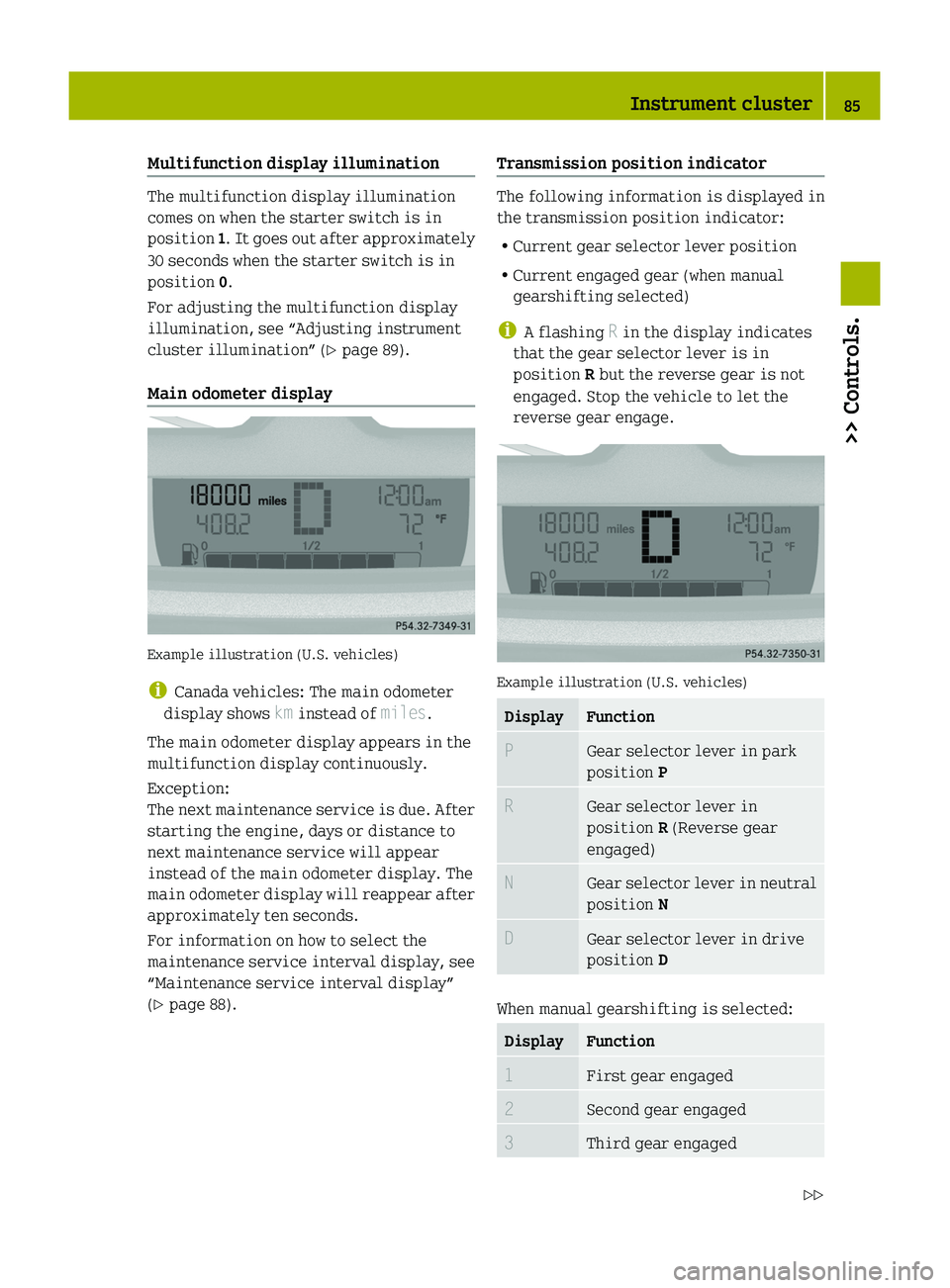
Main odometer display
Example illustration (U.S. vehicles)
i Canada vehicles: The main odometer
display shows km instead of miles.
The main odometer display appears in the
multifunction display continuously.
Exception:
The next maintenance service is due. After
starting the engine, days or distance to
next maintenance service will appear
instead of the main odometer display. The
main odometer display will reappear after
approximately ten seconds.
For information on how to select the
maintenance service interval display, see
“Maintenance service interval display”
( Y page 88).
Transmission position indicator
The following information is displayed in
the transmission position indicator:
R Current gear selector lever position
R Current engaged gear (when manual
gearshifting selected)
i A flashing R in the display indicates
that the gear selector lever is in
position R but the reverse gear is not
engaged. Stop the vehicle to let the
reverse gear engage.
Example illustration (U.S. vehicles)
DisplayFunctionPGear selector lever in park
position PRGear selector lever in
position R (Reverse gear
engaged)NGear selector lever in neutral
position NDGear selector lever in drive
position D
When manual gearshifting is selected:
DisplayFunction1First gear engaged2Second gear engaged3Third gear engagedInstrument cluster85>> Controls.451_AKB; 3; 22, en-USd2ureepe,Version: 2.11.8.12009-07-27T09:36:34+02:00 - Seite 85Z
Page 89 of 216

Indicated temperatures just above the
freezing point do not guarantee that the
road surface is free of ice. The road may
still be icy, especially in wooded areas or
on bridges. Your vehicle could start to skid
if you do not adjust your driving style
accordingly.
Therefore, always adjust your driving style
to the prevailing road and weather
conditions.
Freeze warning (Canada vehicles only)
When the outside temperature falls below
3 ¥ , the multifunction display makes you
aware of the fact that the road may be icy.
An additional freeze warning, i.e. an ice
crystal symbol, in the multifunction
display flashes. After 60 seconds, the
freeze warning stops flashing but
continues to be displayed. When the
outside temperature rises above 3 ¥, the
freeze warning goes out.
Fuel level display
Example illustration (U.S. vehicles)
The fuel level display shows the tank’s fuel
level with the aid of eight segments. The
number of dark segments indicates the fuel
level in the tank. If all eight segments are
dark, the tank is full.
You are driving on reserve fuel if there are
no more than 1.0 US gal (3.78 l) of fuel in the
tank.
If this occurs,
R the fuel pump symbol in the fuel level
display flashes
R the reserve fuel indicator shows the fuel
level in the tank in 0.1 US gal (0.5 l)
increments
For selecting the reserve fuel indicator to
be displayed in the status indicator, see
“Reserve fuel indicator” ( Y page 88).
Selecting display for status indicator
You can select the information to be
displayed in the status indicator:
R Trip odometer display ( Y page 88)
R Maintenance service interval display
( Y page 88)
R Reserve fuel indicator ( Y page 88)
0046Selecting display for status indicator,
setting the clock, activating
maintenance service interval display0047Setting the clock, adjusting instrument
cluster illuminationInstrument cluster87>> Controls.451_AKB; 3; 22, en-USd2ureepe,Version: 2.11.8.12009-07-27T09:36:34+02:00 - Seite 87Z
Page 90 of 216

Trip odometer display
Example illustration (U.S. vehicles)
XSelecting trip odometer display: Press
left button 0046 (Y page 87) repeatedly
until the trip odometer display appears
in the status indicator.XResetting trip odometer display: Press
and hold left button 0046 (Y page 87) until
the value is set to 0.
Maintenance service interval display
Example illustration (U.S. vehicles)
i Canada vehicles: The maintenance
service interval display shows km
instead of miles.
The maintenance service interval display
will notify you approximately one month
before the next maintenance service is
due.
The following information will be
displayed after starting the engine:
R Days or distance to next maintenance
service
This information will be displayed
instead of the main odometer display.
The main odometer display will reappear
after approximately ten seconds
( Y page 85).
R Type of service that is due
This information will be displayed in
the status indicator.XStart the engine.XSelecting maintenance service interval
display: Press left button 0046 (Y page 87)
repeatedly until the maintenance
service interval display appears in the
status indicator.
Depending on the type of maintenance
service that is due, symbol ¬ or } is
displayed.XClearing maintenance service interval
display: Press left button 0046 (Y page 87)
once.
The maintenance service interval
display is cleared.XActivating maintenance service
interval display: Press left button 0046
( Y page 87) twice in quick succession.
Reserve fuel indicator
Example illustration (U.S. vehicles)
88Instrument cluster>> Controls.
451_AKB; 3; 22, en-USd2ureepe,Version: 2.11.8.12009-07-27T09:36:34+02:00 - Seite 88
Page 112 of 216
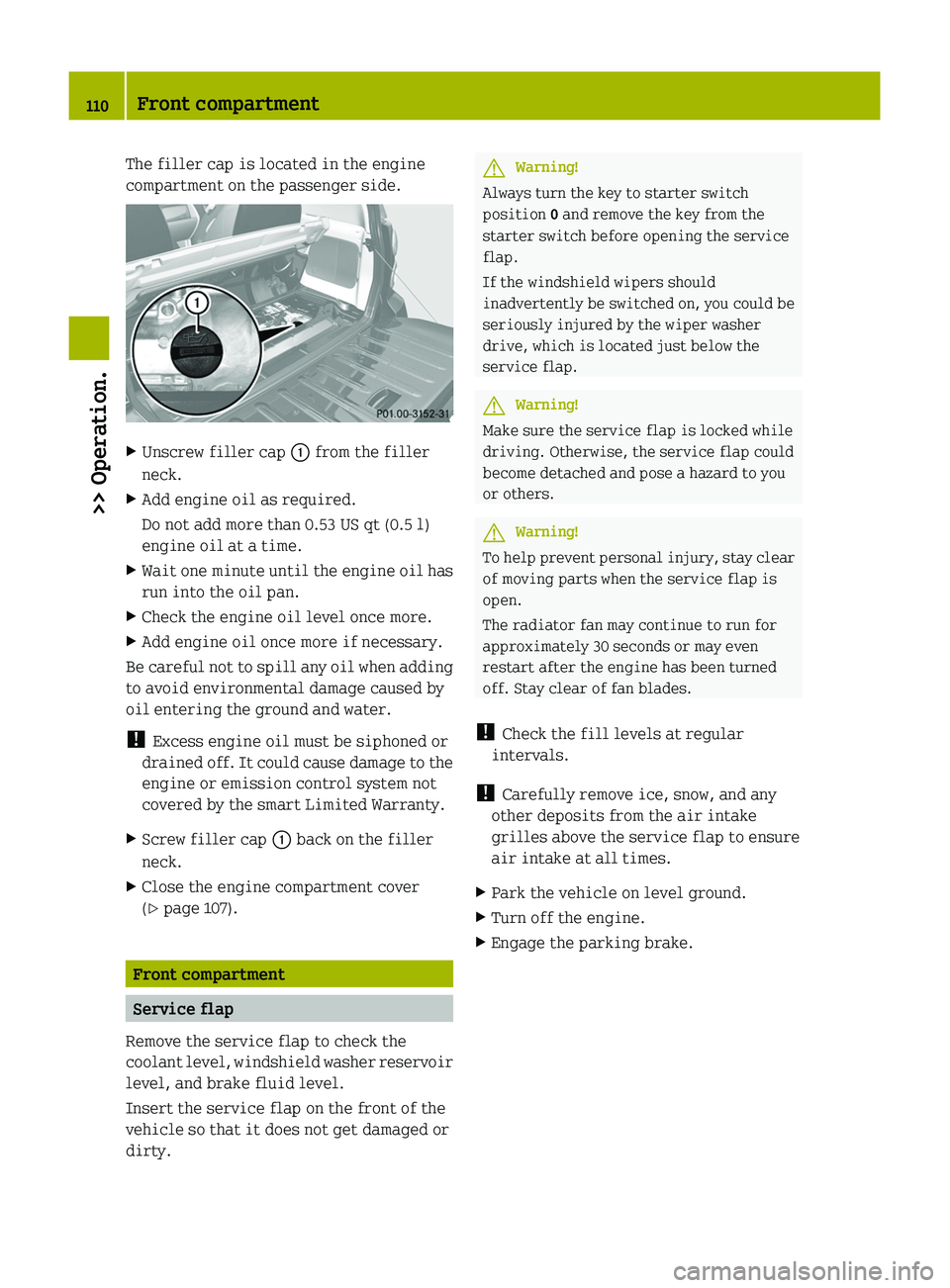
The filler cap is located in the engine
compartment on the passenger side.XUnscrew filler cap 0046 from the filler
neck.XAdd engine oil as required.
Do not add more than 0.53 US qt (0.5 l)
engine oil at a time.XWait one minute until the engine oil has
run into the oil pan.XCheck the engine oil level once more.XAdd engine oil once more if necessary.
Be careful not to spill any oil when adding
to avoid environmental damage caused by
oil entering the ground and water.
! Excess engine oil must be siphoned or
drained off. It could cause damage to the
engine or emission control system not
covered by the smart Limited Warranty.
XScrew filler cap 0046 back on the filler
neck.XClose the engine compartment cover
( Y page 107).
Front compartment
Service flap
Remove the service flap to check the
coolant level, windshield washer reservoir
level, and brake fluid level.
Insert the service flap on the front of the
vehicle so that it does not get damaged or
dirty.
GWarning!
Always turn the key to starter switch
position 0 and remove the key from the
starter switch before opening the service
flap.
If the windshield wipers should
inadvertently be switched on, you could be
seriously injured by the wiper washer
drive, which is located just below the
service flap.
GWarning!
Make sure the service flap is locked while
driving. Otherwise, the service flap could
become detached and pose a hazard to you
or others.
GWarning!
To help prevent personal injury, stay clear
of moving parts when the service flap is
open.
The radiator fan may continue to run for
approximately 30 seconds or may even
restart after the engine has been turned
off. Stay clear of fan blades.
! Check the fill levels at regular
intervals.
! Carefully remove ice, snow, and any
other deposits from the air intake
grilles above the service flap to ensure
air intake at all times.
XPark the vehicle on level ground.XTurn off the engine.XEngage the parking brake.110Front compartment>> Operation.
451_AKB; 3; 22, en-USd2ureepe,Version: 2.11.8.12009-07-27T09:36:34+02:00 - Seite 110
Page 115 of 216
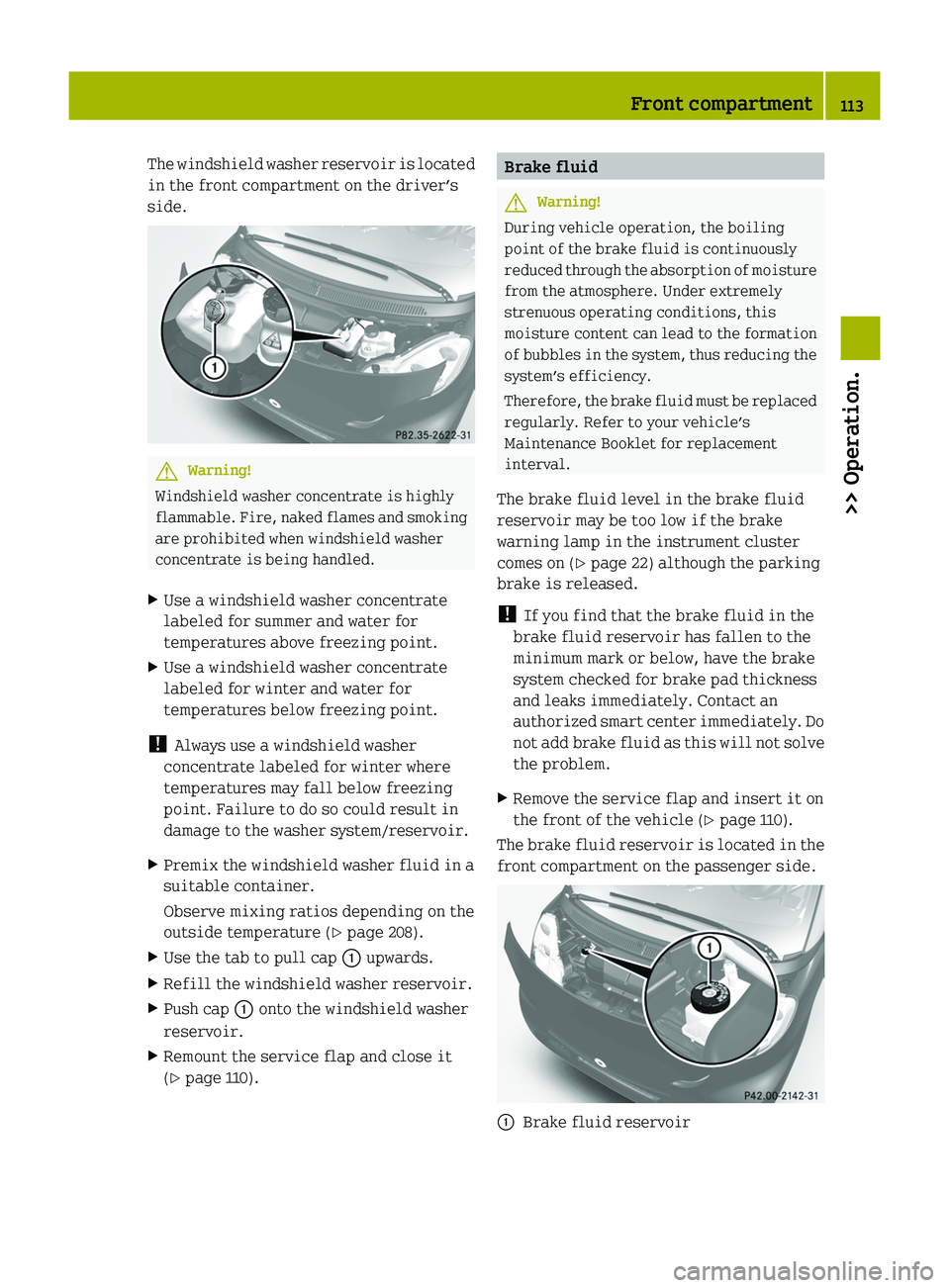
The windshield washer reservoir is located
in the front compartment on the driver’s
side.GWarning!
Windshield washer concentrate is highly
flammable. Fire, naked flames and smoking
are prohibited when windshield washer
concentrate is being handled.
XUse a windshield washer concentrate
labeled for summer and water for
temperatures above freezing point.XUse a windshield washer concentrate
labeled for winter and water for
temperatures below freezing point.
! Always use a windshield washer
concentrate labeled for winter where
temperatures may fall below freezing
point. Failure to do so could result in
damage to the washer system/reservoir.
XPremix the windshield washer fluid in a
suitable container.
Observe mixing ratios depending on the
outside temperature ( Y page 208).XUse the tab to pull cap 0046 upwards.XRefill the windshield washer reservoir.XPush cap 0046 onto the windshield washer
reservoir.XRemount the service flap and close it
( Y page 110).Brake fluidGWarning!
During vehicle operation, the boiling
point of the brake fluid is continuously
reduced through the absorption of moisture
from the atmosphere. Under extremely
strenuous operating conditions, this
moisture content can lead to the formation
of bubbles in the system, thus reducing the
system’s efficiency.
Therefore, the brake fluid must be replaced
regularly. Refer to your vehicle’s
Maintenance Booklet for replacement
interval.
The brake fluid level in the brake fluid
reservoir may be too low if the brake
warning lamp in the instrument cluster
comes on ( Y page 22) although the parking
brake is released.
! If you find that the brake fluid in the
brake fluid reservoir has fallen to the
minimum mark or below, have the brake
system checked for brake pad thickness
and leaks immediately. Contact an
authorized smart center immediately. Do
not add brake fluid as this will not solve
the problem.
XRemove the service flap and insert it on
the front of the vehicle ( Y page 110).
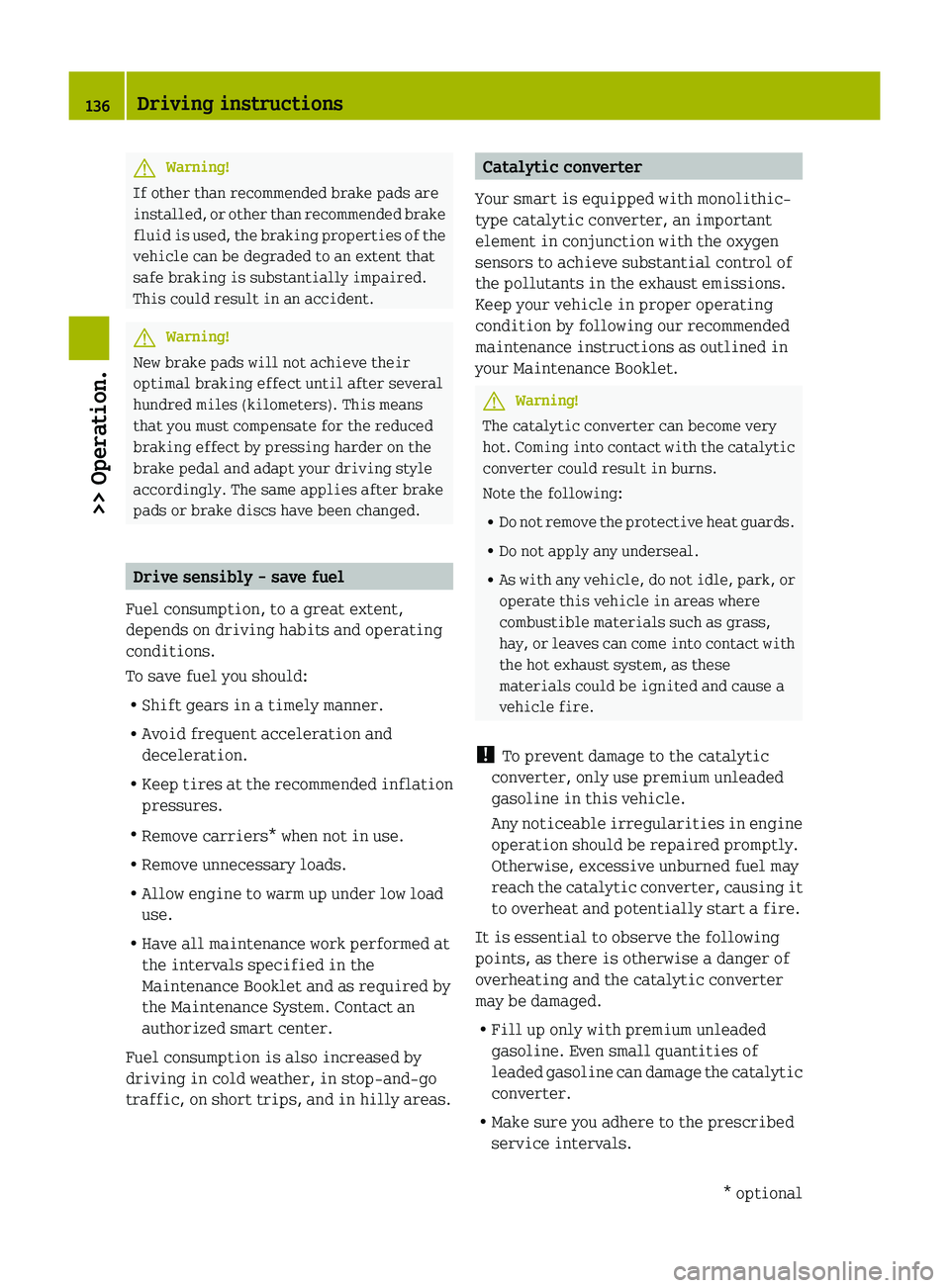
The brake fluid reservoir is located in the
front compartment on the passenger side.
0046Brake fluid reservoirFront compartment113>> Operation.451_AKB; 3; 22, en-USd2ureepe,Version: 2.11.8.12009-07-27T09:36:34+02:00 - Seite 113Z
Page 138 of 216
GWarning!
If other than recommended brake pads are
installed, or other than recommended brake
fluid is used, the braking properties of the
vehicle can be degraded to an extent that
safe braking is substantially impaired.
This could result in an accident.
GWarning!
New brake pads will not achieve their
optimal braking effect until after several
hundred miles (kilometers). This means
that you must compensate for the reduced
braking effect by pressing harder on the
brake pedal and adapt your driving style
accordingly. The same applies after brake
pads or brake discs have been changed.
Drive sensibly - save fuel
Fuel consumption, to a great extent,
depends on driving habits and operating
conditions.
To save fuel you should:
R Shift gears in a timely manner.
R Avoid frequent acceleration and
deceleration.
R Keep tires at the recommended inflation
pressures.
R Remove carriers* when not in use.
R Remove unnecessary loads.
R Allow engine to warm up under low load
use.
R Have all maintenance work performed at
the intervals specified in the
Maintenance Booklet and as required by
the Maintenance System. Contact an
authorized smart center.
Fuel consumption is also increased by
driving in cold weather, in stop-and-go
traffic, on short trips, and in hilly areas.
Catalytic converter
Your smart is equipped with monolithic-
type catalytic converter, an important
element in conjunction with the oxygen
sensors to achieve substantial control of
the pollutants in the exhaust emissions.
Keep your vehicle in proper operating
condition by following our recommended
maintenance instructions as outlined in
your Maintenance Booklet.GWarning!
The catalytic converter can become very
hot. Coming into contact with the catalytic
converter could result in burns.
Note the following:
R Do not remove the protective heat guards.
R Do not apply any underseal.
R As with any vehicle, do not idle, park, or
operate this vehicle in areas where
combustible materials such as grass,
hay, or leaves can come into contact with
the hot exhaust system, as these
materials could be ignited and cause a
vehicle fire.
! To prevent damage to the catalytic
converter, only use premium unleaded
gasoline in this vehicle.
Any noticeable irregularities in engine
operation should be repaired promptly.
Otherwise, excessive unburned fuel may
reach the catalytic converter, causing it
to overheat and potentially start a fire.
It is essential to observe the following
points, as there is otherwise a danger of
overheating and the catalytic converter
may be damaged.
R Fill up only with premium unleaded
gasoline. Even small quantities of
leaded gasoline can damage the catalytic
converter.
R Make sure you adhere to the prescribed
service intervals.
136Driving instructions>> Operation.* optional451_AKB; 3; 22, en-USd2ureepe,Version: 2.11.8.12009-07-27T09:36:34+02:00 - Seite 136
Page 182 of 216

loose if they are not tightened to a torque
of 80 lb-ft (110 Nm).
Steel rim with wheel cover
XVehicles with wheel cover on steel rim:
Position wheel cover aperture 0046 so
valve 0047 fits through.XPush the wheel cover evenly onto the
wheel rim with both hands.XCheck that the wheel cover is fixed
securely to the wheel rim.
i The Tire Pressure Monitoring System
(TPMS)* only functions on wheels that are
equipped with the proper electronic
sensors ( Y page 117).
Battery
About the battery
Your vehicle’s battery is located in the
passenger footwell below the footrest
( Y page 182).
The battery should always be sufficiently
charged in order to achieve its rated
service life. Refer to Maintenance Booklet
for battery maintenance intervals.
If you use your vehicle mostly for short-
distance trips, you will need to have the
battery charge checked more frequently.
When replacing the battery, always use
batteries approved by smart.
Battery: 12 V and 42 Ah
If you do not intend to operate your vehicle
for an extended period of time, consult an
authorized smart center about steps you
need to observe.GWarning!
Observe all safety instructions and
precautions when handling automotive
batteries.
Risk of explosion.Fire, open flames and
smoking are prohibited
when handling batteries.
Avoid creating sparks.Battery acid is caustic.
Do not allow it to come
into contact with skin,
eyes or clothing.
Wear suitable protective
clothing, especially
gloves, apron and
faceguard.Wear eye protection.
Rinse any acid spills
immediately with clear
water. Contact a physician
if necessary.Keep children away.Follow the instructions in
this Operator’s Manual.
Batteries contain materials that can harm
the environment if disposed of improperly.
Recycling of batteries is the preferred
method of disposal. Many states require
sellers of batteries to accept old batteries
for recycling.
180Battery>> Practical hints.* optional451_AKB; 3; 22, en-USd2ureepe,Version: 2.11.8.12009-07-27T09:36:34+02:00 - Seite 180