light SMART FORTWO COUPE 2011 User Guide
[x] Cancel search | Manufacturer: SMART, Model Year: 2011, Model line: FORTWO COUPE, Model: SMART FORTWO COUPE 2011Pages: 228, PDF Size: 11.48 MB
Page 48 of 228
iCanada only:
This device complies with RSS‑210 of
Industry Canada. Operation is subject to
the following two conditions:
R This device may not cause
interference, and
R this device must accept any
interference received, including
interference that may cause undesired
operation of the device.
Any unauthorized modification to this
device could void the user’s authority to
operate the equipment.
Driving safety systems
Introduction
GWarning!
The following factors increase the risk of
accidents:
R Excessive speed, especially in turns
R Wet and slippery road surfaces
R Following another vehicle too closely
The driving safety systems described in
this section cannot reduce these risks or
prevent the natural laws of physics from
acting on the vehicle.
Always adapt your driving style to the
prevailing road and weather and traffic
conditions and keep a safe distance to
other road users and objects on the street.
i In winter operation, the maximum
effectiveness of the ABS, the hydraulic
brake assistant, and the ESP ®
is only
achieved with winter tires ( Y page 145)
or snow chains* as required.
Antilock Brake System (ABS)
GWarning!
Do not pump the brake pedal. Use firm,
steady brake pedal pressure instead.
Pumping the brake pedal defeats the
purpose of the ABS and significantly
reduces braking effectiveness.
The Antilock Brake System (ABS) regulates
the brake pressure so that the wheels do not
lock during braking. This allows you to
maintain the ability to steer your vehicle.
On slippery road surfaces, the ABS will
respond even to light brake pressure.
The ABS indicator lamp in the instrument
cluster ( Y page 22) comes on when you
switch on the ignition. It goes out when the
engine is running.
Braking
At the instant one of the wheels is about to
lock up, a slight pulsation can be felt in
the brake pedal, indicating that the ABS is
regulating the brake pressure.
XKeep firm and steady pressure on the
brake pedal while experiencing the
pulsation.
Continuous, steady brake pedal pressure
yields the advantages provided by the ABS,
namely braking power and the ability to
steer the vehicle.
A pulsating brake pedal can be an
indication of hazardous road conditions
and functions as a reminder to take extra
care while driving.
Emergency brake maneuver
XKeep continuous full pressure on the
brake pedal.GWarning!
When the ABS is malfunctioning, the
hydraulic brake assistant and the ESP ®
are
also switched off.
When the ABS is malfunctioning, the wheels
may lock during hard braking, reducing
steering capability and extending the
braking distance.
46Driving safety systems>> Safety.* optionalBA 451 USA, CA Edition A 2011; 1; 4, en-UShereepeVersion: 3.0.3.62010-05-11T15:12:26+02:00 - Seite 46
Page 53 of 228
>> Controls.Opening and closing ..........................52
Starter switch positions .....................57
Seats ..............................................58
Mirrors ...........................................61
Seat belts ........................................62
Lighting .........................................64
Windshield wipers ............................70
Soft top system (cabriolet only) ............71
Side windows ....................................77
Driving and parking ..........................78
Transmission ...................................82
Instrument cluster .............................87
Control system* ................................93
Audio system* ..................................99
Driving systems ...............................101
HVAC (Heating, Ventilation, Air Con-
ditioning) ......................................103
Loading and storing .........................108
Useful features ................................114
BA 451 USA, CA Edition A 2011; 1; 4, en-UShereepeVersion: 3.0.3.62010-05-11T15:12:26+02:00 - Seite 51
Page 55 of 228
the direction from which the remote
control is activated.
To prevent theft, however, it is advisable
to only unlock the vehicle when you are
in close proximity to it.
Locking and unlocking from the
outside
XSelective unlocking: Press button 0034 on
the key once.
All turn signal lamps flash once.
The anti-theft warning system* is
disarmed.
The driver’s door and the fuel filler flap
are unlocked.XGlobal unlocking: Press button 0034 on the
key twice.
All turn signal lamps flash once again.
The passenger door and the tailgate are
unlocked in addition to the driver’s door
and the fuel filler flap.XGlobal locking: Press button 0038 on the
key.
With the doors, the tailgate(s), and the
fuel filler flap closed the turn signal
lamps flash three times.
The anti-theft warning system* is armed.
The indicator lamp on the central
locking switch flashes ( Y page 54).
The interior and exterior 8
lamps come on
and then go out again after 12 seconds.
i In vehicles with anti-theft warning
system*, an acoustic signal will sound
when locking or unlocking the vehicle.
When unlocking, the acoustic signal
sounds once. When locking, the acoustic
signal sounds three times.
The acoustic signal is activated at the
factory. If you wish to deactivate the
feature, contact an authorized smart
center.
Automatic locking
Auto-relock function
The vehicle will lock again automatically
within approximately 60 seconds of
unlocking with the key if neither the
driver’s nor passenger door is opened.
! To prevent an inadvertent lockout,
never leave your key lying in the vehicle.
Drive lock function
The vehicle locks automatically when the
ignition is switched on and the wheels are
turning at vehicle speeds of approximately
8 mph (14 km/h) or more. The drive lock
function is enabled at the factory.
XSwitching on: Switch off the ignition.XPress the central locking switch
( Y page 54) and button 0038 on the key
simultaneously.
An acoustic signal sounds.
The drive lock function is switched on.XSwitching off: Switch off the ignition.XPress the central unlocking switch
( Y page 54) and button 0034 on the key
simultaneously.
An acoustic signal sounds.
The drive lock function is switched off.
Locking and unlocking from the inside
GWarning!
When leaving the vehicle, always remove the
key from the starter switch, take it with
you, and lock the vehicle. Do not leave
children unattended in the vehicle, or with
access to an unlocked vehicle. A child’s
unsupervised access to a vehicle could
result in an accident and/or serious
personal injury.
You can lock and unlock the vehicle from
inside using the central locking or
8 Vehicles with rain-light sensor* only.Opening and closing53>> Controls.* optionalBA 451 USA, CA Edition A 2011; 1; 4, en-UShereepeVersion: 3.0.3.62010-05-11T15:12:26+02:00 - Seite 53Z
Page 60 of 228

005DFor removing key004AIgnition (power supply for all
electrical consumers) and driving
position
All lamps (except low‑beam
headlamp indicator lamp,
high‑beam headlamp indicator
lamp, and turn signal indicator
lamps unless activated) in the
instrument cluster come on. If a
lamp in the instrument cluster fails
to come on when the ignition is
switched on, have it checked and
replaced if necessary. If a lamp in
the instrument cluster remains on
after starting the engine or comes
on while driving, refer to “Warning
and indicator lamps in the
instrument cluster” ( Y page 164).004BStarting ( Y page 78)
i
When you switch on the ignition, the
indicator and warning lamps (except
low‑beam headlamp indicator lamp,
high‑beam headlamp indicator lamp, and
turn signal indicator lamps unless
activated) in the instrument cluster
come on. The indicator and warning
lamps (except low‑beam headlamp
indicator lamp, high‑beam headlamp
indicator lamp, and turn signal
indicator lamps if activated) will go out
when the engine is running. This
indicates that the respective systems
are operational.
Seats
Safety notes
GWarning!
All seat adjustments, as well as fastening
of seat belts, must be done before the
vehicle is operated.
GWarning!
When adjusting the seat, make sure no one
becomes trapped.
Do not adjust the driver’s seat while
driving. Adjusting the seat while driving
could cause the driver to lose control of the
vehicle.
Never ride in a moving vehicle with the seat
backrest in an excessively reclined
position as this can be dangerous. You
could slide under the seat belt in a
collision. If you slide under the seat belt,
it could apply force at the abdomen or neck,
potentially causing serious or fatal
injuries. The seat backrest and seat belts
provide the best restraint when the wearer
is in a position that is as upright as
possible and seat belts are properly
positioned on the body.
Your seat must be adjusted so that you can
correctly fasten your seat belt.
Observe the following points:
R Adjust the seat backrest until your arms
are slightly angled when holding the
steering wheel.
R Adjust the seat to a comfortable seating
position that still allows you to reach the
accelerator/brake pedal safely. The
position should be as far back as
possible with the driver still able to
operate the controls properly.
R Never place hands under the seat or near
any moving parts while a seat is being
adjusted.
Failure to do so could result in an accident
and/or serious personal injury.
Observe the notes on the air bag system.
GWarning!
Children 12 years old and under must be
seated and properly secured in an
appropriately sized infant restraint,
toddler restraint, or booster seat
recommended for the size and weight of the
58Seats>> Controls.
BA 451 USA, CA Edition A 2011; 1; 4, en-UShereepeVersion: 3.0.3.62010-05-11T15:12:26+02:00 - Seite 58
Page 61 of 228
child. For additional information, see
“Children in the vehicle”.
A child’s risk of serious or fatal injuries
is significantly increased if the child
restraints are not properly secured in the
vehicle and/or the child is not properly
secured in the child restraint.
GWarning!
Contact an authorized smart center if the
seats have become damaged.
The seat is an integral part of the vehicle’s
safety system in the same way as seat belts
and air bags. Damage to the seats may
reduce their ability to protect the
occupants in an accident.
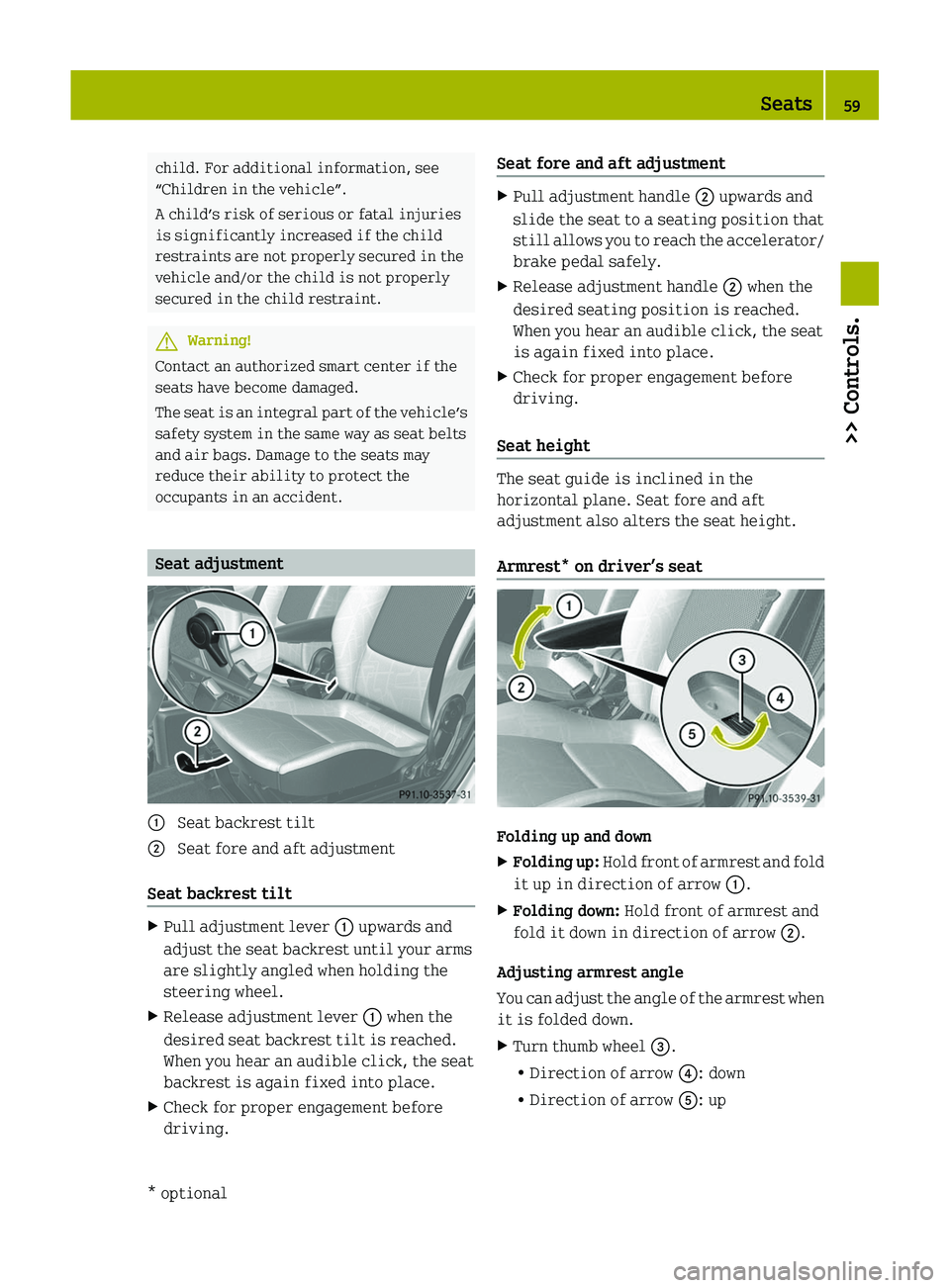
Seat adjustment
\000F Seat backrest tilt\000G Seat fore and aft adjustment
Seat backrest tilt
XPull adjustment lever \000F upwards and
adjust the seat backrest until your arms
are slightly angled when holding the
steering wheel.
XRelease adjustment lever \000F when the
desired seat backrest tilt is reached.
When you hear an audible click, the seat
backrest is again fixed into place.
XCheck for proper engagement before
driving.
Seat fore and aft adjustmentXPull adjustment handle \000G upwards and
slide the seat to a seating position that
still allows you to reach the accelerator/
brake pedal safely.
XRelease adjustment handle \000G when the
desired seating position is reached.
When you hear an audible click, the seat
is again fixed into place.
XCheck for proper engagement before
driving.
Seat height
The seat guide is inclined in the
horizontal plane. Seat fore and aft
adjustment also alters the seat height.
Armrest* on driver’s seat
Folding up and down
XFolding up: Hold front of armrest and fold
it up in direction of arrow \000F.
XFolding down: Hold front of armrest and
fold it down in direction of arrow \000G.
Adjusting armrest angle
You can adjust the angle of the armrest when
it is folded down.
XTurn thumb wheel \000
Page 66 of 228
not touch the neck). Never pass the
shoulder portion of the seat belt under
your arm.
RPosition the lap belt as low as possible
on your hips (over hip joint) and not
across the abdomen.
RPlace the seat backrest in a position that
is as upright as possible.
RNever use a seat belt for more than one
person at a time.
RDo not fasten a seat belt around a person
and another object at the same time. When
using a seat belt to secure infant or
toddler restraints or children in booster
seats, always follow the child seat
manufacturer’s instructions.
RCheck your seat belt during travel to
make sure it is properly positioned.
RMake sure the seat belt is always fitted
snugly. Take special care to maintain a
snug fit when wearing loose clothing.
GWarning!
Do not pass seat belts over sharp edges.
They could tear.
Do not allow the seat belt to get caught in
the door or in the seat adjustment
mechanism. This could damage the seat
belt.
Never attempt to make modifications to
seat belts. This could impair the
effectiveness of the seat belts.
Do not bleach or dye seat belts as this may
severely weaken them. In a crash they may
not be able to provide adequate protection.
Damaged seat belts or seat belts that were
highly stressed in an accident must be
replaced. Contact an authorized smart
center.
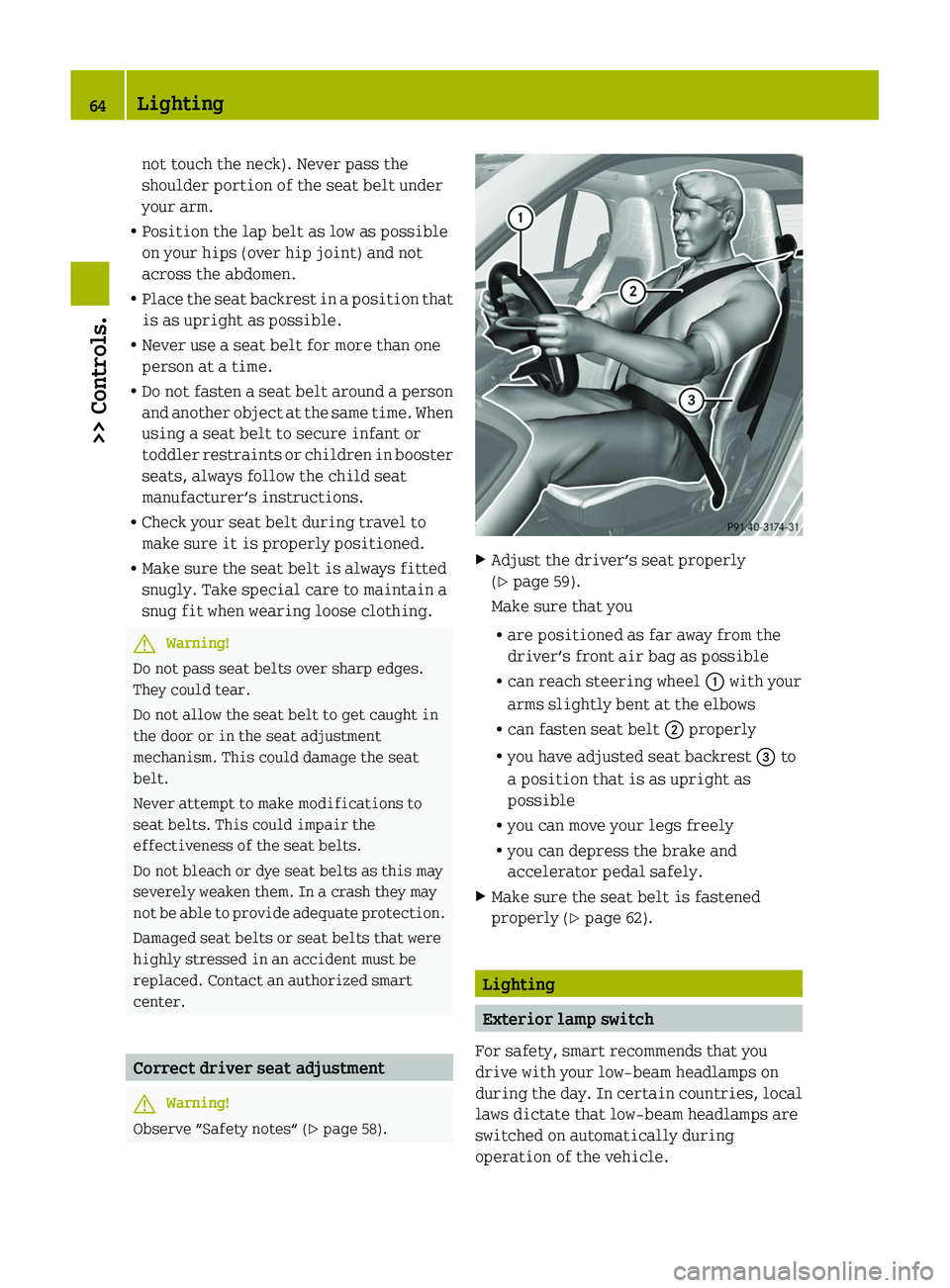
Correct driver seat adjustment
GWarning!
Observe ”Safety notes“ (Y page 58).
XAdjust the driver’s seat properly
(Y page 59).
Make sure that you
Rare positioned as far away from the
driver’s front air bag as possible
Rcan reach steering wheel \000F with your
arms slightly bent at the elbows
Rcan fasten seat belt \000G properly
Ryou have adjusted seat backrest \000
Page 67 of 228
iIf you drive in countries where
vehicles drive on the other side of the
road than the country in which the
vehicle is registered, you must have the
headlamps modified for symmetrical low
beams. Relevant information can be
obtained at any authorized smart center.
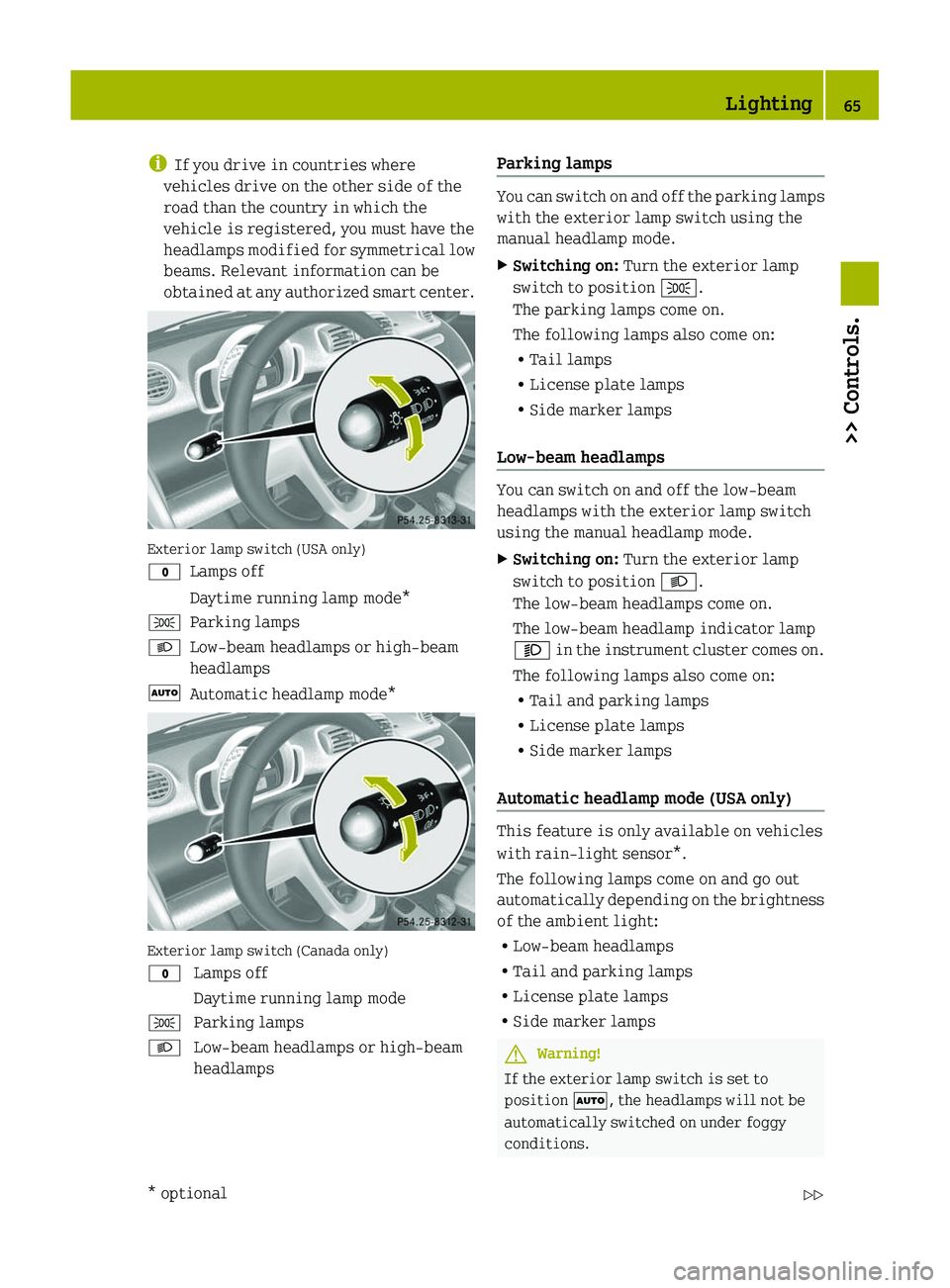
Exterior lamp switch (USA only)
\000'Lamps offDaytime running lamp mode*\000lParking lamps\000dLow‑beam headlamps or high‑beam
headlamps
\000ZAutomatic headlamp mode*
Exterior lamp switch (Canada only)
\000' Lamps offDaytime running lamp mode\000l Parking lamps\000d Low‑beam headlamps or high‑beam
headlamps
Parking lamps
You can switch on and off the parking lamps
with the exterior lamp switch using the
manual headlamp mode.
XSwitching on: Turn the exterior lamp
switch to position \000l.
The parking lamps come on.
The following lamps also come on:
RTail lamps
RLicense plate lamps
RSide marker lamps
Low‑beam headlamps
You can switch on and off the low‑beam
headlamps with the exterior lamp switch
using the manual headlamp mode.
XSwitching on: Turn the exterior lamp
switch to position \000d.
The low‑beam headlamps come on.
The low‑beam headlamp indicator lamp
\000e in the instrument cluster comes on.
The following lamps also come on:
RTail and parking lamps
RLicense plate lamps
RSide marker lamps
Automatic headlamp mode (USA only)
This feature is only available on vehicles
with rain-light sensor*.
The following lamps come on and go out
automatically depending on the brightness
of the ambient light:
RLow‑beam headlamps
RTail and parking lamps
RLicense plate lamps
RSide marker lamps
GWarning!
If the exterior lamp switch is set to
position \000Z, the headlamps will not be
automatically switched on under foggy
conditions.
Lighting65>> Controls.* optionalBA 451 USA, CA Edition A 2011; 1; 4, en-UShereepeVersion: 3.0.3.62010-05-11T15:12:26+02:00 - Seite 65Z
Page 68 of 228
To minimize risk to you and to others,
activate headlamps by turning exterior
lamp switch to position 0064 when driving
or when traffic and/or ambient lighting
conditions require you to do so.
In low ambient lighting conditions, only
switch from position 005A to 0064 with the
vehicle at a standstill in a safe location.
Switching from position 005A to 0064 will
briefly switch off the headlamps. Doing so
while driving in low ambient lighting
conditions may result in an accident.
The automatic headlamp feature is only an
aid to the driver. The driver is responsible
for the operation of the vehicle’s lights at
all times.XTurn the exterior lamp switch to position
005A .
With the key in starter switch position
1 , the tail and parking lamps, the license
plate lamps, and the side marker lamps
will come on and go out automatically
depending on the brightness of the
ambient light.
With the engine running, the low‑beam
headlamps, the tail and parking lamps,
the license plate lamps and the side
marker lamps will come on and go out
automatically depending on the
brightness of the ambient light.
Daytime running lamp mode (Canada only)
In Canada, the daytime running lamp mode
is mandatory and therefore in a constant
mode.
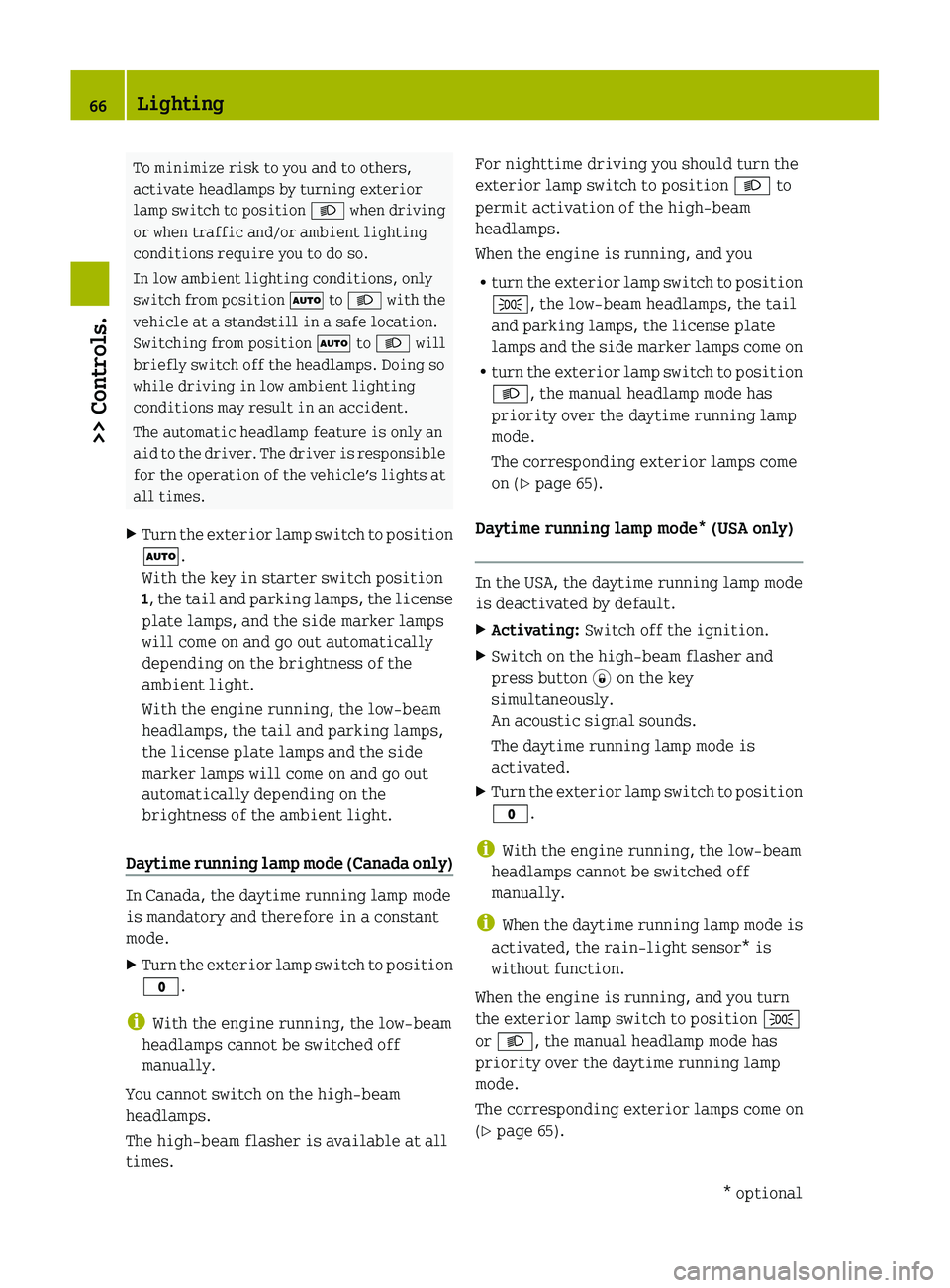
XTurn the exterior lamp switch to position
0027 .
i
With the engine running, the low‑beam
headlamps cannot be switched off
manually.
You cannot switch on the high‑beam
headlamps.
The high‑beam flasher is available at all
times.
For nighttime driving you should turn the
exterior lamp switch to position 0064 to
permit activation of the high‑beam
headlamps.
When the engine is running, and you
R turn the exterior lamp switch to position
006C , the low‑beam headlamps, the tail
and parking lamps, the license plate
lamps and the side marker lamps come on
R turn the exterior lamp switch to position
0064 , the manual headlamp mode has
priority over the daytime running lamp
mode.
The corresponding exterior lamps come
on ( Y page 65).
Daytime running lamp mode* (USA only)
In the USA, the daytime running lamp mode
is deactivated by default.
XActivating: Switch off the ignition.XSwitch on the high-beam flasher and
press button 0038 on the key
simultaneously.
An acoustic signal sounds.
The daytime running lamp mode is
activated.XTurn the exterior lamp switch to position
0027 .
i
With the engine running, the low‑beam
headlamps cannot be switched off
manually.
i When the daytime running lamp mode is
activated, the rain-light sensor* is
without function.
When the engine is running, and you turn
the exterior lamp switch to position 006C
or 0064 , the manual headlamp mode has
priority over the daytime running lamp
mode.
The corresponding exterior lamps come on
( Y page 65).
66Lighting>> Controls.* optionalBA 451 USA, CA Edition A 2011; 1; 4, en-UShereepeVersion: 3.0.3.62010-05-11T15:12:26+02:00 - Seite 66
Page 69 of 228
XDeactivating: Switch off the ignition
and remove the key from the starter
switch.
XSwitch on the high-beam flasher and
press button \0004 on the key
simultaneously.
An acoustic signal sounds.
The daytime running lamp mode is
deactivated.
Combination switch (high beam, high
beam flasher and turn signals
XMake sure the key is in starter switch
position 1.
High‑beam headlamps and high-beam
flasher
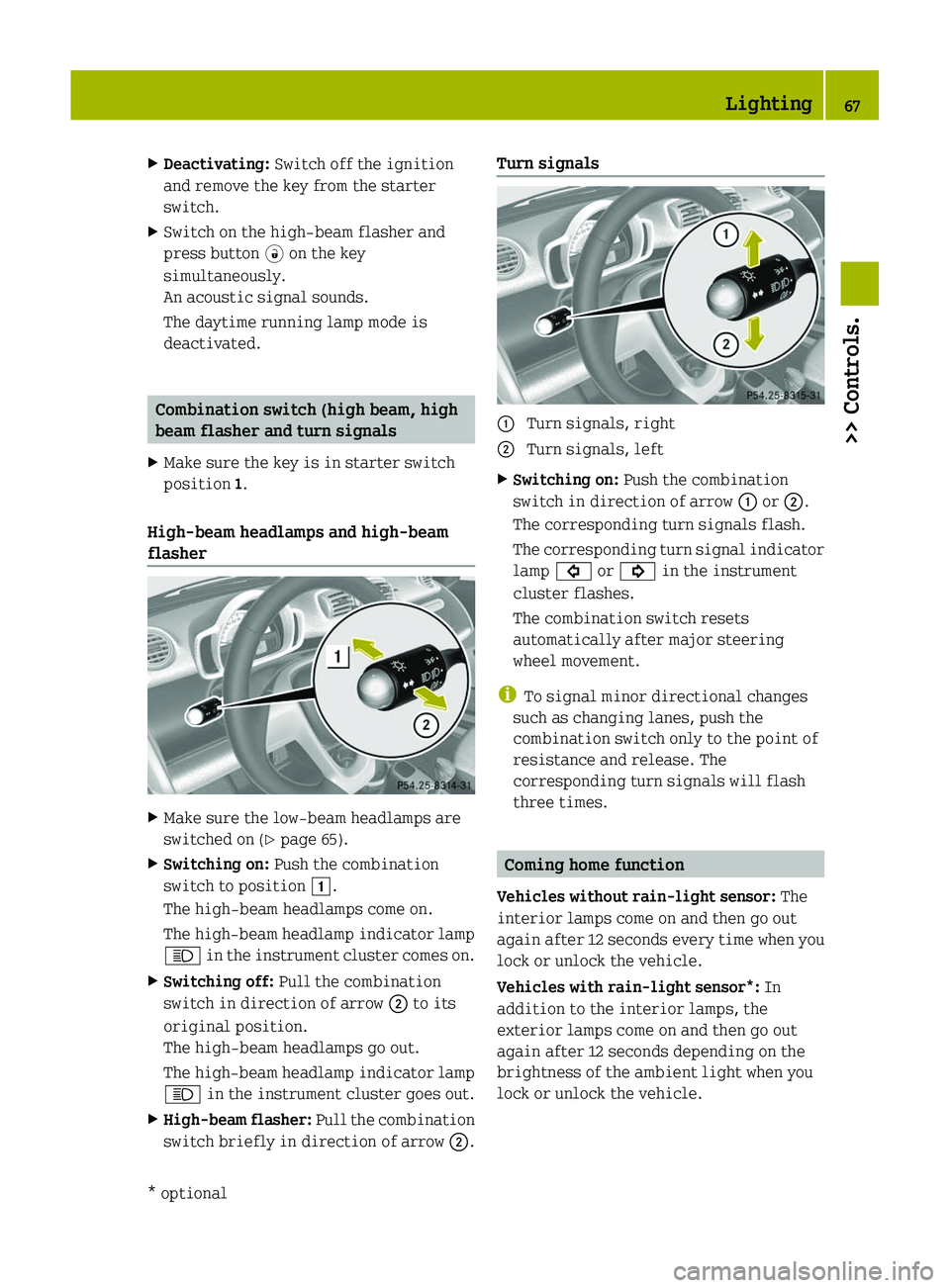
XMake sure the low‑beam headlamps are
switched on (Y page 65).
XSwitching on: Push the combination
switch to position \000J.
The high‑beam headlamps come on.
The high‑beam headlamp indicator lamp
\000c in the instrument cluster comes on.
XSwitching off: Pull the combination
switch in direction of arrow \000G to its
original position.
The high‑beam headlamps go out.
The high‑beam headlamp indicator lamp
\000c in the instrument cluster goes out.
XHigh-beam flasher: Pull the combination
switch briefly in direction of arrow \000G.
Turn signals \000F Turn signals, right\000G Turn signals, leftXSwitching on: Push the combination
switch in direction of arrow \000F or \000G.
The corresponding turn signals flash.
The corresponding turn signal indicator
lamp \000& or \000$ in the instrument
cluster flashes.
The combination switch resets
automatically after major steering
wheel movement.
iTo signal minor directional changes
such as changing lanes, push the
combination switch only to the point of
resistance and release. The
corresponding turn signals will flash
three times.
Coming home function
Vehicles without rain-light sensor: The
interior lamps come on and then go out
again after 12 seconds every time when you
lock or unlock the vehicle.
Vehicles with rain-light sensor*: In
addition to the interior lamps, the
exterior lamps come on and then go out
again after 12 seconds depending on the
brightness of the ambient light when you
lock or unlock the vehicle.
Lighting67>> Controls.* optionalBA 451 USA, CA Edition A 2011; 1; 4, en-UShereepeVersion: 3.0.3.62010-05-11T15:12:26+02:00 - Seite 67Z
Page 70 of 228
When leaving the vehicleXRemove the key from the starter switch.XExit the vehicle.XPress button \0008 on the key.
The vehicle is locked.
The interior and exterior9 lamps come on
and then go out again after 12 seconds.
When returning to the vehicle
XPress button \0004 on the key either once or
twice.
The vehicle is either selectively or
globally unlocked.
The interior and exterior9 lamps come on
and then go out again after 12 seconds.
Front fog lamps
GWarning!
Vehicles with rain-light sensor*:
In low ambient lighting or foggy
conditions, only switch from position
\000Z to \000d with the vehicle at a
standstill in a safe location. Switching
from \000Z to \000d will briefly switch off
the headlamps. Doing so while driving in
low ambient lighting conditions may result
in an accident.
iFog lamps will operate with the parking
lamps and/or the low‑beam headlamps on.
Fog lamps should only be used in
conjunction with low‑beam headlamps.
Consult your State or Province Motor
Vehicle Regulations regarding
permissible lamp operation.
iVehicle with rain-light sensor*:
Fog lamps cannot be switched on manually
with the exterior lamp switch in
position \000Z. To switch on the fog
lamps, turn the exterior lamp switch to
position \000d first.
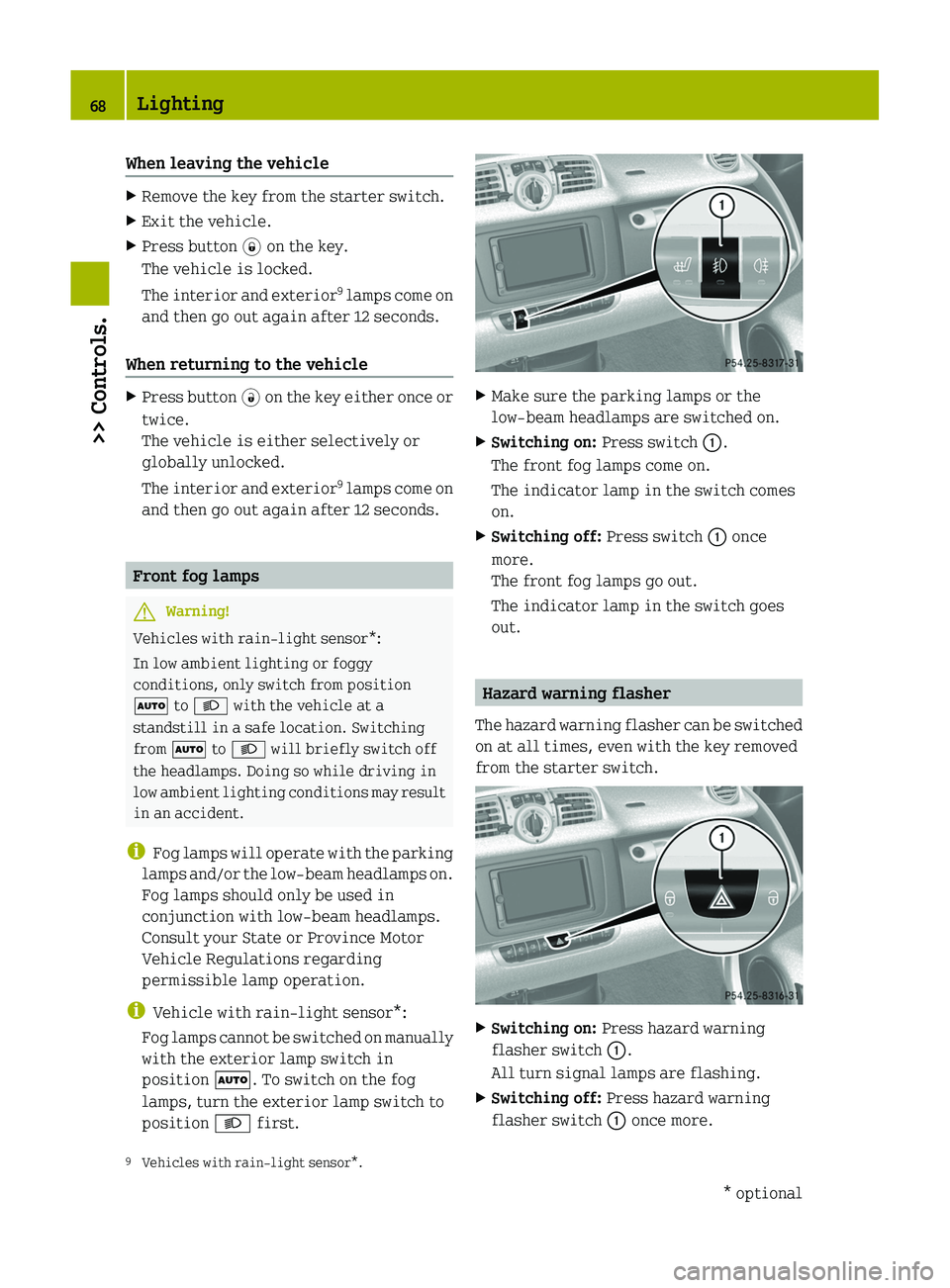
XMake sure the parking lamps or the
low‑beam headlamps are switched on.
XSwitching on: Press switch \000F.
The front fog lamps come on.
The indicator lamp in the switch comes
on.
XSwitching off: Press switch \000F once
more.
The front fog lamps go out.
The indicator lamp in the switch goes
out.
Hazard warning flasher
The hazard warning flasher can be switched
on at all times, even with the key removed
from the starter switch.
XSwitching on: Press hazard warning
flasher switch \000F.
All turn signal lamps are flashing.
XSwitching off: Press hazard warning
flasher switch \000F once more.9Vehicles with rain-light sensor*.68Lighting>> Controls.* optionalBA 451 USA, CA Edition A 2011; 1; 4, en-UShereepeVersion: 3.0.3.62010-05-11T15:12:26+02:00 - Seite 68