light SMART FORTWO COUPE 2011 Owner's Manual
[x] Cancel search | Manufacturer: SMART, Model Year: 2011, Model line: FORTWO COUPE, Model: SMART FORTWO COUPE 2011Pages: 228, PDF Size: 11.48 MB
Page 71 of 228
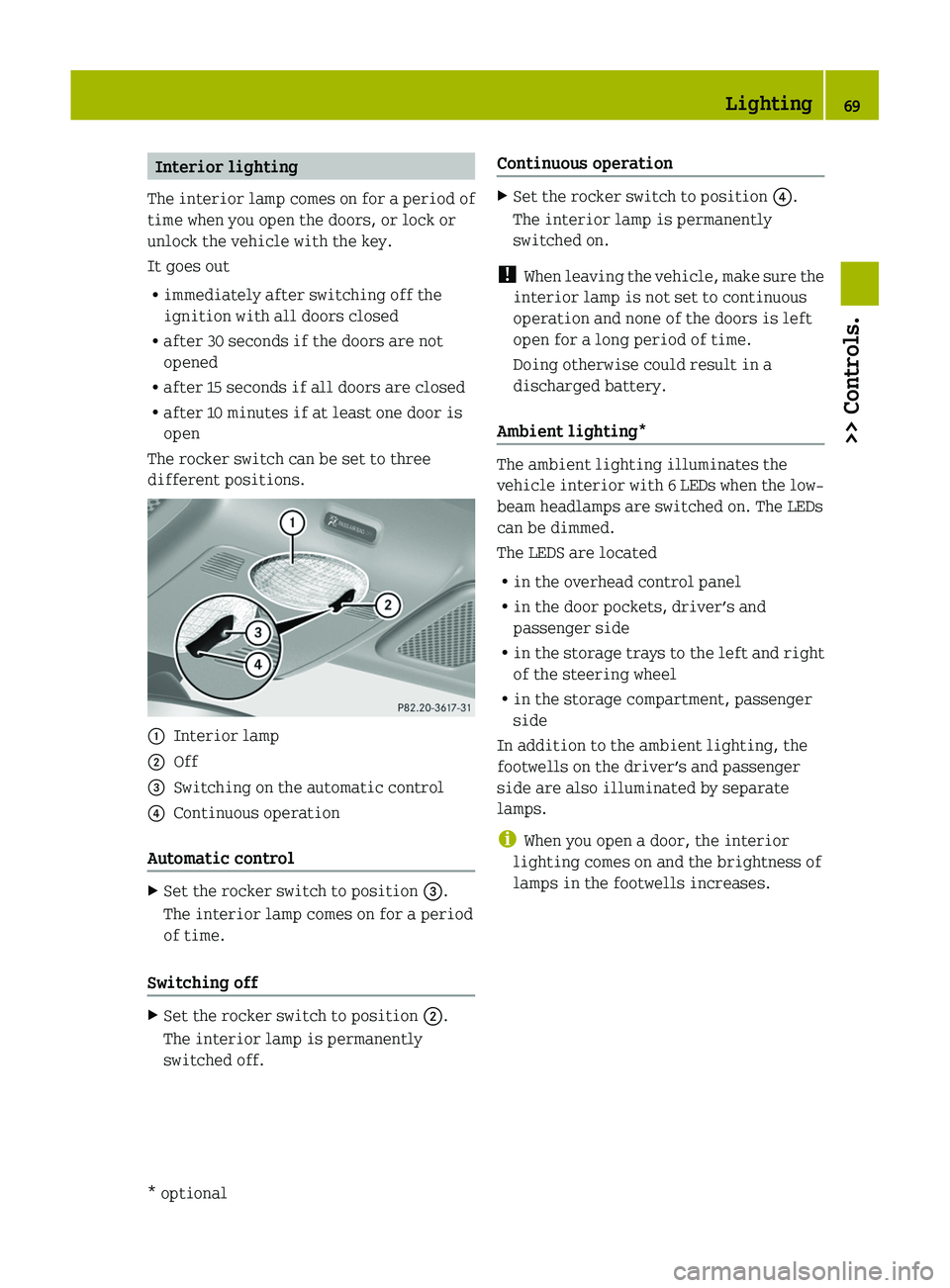
Interior lighting
The interior lamp comes on for a period of
time when you open the doors, or lock or
unlock the vehicle with the key.
It goes out
Rimmediately after switching off the
ignition with all doors closed
Rafter 30 seconds if the doors are not
opened
Rafter 15 seconds if all doors are closed
Rafter 10 minutes if at least one door is
open
The rocker switch can be set to three
different positions.
\000FInterior lamp\000GOff\000
Page 72 of 228
XMake sure the key is in starter switch
position 1.
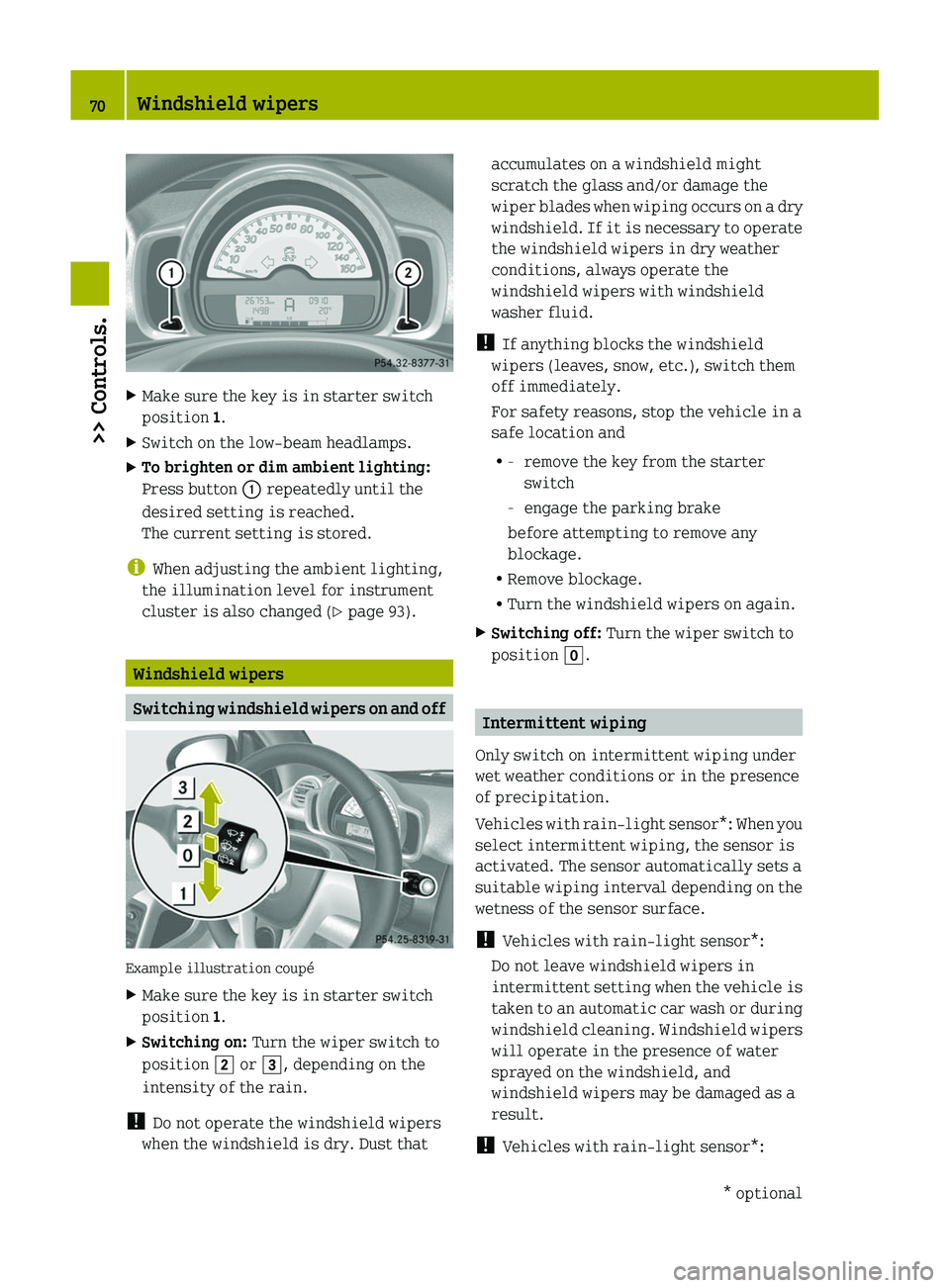
XSwitch on the low-beam headlamps.XTo brighten or dim ambient lighting:
Press button \000F repeatedly until the
desired setting is reached.
The current setting is stored.
iWhen adjusting the ambient lighting,
the illumination level for instrument
cluster is also changed (Y page 93).
Windshield wipers
Switching windshield wipers on and off
Example illustration coupé
XMake sure the key is in starter switch
position 1.
XSwitching on: Turn the wiper switch to
position \000K or \000L, depending on the
intensity of the rain.
! Do not operate the windshield wipers
when the windshield is dry. Dust that
accumulates on a windshield might
scratch the glass and/or damage the
wiper blades when wiping occurs on a dry
windshield. If it is necessary to operate
the windshield wipers in dry weather
conditions, always operate the
windshield wipers with windshield
washer fluid.
! If anything blocks the windshield
wipers (leaves, snow, etc.), switch them
off immediately.
For safety reasons, stop the vehicle in a
safe location and
R-remove the key from the starter
switch
-engage the parking brake
before attempting to remove any
blockage.
RRemove blockage.
RTurn the windshield wipers on again.
XSwitching off: Turn the wiper switch to
position \000].
Intermittent wiping
Only switch on intermittent wiping under
wet weather conditions or in the presence
of precipitation.
Vehicles with rain-light sensor*: When you
select intermittent wiping, the sensor is
activated. The sensor automatically sets a
suitable wiping interval depending on the
wetness of the sensor surface.
! Vehicles with rain-light sensor*:
Do not leave windshield wipers in
intermittent setting when the vehicle is
taken to an automatic car wash or during
windshield cleaning. Windshield wipers
will operate in the presence of water
sprayed on the windshield, and
windshield wipers may be damaged as a
result.
! Vehicles with rain-light sensor*:
70Windshield wipers>> Controls.* optionalBA 451 USA, CA Edition A 2011; 1; 4, en-UShereepeVersion: 3.0.3.62010-05-11T15:12:26+02:00 - Seite 70
Page 73 of 228
If you have set intermittent wiping, dirt
on the surface of the sensor or optical
effects may cause the windshield wipers
to wipe in an undesired fashion. This
could then damage the windshield wiper
blades or scratch the windshield. You
should therefore switch off the
windshield wipers when weather
conditions are dry.
XMake sure the key is in starter switch
position 1.
XActivating intermittent wiping: Turn the
wiper switch to position \000J.
After the initial wipe, pauses between
wipes are automatically controlled
depending on the vehicle speed and by the
rain-light sensor*.
XDeactivating intermittent wiping: Turn
the wiper switch to position \000].
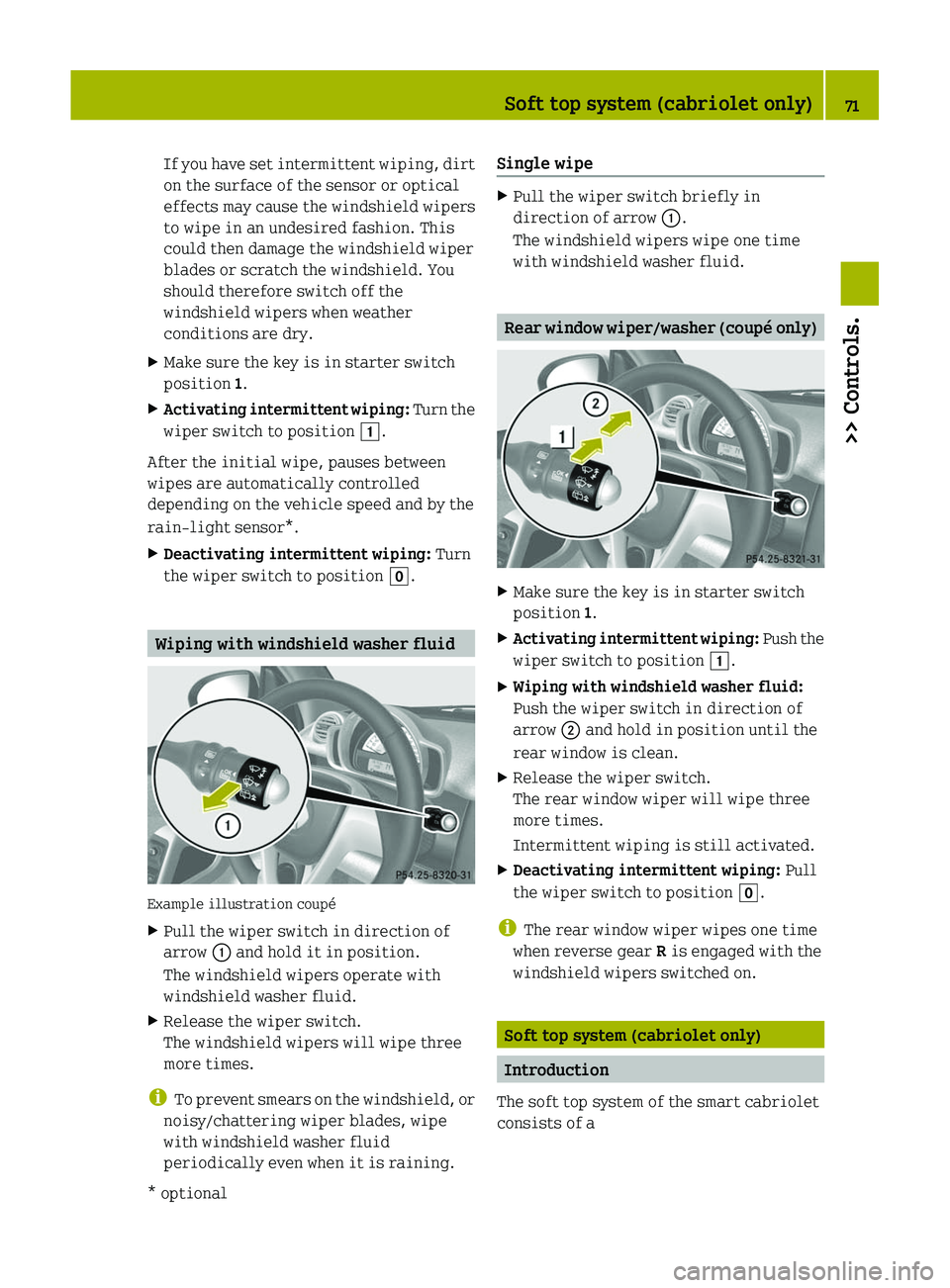
Wiping with windshield washer fluid
Example illustration coupé
XPull the wiper switch in direction of
arrow \000F and hold it in position.
The windshield wipers operate with
windshield washer fluid.
XRelease the wiper switch.
The windshield wipers will wipe three
more times.
iTo prevent smears on the windshield, or
noisy/chattering wiper blades, wipe
with windshield washer fluid
periodically even when it is raining.
Single wipeXPull the wiper switch briefly in
direction of arrow \000F.
The windshield wipers wipe one time
with windshield washer fluid.
Rear window wiper/washer (coupé only)
XMake sure the key is in starter switch
position 1.
XActivating intermittent wiping: Push the
wiper switch to position \000J.
XWiping with windshield washer fluid:
Push the wiper switch in direction of
arrow \000G and hold in position until the
rear window is clean.
XRelease the wiper switch.
The rear window wiper will wipe three
more times.
Intermittent wiping is still activated.
XDeactivating intermittent wiping: Pull
the wiper switch to position \000].
iThe rear window wiper wipes one time
when reverse gear R is engaged with the
windshield wipers switched on.
Soft top system (cabriolet only)
Introduction
The soft top system of the smart cabriolet
consists of a
Soft top system (cabriolet only)71>> Controls.* optionalBA 451 USA, CA Edition A 2011; 1; 4, en-UShereepeVersion: 3.0.3.62010-05-11T15:12:26+02:00 - Seite 71Z
Page 82 of 228
RKeep right foot on the brake pedal.
R Engage the parking brake.
R Move the gear selector lever to park
position P.
R Slowly release the brake pedal.
R When parked on an incline, always turn
the front wheels towards the curb.
R Turn the key to starter switch position 0
and remove the key from the starter
switch.
R Take the key with you and lock the vehicle
when leaving.GWarning!
With the engine not running, there is no
power assistance for the brake and
steering* systems. In this case, it is
important to keep in mind that a
considerably higher degree of effort is
necessary to brake and steer the vehicle.
Adapt your driving accordingly.
XProperly stop and park the vehicle.XDepress the brake pedal.XEngage the parking brake ( Y page 80).
When the ignition is switched on or the
engine is running, the brake warning
lamp 0027 (USA only) or 004D (Canada
only) in the instrument cluster comes on.XRelease the brake pedal.
Parking brake
The parking brake serves to secure the
vehicle against rolling away when it is
stationary or parked.
GWarning!
Engaging the parking brake while the
vehicle is in motion can cause the rear
wheels to lock up. You could lose control of
the vehicle and cause an accident. In
addition, the vehicle’s brake lights do not
light up when the parking brake is engaged.
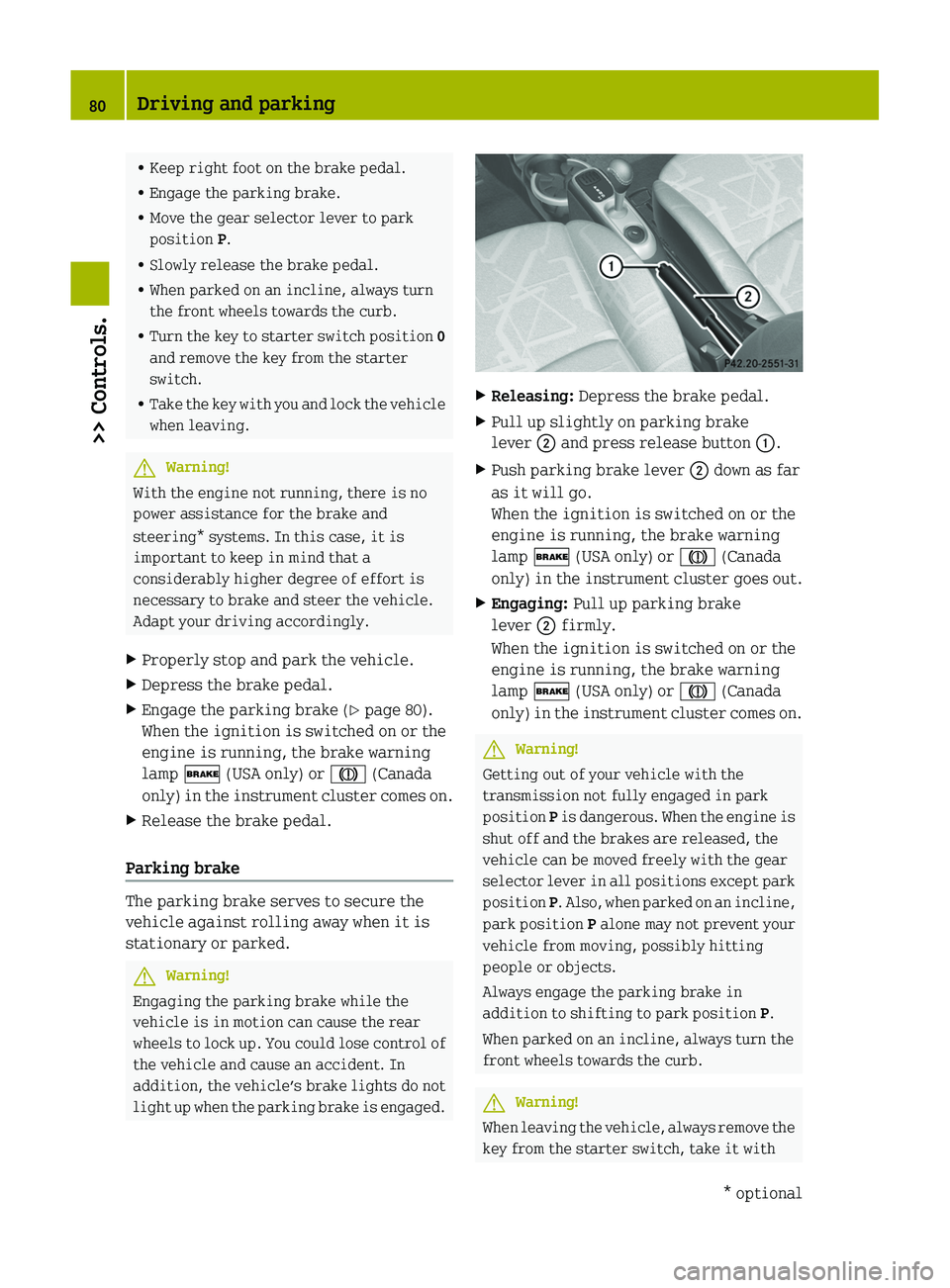
XReleasing: Depress the brake pedal.XPull up slightly on parking brake
lever 0047 and press release button 0046.XPush parking brake lever 0047 down as far
as it will go.
When the ignition is switched on or the
engine is running, the brake warning
lamp 0027 (USA only) or 004D (Canada
only) in the instrument cluster goes out.XEngaging: Pull up parking brake
lever 0047 firmly.
When the ignition is switched on or the
engine is running, the brake warning
lamp 0027 (USA only) or 004D (Canada
only) in the instrument cluster comes on.GWarning!
Getting out of your vehicle with the
transmission not fully engaged in park
position P is dangerous. When the engine is
shut off and the brakes are released, the
vehicle can be moved freely with the gear
selector lever in all positions except park
position P. Also, when parked on an incline,
park position P alone may not prevent your
vehicle from moving, possibly hitting
people or objects.
Always engage the parking brake in
addition to shifting to park position P.
When parked on an incline, always turn the
front wheels towards the curb.
GWarning!
When leaving the vehicle, always remove the
key from the starter switch, take it with
80Driving and parking>> Controls.* optionalBA 451 USA, CA Edition A 2011; 1; 4, en-UShereepeVersion: 3.0.3.62010-05-11T15:12:26+02:00 - Seite 80
Page 86 of 228
The current gear selector lever position
appears in the transmission position
indicator ( Y page 88).
Driving tips
Accelerator pedal position
Your driving style influences the
transmission’s shifting behavior:
Less throttleearlier upshiftingMore throttlelater upshifting
Kickdown
Use kickdown when you want maximum
acceleration.
XPress the accelerator pedal past the
point of resistance.
Depending on the engine speed the
transmission shifts into a lower gear.XEase up on the accelerator pedal when you
have reached the desired speed.
The transmission shifts up again.
Stopping
When you stop briefly, e.g. at traffic
lights:
XLeave the transmission in gear.XHold the vehicle with the brake.
When you stop for a longer period with the
engine idling and/or on a hill:
XEngage the parking brake.XMove the gear selector lever to park
position P.
Working on the vehicle
GWarning!
When working on the vehicle, engage the
parking brake and move the gear selector
lever to park position P. Otherwise the
vehicle could roll away which could result
in an accident and/or serious personal
injury.
Driving on uphill grades
Your vehicle has a hill‑start assist system.
GWarning!
The hill-start assist system is not
designed to function as a parking brake and
does not prevent the vehicle from moving
when parked on an incline.
Always engage the parking brake in
addition to shifting to park position P.
On uphill grades the hill‑start assist
system maintains the pressure in the brake
system for approximately one second after
you have released the brake pedal.
Therefore, you can start off smoothly
without the vehicle moving immediately
after releasing the brake pedal.
XRelease the brake pedal.XApply sufficient pressure to the
accelerator pedal.
! After approximately one second, the
hill‑start assist system stops braking
the vehicle, which then can roll
backwards. If you open the driver’s door
within this time, the hill‑start assist
system is deactivated and a warning
signal sounds.
i The hill‑start assist system is inactive
if you start off with the parking brake
engaged.
Manual gearshifting
With manual gearshifting M selected,
system-controlled automatic gearshifting
is switched off and you need to change the
gears by upshifting or downshifting
84Transmission>> Controls.
BA 451 USA, CA Edition A 2011; 1; 4, en-UShereepeVersion: 3.0.3.62010-05-11T15:12:26+02:00 - Seite 84
Page 94 of 228
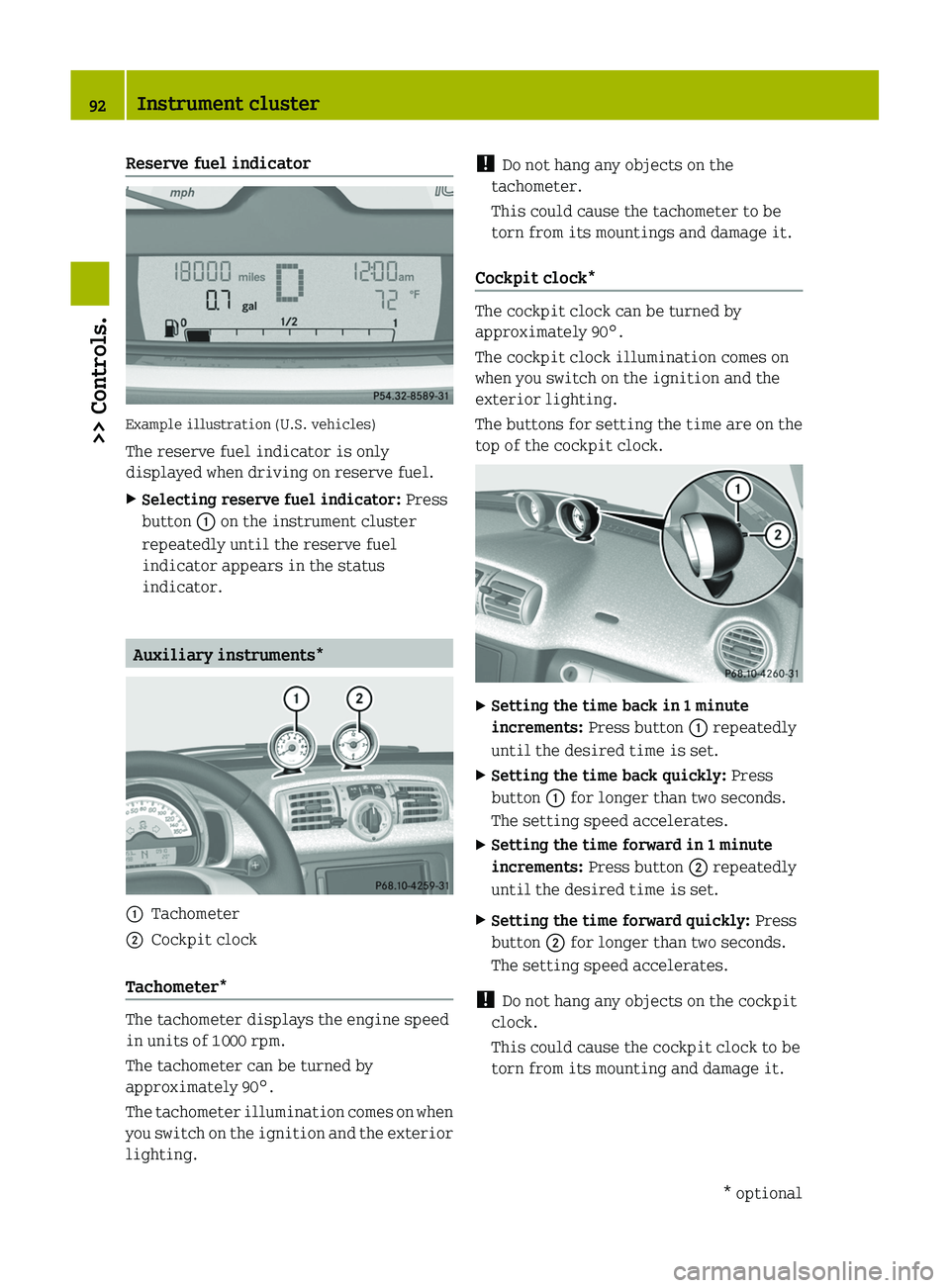
Reserve fuel indicator
Example illustration (U.S. vehicles)
The reserve fuel indicator is only
displayed when driving on reserve fuel.
XSelecting reserve fuel indicator: Press
button \000F on the instrument cluster
repeatedly until the reserve fuel
indicator appears in the status
indicator.
Auxiliary instruments*
\000FTachometer\000GCockpit clock
Tachometer*
The tachometer displays the engine speed
in units of 1 000 rpm.
The tachometer can be turned by
approximately 90°.
The tachometer illumination comes on when
you switch on the ignition and the exterior
lighting.
! Do not hang any objects on the
tachometer.
This could cause the tachometer to be
torn from its mountings and damage it.
Cockpit clock*
The cockpit clock can be turned by
approximately 90°.
The cockpit clock illumination comes on
when you switch on the ignition and the
exterior lighting.
The buttons for setting the time are on the
top of the cockpit clock.
XSetting the time back in 1 minute
increments: Press button \000F repeatedly
until the desired time is set.
XSetting the time back quickly: Press
button \000F for longer than two seconds.
The setting speed accelerates.
XSetting the time forward in 1 minute
increments: Press button \000G repeatedly
until the desired time is set.
XSetting the time forward quickly: Press
button \000G for longer than two seconds.
The setting speed accelerates.
! Do not hang any objects on the cockpit
clock.
This could cause the cockpit clock to be
torn from its mounting and damage it.
92Instrument cluster>> Controls.* optionalBA 451 USA, CA Edition A 2011; 1; 4, en-UShereepeVersion: 3.0.3.62010-05-11T15:12:26+02:00 - Seite 92
Page 111 of 228
event of an accident. For this reason, heavy
objects must be tied down.
Vehicle occupants could be injured by
objects being thrown around in the vehicle
in the event of
Rhard braking
Ra change of direction
Ran accident
GWarning!
Do not place any objects on the mounted
cargo compartment cover blind.
Vehicle occupants could be injured by
objects being thrown around in the vehicle
in the event of
Rhard braking
Ra change of direction
Ran accident
GWarning!
Only place light loads in the parcel net
bag. Do not transport heavy, sharp-edged or
fragile objects in the parcel net bag. The
parcel net bag cannot sufficiently secure
loads in an accident.
Vehicle occupants could be injured by
objects being thrown around in the vehicle
in the event of
Rhard braking
Ra change of direction
Ran accident
Observe the loading guidelines.
The cargo compartment cover blind
Rserves to protect objects that are stored
in the vehicle’s cargo compartment from
prying eyes
Rprevents smaller objects from
penetrating into the passenger
compartment from the cargo
compartment; however, it is not intended
to act as a load restraining device
The parcel net bag
Ris for storing small, lightweight objects
Rprevents small objects from sliding
around inside the passenger
compartment
! If objects are placed on the cargo
compartment cover blind when mounted,
the cover may be damaged.
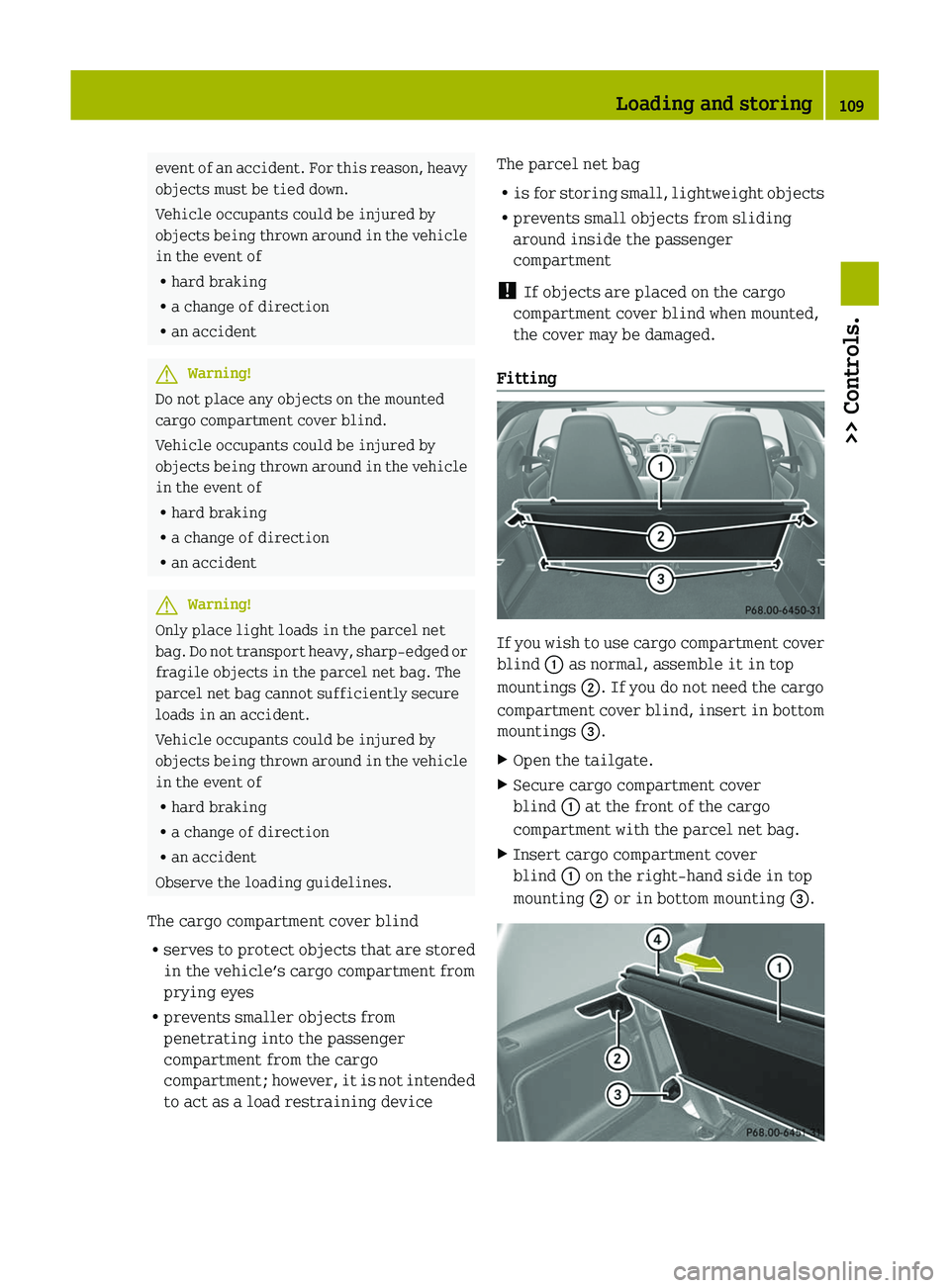
Fitting
If you wish to use cargo compartment cover
blind \000F as normal, assemble it in top
mountings \000G. If you do not need the cargo
compartment cover blind, insert in bottom
mountings \000
Page 117 of 228
Auxiliary power outlet
The auxiliary power outlet supplies power
to the following electrical accessories
when the key is turned to starter switch
position 1:
R the cigarette lighter*, available in
conjunction with the ashtray*
R the electric air pump, available in
conjunction with the tire repair kit*
R other consumers which operate up to a
maximum of 60 W
! The auxiliary power outlet can
accommodate 12V DC electrical
accessories designed for use with the
standard “cigarette lighter” plug type.
Keep in mind, however, that connecting
accessories to the auxiliary power outlet
(for example extensive connecting and
disconnecting, or using plugs that do not
fit properly) can damage the auxiliary
power outlet. With the auxiliary power
outlet damaged, the cigarette lighter*
may no longer be able to be placed in the
heating (pushed-in) position, or may pop
out before it is hot enough.
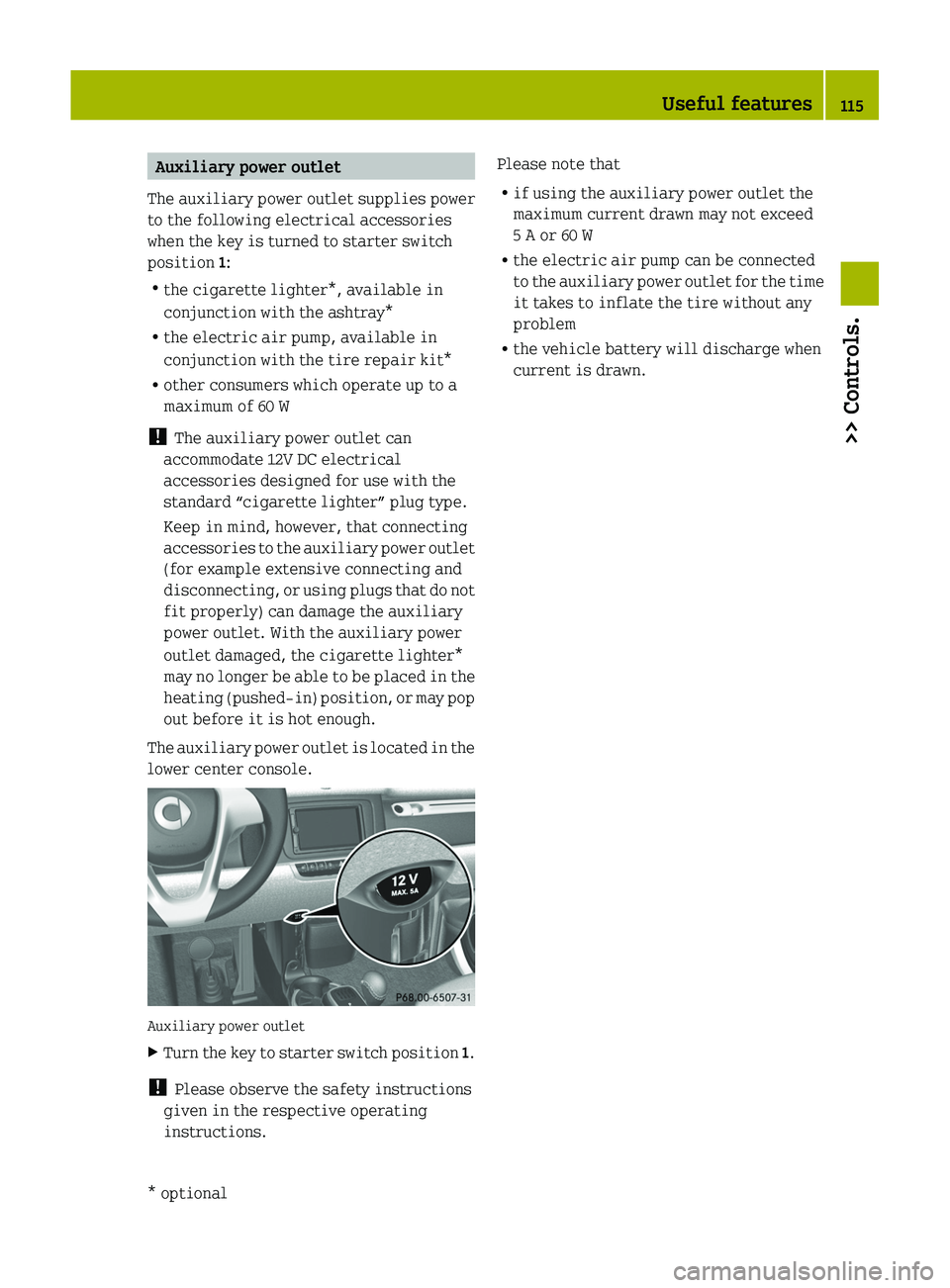
The auxiliary power outlet is located in the
lower center console.
Auxiliary power outlet
XTurn the key to starter switch position 1.
!
Please observe the safety instructions
given in the respective operating
instructions.
Please note that
R if using the auxiliary power outlet the
maximum current drawn may not exceed
5 A or 60 W
R the electric air pump can be connected
to the auxiliary power outlet for the time
it takes to inflate the tire without any
problem
R the vehicle battery will discharge when
current is drawn.Useful features115>> Controls.* optionalBA 451 USA, CA Edition A 2011; 1; 4, en-UShereepeVersion: 3.0.3.62010-05-11T15:12:26+02:00 - Seite 115Z
Page 121 of 228
0088 Fuel type label0086 HolderXTurn off the engine.XRemove the key from the starter switch.XOpen the fuel filler flap by pulling at the
point indicated by arrow 0046.XTurn fuel filler cap 008A counterclockwise
and hold on to it until possible pressure
is released.XTake off fuel filler cap 008A.
!
The fuel filler cap is tethered to the
fuel filler flap. Do not drop the fuel
filler cap. It could damage the vehicle
paint finish.
XInsert fuel filler cap 008A in direction of
arrow 0047 into holder 0086 on the inside of
the fuel filler flap.XFully insert filler nozzle unit and
refuel.XOnly fill your tank until the filler nozzle
unit cuts out — do not top off or overfill .GWarning!
Overfilling of the fuel tank may create
pressure in the system which could cause a
gas discharge. This could cause the gas to
spray back out when removing the fuel pump
nozzle, which could cause personal injury.
XReplace fuel filler cap 008A.XTurn fuel filler cap 008A clockwise until
the handle grip overturns.
i Make sure to close the fuel filler flap
before locking the vehicle as the fuel
filler flap locking pin prevents closing
after you have locked the vehicle.
XClose the fuel filler flap.
You should hear the latch close shut.
i Only use premium unleaded gasoline
with a minimum Posted Octane Rating of
91 (average of 96 RON/86 MON).
Information on gasoline quality can
normally be found on the fuel pump.
Please contact gas station personnel in
case labels on the pump cannot be found.
For more information on gasoline, see
“Premium unleaded gasoline”
( Y page 221) and “Fuel requirements”
( Y page 222), or contact an authorized
smart center.
Check regularly and before a long trip
For information on quantities and
requirements of operating agents, see
“Service fluids and capacities”
( Y page 218).
Check the following:
R Engine oil level ( Y page 120)
R Tire inflation pressure ( Y page 128)
R Coolant level ( Y page 124)
R Vehicle lighting ( Y page 180)
R Windshield washer system ( Y page 124)
R Brake fluid ( Y page 125)
Engine compartment
Engine compartment cover
Open the engine compartment cover to
check the engine oil level and if necessary,
to add engine oil.
GWarning!
High outside temperature, stop-and-go
traffic, driving on long uphill grades or
driving at high engine speed may increase
the temperature in the engine
compartment. Therefore, the engine
compartment cover and parts in the area
around the engine compartment cover may
be hot. Parts of the engine can become very
hot. To prevent burns, let the engine cool
off completely before touching the engine
compartment cover, parts in the area
around the engine compartment cover, and
parts of the engine.
Engine compartment119>> Operation.BA 451 USA, CA Edition A 2011; 1; 4, en-UShereepeVersion: 3.0.3.62010-05-11T15:12:26+02:00 - Seite 119Z
Page 128 of 228
The brake fluid level is correct when it
is between the minimum mark and the
maximum mark.
R If the brake fluid level has fallen
slightly below the minimum mark,
drive to an authorized smart center.
R If the brake fluid level has fallen
significantly below the minimum
mark, call Roadside Assistance or an
authorized smart center.XRemount the service flap and close it
( Y page 122).
Tires and wheels
Safety notes
Contact an authorized smart center for
information on tested and recommended
rims and tires for summer and winter
operation. They can also offer advice
concerning tire service and purchase.
GWarning!
Replace rims or tires with the same
designation, manufacturer and type as
shown on the original part. For further
information contact an authorized smart
center. If incorrectly sized rims and tires
are mounted, the wheel brakes or
suspension components can be damaged.
Also, the operating clearance of the wheels
and the tires may no longer be correct.
GWarning!
Worn, old tires can cause accidents. If the
tire tread is worn to minimum tread depth,
or if the tires have sustained damage,
replace them.
When replacing rims, only use genuine
smart wheel bolts specified for the
particular rim type. Failure to do so can
result in the bolts loosening and possibly
an accident.
Retreaded tires are not tested or
recommended by smart, since previous
damage cannot always be recognized on
retreads. The operating safety of the
vehicle cannot be assured when such tires
are used.GWarning!
If you feel a sudden significant vibration
or ride disturbance, or you suspect that
possible damage to your vehicle has
occurred, you should turn on the hazard
warning flashers, carefully slow down, and
drive with caution to an area which is a safe
distance from the road.
Inspect the tires and the vehicle underbody
for possible damage. If the vehicle or tires
appear unsafe, have the vehicle towed to the
nearest authorized smart center or tire
dealer for repairs.
GWarning!
Do not drive with a flat tire. A flat tire
affects the ability to steer or brake the
vehicle. You could lose control of the
vehicle. Continued driving with a flat tire
or driving at high speed with a flat tire
will cause excessive heat build-up and
possibly a fire.
Modifications to the brake system and
wheels and the use of brake dust rings are
not permissible.
Important guidelines
R Only use sets of tires and rims of the same
type and make.
R Tires must be of the correct size for the
rim.
R Break in new tires for approximately
60 miles (100 km) at moderate speeds.
R Regularly check the tires and rims for
damage. Dented or bent rims can cause
tire pressure loss and damage to the tire
beads.
126Tires and wheels>> Operation.
BA 451 USA, CA Edition A 2011; 1; 4, en-UShereepeVersion: 3.0.3.62010-05-11T15:12:26+02:00 - Seite 126