tow SMART FORTWO COUPE 2012 User Guide
[x] Cancel search | Manufacturer: SMART, Model Year: 2012, Model line: FORTWO COUPE, Model: SMART FORTWO COUPE 2012Pages: 228, PDF Size: 12.76 MB
Page 82 of 228
X
Depress the brake pedal.
X Press the release button (Y page 79) to
disengage the gear selector lever lock.
X Move the gear selector lever to reverse
gear R.
R appears in the transmission position
indicator.
X Release the brake pedal.
X Carefully depress the accelerator pedal. Parking
G
WARNING
Do not park this vehicle in areas where
combustible materials such as grass, hay or
leaves can come into contact with the hot
exhaust system. These materials could be
ignited and cause a vehicle fire.
Vehicle movement can cause serious
personal injury or damage to the vehicle or
the vehicle drivetrain. Therefore, always
do the following before turning off the
engine and leaving the vehicle:
R Keep right foot on the brake pedal.
R Engage the parking brake.
R Move the gear selector lever to park
position P.
R Slowly release the brake pedal.
R When parked on an incline, always turn
the front wheels towards the curb.
R Turn the key to starter switch position 0
and remove the key from the starter
switch.
R Take the key with you and lock the vehicle
when leaving. G
WARNING
With the engine not running, there is no
power assistance for the brake and
steering* systems. In this case, it is
important to keep in mind that a
considerably higher degree of effort is
necessary to brake and steer the vehicle.
Adapt your driving accordingly. X
Properly stop and park the vehicle.
X Depress the brake pedal.
X Engage the parking brake ( Y page 80).
When the ignition is switched on or the
engine is running, the brake warning
lamp $ (USA only) or J (Canada
only)
in the instrument cluster comes on.
X Release the brake pedal.
Parking brake The parking brake serves to secure the
vehicle against rolling away when it is
stationary or parked.
G
WARNING
Engaging the parking brake while the
vehicle is in motion can cause the rear
wheels
to lock up. You could lose control of
the vehicle and cause an accident. In
addition, the vehicle’s brake lights do not
light up when the parking brake is engaged. X
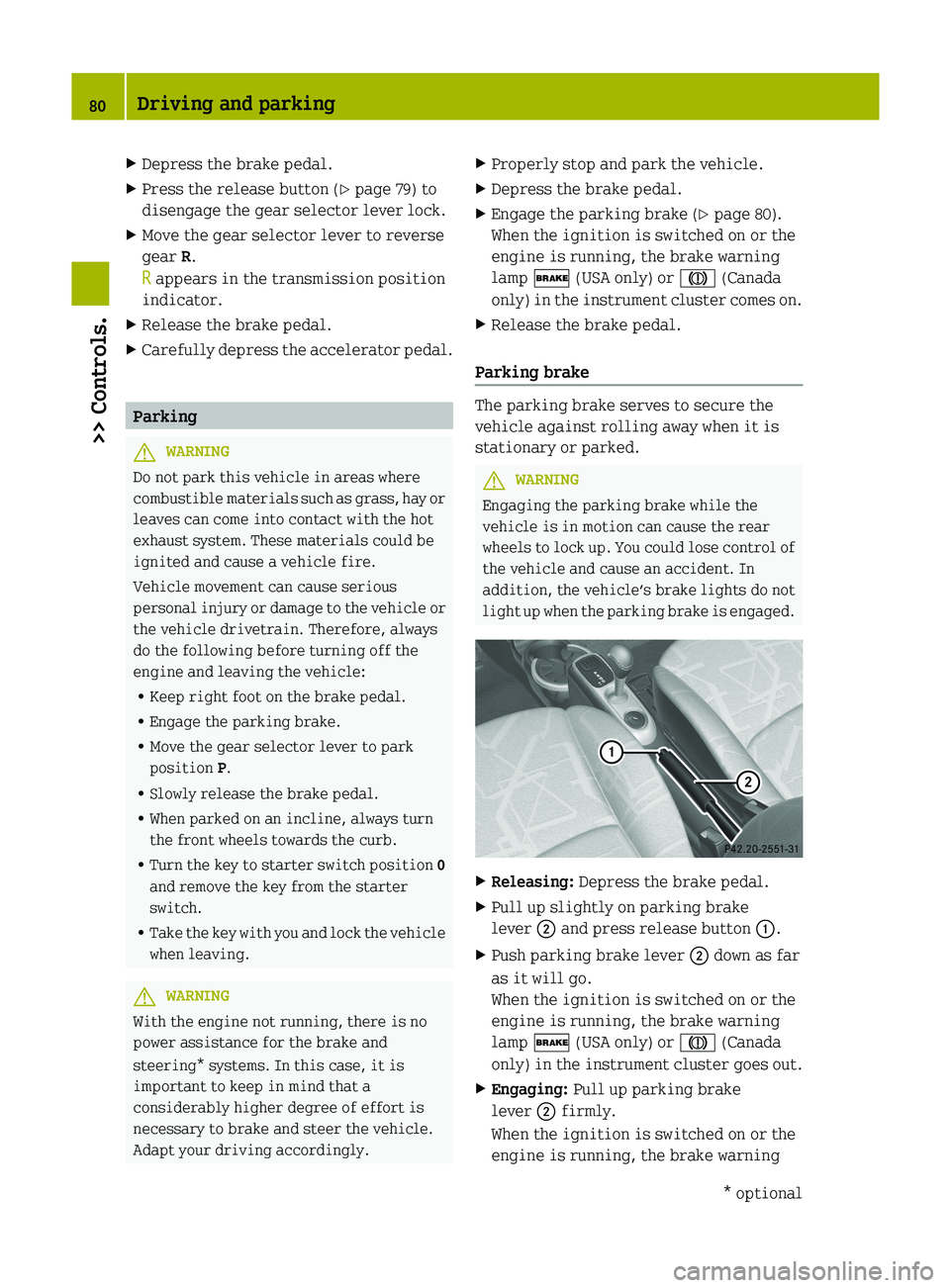
Releasing: Depress the brake pedal.
X Pull up slightly on parking brake
lever ; and press release button :.
X Push parking brake lever ; down as far
as it will go.
When the ignition is switched on or the
engine is running, the brake warning
lamp $ (USA only) or J (Canada
only)
in the instrument cluster goes out.
X Engaging: Pull up parking brake
lever ; firmly.
When the ignition is switched on or the
engine is running, the brake warning 80
Driving and parking
>> Controls.
* optional
Page 83 of 228
lamp $ (USA only) or J (Canada
only)
in the instrument cluster comes on. G
WARNING
Getting out of your vehicle with the
transmission not fully engaged in park
position P
is dangerous. When the engine is
shut off and the brakes are released, the
vehicle can be moved freely with the gear
selector lever in all positions except park
position P. Also, when parked on an incline,
park position P alone may not prevent your
vehicle from moving, possibly hitting
people or objects.
Always engage the parking brake in
addition to shifting to park position P.
When parked on an incline, always turn the
front wheels towards the curb. G
WARNING
When leaving the vehicle, always remove the
key from the starter switch, take it with
you, and lock the vehicle. Do not leave
children
unattended in the vehicle, or with
access to an unlocked vehicle. Children
could release the parking brake and/or
move the gear selector lever from park
position P, either of which could result in
an accident and/or serious personal
injury.
Brake pedal The brake pedal has two brake circuits
independent
of each other. A brake servo is
used during braking (when the engine is
running) to increase pedal force. G
WARNING
Make sure absolutely no objects are
obstructing the pedals’ range of motion.
Keep the driver’s footwell clear of all
obstacles. If there are any floormats*
or
carpets in the footwell, make sure the
pedals still have sufficient clearance.
During sudden acceleration or braking
maneuvers, the objects could get caught between or beneath the pedals and restrict
your ability to brake or accelerate. This
could lead to accidents and/or injury.
G
WARNING
Considerably more effort will be required
to apply the brakes if
R the brake servo has failed
R a brake circuit has failed
R the engine is switched off, e.g. for
towing the vehicle
The braking distance is likewise greater.
Make sure the engine is running whenever
the vehicle is rolling. Have the brake
system repaired at an authorized smart
center, if there is a fault in the brake
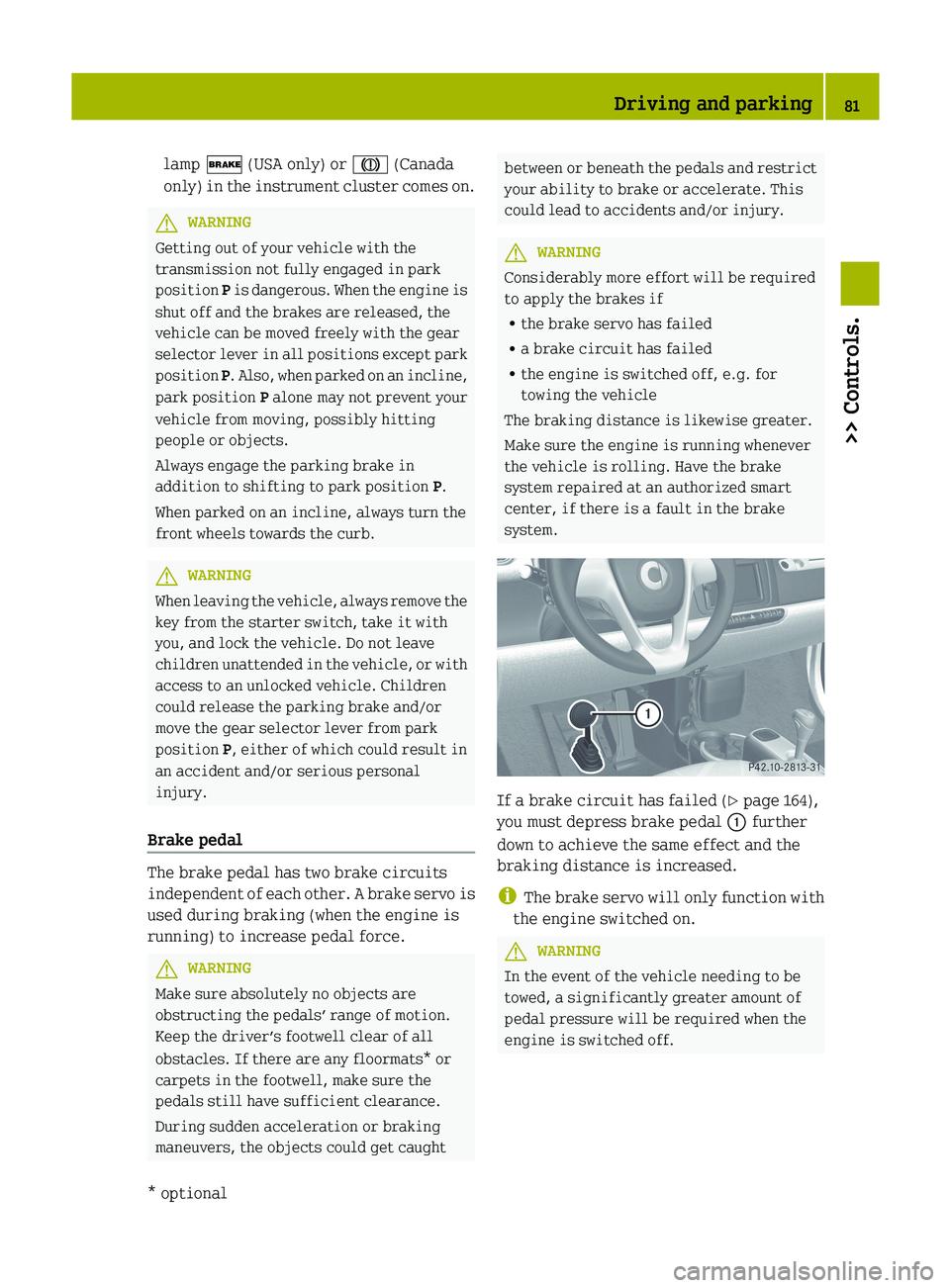
system. If a brake circuit has failed (
Y page 164),
you must depress brake pedal : further
down to achieve the same effect and the
braking distance is increased.
i The
brake servo will only function with
the engine switched on. G
WARNING
In the event of the vehicle needing to be
towed, a significantly greater amount of
pedal pressure will be required when the
engine is switched off. Driving and parking
81
>> Controls.
* optional Z
Page 85 of 228
control of the vehicle and hit someone or
something. Only shift into gear when the
engine is idling normally and when your
right foot is firmly on the brake pedal.
Shifting procedure
The transmission selects individual gears
automatically, depending on:
R the gear selector lever position D
(Y page 83)
R the position of the accelerator pedal
(Y page 84)
R the vehicle speed
R uphill or downhill grades
Press release button : (Y page 82) to
disengage the gear selector lever lock
when moving the gear selector lever from
R P to R, N, or D
R R to P
R N to R or P
! Allow the engine to warm up under low
load use. Do not place full load on the
engine until the operating temperature
has been reached.
Shift into reverse gear R or parking
position P only when the vehicle is
stopped.
Avoid spinning of a drive wheel for an
extended period when driving off on
slippery road surfaces. Otherwise, the
drivetrain could be damaged, which is
not covered by the smart Limited
Warranty.
With manual gearshifting M selected
(Y page 84), you can use the gear selector
lever or steering wheel gearshift control
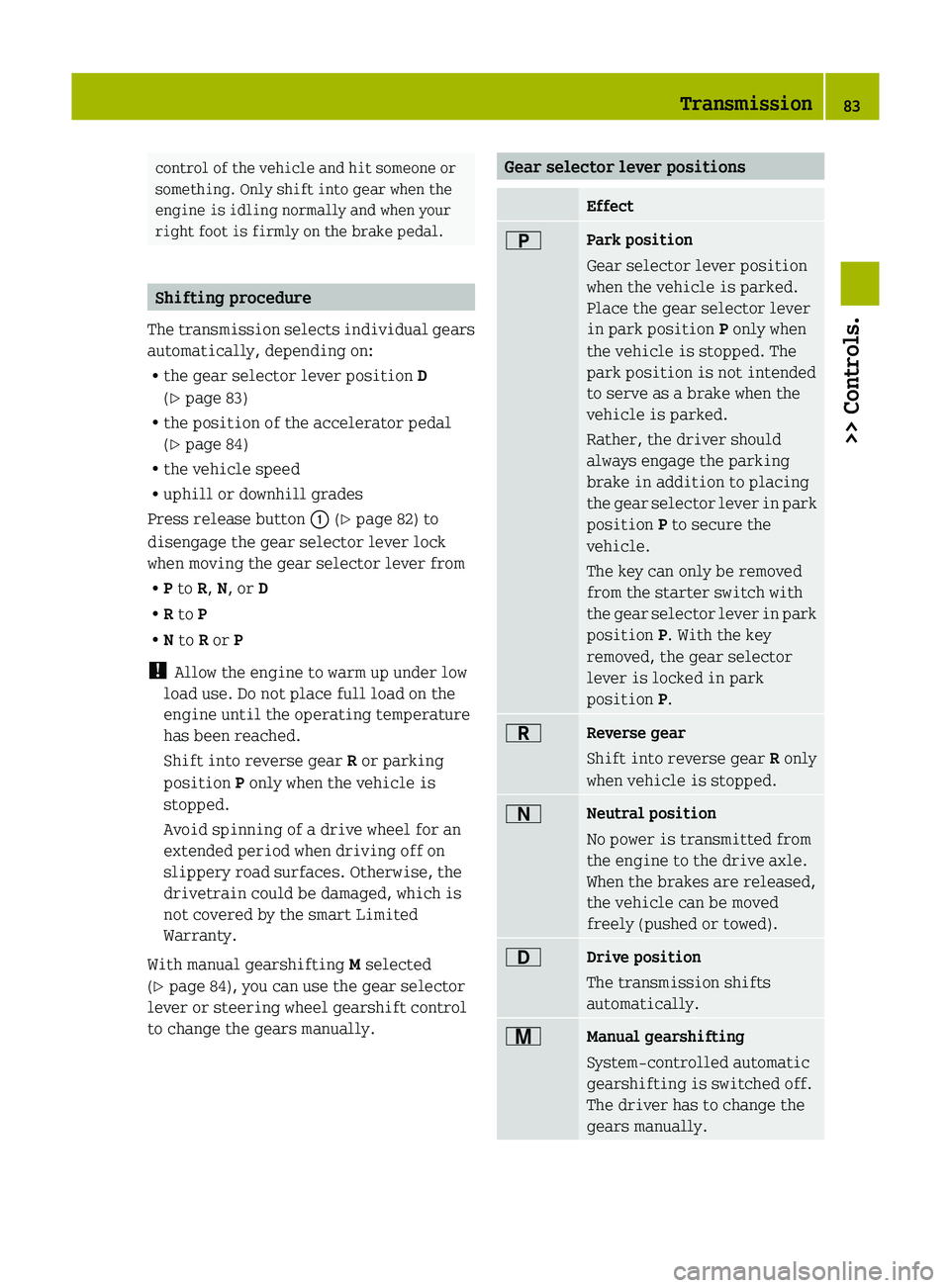
to change the gears manually. Gear selector lever positions
Effect
B
Park position
Gear selector lever position
when the vehicle is parked.
Place the gear selector lever
in park position
P only when
the vehicle is stopped. The
park position is not intended
to serve as a brake when the
vehicle is parked.
Rather, the driver should
always engage the parking
brake in addition to placing
the
gear selector lever in park
position P to secure the
vehicle.
The key can only be removed
from the starter switch with
the gear selector lever in park
position P. With the key
removed, the gear selector
lever is locked in park
position P. C
Reverse gear
Shift into reverse gear
R only
when vehicle is stopped. A
Neutral position
No power is transmitted from
the engine to the drive axle.
When the brakes are released,
the vehicle can be moved
freely (pushed or towed).
7
Drive position
The transmission shifts
automatically.
x
Manual gearshifting
System-controlled automatic
gearshifting is switched off.
The driver has to change the
gears manually. Transmission
83
>> Controls. Z
Page 87 of 228
!
Allow the engine to warm up under low
load use. Do not place full load on the
engine until the operating temperature
has been reached.
Shift into reverse gear R or parking
position P only when the vehicle is
stopped.
Avoid spinning of a drive wheel for an
extended period when driving off on
slippery road surfaces. Otherwise, the
drivetrain could be damaged, which is
not covered by the smart Limited
Warranty. Activating manual gearshifting
X
Move the gear selector lever to drive
position D (Y page 82).
X Pull one of the shift paddles (Y page 85)
towards you.
or
X Move the gear selector lever to manual
gearshifting M (Y page 82).
System-controlled automatic
gearshifting is switched off.
You
can upshift or downshift through the
gears in succession.
The currently engaged gear appears in the
multifunction display ( Y page 85).Upshifting X
Briefly push the gear selector lever
forward in the + direction (Y page 82).
or
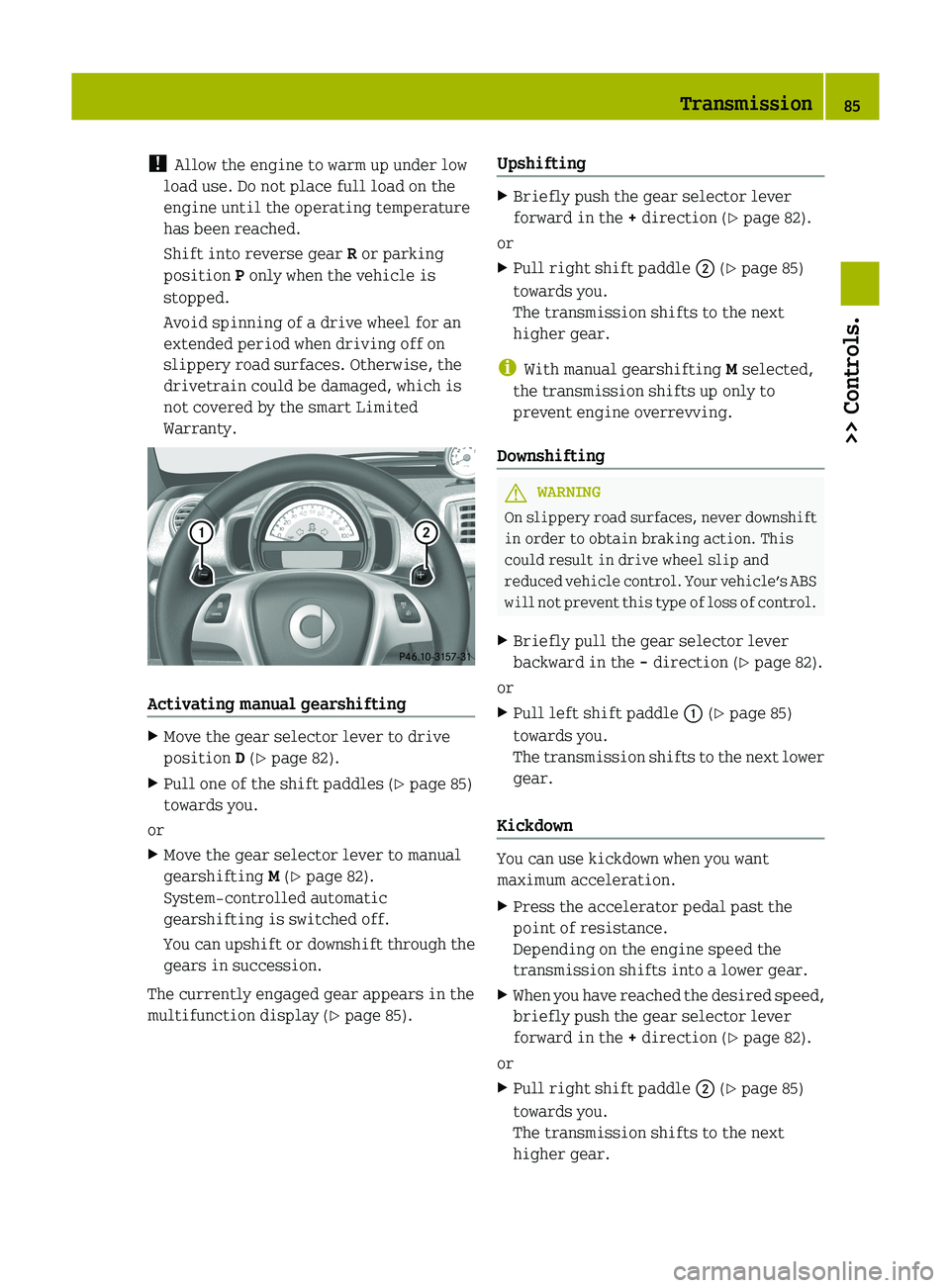
X Pull right shift paddle ; (Y page 85)
towards you.
The transmission shifts to the next
higher gear.
i With manual gearshifting M selected,
the transmission shifts up only to
prevent engine overrevving.
Downshifting G
WARNING
On slippery road surfaces, never downshift
in order to obtain braking action. This
could result in drive wheel slip and
reduced
vehicle control. Your vehicle’s ABS
will not prevent this type of loss of control.
X Briefly pull the gear selector lever
backward in the - direction (Y page 82).
or
X Pull left shift paddle : (Y page 85)
towards you.
The
transmission shifts to the next lower
gear.
Kickdown You can use kickdown when you want
maximum acceleration.
X
Press the accelerator pedal past the
point of resistance.
Depending on the engine speed the
transmission shifts into a lower gear.
X When you have reached the desired speed,
briefly push the gear selector lever
forward in the + direction (Y page 82).
or
X Pull right shift paddle ; (Y page 85)
towards you.
The transmission shifts to the next
higher gear. Transmission
85
>> Controls. Z
Page 88 of 228
Deactivating manual gearshifting
X
With drive position D selected: Pull and
hold right shift paddle ; (Y page 85)
towards you for longer than two seconds.
or
X With manual gearshifting M selected:
Move the gear selector lever to drive
position D (Y page 82).
System-controlled automatic
gearshifting is switched on again. Emergency operation (limp-home
mode)
In this mode only a certain gear or a
certain
gear combination can be selected.
This mode is triggered in case of
transmission malfunctions and enables you
driving to the nearest workshop such as a
smart center.
If vehicle acceleration becomes less
responsive or sluggish or the transmission
no longer shifts, the transmission is most
likely operating in limp-home (emergency
operation) mode. The transmission
position indicator flashes and the ¬
symbol appears in the multifunction
display.
Driving in limp-home mode:
X Move the gear selector lever to drive
position D (Y page 82).
X Continue to drive.
X Have the transmission checked at an
authorized smart center as soon as
possible.
i It is possible that a gear combination
including the reverse gear can not be
selected. Keep in mind when parking,
that reversing the vehicle might be
impossible.
In case of a minor transmission
malfunction,
it might be possible to teach-
in the transmission in order to restore the
normal transmission mode. i
If the attempt to teach-in the
transmission fails, you cannot continue
to drive. Therefore we strongly
recommend that you have the
transmission taught-in at a qualified
workshop or at an authorized smart
center.
Teaching-in the transmission system:
X Stop the vehicle in a safe location.
X Move the gear selector lever to park
position P.
X Turn off the engine.
X Wait at least 30 seconds before
restarting.
X Press the brake pedal.
X Restart the engine
Three bars instead of P appear in the
multifunction display.
X Wait at least 30 seconds.
The transmission is taught in.
When teaching-in was successful: P
appears
in the multifunction display again
and normal transmission operating is
restored.
X Continue to drive.
After an unsuccessful teaching-in: Three
bars instead of P appear in the
multifunction display.
X Do not continue to drive.
X Turn off the engine.
X Engage the parking brake when leaving
the vehicle.
X Contact Roadside Assistance or an
authorized smart center. Instrument cluster
Multifunction display
The following displays and indicators
appear in the multifunction display: 86
Instrument cluster
>> Controls.
Page 106 of 228
Air conditioning with climate control*
Control panel (Y page 103).
X
Make sure the engine is running.
X Switching on: Push air volume
control : to level 1 or higher.
X Press air conditioning switch ;.
The indicator lamp in air conditioning
switch ; comes on.
X Switching off: Press air conditioning
switch ; once more.
The indicator lamp in air conditioning
switch ; goes out.
i The stored status is restored, if you
switch on the ignition again.
i The air condition will be suspended
temporarily:
R if the engine speed is too low
R when driving off
The air condition is switched off:
R at a coolant temperature of more than
239¦ (115¥)
R at outside temperatures below
38¦
(3¥) Setting the temperature
Heating Control panel (Y page 103).
i
You should raise or lower the
temperature setting in small
increments.
X Increasing or decreasing: Push
temperature control ? up or down.
Rapid cooling
X Push air volume control : fully up.
X Turn air distribution control = to
position P. X
Push temperature control ? fully down.
X Adjust the air vents as desired.
Rapid heating
X Push air volume control : to level 3.
X Turn air distribution control = to a
position between z and O.
X Push temperature control ? fully up.
X Adjust the air vents towards the
occupants.
Air conditioning with climate control* Control panel (Y page 103).
i
You should raise or lower the
temperature setting in small
increments, preferably starting at
70¦ (21¥).
X Increasing or decreasing: Push
temperature control A up or down. Adjusting air vents
G
WARNING
When operating the heating or air
conditioning with climate control*, the
air that enters the passenger compartment
through
the air vents can be very hot or very
cold (depending on the set temperature).
This may cause burns or frostbite on
unprotected skin in the immediate area of
the air vents. Always keep sufficient
distance between unprotected parts of the
body and the air vents. If necessary, use the
air distribution control to direct the air
to air vents in the vehicle interior that are
not in the immediate area of unprotected
skin.
To make sure the heating or air
conditioning with climate control* works
properly, please observe the following:
R Keep the air intake grill free from
deposits, e.g. ice or snow, to ensure that104
HVAC (Heating, Ventilation, Air Conditioning)
>> Controls.
* optional
Page 107 of 228
fresh air can flow freely into the vehicle
interior.
R Do not obstruct air vents or ventilation
grilles in the vehicle interior.
i For draft-free ventilation, move the
sliders
for the center air vents and side
air vents to the middle position.
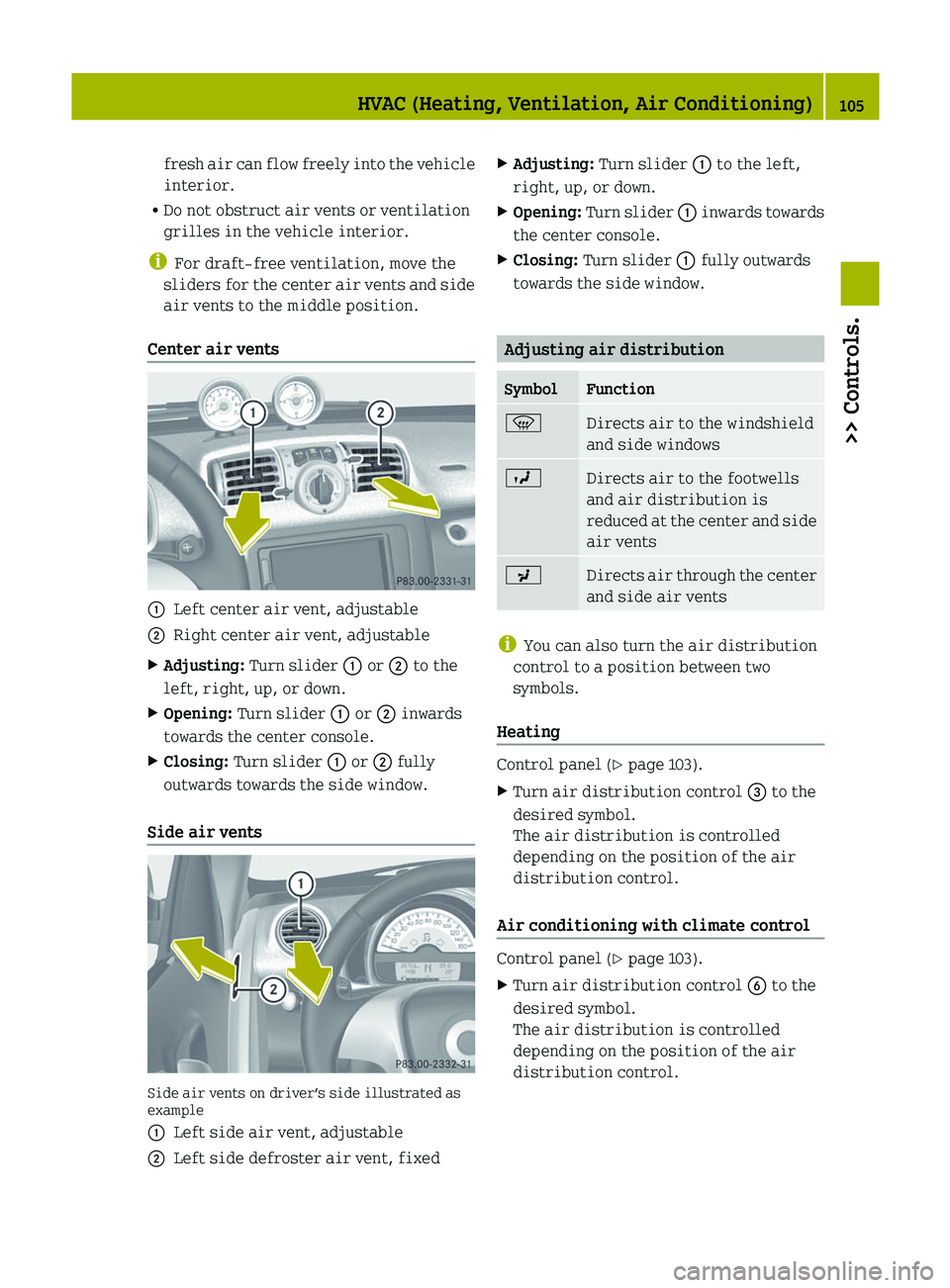
Center air vents :
Left center air vent, adjustable
; Right center air vent, adjustable
X Adjusting: Turn slider : or ; to the
left, right, up, or down.
X Opening: Turn slider : or ; inwards
towards the center console.
X Closing: Turn slider : or ; fully
outwards towards the side window.
Side air vents Side air vents on driver’s side illustrated as
example
:
Left side air vent, adjustable
; Left side defroster air vent, fixed X
Adjusting: Turn slider : to the left,
right, up, or down.
X Opening:
Turn slider : inwards towards
the center console.
X Closing: Turn slider : fully outwards
towards the side window. Adjusting air distribution
Symbol Function
z
Directs air to the windshield
and side windows
O
Directs air to the footwells
and air distribution is
reduced
at the center and side
air vents P
Directs air through the center
and side air vents
i
You can also turn the air distribution
control to a position between two
symbols.
Heating Control panel (Y page 103).
X
Turn air distribution control = to the
desired symbol.
The air distribution is controlled
depending on the position of the air
distribution control.
Air conditioning with climate control Control panel (Y page 103).
X
Turn air distribution control B to the
desired symbol.
The air distribution is controlled
depending on the position of the air
distribution control. HVAC (Heating, Ventilation, Air Conditioning)
105
>> Controls. Z
Page 113 of 228
Storage tray* in center console
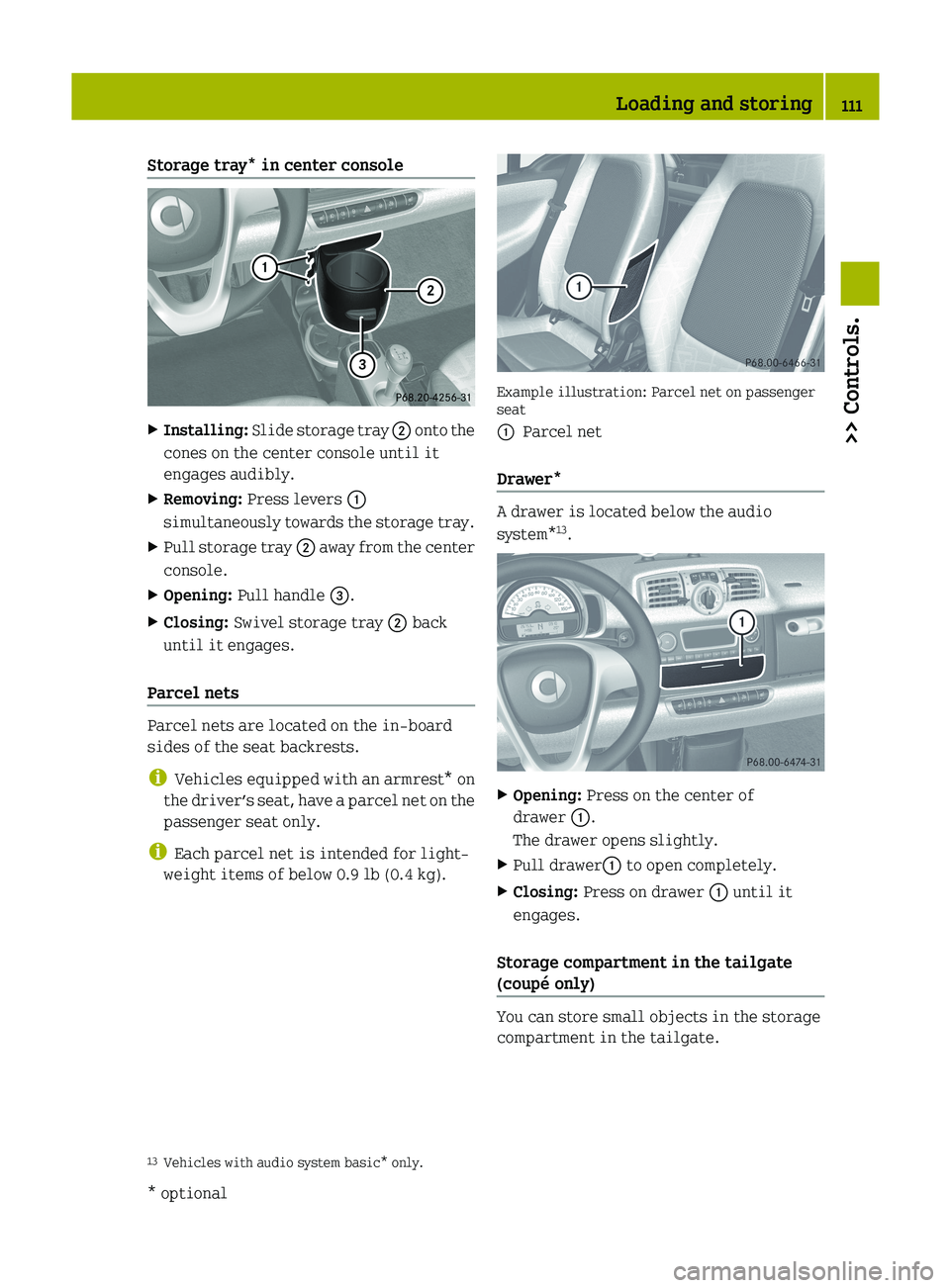
X
Installing: Slide storage tray ; onto the
cones on the center console until it
engages audibly.
X Removing: Press levers :
simultaneously
towards the storage tray.
X Pull storage tray ;
away from the center
console.
X Opening: Pull handle =.
X Closing: Swivel storage tray ; back
until it engages.
Parcel nets Parcel nets are located on the in-board
sides of the seat backrests.
i
Vehicles equipped with an armrest*
on
the driver’s seat, have a parcel net on the
passenger seat only.
i Each parcel net is intended for light-
weight items of below 0.9 lb (0.4 kg). Example illustration: Parcel net on passenger
seat
:
Parcel net
Drawer* A drawer is located below the audio
system*
13
. X
Opening: Press on the center of
drawer :.
The drawer opens slightly.
X Pull drawer: to open completely.
X Closing: Press on drawer : until it
engages.
Storage compartment in the tailgate
(coupé only) You can store small objects in the storage
compartment in the tailgate.
13 Vehicles with audio system basic* only. Loading and storing
111
>> Controls.
* optional Z
Page 114 of 228
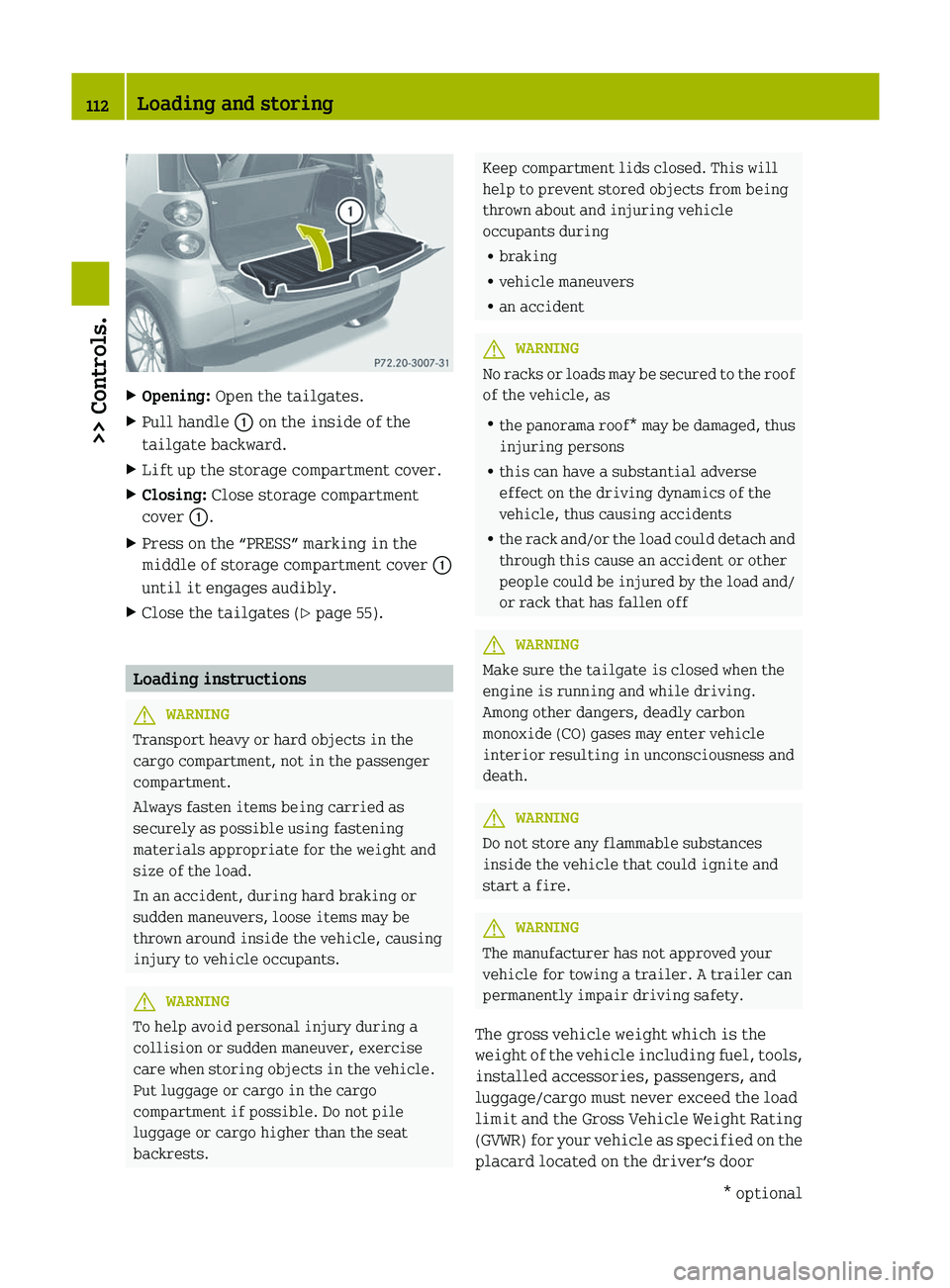
X
Opening: Open the tailgates.
X Pull handle : on the inside of the
tailgate backward.
X Lift up the storage compartment cover.
X Closing: Close storage compartment
cover :.
X Press on the “PRESS” marking in the
middle of storage compartment cover :
until it engages audibly.
X Close the tailgates ( Y page 55).Loading instructions
G
WARNING
Transport heavy or hard objects in the
cargo compartment, not in the passenger
compartment.
Always fasten items being carried as
securely as possible using fastening
materials appropriate for the weight and
size of the load.
In an accident, during hard braking or
sudden maneuvers, loose items may be
thrown around inside the vehicle, causing
injury to vehicle occupants. G
WARNING
To help avoid personal injury during a
collision or sudden maneuver, exercise
care when storing objects in the vehicle.
Put luggage or cargo in the cargo
compartment if possible. Do not pile
luggage or cargo higher than the seat
backrests. Keep compartment lids closed. This will
help to prevent stored objects from being
thrown about and injuring vehicle
occupants during
R
braking
R vehicle maneuvers
R an accident G
WARNING
No racks or loads may be secured to the roof
of the vehicle, as
R the
panorama roof* may be damaged, thus
injuring persons
R this can have a substantial adverse
effect on the driving dynamics of the
vehicle, thus causing accidents
R the rack and/or the load could detach and
through this cause an accident or other
people could be injured by the load and/
or rack that has fallen off G
WARNING
Make sure the tailgate is closed when the
engine is running and while driving.
Among other dangers, deadly carbon
monoxide (CO) gases may enter vehicle
interior resulting in unconsciousness and
death. G
WARNING
Do not store any flammable substances
inside the vehicle that could ignite and
start a fire. G
WARNING
The manufacturer has not approved your
vehicle for towing a trailer. A trailer can
permanently impair driving safety.
The gross vehicle weight which is the
weight
of the vehicle including fuel, tools,
installed accessories, passengers, and
luggage/cargo must never exceed the load
limit and the Gross Vehicle Weight Rating
(GVWR) for your vehicle as specified on the
placard located on the driver’s door 112
Loading and storing
>> Controls.
* optional
Page 115 of 228
B‑pillar (Y page 214). In addition, the
load must be distributed in such a way so
that the weight on each axle never exceeds
the
Gross Axle Weight Rating (GAWR) for the
front and rear axle. The GVWR and GAWR for
your vehicle are indicated on the
certification label which can be found on
the driver’s door B‑pillar.
For more information, see “Loading the
vehicle” ( Y page 130).
The handling characteristics of a fully
loaded vehicle depend greatly on the load
distribution. It is therefore recommended
to load the vehicle with the heaviest items
being placed towards the front of the
vehicle.
Please pay attention to and comply with the
following instructions when loading the
vehicle and transporting cargo:
R Always place items being carried
against seat backrests, and fasten them
as securely as possible.
R The heaviest portion of the cargo should
always be kept as low as possible against
seat backrests.
R Do not stack loads higher than the top
edge of the head restraints.
R Make sure no luggage/cargo items can get
above or next to the driver’s and/or
passenger seat into the passenger
compartment.
R Make sure luggage/cargo is properly
secured.
R Always use, if so equipped, cargo net*
when transporting cargo.
Do not carry any unnecessary weight in the
vehicle. This increases vehicle weight,
which results in increased energy
consumption. Useful features
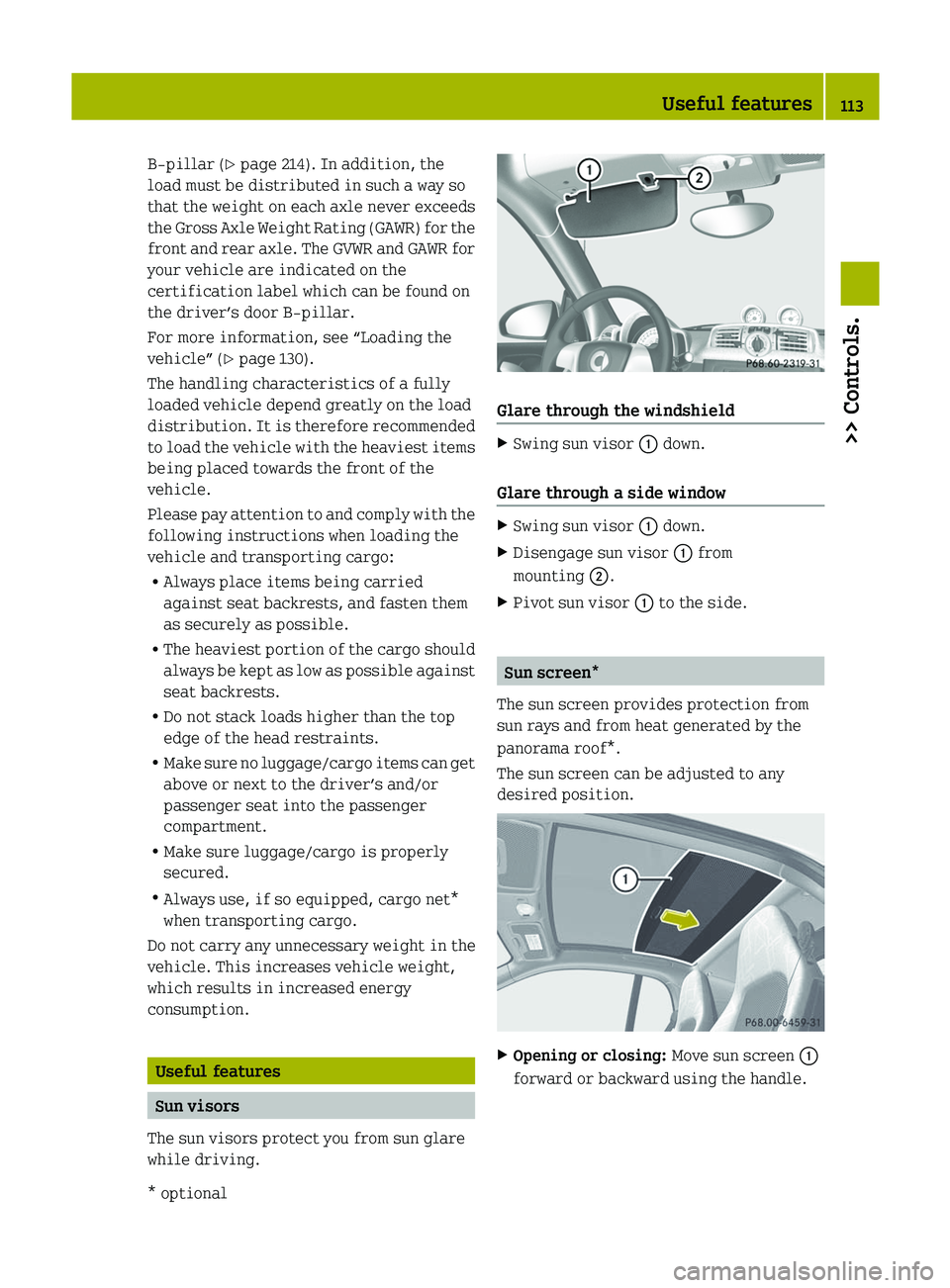
Sun visors
The sun visors protect you from sun glare
while driving. Glare through the windshield
X
Swing sun visor : down.
Glare through a side window X
Swing sun visor : down.
X Disengage sun visor : from
mounting ;.
X Pivot sun visor : to the side. Sun screen*
The sun screen provides protection from
sun rays and from heat generated by the
panorama roof*.
The sun screen can be adjusted to any
desired position. X
Opening or closing: Move sun screen :
forward or backward using the handle. Useful features
113
>> Controls.
* optional Z