warning light SMART FORTWO COUPE 2012 User Guide
[x] Cancel search | Manufacturer: SMART, Model Year: 2012, Model line: FORTWO COUPE, Model: SMART FORTWO COUPE 2012Pages: 228, PDF Size: 12.76 MB
Page 55 of 228
!
The remote control has an operating
range
of approximately 50 ft (15 meters).
This can fluctuate greatly as a
consequence of local conditions
(reflective or absorbing objects) and
interference emitted by other radio
transmission systems. Similarly, the
operating range fluctuates in line with
the direction from which the remote
control is activated.
To prevent theft, however, it is advisable
to only unlock the vehicle when you are
in close proximity to it. Locking and unlocking from the
outside
X Selective unlocking: Press button # on
the key once.
All turn signal lamps flash once.
The anti-theft warning system* is
disarmed.
The
driver’s door and the fuel filler flap
are unlocked.
X Global unlocking:
Press button # on the
key twice.
All turn signal lamps flash once again.
The passenger door and the tailgate are
unlocked in addition to the driver’s door
and the fuel filler flap.
X Global locking: Press button * on the
key.
With the doors, the tailgate(s), and the
fuel filler flap closed, the turn signal
lamps flash three times.
The
anti-theft warning system* is armed.
The indicator lamp on the central
locking switch flashes (Y page 54).
The interior and exterior 8
lamps come on
and then go out again after 12 seconds.
i In vehicles with anti-theft warning
system*, an acoustic signal will sound
when locking or unlocking the vehicle. When unlocking, the acoustic signal
sounds once. When locking, the acoustic
signal sounds three times.
The acoustic signal is activated at the
factory. If you wish to deactivate the
feature, contact an authorized smart
center.
Automatic locking
Auto-relock function The vehicle will lock again automatically
within approximately 60 seconds of
unlocking with the key if neither the
driver’s nor passenger door is opened.
!
To prevent an inadvertent lockout,
never
leave your key lying in the vehicle.
Drive lock function The vehicle locks automatically when the
ignition
is switched on and the wheels are
turning at vehicle speeds of approximately
8 mph (14 km/h) or more. The drive lock
function is enabled at the factory.
X Switching on: Switch off the ignition.
X Press the central locking switch
(Y page 54) and button * on the key
simultaneously.
An acoustic signal sounds.
The drive lock function is switched on.
X Switching off: Switch off the ignition.
X Press the central unlocking switch
(Y page 54) and button # on the key
simultaneously.
An acoustic signal sounds.
The drive lock function is switched off.
8 Vehicles with rain-light sensor* only. Opening and closing
53
>> Controls.
* optional Z
Page 60 of 228
g
For removing key
1
Ignition (power supply for all
electrical consumers) and driving
position
All lamps (except low‑beam
headlamp indicator lamp,
high‑beam headlamp indicator
lamp, and turn signal indicator
lamps unless activated) in the
instrument cluster come on. If a
lamp
in the instrument cluster fails
to come on when the ignition is
switched on, have it checked and
replaced if necessary. If a lamp in
the instrument cluster remains on
after starting the engine or comes
on while driving, refer to “Warning
and indicator lamps in the
instrument cluster” ( Y page 162).2
Starting (
Y page 78)i
When you switch on the ignition, the
indicator and warning lamps (except
low‑beam headlamp indicator lamp,
high‑beam
headlamp indicator lamp, and
turn signal indicator lamps unless
activated) in the instrument cluster
come on. The indicator and warning
lamps (except low‑beam headlamp
indicator lamp, high‑beam headlamp
indicator lamp, and turn signal
indicator lamps if activated) will go out
when the engine is running. This
indicates that the respective systems
are operational. Seats
Safety notes
G
WARNING
All seat adjustments, as well as fastening
of seat belts, must be done before the
vehicle is operated. G
WARNING
When adjusting the seat, make sure no one
becomes trapped.
Do not adjust the driver’s seat while
driving. Adjusting the seat while driving
could
cause the driver to lose control of the
vehicle.
Never ride in a moving vehicle with the seat
backrest in an excessively reclined
position as this can be dangerous. You
could slide under the seat belt in a
collision. If you slide under the seat belt,
it could apply force at the abdomen or neck,
potentially causing serious or fatal
injuries. The seat backrest and seat belts
provide the best restraint when the wearer
is in a position that is as upright as
possible and seat belts are properly
positioned on the body.
Your seat must be adjusted so that you can
correctly fasten your seat belt.
Observe the following points:
R Adjust the seat backrest until your arms
are slightly angled when holding the
steering wheel.
R Adjust the seat to a comfortable seating
position that still allows you to reach the
accelerator/brake pedal safely. The
position should be as far back as
possible with the driver still able to
operate the controls properly.
R Never place hands under the seat or near
any moving parts while a seat is being
adjusted.
Failure to do so could result in an accident
and/or serious personal injury.
Observe the notes on the air bag system. G
WARNING
Children 12 years old and under must be
seated and properly secured in an
appropriately sized infant restraint,
toddler restraint, or booster seat
recommended
for the size and weight of the58
Seats
>> Controls.
Page 61 of 228
child. For additional information, see
“Children in the vehicle”.
A child’s risk of serious or fatal injuries
is significantly increased if the child
restraints are not properly secured in the
vehicle and/or the child is not properly
secured in the child restraint.
G
WARNING
Contact an authorized smart center if the
seats have become damaged.
The
seat is an integral part of the vehicle’s
safety system in the same way as seat belts
and air bags. Damage to the seats may
reduce their ability to protect the
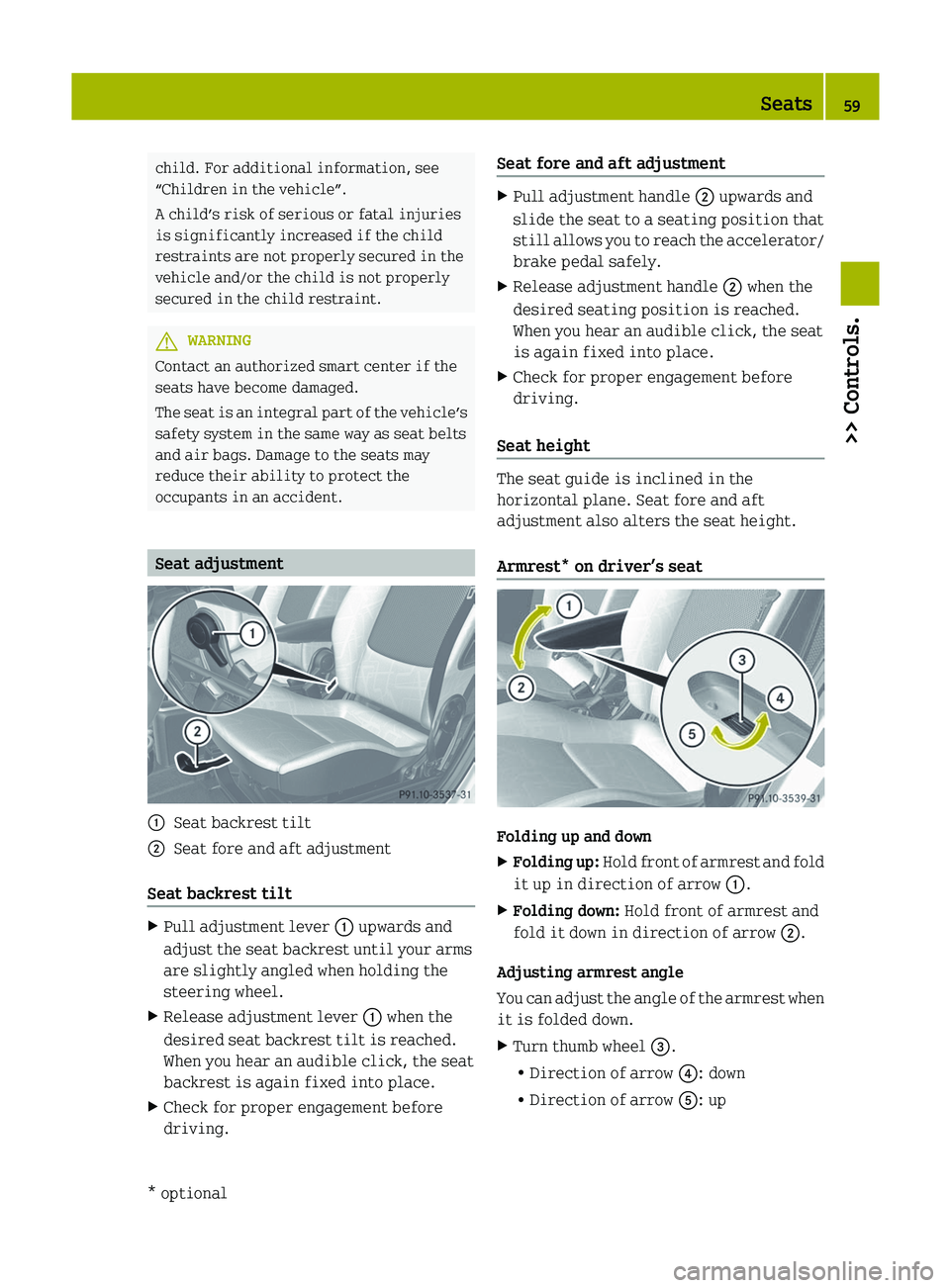
occupants in an accident. Seat adjustment
:
Seat backrest tilt
; Seat fore and aft adjustment
Seat backrest tilt X
Pull adjustment lever : upwards and
adjust the seat backrest until your arms
are slightly angled when holding the
steering wheel.
X Release adjustment lever : when the
desired seat backrest tilt is reached.
When you hear an audible click, the seat
backrest is again fixed into place.
X Check for proper engagement before
driving. Seat fore and aft adjustment X
Pull adjustment handle ; upwards and
slide the seat to a seating position that
still
allows you to reach the accelerator/
brake pedal safely.
X Release adjustment handle ; when the
desired seating position is reached.
When you hear an audible click, the seat
is again fixed into place.
X Check for proper engagement before
driving.
Seat height The seat guide is inclined in the
horizontal plane. Seat fore and aft
adjustment also alters the seat height.
Armrest* on driver’s seat
Folding up and down
X
Folding up:
Hold front of armrest and fold
it up in direction of arrow :.
X Folding down: Hold front of armrest and
fold it down in direction of arrow ;.
Adjusting armrest angle
You
can adjust the angle of the armrest when
it is folded down.
X Turn thumb wheel =.
R
Direction of arrow ?: down
R Direction of arrow A: up Seats
59
>> Controls.
* optional Z
Page 66 of 228
not touch the neck). Never pass the
shoulder portion of the seat belt under
your arm.
R Position the lap belt as low as possible
on your hips (over hip joint) and not
across the abdomen.
R Place
the seat backrest in a position that
is as upright as possible.
R Never use a seat belt for more than one
person at a time.
R Do not fasten a seat belt around a person
and another object at the same time. When
using a seat belt to secure infant or
toddler restraints or children in booster
seats, always follow the child seat
manufacturer’s instructions.
R Check your seat belt during travel to
make sure it is properly positioned.
R Make sure the seat belt is always fitted
snugly. Take special care to maintain a
snug fit when wearing loose clothing. G
WARNING
Do not pass seat belts over sharp edges.
They could tear.
Do not allow the seat belt to get caught in
the door or in the seat adjustment
mechanism. This could damage the seat
belt.
Never attempt to make modifications to
seat belts. This could impair the
effectiveness of the seat belts.
Do not bleach or dye seat belts as this may
severely weaken them. In a crash they may
not
be able to provide adequate protection.
Damaged seat belts or seat belts that were
highly stressed in an accident must be
replaced. Contact an authorized smart
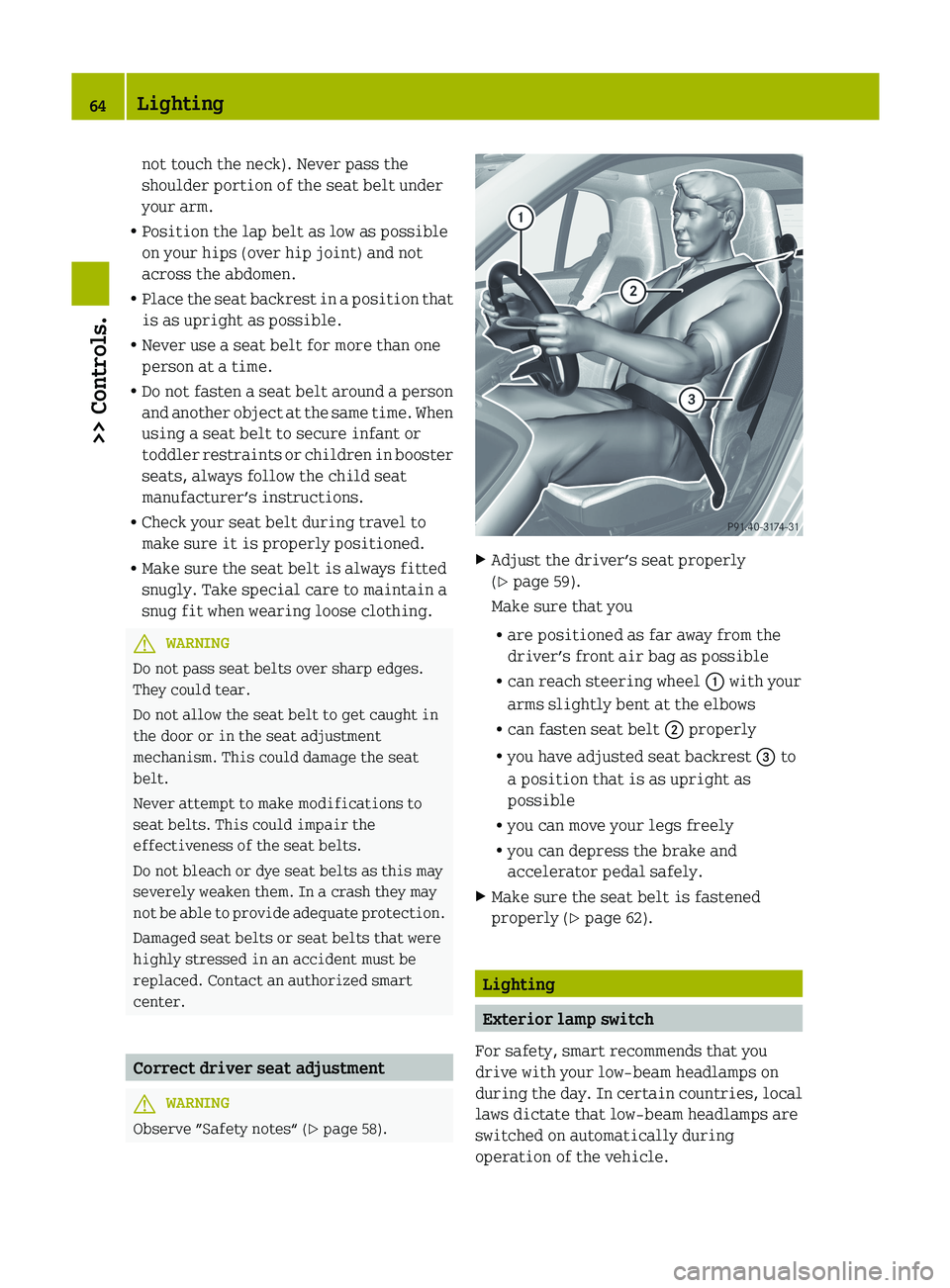
center. Correct driver seat adjustment
G
WARNING
Observe ”Safety notes“ ( Y page 58). X
Adjust the driver’s seat properly
(Y page 59).
Make sure that you
R are positioned as far away from the
driver’s front air bag as possible
R can reach steering wheel : with your
arms slightly bent at the elbows
R can fasten seat belt ; properly
R you have adjusted seat backrest = to
a position that is as upright as
possible
R you can move your legs freely
R you can depress the brake and
accelerator pedal safely.
X Make sure the seat belt is fastened
properly (Y page 62). Lighting
Exterior lamp switch
For safety, smart recommends that you
drive with your low‑beam headlamps on
during
the day. In certain countries, local
laws dictate that low‑beam headlamps are
switched on automatically during
operation of the vehicle. 64
Lighting
>> Controls.
Page 67 of 228
i
If you drive in countries where
vehicles drive on the other side of the
road than the country in which the
vehicle is registered, you must have the
headlamps
modified for symmetrical low
beams. Relevant information can be
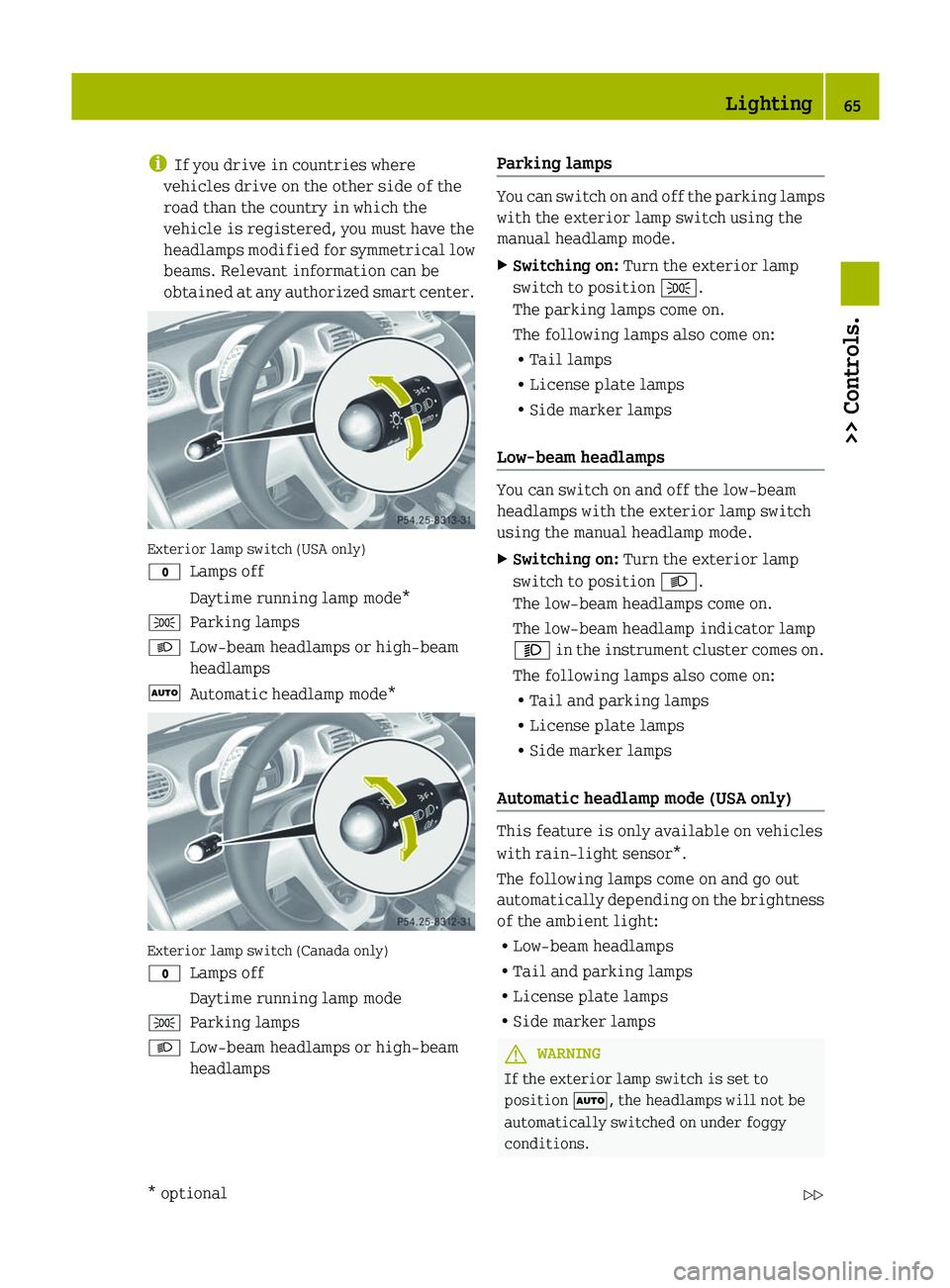
obtained at any authorized smart center. Exterior lamp switch (USA only)
$
Lamps off
Daytime running lamp mode*
T Parking lamps
L Low‑beam headlamps or high‑beam
headlamps
à Automatic headlamp mode* Exterior lamp switch (Canada only)
$
Lamps off
Daytime running lamp mode
T Parking lamps
L Low‑beam headlamps or high‑beam
headlamps Parking lamps You can switch on and off the parking lamps
with the exterior lamp switch using the
manual headlamp mode.
X
Switching on: Turn the exterior lamp
switch to position T.
The parking lamps come on.
The following lamps also come on:
R Tail lamps
R License plate lamps
R Side marker lamps
Low‑beam headlamps You can switch on and off the low‑beam
headlamps with the exterior lamp switch
using the manual headlamp mode.
X
Switching on: Turn the exterior lamp
switch to position L.
The low‑beam headlamps come on.
The low‑beam headlamp indicator lamp
M
in the instrument cluster comes on.
The following lamps also come on:
R Tail and parking lamps
R License plate lamps
R Side marker lamps
Automatic headlamp mode (USA only) This feature is only available on vehicles
with rain-light sensor*.
The following lamps come on and go out
automatically
depending on the brightness
of the ambient light:
R Low‑beam headlamps
R Tail and parking lamps
R License plate lamps
R Side marker lamps G
WARNING
If the exterior lamp switch is set to
position Ã, the headlamps will not be
automatically switched on under foggy
conditions. Lighting
65
>> Controls.
* optional Z
Page 70 of 228
Turn signals
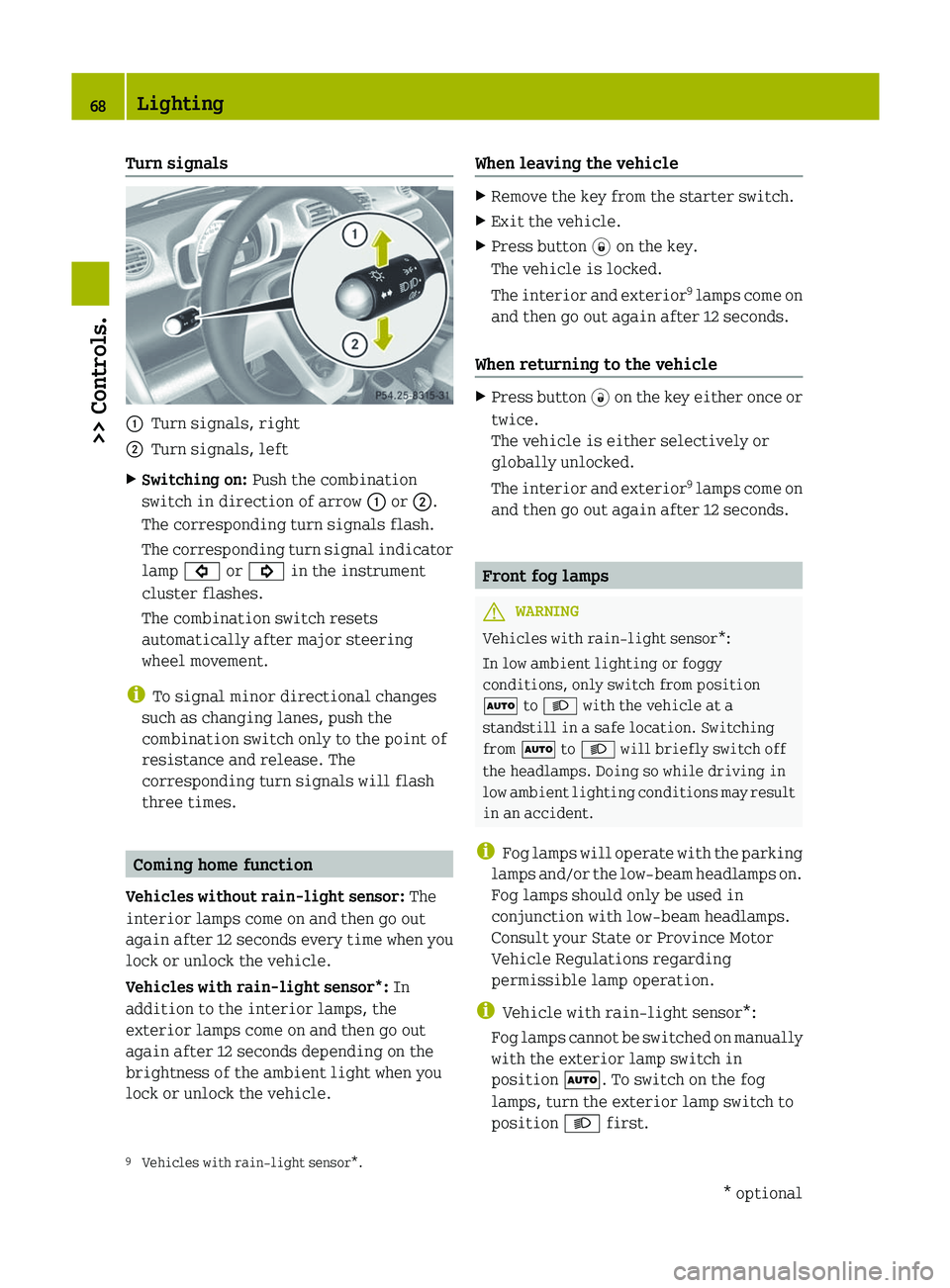
:
Turn signals, right
; Turn signals, left
X Switching on: Push the combination
switch in direction of arrow : or ;.
The corresponding turn signals flash.
The
corresponding turn signal indicator
lamp # or ! in the instrument
cluster flashes.
The combination switch resets
automatically after major steering
wheel movement.
i To signal minor directional changes
such as changing lanes, push the
combination switch only to the point of
resistance and release. The
corresponding turn signals will flash
three times. Coming home function
Vehicles without rain-light sensor: The
interior lamps come on and then go out
again
after 12 seconds every time when you
lock or unlock the vehicle.
Vehicles with rain-light sensor*: In
addition to the interior lamps, the
exterior lamps come on and then go out
again after 12 seconds depending on the
brightness of the ambient light when you
lock or unlock the vehicle. When leaving the vehicle X
Remove the key from the starter switch.
X Exit the vehicle.
X Press button * on the key.
The vehicle is locked.
The
interior and exterior 9
lamps come on
and then go out again after 12 seconds.
When returning to the vehicle X
Press button #
on the key either once or
twice.
The vehicle is either selectively or
globally unlocked.
The interior and exterior 9
lamps come on
and then go out again after 12 seconds. Front fog lamps
G
WARNING
Vehicles with rain-light sensor*:
In low ambient lighting or foggy
conditions, only switch from position
à to L with the vehicle at a
standstill in a safe location. Switching
from à to L will briefly switch off
the headlamps. Doing so while driving in
low
ambient lighting conditions may result
in an accident.
i Fog lamps will operate with the parking
lamps and/or the low‑beam headlamps on.
Fog lamps should only be used in
conjunction with low‑beam headlamps.
Consult your State or Province Motor
Vehicle Regulations regarding
permissible lamp operation.
i Vehicle with rain-light sensor*:
Fog lamps cannot be switched on manually
with the exterior lamp switch in
position Ã. To switch on the fog
lamps, turn the exterior lamp switch to
position L first.
9 Vehicles with rain-light sensor*. 68
Lighting
>> Controls.
* optional
Page 71 of 228
X
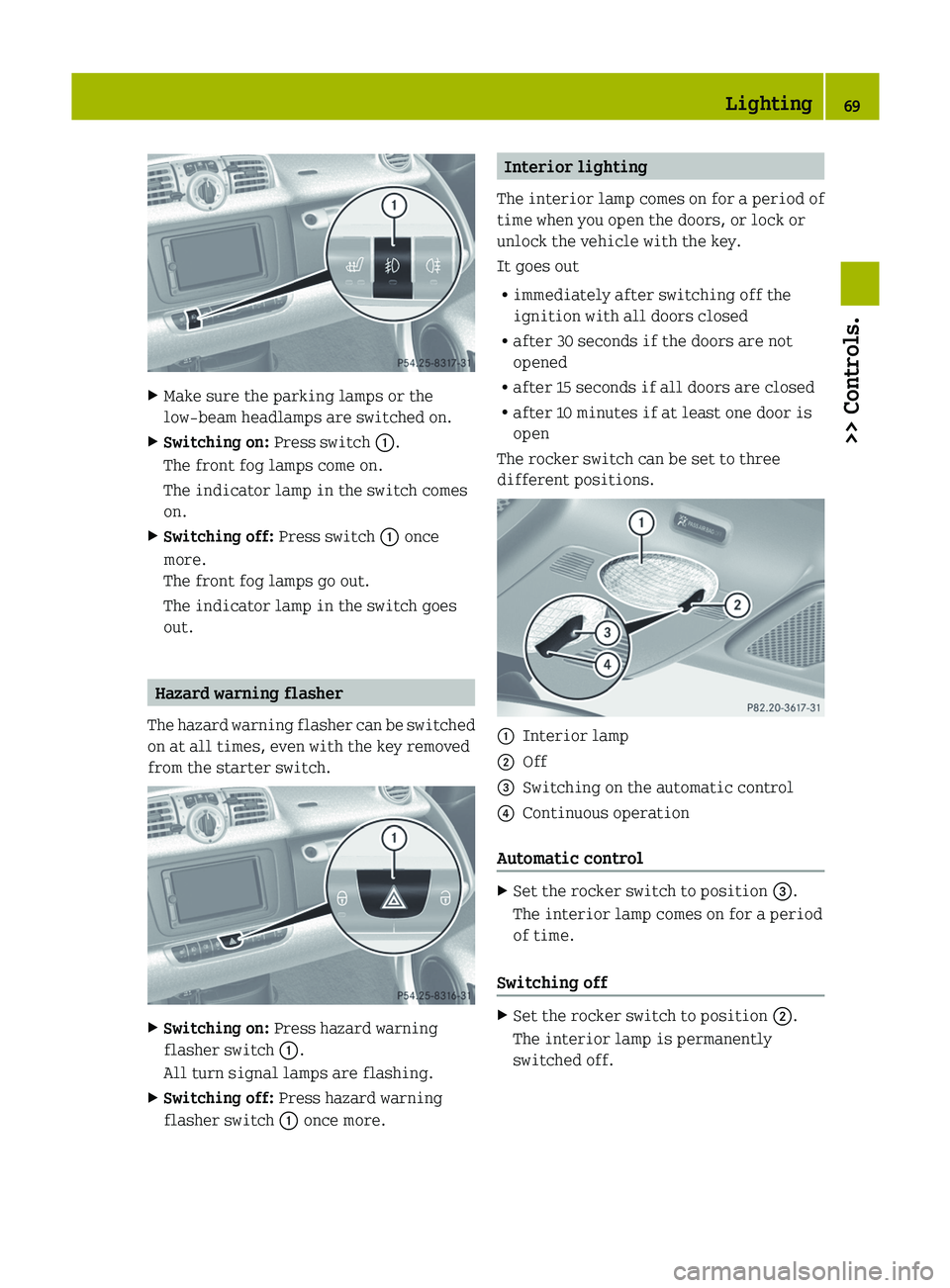
Make sure the parking lamps or the
low‑beam headlamps are switched on.
X Switching on: Press switch :.
The front fog lamps come on.
The indicator lamp in the switch comes
on.
X Switching off: Press switch : once
more.
The front fog lamps go out.
The indicator lamp in the switch goes
out. Hazard warning flasher
The hazard warning flasher can be switched
on at all times, even with the key removed
from the starter switch. X
Switching on: Press hazard warning
flasher switch :.
All turn signal lamps are flashing.
X Switching off: Press hazard warning
flasher switch : once more. Interior lighting
The
interior lamp comes on for a period of
time when you open the doors, or lock or
unlock the vehicle with the key.
It goes out
R immediately after switching off the
ignition with all doors closed
R after 30 seconds if the doors are not
opened
R after 15 seconds if all doors are closed
R after 10 minutes if at least one door is
open
The rocker switch can be set to three
different positions. :
Interior lamp
; Off
= Switching on the automatic control
? Continuous operation
Automatic control X
Set the rocker switch to position =.
The interior lamp comes on for a period
of time.
Switching off X
Set the rocker switch to position ;.
The interior lamp is permanently
switched off. Lighting
69
>> Controls. Z
Page 82 of 228
X
Depress the brake pedal.
X Press the release button (Y page 79) to
disengage the gear selector lever lock.
X Move the gear selector lever to reverse
gear R.
R appears in the transmission position
indicator.
X Release the brake pedal.
X Carefully depress the accelerator pedal. Parking
G
WARNING
Do not park this vehicle in areas where
combustible materials such as grass, hay or
leaves can come into contact with the hot
exhaust system. These materials could be
ignited and cause a vehicle fire.
Vehicle movement can cause serious
personal injury or damage to the vehicle or
the vehicle drivetrain. Therefore, always
do the following before turning off the
engine and leaving the vehicle:
R Keep right foot on the brake pedal.
R Engage the parking brake.
R Move the gear selector lever to park
position P.
R Slowly release the brake pedal.
R When parked on an incline, always turn
the front wheels towards the curb.
R Turn the key to starter switch position 0
and remove the key from the starter
switch.
R Take the key with you and lock the vehicle
when leaving. G
WARNING
With the engine not running, there is no
power assistance for the brake and
steering* systems. In this case, it is
important to keep in mind that a
considerably higher degree of effort is
necessary to brake and steer the vehicle.
Adapt your driving accordingly. X
Properly stop and park the vehicle.
X Depress the brake pedal.
X Engage the parking brake ( Y page 80).
When the ignition is switched on or the
engine is running, the brake warning
lamp $ (USA only) or J (Canada
only)
in the instrument cluster comes on.
X Release the brake pedal.
Parking brake The parking brake serves to secure the
vehicle against rolling away when it is
stationary or parked.
G
WARNING
Engaging the parking brake while the
vehicle is in motion can cause the rear
wheels
to lock up. You could lose control of
the vehicle and cause an accident. In
addition, the vehicle’s brake lights do not
light up when the parking brake is engaged. X
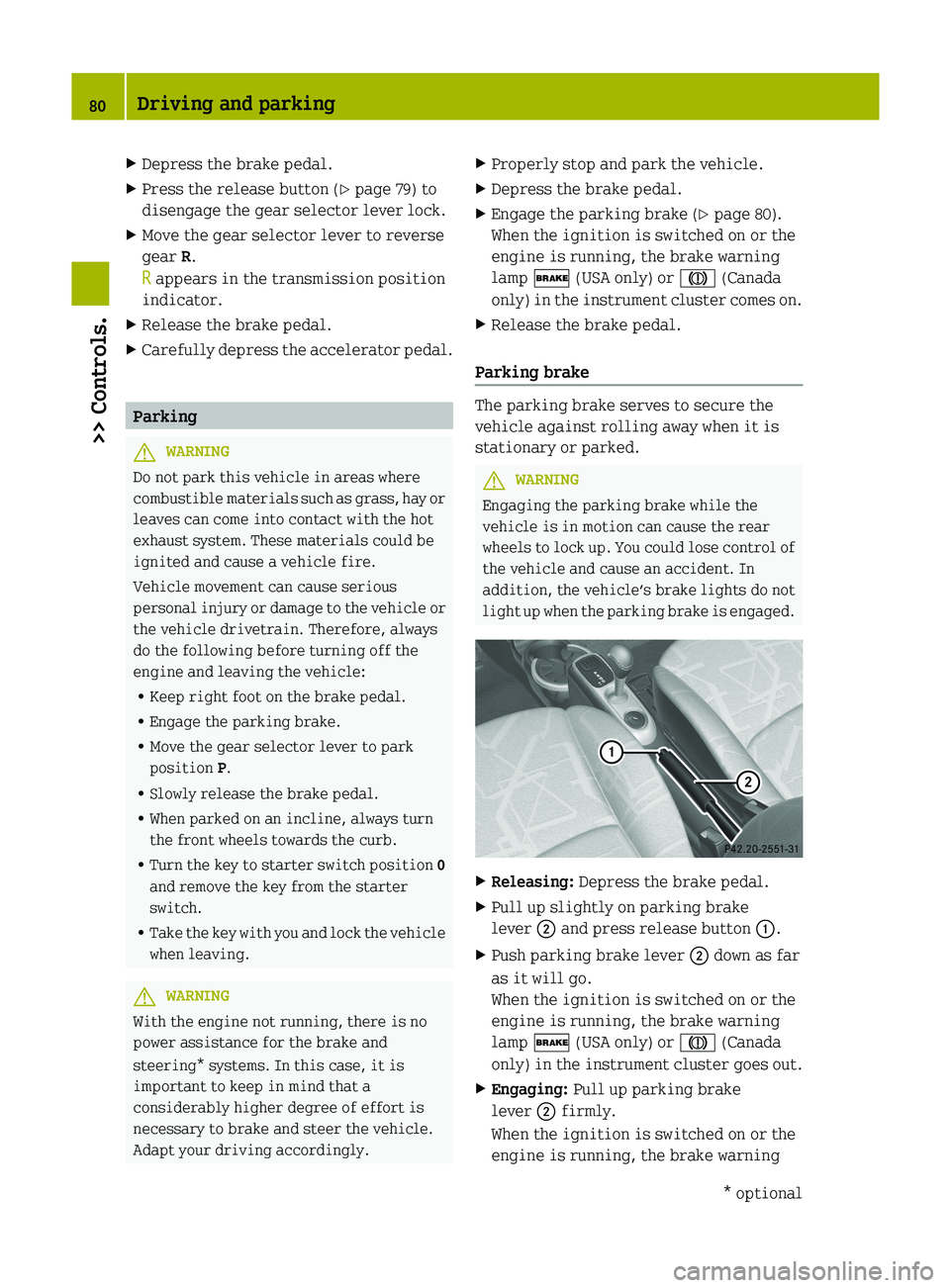
Releasing: Depress the brake pedal.
X Pull up slightly on parking brake
lever ; and press release button :.
X Push parking brake lever ; down as far
as it will go.
When the ignition is switched on or the
engine is running, the brake warning
lamp $ (USA only) or J (Canada
only)
in the instrument cluster goes out.
X Engaging: Pull up parking brake
lever ; firmly.
When the ignition is switched on or the
engine is running, the brake warning 80
Driving and parking
>> Controls.
* optional
Page 86 of 228
The current gear selector lever position
appears in the transmission position
indicator (Y page 88).
Driving tips
Accelerator pedal position Your driving style influences the
transmission’s shifting behavior:
Less throttle earlier upshifting
More throttle later upshifting
Kickdown
Use kickdown when you want maximum
acceleration.
X
Press the accelerator pedal past the
point of resistance.
Depending on the engine speed the
transmission shifts into a lower gear.
X Ease up on the accelerator pedal when you
have reached the desired speed.
The transmission shifts up again.
Stopping When you stop briefly, e.g. at traffic
lights:
X
Leave the transmission in gear.
X Hold the vehicle with the brake.
When you stop for a longer period with the
engine idling and/or on a hill:
X Engage the parking brake.
X Move the gear selector lever to park
position P.
Working on the vehicle G
WARNING
When working on the vehicle, engage the
parking brake and move the gear selector
lever to park position P. Otherwise the
vehicle could roll away which could result in an accident and/or serious personal
injury.
Driving on uphill grades Your vehicle has a hill‑start assist system.
G
WARNING
The hill-start assist system is not
designed to function as a parking brake and
does not prevent the vehicle from moving
when parked on an incline.
Always engage the parking brake in
addition to shifting to park position P.
On uphill grades the hill‑start assist
system maintains the pressure in the brake
system for approximately one second after
you have released the brake pedal.
Therefore, you can start off smoothly
without the vehicle moving immediately
after releasing the brake pedal.
X Release the brake pedal.
X Apply sufficient pressure to the
accelerator pedal.
! After approximately one second, the
hill‑start assist system stops braking
the vehicle, which then can roll
backwards. If you open the driver’s door
within this time, the hill‑start assist
system is deactivated and a warning
signal sounds.
i The
hill‑start assist system is inactive
if you start off with the parking brake
engaged. Manual gearshifting
With manual gearshifting M selected,
system-controlled automatic gearshifting
is switched off and you need to change the
gears by upshifting or downshifting
manually using the gear selector lever or
the steering wheel gearshift control 10
.
10 Model passion and BRABUS only. 84
Transmission
>> Controls.
Page 110 of 228
event of an accident. For this reason, heavy
objects must be tied down.
Vehicle occupants could be injured by
objects
being thrown around in the vehicle
in the event of
R hard braking
R a change of direction
R an accident G
WARNING
Do not place any objects on the mounted
cargo compartment cover blind.
Vehicle occupants could be injured by
objects
being thrown around in the vehicle
in the event of
R hard braking
R a change of direction
R an accident G
WARNING
Only place light loads in the parcel net
bag.
Do not transport heavy, sharp-edged or
fragile objects in the parcel net bag. The
parcel net bag cannot sufficiently secure
loads in an accident.
Vehicle occupants could be injured by
objects being thrown around in the vehicle
in the event of
R hard braking
R a change of direction
R an accident
Observe the loading guidelines.
The cargo compartment cover blind
R serves to protect objects that are stored
in the vehicle’s cargo compartment from
prying eyes
R prevents smaller objects from
penetrating into the passenger
compartment from the cargo
compartment; however, it is not intended
to act as a load restraining device The parcel net bag
R
is
for storing small, lightweight objects
R prevents small objects from sliding
around inside the passenger
compartment
! If objects are placed on the cargo
compartment cover blind when mounted,
the cover may be damaged.
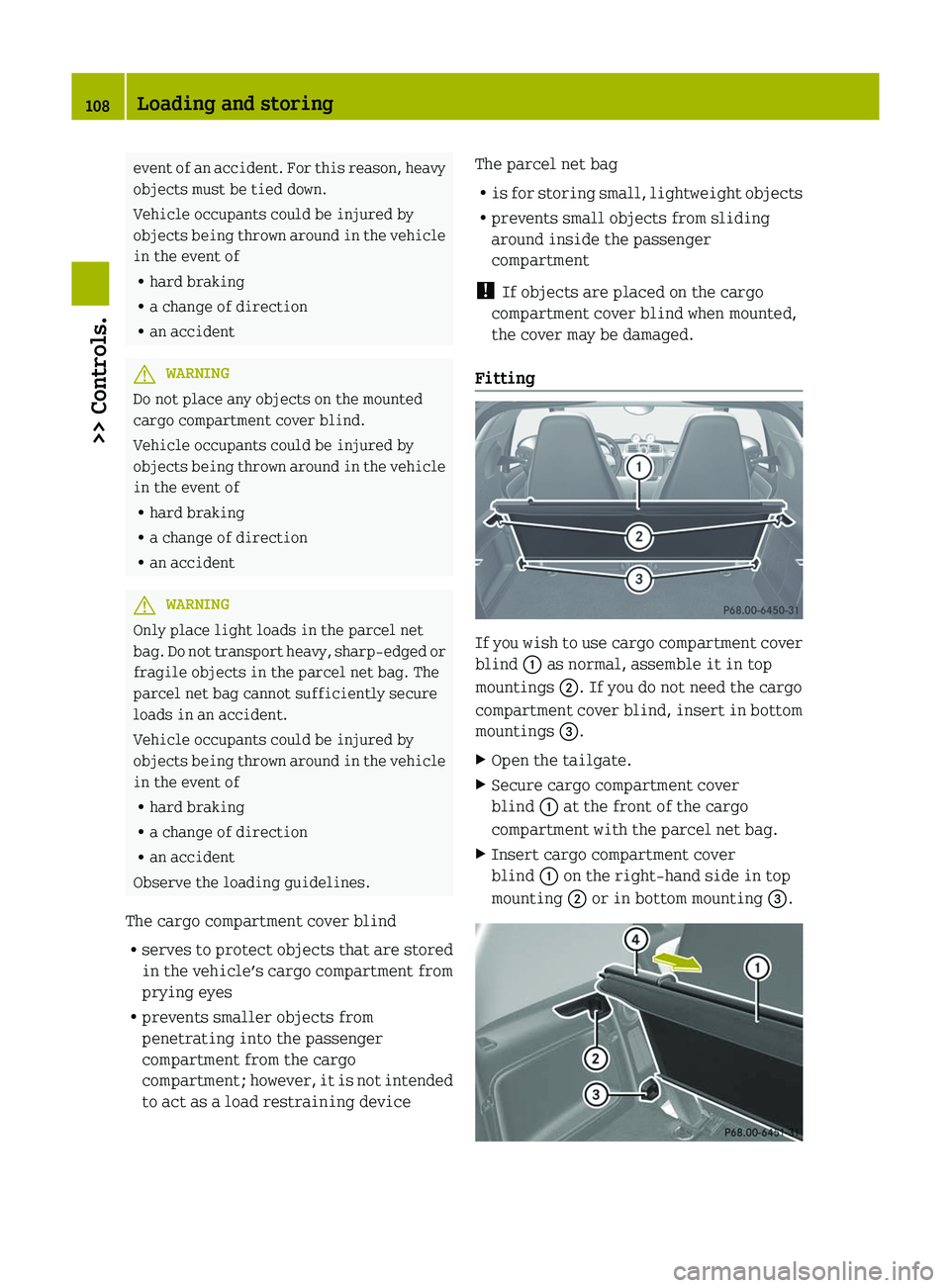
Fitting If you wish to use cargo compartment cover
blind : as normal, assemble it in top
mountings ;. If you do not need the cargo
compartment
cover blind, insert in bottom
mountings =.
X Open the tailgate.
X Secure cargo compartment cover
blind : at the front of the cargo
compartment with the parcel net bag.
X Insert cargo compartment cover
blind : on the right-hand side in top
mounting ; or in bottom mounting =.108
Loading and storing
>> Controls.