instrument cluster SMART FORTWO COUPE 2013 User Guide
[x] Cancel search | Manufacturer: SMART, Model Year: 2013, Model line: FORTWO COUPE, Model: SMART FORTWO COUPE 2013Pages: 218, PDF Size: 2.69 MB
Page 36 of 218

any authorized electric drive smart
center.
How an air bag operates An air bag is inflated in a matter of
milliseconds. If an air bag is triggered,
the SRS indicator lamp
000Ain the
instrument cluster illuminates.
! If the air bags are activated, you will
hear a loud noise and some dust may be
generated. The explosion fundamentally
represents no risk to your hearing.
An inflated air bag slows down and reduces
the movement of the occupant. When the
occupant makes contact with a front air bag
or head-thorax air bag (cabriolet only),
hot gas flows out of the inflated front air
bags and head-thorax air bags (cabriolet
only). This reduces the load on the
occupant’s head and upper body. These air
bags are consequently deflated after the
accident.
Driver front air bag/passenger front air
bag The front air bags are designed to reduce
the potential of injury in certain frontal
impacts.
Driver front air bag and passenger front
air bag are deployed
R
at the start of an accident with high
vehicle deceleration in the longitudinal
direction
R independently of other air bags in the
vehicle being deployed
R never in the event of arollover, unless
high vehicle deceleration in the
longitudinal direction is detected
i The front air bags in this vehicle have
been designed to inflate in two stages.
This allows the air bag to have different
rates of inflation that are based on the
rate of relevant vehicle deceleration and a fastened or unfastened seat belt as
assessed by the air bag control unit.
On the passenger side, the front air bag
deployment is additionally influenced
by the passenger’s weight category as
identified by the Occupant
Classification System (OCS)
(Y
page 37).
The lighter the passenger side occupant,
the higher the vehicle deceleration rate
required for the second stage inflation
of the air bag.
The air bags will not deploy in impacts
which do not exceed the system’s
deployment thresholds. In such instances,
the seat belts are designed to protect you.
The passenger air bag will only be
deployed if
R the system, based on OCS weight sensor
readings, senses that the passenger seat
is occupied and the 00090007
indicator lamp is not lit (Y page 39)
R the impact exceeds a preset deployment
threshold
The driver front air bag is located in the
steering wheel housing, the passenger
front air bag above the glove box. 0002
Driver front air bag
0003 Passenger front air bag 34
Occupant safety>> Safety.
Page 46 of 218

2. this device must accept any
interference received, including
interference that may cause undesired
operation.
Any unauthorized modification to this
device could void the user’s authority to
operate the equipment.
The product label with FCC ID and IC
certification number can be foun
dinthe
battery case.
i Canada only:
This device complies with RSS‑210 of
Industr yCanada. Operation is subject to
the following two conditions:
1. This device may not cause
interference, and
2. this device must accept any
interference received, including
interference that may cause undesired
operation of the device.
Any unauthorized modification to this
device could void the user’s authority to
operate the equipment.
The product label with FCC ID and IC
certification number can be found in the
battery case. Driving safety systems
Introduction
G
WARNING
The following factors increase the risk of
accidents:
R Excessive speed, especially in turns
R Wet and slippery road surfaces
R Following another vehicle too closely
The driving safety systems described in
this section cannot reduce these risks or
prevent the natural laws of physics from
acting on the vehicle.
Always adapt your driving style to the
prevailing road and weather and traffic conditions and keep a safe distance to
other road users and objects on the street.
i In winter operation, the maximum
effectiveness of the ABS, the hydraulic
brake assistant, and the ESP ®
is only
achieved with winter tires (Y page 140)
or snow chains* as required. Antilock Brake System (ABS)
G
WARNING
Do not pump the brake pedal. Use firm,
steady brake pedal pressure instead.
Pumping the brake pedal defeats the
purpose of the ABS and significantly
reduces braking effectiveness.
The Antilock BrakeSystem (ABS) regulates
the brake pressure so that the wheels do not
lock during braking. This allows you to
maintain the ability to steer your vehicle.
On slippery road surfaces, the ABS will
respond even to light brake pressure.
The ABS indicator lamp in the instrument
cluster (Y page 22) comes on when you
switch on the ignition. It goes out when the
drive system is active.
Braking At the instant one of the wheels is about to
lock up, a slight pulsation can be felt in
the brake pedal, indicating that the ABS is
regulating the brake pressure.
X
Keep firm and steady pressure on the
brake pedal while experiencing the
pulsation.
Continuous, steady brake pedal pressure
yields the advantages provided by the ABS,
namely braking power and the ability to
steer the vehicle.
A pulsating brake pedal can be an
indication of hazardous road conditions
and functions as a reminder to take extra
care while driving. 44
Driving safety systems>> Safety.
* optional
Page 47 of 218

Emergency brake maneuver
X
Keep continuous full pressure on the
brake pedal. G
WARNING
When the ABS is malfunctioning, the
hydraulic brake assistant and the ESP ®
are
also switched off.
When the ABS is malfunctioning, the wheels
may lock during hard braking, reducing
steering capability and extending the
braking distance. G
WARNING
The ABS cannot prevent the natural laws of
physics from acting on the vehicle, nor can
it increase brakin gor steering efficiency
beyond that afforded by the condition of the
vehicle brakes and tires or the traction
afforded. The ABS cannot prevent
accidents, including those resulting from
excessive speed in turns, following
another vehicle too closely, or
hydroplaning. Only a safe, attentive, and
skillful driver can prevent accidents. The
capabilities of an ABS equipped vehicle
must never be exploited in a reckless or
dangerous manner which could jeopardize
the user’s safety or the safety of others. Electronic Stability Program (ESP
®
)
Your vehicle is equipped with the
Electronic StabilityProgram (ESP ®
). The
ESP ®
is operational as soon as the drive
system is switched on and it monitors the
vehicle’s traction (force of adhesive
friction between the tires and the road
surface) and handling.
The ESP ®
recognizes when awheel is
spinning or if the vehicle starts to skid.
By applying brakes to the appropriate
wheel and by limiting the power output, the
ESP ®
works to stabilize the vehicle. The
ESP ®
is especially useful while driving off
and on wet or slippery road surfaces. The ESP
®
also stabilizes the vehicle during
braking and steering maneuvers.
The ESP ®
warning lamp 0004in the
instrument cluster flashes when the ESP ®
is
engaged.
The ESP ®
warning lamp 0004in the
instrument cluster comes on when you
switch on the ignition. It goes out when the
drive system is active.
Depending on the driving situation, the
ESP ®
R reduces the speed
R selectively brakes individual wheels
R equalizes the speed of the driven wheels
R stabilizes the vehicle when braking
R assists you in evasive maneuvers on all
roads G
WARNING
If the ESP ®
warning lamp 0004in the
instrument cluster flashes, proceed as
follows:
R While driving off, apply as little
throttle as possible.
R While driving, ease up on the accelerator
pedal.
R Adapt your speed and driving style to the
prevailing road conditions.
Failure to observe these guidelines could
cause the vehicle to skid.
The ESP ®
cannot prevent accidents
resulting from excessive speed. G
WARNING
The ESP ®
cannot prevent the natura llaws of
physics from acting on the vehicle, nor can
it increase the traction afforded. The
ESP ®
cannot prevent accidents, including
those resulting from excessive speed in
turns, or hydroplaning. Only a safe,
attentive, and skillful driver can prevent
accidents. The capabilities of an ESP ®
equipped vehicle must never be exploited
in a reckless or dangerous manner which Driving safety systems
45>> Safety.
Z
Page 51 of 218

>> Controls.Openin
gand closing .......................... 50
Starter switch positions .....................55
Seats .............................................. 56
Mirrors ........................................... 58
Seat belts ........................................ 60
Lighting ......................................... 62
Windshield wipers ............................. 67
Soft top system (cabriolet only) ...........68
Side windows .................................... 73
Driving and parking .......................... 74
Transmission ................................... 77
Instrument cluster ............................. 79
Control system .................................. 81
Audio system* ................................... 91
Driving systems ................................ 93
Air conditioning with climate control ..95
Loading and storing ......................... 100
Useful feature s................................ 105
Page 57 of 218

X
Closing: Swivel the rear soft top
downwards to close.
X Pull soft top down.
X Pull release levers 0002, located to the left
and right of the retaining clip,
downwards.
X Make sure the rear soft top is correctly
locked in place on both sides. Closing the tailgate on the cabriolet
G
WARNING
To prevent possible personal injury,
always keep hands and fingers away from the
cargo compartment opening when closing
the tailgate. Be especially careful when
small children are around.
! When closing the tailgate, you must
first close the rear soft top. Otherwise
you might break the release levers of the
rear soft top.
X Swivel the tailgate upwards to close. Let
the tailgate lock into place. G
WARNING
When leaving the vehicle, always remove the
key from the starter switch, take it with
you, and lock the vehicle. Do not leave
children unattended in the vehicle, or with
access to an unlocked vehicle. A child’s
unsupervised access to a vehicle could
result in an accident and/or serious
personal injury. Starter switch positions
Starter switch
0008
For removing key
0004
Ignition (power supply for all
electrical consumers) and driving
position
0005
Starting the drive system
i
When you switch on the ignition, the
indicator and warning lamps (except
low‑beam headlamp indicator lamp,
high‑beam headlamp indicator lamp, and
turn signal indicator lamps unless
activated) in the instrument cluster
come on. The indicator and warning
lamps (except low‑beam headlamp
indicator lamp, high‑beam headlamp
indicator lamp, and turn signal
indicator lamps if activated) will go out
when the drive system is running. This
indicates that the respective systems
are operational.
i When you start the drive system, READY appears in the multifunction display.
The warning and indicator lamps will go
out.
The pointer of the power gauge moves
from "OFF“ to "0“ (Y page 79). Starter switch positions
55>> Controls. Z
Page 64 of 218

R
you have adjusted seat backrest 002Bto
a position that is as upright as
possible
R you can move your legs freely
R you can depress the brake and
accelerator pedal safely.
X Make sure the seat belt is fastened
properly (Y page 60). Lighting
Exterior lamp switch
For safety, smart recommends that you
drive with your low‑beam headlamps on
during the day. In certain countries, local
laws dictate that low‑beam headlamps are
switched on automatically during
operation of the vehicle.
i If you drive in countries where
vehicles drive on the other side of the
road than the country in which the
vehicle is registered, you must have the
headlamps modified for symmetrical low
beams. Relevant information can be
obtained at any authorized electric
drive smart center. Exterior lamp switch
0004
Lamps off
Daytime running lamp mode*
0006 Parking lamps
0002 Low‑beam headlamps or high‑beam
headlamps
0002 Automatic headlamp mode* Parking lamps You can switch on and off the parking lamps
with the exterior lamp switch using the
manual headlamp mode.
X
Switching on: Turn the exterior lamp
switch to position 0006.
The parking lamps come on.
The following lamps also come on:
R Tail lamps
R License plate lamps
R Side marker lamps
Low‑beam headlamps You can switch on and off the low‑beam
headlamps with the exterior lamp switch
using the manual headlamp mode.
X Switching on: Turn the exterior lamp
switch to position 0002.
The low‑beam headlamps come on.
The low‑beam headlamp indicator lamp
0003 in the instrument cluster comes on.
The following lamps also come on:
R Tail and parking lamps
R License plate lamps
R Side marker lamps
Automatic headlamp mode* This feature is only available on vehicles
with rain-light sensor*.
The following lamps come on and go out
automatically depending on the brightness
of the ambient light:
R Low‑beam headlamps
R Tail and parking lamps
R License plate lamps
R Side marker lamps G
WARNING
If the exterior lamp switch is set to
position 0002, the headlamps will not be
automatically switched on under foggy
conditions. 62
Lighting>> Controls.
* optional
Page 66 of 218
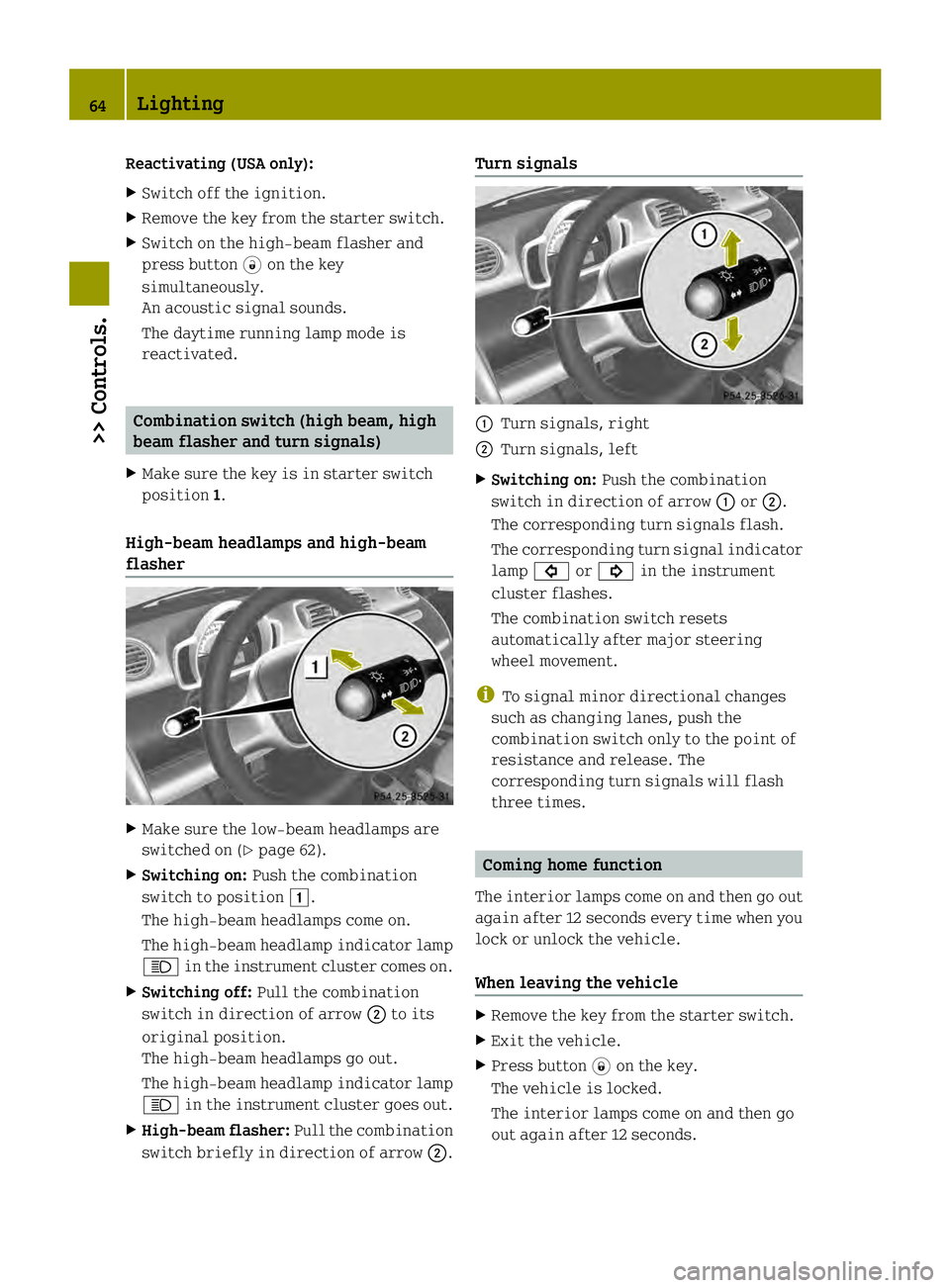
Reactivating (USA only):
X
Switch off the ignition.
X Remove the key from the starter switch.
X Switch on the high-beam flasher and
press button 0006on the key
simultaneously.
An acoustic signal sounds.
The daytime running lamp mode is
reactivated. Combination switch (high beam, high
beam flasher and turn signals)
X Make sure the key is in starter switch
position 1.
High‑beam headlamps and high-beam
flasher X
Make sure the low‑beam headlamps are
switched on (Y page 62).
X Switching on: Push the combination
switch to position 0004.
The high‑beam headlamps come on.
The high‑beam headlamp indicator lamp
0001 in the instrument cluster comes on.
X Switching off: Pull the combination
switch in direction of arrow 0003to its
original position.
The high‑beam headlamps go out.
The high‑beam headlamp indicator lamp
0001 in the instrument cluster goes out.
X High-beam flasher: Pull the combination
switch briefly in direction of arrow 0003.Turn signals
0002
Turn signals, right
0003 Turn signals, left
X Switching on: Push the combination
switch in direction of arrow 0002or0003.
The corresponding turn signals flash.
The corresponding turn signal indicator
lamp 0003 or0002 in the instrument
cluster flashes.
The combination switch resets
automatically after major steering
wheel movement.
i To signal minor directional changes
such as changing lanes, push the
combination switch only to the point of
resistance and release. The
corresponding turn signals will flash
three times. Coming home function
The interior lamps come on and then go out
again after 12 seconds every time when you
lock or unlock the vehicle.
When leaving the vehicle X
Remove the key from the starter switch.
X Exit the vehicle.
X Press button 0004on the key.
The vehicle is locked.
The interior lamps come on and then go
out again after 12 seconds. 64
Lighting>> Controls.
Page 67 of 218

When returning to the vehicle
X
Press button 0006on the key either once or
twice.
The vehicle is either selectively or
globally unlocked.
The interior lamps come on and then go
out again after 12 seconds. Ambient lighting*
The ambient lighting illuminates the
vehicle interior with 6 LEDs when the low-
beam headlamps are switched on. The LEDs
can be dimmed.
The LEDS are located
R in the overhead control panel
R in the door pockets, driver’s and
passenger side
R in the storage trays to the left and right
of the steering wheel
In addition to the ambient lighting, the
footwells on the driver’s and passenger
side are also illuminated by separate
lamps.
i When you open a door, the interior
lighting comes on and the brightness of
lamps in the footwells increases. X
Make sure the key is in starter switch
position 1.
X Switch on the parking lamps.
X To brighten or dim ambient lighting:
Press button 0002on the instrument cluster repeatedly until the desired setting is
reached.
The current setting is stored.
i When adjusting the ambient lighting,
the illumination level for instrument
cluster is also changed (Y page 80). Front fog lamps
G
WARNING
Vehicles with rain-light sensor*:
In low ambient lighting or foggy
conditions, only switch from position
0002 to0002 with the vehicle at a
standstill in a safe location. Switching
from 0002 to0002 will briefly switch off
the headlamps. Doing so while driving in
low ambient lighting conditions may result
in an accident.
i Fog lamps will operat ewith the parking
lamps and/or the low‑beam headlamps on.
Fog lamps should only be used in
conjunction with low‑beam headlamps.
Consult your State or Province Motor
Vehicle Regulation sregarding
permissible lamp operation.
i Vehicle with rain-light sensor*:
Fog lamps cannot be switched on manually
with the exterior lamp switch in
position 0002. To switch on the fog
lamps, turn the exterior lamp switch to
position 0002first. Lighting
65>> Controls.
* optional Z
Page 77 of 218

Driving
i The vehicle has acrawler function. The
vehicle moves forward when the brake
pedal is released.
X Depress the brake pedal.
X Move the gear selector lever to drive
position D.
D appears in the transmission position
indicator.
X Release the brake pedal.
The vehicle moves forward.
X Depress the accelerator pedal smoothly.
The vehicle accelerates. Reversing the vehicle
! Shift the transmission into reverse
gear Ronly when the vehicle is stopped
in order to avoid damaging the
transmission.
You can drive in reverse gear at a speed
of up to 9 mph (15 km/h).
i Das Fahrzeug verfügt über eine
Kriechfunktion. Bei Lösen des
Bremspedals fährt das Fahrzeug an.
X Depress the brake pedal.
X Move the gear selector lever to reverse
gear R.
R appears in the transmission position
indicator.
X Release the brake pedal.
Das Fahrzeug fährt an.
X Gleichmäßig Gas geben.
Das Fahrzeug beschleunigt. Parking
G
WARNING
With the drive system inactive, there is no
power assistance for the brake and steering
systems. In this case, it is important to
keep in mind that a considerably higher
degree of effort is necessary to brake and steer the vehicle
.Adapt your driving
accordingly. G
WARNING
Vehicle movement can cause serious
personal injury. Therefore, always do the
following before exiting and leaving the
vehicle:
R Keep right foot on the brake pedal.
R Engage the parking brake.
R Move the gear selector lever to park
position P.
R Slowly release the brake pedal.
R When parked on an incline, always turn
the front wheels towards the curb.
R Turn the key to starter switch position 0
and remove the key from the starter
switch.
R Take the key with you and lock the vehicle
when leaving.
X Properly stop and park the vehicle.
X Depress the brake pedal.
X Engage the parking brake (Y page 75).
When the ignition is switched on, the
brake warning lamp 0002(USA only) or
0001 (Canada only) in the instrument
cluster comes on.
X Release the brake pedal.
Parking brake The parking brake serves to secure the
vehicle against rolling away when it is
stationary or parked.
G
WARNING
Engaging the parking brake while the
vehicle is in motion can cause the rear
wheels to lock up. You could lose control of
the vehicle and cause an accident. In
addition, the vehicle’s brake lights do not
light up when the parking brake is engaged. Driving and parking
75>> Controls. Z
Page 78 of 218

X
Releasing: Depress the brake pedal.
X Pull up slightly on parking brake
lever 0003and press release button 0002.
X Push parking brake lever 0003down as far
as it will go.
When the ignition is switched on, the
brake warning lamp 0002(USA only) or
0001 (Canada only) in the instrument
cluster goes out.
X Engaging: Pull up parking brake
lever 0003firmly.
When the ignition is switched on, the
brake warning lamp 0002(USA only) or
0001 (Canada only) in the instrument
cluster comes on. G
WARNING
Getting out of your vehicle with the
transmission not fully engaged in park
position Pis dangerous. When the drive
system is switched off and the brakes are
released, the vehicle can be moved freely
with the gear selector lever in all
positions except park position P. Also,
when parked on an incline, park position
P alone may not prevent your vehicle from
moving, possibly hitting people or
objects.
Always engage the parking brake in
addition to shifting to park position P.
When parked on an incline, always turn the
front wheels towards the curb. G
WARNING
When leaving the vehicle, always remove the
key from the starter switch, take it with
you, and lock the vehicle. Do not leave
children unattended in the vehicle, or with
access to an unlocked vehicle. Children
could release the parking brake and/or
move the gear selector lever from park
position P, either of which could result in
an accident and/or serious personal
injury.
Brake pedal The brake pedal has two brake circuits
independent of each other. When the
ignition is switched on, a brake servo is
used during braking to increase pedal
force.
G
WARNING
Make sure absolutely no objects are
obstructing the pedals’ range of motion.
Keep the driver’s footwell clear of all
obstacles. If there are any floormats* or
carpets in the footwell, make sure the
pedals still have sufficient clearance.
During sudden acceleration or braking
maneuvers, the objects could get caught
between or beneath the pedals and restrict
your ability to brake or accelerate. This
could lead to accidents and/or injury. G
WARNING
Considerably more effort will be required
to apply the brakes if
R the brake servo has failed
R a brake circuit has failed
R the ignition is switched off, e.g. for
towing the vehicle
The braking distance is likewise greater.
Make sure the drive system is active
whenever the vehicle is rolling. Have the
brake system repaired at an authorized
electric drive smart center, if there is a
fault in the brake system. 76
Driving and parking>> Controls.
* optional