battery SMART FORTWO COUPE 2013 Owner's Manual
[x] Cancel search | Manufacturer: SMART, Model Year: 2013, Model line: FORTWO COUPE, Model: SMART FORTWO COUPE 2013Pages: 218, PDF Size: 2.69 MB
Page 88 of 218
Odometer menu appears in the
multifunction display.
X To switch between submenus: Press the OK
button on the control lever briefly.
X To reset the trip odometer: Select the
trip odometer display.
X Press button 0029on the instrument cluster
until the trip odometer is reset to 0
(Y page 21).
If the remaining cruise range of the charge
level of the high-voltage battery has
dropped below 10 %, Low Battery is
displayed on position 002B.Start menu
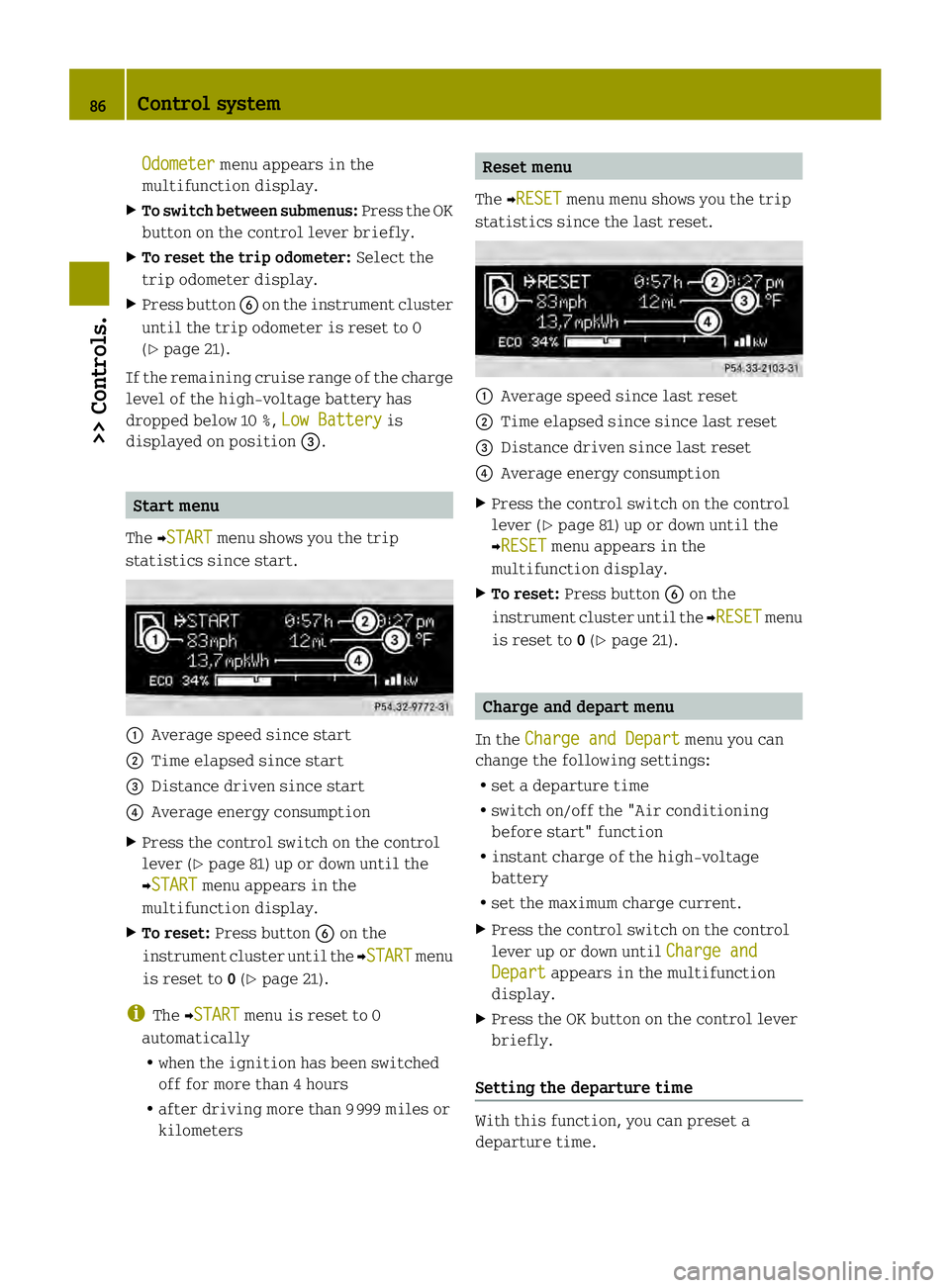
The 0001START menu shows you the trip
statistics since start. 0002
Average speed since start
0003 Time elapsed since start
002B Distance driven since start
002A Average energy consumption
X Press the control switch on the control
lever (Y page 81) up or down until the
0001START menu appears in the
multifunction display.
X To reset: Press button 0029on the
instrument cluster until the 0001START menu
is reset to 0(Y page 21).
i The 0001START menu is reset to 0
automatically
R when the ignition has been switched
off for more than 4 hours
R after driving more than 9999 miles or
kilometers Reset menu
The 0001RESET menu menu shows you the trip
statistics since the last reset. 0002
Average speed since last reset
0003 Time elapsed since since last reset
002B Distance driven since last reset
002A Average energy consumption
X Press the control switch on the control
lever (Y page 81) up or down until the
0001RESET menu appears in the
multifunction display.
X To reset: Press button 0029on the
instrument cluster until the 0001RESET menu
is reset to 0(Y page 21). Charge and depart menu
In the Charge and Depart menu you can
change the following settings:
R set a departure time
R switch on/off the "Air conditioning
before start" function
R instant charge of the high‑voltage
battery
R set the maximum charge current.
X Press the control switch on the control
lever up or down until Charge and Depart appears in the multifunction
display.
X Press the OK button on the control lever
briefly.
Setting the departure time With this function, you can preset a
departure time.86
Control system>> Controls.
Page 89 of 218

This is useful:
R
if you wish to cool the interior of the
vehicle before driving
R if you wish to charge the vehicle at a
charging station/wallbox at the most
inexpensive electricity rate
With the "Air conditioning before start"
function, the vehicle interior is cooled
prior to a desired departure time.
Prerequisites:
R The doors and tailgate are closed.
R The charging cable for the high‑voltage
battery is connected to a power source
and inserted into the vehicle's power
socket.
R The high‑voltage battery has a
sufficient charge.
The maximum duration of "Air
conditioning before start" is 30 minutes.
Set the air distribution of your vehicle as
follows so that the "Air conditioning
before start" function has the greatest
effect:
R in summer, to the center and side vents
R in winter, onto the windshield and side
windows
Information on air distribution can be
found on (Y page 98).
The setting of the airflow regulator has no
influence on the "Air conditioning before
start" function.
i If the programmed time is too short, the
high‑voltage battery cannot be
completely charged. After setting the
departure time, the maximum charge
level which can be reached is then shown.
i If the high‑voltage battery is not
sufficiently charged and the "Air
conditioning before start" function is
activated, the high‑voltage battery is
charged first. When acharge level of at
least 20 % has been reached, the "Air
conditioning before start" function is
activated. This function then has priority over the charging of the
high‑voltage battery.
Activating the set departure time X
Press and hold the control switch on the
control lever up or down until the display
of the last set departure time 0002appears
in the multifunction display. X
Briefl ypress the OK button on the control
lever.
The departure time is activated 0003. The
setting for the "Air conditioning before
start" function 002Bis stored.
Changing the set departure time
X Press and hold the control switch on the
control lever up or down until the
Overwrite menu appears in the
multifunction display.
X Briefly press the OK button on the control
lever.
X If the 12-hour mode is set:
press and hold the control switch on the
control lever up or down until the
desired mode (am oder
pm ) is selected.
X Briefly press the OK button on the control
lever.
X Press and hold the control switch on the
control lever up or down until the
desired hour is selected. Control system
87>> Controls. Z
Page 90 of 218

X
Briefly press the OK button on the control
lever.
X Press and hold the control switch on the
control lever up or down until the "Air
conditioning before start" function is
activated or deactivated.
X Briefly press the OK button on the control
lever.
X Press and hold the control switch on the
control lever up or down until the "Air
conditioning before start" function is
activated or deactivated.
X Briefly press the OK button on the control
lever.
The new departure time is stored and
activated.
The "Air conditioning before start"
function is activated or deactivated.
Starting the charging process of the
high‑voltage battery immediately This function allows you to start the
charging process immediately. The
charging process begins as soon as the
charging cable is connected.
i The charging process also begins when
you insert the charging cable into the
vehicle's power socket. However, this is
only the case if you have not made any
departure time settings.
Information on the chargin gprocess can
be found on (Y page 112).
X Press and hold the control switch on the
control lever up or down until the
Instant Charge menu appears in the
multifunction display.
X Briefly press the OK button on the control
lever.
The charging process is started as soon
as the charging cable is connected.
i When you call up the Instant Chargemenu, the "Air conditioning before
start" function is not available. Setting the maximum charge current G
WARNING
When connected to a power supply socket, a
high electrical load during the charging
process can lead to overheating of the
external power supply. There is a risk of
fire.
Find out about the maximum permissible
current load of the external power supply
socket for the respective country at an
authorized electric drive smart center.
Check the maximum permissible charge
current on site before you begin the
charging process. Contact an authorized
electric drive smart center should you
require assistance. If necessary, adjust
the settings of your vehicle.
You can limit the charge current of the
high‑voltage battery. This can protect the
power supply from overloading. You can set
the limit either on the control unit of the
charging cable or via the control system.
The preset standard value is "Max". This
corresponds to the maximum available
charge current of the power supply.
Check the maximum permissible charge
current for the respective power supply
socket before charging the high‑voltage
battery.
The following values are available for
selection: 8 A, 10 A, 12 A, Max. The last value
set remains stored until a chang eis made.
X Press and hold the control switch on the
control lever up or down until the
Charge Current menu appears in the
multifunction display.
X Briefly press the OK button on the control
lever.
X Press and hold the control switch on the
control lever up or down until the
desired amperage is selected.
X Briefly press the OK button on the control
lever.
The selected amperage is set. 88
Control system>> Controls.
Page 91 of 218

i
You can also set the maximum charge
current via the control element on the
charging cable (Y page 113).
If differing values are set on the
charging cable and the control system,
the high‑voltage battery is charged
using the lowest value.
i If the vehicle needs more time to charge
the high‑voltage battery than usual,
check the settings of the maximum
permissible charge current. Messages menu
The Messages menu stores messages that
you can call up.
i When no messages have been stored, the
Messages menu is not displayed.
X
Press the control switch on the control
lever (Y page 81) up or down until the
Messages menu appears in the
multifunction display.
The number of stored messages is 0002
displayed
X Press the OK button on the control lever
briefly.
The first stored message appears.
X To scroll through messages: Press the OK
button on the control lever briefly.
For more information on display messages,
see (Y page 155).
Maintenance service interval display The maintenance service interval display
will notify you when the next maintenance
service is due and what type of maintenance
service is required. Example:
R
0004 Main Service in XXX mi R
0004 Main Service in XX Days X
To confirm: Press the OK button on the
control lever briefly.
The mesage is stored.
When the due date for the maintenance
service has been has been passed, the
number of miles (kilometers) or days since
are preceeded by a minus sign.
! Failure to have the maintenance
service performed at the designated
times/mileage, may result in vehicle
damage that is not covered by the smart
Limited Warranty. Settings menu
In the Settings menu, you can select
individual settings for your vehicle.
The following functions are available:
R Setting the language
R Setting the temperature unit
R Setting the distance and speed unit
X Press the control switch on the control
lever (Y page 81) up or down until the
Settings menu appears in the
multifunction display.
X Press the OK button on the control lever
briefly.
Setting the language The following languages are available:
R
German
R US English
R UK English
R French
R Italian
R Spanish Control system
89>> Controls. Z
Page 97 of 218

could cause an accident and/or serious
injury to you and others.
X Press RES/+ button 0003briefly.
The cruise control resumes the
previously set speed.
i The last set speed stored in memory is
deleted when the drive system is
switched off.
Changing the set speed You must have set a speed prior to
increasing or decreasing the current
speed.
i
Depressing the accelerator pedal does
not deactivate the cruise control. After
a brief acceleration (e.g. for passing),
the cruise control will resume the last
set speed.
Continuous adjustment
X Press and hold RES/+ button 0003to
increase the speed.
or
X Press and hold SET/− 002Bto decrease the
speed.
X Press and hold the respective button
until the desired speed is reached.
X Release the respective button.
The new speed is stored.
Adjustment in 1 mph (Canada 1 km/h)
increments
X Press RES/+ button 0003briefly to increase
the speed.
or
X Press SET/− 002Bbriefly to decrease the
speed.
The new speed is stored after releasing the
respective button. Air conditioning with climatec
ontrol Notes
G
WARNING
Follow the recommended settings for
heating and cooling given on the following
pages .Otherwise the windows could fog up,
impairing visibility and endangering you
and others.
The air conditionin gimproves the leve lof
comfort when driving at high outside
temperatures by cooling and
dehumidifying the air.
Nearly all dust particles, pollutants, are
filtered out by an integrated particle
filter before outside air enters the
passenger compartment through the air
distribution system .It also operates when
the air conditioning is switched off and
you have switched on the blower.
The dehumidification of the air by the air
conditioner prevents the windows from
misting up when the outside air humidity
is high.
This effect can also be used to defrost the
windows. For this, make sure, in addition
to the air conditioner, that the heater is
on the maximum setting.
The air conditioner only works when:
R the ignition is switched on
R the blower is switched on
R the driver's door is closed
Maximum effectiveness is achieved if you
drive with the windows closed.
If the operating temperature of the
high‑voltage battery is too high, the
high‑voltage battery is cooled by the air
conditioner. When the air conditioner
switches on, the cooling output in the
vehicle's interior is reduced as a result.
The temperature in the vehicle's interior
may rise briefly.
If the air conditioner is not switched on,
the compressor of the air conditioner and Air conditioning with climate control
95>> Controls. Z
Page 98 of 218

the vehicle's cooling fan are switched on
automatically. This cools the high‑voltage
battery but not the vehicle's interior .When
the high‑voltage battery reaches the
nominal temperature again, the air
conditioner switches off automatically.
i The range of the vehicle is decreased
when the air conditioner is switched on.
i In warmer weather, ventilate the
passenger compartment for a short
period of time before utilizing the air
conditioning.
Further information on the "Air
conditioning before start" function can be
found on (Y page 86).96
Air conditioning with climate control>> Controls.
Page 101 of 218

X
Turn air distribution control 0029to the
desired symbol.
The air distribution is controlled
depending on the position of the air
distribution control. Adjusting air volume
The air volume is controlled depending on
the blower speed selected. Five blower
speeds are available. 0
Off
1
Slow
2
Medium
3
High/defrosting
4
Maximum
X
Increasing or decreasing: Push air
volume control 0002up or down. Defrosting
G
WARNING
Never drive with iced up or fogged
windows. Visibility will be significantly
impaired. Impaired visibility could
endanger yourself and others. This may
prevent you from observing the traffic
conditions, thereby causing an accident.
The best defrosting of windows is achieved
if the ice is completely removed from the
windows manually with an ice scraper
before driving off.
Also use the "Air conditioning before
start" function (Y page 86).
Control panel (Y page 97). X
Switching on: Push air volume
control 0002to level 3.
X Turn air distribution control 0029to
position 0006.
X Push temperature control 0028fully up. Rear window defroster
The rear window defroster serves to de-ice
the rear window quickly and clear the view
if the rear window is fogged.
The rear window defroster uses a large
amount of power. To keep battery drain to a
minimum, switch off the rear window
defroster as soon as the rear window is
clear. The rear window defroster is
automatically deactivated after
approximately 10 minutes of operation. X
Make sure the key is in starter switch
position 1.
X Switching on: Press rear window
defroster switch 0002.
The indicator lamp in rear window
defroster switch 0002comes on.
X Switching off: Press rear window
defroster switch 0002once more.
The indicator lamp in rear window
defroster switch 0002goes out. Air recirculation mode
Switch to air recirculation mode to prevent
unpleasant odors from entering the vehicle Air conditioning with climate control
99>> Controls. Z
Page 108 of 218
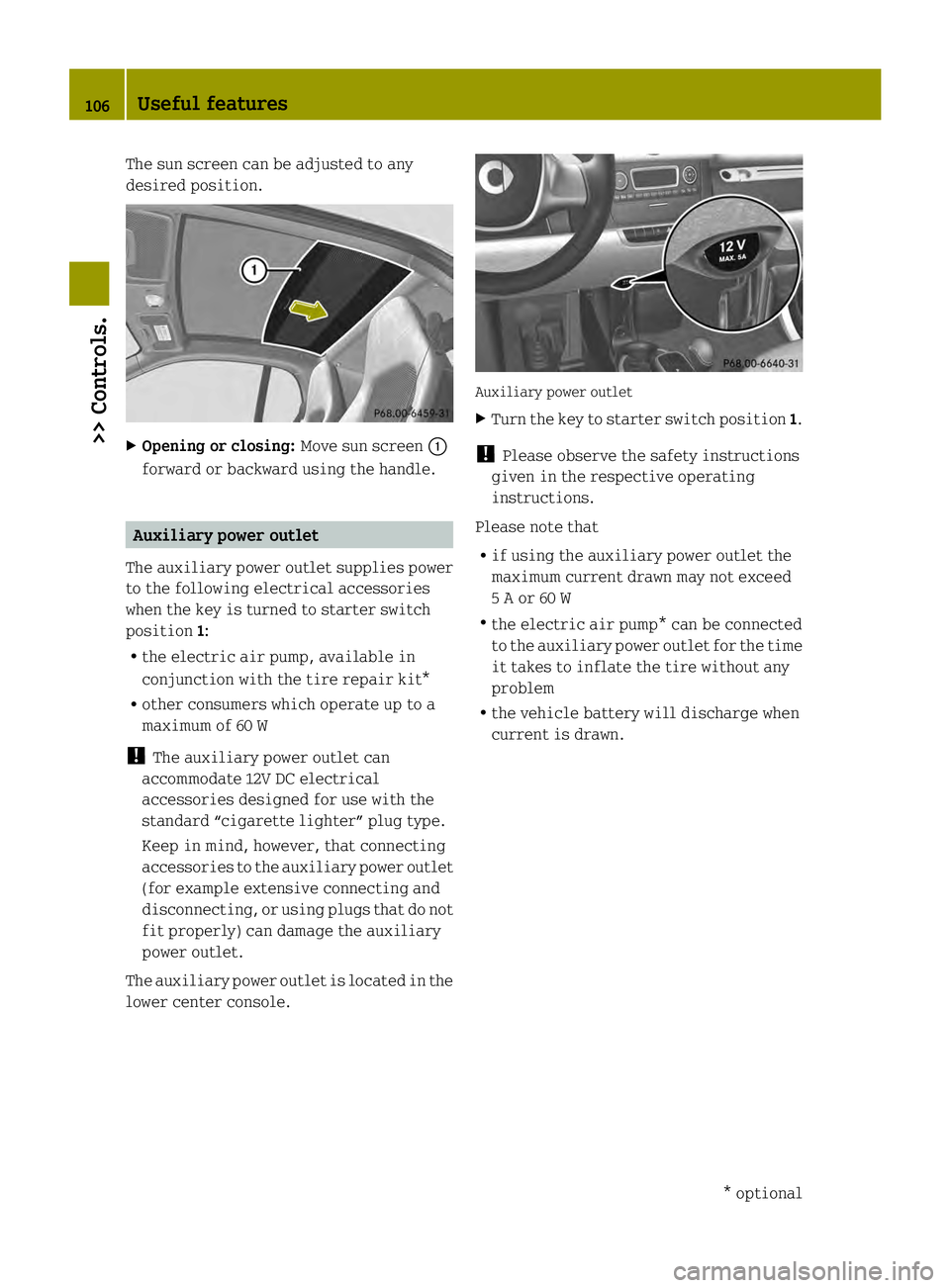
The sun screen can be adjusted to any
desired position.
X
Opening or closing: Move sun screen0002
forward or backward using the handle. Auxiliary power outlet
The auxiliary power outlet supplies power
to the following electrical accessories
when the key is turned to starter switch
position 1:
R the electric air pump, available in
conjunction with the tire repair kit*
R other consumers which operate up to a
maximum of 60 W
! The auxiliary power outlet can
accommodate 12V DC electrical
accessories designed for use with the
standard “cigarette lighter” plug type.
Keep in mind, however, that connecting
accessories to the auxiliary power outlet
(for example extensive connecting and
disconnecting, or using plugs that do not
fit properly) can damage the auxiliary
power outlet.
The auxiliary power outlet is located in the
lower center console. Auxiliary power outlet
X
Turn the key to starter switch position 1.
! Please observe the safety instructions
given in the respective operating
instructions.
Please note that
R if using the auxiliary power outlet the
maximum current drawn may not exceed
5 A or 60 W
R the electric air pump* can be connected
to the auxiliary power outlet for the time
it takes to inflate the tire without any
problem
R the vehicle battery will discharge when
current is drawn. 106
Useful features>> Controls.
* optional
Page 109 of 218

>> Operation.High-voltage battery
........................108
Front compartment ............................ 117
Tires and wheel s.............................. 122
Winte rdriving ................................ 140
Driving instructions ........................141
Driving abroad ................................ 146
Vehicle care ................................... 147
Page 110 of 218

High-voltage battery
Introduction
The components of the drive system are
indicated by yellow warning labels to make
you aware of high voltage.
High‑voltage cablesa
re orange‑colored.G
WARNING
The drive system is subject to high
voltages.
You may be seriously or even fatally injured
if you:
R tamper with components or high-voltage
cables in the drive system
R touch components or high-voltage cables
in the drive system on avehicle which has
been involved in an accident
R touch damaged drive system components
Do not remove any drive system component
covers which are marked with a warning
sticker. Do not tamper with components or
orange high-voltage drive system cables. G
WARNING
The high‑voltage battery of the drive
system is located under the vehicle’s
underbody. When the pressure inside the
high‑voltage battery exceeds a certain
value, for example in case of avehicle fire,
inflammable gas will escape via a duct. The
inflammable gas escapes to an area under
the vehicle. This prevents the high‑voltage
battery from exploding.
Stay away from this area of the vehicle. The drive system is powered by a
high‑voltage battery. The high‑voltage
battery stores and releases the energy
required for operation of the electric
motor.
The electric motor uses the energy that is
stored in the high‑voltage battery when
driving off and when accelerating.
When rolling, kinetic energy is converted
into electrical energy by energy recovery
and stored in the high‑voltage battery.
The range of the vehicle is reduced when
consumers are switched on, e.g. climate
control.
The high‑voltage battery can be charged in
a voltage range from 100 V to 240 V.
The high‑voltage battery can be charged
R through energy recovery while the
vehicle is rolling or when braking
R Level 1 charging - 110 V / 120 V -
A travel cord will be supplied with the
vehicle. This charging cable can be
plugged into commonly available
110 V / 120 V, 15 A power sources. This
charging method will take longer to
charge your vehicle than adedicated
level 2 charging source. Therefore it is
not recommended as the primary method
of charging.
R Level 2 charging - 220 V / 240 V -
For the fastest possible charging time, a
dedicated 220 V /240 V, 20 A circuit is
required. Local electrical code can vary
from town to town. Therefore, it is highly
recommended that this service is
professionally installed. This service
should be installed in a dry area with
easy access to the passenger side of the
vehicle. You will need to obtain avehicle
charge connector that can be wired
directly to or plugged into the dedicated
220 V / 240 V service. Charge connectors
will be available for purchase through
your authorized electric drive smart
center.
R Level 2 charging - Charging station 108
High-voltage battery>> Operation.