brake SMART FORTWO COUPE 2013 Owner's Manual
[x] Cancel search | Manufacturer: SMART, Model Year: 2013, Model line: FORTWO COUPE, Model: SMART FORTWO COUPE 2013Pages: 218, PDF Size: 2.69 MB
Page 79 of 218

If a brake circuit has failed (Y
page 160),
you must depress brake pedal 0002further
down to achieve the same effect and the
braking distance is increased.
i The brake servo will only function with
the ignition switched on. Switching off the drive system
G
WARNING
Do not turn off the drive system before the
vehicle has come to a complete stop. With
the drive system not running, there is no
power assistance for the brake and steering
systems. In this case, it is important to
keep in mind that a considerably higher
degree of effort is necessary to brake and
steer the vehicle.
X Depress the brake pedal.
X Move the gear selector lever to park
position P.
The transmission position indicator
should be on P !
Always engage the parking brake in
addition to shifting to park position P.
X Release the brake pedal.
X Turn the key to starter switch position
0.
X Remove the key from the starter switch.
The electronic immobilizer is
activated. Transmission
Shifting procedure
Gearshift pattern for transmission
0010
Park position
0009
Reverse gear
000B
Neutral position
000F
Drive position
Select a gear:
X
Switch on the ignition.
X Depress the brake pedal.
X Move the gear selector lever to the
desired position. Steering wheel paddle shifters (for
recuperation)*
G
WARNING
The operating condition of the high-
voltage battery (e.g. not yet at normal
operating temperature or fully charged)
influences the braking effect of the
electric motor.
In overrun or braking mode, the motor's
braking effect may therefore be reduced or
may not be present at all.
As a result of the reduced engine braking
effect, you may cause an accident and
injure yourself or others. Transmission
77>> Controls.
* optional Z
Page 80 of 218

Compensate for the reduced engine braking
effect by pressing the brake pedal
accordingly, as required.
Using the steering wheel paddle shifters,
you can increase or decrease the
recuperation in overrun phases.
Recuperation means that energy is
recovered while driving - the electric
motor functions as a generator. The kinetic
energy of the vehicle is converted into
electric power and stored in the high-
voltage battery. The more the recuperation
increases, the more the vehicle will be
decelerated.
In overrun phases, there are three levels of
recuperation:
R no recuperation (level 0, coasting)
R mid-level recuperation (level 1)
R high-level recuperation (level 2)
The amount of recuperation in overrun
mode is displayed in the power gauge
(Y page 79).
When you switch on the ignition, level 1 is
automatically preset. X
Decrease recuperation: Pull left
steering wheel paddle shifter 0002.
X Increase recuperation: Pull right
steering wheel paddle shifter 0003.Use the different levels 0 to 2 for
conditions as described below: Level 0 Driving without frequent
breaking. No sharp bends on
the road ahead.
Maximum kinetic energy
remains for the vehicle.
Level 1 Normal driving, standard
setting.
Level 2 Sporty driving.
The break pedal has to be
depressed less often, as the
deceleration due to
recuperation is higher than
in level 1.
The energy efficiency is
substantially higher than if
the vehicle is decelerated by
depressing the brake pedal.
At levels
1and 2the vehicle can be
steplessly decelerated by depressing the
brake pedal.
i Under certain circumstances, in
overrun phases recuperation does not
work as described above. This may be e. g
the case if the high-voltage battery is
already fully charged or has not reached
operating temperature. Driving tips
Driving on uphill grades G
WARNING
The hill-start assist system is not
designed to function as a parking brake and
does not prevent the vehicle from moving
when parked on an incline.
Always engage the parking brake in
addition to shifting to park position P.78
Transmission>> Controls.
Page 81 of 218

!
When the hill‑start assist system stops
braking the vehicle, it can roll
backwards.
If you open the driver’s door, the
hill‑start assist system is deactivated
and a warning signal sounds.
Your vehicle has a hill‑start assist system.
On uphill grades the hill‑start assist
system maintains the pressure in the brake
system for approximately one second after
you have released the brake pedal.
Therefore, you can start off smoothly
without the vehicle moving immediately
after releasing the brake pedal.
X Release the brake pedal.
X Apply sufficient pressure to the
accelerator pedal to drive off.
On uphill grades with higher inclination,
the hill-start assist system will release
the pressure in the brake system after
approximately two seconds. A warning
signal sounds and the transmission
position indicator shows a flashing N in
order to warn you of the vehicle rolling
backwards.
X Press the brake pedal.
X Release the brake pedal.
X Apply sufficient pressure to the
accelerator pedal to drive off.
i The hill‑start assist system is inactive
if you start off with the parking brake
engaged. Instrument cluster
Charge level and power gauges
0002
Charge level gauge
0003 Power gauge
The gauges can be turned by approximately
90°.
The illumination for both gauges comes on
when you switch on the ignition and the
exterior lighting.
Charge level gauge !
Do not hang any objects on the charge
level gauge.
This could cause the charge level gauge
to be torn from its mountings and be
damaged.
The charge level gauge 0002displays charge
status of the high-voltage battery as a
percentage.
When the High-voltage Battery at Reserve Level message appears in the
multifunction display while the drive
system is in operation, the high-voltage
battery has reached the reserve level.
i If the charge level of the high-voltage
battery has dropped below 20 %, recharge
it at:
R an AC power socket (Y page 112)
R a private wall box (Y page 112)
R a public charging station
(Y page 114) Instrument cluster
79>> Controls. Z
Page 82 of 218

Power gauge
G
WARNING
The operating condition of the high-
voltage battery (e.g. not yet at normal
operating temperature or fully charged)
influences the braking effect of the
electric motor.
In overrun or braking mode, the motor's
braking effect may therefore be reduced or
may not be present at all.
As a result of the reduced engine braking
effect, you may cause an accident and
injure yourself or others.
Compensate for the reduced engine braking
effect by pressing the brake pedal
accordingly, as required.
! Do not hang any objects on the power
gauge.
This could cause the power gauge to be
torn from its mountings and be damaged.
Power gauge 0003contains two segments:
R Section right of 0
Power gauge 0003indicates the current
power that the drive system delivers to
the rear wheels. 100 % correspond to
55 kW peak power.
R Section left of 0
When you release the accelerator pedal
or when you depress the brake pedal, the
electric motor operates as a generator.
Electric current is produced and stored
in the high-voltage battery. As long as
the high-voltage battery is being
charged, the electric motor simulates an
engine brake.
When the pointer of power gauge 0003is in
the "OFF “position, the vehicle is not ready
to drive, because:
R the drive system has not been started
R the gear selector lever has not been
moved to position Nor Pwhen starting
the drive system R
the charging cable is connected to the
vehicle
R there is not enough power from the high-
voltage battery
R a problem occured in the high-voltage
system
After the drive system has been started, the
pointer of power gauge 0003moves to
position 0.READY appears in the
multifunction display (Y page 82). The
vehicle is ready to drive. Adjusting instrument cluster
illumination
You can adjust the illumination of
R the switches and dials in the instrument
cluster
R the radio
R the climate control panel
R the charge level and power gauges
Five illumination levels are available. X
Make sure the key is in starter switch
position 1.
X Switch on the parking lamps.
X To brighten or dim illumination: Press
button 0002on the instrument cluster
repeatedly until the desired setting is
reached.
The current setting is stored. 80
Instrument cluster>> Controls.
Page 84 of 218

Display Function
N
Neutral
D
Drive
N (flashes)
There is a parking lock
malfunction.
X
Move the gear selector
leve rslowly from
position Pto position R
and back to position P.
If Nremains flashing in
the multifunctio ndisplay:
X Move the gear selector
lever to position P. When
leaving the vehicle,
apply the parking brake
to secure the vehicle
from rolling away.
X Contact an authorized
electric drive smart
center. 0 X
Move the gear selector
lever to park position P
or neutral position N.
X Turn the key to starter
switch position 2
(Y page 55) and hold it in
position until READY appears in the
multifunction display
(Y
page 82). READY indicator
READY appears for two seconds in the
multifunction display, if: R
the key is turned to starter switch
position 2
R there is no malfunction in the drive
system
The vehicle is ready to drive. Maximum available power
G
WARNING
When the indicator for the maximum
available power is not at its maximal
range, the power output is reduced
noticeably. Adapt your speed and driving
accordingly. Otherwise, you could cause an
accident. Exercise particular care when
passing or accelerating. The indicator for the maximum available
power of the drive system contains three
segments
0002. The number of dark segments
indicates power that is currently
available.
R Three segments: maximum power is
available.
R Two segments: Less than 66 % amount of
power is available.
R One segment: Less than 33 % amount of
power is available.
Under normal operating conditions the
indicator for the maximum power is at the
maximum range 0002.
The available amount of power can vary
from the the maximum range due to:
R very high or low outside temperatures
R very high power demand over along time
period
R very low charge level of the high-voltage
battery 82
Control system>> Controls.
Page 95 of 218
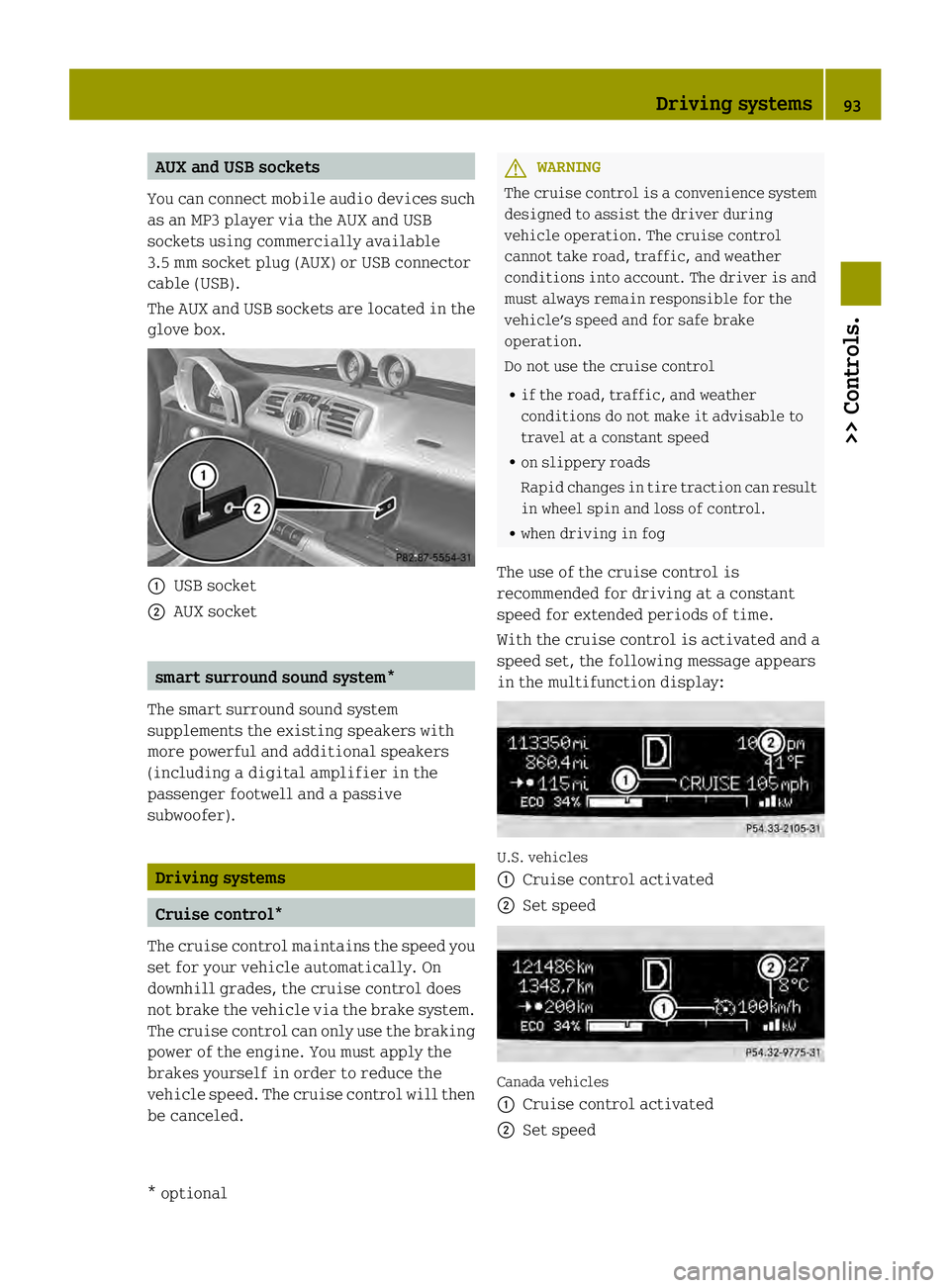
AUX and USB sockets
You can connect mobile audio devices such
as an MP3 player via the AUX and USB
sockets using commercially available
3.5 mm socket plug (AUX) or USB connector
cable (USB).
The AUX and USB sockets are located in the
glove box. 0002
USB socket
0003 AUX socket smart surround sound system*
The smart surround sound system
supplements the existing speakers with
more powerful and additional speakers
(including a digital amplifier in the
passenger footwell and a passive
subwoofer). Driving systems
Cruise control*
The cruise control maintains the speed you
set for your vehicle automatically. On
downhill grades, the cruise control does
not brake the vehicle via the brake system.
The cruise control can only use the braking
power of the engine. You must apply the
brakes yourself in order to reduce the
vehicle speed. The cruise control will then
be canceled. G
WARNING
The cruise control is aconvenience system
designed to assist the driver during
vehicle operation. The cruise control
cannot take road, traffic, and weather
conditions into account. The driver is and
must always remain responsible for the
vehicle’s speed and for safe brake
operation.
Do not use the cruise control
R if the road, traffic, and weather
conditions do not make it advisable to
travel at a constant speed
R on slippery roads
Rapid changes in tire traction can result
in wheel spin and loss of control.
R when driving in fog
The use of the cruise control is
recommended for driving at a constant
speed for extended periods of time.
With the cruise control is activated and a
speed set, the following message appears
in the multifunction display: U.S. vehicles
0002
Cruise control activated
0003 Set speed Canada vehicles
0002
Cruise control activated
0003 Set speed Driving systems
93>> Controls.
* optional Z
Page 96 of 218

The cruise control is operated via buttons
on the steering wheel.
0002
Activating or deactivating the cruise
control
0003 Resuming at last set speed or
increasing speed
002B Setting current or lower speed, or
decreasing speed
002A Canceling the cruise control
Activating/deactivating The cruise control must be activated before
you can set
aspeed. When you switch off the
drive system, the cruise control is
deactivated automatically.
X Press ON/OFF button 0002briefly.
The cruise control is activated.
CRUISE (USA only) or
0003(Canada only)
appears in the multifunction display.
Setting current speed You can set any speed above 20 mph
(30 km/h).
X
Accelerate the vehicle to the desired
speed.
X With the cruise control activated, press
SET/− button 002Bbriefly.
X Remove your foot from the accelerator
pedal.
The current speed is set and the vehicle
maintains that speed. USA only:
set appears in the
multifunction display to indicate that
the speed has been set.
Canada only: The set speed appears in the
multifunction display next to cruise
control symbol 0003.
i On uphill grades, the cruise control
may not be able to maintain the set speed.
Once the grade eases, the set speed will
be resumed.
On downhill grades, the cruise control
can only maintain the set speed using the
drive systems braking power. You must
apply the brakes yourself when the
vehicle does not slow down sufficiently.
This will cancel the cruise control.
Canceling cruise control When the cruise control is activated, you
can cancel it at any time and resume the set
speed later.
X Press CANCEL button 002Abriefly.
or
X Depress the brake pedal.
The cruise control is canceled.
The cruise control deactivates
automatically, when
R you depress the brake pedal
R the vehicle speed is below 20 mphh
(30 km/h)
R ESP ®
is in operation.
Resuming last set speed G
WARNING
The “Resume” function should only be
operated if the driver is fully aware of the
previously set speed and wishes to resume
this particular preset speed.
The set speed stored in memory should only
be set again if prevailing road conditions
and legal speed limits permit. Possible
acceleration or deceleration differences
arising from returning to the preset speed 94
Driving systems>> Controls.
Page 104 of 218

Coat hook on driver’s side
0002
Coat hook Storage compartments
G
WARNING
To help avoid personal injury during a
collision or sudden maneuver, exercise
care when storing objects in the vehicle.
Put luggage or cargo in the cargo
compartment if possible. Do not pile
luggage or cargo higher than the seat
backrests.
Keep compartment lids closed. This will
help to prevent stored objects from being
thrown about and injuring vehicle
occupants during
R hard braking
R a change of direction
R an accident
Do not store objects under the driver’s seat.
Objects stored under the driver’s seat can
slide forwar dinto driver’s foot well during
braking and get caught between or beneath
the pedals .This could restrict your ability
to brake or accelerate and could lead to
accidents and injury.
Coin holder The coin holder is located in front of the
gear selector lever. Example illustration (coupé)
0002
Coin holder
Door pockets The door pockets are located in the driver’s
and passenger door.
0002
Door pocket
Storage trays next to the steering wheel The storage trays are located to the left and
right of the steering wheel.
0002
Storage tray 102
Loading and storing>> Controls.
Page 116 of 218

If you leave the charging cable in the power
supply socket after charging, the set value
is used for the next charging process.
If you remove the charging cable from the
power supply socket, the value is reset to
the default value for the next charging
process.
i You can also set the maximum charge
current via the control system
(Y page 88).
If differing values are set on the
charging cable and the control system,
the high‑voltage battery is charged
using the lowest value.
Charging the high‑voltage battery X
Engage the parking brake.
X Move the gear selector lever to park
position P.
X Switch off the ignition. X
Open charge socket flap 0002.
X Remove cover 0003from the charge socket. X
Insert the charging cable into the
stationary connection, i.e. an AC power
socket.
X Insert plug 0028of the charging cable into
charge socket 002Bto the stop.
The high‑voltage battery is being
charged.
i The vehicle must not be moved during
charging.
The 0003 indicator lamp in the
instrument cluster comes on when the
ignition is switched on and the charging
cable is connected.
i The drive system and battery cooling
systems may switch on audibly during the
charging process, depending on the
temperature.
Removing the charging cable The battery is charged completely when the
indicator in the charge level gauge is at
100% (Y
page 79).
! Make sure the charging cable has been
disconnected before driving off. The
vehicle or charging cable may otherwise
be damaged.
X Press release button 002Aon cable plug
0028 and disconnect it from charge socket
002B.
X Disconnect the charging cable from the
stationary connection.
X Slip cover 0003on charge socket 002B.
X Close charge socket flap 0002. Charging at a public charging station
The payment procedure and charging
processes may differ between public
charging stations, depending on the
provider. Please make yourself familiar
with the proper procedures of the public
charging station at which you are
intending to charge your vehicle. 114
High-voltage battery>> Operation.
Page 117 of 218
Charging station without charging
communication
You must activate charging stations
without charging communication before
the charging process. This can be done with
an RFID card or a telephone call, for
example. Observe the provider's
instructions at the charging station.
Charging station with charging
communication („Plug&Charge“) You do not have to activate charging
stations with charging communication
before the charging process. This is done
by the vehicle. This function is called
"Plug & Charge". Information is exchanged
between the vehicle and the charging
station via the charging cable for
activation.
This is for:
R mutual authorization of the vehicle and
the charging station
R verification of contract data
R automatic billing of the energy costs
Electronic certificates are used here for
secure exchange of data.
If the verification of contract data is
successful, the charging process is
initiated.
i A preliminary version of the
ISO/IEC 15118 standard is used for
communication between the vehicle and
the charging station. If it is necessary
to update your vehicle, consult an
authorized electric drive smart center.
In order to use "Plug & Charge", you have to
configure the functions of your vehicle on
the "Vehicle Homepage" (Y page 110). For
this you require a "Plug & Charge"
certificate which you receive from your
power company after concluding a suitable
contract. Consult an authorized electric
drive smart center if you have problems with the configuration or have no access to
the Internet.
The charging station offers information on
the availability of electricity and costs.
This information is processed by the
vehicle and is used for an optimum
charging of the high‑voltage battery
(Y
page 117). The energy costs are
automatically calculated after the
charging process is complete.
With your existing electricity contract,
you and others who have access to your
vehicle can charge the costs to your
electricity bill. For this reason, cancel
your existing electricity contract for this
vehicle before you sell it. Delete your
"Plug & Charge" certificate by all means.
i You can delete the certificate from the
vehicle's data on the "Vehicle
Homepage". Pleas econsult an authorized
electric drive smart center if you do not
have access to the Internet.
If the charging station allows the
connected vehicle access to the Internet,
you can call up and change information
pertaining to the vehicle on the "Vehicle
Homepage" (Y page 110).
Connecting the charging cable X
Engage the parking brake.
X Move the gear selector lever to park
position P.
X Switch off the ignition.
X Open the charge socket flap.
X Remove the cover from the charge socket.
X Insert plug of the charging cable into the
charge socket to the stop.
The high‑voltage battery is being
charged.
i The vehicle must not be moved during
charging.
The 0003 indicator lamp in the
multifunction display comes on when the High-voltage battery
115>> Operation. Z