light SMART FORTWO COUPE 2013 Owner's Manual
[x] Cancel search | Manufacturer: SMART, Model Year: 2013, Model line: FORTWO COUPE, Model: SMART FORTWO COUPE 2013Pages: 218, PDF Size: 2.69 MB
Page 66 of 218
Reactivating (USA only):
X
Switch off the ignition.
X Remove the key from the starter switch.
X Switch on the high-beam flasher and
press button 0006on the key
simultaneously.
An acoustic signal sounds.
The daytime running lamp mode is
reactivated. Combination switch (high beam, high
beam flasher and turn signals)
X Make sure the key is in starter switch
position 1.
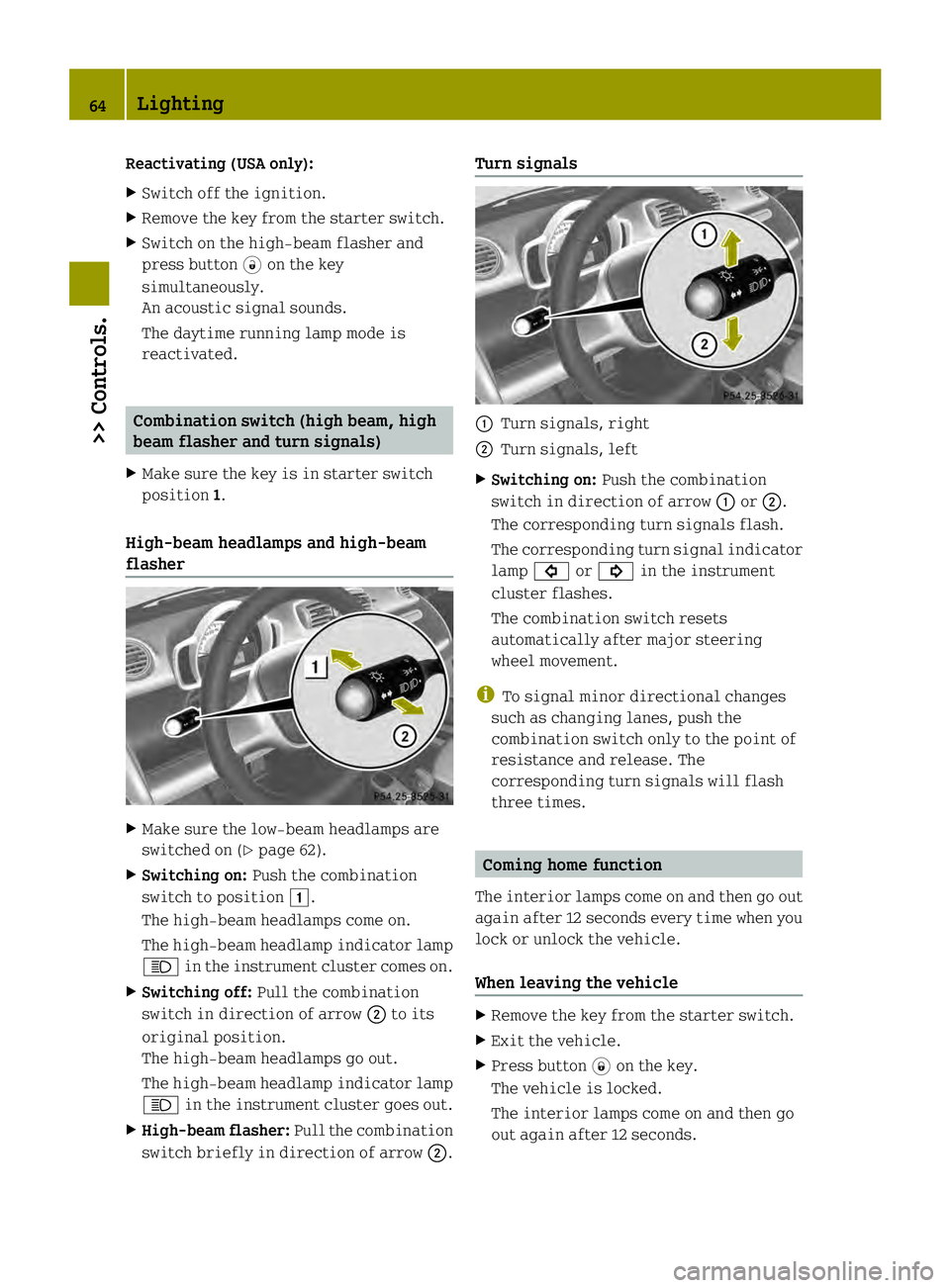
High‑beam headlamps and high-beam
flasher X
Make sure the low‑beam headlamps are
switched on (Y page 62).
X Switching on: Push the combination
switch to position 0004.
The high‑beam headlamps come on.
The high‑beam headlamp indicator lamp
0001 in the instrument cluster comes on.
X Switching off: Pull the combination
switch in direction of arrow 0003to its
original position.
The high‑beam headlamps go out.
The high‑beam headlamp indicator lamp
0001 in the instrument cluster goes out.
X High-beam flasher: Pull the combination
switch briefly in direction of arrow 0003.Turn signals
0002
Turn signals, right
0003 Turn signals, left
X Switching on: Push the combination
switch in direction of arrow 0002or0003.
The corresponding turn signals flash.
The corresponding turn signal indicator
lamp 0003 or0002 in the instrument
cluster flashes.
The combination switch resets
automatically after major steering
wheel movement.
i To signal minor directional changes
such as changing lanes, push the
combination switch only to the point of
resistance and release. The
corresponding turn signals will flash
three times. Coming home function
The interior lamps come on and then go out
again after 12 seconds every time when you
lock or unlock the vehicle.
When leaving the vehicle X
Remove the key from the starter switch.
X Exit the vehicle.
X Press button 0004on the key.
The vehicle is locked.
The interior lamps come on and then go
out again after 12 seconds. 64
Lighting>> Controls.
Page 67 of 218

When returning to the vehicle
X
Press button 0006on the key either once or
twice.
The vehicle is either selectively or
globally unlocked.
The interior lamps come on and then go
out again after 12 seconds. Ambient lighting*
The ambient lighting illuminates the
vehicle interior with 6 LEDs when the low-
beam headlamps are switched on. The LEDs
can be dimmed.
The LEDS are located
R in the overhead control panel
R in the door pockets, driver’s and
passenger side
R in the storage trays to the left and right
of the steering wheel
In addition to the ambient lighting, the
footwells on the driver’s and passenger
side are also illuminated by separate
lamps.
i When you open a door, the interior
lighting comes on and the brightness of
lamps in the footwells increases. X
Make sure the key is in starter switch
position 1.
X Switch on the parking lamps.
X To brighten or dim ambient lighting:
Press button 0002on the instrument cluster repeatedly until the desired setting is
reached.
The current setting is stored.
i When adjusting the ambient lighting,
the illumination level for instrument
cluster is also changed (Y page 80). Front fog lamps
G
WARNING
Vehicles with rain-light sensor*:
In low ambient lighting or foggy
conditions, only switch from position
0002 to0002 with the vehicle at a
standstill in a safe location. Switching
from 0002 to0002 will briefly switch off
the headlamps. Doing so while driving in
low ambient lighting conditions may result
in an accident.
i Fog lamps will operat ewith the parking
lamps and/or the low‑beam headlamps on.
Fog lamps should only be used in
conjunction with low‑beam headlamps.
Consult your State or Province Motor
Vehicle Regulation sregarding
permissible lamp operation.
i Vehicle with rain-light sensor*:
Fog lamps cannot be switched on manually
with the exterior lamp switch in
position 0002. To switch on the fog
lamps, turn the exterior lamp switch to
position 0002first. Lighting
65>> Controls.
* optional Z
Page 68 of 218

X
Make sure the parking lamps or the
low‑beam headlamps are switched on.
X Switching on: Press switch0002.
The front fog lamps come on.
The indicator lamp in the switch comes
on.
X Switching off: Press switch0002once
more.
The front fog lamps go out.
The indicator lamp in the switch goes
out. Hazard warning flasher
The hazard warning flasher can be switched
on at all times, even with the key removed
from the starter switch. X
Switching on: Press hazard warning
flasher switch 0002.
All turn signal lamps are flashing.
X Switching off: Press hazard warning
flasher switch 0002once more. Interior lighting
The interior lamp comes on for a period of
time when you open the doors, or lock or
unlock the vehicle with the key.
It goes out
R immediately after switching off the
ignition with all doors closed
R after 30 seconds if the doors are not
opened R
after 15 seconds if all doors are closed
R after 10 minutes if at least one door is
open
The rocker switch can be set to three
different positions. 0002
Interior lamp
0003 Off
002B Switching on the automatic control
002A Continuous operation
Automatic control X
Set the rocker switch to position 002B.
The interior lamp comes on for a period
of time.
Switching off X
Set the rocker switch to position 0003.
The interior lamp is permanently
switched off.
Continuous operation X
Set the rocker switch to position 002A.
The interior lamp is permanently
switched on.
! When leaving the vehicle, make sure the
interior lamp is not set to continuous
operation and none of the doors is left
open for a long period of time.
Doing otherwise could result in a
discharged battery. 66
Lighting>> Controls.
Page 69 of 218

Windshield wipers
Switching windshiel
dwipers on and off Example illustration coupé
X
Make sure the key is in starter switch
position 1.
X Switching on: Turn the wiper switch to
position 0005or0006, depending on the
intensity of the rain.
! Do not operate the windshield wipers
when the windshield is dry. Dust that
accumulates on a windshield might
scratch the glass and/or damage the
wiper blades when wiping occurs on a dry
windshield. If it is necessary to operate
the windshield wipers in dry weather
conditions, always operate the
windshield wipers with windshield
washer fluid.
! If anything blocks the windshield
wipers (leaves, snow, etc.), switch them
off immediately.
For safety reasons, stop the vehicle in a
safe location and
R -
remove the key from the starter
switch
- engage the parking brake
before attempting to remove any
blockage.
R Remove blockage.
R Turn the windshield wipers on again.
X Switching off: Turn the wiper switch to
position 0008. Intermittent wiping
Only switch on intermittent wiping under
wet weather conditions or in the presence
of precipitation.
Vehicle swith rain-ligh tsensor*: When you
select intermittent wiping, the sensor is
activated. The sensor automatically sets a
suitablew iping interval depending on the
wetness of the sensor surface.
! Vehicles with rain-light sensor*:
Do not leave windshield wipers in
intermittent setting when the vehicle is
taken to an automatic car wash or during
windshield cleaning. Windshield wipers
will operate in the presence of water
sprayed on the windshield, and
windshield wipers may be damaged as a
result.
! Vehicles with rain-light sensor*:
If you have set intermittent wiping, dirt
on the surface of the sensor or optical
effects may cause the windshield wipers
to wipe in an undesired fashion. This
could then damage the windshield wiper
blades or scratch the windshield. You
should therefore switch off the
windshield wipers when weather
conditions are dry.
X Make sure the key is in starter switch
position 1.
X Activating intermittent wiping: Turn the
wiper switch to position 0004.
After the initial wipe, pauses between
wipes are automatically controlled
depending on the vehicle speed and by the
rain-light sensor*.
X Deactivating intermittent wiping: Turn
the wiper switch to position 0008. Windshield wipers
67>> Controls.
* optional Z
Page 77 of 218

Driving
i The vehicle has acrawler function. The
vehicle moves forward when the brake
pedal is released.
X Depress the brake pedal.
X Move the gear selector lever to drive
position D.
D appears in the transmission position
indicator.
X Release the brake pedal.
The vehicle moves forward.
X Depress the accelerator pedal smoothly.
The vehicle accelerates. Reversing the vehicle
! Shift the transmission into reverse
gear Ronly when the vehicle is stopped
in order to avoid damaging the
transmission.
You can drive in reverse gear at a speed
of up to 9 mph (15 km/h).
i Das Fahrzeug verfügt über eine
Kriechfunktion. Bei Lösen des
Bremspedals fährt das Fahrzeug an.
X Depress the brake pedal.
X Move the gear selector lever to reverse
gear R.
R appears in the transmission position
indicator.
X Release the brake pedal.
Das Fahrzeug fährt an.
X Gleichmäßig Gas geben.
Das Fahrzeug beschleunigt. Parking
G
WARNING
With the drive system inactive, there is no
power assistance for the brake and steering
systems. In this case, it is important to
keep in mind that a considerably higher
degree of effort is necessary to brake and steer the vehicle
.Adapt your driving
accordingly. G
WARNING
Vehicle movement can cause serious
personal injury. Therefore, always do the
following before exiting and leaving the
vehicle:
R Keep right foot on the brake pedal.
R Engage the parking brake.
R Move the gear selector lever to park
position P.
R Slowly release the brake pedal.
R When parked on an incline, always turn
the front wheels towards the curb.
R Turn the key to starter switch position 0
and remove the key from the starter
switch.
R Take the key with you and lock the vehicle
when leaving.
X Properly stop and park the vehicle.
X Depress the brake pedal.
X Engage the parking brake (Y page 75).
When the ignition is switched on, the
brake warning lamp 0002(USA only) or
0001 (Canada only) in the instrument
cluster comes on.
X Release the brake pedal.
Parking brake The parking brake serves to secure the
vehicle against rolling away when it is
stationary or parked.
G
WARNING
Engaging the parking brake while the
vehicle is in motion can cause the rear
wheels to lock up. You could lose control of
the vehicle and cause an accident. In
addition, the vehicle’s brake lights do not
light up when the parking brake is engaged. Driving and parking
75>> Controls. Z
Page 78 of 218

X
Releasing: Depress the brake pedal.
X Pull up slightly on parking brake
lever 0003and press release button 0002.
X Push parking brake lever 0003down as far
as it will go.
When the ignition is switched on, the
brake warning lamp 0002(USA only) or
0001 (Canada only) in the instrument
cluster goes out.
X Engaging: Pull up parking brake
lever 0003firmly.
When the ignition is switched on, the
brake warning lamp 0002(USA only) or
0001 (Canada only) in the instrument
cluster comes on. G
WARNING
Getting out of your vehicle with the
transmission not fully engaged in park
position Pis dangerous. When the drive
system is switched off and the brakes are
released, the vehicle can be moved freely
with the gear selector lever in all
positions except park position P. Also,
when parked on an incline, park position
P alone may not prevent your vehicle from
moving, possibly hitting people or
objects.
Always engage the parking brake in
addition to shifting to park position P.
When parked on an incline, always turn the
front wheels towards the curb. G
WARNING
When leaving the vehicle, always remove the
key from the starter switch, take it with
you, and lock the vehicle. Do not leave
children unattended in the vehicle, or with
access to an unlocked vehicle. Children
could release the parking brake and/or
move the gear selector lever from park
position P, either of which could result in
an accident and/or serious personal
injury.
Brake pedal The brake pedal has two brake circuits
independent of each other. When the
ignition is switched on, a brake servo is
used during braking to increase pedal
force.
G
WARNING
Make sure absolutely no objects are
obstructing the pedals’ range of motion.
Keep the driver’s footwell clear of all
obstacles. If there are any floormats* or
carpets in the footwell, make sure the
pedals still have sufficient clearance.
During sudden acceleration or braking
maneuvers, the objects could get caught
between or beneath the pedals and restrict
your ability to brake or accelerate. This
could lead to accidents and/or injury. G
WARNING
Considerably more effort will be required
to apply the brakes if
R the brake servo has failed
R a brake circuit has failed
R the ignition is switched off, e.g. for
towing the vehicle
The braking distance is likewise greater.
Make sure the drive system is active
whenever the vehicle is rolling. Have the
brake system repaired at an authorized
electric drive smart center, if there is a
fault in the brake system. 76
Driving and parking>> Controls.
* optional
Page 81 of 218

!
When the hill‑start assist system stops
braking the vehicle, it can roll
backwards.
If you open the driver’s door, the
hill‑start assist system is deactivated
and a warning signal sounds.
Your vehicle has a hill‑start assist system.
On uphill grades the hill‑start assist
system maintains the pressure in the brake
system for approximately one second after
you have released the brake pedal.
Therefore, you can start off smoothly
without the vehicle moving immediately
after releasing the brake pedal.
X Release the brake pedal.
X Apply sufficient pressure to the
accelerator pedal to drive off.
On uphill grades with higher inclination,
the hill-start assist system will release
the pressure in the brake system after
approximately two seconds. A warning
signal sounds and the transmission
position indicator shows a flashing N in
order to warn you of the vehicle rolling
backwards.
X Press the brake pedal.
X Release the brake pedal.
X Apply sufficient pressure to the
accelerator pedal to drive off.
i The hill‑start assist system is inactive
if you start off with the parking brake
engaged. Instrument cluster
Charge level and power gauges
0002
Charge level gauge
0003 Power gauge
The gauges can be turned by approximately
90°.
The illumination for both gauges comes on
when you switch on the ignition and the
exterior lighting.
Charge level gauge !
Do not hang any objects on the charge
level gauge.
This could cause the charge level gauge
to be torn from its mountings and be
damaged.
The charge level gauge 0002displays charge
status of the high-voltage battery as a
percentage.
When the High-voltage Battery at Reserve Level message appears in the
multifunction display while the drive
system is in operation, the high-voltage
battery has reached the reserve level.
i If the charge level of the high-voltage
battery has dropped below 20 %, recharge
it at:
R an AC power socket (Y page 112)
R a private wall box (Y page 112)
R a public charging station
(Y page 114) Instrument cluster
79>> Controls. Z
Page 94 of 218

The following pages contain a brief
description of the audio systems available
for the coupé and cabriolet.
The devices are described with their full
complement of equipment. The description
for your individual equipment
specification applies.
Please refer to the separate operating
instructions for detailed functions.
Audio system basic
The audio system basic contains the
following functions:
R Radio (FM/AM)
R Radio Broadcast Data System (RBDS) and
radio text
R AUX and USB socket (Y page 93)
! Please be sure to read the operating
instructions for the audio system basic
before using the unit. Familiarize
yourself with the various functions of the
unit so that you are able to operate it
easily, reliably and correctly at any
time. 0002
On/off and volume switch
0003 Display
002B Skip/Scroll/Frequency search switches
002A Tone settings/Mute/Back control panel
0028 Stored station buttons
0029 Radio/Media/System control panel Audio system navigation/multimedia*
The audio system navigation/multimedia
contains the following functions:
R Radio (FM/AM)
R Radio Broadcast Data System (RBDS)
R AUX and USB-socket
R Bluetooth ®
hands-free device
R Navigation
R Audio operation from CD/DVD or SD Card,
via AUX/USB/iPod ®
, or Bluetooth ®
Audio
R Video operation from CD/DVD or SD Card,
via AUX/USB/iPod ®
R Image display from CD/DVD or SD Card,
via USB/iPod ®
! Please be sure to read the operating
instructions for the audio system
navigation/multimedia before using the
unit. Familiarize yourself with the
various functions of the unit so that you
are able to operate it easily, reliably
and correctly at any time. 0002
Bluetooth ®
connection indicator lamp
0003 Display
002B Microphone
002A Light sensor
0028 Eject button
0029 Rotary/Push button
0018 Menu button 92
Audio system*>> Controls.
* optional
Page 102 of 218

from the outside (e.g. before driving
through a tunnel). This setting cuts off the
intake of outside air and recirculates the
air in the passenger compartment.
G
WARNING
When the air recirculation mode is
switched on, windows can fog on the inside
immediately. Fogged windows impair
visibility, endangering you and others. If
the windows begin to fog on the inside,
switching off the air recirculation mode
immediately should clear interior window
fogging. If interior window fogging
persists,m ake sure the air conditionin gis
switched on, turn air distribution control
0029 to position 0006and increase the air
volume using air volume control 0002.
Control panel (Y page 97).
X Switching on: Press air recirculation
switch 002A.
The indicator lamp in air recirculation
switch 002Acomes on.
X Switching off: Press air recirculation
switch 002Aonce more.
The indicator lamp in air recirculation
switch 002Agoes out. Loading and storing
Cargo compartment cover blind with
parcel net bag
G
WARNING
The cargo compartment cover blind is not
intended to secure heavy objects in the
event of an accident. For this reason, heavy
objects must be tied down.
Vehicle occupants could be injured by
objects being thrown around in the vehicle
in the event of
R hard braking
R a change of direction
R an accident G
WARNING
Do not place any objects on the mounted
cargo compartment cover blind.
Vehicle occupants could be injured by
objects being thrown around in the vehicle
in the event of
R hard braking
R a change of direction
R an accident G
WARNING
Only place light loads in the parcel net
bag. Do not transport heavy ,sharp-edged or
fragile objects in the parcel net bag. The
parcel net bag cannot sufficiently secure
loads in an accident.
Vehicle occupants could be injured by
objects being thrown around in the vehicle
in the event of
R hard braking
R a change of direction
R an accident
Observe the loading guidelines.
The cargo compartment cover blind
R serves to protect objects that are stored
in the vehicle’s cargo compartment from
prying eyes
R prevents smaller objects from
penetrating into the passenger
compartment from the cargo
compartment; however, it is not intended
to act as a load restraining device
The parcel net bag
R is for storing small, lightweight objects
R prevents small objects from sliding
around inside the passenger
compartment
! If objects are placed on the cargo
compartment cover blind when mounted,
the cover may be damaged. 100
Loading and storing>> Controls.
Page 103 of 218

Fitting
If you wish to use cargo compartment cover
blind 0002as normal, assemble it in top
mountings 0003. If you do not need the cargo
compartment cover blind, insert in bottom
mountings 002B.
X Open the tailgate.
X Secure cargo compartment cover
blind 0002at the front of the cargo
compartment with the parcel net bag.
X Insert cargo compartment cover
blind 0002on the right-hand side in top
mounting 0003or in bottom mounting 002B.X
Push handle 002Ato the right in the
direction of the arrow.
X Insert cargo compartment cover
blind 0002in top mounting 0003or bottom
mounting 002Bin the left-hand side
paneling and release handle 002A.
X Cargo compartment cover blind 0002
engages. X
Pull parcel net bag 0028down slightly and
secure with the hook and loop fastener.
X Remove in reverse order.
Controls X
Closing: Take hold of cargo compartment
cover blind 0002in the middle and pull
backwards.
X Guide cargo compartment cover
blind 0002into the rear right and left
mountings 0003.
X Opening: Take hold of cargo compartment
cover blind 0002in the middle, pull
backwards, and remove from rear
mountings 0003.
X Guide cargo compartment cover
blind 0002into position. Coat hooks
The coat hooks are located at the rear roof
rail on the driver’s and passenger side. Loading and storing
101>> Controls. Z