warning SMART FORTWO COUPE ELECTRIC DRIVE 2013 Workshop Manual
[x] Cancel search | Manufacturer: SMART, Model Year: 2013, Model line: FORTWO COUPE ELECTRIC DRIVE, Model: SMART FORTWO COUPE ELECTRIC DRIVE 2013Pages: 218, PDF Size: 2.69 MB
Page 72 of 218
Opening from outside
You can open the retractable soft top
completely with the key.
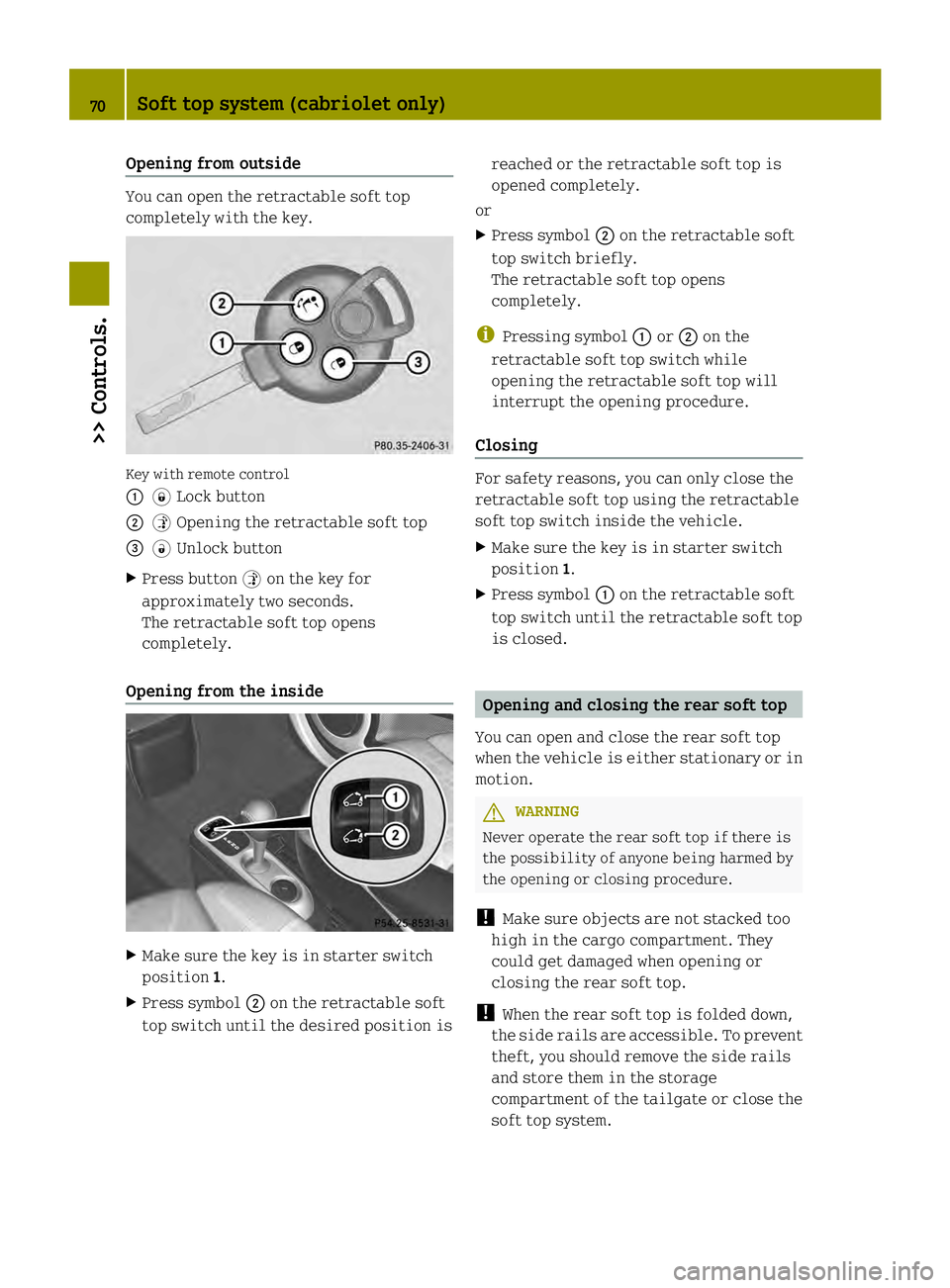
Key with remote control
0002
0004Lock button
0003 0005Opening the retractable soft top
002B 0006Unlock button
X Press button 0005on the key for
approximately two seconds.
The retractable soft top opens
completely.
Opening from the inside X
Make sure the key is in starter switch
position 1.
X Press symbol 0003on the retractable soft
top switch until the desired position is reached or the retractable soft top is
opened completely.
or
X Press symbol 0003on the retractable soft
top switch briefly.
The retractable soft top opens
completely.
i Pressing symbol 0002or0003 on the
retractable soft top switch while
opening the retractable soft top will
interrupt the opening procedure.
Closing For safety reasons, you can only close the
retractable soft top using the retractable
soft top switch inside the vehicle.
X
Make sure the key is in starter switch
position 1.
X Press symbol 0002on the retractable soft
top switch until the retractable soft top
is closed. Opening and closing the rear soft top
You can open and close the rear soft top
when the vehicle is either stationary or in
motion. G
WARNING
Never operate the rear soft top if there is
the possibility of anyone being harmed by
the opening or closing procedure.
! Make sure objects are not stacked too
high in the cargo compartment. They
could get damaged when opening or
closing the rear soft top.
! When the rear soft top is folded down,
the side rails are accessible. To prevent
theft, you should remove the side rails
and store them in the storage
compartment of the tailgate or close the
soft top system. 70
Soft top system (cabriolet only)>> Controls.
Page 74 of 218
X
Carry out the following steps when
conditions are safe to do so.
X First lift the side rail at the rear end in
direction of arrows 002A.
X Then remove it in direction of
arrows 0028. Storing the side rails
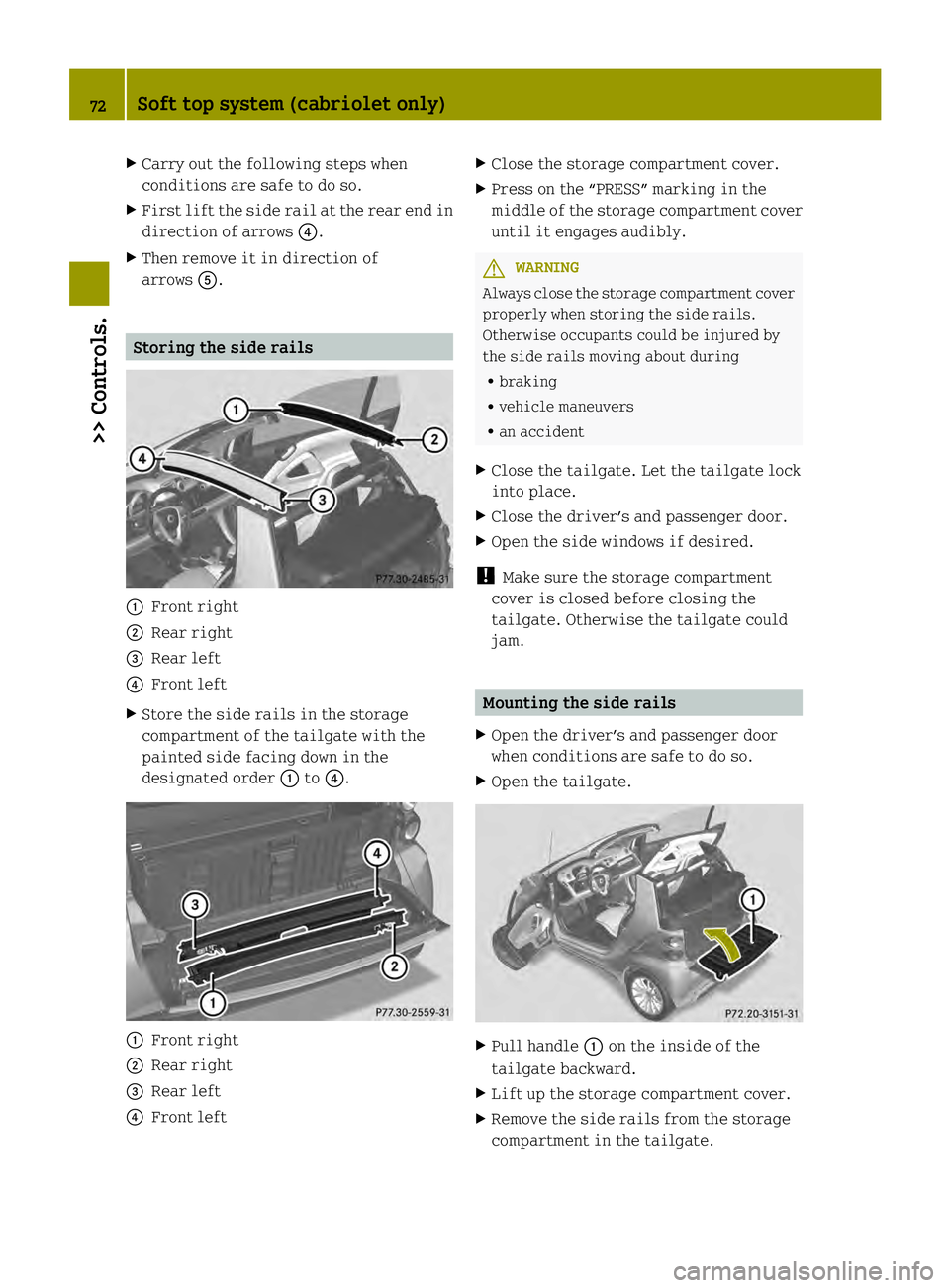
0002
Front right
0003 Rear right
002B Rear left
002A Front left
X Store the side rails in the storage
compartment of the tailgate with the
painted side facing down in the
designated order 0002to002A. 0002
Front right
0003 Rear right
002B Rear left
002A Front left X
Close the storage compartment cover.
X Press on the “PRESS” marking in the
middle of the storage compartment cover
until it engages audibly. G
WARNING
Always close the storage compartment cover
properly when storing the side rails.
Otherwise occupants could be injured by
the side rails moving about during
R braking
R vehicle maneuvers
R an accident
X Close the tailgate. Let the tailgate lock
into place.
X Close the driver’s and passenger door.
X Open the side windows if desired.
! Make sure the storage compartment
cover is closed before closing the
tailgate. Otherwise the tailgate could
jam. Mounting the side rails
X Open the driver’s and passenger door
when conditions are safe to do so.
X Open the tailgate. X
Pull handle 0002on the inside of the
tailgate backward.
X Lift up the storage compartment cover.
X Remove the side rails from the storage
compartment in the tailgate. 72
Soft top system (cabriolet only)>> Controls.
Page 75 of 218
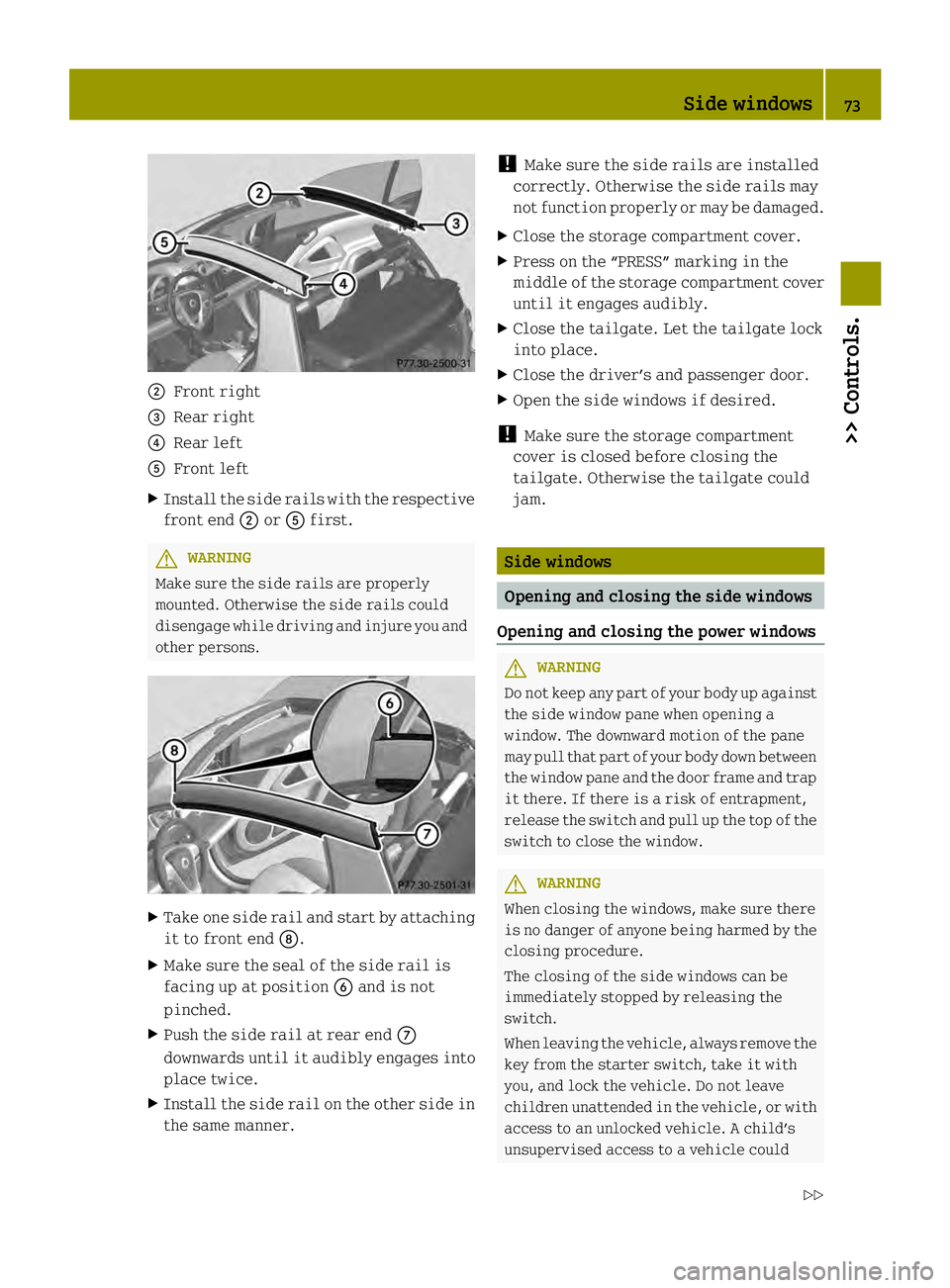
0003
Front right
002B Rear right
002A Rear left
0028 Front left
X Install the side rails with the respective
front end 0003or0028 first. G
WARNING
Make sure the side rails are properly
mounted. Otherwise the side rails could
disengage while driving and injure you and
other persons. X
Take one side rail and start by attaching
it to front end 0019.
X Make sure the seal of the side rail is
facing up at position 0029and is not
pinched.
X Push the side rail at rear end 0018
downwards until it audibly engages into
place twice.
X Install the side rail on the other side in
the same manner. !
Make sure the side rails are installed
correctly. Otherwise the side rails may
not function properly or may be damaged.
X Close the storage compartment cover.
X Press on the “PRESS” marking in the
middle of the storage compartment cover
until it engages audibly.
X Close the tailgate. Let the tailgate lock
into place.
X Close the driver’s and passenger door.
X Open the side windows if desired.
! Make sure the storage compartment
cover is closed before closing the
tailgate. Otherwise the tailgate could
jam. Side windows
Opening and closing the side windows
Opening and closing the power windows G
WARNING
Do not keep any part of your body up against
the side window pane when opening a
window. The downward motion of the pane
may pull that part of your body down between
the window pane and the door fram eand trap
it there. If there is a risk of entrapment,
releas ethe switch and pull up the top of the
switch to close the window. G
WARNING
When closing the windows, make sure there
is no danger of anyone being harmed by the
closing procedure.
The closing of the side windows can be
immediately stopped by releasing the
switch.
When leaving the vehicle, always remove the
key from the starter switch, take it with
you, and lock the vehicle. Do not leave
children unattended in the vehicle, or with
access to an unlocked vehicle. A child’s
unsupervised access to a vehicle could Side windows
73>> Controls.
Z
Page 76 of 218
result in an accident and/or serious
personal injury.
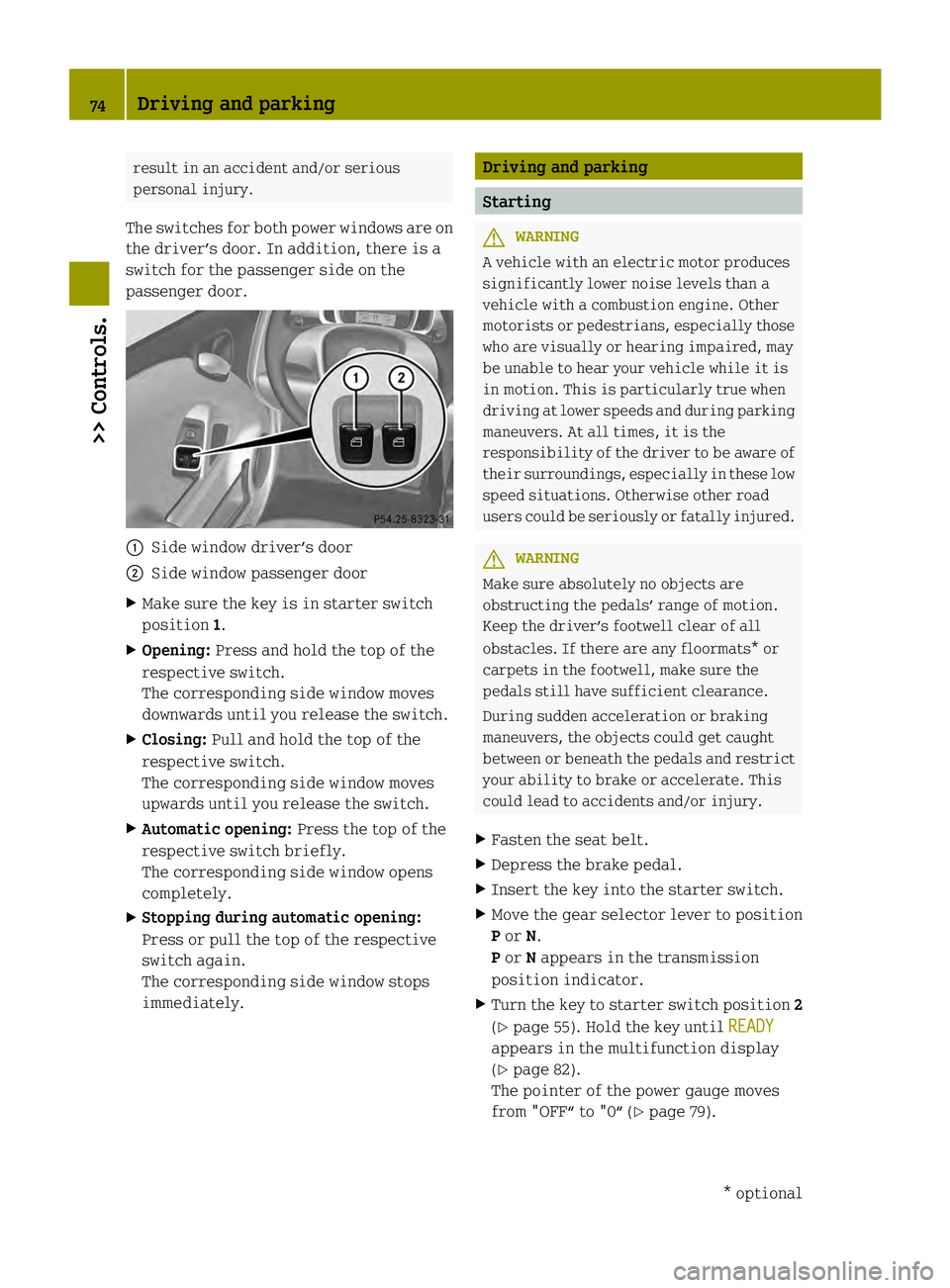
The switches for both power windows are on
the driver’s door. In addition, there is a
switch for the passenger side on the
passenger door. 0002
Side window driver’s door
0003 Side window passenger door
X Make sure the key is in starter switch
position 1.
X Opening: Press and hold the top of the
respective switch.
The corresponding side window moves
downwards until you release the switch.
X Closing: Pull and hold the top of the
respective switch.
The corresponding side window moves
upwards until you release the switch.
X Automatic opening: Press the top of the
respective switch briefly.
The corresponding side window opens
completely.
X Stopping during automatic opening:
Press or pull the top of the respective
switch again.
The corresponding side window stops
immediately. Driving and parking
Starting
G
WARNING
A vehicle with an electric motor produces
significantly lower noise levels than a
vehicle with a combustion engine. Other
motorists or pedestrians, especially those
who are visually or hearing impaired, may
be unable to hear your vehicle while it is
in motion. This is particularly true when
driving at lower speeds and during parking
maneuvers. At all times, it is the
responsibility of the driver to be aware of
their surroundings, especially in these low
speed situations. Otherwise other road
users could be seriously or fatally injured. G
WARNING
Make sure absolutely no objects are
obstructing the pedals’ range of motion.
Keep the driver’s footwell clear of all
obstacles. If there are any floormats* or
carpets in the footwell, make sure the
pedals still have sufficient clearance.
During sudden acceleration or braking
maneuvers, the objects could get caught
between or beneath the pedals and restrict
your ability to brake or accelerate. This
could lead to accidents and/or injury.
X Fasten the seat belt.
X Depress the brake pedal.
X Insert the key into the starter switch.
X Move the gear selector lever to position
Por N.
P or Nappears in the transmission
position indicator.
X Turn the key to starter switch position 2
(Y page 55). Hold the key until READY appears in the multifunction display
(Y
page 82).
The pointer of the power gauge moves
from "OFF“ to "0“ (Y page 79).74
Driving and parking>> Controls.
* optional
Page 77 of 218
Driving
i The vehicle has acrawler function. The
vehicle moves forward when the brake
pedal is released.
X Depress the brake pedal.
X Move the gear selector lever to drive
position D.
D appears in the transmission position
indicator.
X Release the brake pedal.
The vehicle moves forward.
X Depress the accelerator pedal smoothly.
The vehicle accelerates. Reversing the vehicle
! Shift the transmission into reverse
gear Ronly when the vehicle is stopped
in order to avoid damaging the
transmission.
You can drive in reverse gear at a speed
of up to 9 mph (15 km/h).
i Das Fahrzeug verfügt über eine
Kriechfunktion. Bei Lösen des
Bremspedals fährt das Fahrzeug an.
X Depress the brake pedal.
X Move the gear selector lever to reverse
gear R.
R appears in the transmission position
indicator.
X Release the brake pedal.
Das Fahrzeug fährt an.
X Gleichmäßig Gas geben.
Das Fahrzeug beschleunigt. Parking
G
WARNING
With the drive system inactive, there is no
power assistance for the brake and steering
systems. In this case, it is important to
keep in mind that a considerably higher
degree of effort is necessary to brake and steer the vehicle
.Adapt your driving
accordingly. G
WARNING
Vehicle movement can cause serious
personal injury. Therefore, always do the
following before exiting and leaving the
vehicle:
R Keep right foot on the brake pedal.
R Engage the parking brake.
R Move the gear selector lever to park
position P.
R Slowly release the brake pedal.
R When parked on an incline, always turn
the front wheels towards the curb.
R Turn the key to starter switch position 0
and remove the key from the starter
switch.
R Take the key with you and lock the vehicle
when leaving.
X Properly stop and park the vehicle.
X Depress the brake pedal.
X Engage the parking brake (Y page 75).
When the ignition is switched on, the
brake warning lamp 0002(USA only) or
0001 (Canada only) in the instrument
cluster comes on.
X Release the brake pedal.
Parking brake The parking brake serves to secure the
vehicle against rolling away when it is
stationary or parked.
G
WARNING
Engaging the parking brake while the
vehicle is in motion can cause the rear
wheels to lock up. You could lose control of
the vehicle and cause an accident. In
addition, the vehicle’s brake lights do not
light up when the parking brake is engaged. Driving and parking
75>> Controls. Z
Page 78 of 218
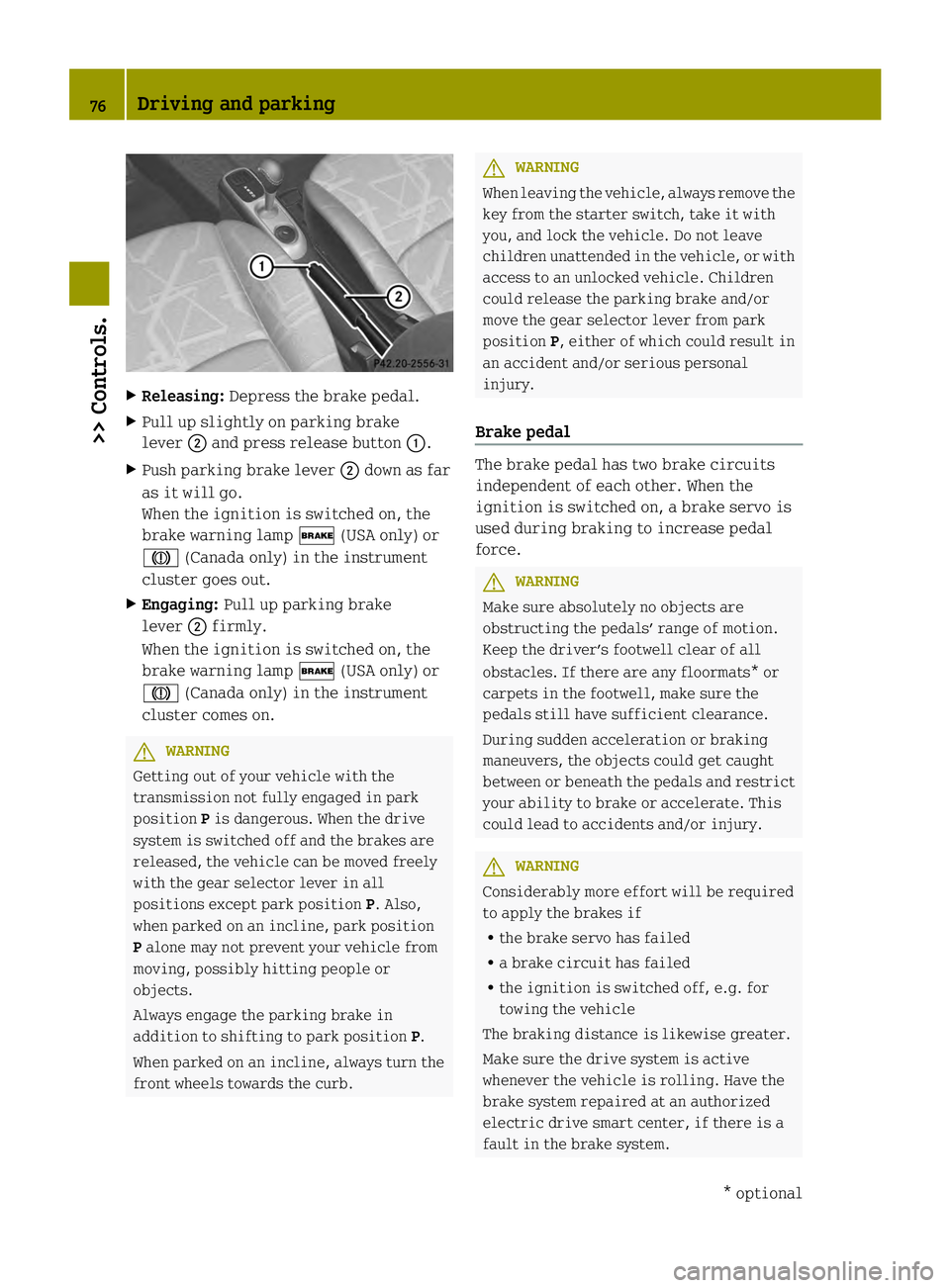
X
Releasing: Depress the brake pedal.
X Pull up slightly on parking brake
lever 0003and press release button 0002.
X Push parking brake lever 0003down as far
as it will go.
When the ignition is switched on, the
brake warning lamp 0002(USA only) or
0001 (Canada only) in the instrument
cluster goes out.
X Engaging: Pull up parking brake
lever 0003firmly.
When the ignition is switched on, the
brake warning lamp 0002(USA only) or
0001 (Canada only) in the instrument
cluster comes on. G
WARNING
Getting out of your vehicle with the
transmission not fully engaged in park
position Pis dangerous. When the drive
system is switched off and the brakes are
released, the vehicle can be moved freely
with the gear selector lever in all
positions except park position P. Also,
when parked on an incline, park position
P alone may not prevent your vehicle from
moving, possibly hitting people or
objects.
Always engage the parking brake in
addition to shifting to park position P.
When parked on an incline, always turn the
front wheels towards the curb. G
WARNING
When leaving the vehicle, always remove the
key from the starter switch, take it with
you, and lock the vehicle. Do not leave
children unattended in the vehicle, or with
access to an unlocked vehicle. Children
could release the parking brake and/or
move the gear selector lever from park
position P, either of which could result in
an accident and/or serious personal
injury.
Brake pedal The brake pedal has two brake circuits
independent of each other. When the
ignition is switched on, a brake servo is
used during braking to increase pedal
force.
G
WARNING
Make sure absolutely no objects are
obstructing the pedals’ range of motion.
Keep the driver’s footwell clear of all
obstacles. If there are any floormats* or
carpets in the footwell, make sure the
pedals still have sufficient clearance.
During sudden acceleration or braking
maneuvers, the objects could get caught
between or beneath the pedals and restrict
your ability to brake or accelerate. This
could lead to accidents and/or injury. G
WARNING
Considerably more effort will be required
to apply the brakes if
R the brake servo has failed
R a brake circuit has failed
R the ignition is switched off, e.g. for
towing the vehicle
The braking distance is likewise greater.
Make sure the drive system is active
whenever the vehicle is rolling. Have the
brake system repaired at an authorized
electric drive smart center, if there is a
fault in the brake system. 76
Driving and parking>> Controls.
* optional
Page 79 of 218
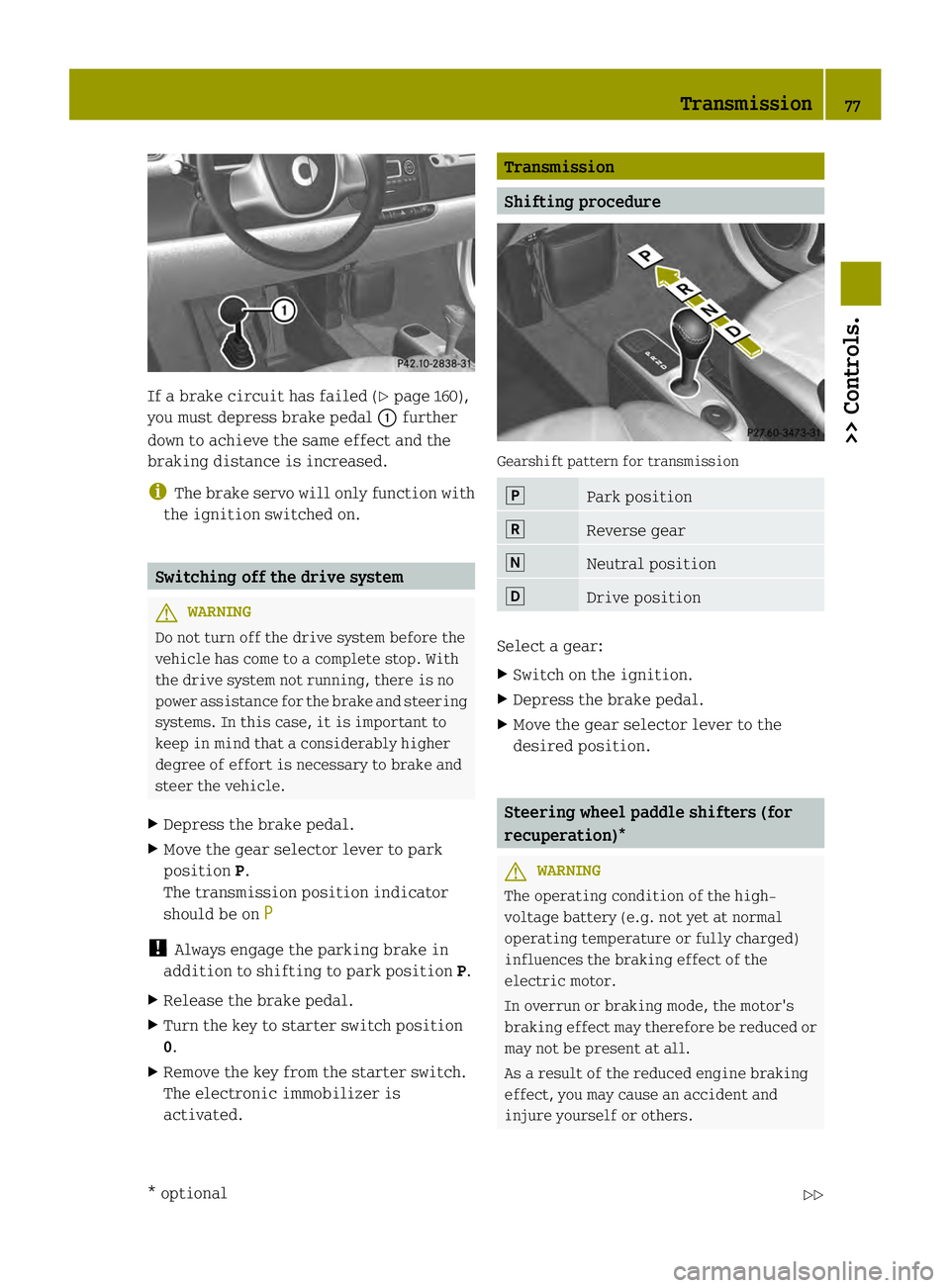
If a brake circuit has failed (Y
page 160),
you must depress brake pedal 0002further
down to achieve the same effect and the
braking distance is increased.
i The brake servo will only function with
the ignition switched on. Switching off the drive system
G
WARNING
Do not turn off the drive system before the
vehicle has come to a complete stop. With
the drive system not running, there is no
power assistance for the brake and steering
systems. In this case, it is important to
keep in mind that a considerably higher
degree of effort is necessary to brake and
steer the vehicle.
X Depress the brake pedal.
X Move the gear selector lever to park
position P.
The transmission position indicator
should be on P !
Always engage the parking brake in
addition to shifting to park position P.
X Release the brake pedal.
X Turn the key to starter switch position
0.
X Remove the key from the starter switch.
The electronic immobilizer is
activated. Transmission
Shifting procedure
Gearshift pattern for transmission
0010
Park position
0009
Reverse gear
000B
Neutral position
000F
Drive position
Select a gear:
X
Switch on the ignition.
X Depress the brake pedal.
X Move the gear selector lever to the
desired position. Steering wheel paddle shifters (for
recuperation)*
G
WARNING
The operating condition of the high-
voltage battery (e.g. not yet at normal
operating temperature or fully charged)
influences the braking effect of the
electric motor.
In overrun or braking mode, the motor's
braking effect may therefore be reduced or
may not be present at all.
As a result of the reduced engine braking
effect, you may cause an accident and
injure yourself or others. Transmission
77>> Controls.
* optional Z
Page 80 of 218
Compensate for the reduced engine braking
effect by pressing the brake pedal
accordingly, as required.
Using the steering wheel paddle shifters,
you can increase or decrease the
recuperation in overrun phases.
Recuperation means that energy is
recovered while driving - the electric
motor functions as a generator. The kinetic
energy of the vehicle is converted into
electric power and stored in the high-
voltage battery. The more the recuperation
increases, the more the vehicle will be
decelerated.
In overrun phases, there are three levels of
recuperation:
R no recuperation (level 0, coasting)
R mid-level recuperation (level 1)
R high-level recuperation (level 2)
The amount of recuperation in overrun
mode is displayed in the power gauge
(Y page 79).
When you switch on the ignition, level 1 is
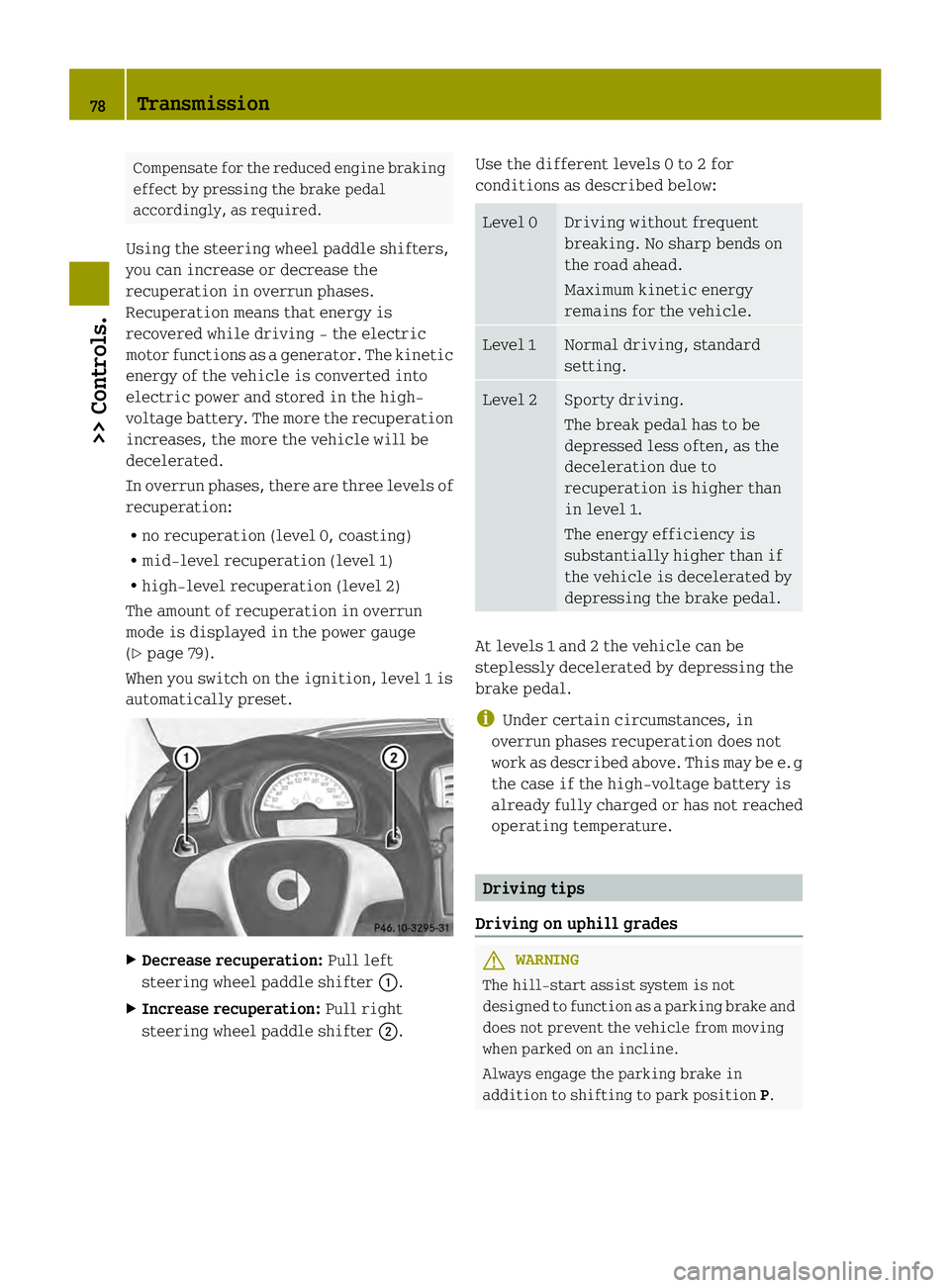
automatically preset. X
Decrease recuperation: Pull left
steering wheel paddle shifter 0002.
X Increase recuperation: Pull right
steering wheel paddle shifter 0003.Use the different levels 0 to 2 for
conditions as described below: Level 0 Driving without frequent
breaking. No sharp bends on
the road ahead.
Maximum kinetic energy
remains for the vehicle.
Level 1 Normal driving, standard
setting.
Level 2 Sporty driving.
The break pedal has to be
depressed less often, as the
deceleration due to
recuperation is higher than
in level 1.
The energy efficiency is
substantially higher than if
the vehicle is decelerated by
depressing the brake pedal.
At levels
1and 2the vehicle can be
steplessly decelerated by depressing the
brake pedal.
i Under certain circumstances, in
overrun phases recuperation does not
work as described above. This may be e. g
the case if the high-voltage battery is
already fully charged or has not reached
operating temperature. Driving tips
Driving on uphill grades G
WARNING
The hill-start assist system is not
designed to function as a parking brake and
does not prevent the vehicle from moving
when parked on an incline.
Always engage the parking brake in
addition to shifting to park position P.78
Transmission>> Controls.
Page 81 of 218
!
When the hill‑start assist system stops
braking the vehicle, it can roll
backwards.
If you open the driver’s door, the
hill‑start assist system is deactivated
and a warning signal sounds.
Your vehicle has a hill‑start assist system.
On uphill grades the hill‑start assist
system maintains the pressure in the brake
system for approximately one second after
you have released the brake pedal.
Therefore, you can start off smoothly
without the vehicle moving immediately
after releasing the brake pedal.
X Release the brake pedal.
X Apply sufficient pressure to the
accelerator pedal to drive off.
On uphill grades with higher inclination,
the hill-start assist system will release
the pressure in the brake system after
approximately two seconds. A warning
signal sounds and the transmission
position indicator shows a flashing N in
order to warn you of the vehicle rolling
backwards.
X Press the brake pedal.
X Release the brake pedal.
X Apply sufficient pressure to the
accelerator pedal to drive off.
i The hill‑start assist system is inactive
if you start off with the parking brake
engaged. Instrument cluster
Charge level and power gauges
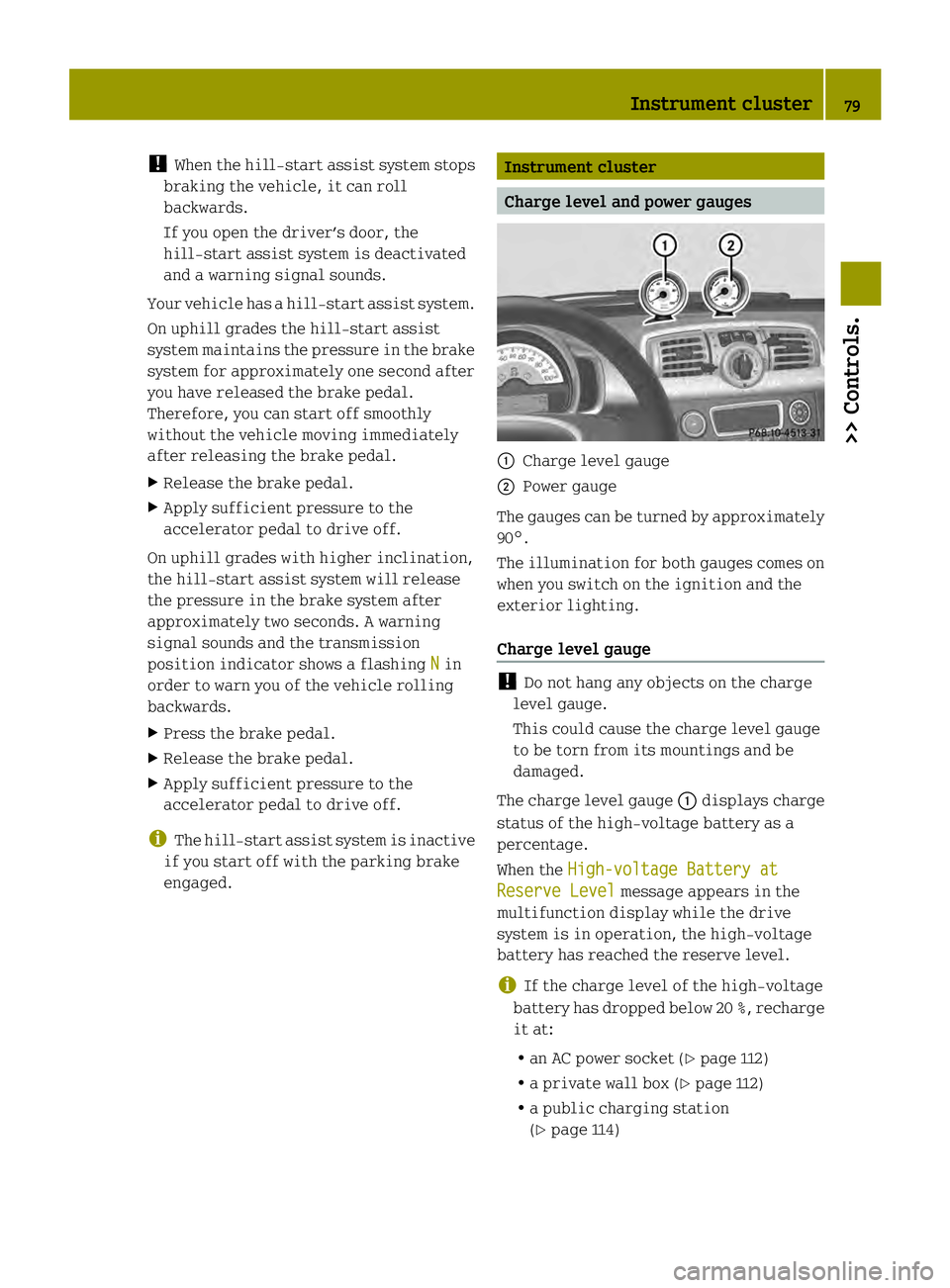
0002
Charge level gauge
0003 Power gauge
The gauges can be turned by approximately
90°.
The illumination for both gauges comes on
when you switch on the ignition and the
exterior lighting.
Charge level gauge !
Do not hang any objects on the charge
level gauge.
This could cause the charge level gauge
to be torn from its mountings and be
damaged.
The charge level gauge 0002displays charge
status of the high-voltage battery as a
percentage.
When the High-voltage Battery at Reserve Level message appears in the
multifunction display while the drive
system is in operation, the high-voltage
battery has reached the reserve level.
i If the charge level of the high-voltage
battery has dropped below 20 %, recharge
it at:
R an AC power socket (Y page 112)
R a private wall box (Y page 112)
R a public charging station
(Y page 114) Instrument cluster
79>> Controls. Z
Page 82 of 218
Power gauge
G
WARNING
The operating condition of the high-
voltage battery (e.g. not yet at normal
operating temperature or fully charged)
influences the braking effect of the
electric motor.
In overrun or braking mode, the motor's
braking effect may therefore be reduced or
may not be present at all.
As a result of the reduced engine braking
effect, you may cause an accident and
injure yourself or others.
Compensate for the reduced engine braking
effect by pressing the brake pedal
accordingly, as required.
! Do not hang any objects on the power
gauge.
This could cause the power gauge to be
torn from its mountings and be damaged.
Power gauge 0003contains two segments:
R Section right of 0
Power gauge 0003indicates the current
power that the drive system delivers to
the rear wheels. 100 % correspond to
55 kW peak power.
R Section left of 0
When you release the accelerator pedal
or when you depress the brake pedal, the
electric motor operates as a generator.
Electric current is produced and stored
in the high-voltage battery. As long as
the high-voltage battery is being
charged, the electric motor simulates an
engine brake.
When the pointer of power gauge 0003is in
the "OFF “position, the vehicle is not ready
to drive, because:
R the drive system has not been started
R the gear selector lever has not been
moved to position Nor Pwhen starting
the drive system R
the charging cable is connected to the
vehicle
R there is not enough power from the high-
voltage battery
R a problem occured in the high-voltage
system
After the drive system has been started, the
pointer of power gauge 0003moves to
position 0.READY appears in the
multifunction display (Y page 82). The
vehicle is ready to drive. Adjusting instrument cluster
illumination
You can adjust the illumination of
R the switches and dials in the instrument
cluster
R the radio
R the climate control panel
R the charge level and power gauges
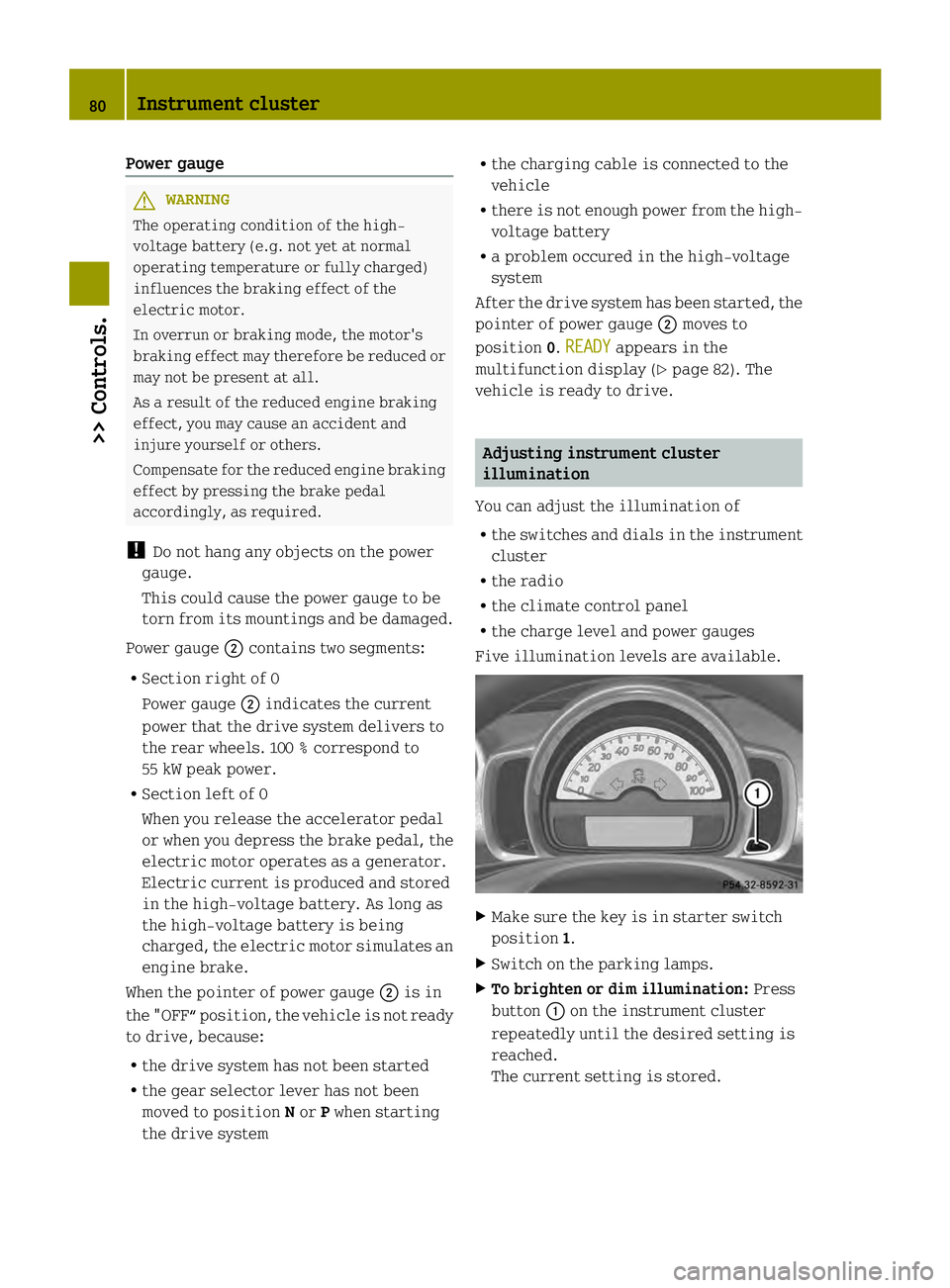
Five illumination levels are available. X
Make sure the key is in starter switch
position 1.
X Switch on the parking lamps.
X To brighten or dim illumination: Press
button 0002on the instrument cluster
repeatedly until the desired setting is
reached.
The current setting is stored. 80
Instrument cluster>> Controls.