lock SUBARU BAJA 2006 1.G Manual PDF
[x] Cancel search | Manufacturer: SUBARU, Model Year: 2006, Model line: BAJA, Model: SUBARU BAJA 2006 1.GPages: 487, PDF Size: 5.55 MB
Page 156 of 487
3-29
Instruments and controls
– CONTINUED –
Windshield wiper de icer (if equipped)Windshield
Wiper deicer
To prevent the battery from being discharged,
do not operate the windshield wiper deicer con-
tinuously for any longer than necessary.
The windshield wiper deicer operates only when the
ignition switch is in the “ON” position.
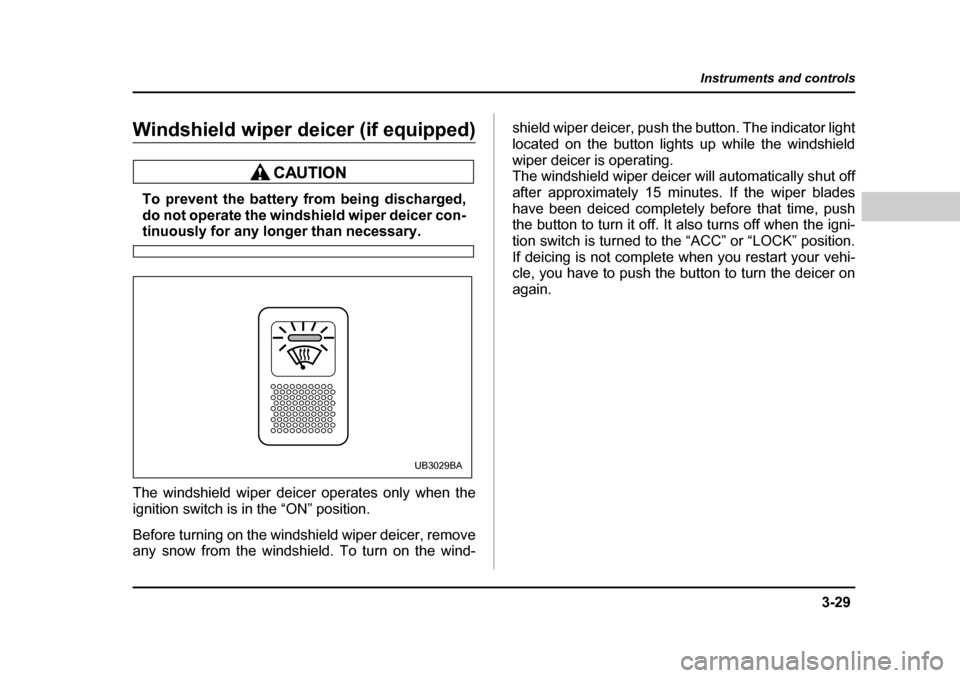
Before turning on the windshield wiper deicer, remove
any snow from the windshield. To turn on the wind- shield wiper deicer, push the button. The indicator light
located on the button lights up while the windshield
wiper deicer is operating.
The windshield wiper deicer will automatically shut off
after approximately 15 minutes. If the wiper blades
have been deiced completely before that time, push
the button to turn it off. It also turns off when the igni-
tion switch is turned to the “ACC” or “LOCK” position.
If deicing is not complete when you restart your vehi-
cle, you have to push the
button to turn the deicer on
again.
UB3029BA
Page 161 of 487
3-34
Instruments and controls
The indicator light located on the button will come on
when the outside mirror defogger heater in operation.
To turn it off, push the button again.Tilt steering wheelTilt steering wheel
Do not adjust the steering wheel tilt position
while driving. This may cause loss of vehicle
control and result in personal injury.
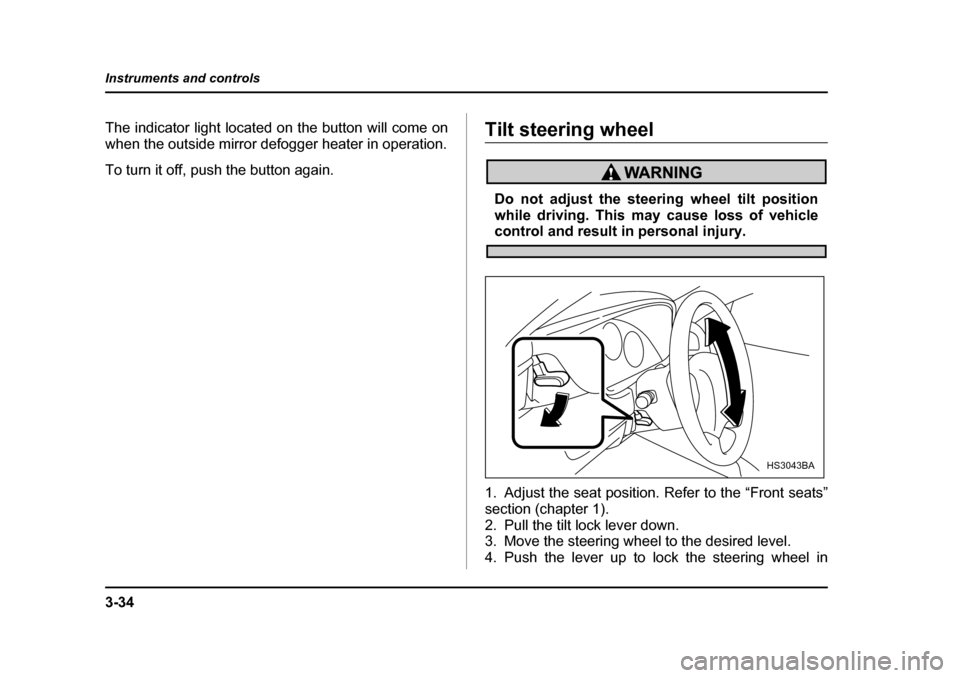
1. Adjust the seat position. Refer to the “Front seats”
section (chapter 1).
2. Pull the tilt lock lever down.
3. Move the steering wheel to the desired level.
4. Push the lever up to lock the steering wheel in
HS3043BA
Page 162 of 487
3-35
Instruments and controls
– CONTINUED –
place.
5. Make sure that the steering wheel is securely
locked by moving it up and down.HornHorn
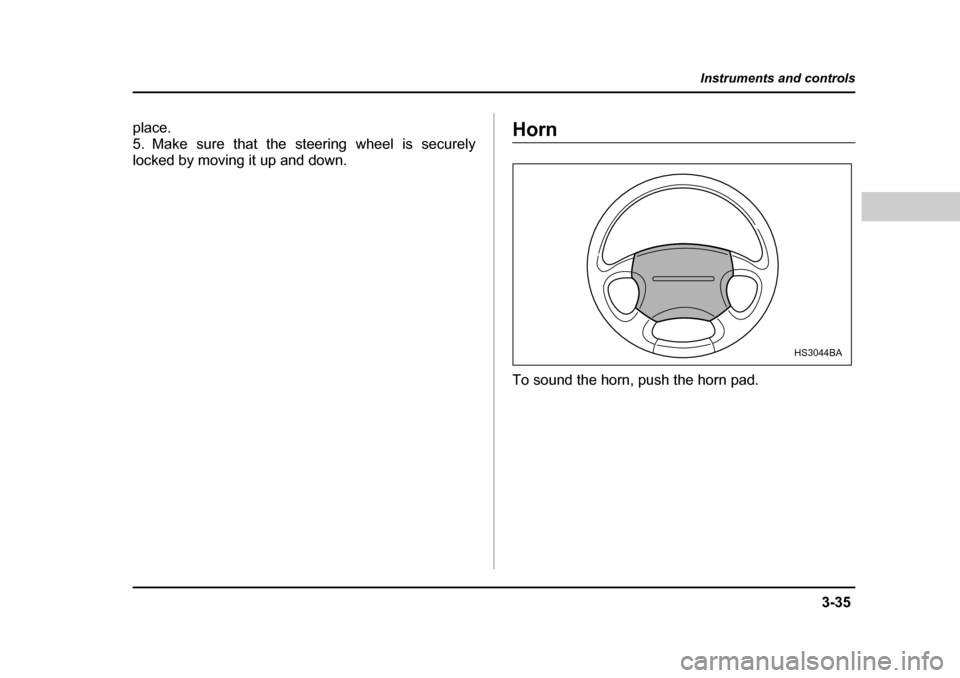
To sound the horn, push the horn pad.
HS3044BA
Page 180 of 487
5-3
Audio
– CONTINUED –
Stand the roof antenna up for use. You can detach the
roof antenna by turning it counterclockwise. When fit-
ting the roof antenna, turn it clockwise and tighten it securely.
When working on the cargo bed, be careful notto get poked in the eye by the roof antenna.
NOTE y Detach the roof antenna before putting the vehi-
cle in a garage and before washing it in an auto-
matic car wash.y After detaching the roof antenna, keep the
mounting hole free of dirt and dust. If any dirt or
dust sticks to the hole, remove it before attaching
the roof antenna. y When detaching the roof antenna, grasp and
turn the roof antenna at the base. y To avoid damaging the roof antenna, be careful
not to overtighten it when attaching it.
y Radio reception is not poss ible with the roof an-
tenna folded down. Also, reception deteriorates if
metallic objects are placed near the roof antenna. „
FM reception
Although FM is normally static free, reception can be
affected by the surroundi ng area, atmospheric condi-
tions, station strength and transmitter distance. Build-
ings or other obstructions may cause momentary stat-
ic, flutter or station interference. If reception continues
to be unsatisfactory, swit ch to a stronger station.
Page 185 of 487
5-8
Audio
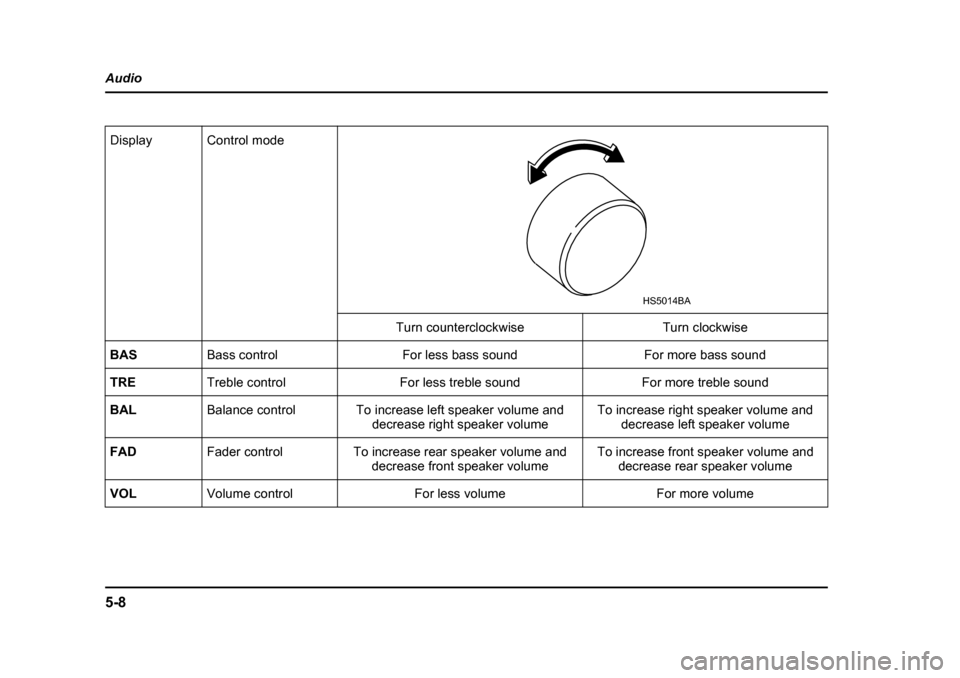
Display Control mode
Turn counterclockwise Turn clockwise
BAS Bass control For less bass sound For more bass sound
TRE Treble control For less treble sound For more treble sound
BAL Balance control To increase left speaker volume and
decrease right speaker volume To increase right speaker volume and
decrease left speaker volume
FAD Fader control To increase rear speaker volume and
decrease front speaker volume To increase front speaker volume and
decrease rear speaker volume
VOL Volume control For less volume For more volume
HS5014BA
Page 190 of 487
5-13
Audio
– CONTINUED –
VFast-reversing
Press the “ ” side of the button (11) continuously
to fast-reverse the disc.
Release the button to stop fast-reversing. T Repeat playback
Use this to play a certain track repeatedly. During
playback, press the “RPT” button (13) and release it in
less than 2 seconds. The “R PT” indicator will come on
and the song will be played continuously. To cancel
the repeat mode, press the button again. Then the
“RPT” indicator goes out, and normal playback mode
is restored. T Random playback
Use this to play the tracks on the disc in random order.
During playback, press the “RAND” button (12) and
hold it in for more than 2 seconds. The “RAND” indica-
tor will come on and all songs on the disc will be
played in a random order.
To cancel the random mode, press the button again.
Then the “RAND” indicator goes out, and normal play-
back mode is restored. T Scan
Press the “SCAN” button (14) and release it in less
than 2 seconds, and you can hear the first 10 seconds
of each track to search for the desired program. To continue listening to the program, press the “SCAN”
button again. After all tracks on the disc has been
scanned, normal playback mode is restored. T
To eject a disc from the player
When a disc is being played back or when a disc is in
the player, press the “Eject” button “ ” (9). The disc
will be ejected.
The disc may be removed even when the ignition
switch is in the “LOCK” position.
NOTE y Avoid driving the vehicle with a CD sticking out,
because vibration might make it fall out. y To protect the disc, the disc is automatically
loaded if it is left in the ejected position for more
than approximately 15 seconds (Auto Reload). In
this case, the disc is not played. „ CD changer control (if optional in dash
CD changer is connected)
An optional CD changer can be connected to this au-
dio unit. See your SUBARU dealer for more informa-
tion. For procedures for loading and unloading CDs,
refer to “In-dash 6 CD auto changer (Optional audio
unit – if equipped)” section in this chapter.
Page 196 of 487
5-19
Audio
– CONTINUED –
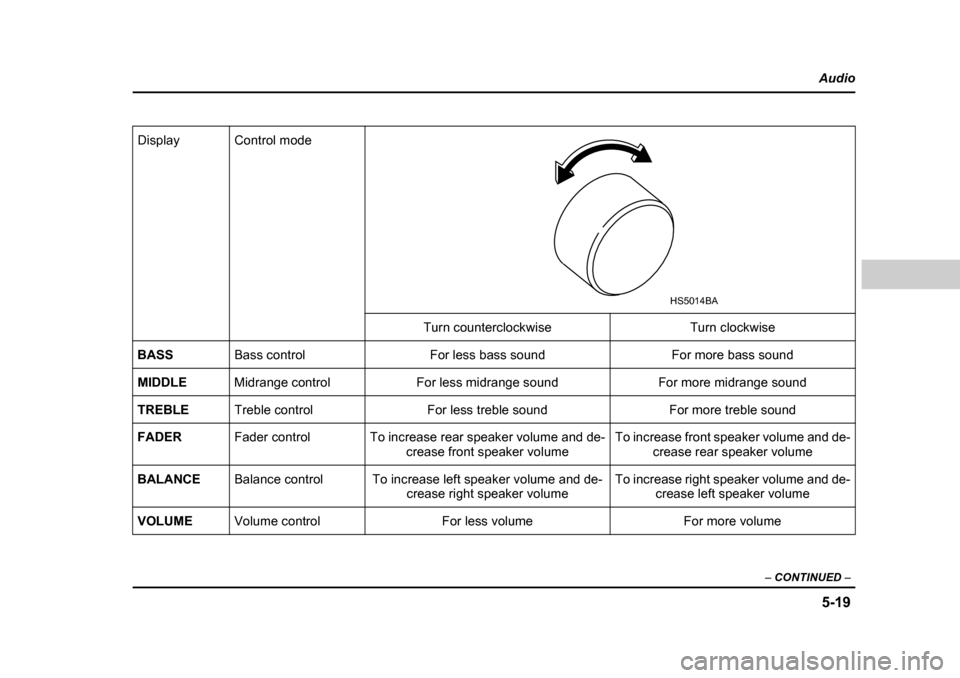
Display Control mode
Turn counterclockwise Turn clockwise
BASS Bass control For less bass sound For more bass sound
MIDDLE Midrange control For less midrange sound For more midrange sound
TREBLE Treble control For less treble sound For more treble sound
FADER Fader control To increase rear speaker volume and de-
crease front speaker volume To increase front speaker volume and de-
crease rear speaker volume
BALANCE Balance control To increase left speaker volume and de-
crease right speaker volume To increase right speaker volume and de-
crease left speaker volume
VOLUME Volume control For less volume For more volume
HS5014BA
Page 206 of 487
5-29
Audio
– CONTINUED –
2. Press the “Eject” button (4). The selected disc will
be ejected and the indicator light will begin blinking.
3. To remove another disc, repeat Steps 1 and 2
choosing a different “Disc select” button.
(To remove discs when the ig nition switch is in the
“Lock” position, press the “Eject” button, and the first
disc will be ejected. Press the “Eject” button again,
and the next disc will be ejected and so on. At this
time, the “Disc select” buttons are disabled.) T To remove all discs at one time
1. Press and hold the “Eject” button (4) until all “Disc”
indicators begin blinking (approximately 1.5 seconds),
and the first disc will be ejected.
2. When the disc is removed, the next one will be
ejected, and so on. T To replace a playing disc with another
Simply press the desired one of “Disc select” buttons
(3) (numbered from 1 to 6) or press the “DISC UP” or
“DISC DOWN” button on the ra dio unit to select the
desired disc, and the disc will begin to play. T Disc indicators
Lit: when the corresponding storage tray is occupied
by a disc.
Blinking: Disc player is either in loading, eject or
changing mode. OFF: No disc is loaded or the ignition switch is in the
“LOCK” position. T
Function control
Refer to CD player control operating instructions de-
scribed in the “AM/FM radio with CD player” section.
Page 210 of 487

6-1
6
Interior and exterior equipments
Interior light .................................................. 6-2 Dome light ......................................................... 6-2
Map light ........................................................ 6-3
Sun visors ..................................................... 6-3 Vanity mirror (if equipped) ............................... 6-4
Storage compartment .................................. 6-4 Glove box ........................................................... 6-5
Center console .................................................. 6-5
Rear center console .......................................... 6-6
Coin compartment ............................................ 6-6
Cup holder .................................................... 6-7 Front cup holder ............................................... 6-7
Rear passenger’s cup holder ........................... 6-8
Accessory power outlet . .............................. 6-8
Cigarette lighter socket .. .............................. 6-9
Use with a cigarette lighter .............................. 6-10
Using as an accessory power outlet ............... 6-11
Ashtray .......................................................... 6-12
Convenience hook ....................................... 6-13 Coat hook .......................................................... 6-13
Cargo net hooks ................................................ 6-13
Floor mat (if equipped) ................................. 6-15
Cargo bed ...................................................... 6-16 Cargo tie-down hooks ...................................... 6-17
Bed extender (if equipped) .......................... 6-17 Operation ........................................................... 6-18
Bed extender removal ...................................... 6-19
Cargo lamp .................................................... 6-20
Soft bed cover (if equipped) ........................ 6-21 Securing the cover ........................................... 6-21
Cover removal ................................................... 6-22
Cover reinstallation .......................................... 6-23
Hard bed cover (if equipped) ....................... 6-24 Locking and unlocking the bed cover ............ 6-25
Internal hard bed cover release handle .......... 6-27
Opening and closing the hard bed cover ....... 6-28
Removal and installation of the hard bed cover ................................................................ 6-32
Roof rail and crossbar .................................. 6-36 Installing carrying attachments on the crossbars ........................................................ 6-37
Removal and installation of the crossbars .... 6-37
Sport activity lights (if equipped) ................ 6-42
Page 212 of 487
6-3
Interior and exterior equipments
– CONTINUED –
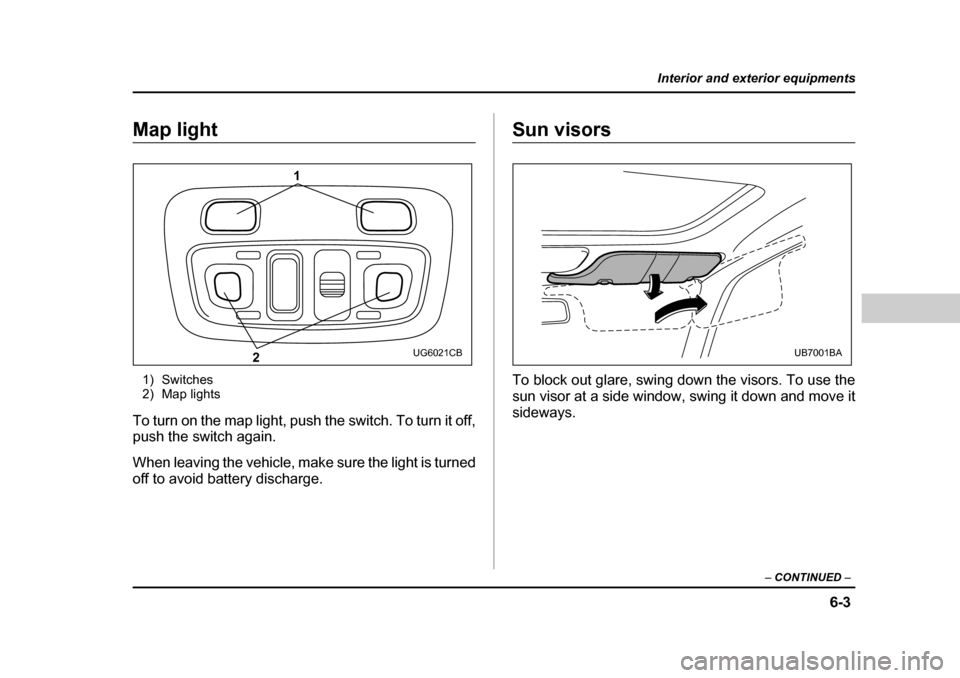
Map light
1) Switches
2) Map lights
To turn on the map light, push the switch. To turn it off,
push the switch again.
When leaving the vehicle, make sure the light is turned
off to avoid battery discharge.Sun visors
To block out glare, swing down the visors. To use the
sun visor at a side window, swing it down and move it sideways.
1
2
UG6021CBUB7001BA