ECU SUBARU BRZ 2018 Workshop Manual
[x] Cancel search | Manufacturer: SUBARU, Model Year: 2018, Model line: BRZ, Model: SUBARU BRZ 2018Pages: 568, PDF Size: 8.94 MB
Page 320 of 568
320
3-5. Other interior features
BRZ_U (A4450BE-A)
Floor mat∗
∗: If equipped
Make sure to only use floor mats that are specifically designed for
use with the same model and model year as your vehicle. Fix them
securely in place on top of the carpet.
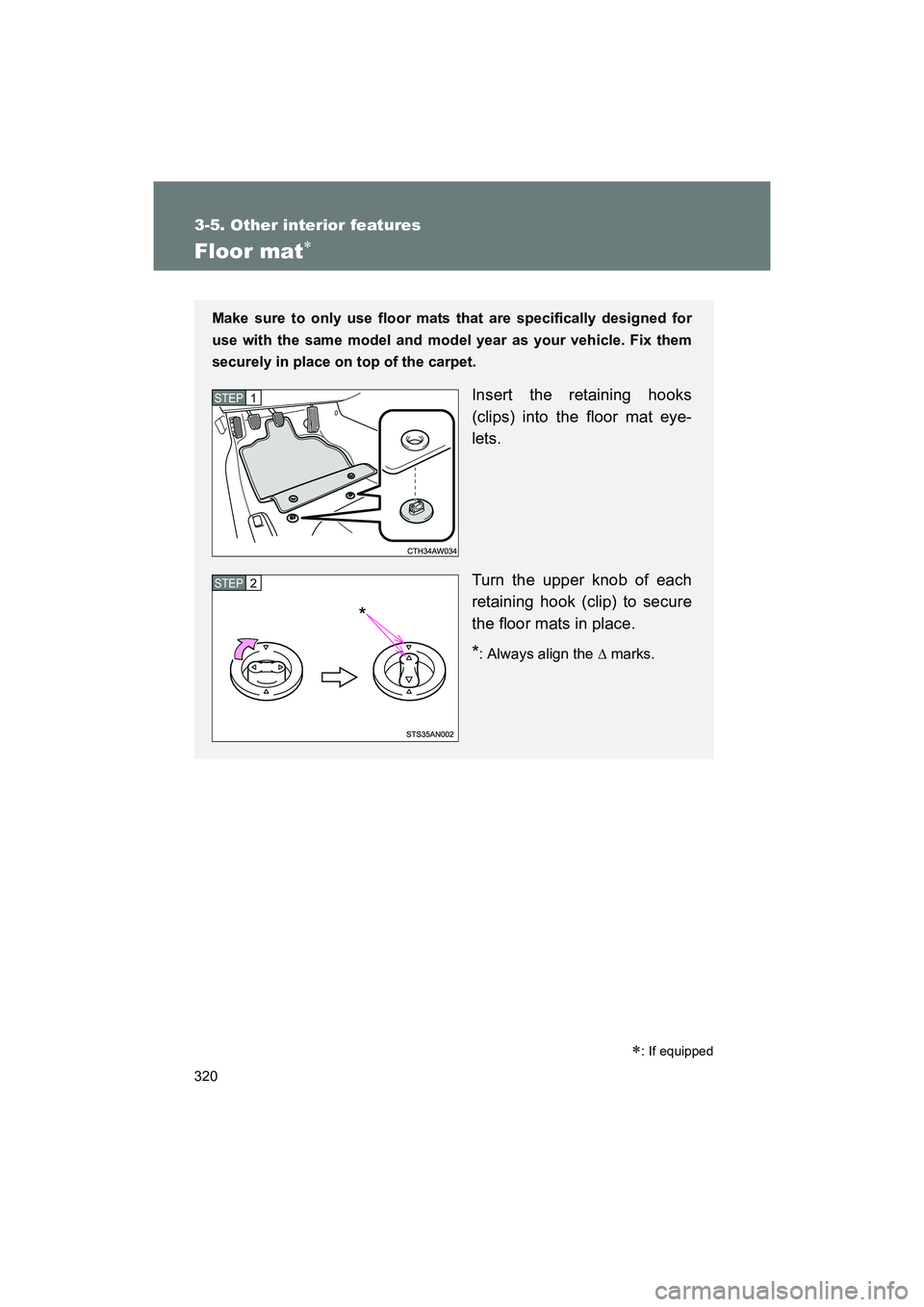
Insert the retaining hooks
(clips) into the floor mat eye-
lets.
Turn the upper knob of each
retaining hook (clip) to secure
the floor mats in place.
*: Always align the ∆ marks.
STEP 1
STEP 2
*
Page 321 of 568
321
3-5. Other interior features
3
Interior features
BRZ_U (A4450BE-A)
WARNING
Observe the following precautions.
Failure to do so may cause the driver's floor mat to slip, possibly interfering
with the pedals while driving. An unexpectedly high speed may result or it may
become difficult to stop the vehicle. Th
is could lead to an accident, resulting in
death or serious injury.
■ When installing the driver's floor mat
● Do not use floor mats designed for ot her models or different model year
vehicles, even if they are SUBARU Genuine floor mats.
● Only use floor mats designed for the driver's seat.
● Always install the floor mat securely using the retaining hooks (clips) pro-
vided.
● Do not use two or more floor mats on top of each other.
● Do not place the floor mat bottom-side up or upside-down.
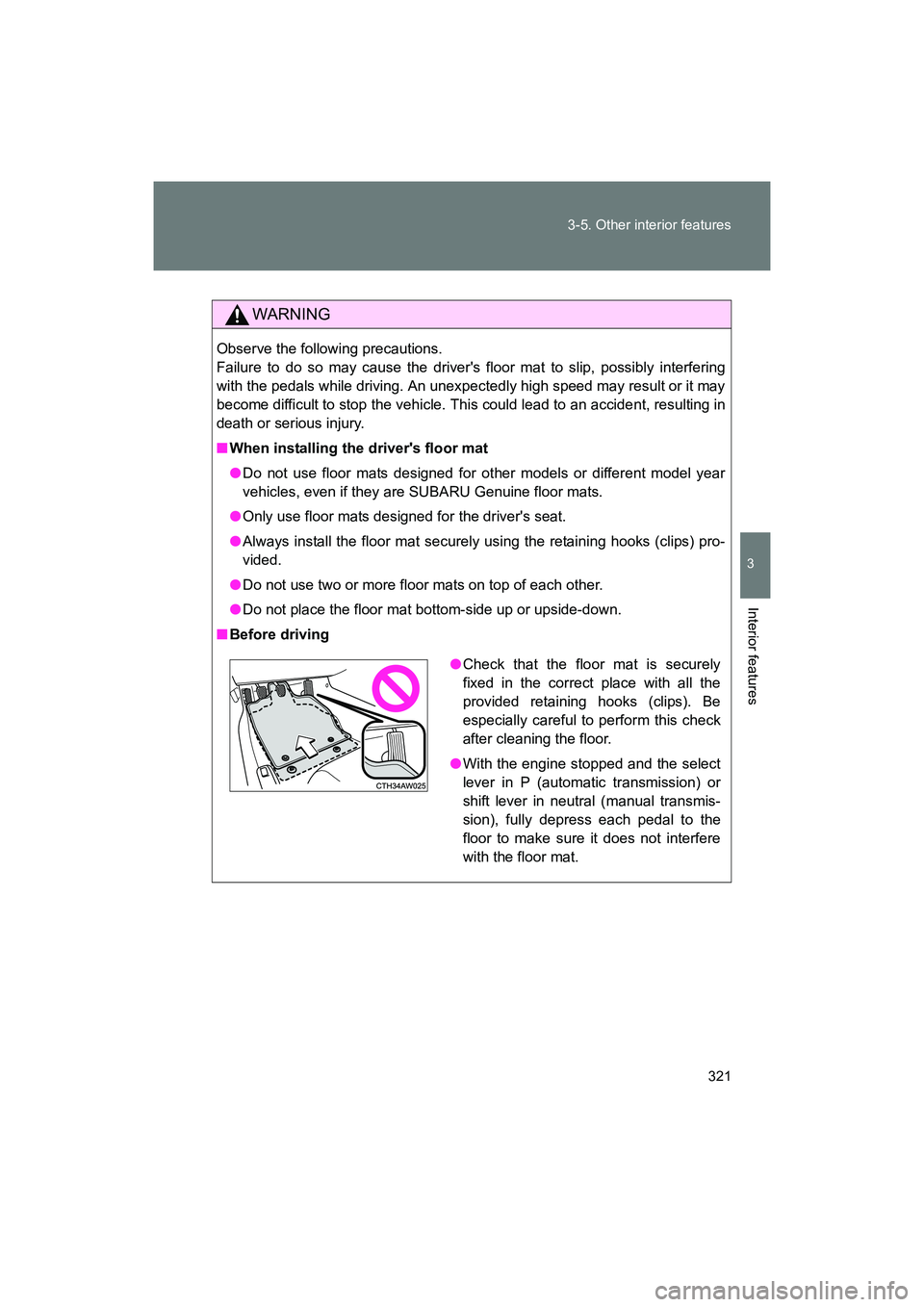
■ Before driving
●Check that the floor mat is securely
fixed in the correct place with all the
provided retaining hooks (clips). Be
especially careful to perform this check
after cleaning the floor.
● With the engine stopped and the select
lever in P (automatic transmission) or
shift lever in neutral (manual transmis-
sion), fully depress each pedal to the
floor to make sure it does not interfere
with the floor mat.
Page 322 of 568
322
3-5. Other interior features
BRZ_U (A4450BE-A)
HomeLink®∗
Programming HomeLink
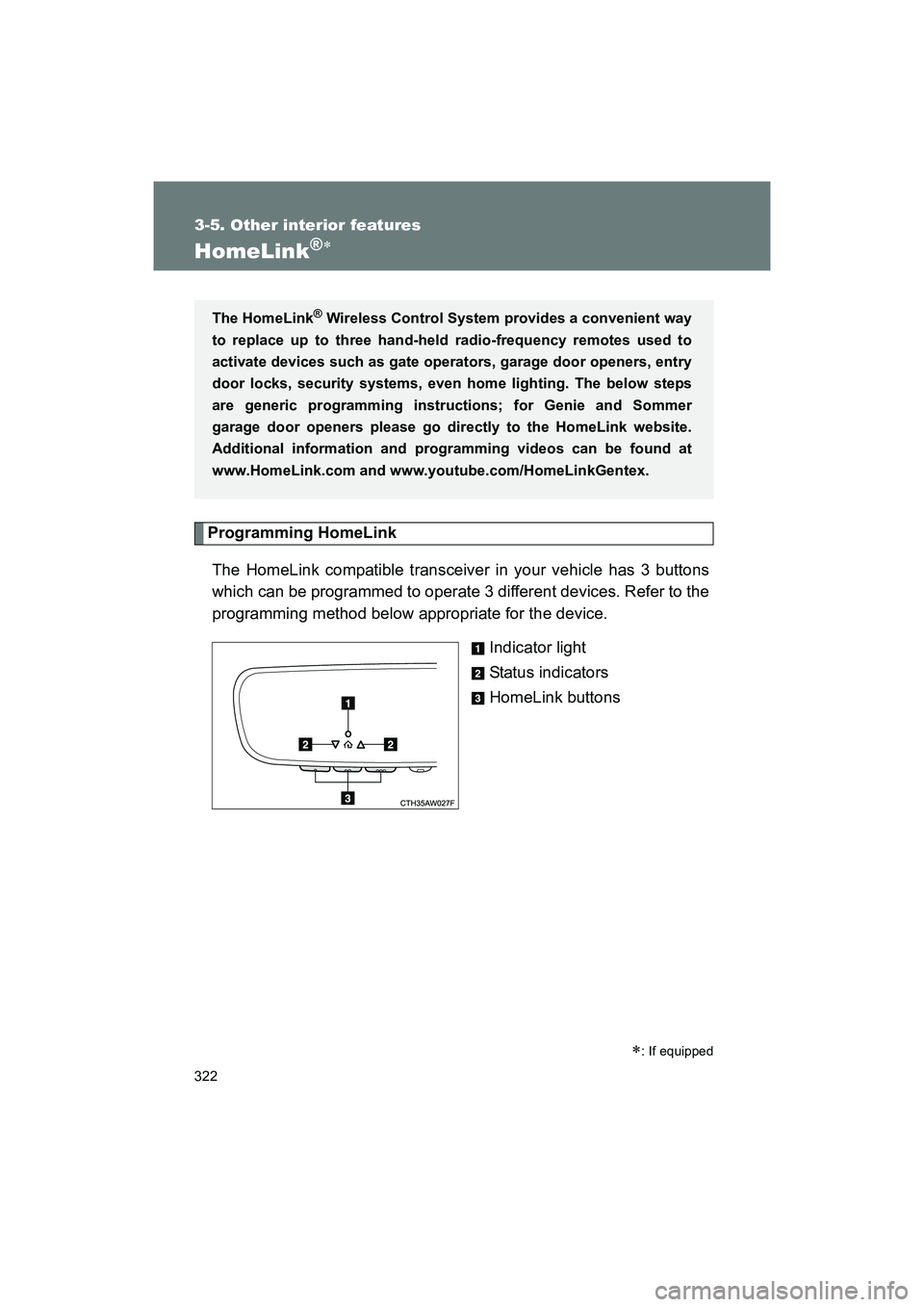
The HomeLink compatible transceiver in your vehicle has 3 buttons
which can be programmed to operate 3 different devices. Refer to the
programming method below appropriate for the device. Indicator light
Status indicators
HomeLink buttons
∗: If equipped
The HomeLink® Wireless Control System provides a convenient way
to replace up to three hand-held radio-frequency remotes used to
activate devices such as gate operators, garage door openers, entry
door locks, security systems, even home lighting. The below steps
are generic programming instructions; for Genie and Sommer
garage door openers please go dir ectly to the HomeLink website.
Additional information and programming videos can be found at
www.HomeLink.com and www.youtube.com/HomeLinkGentex.
Page 326 of 568
326 3-5. Other interior features
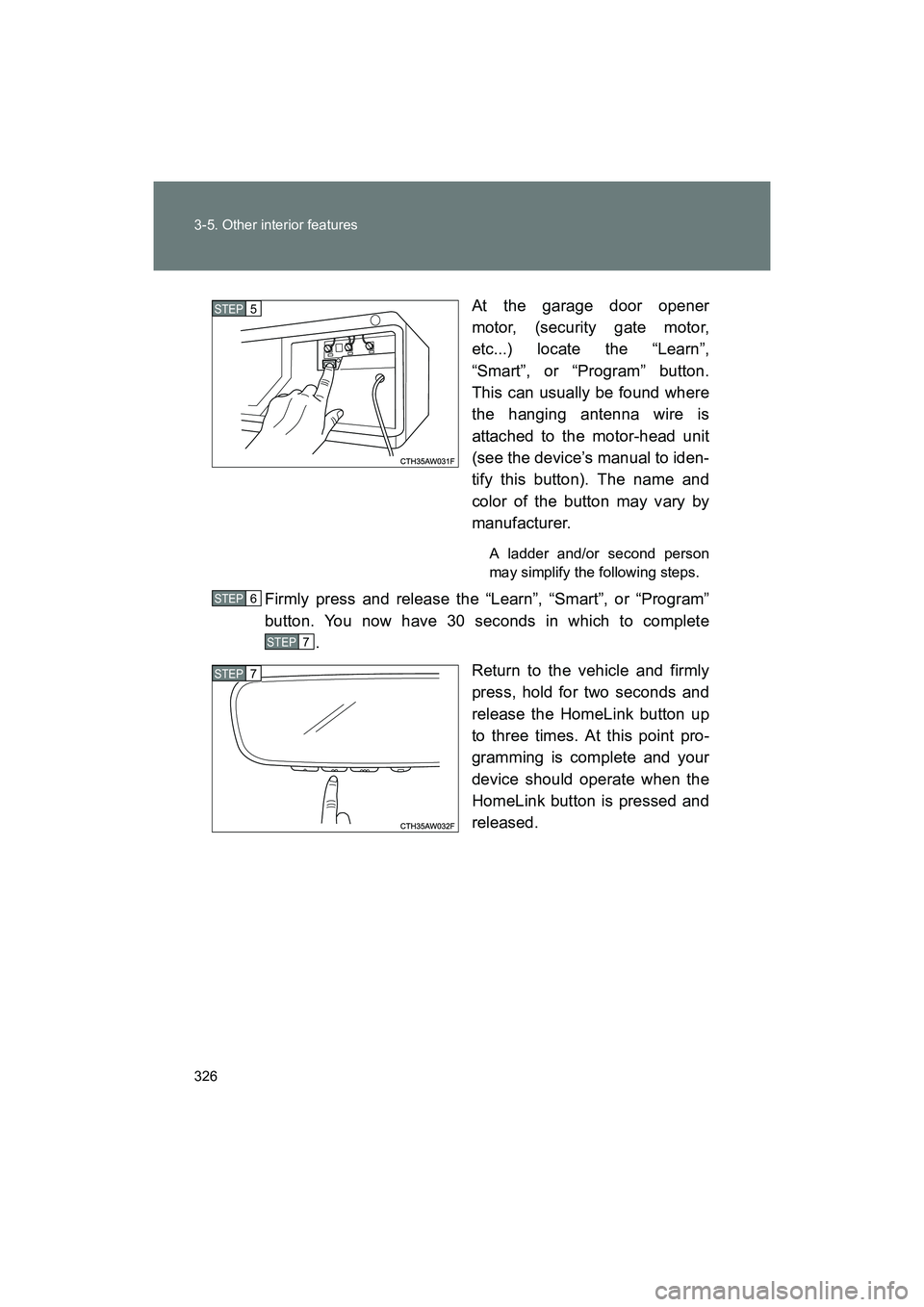
BRZ_U (A4450BE-A)At the garage door opener
motor, (security gate motor,
etc...) locate the “Learn”,
“Smart”, or “Program” button.
This can usually be found where
the hanging antenna wire is
attached to the motor-head unit
(see the device’s manual to iden-
tify this button). The name and
color of the button may vary by
manufacturer.
A ladder and/or second person
may simplify the following steps.
Firmly press and release the “Learn”, “Smart”, or “Program”
button. You now have 30 seconds in which to complete
.
Return to the vehicle and firmly
press, hold for two seconds and
release the HomeLink button up
to three times. At this point pro-
gramming is complete and your
device should operate when the
HomeLink button is pressed and
released.
STEP 5
STEP 6
STEP 7
STEP 7
Page 328 of 568
328 3-5. Other interior features
BRZ_U (A4450BE-A)
Using HomeLinkTo operate, simply press and release the programmed HomeLink but-
ton. Activation will now occur for the trained device (i.e. garage door
opener, gate operator, security system, entry door lock, home/office
lighting, etc.). For convenience, the handheld remote of the device
may also be used at any time.
Reprogramming a Single HomeLink ButtonTo program a previously trained button, follow these steps: Press and hold the desired HomeLink button. DO NOT
release the button.
The indicator light will begin to slowly flash orange after 20
seconds. The HomeLink button can be released at this point.
Proceed with “Programming a New HomeLink Button” -.
If you do not complete the programming of a new device to
the button, it will revert to the previously stored programming.
Erasing HomeLink Buttons
To erase programming from the three buttons (individual buttons can-
not be erased but can be “reprogrammed” as outlined below), follow
the step noted:
Press and hold the two outer HomeLink buttons for at least 10 sec-
onds. The LED indicator will change from continuously lit to rapidly
flashing. Release both buttons. Do not hold for longer than 20 sec-
onds. HomeLink is now ready to be programmed at any time begin-
ning with “Programming a New HomeLink Button” - .
STEP 1
STEP 2
STEP 3
STEP 3
STEP 1
Page 332 of 568
332 3-5. Other interior features
BRZ_U (A4450BE-A)
WARNING
■When programming a garage door or other remote control devices
When programming the HomeLink
® Wireless Control System, you may be
operating a garage door opener or other device. Make sure that people and
objects are out of the way of the garage door or other device to prevent
potential harm or damage.
■ Conforming to federal safety standards
Do not use the HomeLink
® Wireless Control System with a garage door
opener that lacks the safety stop and reverse feature as required by applica-
ble safety standards. A garage door opener which cannot detect an object,
signaling the door to stop and reverse, does not meet these safety stan-
dards. Using a garage door opener without these features increases risk of
serious injury or death. For more information, consult the HomeLink website
at www.homelink.co m or call 1-800-355-3515.
CAUTION
■Hand-held remote (garage door opener remote)
Keep the hand-held remote (garage door opener remote) of the device you
are programming for use in other vehicles as well as for future HomeLink
programming. It is also suggested that upon the sale of the vehicle, the pro-
grammed HomeLink buttons be erased for security purposes. Refer to
“Erasing HomeLink Buttons”. ( →P. 328)
Page 352 of 568
352 4-2. Maintenance
BRZ_U (A4450BE-A)
Vehicle interior
ItemsCheck points
Accelerator pedal • Moves smoothly (without uneven
pedal effort or catching)?
Automatic transmission “Park”
mechanism • Can the vehicle be held securely
on an incline with the select lever
in P?
Brake pedal • Moves smoothly?
• Does it have appropriate clear-
ance and correct amount of free
play?
Brakes • Not pull to one side when
applied?
• Loss of brake effectiveness?
• Spongy feeling brake pedal?
• Pedal almost touches floor?
Clutch pedal • Moves smoothly?
Head restraints • Move smoothly and lock
securely?
Indicators/buzzers • Function properly?
Lights • Do all the lights come on?
Parking brake • Moves smoothly?
• Can hold the vehicle securely on
an incline?
Seatbelts • Does the seatbelt system oper-
ate smoothly?
• Are the belts undamaged?
Seats • Do the seat controls operate
properly?
Steering wheel • Moves smoothly?
• Has correct free play?
• No strange noises?
Page 369 of 568
369
4-3. Do-it-yourself maintenance
4
Maintenance and care
BRZ_U (A4450BE-A)
■
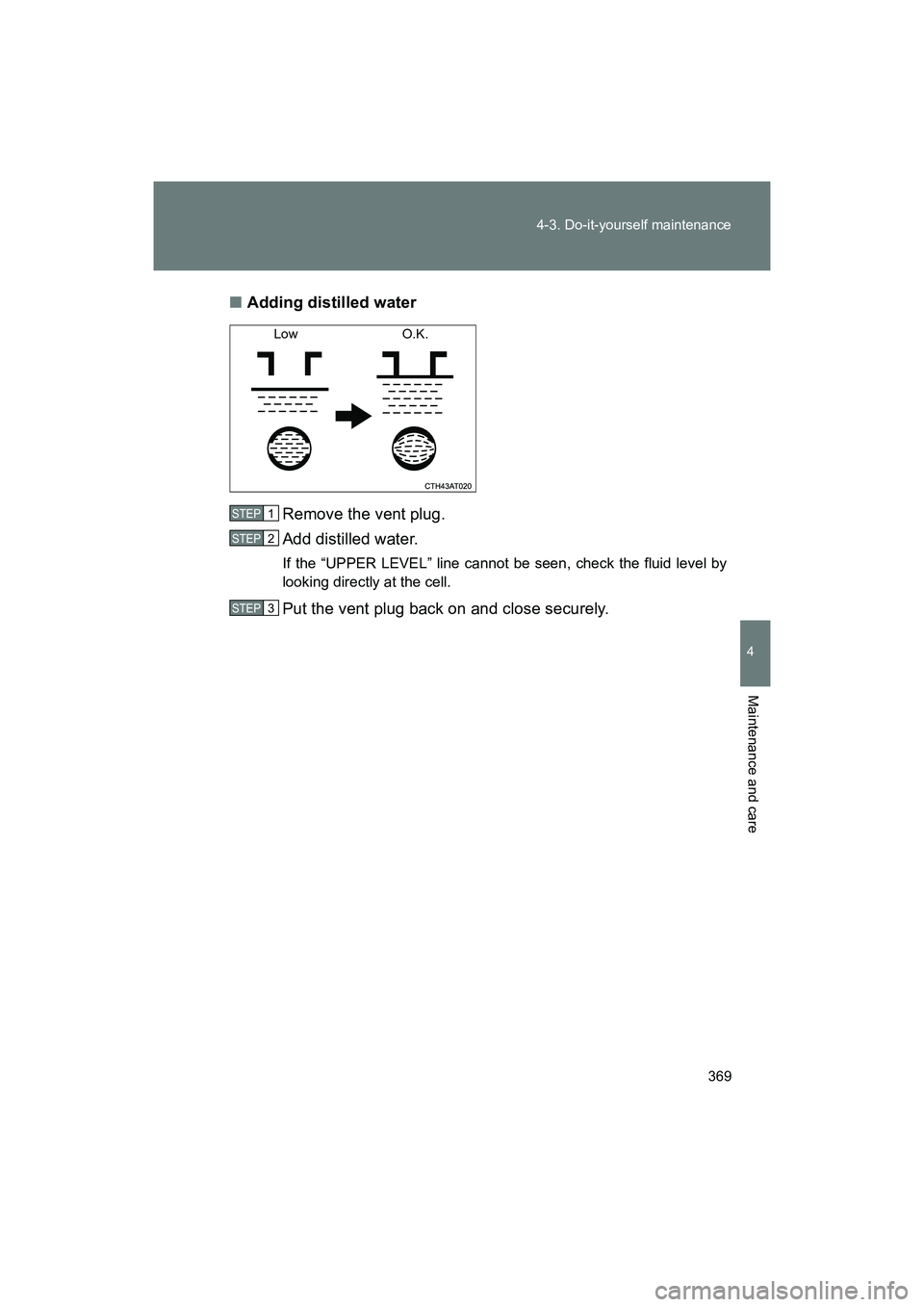
Adding distilled water
Remove the vent plug.
Add distilled water.
If the “UPPER LEVEL” line cannot be seen, check the fluid level by
looking directly at the cell.
Put the vent plug back on and close securely.
Low O.K.
STEP 1
STEP 2
STEP 3
Page 401 of 568
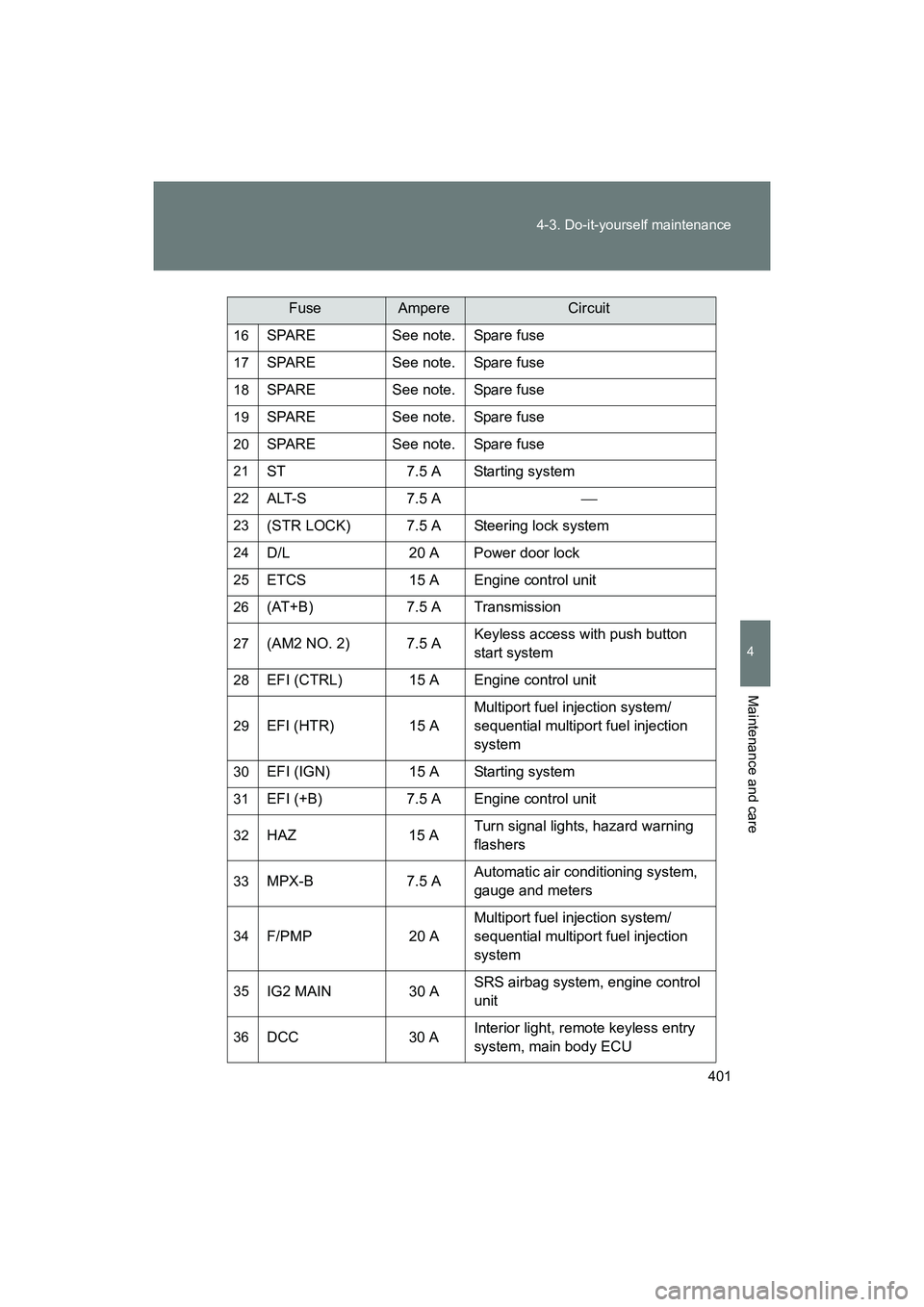
401
4-3. Do-it-yourself maintenance
4
Maintenance and care
BRZ_U (A4450BE-A)
16SPARE See note. Spare fuse
17SPARE See note. Spare fuse
18SPARE See note. Spare fuse
19SPARE See note. Spare fuse
20SPARE See note. Spare fuse
21ST 7.5 A Starting system
22ALT-S 7.5 A
23(STR LOCK) 7.5 A Steering lock system
24D/L 20 A Power door lock
25ETCS 15 A Engine control unit
26(AT+B) 7.5 A Transmission
27(AM2 NO. 2) 7.5 AKeyless access with push button
start system
28EFI (CTRL) 15 A Engine control unit
29EFI (HTR) 15 AMultiport fuel injection system/
sequential multiport fuel injection
system
30EFI (IGN) 15 A Starting system
31EFI (+B) 7.5 A Engine control unit
32HAZ 15 A
Turn signal lights, hazard warning
flashers
33MPX-B 7.5 AAutomatic air condi
tioning system,
gauge and meters
34F/PMP 20 A Multiport fuel injection system/
sequential multiport fuel injection
system
35IG2 MAIN 30 A
SRS airbag system, engine control
unit
36DCC 30 AInterior light, remote keyless entry
system, main body ECU
FuseAmpereCircuit
Page 402 of 568
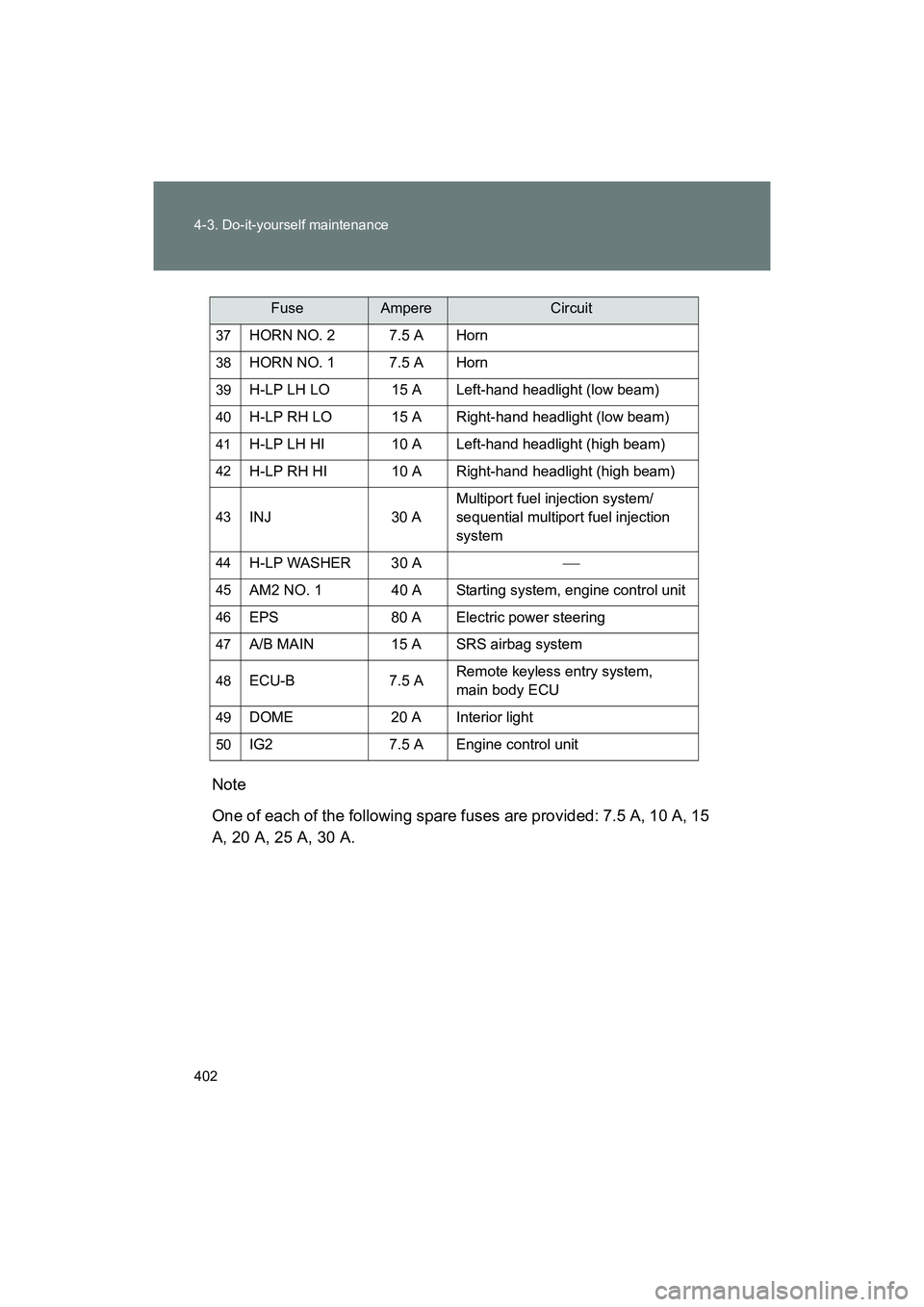
402 4-3. Do-it-yourself maintenance
BRZ_U (A4450BE-A)Note
One of each of the following spare fuses are provided: 7.5 A, 10 A, 15
A, 20 A, 25 A, 30 A.
37HORN NO. 2 7.5 A Horn
38HORN NO. 1 7.5 A Horn
39H-LP LH LO 15 A Left-hand headlight (low beam)
40H-LP RH LO 15 A Right-
hand headlight (low beam)
41H-LP LH HI 10 A Left-hand headlight (high beam)
42H-LP RH HI 10 A Right-hand headlight (high beam)
43INJ 30 AMultiport fuel injection system/
sequential multiport fuel injection
system
44H-LP WASHER 30 A
45AM2 NO. 1 40 A Starting system, engine control unit
46EPS 80 A Electric power steering
47A/B MAIN 15 A SRS airbag system
48ECU-B 7.5 A
Remote keyless entry system,
main body ECU
49DOME 20 A Interior light
50IG2 7.5 A Engine control unit
FuseAmpereCircuit