alarm SUBARU BRZ 2023 User Guide
[x] Cancel search | Manufacturer: SUBARU, Model Year: 2023, Model line: BRZ, Model: SUBARU BRZ 2023Pages: 432, PDF Size: 16.56 MB
Page 163 of 432
Combination Meter Display (Color TFT)
157
Instruments and Controls3
– CONTINUED –
■Driving Support System
Settings DisplayThe setting adjustments to the following
systems can be changed to meet your
personal requirements.
LDW (Lane Departure Warning)
*1*2
PCB (Pre-Collision Braking)
*1*2
BSD/RCTA
*1
RAB (Reverse Automatic Braking
system)
*1
(Sonar Audible Alarm)
*1
SRH (Steering Responsive Head-
light)
*1
*1: If equipped
*2: For details about EyeSight system, refer to
the Owner’s Manual supplement for the
EyeSight system.■ Settings DisplayUse the meter control switches on the
steering wheel to change settings.
1. Press or to select .
2. Operate the switches to select a
desired item.
3. Press / or / to change
the setting and then press to confirm
the change.
BRZ_U.book 157 ページ 2022年3月29日 火曜日 午後3時59分
Page 172 of 432
Center Information Display (CID)
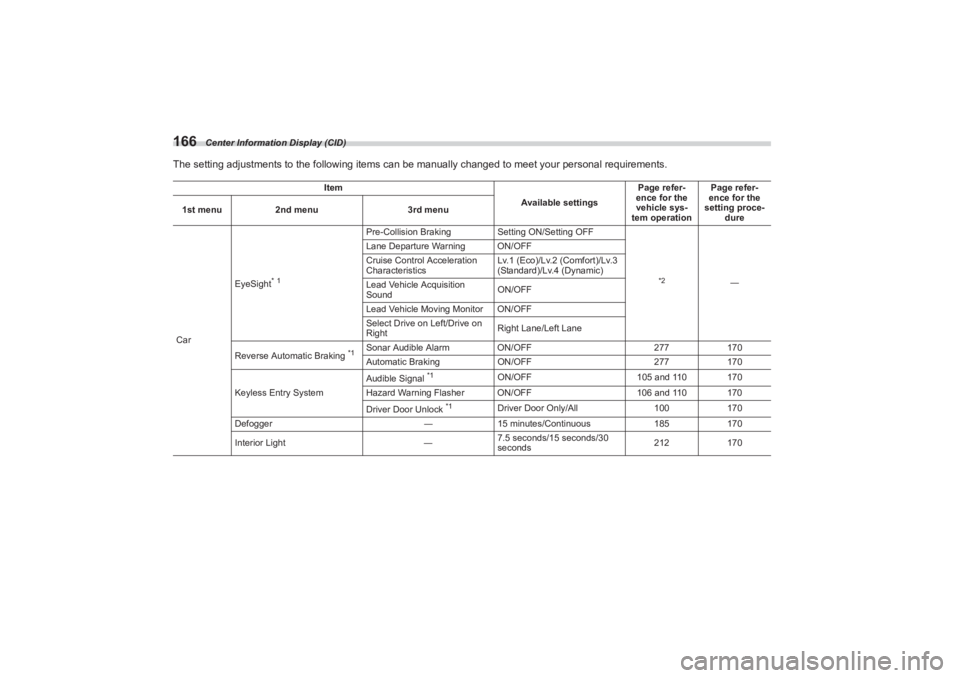
166The setting adjustments to the following items can be manually changed to meet your personal requirements.
Item
Available settingsPage refer-
ence for the
vehicle sys-
tem operation Page refer-
ence for the
setting proce- dure
1st menu
2nd menu 3rd menu
Car EyeSight
* 1
Pre-Collision Braking
Setting ON/Setting OFF
*2
―
Lane Departure Warning ON/OFF
Cruise Control Acceleration
Characteristics
Lv.1 (Eco)/Lv.2 (Comfort)/Lv.3
(Standard)/Lv.4 (Dynamic)
Lead Vehicle Acquisition
Sound ON/OFF
Lead Vehicle Moving Monitor ON/OFF
Select Drive on Left/Drive on
Right Right Lane/Left Lane
Reverse Automatic Braking
*1
Sonar Audible Alarm ON/OFF 277170
Automatic Braking ON/OFF 277170
Keyless Entry System Audible Signal
*1
ON/OFF
105 and 110 170
Hazard Warning Flasher ON/OFF 106 and 110 170
Driver Door Unlock
*1
Driver Door Only/All 100170
Defogger ―15 minutes/Continuous 185170
Interior Light ―7.5 seconds/15 seconds/30
seconds 212
170
BRZ_U.book 166 ページ 2022年3月29日 火曜日 午後3時59分
Page 228 of 432
Starting and Operating
Changing the ID code set ............................................ 255
7-16. Parking Your Vehicle ........................................255
Parking Brake ............................................................... 255
Parking Tips.................................................................. 256
7-17. Hill Start Assist System ....................................257
To Activate/Deactivate the Hill Start Assist
System ........................................................................ 258
Hill Start Assist Indicator Light................................... 259
7-18. Cruise Control (Models without the
EyeSight system) ..............................................260
To Set Cruise Control .................................................. 260
To Temporarily Cancel the Cr uise Control ................ 261
To Turn Off the Cruise Control ................................... 262
To Change the Cruising Speed ................................... 262
Cruise Control Indicator Light .................................... 263
7-19. Rear View Camera .............................................263
How to Use the Rear View Camera ............................. 264
Viewing Range on the Screen ..................................... 265
Help Lines ..................................................................... 266
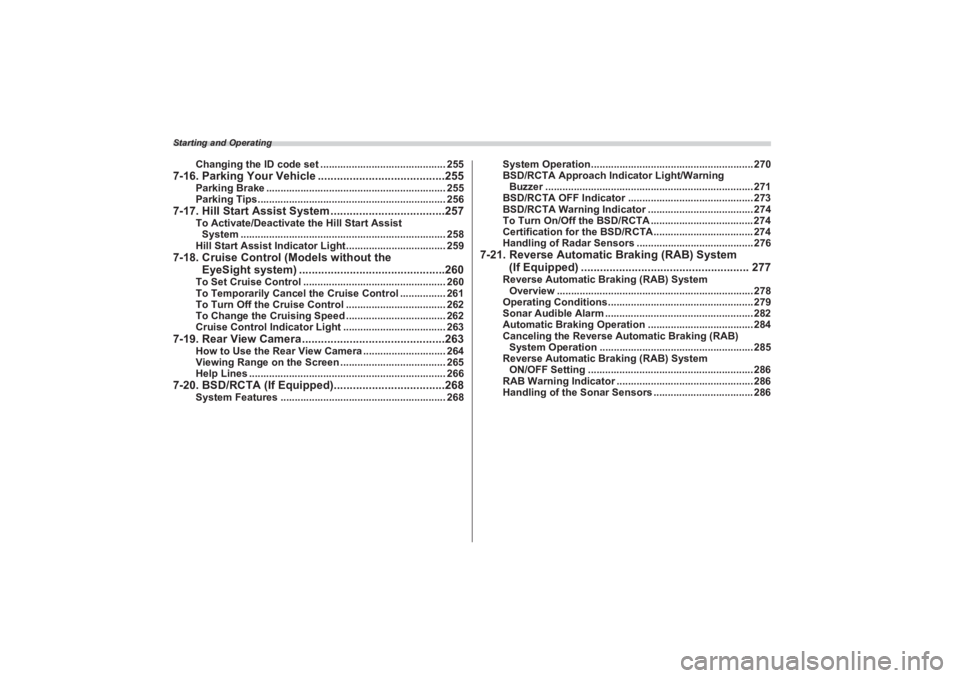
7-20. BSD/RCTA (If Equipped)...................................268
System Features .......................................................... 268 System Operation......................................................... 270
BSD/RCTA Approach Indi
cator Light/Warning
Buzzer ......................................................................... 271
BSD/RCTA OFF Indicator ............................................ 273
BSD/RCTA Warning Indicator ..................................... 274
To Turn On/Off the BSD/RCTA .................................... 274
Certification for the BSD/RCTA................................... 274
Handling of Radar Sensors ......................................... 276
7-21. Reverse Automatic Braking (RAB) System
(If Equipped) ..................................................... 277
Reverse Automatic Braking (RAB) System
Overview ..................................................................... 278
Operating Conditions................................................... 279
Sonar Audible Alarm .................................................... 282
Automatic Braking Operation ..................................... 284
Canceling the Reverse Au tomatic Braking (RAB)
System Operation ...................................................... 285
Reverse Automatic Braking (RAB) System
ON/OFF Setting .......................................................... 286
RAB Warning Indicator ................................................ 286
Handling of the Sonar Sensors ................................... 286
BRZ_U.book 222 ページ 2022年3月29日 火曜日 午後3時59分
Page 284 of 432
Reverse Automatic Braking (RAB) System (If Equipped)
278tion for statistical processing or similar
purposes.■ Reverse Automatic Braking
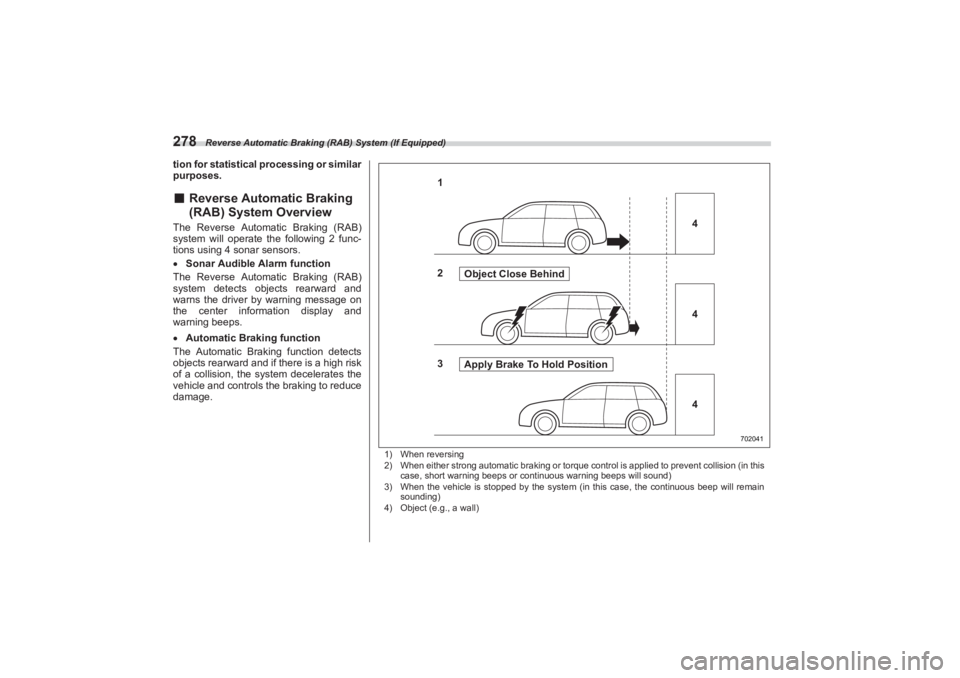
(RAB) System OverviewThe Reverse Automatic Braking (RAB)
system will operate th e following 2 func-
tions using 4 sonar sensors.
Sonar Audible Alarm function
The Reverse Automatic Braking (RAB)
system detects objects rearward and
warns the driver by warning message on
the center information display and
warning beeps.
Automatic Braking function
The Automatic Braking function detects
objects rearward and if there is a high risk
of a collision, the system de celerates the
vehicle and controls the braking to reduce
damage.
1) When reversing
2) When either strong automatic br aking or torque control is applied to prevent collision (in this
case, short warning beeps or continuous warning beeps will sound)
3) When the vehicle is stopped by the system (in this case, the continuous beep will remain
sounding)
4) Object (e.g., a wall)
702041
1
4
2 Object Close Behind
3 Apply Brake To Hold Position 4
4
BRZ_U.book 278 ページ 2022年3月29日 火曜日 午後3時59分
Page 285 of 432
Reverse Automatic Braking (RAB) System (If Equipped)
279
Starting and Operating7
– CONTINUED –
■Operating ConditionsThe Reverse Automatic Braking (RAB)
system will operat e when all of the
following conditions are met.
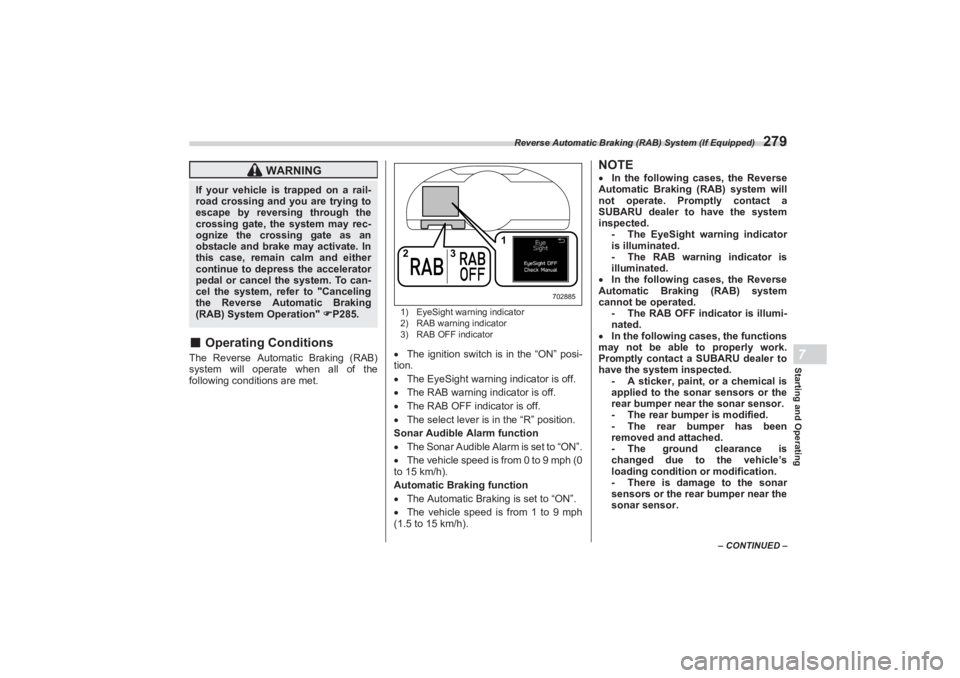
1) EyeSight warning indicator
2) RAB warning indicator
3) RAB OFF indicator The ignition switch is in the “ON” posi-
tion.
The EyeSight warning indicator is off.
The RAB warning indicator is off.
The RAB OFF indicator is off.
The select lever is in the “R” position.
Sonar Audible Alarm function
The Sonar Audible Alarm is set to “ON”.
The vehicle speed is from 0 to 9 mph (0
to 15 km/h).
Automatic Brak ing function
The Automatic Braking is set to “ON”.
The vehicle speed is from 1 to 9 mph
(1.5 to 15 km/h).
NOTE In the following cases, the Reverse
Automatic Braking (RAB) system will
not operate. Promptly contact a
SUBARU dealer to have the system
inspected. - The EyeSight warning indicator
is illuminated.
- The RAB warning indicator is
illuminated.
In the following cases, the Reverse
Automatic Braking (RAB) system
cannot be operated. - The RAB OFF indicator is illumi-
nated.
In the following ca ses, the functions
may not be able to properly work.
Promptly contact a SUBARU dealer to
have the system inspected. - A sticker, paint, or a chemical is
applied to the sonar sensors or the
rear bumper near the sonar sensor.
- The rear bumper is modified.
- The rear bumper has been
removed and attached.
- The ground clearance is
changed due to the vehicle’s
loading condition or modification.
- There is damage to the sonar
sensors or the rear bumper near the
sonar sensor.
WARNING
If your vehicle is trapped on a rail-
road crossing and you are trying to
escape by reversing through the
crossing gate, the system may rec-
ognize the crossing gate as an
obstacle and brake may activate. In
this case, remain calm and either
continue to depress the accelerator
pedal or cancel the system. To can-
cel the system, refer to "Canceling
the Reverse Automatic Braking
(RAB) System Operation" P285.
3 1
2
702885
BRZ_U.book 279 ページ 2022年3月29日 火曜日 午後3時59分
Page 288 of 432
Reverse Automatic Braking (RAB) System (If Equipped)
282
- There is an obstacle that is next
to an object.
- Going back along a wall.
- The area where the road starts
touching dirt and snow
- When reversing on an uneven
road.
In circumstances such as the
following, it may not be possible to
avoid a collision even when the system
operates normally. - Roads are slippery.
- The tire air pressure is not
correct.
- The tires have become worn.
- Tire chains are installed.
- Tires which are not the desig-
nated size are installed.
- Emergency repairs were
performed using a puncture repair
kit.
- The suspension was modified.
- Vehicle driving is unstable due to
accident or malfunction.
- The brake warning light is illumi-
nated.
■ Sonar Audible Alarm func -
tionWhen Reverse Automatic Braking (RAB)
system is in operation, an audible warning
beeps will sound in 3 levels to warn the
driver of a potential collision.
NOTEIt may take time to display the wall and
sound warning beeps after the object
was recognized by the Sonar Audible
Alarm function.
BRZ_U.book 282 ページ 2022年3月29日 火曜日 午後3時59分
Page 289 of 432
Reverse Automatic Braking (RAB) System (If Equipped)
283
– CONTINUED –
Starting and Operating7
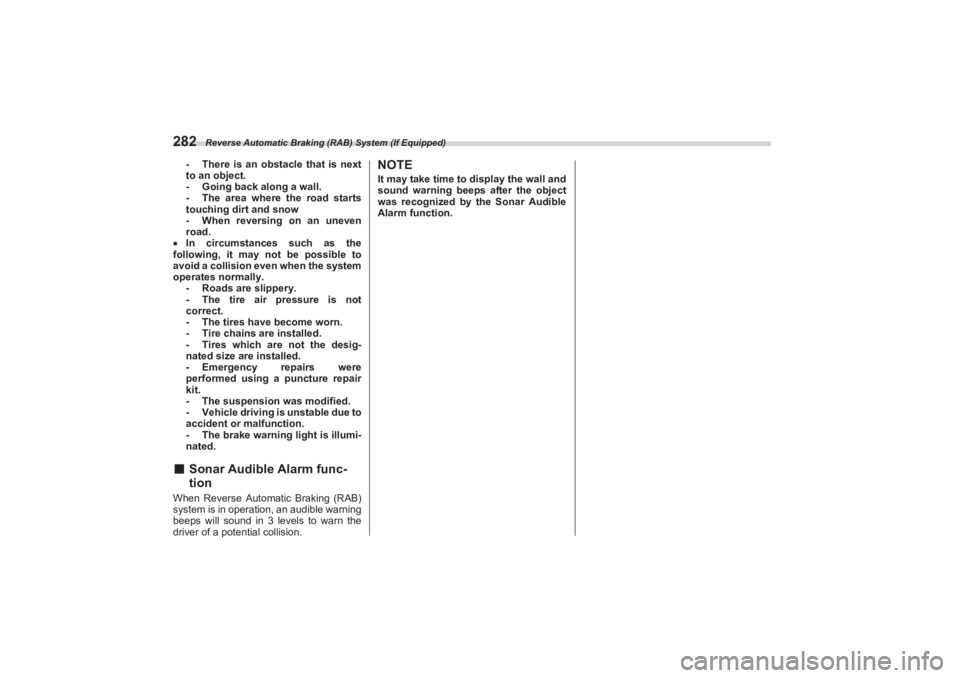
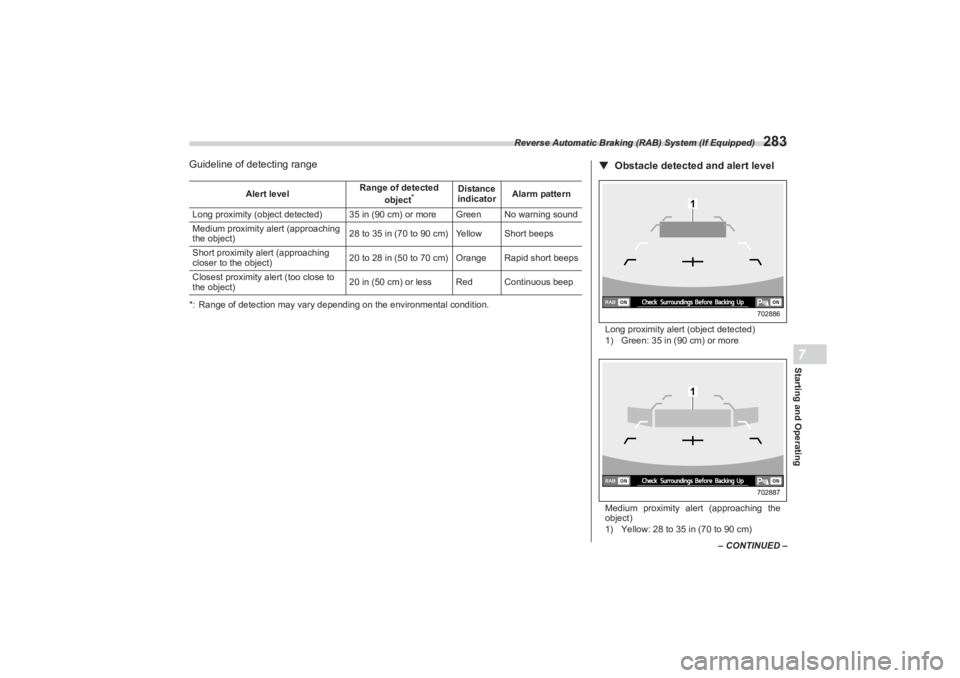
Guideline of detecting range*: Range of detection may vary depending on the environmental condition.Alert level
Range of detected
object
*
Distance
indicator Alarm pattern
Long proximity (object detected) 35 in (90 cm) or more Green No warning sound
Medium proximity alert (approaching
the object) 28 to 35 in (70 to 90 cm) Yellow Short beeps
Short proximity alert (approaching
closer to the object) 20 to 28 in (50 to 70 cm) Orange Rapid short beeps
Closest proximity alert (too close to
the object) 20 in (50 cm) or less Red Continuous beep
▼
Obstacle detected and alert levelLong proximity alert (object detected)
1) Green: 35 in (90 cm) or more
Medium proximity alert (approaching the
object)
1) Yellow: 28 to 35 in (70 to 90 cm)
1
702886
1
702887
BRZ_U.book 283 ページ 2022年3月29日 火曜日 午後3時59分
Page 290 of 432
Reverse Automatic Braking (RAB) System (If Equipped)
284Short proximity alert (approaching the
object closer)
1) Orange: 20 to 28 in (50 to 70 cm)
Closest proximity alert (too close to the
object)
1) Red: 20 in (50 cm) or less
When an object is detected in the
reversing direction, the range of detected
object will be shown on the center infor-
mation display.
A warning alarm will sound and,
depending on the speed, either torque
control to generate engine braking or
automatic braking will be applied.■ Automatic Braking function
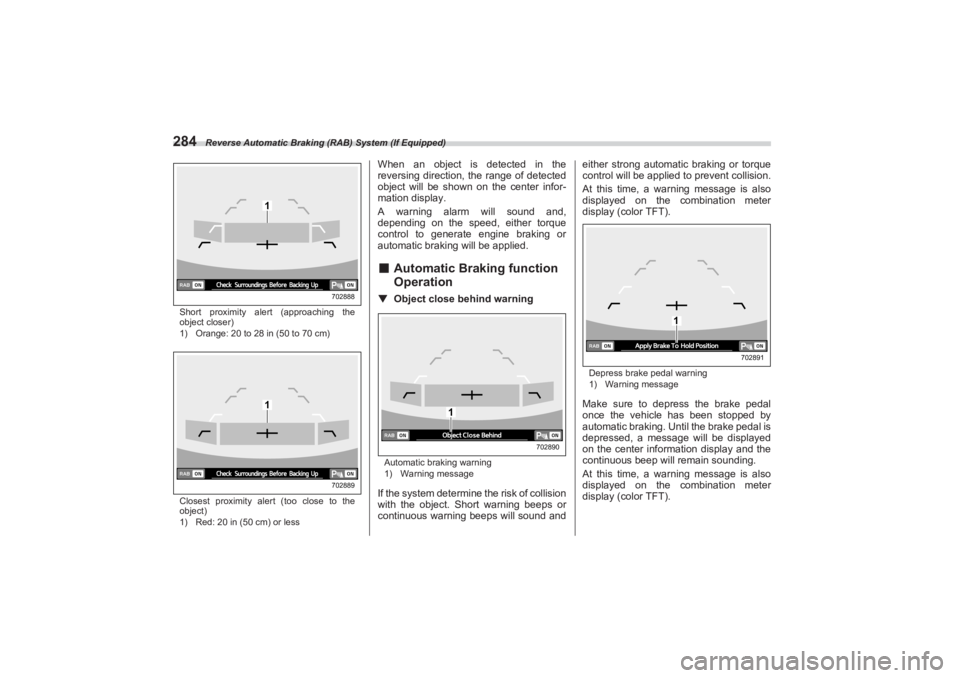
Operation▼ Object close behind warningAutomatic braking warning
1) Warning messageIf the system determine the risk of collision
with the object. Short warning beeps or
continuous warning beeps will sound and either strong automatic braking or torque
control will be applied to prevent collision.
At this time, a warning message is also
displayed on the combination meter
display (color TFT).
Depress brake pedal warning
1) Warning messageMake sure to depress the brake pedal
once the vehicle has been stopped by
automatic braking. Un til the brake pedal is
depressed, a message will be displayed
on the center information display and the
continuous beep will remain sounding.
At this time, a warning message is also
displayed on the combination meter
display (color TFT).
1
702888
1
702889
1
702890
1
702891
BRZ_U.book 284 ページ 2022年3月29日 火曜日 午後3時59分
Page 291 of 432
Reverse Automatic Braking (RAB) System (If Equipped)
285
Starting and Operating7
– CONTINUED –
NOTEThe Sonar Audible Alarm function and
Automatic Braking fu nction are differ-
ent in operation conditions. Therefore
there are cases in which only one of
these functions will activate.▼ After the vehicle is stopped by the
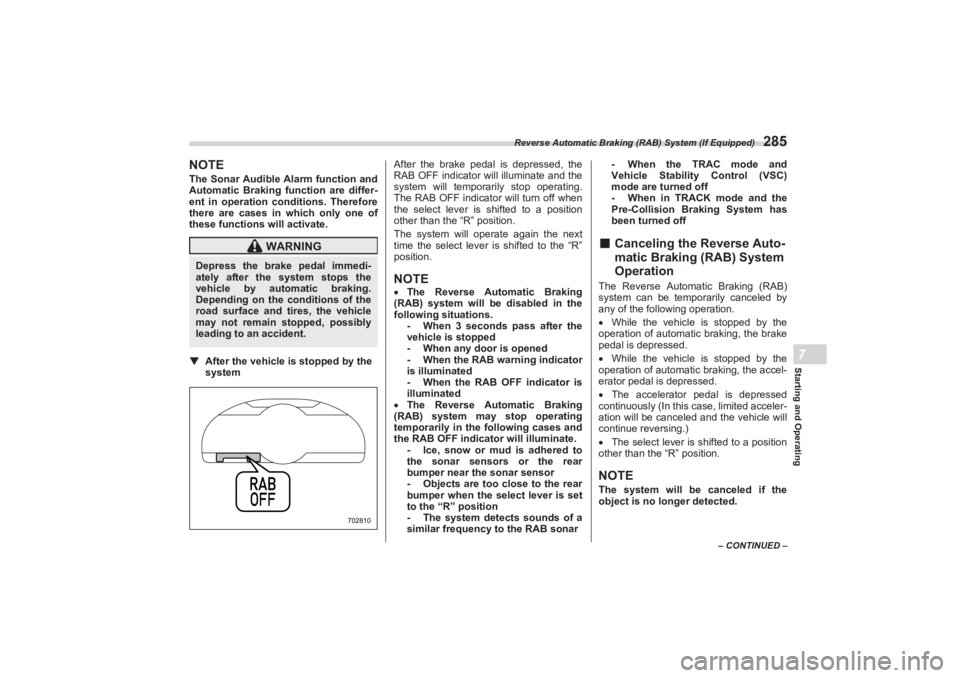
system After the brake pedal is depressed, the
RAB OFF indicator will illuminate and the
system will temporarily stop operating.
The RAB OFF indicator will turn off when
the select lever is shifted to a position
other than the “R” position.
The system will operate again the next
time the select lever is shifted to the “R”
position.
NOTE The Reverse Automatic Braking
(RAB) system will be disabled in the
following situations. - When 3 seconds pass after the
vehicle is stopped
- When any door is opened
- When the RAB warning indicator
is illuminated
- When the RAB OFF indicator is
illuminated
The Reverse Automatic Braking
(RAB) system may stop operating
temporarily in the following cases and
the RAB OFF indicator will illuminate. - Ice, snow or mud is adhered to
the sonar sensors or the rear
bumper near the sonar sensor
- Objects are too close to the rear
bumper when the select lever is set
to the “R” position
- The system detects sounds of a
similar frequency to the RAB sonar - When the TRAC mode and
Vehicle Stability Control (VSC)
mode are turned off
- When in TRACK mode and the
Pre-Collision Braking System has
been turned off
■ Canceling the Reverse Auto -
matic Braking (RAB) System
OperationThe Reverse Automatic Braking (RAB)
system can be temporarily canceled by
any of the following operation.
While the vehicle is stopped by the
operation of automatic braking, the brake
pedal is depressed.
While the vehicle is stopped by the
operation of automati c braking, the accel-
erator pedal is depressed.
The accelerator pedal is depressed
continuously (In this case, limited acceler-
ation will be canceled and the vehicle will
continue reversing.)
The select lever is shifted to a position
other than the “R” position.NOTEThe system will be canceled if the
object is no longer detected.
WARNING
Depress the brake pedal immedi-
ately after the system stops the
vehicle by automatic braking.
Depending on the conditions of the
road surface and tires, the vehicle
may not remain stopped, possibly
leading to an accident.
702810
BRZ_U.book 285 ページ 2022年3月29日 火曜日 午後3時59分
Page 292 of 432
Reverse Automatic Braking (RAB) System (If Equipped)
286■Reverse Automatic Braking
(RAB) System ON/OFF
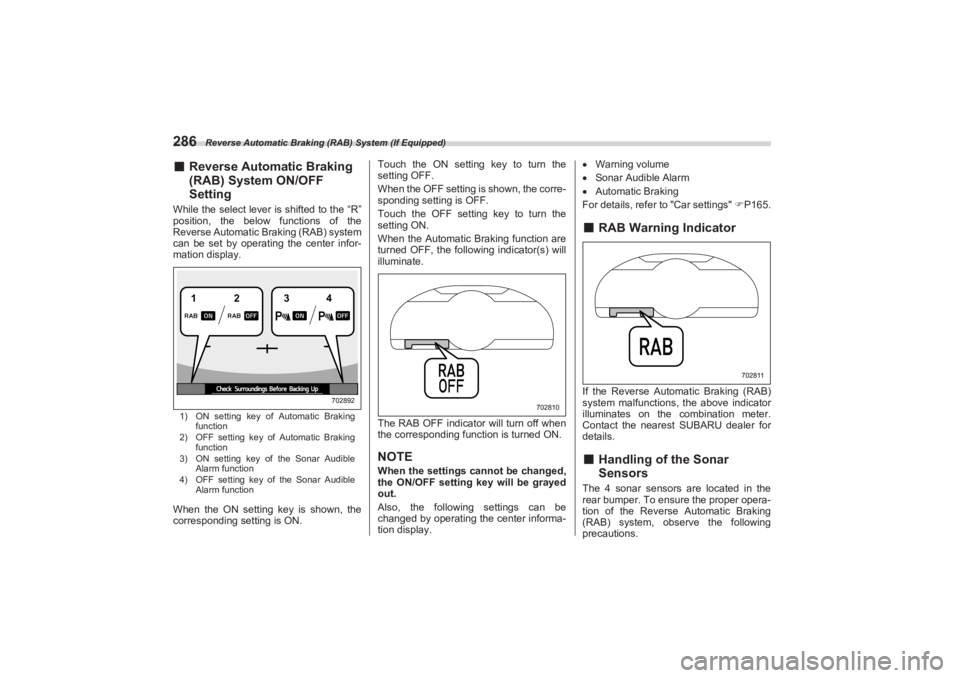
SettingWhile the select lever is shifted to the “R”
position, the below functions of the
Reverse Automatic Braking (RAB) system
can be set by operating the center infor-
mation display.1) ON setting key of Automatic Braking
function
2) OFF setting key of Automatic Braking
function
3) ON setting key of the Sonar Audible
Alarm function
4) OFF setting key of the Sonar Audible
Alarm functionWhen the ON setting key is shown, the
corresponding setting is ON. Touch the ON setting key to turn the
setting OFF.
When the OFF setting is shown, the corre-
sponding setting is OFF.
Touch the OFF setting key to turn the
setting ON.
When the Automatic Braking function are
turned OFF, the following indicator(s) will
illuminate.
The RAB OFF indicator will turn off when
the corresponding function is turned ON.
NOTEWhen the settings cannot be changed,
the ON/OFF setting key will be grayed
out.
Also, the following settings can be
changed by operating the center informa-
tion display.
Warning volume
Sonar Audible Alarm
Automatic Braking
For details, refer to "Car settings" P165.
■ RAB Warning IndicatorIf the Reverse Automatic Braking (RAB)
system malfunctions, the above indicator
illuminates on the combination meter.
Contact the nearest SUBARU dealer for
details.■ Handling of the Sonar
SensorsThe 4 sonar sensors are located in the
rear bumper. To ensure the proper opera-
tion of the Reverse Automatic Braking
(RAB) system, observe the following
precautions.
12
34
702892
702810
702811
BRZ_U.book 286 ページ 2022年3月29日 火曜日 午後3時59分