brake SUBARU BRZ 2023 User Guide
[x] Cancel search | Manufacturer: SUBARU, Model Year: 2023, Model line: BRZ, Model: SUBARU BRZ 2023Pages: 432, PDF Size: 16.56 MB
Page 152 of 432
Warning and Indicator Lights
146
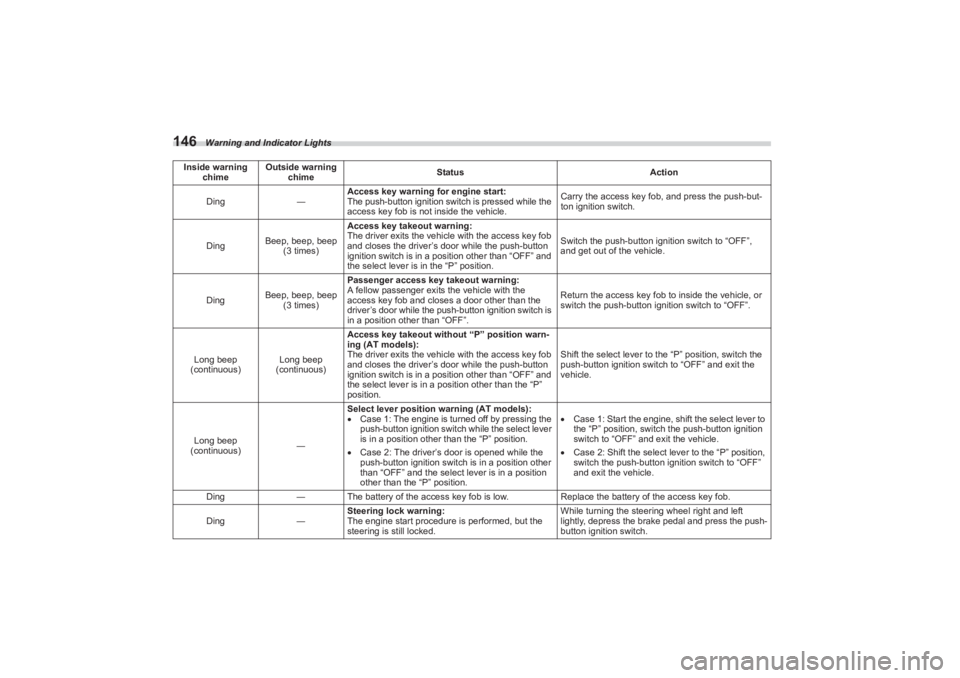
Ding―Access key warning for engine start:
The push-button ignition switch is pressed while the
access key fob is not
inside the vehicle. Carry the access key fob, and press the push-but-
ton ignition switch.
Ding Beep, beep, beep
(3 times) Access key takeout warning:
The driver exits the vehicl
e with the access key fob
and closes the driver’s door while the push-button
ignition switch is in a position other than “OFF” and
the select lever is in the “P” position. Switch the push-button ignition switch to “OFF”,
and get out of the vehicle.
Ding Beep, beep, beep
(3 times) Passenger access key takeout warning:
A fellow passenger exits the vehicle with the
access key fob and closes a door other than the
driver’s door while the push
-button ignition switch is
in a position other than “OFF”. Return the access key fob
to inside the vehicle, or
switch the push-button ignition switch to “OFF”.
Long beep
(continuous) Long beep
(continuous) Access key takeout without “P” position warn-
ing (AT models):
The driver exits the vehicl
e with the access key fob
and closes the driver’s door while the push-button
ignition switch is in a position other than “OFF” and
the select lever is in a position other than the “P”
position. Shift the select lever to the “P” position, switch the
push-button ignition switch to “OFF” and exit the
vehicle.
Long beep
(continuous) ―Select lever position warning (AT models):
Case 1: The engine is turned off by pressing the
push-button ignition switch while the select lever
is in a position other than the “P” position.
Case 2: The driver’s door is opened while the
push-button ignition switch is in a position other
than “OFF” and the select lever is in a position
other than the “P” position.
Case 1: Start the engine, shift the select lever to
the “P” position, switch the push-button ignition
switch to “OFF” and exit the vehicle.
Case 2: Shift the select lever to the “P” position,
switch the push-button ignition switch to “OFF”
and exit the vehicle.
Ding ―The battery of the access ke y fob is low.Replace the battery of the access key fob.
Ding ―Steering lock warning:
The engine start procedure is performed, but the
steering is still locked. While turning the steering wheel right and left
lightly, depress the brake pedal and press the push-
button ignition switch.
Inside warning
chime Outside warning
chime Status
Action
BRZ_U.book 146 ページ 2022年3月29日 火曜日 午後3時59分
Page 160 of 432
Combination Meter Display (Color TFT)
154Pressing and holding will reset the
average vehicle speed/driving time/
driving distance.▼ Drive information (page 4) (if
equipped)
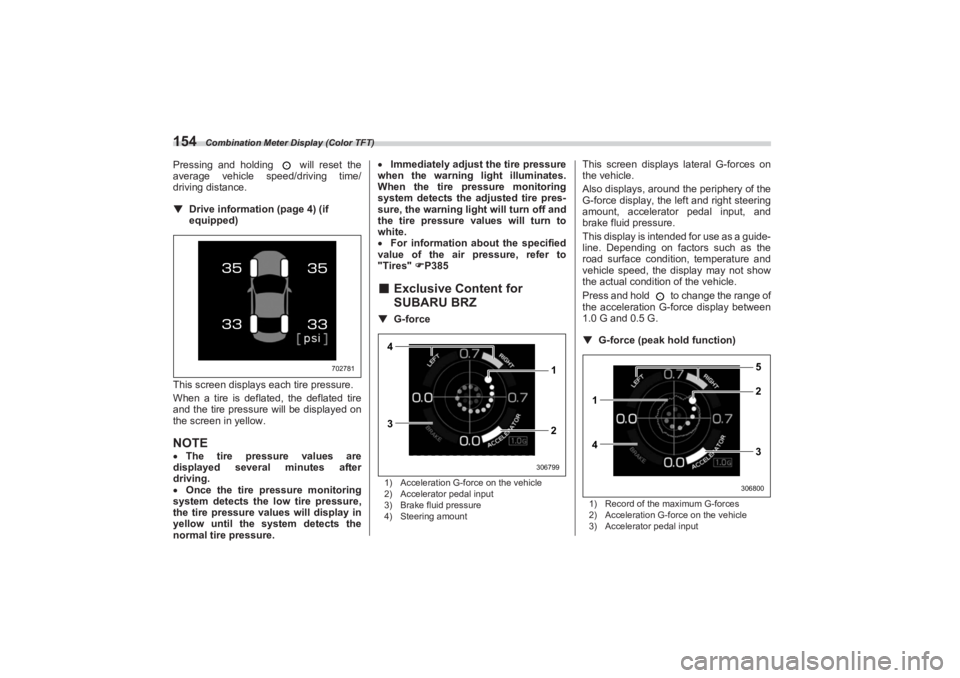
This screen displays each tire pressure.
When a tire is deflated, the deflated tire
and the tire pressure will be displayed on
the screen in yellow.NOTE The tire pressure values are
displayed several minutes after
driving.
Once the tire pressure monitoring
system detects the low tire pressure,
the tire pressure values will display in
yellow until the system detects the
normal tire pressure.
Immediately adjust the tire pressure
when the warning light illuminates.
When the tire pr essure monitoring
system detects the adjusted tire pres-
sure, the warning ligh t will turn off and
the tire pressure values will turn to
white.
For information about the specified
value of the air pressure, refer to
"Tires" P385
■ Exclusive Content for
SUBARU BRZ▼ G-force1) Acceleration G-force on the vehicle
2) Accelerator pedal input
3) Brake fluid pressure
4) Steering amount
This screen displays lateral G-forces on
the vehicle.
Also displays, around the periphery of the
G-force display, the left and right steering
amount, accelerator pedal input, and
brake fluid pressure.
This display is intended for use as a guide-
line. Depending on factors such as the
road surface conditi on, temperature and
vehicle speed, the display may not show
the actual condition of the vehicle.
Press and hold to change the range of
the acceleration G-force display between
1.0 G and 0.5 G.
▼ G-force (peak ho ld function)1) Record of the maximum G-forces
2) Acceleration G-force on the vehicle
3) Accelerator pedal input
702781
4
3 1
2
306799
1
42 5
3
306800
BRZ_U.book 154 ページ 2022年3月29日 火曜日 午後3時59分
Page 161 of 432
Combination Meter Display (Color TFT)
155
Instruments and Controls3
– CONTINUED –
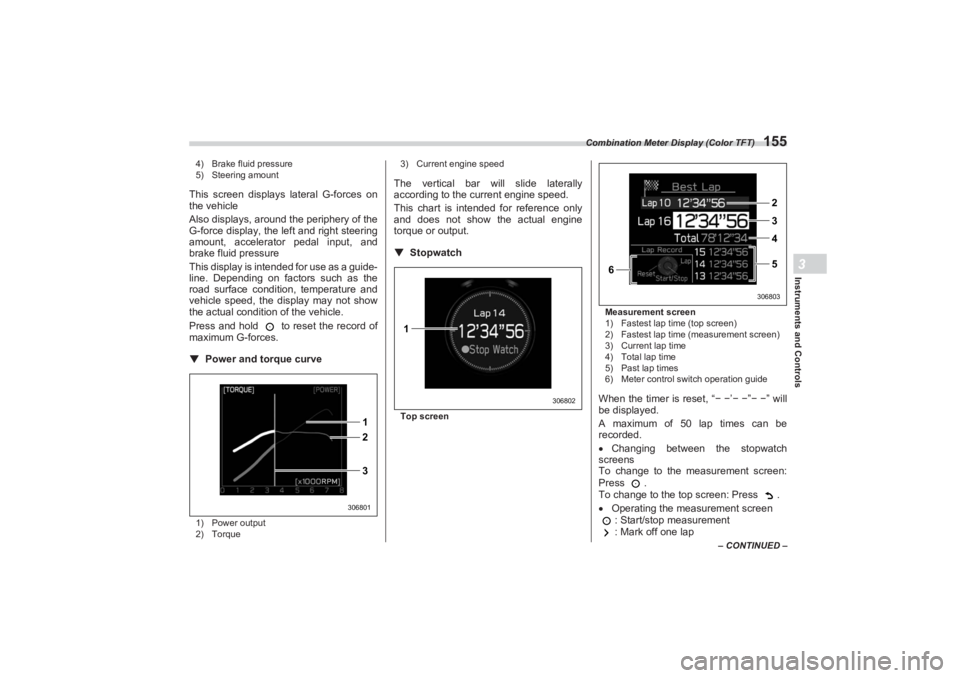
4) Brake fluid pressure
5) Steering amount
This screen displays lateral G-forces on
the vehicle
Also displays, around the periphery of the
G-force display, the left and right steering
amount, accelerator pedal input, and
brake fluid pressure
This display is intended for use as a guide-
line. Depending on factors such as the
road surface condition, temperature and
vehicle speed, the display may not show
the actual condition of the vehicle.
Press and hold to reset the record of
maximum G-forces.▼ Power and torque curve1) Power output
2) Torque 3) Current engine speed
The vertical bar will slide laterally
according to the current engine speed.
This chart is intended for reference only
and does not show the actual engine
torque or output.
▼ StopwatchTop screen Measurement screen
1) Fastest lap time (top screen)
2) Fastest lap time (measurement screen)
3) Current lap time
4) Total lap time
5) Past lap times
6) Meter control switch operation guide
When the timer is reset, “
− − ’− − ”− − ” will
be displayed.
A maximum of 50 lap times can be
recorded.
Changing between the stopwatch
screens
To change to the measurement screen:
Press .
To change to the top screen: Press .
Operating the measurement screen
: Start/stop measurement
: Mark off one lap
2 1
3
306801
1
306802
6
2
3
4
5
306803
BRZ_U.book 155 ページ 2022年3月29日 火曜日 午後3時59分
Page 180 of 432
Light Control Switch
1743-10. Light Control SwitchThe light control switch operates when the
push-button ignition switch is in the “ACC”
or “ON” position.
Regardless of the pos ition of the light
control switch, the illuminated lights are
turned off when the push-button ignition
switch is turned off.NOTEThe light control switch can be oper-
ated (except auto on/off headlights),
even the push-button ignition switch
is turned off.
If the driver’s door is opened while the
headlights are illuminated under such conditions, a chirp sound will inform
the driver that the lights are illumi-
nated.
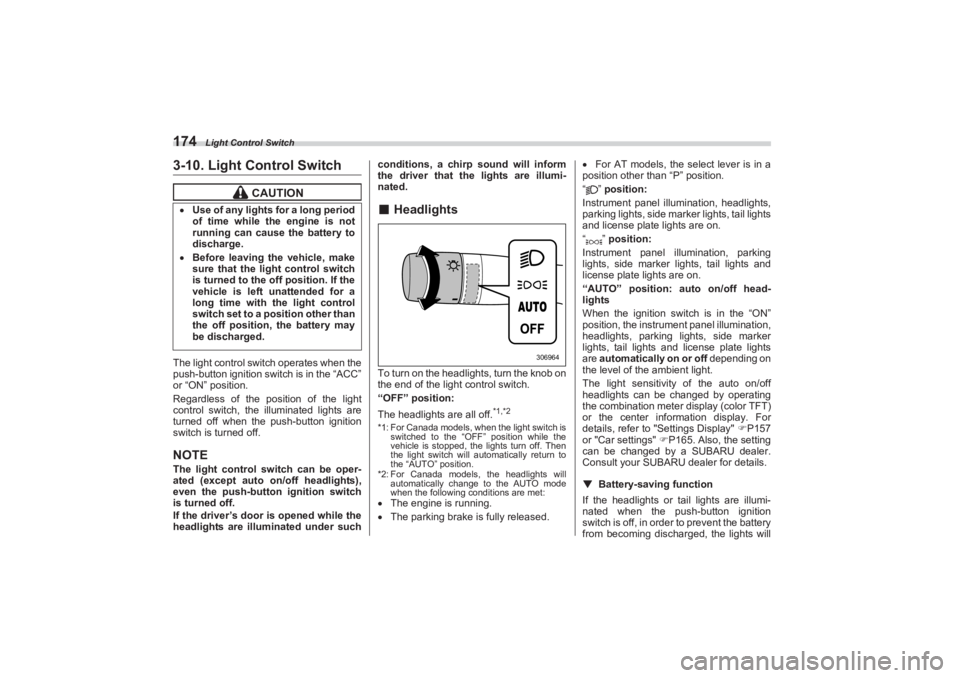
■ HeadlightsTo turn on the headlights, turn the knob on
the end of the light control switch.
“OFF” position:
The headlights are all off.
*1,*2
*1: For Canada models, when the light switch is
switched to the “OFF” position while the
vehicle is stopped, the lights turn off. Then
the light switch will automatically return to
the “AUTO” position.
*2: For Canada models, the headlights will automatically change to the AUTO mode
when the following conditions are met: The engine is running.
The parking brake is fully released.
For AT models, the select lever is in a
position other than “P” position.
“” position:
Instrument panel illumination, headlights,
parking lights, side marker lights, tail lights
and license plate lights are on.
“” position:
Instrument panel illumination, parking
lights, side marker lights, tail lights and
license plate lights are on.
“AUTO” position: auto on/off head-
lights
When the ignition switch is in the “ON”
position, the instrum ent panel illumination,
headlights, parking lights, side marker
lights, tail lights and license plate lights
are automatically on or off depending on
the level of the ambient light.
The light sensitivity of the auto on/off
headlights can be changed by operating
the combination meter display (color TFT)
or the center information display. For
details, refer to "Settings Display" P157
or "Car settings" P165. Also, the setting
can be changed by a SUBARU dealer.
Consult your SUBARU dealer for details.
▼ Battery-saving function
If the headlights or tail lights are illumi-
nated when the push-button ignition
switch is off, in order to prevent the battery
from becoming discharg ed, the lights will
CAUTION
Use of any lights for a long period
of time while the engine is not
running can cause the battery to
discharge. Before leaving the vehicle, make
sure that the light control switch
is turned to the off position. If the
vehicle is left unattended for a
long time with the light control
switch set to a position other than
the off position, the battery may
be discharged.
306964
BRZ_U.book 174 ページ 2022年3月29日 火曜日 午後3時59分
Page 186 of 432
Steering Responsive Headlight (SRH) (If Equipped)
180■Daytime Running Light
SystemThe daytime running lights will automati-
cally illuminate when the following condi-
tions are fulfilled.
The engine is running.
The parking brake is fully released.
The light control switch is in the
“AUTO”, “ ” or “OFF” position.
For AT models, the select lever is in a
position other than the “P” position.NOTE When the light switch is in the “ ”
position, the instrument panel illumina-
tion, side marker lights, tail lights and
license plate lights are also illumi-
nated.
While the headlight switch is in the
“AUTO” position and the headlights
turn on automatically, the daytime
running light is deactivated.
When the turn signal indicators are
flashing, the daytime running light on
the side that the turn signals are
flashing will turn off.
3-11. Steering Responsive
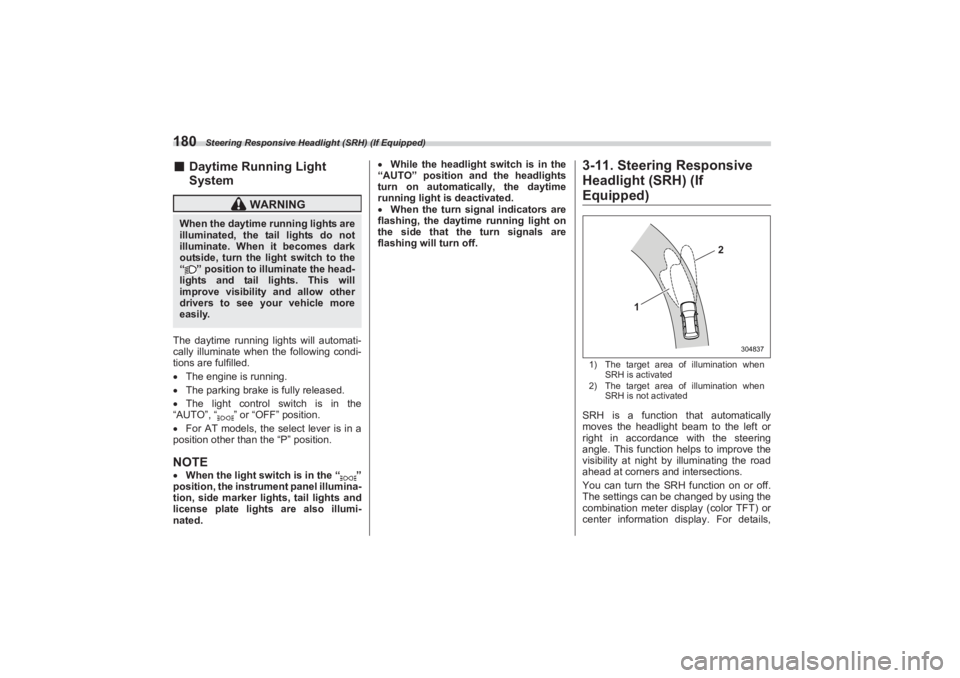
Headlight (SRH) (If Equipped)1) The target area of illumination when
SRH is activated
2) The target area of illumination when
SRH is not activatedSRH is a function that automatically
moves the headlight beam to the left or
right in accordance with the steering
angle. This function helps to improve the
visibility at night by illuminating the road
ahead at corners and intersections.
You can turn the SRH function on or off.
The settings can be changed by using the
combination meter display (color TFT) or
center information display. For details,
WARNING
When the daytime running lights are
illuminated, the tail lights do not
illuminate. When it becomes dark
outside, turn the li ght switch to the
“ ” position to illuminate the head-
lights and tail lights. This will
improve visibility and allow other
drivers to see your vehicle more
easily.
1
2
304837
BRZ_U.book 180 ページ 2022年3月29日 火曜日 午後3時59分
Page 222 of 432
USB Power Supply
216
6-6. USB Power Supply
NOTEThe rated voltage of each USB
terminal is 5 V/2.1 A (total 4.2 A). For
details about the maximum rated
power, refer to "How to Use the USB
Power Supply" P217. Before
connecting a device, be sure to read
the instruction manual of the device
and check whether or not this specifi-
cation of the output is supported by the
device. If a device that requires power
exceeding the maximum rating is
connected, power supply or charging
may not be possible. Even if charging
could be completed, the time required
for charging may be longer than when
the genuine charger for that device is
used.
Depending on the device, charging
may be possible only when a special
If the plug on your electric appli-
ance is either too loose or too
tight for the accessory power
outlet, this can result in a poor
contact or cause the plug to get
stuck. Only use plugs that fit
properly. Use of an electric appliance in the
accessory power outlet for a long
period of time while the engine is
not running can cause battery
discharge. Before driving your vehicle, make
sure that the plug and the cord on
your electrical appliance will not
interfere with your shifting gears
and operating the accelerator and
brake pedals. If they do, do not
use the electrical appliance while
driving.
CAUTION
The specification of a USB
terminal that can be used is the A-
type. If a different specification of
terminal is connected, power
supply or charging may not be
possible, or the device may
malfunction. There is a risk that a connected
device may malfunction or data
may be damaged. The connection
of a device shall be performed at
your responsibility. To avoid an electric shock or a
malfunction, observe the
following precautions.
- Do not connect a USB hub.- Do not insert any metal or
other foreign object into the
USB terminal.- Do not spill water or other
liquid on the USB terminal.
Be careful not to pull the
connected cable. Doing so could
break the USB terminal and the
connected device.
If a device is connected for a long
time when the engine is not
running, doing so may cause the
risk of a discharged battery. Even
when the engine is running, we
recommend that you do not
connect a device for an unneces-
sarily long time. Do not connect a malfunctioning
device. Doing so may cause the
risk of smoke and fire.
BRZ_U.book 216 ページ 2022年3月29日 火曜日 午後3時59分
Page 227 of 432
Starting and Operating7
Starting and Operating
7-1. Fuel.......................................................................223
Fuel Requirements .......................................................223
Fuel Filler Lid and Cap .................................................224
7-2. State Emission Testing (U.S. Only) ...................227
7-3. Preparing to Drive ...............................................228
7-4. Starting and Stopping Engine ...........................229
Safety Precautions ............................................ ...........229
Operating Range for Push-Button Start System .......229
General Precautions When St arting Engine ..............229
Starting Engine .............................................................230
Stopping Engine ...........................................................232
When Access Key Fob Does Not Operate
Properly.......................................................................232
Steering Lock ................................................................232
7-5. Manual Transmission .........................................233
Shifting Speeds ............................................................234
Driving Tips ...................................................................235
7-6. Automatic Transmission ....................................235
Select Lever ..... .......................................... ...................236
Adaptive Control...........................................................237
Shift Lock Function ......................................................238
Selection of Manual Mode ...........................................239
Driving Tips ...................................................................240
7-7. Driving Mode Select Switch (If Equipped) ........241
Normal Mode .................................................................241
Sport Mode ....................................................................241
Snow Mode....................................................................241
Driving Mode Select Switch.........................................241
7-8. Active Sound Control .........................................242
7-9. Power Steering ....................................................242
7-10. Braking...............................................................243
Braking Tips ..................................................................243 Brake System ............................................................... 244
Disc Brake Pad Wear Warning Indicators ................. 245
7-11. ABS (Anti-Lock Brake System) ........................245
ABS Self-Check............................................................ 245
ABS Warning Light ...................................................... 245
7-12. Electronic Brake Force Distribution (EBD)
System ...............................................................246
EBD System Malfunctions .......................................... 246
7-13. Vehicle Stability Control (VSC)/TRAC
System ...............................................................247
Vehicle Stability Control (VSC) System ..................... 247
TRAC System ............................................................... 247
Vehicle Stability Control (VSC) System Monitor....... 248
Vehicle Stability Control (VSC) OFF Switch .............. 248
7-14. TRACK Mode .....................................................250
TRACK Mode ................................................................ 250
Selecting TRAC Mode and Ve hicle Stability Control
(VSC) Mode ............................................................... 251
7-15. Tire Pressure Monitoring System (TPMS)
(If Equipped) ......................................................251
Certification for the Transmitter ................................. 253
Certification for the Receiver...................................... 253
TPMS Screen ................................................................ 254
Initializing the Tire Pressure Monitoring System ..... 254
How to Initialize the Tire Pressure Monitoring
System (If Equipped) ................................................. 254
If You Press the Tire Pressure Monitoring Reset
Switch Accidentally................................................... 254
Initialization Procedure ............................................... 254
When Initialization of the Tire Pressure Monitoring System has Failed ..................................................... 255
Registering ID Codes .................................................. 255
BRZ_U.book 221 ページ 2022年3月29日 火曜日 午後3時59分
Page 228 of 432
Starting and Operating
Changing the ID code set ............................................ 255
7-16. Parking Your Vehicle ........................................255
Parking Brake ............................................................... 255
Parking Tips.................................................................. 256
7-17. Hill Start Assist System ....................................257
To Activate/Deactivate the Hill Start Assist
System ........................................................................ 258
Hill Start Assist Indicator Light................................... 259
7-18. Cruise Control (Models without the
EyeSight system) ..............................................260
To Set Cruise Control .................................................. 260
To Temporarily Cancel the Cr uise Control ................ 261
To Turn Off the Cruise Control ................................... 262
To Change the Cruising Speed ................................... 262
Cruise Control Indicator Light .................................... 263
7-19. Rear View Camera .............................................263
How to Use the Rear View Camera ............................. 264
Viewing Range on the Screen ..................................... 265
Help Lines ..................................................................... 266
7-20. BSD/RCTA (If Equipped)...................................268
System Features .......................................................... 268 System Operation......................................................... 270
BSD/RCTA Approach Indi
cator Light/Warning
Buzzer ......................................................................... 271
BSD/RCTA OFF Indicator ............................................ 273
BSD/RCTA Warning Indicator ..................................... 274
To Turn On/Off the BSD/RCTA .................................... 274
Certification for the BSD/RCTA................................... 274
Handling of Radar Sensors ......................................... 276
7-21. Reverse Automatic Braking (RAB) System
(If Equipped) ..................................................... 277
Reverse Automatic Braking (RAB) System
Overview ..................................................................... 278
Operating Conditions................................................... 279
Sonar Audible Alarm .................................................... 282
Automatic Braking Operation ..................................... 284
Canceling the Reverse Au tomatic Braking (RAB)
System Operation ...................................................... 285
Reverse Automatic Braking (RAB) System
ON/OFF Setting .......................................................... 286
RAB Warning Indicator ................................................ 286
Handling of the Sonar Sensors ................................... 286
BRZ_U.book 222 ページ 2022年3月29日 火曜日 午後3時59分
Page 235 of 432
Starting and Stopping Engine
229
Starting and Operating7
– CONTINUED –
NOTEEngine oil, engine coolant, brake fluid,
washer fluid and other fluid levels
should be checked daily, weekly or at
fuel stops.
7-4. Starting and Stopping Engine■Safety PrecautionsRefer to "Safety Precautions" P94.■Operating Range for Push-
Button Start SystemRefer to "Operating Range for Push-
Button Start System" P125.■ General Precautions When
Starting Engine
NOTEIt may be difficult to start the engine
when the battery has been discon-
nected and reconnected (for mainte-
nance or other purposes). This
difficulty is caused by the electroni-
cally controlled throttle’s self-diag-
nosis function. To overcome it, keep
the ignition switch in the “ON” position
for approximately 10 seconds before
starting the engine.
Avoid rapid racing and rapid accel-
eration immediately after the engine
has started.
After the engine starts, the engine
speed will be kept high.
CAUTION
Small animals trapped in the cool-
ing fan and belt of the engine may
result in a malfunction. Check that
no small animal enters the engine
compartment and under the vehicle
before starting the engine.
WARNING
Never start the engine from
outside the vehicle. It may result
in an accident. Do not leave the engine running
in locations with poor ventilation,
such as a garage and indoors.
The exhaust gas may enter the
vehicle or indoors, and it may
result in carbon monoxide
poisoning.
Do not start the engine near dry
foliage, paper, or other flammable
substances. The exhaust pipe
and exhaust emissions can
create a fire hazard at high
temperatures.
CAUTION
If the engine is stopped during
driving, the catalyst may overheat
and burn. When starting the engine, be sure
to sit in the driver’s seat.
BRZ_U.book 229 ページ 2022年3月29日 火曜日 午後3時59分
Page 236 of 432
Starting and Stopping Engine
230On rare occasions, it may be difficult
to start the engine depending on the
fuel and the usage condition (repeated
driving of a distance in which the
engine has not warmed up suffi-
ciently). In such a case, it is recom-
mended that you change to a different
brand of fuel.
On rare occasions, transient
knocking may be heard from the
engine when the accelerator is oper-
ated rapidly such as a rapid start-up
and a rapid acceleration. This is not a
malfunction.
The engine starts more easily when
the headlights, air conditioner and rear
window defogger are turned off.■ Starting Engine
NOTEWhen pressing the push-button
ignition switch while depressing the
clutch pedal (MT models) or the brake
pedal (AT models): - The engine starter operates for a
maximum of 10 seconds and after
starting the engine, the starter stops
automatically.
- The engine can be started
regardless of the power status.
If the engine does not start, check
the security indicator light. Then press
the push-button ignition switch
without depressing the clutch pedal
(MT models) or the brake pedal (AT
models) to switch the power to “OFF”. - If the light had illuminated, try to
start the engine again.
- If the light had been off, press the
push-button ignition switch while
depressing the clutch pedal (MT
models) or the brake pedal (AT
models) more forcefully.
The engine start procedures may
not function depending on the radio
wave conditions around the vehicle. In
such a case, refer to "Starting Engine"
P326.
If the vehicle battery is discharged,
the steering cannot be unlocked.
Charge the battery.
WARNING
There are some general precau-
tions when starting the engine.
Carefully read the precautions
described in "General Precau-
tions When Starting Engine"
P229. If the steering lock cannot be
released after the engine has
started, never drive the vehicle.
The steering is still locked, and it
may result in an accident.
CAUTION
If a system malfunction warning
message is displayed on the
combination meter, there may be
a malfunction with the vehicle.
Contact a SUBARU dealer imme-
diately. If a steering lock warning
message is displayed on the
combination me ter after the
engine has started, it means that
the steering is still locked. While
moving the steering wheel right
and left, depress the brake pedal,
and press the push-button igni-
tion switch. Do not continue pressing the
push-button ignition switch for
more than 10 seconds. Doing so
could cause a malfunction. If the
engine does not start, stop
pressing the push -button ignition
switch. Instead, press the push-
button ignition switch without
depressing the clutch pedal (MT
models) or the brake pedal (AT
models) to switch the power
status to “OFF”. Wait 10 seconds,
and then press the push-button
ignition switch to start the
engine.
BRZ_U.book 230 ページ 2022年3月29日 火曜日 午後3時59分