check engine SUBARU CROSSTREK 2017 1.G User Guide
[x] Cancel search | Manufacturer: SUBARU, Model Year: 2017, Model line: CROSSTREK, Model: SUBARU CROSSTREK 2017 1.GPages: 572, PDF Size: 41.52 MB
Page 161 of 572
WARNING
When the Hill start assist warning
light illuminates, have the vehicle
inspected at an authorized SUBARU
dealer.
!Hill start assist OFF indicator light
While the Hill start assist system is
deactivated, the Hill start assist OFF
indicator light illuminates continuously to
inform the driver that the Hill start assist
system is not operational.
&Door open warning
light
The warning light illuminates if any door
(including the rear gate) is not fully closed.
This function is effective even if the
ignition switch is in the“LOCK”/“OFF”or
“ACC”position, or the key is removed from
the ignition switch.
Always make sure this light is not illumi-
nated before you start to drive.
&All-Wheel Drive warn-
ing light (CVT models)
This light blinks if the vehicle is driven with
tires of differing diameters fitted on the
wheels or with an excessively low airpressure in any of the tires.
WARNING
If the AWD warning light flashes,
promptly park in a safe location then
check whether all four tires are the
same diameter and whether any of
the tires has a puncture or has lost
air pressure for some other reason.
Continuing to drive with the AWD
warning light flashing can lead to
powertrain damage.
&Power steering warn-
ing light
This warning light illuminates when the
ignition switch is turned to the“ON”
position and turns off after the engine
has started. This indicates that the warn-
ing system is working properly.
While the engine is running, this warning
light illuminates when a malfunction has
been detected in the electric power steer-
ing system.
CAUTION
When the power steering warning
light is illuminated, there may be
more resistance when the steeringwheel is operated. Drive carefully to
the nearest SUBARU dealer and
have the vehicle inspected immedi-
ately.
NOTE
If the steering wheel is operated in the
following ways, the power steering
control system may temporarily limit
the power assist in order to prevent the
system components, such as the con-
trol computer and drive motor, from
overheating.
.The steering wheel is operated fre-
quently and turned sharply while the
vehicle is maneuvered at extremely low
speeds, such as while frequently turn-
ing the steering wheel during parallel
parking.
.The steering wheel remains in the
fully turned position for a long period
of time.
At this time, there will be more resis-
tance when steering. However this is
not a malfunction. Normal steering
force will be restored after the steering
wheel is not operated for a while and
the power steering control system has
an opportunity to cool down. However,
if the power steering is operated in a
non-standard way which causes power
Instruments and controls/Warning and indicator lights
–CONTINUED–3-23
Page 162 of 572
Instruments and controls/Warning and indicator lights
assist limitation to occur too fre-
quently, that may result in a malfunc-
tion of the power steering control
system.
&Vehicle Dynamics
Control warning light/
Vehicle Dynamics Con-
trol operation indicator
light
!Vehicle Dynamics Control warning
light
CAUTION
The Vehicle Dynamics Control sys-
tem provides its ABS control
through the electrical circuit of the
ABS. Accordingly, if the ABS is
inoperative, the Vehicle Dynamics
Control system becomes unable to
provide ABS control. As a result, the
Vehicle Dynamics Control system
also becomes inoperative, causing
the warning light to illuminate.
Although both the Vehicle Dynamics
Control system and ABS are inop-
erative in this case, the ordinary
functions of the brake system are
still available. You will be safe whiledriving with this condition, but drive
carefully and have your vehicle
checked at a SUBARU dealer as
soon as possible.
NOTE
.If the electrical circuit of the Vehicle
Dynamics Control system itself mal-
functions, the warning light only illumi-
nates. At this time, the ABS (Anti-lock
Brake System) remains fully opera-
tional.
.The warning light illuminates when
the electronic control system of the
ABS/Vehicle Dynamics Control system
malfunctions.
The Vehicle Dynamics Control system is
probably inoperative under any of the
following conditions. Have your vehicle
checked at a SUBARU dealer immedi-
ately.
.The warning light does not illuminate
when the ignition switch is turned to the
“ON”position.
.The warning light illuminates while the
vehicle is running.
NOTE
If the warning light behavior is as
described in the following examples,
the Vehicle Dynamics Control system
may be considered normal.
.The warning light illuminates when
the ignition switch is turned to the
“ON”position and turns off approxi-
mately 2 seconds after the engine has
started.
.The warning light illuminates right
after the engine is started but turns off
immediately, remaining off.
.The warning light illuminates after
the engine has started and turns off
while the vehicle is subsequently being
driven.
.The warning light illuminates during
driving, but it turns off immediately and
remains off.
.The warning light illuminates when
the engine has stalled and continues to
illuminate after the engine has been
restarted. However, it will turn off once
the vehicle starts moving.
3-24
Page 163 of 572
!Vehicle Dynamics Control opera-
tion indicator light
The indicator light flashes during activa-
tion of the skid suppression function and
during activation of the traction control
function.
NOTE
.The light may remain illuminated for
a short period of time after the engine
has been started, especially in cold
weather. This does not indicate the
existence of a problem. The light
should turn off as soon as the engine
has warmed up.
.The indicator light illuminates when
the engine has developed a problem
and the CHECK ENGINE warning light/
malfunction indicator light is on.
The Vehicle Dynamics Control system is
probably malfunctioning under the follow-
ing condition. Have your vehicle checked
at a SUBARU dealer as soon as possible.
.The light does not turn off even after
the lapse of several minutes (the engine
has warmed up) after the engine has
started.
&Vehicle Dynamics
Control OFF indicator
light
The light illuminates when the Vehicle
Dynamics Control OFF switch is pressed
to deactivate the Vehicle Dynamics Con-
trol system.
The Vehicle Dynamics Control system is
probably malfunctioning under any of the
following conditions. Have your vehicle
checked at a SUBARU dealer immedi-
ately.
.The light does not illuminate when the
ignition switch is turned to the“ON”
position.
.The light does not turn off even once
several seconds have elapsed after the
ignition switch has been turned to the
“ON”position.
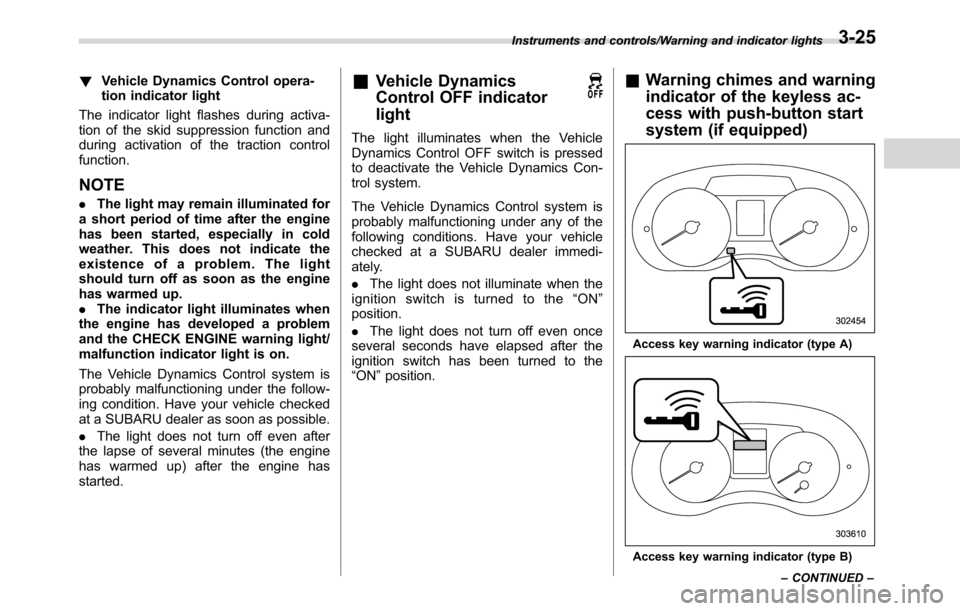
&Warning chimes and warning
indicator of the keyless ac-
cess with push-button start
system (if equipped)
Access key warning indicator (type A)
Access key warning indicator (type B) Instruments and controls/Warning and indicator lights
–CONTINUED–
3-25
Page 169 of 572
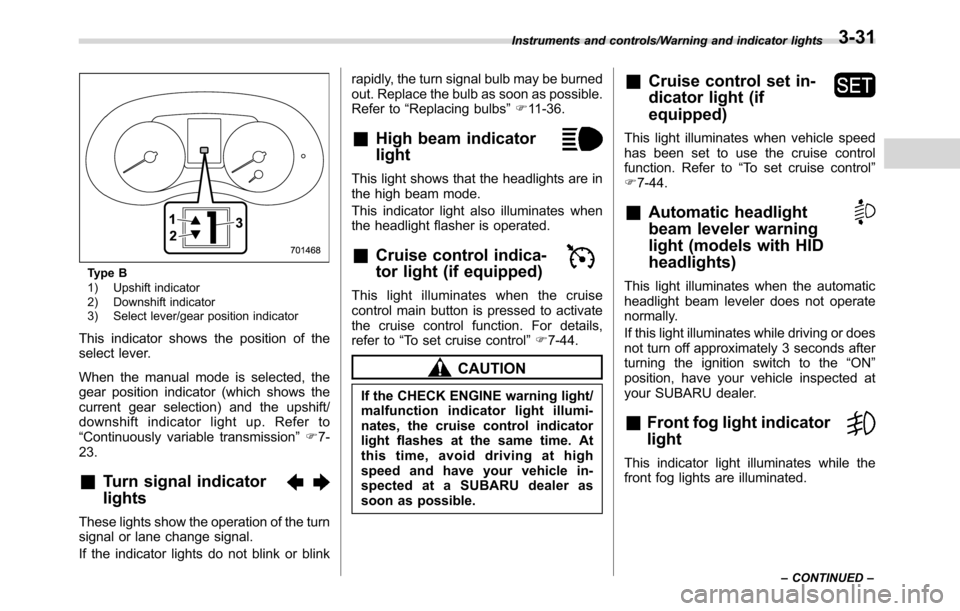
Type B
1) Upshift indicator
2) Downshift indicator
3) Select lever/gear position indicator
This indicator shows the position of the
select lever.
When the manual mode is selected, the
gear position indicator (which shows the
current gear selection) and the upshift/
downshift indicator light up. Refer to
“Continuously variable transmission”F7-
23.
&Turn signal indicator
lights
These lights show the operation of the turn
signal or lane change signal.
If the indicator lights do not blink or blinkrapidly, the turn signal bulb may be burned
out. Replace the bulb as soon as possible.
Refer to“Replacing bulbs”F11-36.
&High beam indicator
light
This light shows that the headlights are in
the high beam mode.
This indicator light also illuminates when
the headlight flasher is operated.
&Cruise control indica-
tor light (if equipped)
This light illuminates when the cruise
control main button is pressed to activate
the cruise control function. For details,
refer to“To set cruise control”F7-44.
CAUTION
If the CHECK ENGINE warning light/
malfunction indicator light illumi-
nates, the cruise control indicator
light flashes at the same time. At
this time, avoid driving at high
speed and have your vehicle in-
spected at a SUBARU dealer as
soon as possible.
&Cruise control set in-
dicator light (if
equipped)
This light illuminates when vehicle speed
has been set to use the cruise control
function. Refer to“To set cruise control”
F7-44.
&Automatic headlight
beam leveler warning
light (models with HID
headlights)
This light illuminates when the automatic
headlight beam leveler does not operate
normally.
If this light illuminates while driving or does
not turn off approximately 3 seconds after
turning the ignition switch to the“ON”
position, have your vehicle inspected at
your SUBARU dealer.
&Front fog light indicator
light
This indicator light illuminates while the
front fog lights are illuminated.
Instruments and controls/Warning and indicator lights
–CONTINUED–3-31
Page 171 of 572
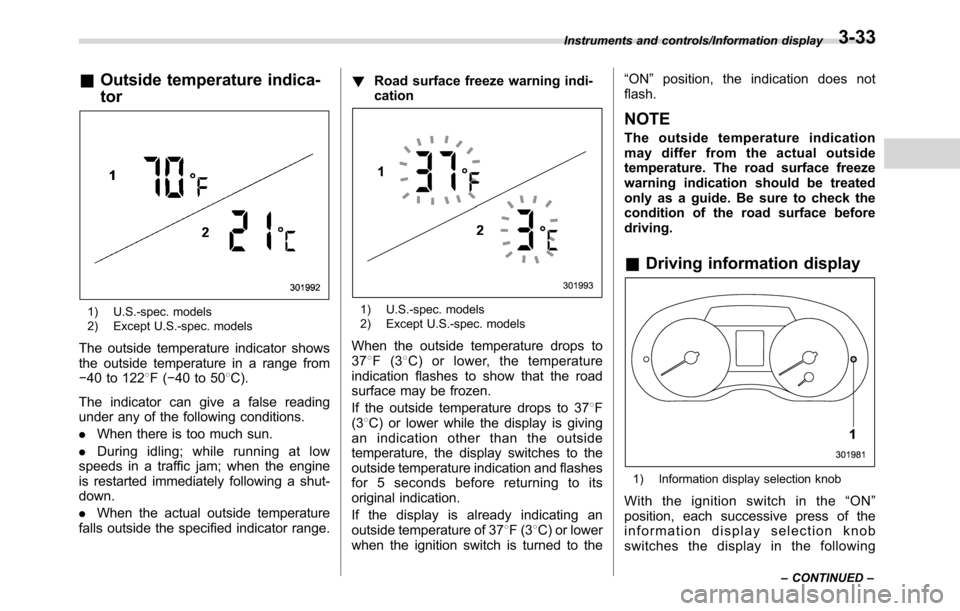
&Outside temperature indica-
tor
1) U.S.-spec. models
2) Except U.S.-spec. models
The outside temperature indicator shows
the outside temperature in a range from
−40 to 1228F(−40 to 508C).
The indicator can give a false reading
under any of the following conditions.
.When there is too much sun.
.During idling; while running at low
speeds in a traffic jam; when the engine
is restarted immediately following a shut-
down.
.When the actual outside temperature
falls outside the specified indicator range.!Road surface freeze warning indi-
cation
1) U.S.-spec. models
2) Except U.S.-spec. models
When the outside temperature drops to
378F(38C) or lower, the temperature
indication flashes to show that the road
surface may be frozen.
If the outside temperature drops to 378F
(38C) or lower while the display is giving
an indication other than the outside
temperature, the display switches to the
outside temperature indication and flashes
for 5 seconds before returning to its
original indication.
If the display is already indicating an
outside temperature of 378F(38C) or lower
when the ignition switch is turned to the“ON”position, the indication does not
flash.
NOTE
The outside temperature indication
may differ from the actual outside
temperature. The road surface freeze
warning indication should be treated
only as a guide. Be sure to check the
condition of the road surface before
driving.
&Driving information display
1) Information display selection knob
With the ignition switch in the“ON”
position, each successive press of the
information display selection knob
switches the display in the following
Instruments and controls/Information display
–CONTINUED–3-33
Page 183 of 572
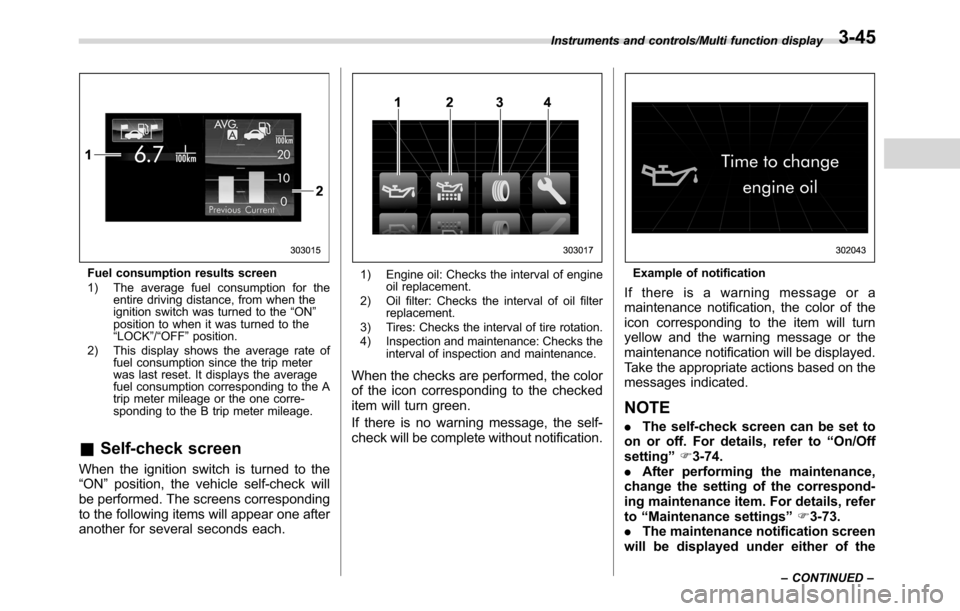
Fuel consumption results screen
1) The average fuel consumption for the
entire driving distance, from when the
ignition switch was turned to the“ON”
position to when it was turned to the
“LOCK”/“OFF”position.
2) This display shows the average rate of
fuel consumption since the trip meter
was last reset. It displays the average
fuel consumption corresponding to the A
trip meter mileage or the one corre-
sponding to the B trip meter mileage.
&Self-check screen
When the ignition switch is turned to the
“ON”position, the vehicle self-check will
be performed. The screens corresponding
to the following items will appear one after
another for several seconds each.
1) Engine oil: Checks the interval of engine
oil replacement.
2) Oil filter: Checks the interval of oil filter
replacement.
3) Tires: Checks the interval of tire rotation.
4) Inspection and maintenance: Checks the
interval of inspection and maintenance.
When the checks are performed, the color
of the icon corresponding to the checked
item will turn green.
If there is no warning message, the self-
check will be complete without notification.
Example of notification
If there is a warning message or a
maintenance notification, the color of the
icon corresponding to the item will turn
yellow and the warning message or the
maintenance notification will be displayed.
Take the appropriate actions based on the
messages indicated.
NOTE
.The self-check screen can be set to
on or off. For details, refer to“On/Off
setting”F3-74.
.After performing the maintenance,
change the setting of the correspond-
ing maintenance item. For details, refer
to“Maintenance settings”F3-73.
.The maintenance notification screen
will be displayed under either of the
Instruments and controls/Multi function display
–CONTINUED–3-45
Page 192 of 572
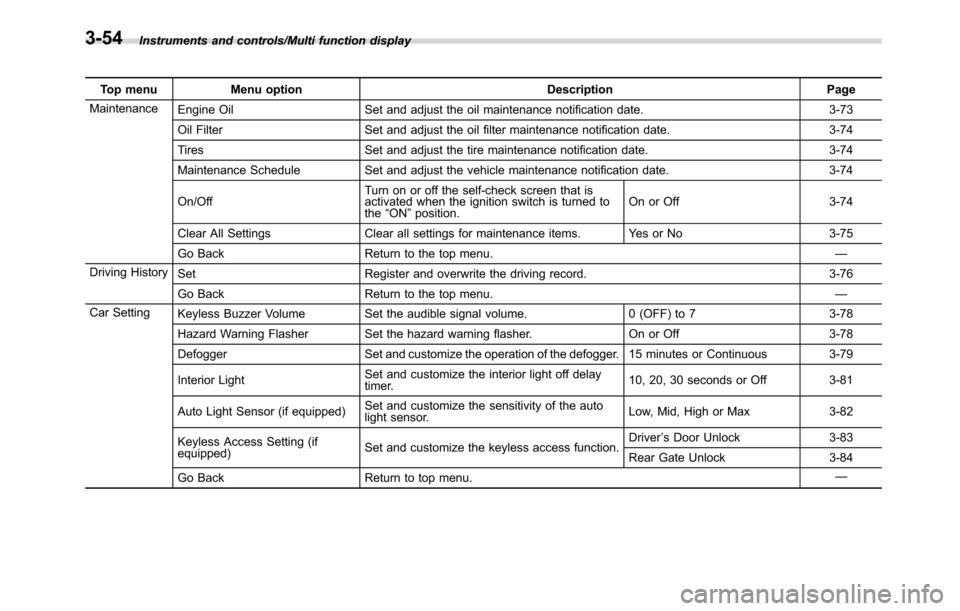
Instruments and controls/Multi function display
Top menu Menu option Description Page
Maintenance
Engine Oil Set and adjust the oil maintenance notification date. 3-73
Oil Filter Set and adjust the oil filter maintenance notification date. 3-74
Tires Set and adjust the tire maintenance notification date. 3-74
Maintenance Schedule Set and adjust the vehicle maintenance notification date. 3-74
On/OffTurn on or off the self-check screen that is
activated when the ignition switch is turned to
the“ON”position.On or Off 3-74
Clear All Settings Clear all settings for maintenance items. Yes or No 3-75
Go Back Return to the top menu.—
Driving History
Set Register and overwrite the driving record. 3-76
Go Back Return to the top menu.—
Car Setting
Keyless Buzzer Volume Set the audible signal volume. 0 (OFF) to 7 3-78
Hazard Warning Flasher Set the hazard warning flasher. On or Off 3-78
Defogger Set and customize the operation of the defogger. 15 minutes or Continuous 3-79
Interior LightSet and customize the interior light off delay
timer.10, 20, 30 seconds or Off 3-81
Auto Light Sensor (if equipped)Set and customize the sensitivity of the auto
light sensor.Low, Mid, High or Max 3-82
Keyless Access Setting (if
equipped)Set and customize the keyless access function.Driver’s Door Unlock 3-83
Rear Gate Unlock 3-84
Go Back Return to top menu.—
3-54
Page 241 of 572
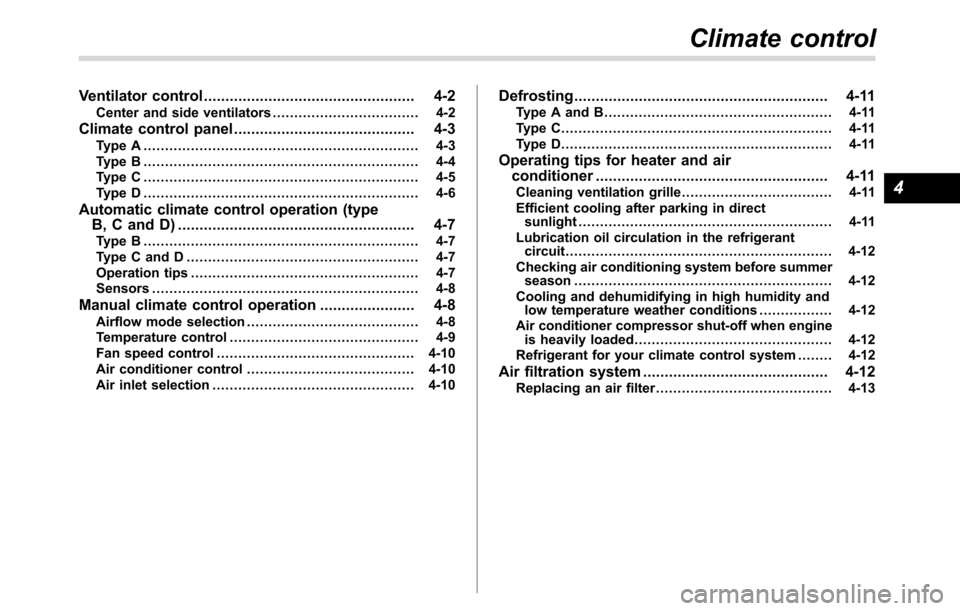
Ventilator control................................................. 4-2
Center and side ventilators.................................. 4-2
Climate control panel.......................................... 4-3Type A ................................................................ 4-3
Type B ................................................................ 4-4
Type C ................................................................ 4-5
Type D ................................................................ 4-6
Automatic climate control operation (type
B, C and D) ....................................................... 4-7
Type B ................................................................ 4-7
Type C and D ...................................................... 4-7
Operation tips..................................................... 4-7
Sensors.............................................................. 4-8
Manual climate control operation...................... 4-8Airflow mode selection........................................ 4-8
Temperature control............................................ 4-9
Fan speed control.............................................. 4-10
Air conditioner control....................................... 4-10
Air inlet selection............................................... 4-10
Defrosting........................................................... 4-11Type A and B..................................................... 4-11
Type C............................................................... 4-11
Type D............................................................... 4-11
Operating tips for heater and air
conditioner...................................................... 4-11
Cleaning ventilation grille................................... 4-11
Efficient cooling after parking in direct
sunlight........................................................... 4-11
Lubrication oil circulation in the refrigerant
circuit.............................................................. 4-12
Checking air conditioning system before summer
season............................................................ 4-12
Cooling and dehumidifying in high humidity and
low temperature weather conditions................. 4-12
Air conditioner compressor shut-off when engine
is heavily loaded.............................................. 4-12
Refrigerant for your climate control system ........ 4-12
Air filtration system........................................... 4-12Replacing an air filter......................................... 4-13
Climate control
4
Page 252 of 572
Climate control/Air filtration system
allow outside air to circulate into the
heated interior. This results in quicker
cooling by the air conditioner. Keep the
windows closed during the operation of
the air conditioner for maximum cooling
efficiency.
&Lubrication oil circulation in
the refrigerant circuit
Operate the air conditioner compressor at
a low engine speed (at idle or low driving
speeds) a few minutes each month during
the off-season to circulate its oil.
&Checking air conditioning
system before summer sea-
son
Check the air conditioner unit for refriger-
ant leaks, hose conditions, and proper
operation each spring. Have the air con-
ditioning system checked by your
SUBARU dealer.
&Cooling and dehumidifying in
high humidity and low tem-
perature weather conditions
Under certain weather conditions (high
relative humidity, low temperatures, etc.) a
small amount of water vapor emission
from the air outlets may be noticed. This
condition is normal and does not indicateany problem with the air conditioning
system.
&Air conditioner compressor
shut-off when engine is
heavily loaded
To improve acceleration and gas mileage,
the air conditioner compressor is designed
to temporarily shut off during air condi-
tioner operation whenever the accelerator
is fully depressed such as during rapid
acceleration or when driving on a steep
upgrade.
&Refrigerant for your climate
control system
Your air conditioner uses ozone friendly
refrigerant HFC134a. Therefore, the meth-
od of adding, changing or checking the
refrigerant is different from the method for
CFC12 (freon). Consult your SUBARU
dealer for service. Repairs needed as a
result of using the wrong refrigerant are
not covered under warranty.
Air filtration system
Your vehicle’s air conditioning system is
equipped with an air filtration system.
Replace the air filter element according
to the replacement schedule found in the
“Warranty and Maintenance Booklet”. This
schedule should be followed to maintain
the filter’s dust collection ability. Under
extremely dusty conditions, the filter
should be replaced more frequently. Have
your filter checked or replaced by your
SUBARU dealer. For replacement, use
only a genuine SUBARU air filter kit.
CAUTION
Contact your SUBARU dealer if the
following occurs, even if it is not yet
time to change the filter:
.Reduction of the airflow through
the vents.
.Windshield gets easily fogged or
misted.
NOTE
The filter can influence the air condi-
tioning, heating and defroster perfor-
mance if not properly maintained.
4-12
Page 363 of 572
Rear view camera
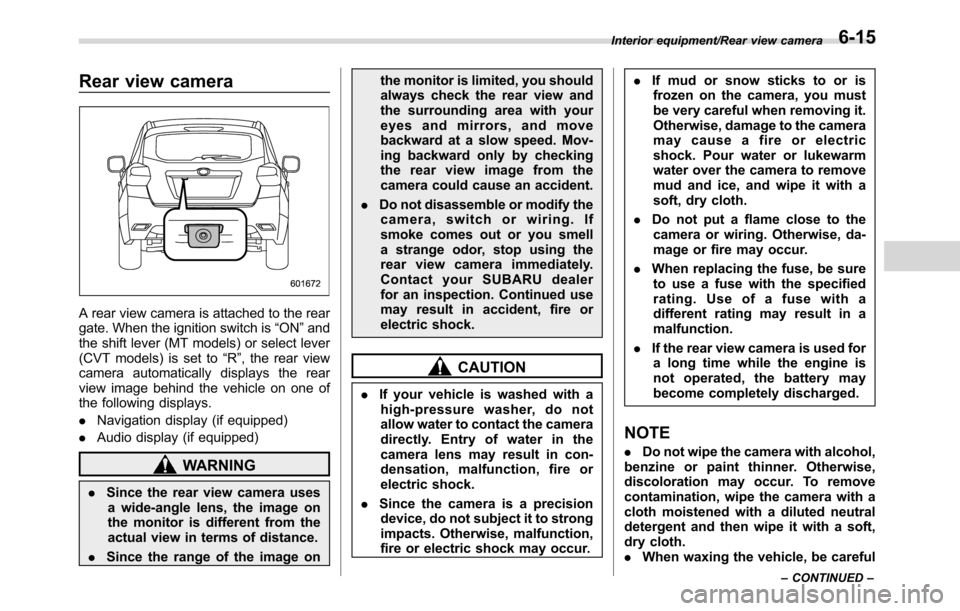
A rear view camera is attached to the rear
gate. When the ignition switch is“ON”and
the shift lever (MT models) or select lever
(CVT models) is set to“R”, the rear view
camera automatically displays the rear
view image behind the vehicle on one of
the following displays.
.Navigation display (if equipped)
.Audio display (if equipped)
WARNING
.Since the rear view camera uses
a wide-angle lens, the image on
the monitor is different from the
actual view in terms of distance.
.Since the range of the image onthe monitor is limited, you should
always check the rear view and
the surrounding area with your
eyes and mirrors, and move
backward at a slow speed. Mov-
ing backward only by checking
the rear view image from the
camera could cause an accident.
.Do not disassemble or modify the
camera, switch or wiring. If
smoke comes out or you smell
a strange odor, stop using the
rear view camera immediately.
Contact your SUBARU dealer
for an inspection. Continued use
may result in accident, fire or
electric shock.
CAUTION
.If your vehicle is washed with a
high-pressure washer, do not
allow water to contact the camera
directly. Entry of water in the
camera lens may result in con-
densation, malfunction, fire or
electric shock.
.Since the camera is a precision
device, do not subject it to strong
impacts. Otherwise, malfunction,
fire or electric shock may occur..If mud or snow sticks to or is
frozen on the camera, you must
be very careful when removing it.
Otherwise, damage to the camera
may cause a fire or electric
shock. Pour water or lukewarm
water over the camera to remove
mud and ice, and wipe it with a
soft, dry cloth.
.Do not put a flame close to the
camera or wiring. Otherwise, da-
mage or fire may occur.
.When replacing the fuse, be sure
to use a fuse with the specified
rating. Use of a fuse with a
different rating may result in a
malfunction.
.If the rear view camera is used for
a long time while the engine is
not operated, the battery may
become completely discharged.
NOTE
.Do not wipe the camera with alcohol,
benzine or paint thinner. Otherwise,
discoloration may occur. To remove
contamination, wipe the camera with a
cloth moistened with a diluted neutral
detergent and then wipe it with a soft,
dry cloth.
.When waxing the vehicle, be careful
Interior equipment/Rear view camera
–CONTINUED–6-15