height SUBARU CROSSTREK 2017 1.G User Guide
[x] Cancel search | Manufacturer: SUBARU, Model Year: 2017, Model line: CROSSTREK, Model: SUBARU CROSSTREK 2017 1.GPages: 572, PDF Size: 41.52 MB
Page 231 of 572
To darken, turn the control dial downward.
NOTE
.When the control dial is turned fully
upward, the illumination brightness
becomes the maximum and the auto-
matic dimming function does not work
at all.
.The brightness setting is not can-
celed even when the ignition switch is
turned to the“LOCK”/“OFF”position.
Headlight beam leveler (if
equipped)
&Automatic headlight beam
leveler (models with HID
headlights)
The HID headlights generate more light
than conventional halogen headlights.
Therefore a driver of an oncoming vehicle
may experience too much glare if your
headlight beam height adjustment is high
when the vehicle is carrying a heavy load.
The automatic headlight beam leveler
adjusts the headlight beam height auto-
matically and optimally according to the
load being carried by the vehicle.
Fog light switch
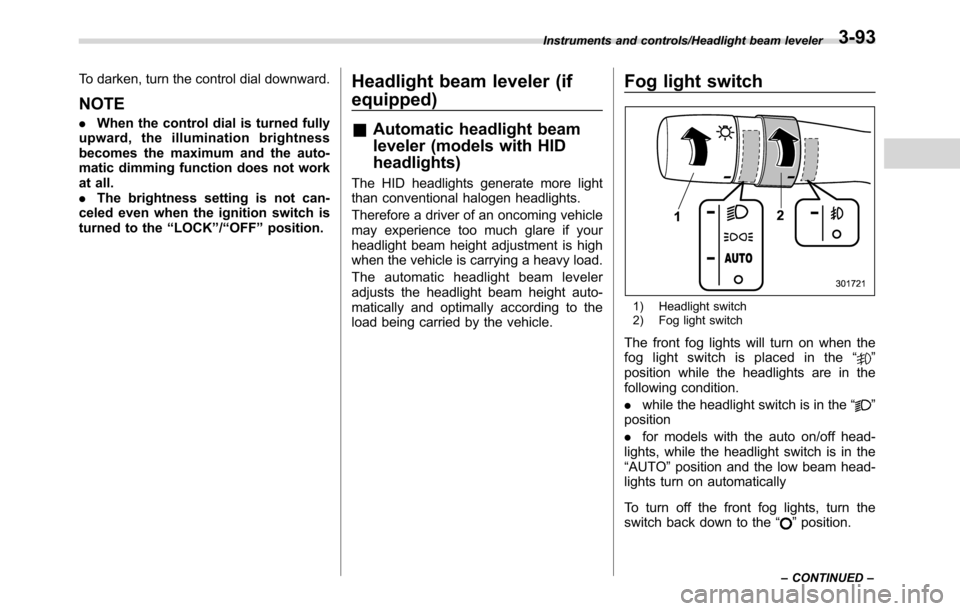
1) Headlight switch
2) Fog light switch
The front fog lights will turn on when the
fog light switch is placed in the“”
position while the headlights are in the
following condition.
.while the headlight switch is in the“
”
position
.for models with the auto on/off head-
lights, while the headlight switch is in the
“AUTO”position and the low beam head-
lights turn on automatically
To turn off the front fog lights, turn the
switch back down to the“
”position.
Instruments and controls/Headlight beam leveler
–CONTINUED–3-93
Page 420 of 572
Starting and operating/BSD/RCTA
with a low body height such as
sports cars or a trailer with no
cargo)
–Vehicles that are not approach-
ing your vehicle even though they
are in the detection area (either on a
neighboring lane to the rear or
beside your vehicle when rever-
sing) (The system determines the
presence of approaching vehicles
based on data detected by the radar
sensors.)
–Vehicles traveling at significantly
different speeds
–Vehicles driving in parallel at
almost the same speed as your
vehicle for a prolonged time
–Oncoming vehicles
–Vehicles in a lane beyond the
neighboring lane
–Vehicles travelling at a signifi-
cantly lower speed that you are
trying to overtake
.On a road with extremely narrow
lanes, the system may detect vehicles
driving in a lane next to the neighbor-
ing lane.&BSD/RCTA approach indica-
tor light/warning buzzer
While the BSD/RCTA is active, the follow-
ing item(s) will operate to alert the driver:
.The BSD/RCTA approach indicator
light (when there are vehicles in the
neighboring lanes).
.The BSD/RCTA approach indicator
light and warning buzzer (when a vehicle
is approaching from the left or right side
while your vehicle is reversing)
!BSD/RCTA approach indicator light
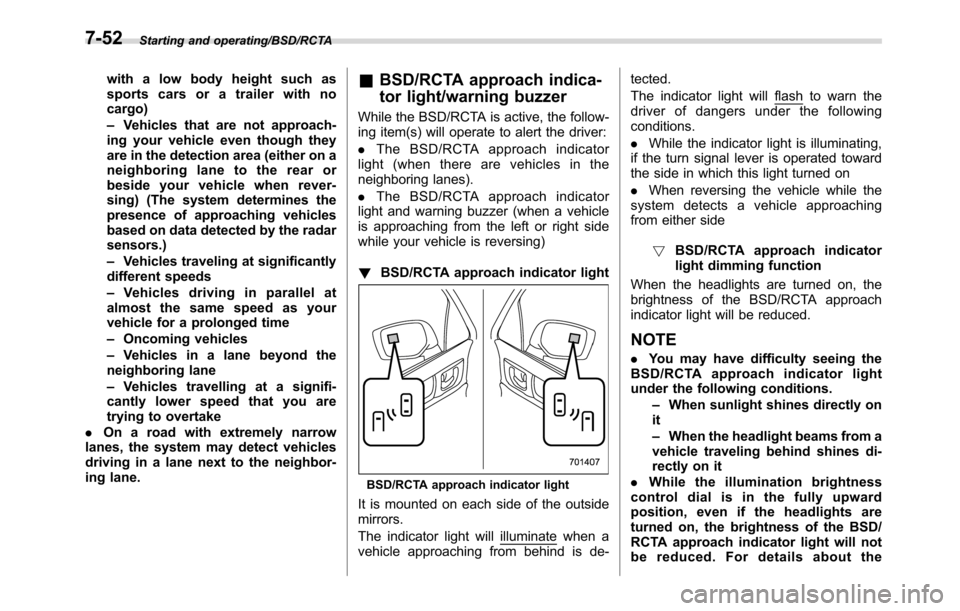
BSD/RCTA approach indicator light
It is mounted on each side of the outside
mirrors.
The indicator light will
illuminate when a
vehicle approaching from behind is de-tected.
The indicator light will
flash to warn the
driver of dangers under the following
conditions.
.While the indicator light is illuminating,
if the turn signal lever is operated toward
the side in which this light turned on
.When reversing the vehicle while the
system detects a vehicle approaching
from either side
!BSD/RCTA approach indicator
light dimming function
When the headlights are turned on, the
brightness of the BSD/RCTA approach
indicator light will be reduced.
NOTE
.You may have difficulty seeing the
BSD/RCTA approach indicator light
under the following conditions.
–When sunlight shines directly on
it
–When the headlight beams from a
vehicle traveling behind shines di-
rectly on it
.While the illumination brightness
control dial is in the fully upward
position, even if the headlights are
turned on, the brightness of the BSD/
RCTA approach indicator light will not
be reduced. For details about the
7-52
Page 421 of 572
illumination brightness control dial,
refer to“Illumination brightness con-
trol”F3-92.
!BSD/RCTA approach warning buz-
zer (only when reversing)
A warning buzzer sounds along with
flashing of the BSD/RCTA approach in-
dicator light to warn the driver of dangers.
The setting of the warning buzzer volume
can be changed by operating the multi
information display of the combination
meter. For details, refer to“BSD/RCTA”
F3-42.
!Safety tips regarding the BSD/RCTA
approach indicator light/warning
buzzer
.In the following cases, operation of the
BSD/RCTA approach indicator light and
the warning buzzer may be delayed or the
system may fail to issue these warnings.
–When a vehicle moves to the
neighboring lane from a lane next to
the neighboring lane
–When driving on a steep incline or
on repeated sharp uphill and downhill
grades
–When going beyond a pass
–When both your vehicle and a
vehicle driving on a neighboring lane
are driving on the far side of each lane.–When several narrowly-spaced ve-
hicles are approaching in a row
–In low radius bends (tight bends or
when making turns at an intersection)
–When there is a difference in height
between your lane and the neighbor-
ing lane
–Immediately after the BSD/RCTA is
activated by pressing the BSD/RCTA
OFF switch
–Immediately after the shift lever/
select lever is shifted to the“R”
position
–When extremely heavy cargo is
loaded in the cargo area
.During reversing, operation of the BSD/
RCTA approach indicator light and the
warning buzzer may be delayed or the
system may fail to issue these warnings
under the following conditions.
–When backing out of an angled
parking space
–When a large-sized vehicle is
parked next to your vehicle (That
vehicle prevents the propagation of
radar waves.)
–When reversing on sloped roads
–When reversing at a high speed
.The BSD/RCTA approach indicator
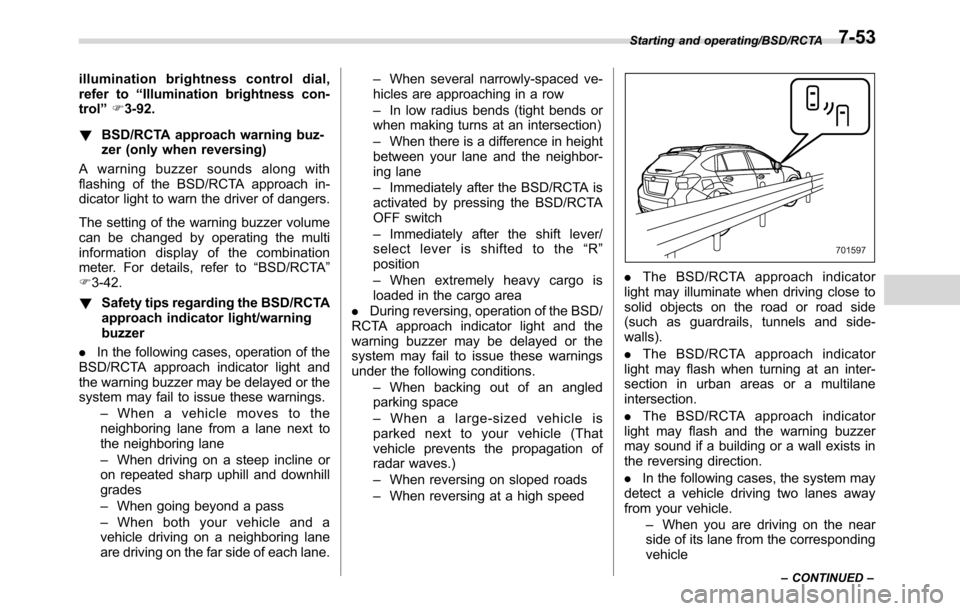
light may illuminate when driving close to
solid objects on the road or road side
(such as guardrails, tunnels and side-
walls).
.The BSD/RCTA approach indicator
light may flash when turning at an inter-
section in urban areas or a multilane
intersection.
.The BSD/RCTA approach indicator
light may flash and the warning buzzer
may sound if a building or a wall exists in
the reversing direction.
.In the following cases, the system may
detect a vehicle driving two lanes away
from your vehicle.
–When you are driving on the near
side of its lane from the corresponding
vehicle
Starting and operating/BSD/RCTA
–CONTINUED–7-53
Page 447 of 572
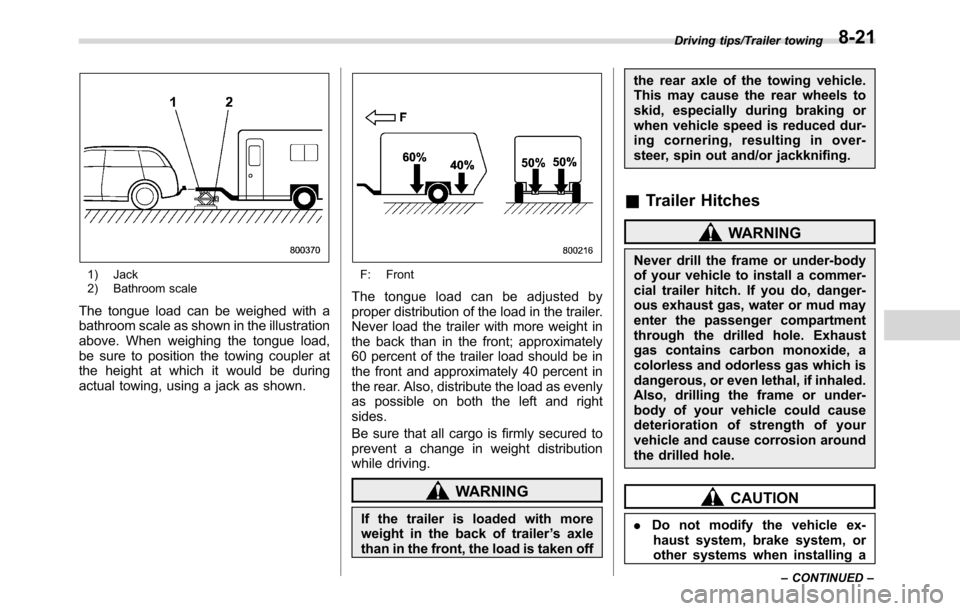
1) Jack
2) Bathroom scale
The tongue load can be weighed with a
bathroom scale as shown in the illustration
above. When weighing the tongue load,
be sure to position the towing coupler at
the height at which it would be during
actual towing, using a jack as shown.
F: Front
The tongue load can be adjusted by
proper distribution of the load in the trailer.
Never load the trailer with more weight in
the back than in the front; approximately
60 percent of the trailer load should be in
the front and approximately 40 percent in
the rear. Also, distribute the load as evenly
as possible on both the left and right
sides.
Be sure that all cargo is firmly secured to
prevent a change in weight distribution
while driving.
WARNING
If the trailer is loaded with more
weight in the back of trailer’s axle
than in the front, the load is taken offthe rear axle of the towing vehicle.
This may cause the rear wheels to
skid, especially during braking or
when vehicle speed is reduced dur-
ing cornering, resulting in over-
steer, spin out and/or jackknifing.
&Trailer Hitches
WARNING
Never drill the frame or under-body
of your vehicle to install a commer-
cial trailer hitch. If you do, danger-
ous exhaust gas, water or mud may
enter the passenger compartment
through the drilled hole. Exhaust
gas contains carbon monoxide, a
colorless and odorless gas which is
dangerous, or even lethal, if inhaled.
Also, drilling the frame or under-
body of your vehicle could cause
deterioration of strength of your
vehicle and cause corrosion around
the drilled hole.
CAUTION
.Do not modify the vehicle ex-
haust system, brake system, or
other systems when installing a
Driving tips/Trailer towing
–CONTINUED–8-21
Page 484 of 572
Maintenance and service/Engine hood
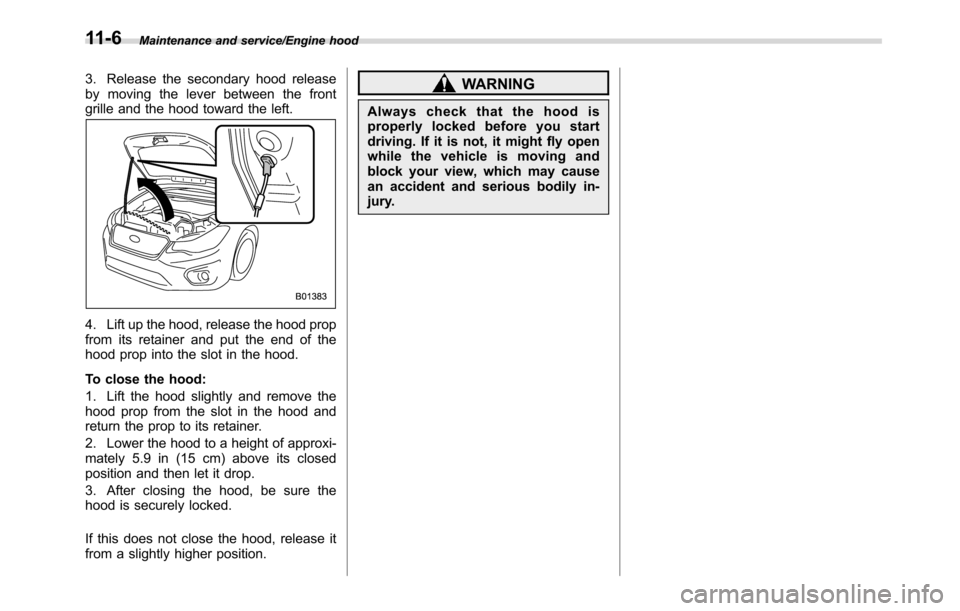
3. Release the secondary hood release
by moving the lever between the front
grille and the hood toward the left.
4. Lift up the hood, release the hood prop
from its retainer and put the end of the
hood prop into the slot in the hood.
To close the hood:
1. Lift the hood slightly and remove the
hood prop from the slot in the hood and
return the prop to its retainer.
2. Lower the hood to a height of approxi-
mately 5.9 in (15 cm) above its closed
position and then let it drop.
3. After closing the hood, be sure the
hood is securely locked.
If this does not close the hood, release it
from a slightly higher position.
WARNING
Always check that the hood is
properly locked before you start
driving. If it is not, it might fly open
while the vehicle is moving and
block your view, which may cause
an accident and serious bodily in-
jury.
11-6
Page 495 of 572
Alcohol contained in the clutch
fluid may damage them.
.Be careful not to spill clutch fluid
when adding it. If clutch fluid
touches the exhaust pipe, it may
cause a bad smell, smoke, and/or
a fire. If clutch fluid gets on the
exhaust pipe, be sure to wipe it
off.
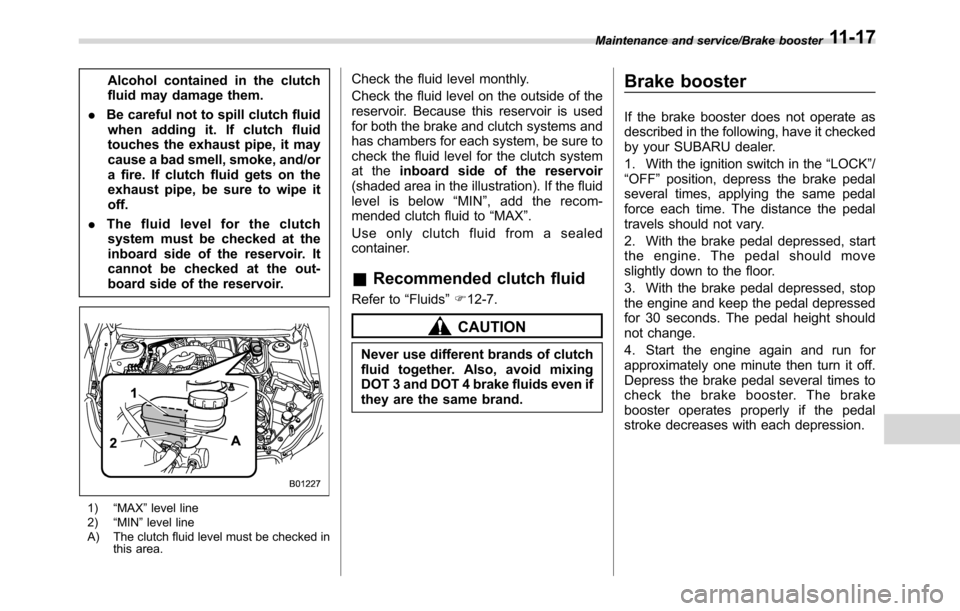
.The fluid level for the clutch
system must be checked at the
inboard side of the reservoir. It
cannot be checked at the out-
board side of the reservoir.
1)“MAX”level line
2)“MIN”level line
A) The clutch fluid level must be checked in
this area.
Check the fluid level monthly.
Check the fluid level on the outside of the
reservoir. Because this reservoir is used
for both the brake and clutch systems and
has chambers for each system, be sure to
check the fluid level for the clutch system
at theinboard side of the reservoir
(shaded area in the illustration). If the fluid
level is below“MIN”, add the recom-
mended clutch fluid to“MAX”.
Use only clutch fluid from a sealed
container.
&Recommended clutch fluid
Refer to“Fluids”F12-7.
CAUTION
Never use different brands of clutch
fluid together. Also, avoid mixing
DOT 3 and DOT 4 brake fluids even if
they are the same brand.
Brake booster
If the brake booster does not operate as
described in the following, have it checked
by your SUBARU dealer.
1. With the ignition switch in the“LOCK”/
“OFF”position, depress the brake pedal
several times, applying the same pedal
force each time. The distance the pedal
travels should not vary.
2. With the brake pedal depressed, start
the engine. The pedal should move
slightly down to the floor.
3. With the brake pedal depressed, stop
the engine and keep the pedal depressed
for 30 seconds. The pedal height should
not change.
4. Start the engine again and run for
approximately one minute then turn it off.
Depress the brake pedal several times to
check the brake booster. The brake
booster operates properly if the pedal
stroke decreases with each depression.
Maintenance and service/Brake booster11-17
Page 524 of 572
Specifications/Specifications
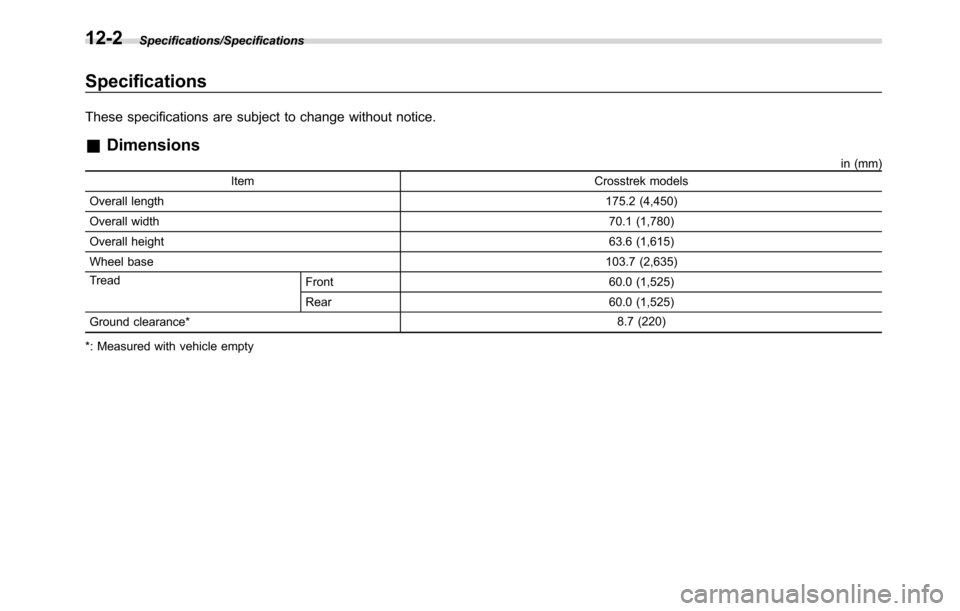
Specifications
These specifications are subject to change without notice.
&Dimensions
in (mm)
Item Crosstrek models
Overall length175.2 (4,450)
Overall width70.1 (1,780)
Overall height63.6 (1,615)
Wheel base103.7 (2,635)
Tread
Front 60.0 (1,525)
Rear 60.0 (1,525)
Ground clearance*8.7 (220)
*: Measured with vehicle empty
12-2
Page 540 of 572
Consumer information and Reporting safety defects/For U.S.A.
For U.S.A.
The following information has been
compiled according to Code of
Federal Regulations“Title 49, Part
575”.
Tire information
&Tire labeling
Many markings (e.g. Tire size, Tire
Identification Number or TIN) are
placed on the sidewall of a tire by
tire manufacturers. These markings
can provide you with useful infor-
mation on the tire.
!Tire size
Your vehicle comes equipped with
P-Metric tire size. It is important to
understand the sizing system in
selecting the proper tire for your
vehicles. Here is a brief review of
the tire sizing system with a break-
down of its individual elements.
!P Metric
With the P-Metric system, Section
Width is measured in millimeters.
To convert millimeters into inches,
divide by 25.4. The Aspect Ratio
(Section Height divided by Section
Width) helps provide more dimen-
sional information about the tire
size.
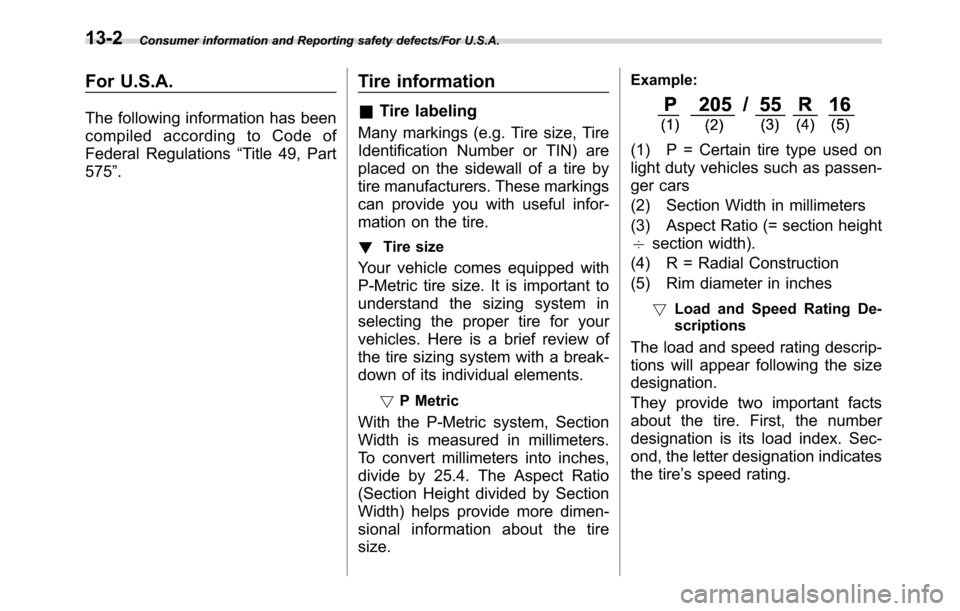
Example:
(1) P = Certain tire type used on
light duty vehicles such as passen-
ger cars
(2) Section Width in millimeters
(3) Aspect Ratio (= section height
7section width).
(4) R = Radial Construction
(5) Rim diameter in inches
!Load and Speed Rating De-
scriptions
The load and speed rating descrip-
tions will appear following the size
designation.
They provide two important facts
about the tire. First, the number
designation is its load index. Sec-
ond, the letter designation indicates
the tire’s speed rating.
13-2
Page 561 of 572
Hood.................................................................... 11-5
Low oil level warning light....................................... 3-18
Oil................................................................ 11-8, 12-4
Overheating.......................................................... 9-12
Starting & stopping........................................... 7-9, 7-11
Event data recorder......................................................... 9
Exterior care.............................................................. 10-2
F
Flat tires..................................................................... 9-5
Floor mat.................................................................. 6-11
Fluid level
Brake.................................................................. 11-15
Clutch.................................................................. 11-16
Continuously variable transmission.......................... 11-15
Fog light
Bulb.......................................................... 11-38, 12-13
Indicator light......................................................... 3-31
Switch.................................................................. 3-93
Front
Differential gear oil........................................ 11-15, 12-6
Seatbelt pretensioners............................................ 1-20
Turn signal light.................................................... 11-38
Front seats.................................................................. 1-2
Forward and backward adjustment............................. 1-3
Head restraint adjustment......................................... 1-5
Reclining................................................................. 1-4
Seat height adjustment............................................. 1-4
Fuel........................................................................... 7-3
Consumption indicator............................................ 3-33
Consumption screen............................................... 3-48Economy hints........................................................ 8-2
Filler lid and cap...................................................... 7-4
Gauge................................................................... 3-12
Requirements................................................. 7-3, 12-3
Fuses..................................................................... 11-34
Fuses and circuits...................................................... 12-9
G
GAWR (Gross Axle Weight Rating) ............................... 8-13
Glove box................................................................... 6-6
GVWR (Gross Vehicle Weight Rating)........................... 8-13
H
Hands-free phone system............................................ 5-70
Hazard warning flasher.......................................... 3-8, 9-2
Head restraint adjustment
Front seat............................................................... 1-5
Rear seat............................................................... 1-8
Headlight
Beam leveler.......................................................... 3-93
Bulb replacing...................................................... 11-36
Bulb wattage........................................................ 12-13
Control switch........................................................ 3-88
Flasher.................................................................. 3-91
Indicator light......................................................... 3-32
Welcome lighting function........................................ 3-89
HID headlights...................................................... 1, 11-36
High beam indicator light............................................. 3-31
High/low beam change (dimmer).................................. 3-90
Hill start assist................................................. 7-41, 11-19
OFF indicator light.................................................. 3-23
Index14-5