tail light SUBARU CROSSTREK 2017 1.G Owner's Manual
[x] Cancel search | Manufacturer: SUBARU, Model Year: 2017, Model line: CROSSTREK, Model: SUBARU CROSSTREK 2017 1.GPages: 572, PDF Size: 41.52 MB
Page 239 of 572
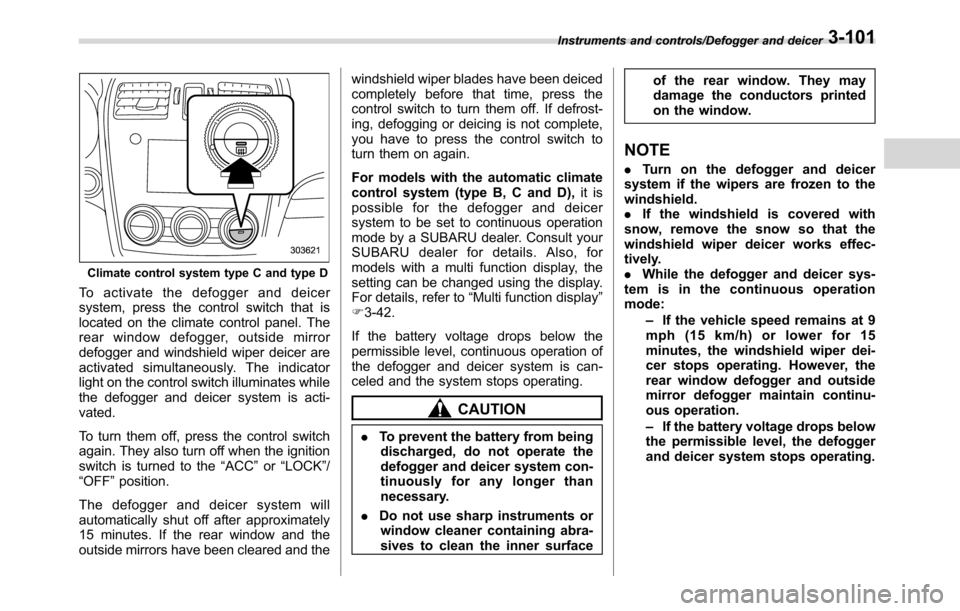
Climate control system type C and type D
To activate the defogger and deicer
system, press the control switch that is
located on the climate control panel. The
rear window defogger, outside mirror
defogger and windshield wiper deicer are
activated simultaneously. The indicator
light on the control switch illuminates while
the defogger and deicer system is acti-
vated.
To turn them off, press the control switch
again. They also turn off when the ignition
switch is turned to the“ACC”or“LOCK”/
“OFF”position.
The defogger and deicer system will
automatically shut off after approximately
15 minutes. If the rear window and the
outside mirrors have been cleared and thewindshield wiper blades have been deiced
completely before that time, press the
control switch to turn them off. If defrost-
ing, defogging or deicing is not complete,
you have to press the control switch to
turn them on again.
For models with the automatic climate
control system (type B, C and D),it is
possible for the defogger and deicer
system to be set to continuous operation
mode by a SUBARU dealer. Consult your
SUBARU dealer for details. Also, for
models with a multi function display, the
setting can be changed using the display.
For details, refer to“Multi function display”
F3-42.
If the battery voltage drops below the
permissible level, continuous operation of
the defogger and deicer system is can-
celed and the system stops operating.
CAUTION
.To prevent the battery from being
discharged, do not operate the
defogger and deicer system con-
tinuously for any longer than
necessary.
.Do not use sharp instruments or
window cleaner containing abra-
sives to clean the inner surfaceof the rear window. They may
damage the conductors printed
on the window.
NOTE
.Turn on the defogger and deicer
system if the wipers are frozen to the
windshield.
.If the windshield is covered with
snow, remove the snow so that the
windshield wiper deicer works effec-
tively.
.While the defogger and deicer sys-
tem is in the continuous operation
mode:
–If the vehicle speed remains at 9
mph (15 km/h) or lower for 15
minutes, the windshield wiper dei-
cer stops operating. However, the
rear window defogger and outside
mirror defogger maintain continu-
ous operation.
–If the battery voltage drops below
the permissible level, the defogger
and deicer system stops operating.
Instruments and controls/Defogger and deicer3-101
Page 264 of 572
Audio/Audio set
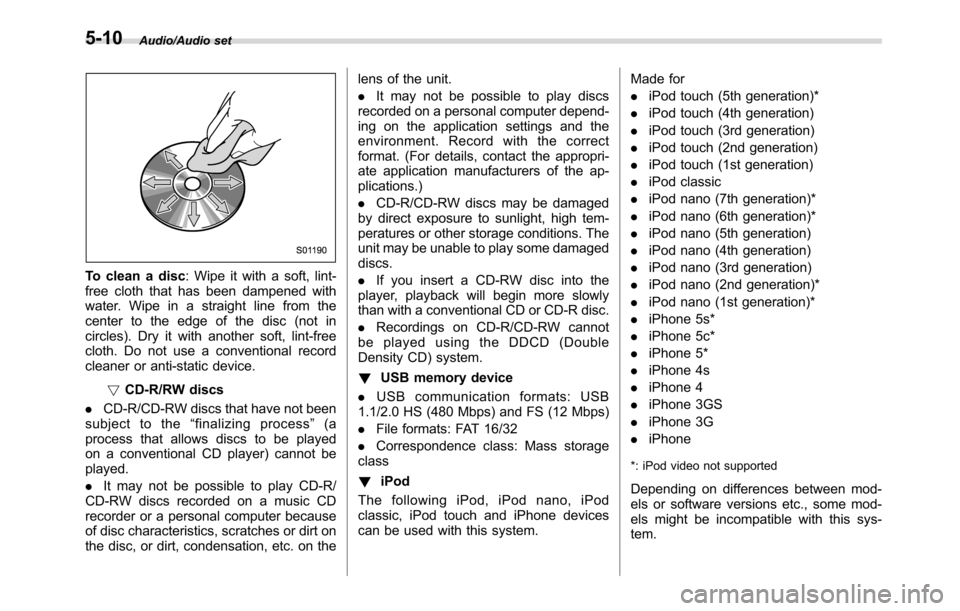
To clean a disc: Wipe it with a soft, lint-
free cloth that has been dampened with
water. Wipe in a straight line from the
center to the edge of the disc (not in
circles). Dry it with another soft, lint-free
cloth. Do not use a conventional record
cleaner or anti-static device.
!CD-R/RW discs
.CD-R/CD-RW discs that have not been
subject to the“finalizing process”(a
process that allows discs to be played
on a conventional CD player) cannot be
played.
.It may not be possible to play CD-R/
CD-RW discs recorded on a music CD
recorder or a personal computer because
of disc characteristics, scratches or dirt on
the disc, or dirt, condensation, etc. on thelens of the unit.
.It may not be possible to play discs
recorded on a personal computer depend-
ing on the application settings and the
environment. Record with the correct
format. (For details, contact the appropri-
ate application manufacturers of the ap-
plications.)
.CD-R/CD-RW discs may be damaged
by direct exposure to sunlight, high tem-
peratures or other storage conditions. The
unit may be unable to play some damaged
discs.
.If you insert a CD-RW disc into the
player, playback will begin more slowly
than with a conventional CD or CD-R disc.
.Recordings on CD-R/CD-RW cannot
be played using the DDCD (Double
Density CD) system.
!USB memory device
.USB communication formats: USB
1.1/2.0 HS (480 Mbps) and FS (12 Mbps)
.File formats: FAT 16/32
.Correspondence class: Mass storage
class
!iPod
The following iPod, iPod nano, iPod
classic, iPod touch and iPhone devices
can be used with this system.Made for
.iPod touch (5th generation)*
.iPod touch (4th generation)
.iPod touch (3rd generation)
.iPod touch (2nd generation)
.iPod touch (1st generation)
.iPod classic
.iPod nano (7th generation)*
.iPod nano (6th generation)*
.iPod nano (5th generation)
.iPod nano (4th generation)
.iPod nano (3rd generation)
.iPod nano (2nd generation)*
.iPod nano (1st generation)*
.iPhone 5s*
.iPhone 5c*
.iPhone 5*
.iPhone 4s
.iPhone 4
.iPhone 3GS
.iPhone 3G
.iPhone
*: iPod video not supported
Depending on differences between mod-
els or software versions etc., some mod-
els might be incompatible with this sys-
tem.
5-10
Page 351 of 572
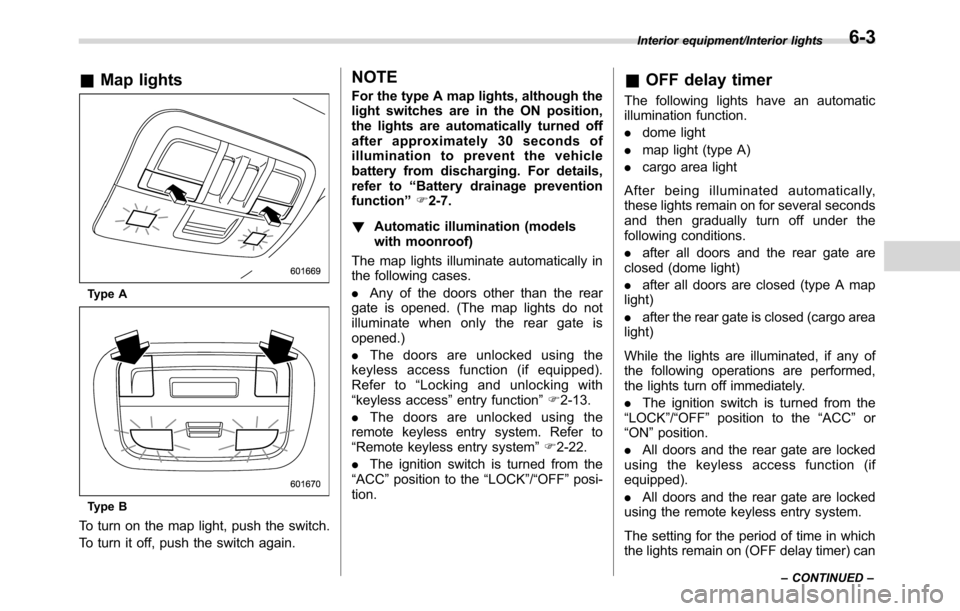
&Map lights
Type A
Type B
To turn on the map light, push the switch.
To turn it off, push the switch again.
NOTE
For the type A map lights, although the
light switches are in the ON position,
the lights are automatically turned off
after approximately 30 seconds of
illumination to prevent the vehicle
battery from discharging. For details,
refer to“Battery drainage prevention
function”F2-7.
!Automatic illumination (models
with moonroof)
The map lights illuminate automatically in
the following cases.
.Any of the doors other than the rear
gate is opened. (The map lights do not
illuminate when only the rear gate is
opened.)
.The doors are unlocked using the
keyless access function (if equipped).
Refer to“Locking and unlocking with
“keyless access”entry function”F2-13.
.The doors are unlocked using the
remote keyless entry system. Refer to
“Remote keyless entry system”F2-22.
.The ignition switch is turned from the
“ACC”position to the“LOCK”/“OFF”posi-
tion.&OFF delay timer
The following lights have an automatic
illumination function.
.dome light
.map light (type A)
.cargo area light
After being illuminated automatically,
these lights remain on for several seconds
and then gradually turn off under the
following conditions.
.after all doors and the rear gate are
closed (dome light)
.after all doors are closed (type A map
light)
.after the rear gate is closed (cargo area
light)
While the lights are illuminated, if any of
the following operations are performed,
the lights turn off immediately.
.The ignition switch is turned from the
“LOCK”/“OFF”position to the“ACC”or
“ON”position.
.All doors and the rear gate are locked
using the keyless access function (if
equipped).
.All doors and the rear gate are locked
using the remote keyless entry system.
The setting for the period of time in which
the lights remain on (OFF delay timer) can
Interior equipment/Interior lights
–CONTINUED–6-3
Page 352 of 572
Interior equipment/Sun visors
be changed by a SUBARU dealer. Con-
tact your SUBARU dealer for details. For
models with multi function display, the
setting can be changed by operating the
multi function display. For details, refer to
“Interior light off delay timer setting”F3-
81.Sun visors
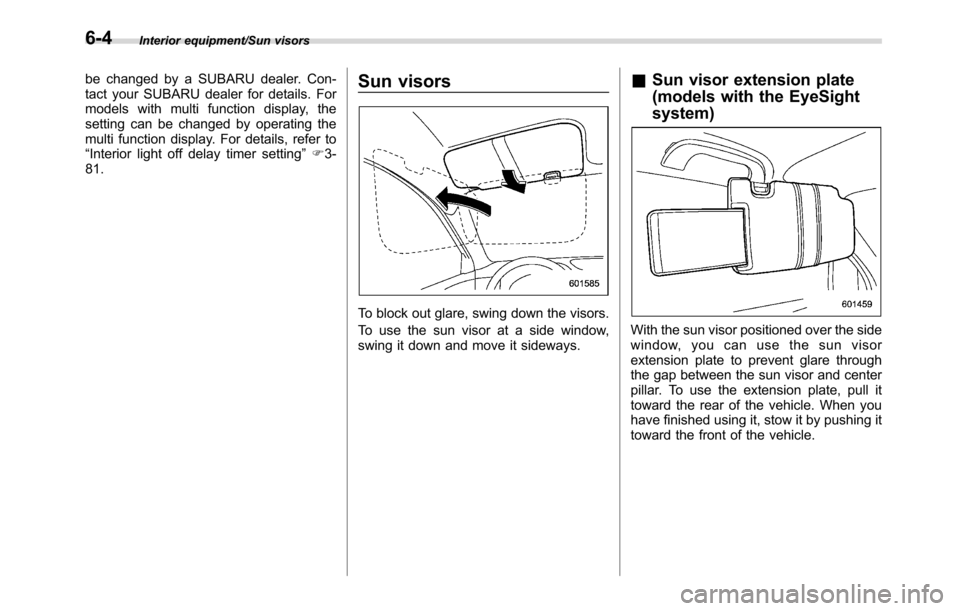
To block out glare, swing down the visors.
To use the sun visor at a side window,
swing it down and move it sideways.
&Sun visor extension plate
(models with the EyeSight
system)
With the sun visor positioned over the side
window, you can use the sun visor
extension plate to prevent glare through
the gap between the sun visor and center
pillar. To use the extension plate, pull it
toward the rear of the vehicle. When you
have finished using it, stow it by pushing it
toward the front of the vehicle.
6-4
Page 384 of 572
Starting and operating/Remote engine start system (dealer option)
operating range of the system and the
start request is received, the following
phenomena will occur.
.The fob flashes and beeps once.
.The horn sounds once.
.The side marker lights, tail lights, and
parking lights flash once.
If the fob is not within range (the user is
too far away from the vehicle), the fob will
indicate two long flashes without beeping.
The system will check certain safety
preconditions before starting, and if all
conditions are met, the engine will start
within 5 seconds. After the engine starts,
the following phenomena will occur.
.The fob flashes and beeps twice.
.The horn sounds once.
.The side marker lights, tail lights, and
parking lights flash once.
While the engine is idling via the remote
engine start system, the following phe-
nomena will occur.
.The side marker lights, tail lights, and
parking lights remain illuminated.
.The fob button flashes once every 3
seconds.
.The power windows are disabled.
If the engine turns over but does not start
(or starts and stalls) the remote enginestart system will power off and then
attempt to start the engine 3 additional
times. The system will not attempt to
restart the engine if it determines a vehicle
malfunction is preventing starting. If the
engine does not start after 3 additional
attempts, the remote engine start request
will be aborted.
!Stopping the engine
Press and hold the fob button for at least 2
seconds to stop the engine. The fob will
flash and beep three times, indicating the
engine has stopped. If the stop request is
not received (for example, if the user is too
far away from the vehicle), the fob will
continue to flash once every 3 seconds.
The system will automatically stop the
engine after 15 minutes.
!Remote start safety features
For safety and security reasons, the
remote engine start system will prevent
starting (or stop the engine if running) and
sound the horn twice if any of the following
conditions is detected. In addition, the fob
will flash and beep 3 times.
.The brake pedal is depressed
.A key is in the ignition switch
.The engine hood is open
.The remote start system“Service
mode”is engaged
.The engine idle speed exceeds 3,500RPM
.The security alarm is triggered
.The select lever is not in the“P”
position (CVT models)
If the system detects any door (including
the rear gate) open during operation, it will
prevent starting or stop the engine, and
sound the horn and flash side marker
lights, tail lights, and parking lights 6
times.
In addition to the items above, if the
vehicle’s engine management system
determines there is a safety risk due to a
vehicle-related problem, the vehicle will
power down and the horn will sound 3
times.
NOTE
.If the alarm system is armed at the
time of remote engine starter activation
(the security indicator light on the
combination meter is flashing), the
alarm system will remain armed
throughout the remote start run cycle.
.If the alarm system is disarmed at
the time of remote engine starter
activation (the security indicator light
on the combination meter is not flash-
ing), the alarm system will remain
disarmed throughout the remote start
run cycle.
7-16
Page 388 of 572
Starting and operating/Remote engine start system (dealer option)
ing to the following procedure.
1. Open the driver’s door (the driver’s
door must remain opened throughout the
entire process).
2. Depress and hold the brake pedal.
3. Turn the ignition switch to“ON”then
“LOCK”/“OFF”, back to“ON”then“LOCK”/
“OFF”, back to“ON”then“LOCK”/“OFF”,
then back to“ON”again and leave the
ignition“ON”throughout the programming
process.
4. The system will flash the side marker
lights, tail lights and parking lights and
honk the horn three times, indicating that
the system has entered the transmitter
learn mode.
5. Press and release the“
”button on
the transmitter that you want to program.
6. The system will flash the side marker
lights, tail lights and parking lights and
honk the horn one time, indicating that the
system has learned the transmitter. Upon
successful programming, the remote start
confirmation transmitter button will flash
one time.
7. Repeat step 5 for any additional
transmitters (the system will accept up to
eight transmitters).
8. The system will exit the transmitter
learn mode if the key is turned to the
“LOCK”/“OFF”position, the door is closedor after 2 minutes.
&System maintenance
NOTE
For models without“keyless access
with push-button start system”:
In the event that the vehicle’s battery is
replaced, discharged or disconnected,
it will be necessary to start the vehicle
a minimum of one time using the key
prior to activating the remote engine
start system. This is required to allow
the vehicle electronic systems to re-
synchronize.
!Changing the batteries
CAUTION
.Do not let dust, oil or water get on
or in the remote engine start
transmitter when replacing the
battery.
.Be careful not to damage the
printed circuit board in the re-
mote engine start transmitter
when replacing the battery.
.Be careful not to allow children to
touch the battery and any re-
moved parts; children could
swallow them..There is a danger of explosion if
an incorrect replacement battery
is used. Replace only with the
same or equivalent type of bat-
tery.
.Batteries should not be exposed
to excessive heat such as sun-
shine, fire or the like.
For models with“keyless access with
push-button start system”:
Perform the procedure described in“Re-
placing battery of access key”F11-42.
For models without“keyless access
with push-button start system”:
The two 3-volt lithium batteries (model
CR-2032) supplied in your remote engine
start transmitter should last approximately
one year, depending on usage. When the
batteries begin to weaken, you will notice
a decrease in range (distance from the
vehicle that your remote control operates).
Follow the instructions below to change
the remote engine start transmitter bat-
teries.
7-20
Page 393 of 572
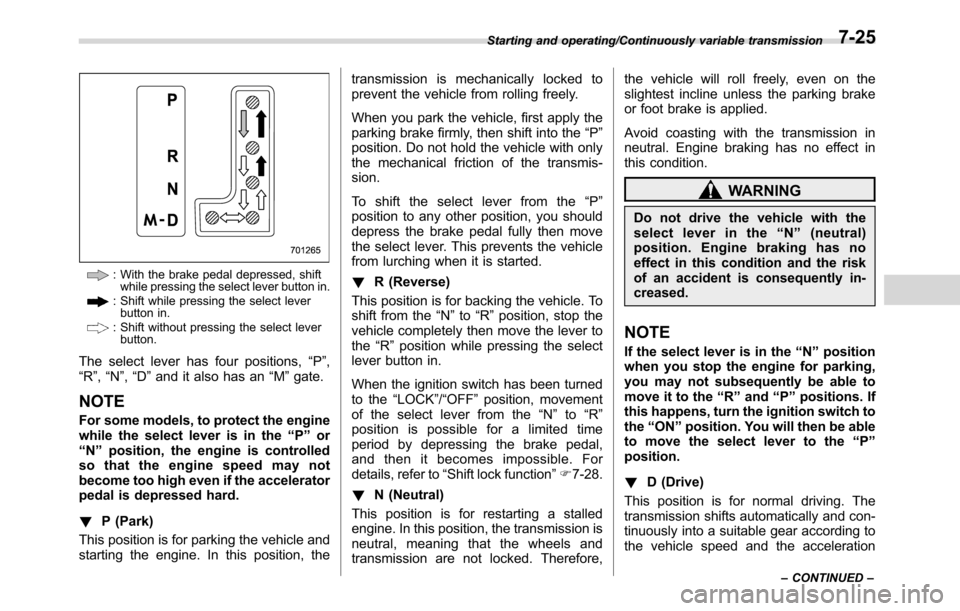
: With the brake pedal depressed, shift
while pressing the select lever button in.
: Shift while pressing the select lever
button in.
: Shift without pressing the select lever
button.
The select lever has four positions,“P”,
“R”,“N”,“D”and it also has an“M”gate.
NOTE
For some models, to protect the engine
while the select lever is in the“P”or
“N”position, the engine is controlled
so that the engine speed may not
become too high even if the accelerator
pedal is depressed hard.
!P (Park)
This position is for parking the vehicle and
starting the engine. In this position, thetransmission is mechanically locked to
prevent the vehicle from rolling freely.
When you park the vehicle, first apply the
parking brake firmly, then shift into the“P”
position. Do not hold the vehicle with only
the mechanical friction of the transmis-
sion.
To shift the select lever from the“P”
position to any other position, you should
depress the brake pedal fully then move
the select lever. This prevents the vehicle
from lurching when it is started.
!R (Reverse)
This position is for backing the vehicle. To
shift from the“N”to“R”position, stop the
vehicle completely then move the lever to
the“R”position while pressing the select
lever button in.
When the ignition switch has been turned
to the“LOCK”/“OFF”position, movement
of the select lever from the“N”to“R”
position is possible for a limited time
period by depressing the brake pedal,
and then it becomes impossible. For
details, refer to“Shift lock function”F7-28.
!N (Neutral)
This position is for restarting a stalled
engine. In this position, the transmission is
neutral, meaning that the wheels and
transmission are not locked. Therefore,the vehicle will roll freely, even on the
slightest incline unless the parking brake
or foot brake is applied.
Avoid coasting with the transmission in
neutral. Engine braking has no effect in
this condition.
WARNING
Do not drive the vehicle with the
select lever in the“N”(neutral)
position. Engine braking has no
effect in this condition and the risk
of an accident is consequently in-
creased.
NOTE
If the select lever is in the“N”position
when you stop the engine for parking,
you may not subsequently be able to
move it to the“R”and“P”positions. If
this happens, turn the ignition switch to
the“ON”position. You will then be able
to move the select lever to the“P”
position.
!D (Drive)
This position is for normal driving. The
transmission shifts automatically and con-
tinuously into a suitable gear according to
the vehicle speed and the acceleration
Starting and operating/Continuously variable transmission
–CONTINUED–7-25
Page 402 of 572
Starting and operating/Vehicle Dynamics Control system
2. Apply the parking brake.
3. Check the brake fluid level. For details
about checking the brake fluid level, refer
to“Checking the fluid level”F11-15.
.If the brake fluid level is not below the
“MIN”mark, the EBD system may be
malfunctioning. Drive carefully to the
nearest SUBARU dealer and have the
system inspected.
.If the brake fluid level is below the
“MIN”mark, DO NOT drive the vehicle.
Instead, have the vehicle towed to the
nearest SUBARU dealer for repair.
WARNING
.Driving with the brake system
warning light illuminated is dan-
gerous. This indicates your brake
system may not be working
properly. If the light remains
illuminated, have the brakes in-
spected by a SUBARU dealer
immediately.
.If at all in doubt about whether
the brakes are operating prop-
erly, do not drive the vehicle.
Have your vehicle towed to the
nearest SUBARU dealer for re-
pair.
Vehicle Dynamics Control
system
&Safety precautions
WARNING
Always use the utmost care in
driving–overconfidence because
you are driving a vehicle with the
Vehicle Dynamics Control system
could easily lead to a serious acci-
dent.
CAUTION
.Even if your vehicle is equipped
with Vehicle Dynamics Control
system, winter tires should be
used when driving on snow-cov-
ered or icy roads; in addition,
vehicle speed should be reduced
considerably. Simply having a
Vehicle Dynamics Control sys-
tem does not guarantee that the
vehicle will be able to avoid
accidents in any situation.
.Activation of the Vehicle Dy-
namics Control system is an
indication that the road being
travelled on has a slippery sur-face; since having Vehicle Dy-
namics Control is no guarantee
that full vehicle control will be
maintained at all times and under
all conditions, its activation
should be seen as a sign that
the speed of the vehicle should
be reduced considerably.
.Whenever suspension compo-
nents, steering components, or
an axle are removed from a
vehicle, have an inspection of
that system performed by an
authorized SUBARU dealer.
.The following precautions should
be observed in order to ensure
that the Vehicle Dynamics Con-
trol system is operating properly:
–All four wheels should be
fitted with tires of the same
size, type, and brand. Further-
more, the amount of wear
should be the same for all
four tires.
–Keep the tire pressure at the
proper level as shown on the
vehicle placard attached to
the driver’s side door pillar.
–Use only the specified tem-
porary spare tire to replace a
flat tire. With a temporary
7-34
Page 419 of 572
&System operation
!Operating conditions
The BSD/RCTA will operate when all of
the following conditions are met.
.The ignition switch is in the“ON”
position.
.The BSD/RCTA warning indicator and
BSD/RCTA OFF indicator are turned off.
.The vehicle is driven at speeds above
6 mph (10 km/h) (except when reversing).
.The shift lever/select lever is in the“R”
position (RCTA only).
The BSD/RCTA will not operate in the
following situations.
.The BSD/RCTA OFF indicator is on.
.The vehicle speed is below 6 mph (10
km/h) even when the BSD/RCTA OFF
indicator remains off (except when rever-
sing).
NOTE
.When a malfunction occurs in the
system (including the BSD/RCTA ap-
proach indicator light), the BSD/RCTA
will stop operating and the BSD/RCTA
warning indicator will appear.
.If the BSD/RCTA warning indicator
appears, exercise proper caution. For
details, refer to“BSD/RCTA warning
indicator”F7-54..In the following cases, the BSD/
RCTA will temporarily stop operating
(or may stop operating) and the BSD/
RCTA warning indicator will appear.
–When the radar sensor becomes
significantly misaligned (If the or-
ientation of the radar sensor is
shifted for any reason, readjust-
ment is required. Have the sensor
adjusted at a SUBARU dealer.)
–When a large amount of snow or
ice sticks to the rear bumper sur-
face around the radar sensors
–When the vehicle is driven on a
snow-covered road or in an envir-
onment in which there are no
objects around (such as in a desert)
for a prolonged period of time
–When the temperature around
the radar sensors increases exces-
sively due to long driving on uphill
grades in the summer, etc.
–When the temperature around
the radar sensors becomes extre-
mely low
–When the vehicle battery voltage
lowers
–When the vehicle voltage ex-
ceeds the battery voltage rating
The BSD/RCTA will resume operation
once these conditions are corrected,and the BSD/RCTA warning indicator
will disappear. However, if the BSD/
RCTA warning indicator appears for a
prolonged period of time, have the
system inspected at a SUBARU dealer
as soon as possible.
.The detectability of the radar sen-
sors is restricted. The BSD/RCTA de-
tection may be impaired and the sys-
tem may not operate properly under the
following conditions.
–When the rear bumper around
the radar sensors is distorted
–When ice, snow or mud adheres
to the rear bumper surface around
the radar sensors
–When stickers, etc. are affixed on
the areas of the radar sensors on
the rear bumper
–During adverse weather condi-
tions such as rain, snow or fog
–When driving on wet roads such
as snow-covered roads and
through puddles
.The radar sensors may not detect or
may have difficulty detecting the fol-
lowing.
–Small motorcycles, bicycles, pe-
destrians, stationary objects on the
road or road side, etc.
–Vehicles with body shapes that
the radar may not reflect (vehicles
Starting and operating/BSD/RCTA
–CONTINUED–7-51
Page 420 of 572
Starting and operating/BSD/RCTA
with a low body height such as
sports cars or a trailer with no
cargo)
–Vehicles that are not approach-
ing your vehicle even though they
are in the detection area (either on a
neighboring lane to the rear or
beside your vehicle when rever-
sing) (The system determines the
presence of approaching vehicles
based on data detected by the radar
sensors.)
–Vehicles traveling at significantly
different speeds
–Vehicles driving in parallel at
almost the same speed as your
vehicle for a prolonged time
–Oncoming vehicles
–Vehicles in a lane beyond the
neighboring lane
–Vehicles travelling at a signifi-
cantly lower speed that you are
trying to overtake
.On a road with extremely narrow
lanes, the system may detect vehicles
driving in a lane next to the neighbor-
ing lane.&BSD/RCTA approach indica-
tor light/warning buzzer
While the BSD/RCTA is active, the follow-
ing item(s) will operate to alert the driver:
.The BSD/RCTA approach indicator
light (when there are vehicles in the
neighboring lanes).
.The BSD/RCTA approach indicator
light and warning buzzer (when a vehicle
is approaching from the left or right side
while your vehicle is reversing)
!BSD/RCTA approach indicator light
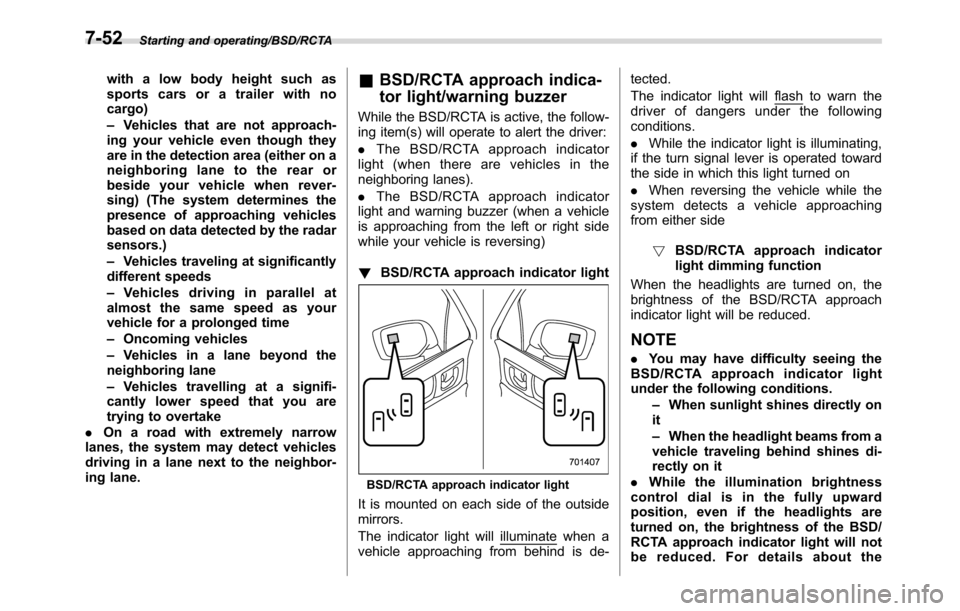
BSD/RCTA approach indicator light
It is mounted on each side of the outside
mirrors.
The indicator light will
illuminate when a
vehicle approaching from behind is de-tected.
The indicator light will
flash to warn the
driver of dangers under the following
conditions.
.While the indicator light is illuminating,
if the turn signal lever is operated toward
the side in which this light turned on
.When reversing the vehicle while the
system detects a vehicle approaching
from either side
!BSD/RCTA approach indicator
light dimming function
When the headlights are turned on, the
brightness of the BSD/RCTA approach
indicator light will be reduced.
NOTE
.You may have difficulty seeing the
BSD/RCTA approach indicator light
under the following conditions.
–When sunlight shines directly on
it
–When the headlight beams from a
vehicle traveling behind shines di-
rectly on it
.While the illumination brightness
control dial is in the fully upward
position, even if the headlights are
turned on, the brightness of the BSD/
RCTA approach indicator light will not
be reduced. For details about the
7-52