tow SUBARU CROSSTREK 2017 1.G Owner's Manual
[x] Cancel search | Manufacturer: SUBARU, Model Year: 2017, Model line: CROSSTREK, Model: SUBARU CROSSTREK 2017 1.GPages: 572, PDF Size: 41.52 MB
Page 325 of 572
pointed towards the microphone.
–The sound of the air conditioning
fan is loud.
–Thereisanegativeeffecton
sound quality due to the phone
and/or network being used.
.When another phone is connected,
the following registered data cannot be
read:
–Contact data
–Call history data
–All phone settings
.When selling or disposing of the
vehicle, initialize the data. Refer to
“Unit settings”F5-19.
.Once initialized, the data and set-
tings will be erased. Take extra caution
when initializing the data.
.The voice command system sup-
ports phone commands, so dialing a
phone number using your voice is
possible. Refer to“Vo i c e c o m m a n d
system”F5-80.
.The images shown in this Owner’s
Manual are sample images. The actual
images may vary depending on the
market and specifications of your ve-
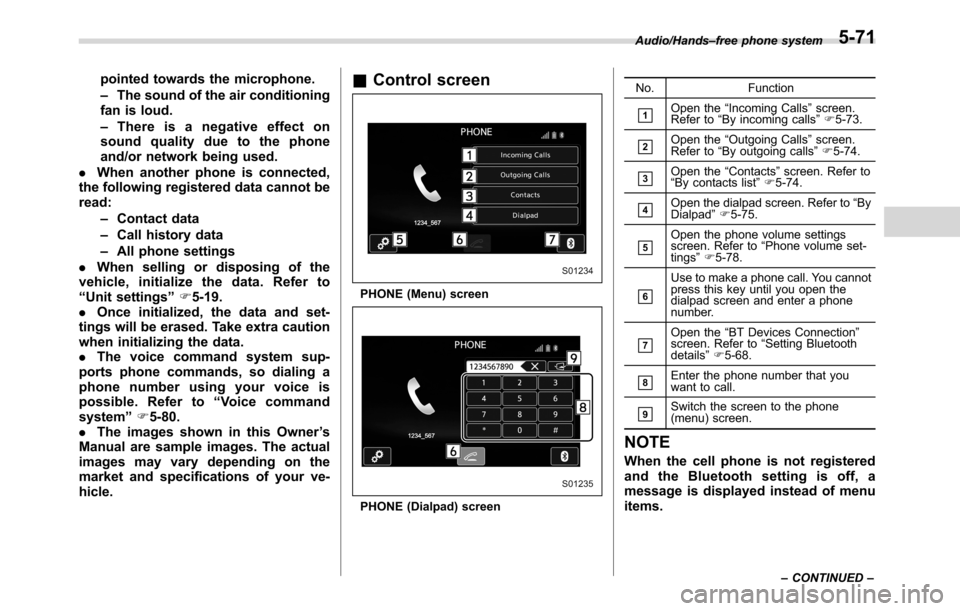
hicle.&Control screen
PHONE (Menu) screen
PHONE (Dialpad) screenNo. Function
&1Open the“Incoming Calls”screen.
Refer to“By incoming calls”F5-73.
&2Open the“Outgoing Calls”screen.
Refer to“By outgoing calls”F5-74.
&3Open the“Contacts”screen. Refer to
“By contacts list”F5-74.
&4Open the dialpad screen. Refer to“By
Dialpad”F5-75.
&5Open the phone volume settings
screen. Refer to“Phone volume set-
tings”F5-78.
&6
Use to make a phone call. You cannot
press this key until you open the
dialpad screen and enter a phone
number.
&7Open the“BT Devices Connection”
screen. Refer to“Setting Bluetooth
details”F5-68.
&8Enter the phone number that you
want to call.
&9Switch the screen to the phone
(menu) screen.
NOTE
When the cell phone is not registered
and the Bluetooth setting is off, a
message is displayed instead of menu
items.
Audio/Hands–free phone system
–CONTINUED–5-71
Page 335 of 572
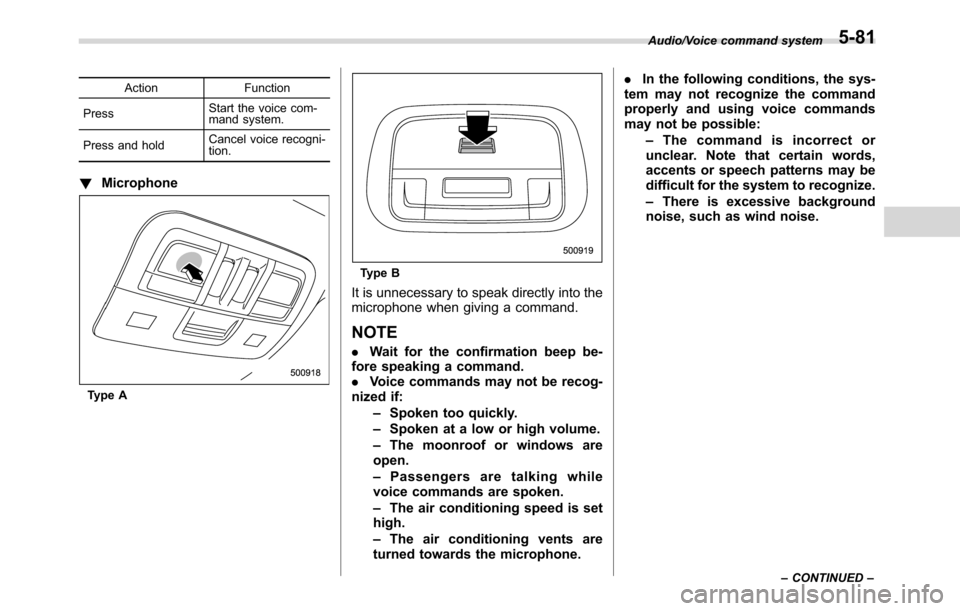
Action Function
PressStart the voice com-
mand system.
Press and holdCancel voice recogni-
tion.
!Microphone
Type A
Type B
It is unnecessary to speak directly into the
microphone when giving a command.
NOTE
.Wait for the confirmation beep be-
fore speaking a command.
.Voice commands may not be recog-
nized if:
–Spoken too quickly.
–Spoken at a low or high volume.
–The moonroof or windows are
open.
–Passengers are talking while
voice commands are spoken.
–The air conditioning speed is set
high.
–The air conditioning vents are
turned towards the microphone..In the following conditions, the sys-
tem may not recognize the command
properly and using voice commands
may not be possible:
–The command is incorrect or
unclear. Note that certain words,
accents or speech patterns may be
difficult for the system to recognize.
–There is excessive background
noise, such as wind noise.
Audio/Voice command system
–CONTINUED–5-81
Page 349 of 572
Interior lights....................................................... 6-2
Dome light.......................................................... 6-2
Cargo area light.................................................. 6-2
Map lights........................................................... 6-3
OFF delay timer.................................................. 6-3
Sun visors........................................................... 6-4Sun visor extension plate (models with the
EyeSight system).............................................. 6-4
Vanity mirror....................................................... 6-5
Storage compartment......................................... 6-5Glove box........................................................... 6-6
Center console.................................................... 6-6
Cup holders......................................................... 6-7
Bottle holders...................................................... 6-7
Accessory power outlets.................................... 6-8
Use with a cigarette lighter (dealer option)........... 6-9
Ashtray (dealer option)...................................... 6-10
Floor mat (if equipped)...................................... 6-11
Coat hook........................................................... 6-11
Shopping bag hook........................................... 6-12
Cargo area cover (if equipped)......................... 6-12
Using the cover................................................. 6-12
To remove the cover housing ............................. 6-13
Stowage of the cargo area cover........................ 6-13
To install the cover housing............................... 6-14
Cargo tie-down hooks (if equipped)................. 6-14
Rear view camera.............................................. 6-15
How to use the rear view camera....................... 6-16
Viewing range on the screen.............................. 6-17
Help line............................................................ 6-18
Interior equipment
6
Page 352 of 572
Interior equipment/Sun visors
be changed by a SUBARU dealer. Con-
tact your SUBARU dealer for details. For
models with multi function display, the
setting can be changed by operating the
multi function display. For details, refer to
“Interior light off delay timer setting”F3-
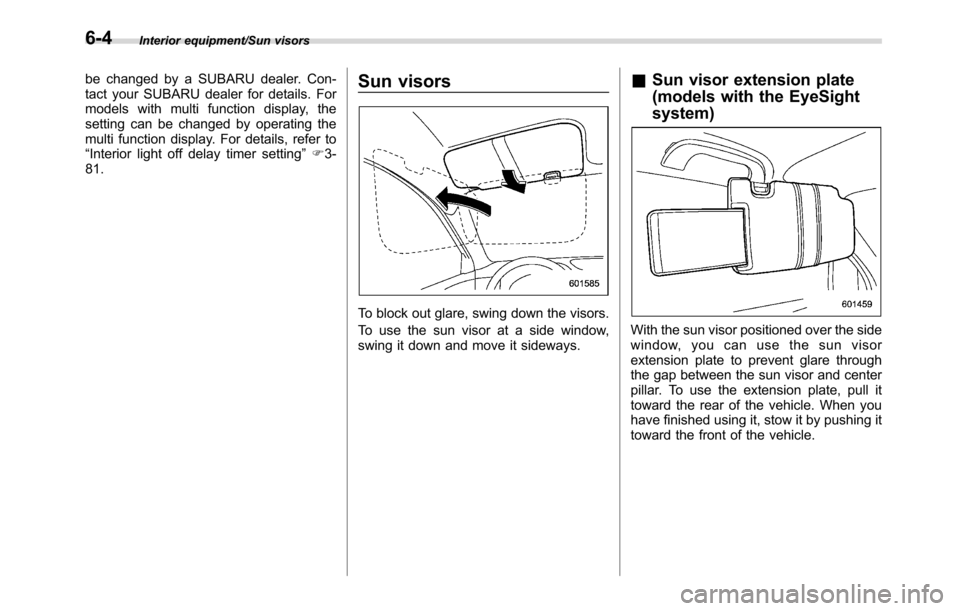
81.Sun visors
To block out glare, swing down the visors.
To use the sun visor at a side window,
swing it down and move it sideways.
&Sun visor extension plate
(models with the EyeSight
system)
With the sun visor positioned over the side
window, you can use the sun visor
extension plate to prevent glare through
the gap between the sun visor and center
pillar. To use the extension plate, pull it
toward the rear of the vehicle. When you
have finished using it, stow it by pushing it
toward the front of the vehicle.
6-4
Page 361 of 572
WARNING
Do not place anything on the ex-
tended cover. Putting excessive
weight on the extended cover can
break it and an object on the cover
could tumble forward in the event of
a sudden stop or collision. This
could cause serious injury.
CAUTION
Be careful not to scratch the rear
gate stays while extending and
rewinding the cover.
Scratches on the stays could cause
leakage of gas from the stays, which
may result in their inability to hold
the rear gate open.
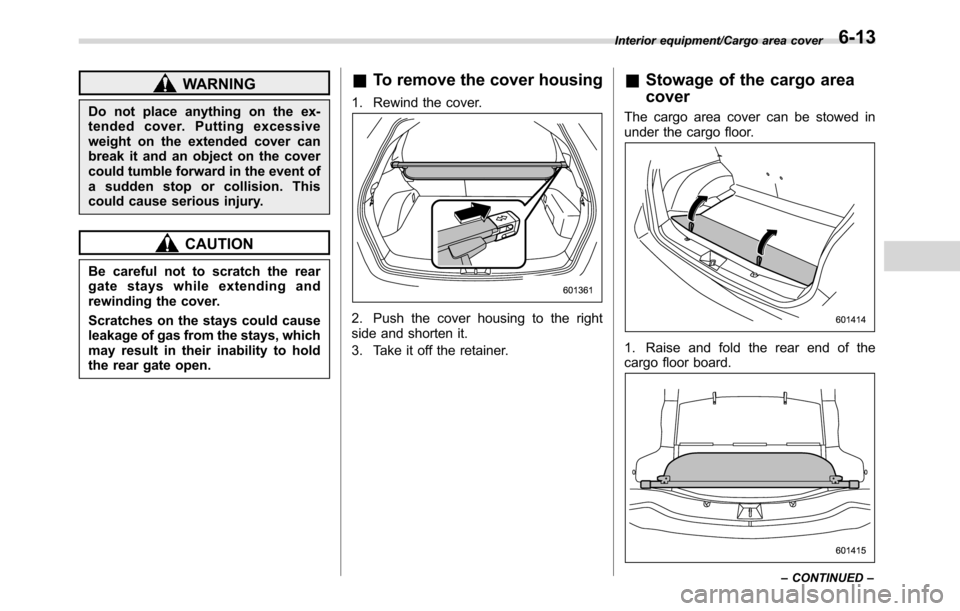
&To remove the cover housing
1. Rewind the cover.
2. Push the cover housing to the right
side and shorten it.
3. Take it off the retainer.
&Stowage of the cargo area
cover
The cargo area cover can be stowed in
under the cargo floor.
1. Raise and fold the rear end of the
cargo floor board.
Interior equipment/Cargo area cover
–CONTINUED–6-13
Page 362 of 572
Interior equipment/Cargo tie–down hooks
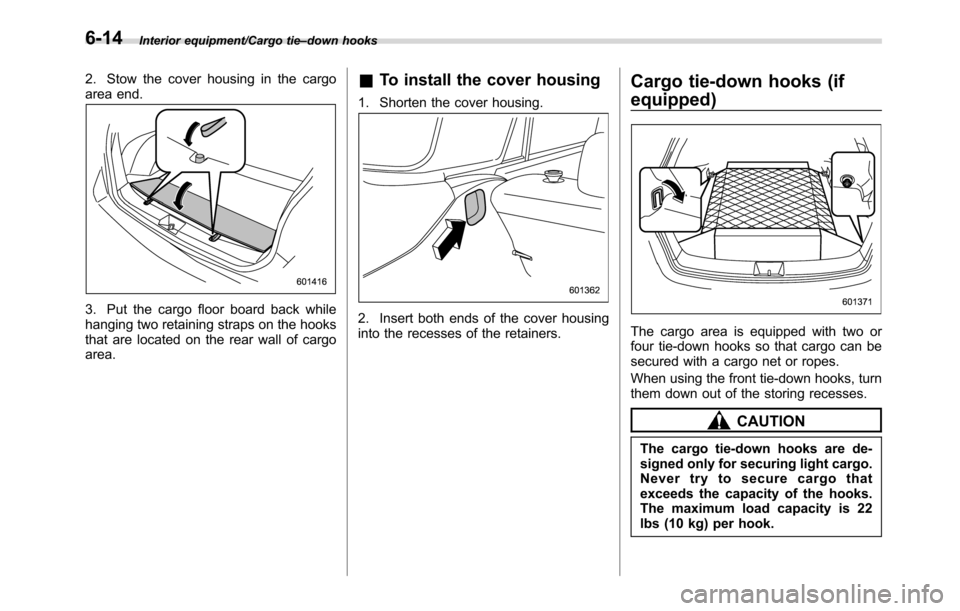
2. Stow the cover housing in the cargo
area end.
3. Put the cargo floor board back while
hanging two retaining straps on the hooks
that are located on the rear wall of cargo
area.
&To install the cover housing
1. Shorten the cover housing.
2. Insert both ends of the cover housing
into the recesses of the retainers.
Cargo tie-down hooks (if
equipped)
The cargo area is equipped with two or
four tie-down hooks so that cargo can be
secured with a cargo net or ropes.
When using the front tie-down hooks, turn
them down out of the storing recesses.
CAUTION
The cargo tie-down hooks are de-
signed only for securing light cargo.
Never try to secure cargo that
exceeds the capacity of the hooks.
The maximum load capacity is 22
lbs (10 kg) per hook.
6-14
Page 364 of 572
Interior equipment/Rear view camera
not to apply the wax to the camera. If it
comes in contact with the camera,
moisten a clean cloth with a diluted
neutral detergent to remove the wax.
.The camera lens has a hard coating
to help prevent scratches. However,
when washing the vehicle or cleaning
the camera lens, be careful not to
scratch the camera lens. Do not use a
washing brush directly on the camera
lens. The image quality of the rear view
camera may deteriorate.
.Strong light shined on the camera
lens may develop vertical lines around
the light source. This is not a malfunc-
tion.
.Under fluorescent light, the display
may flicker. However, this is not a
malfunction.
.The image of the rear view camera
may be slightly different from the
actual color of the objects.&How to use the rear view
camera
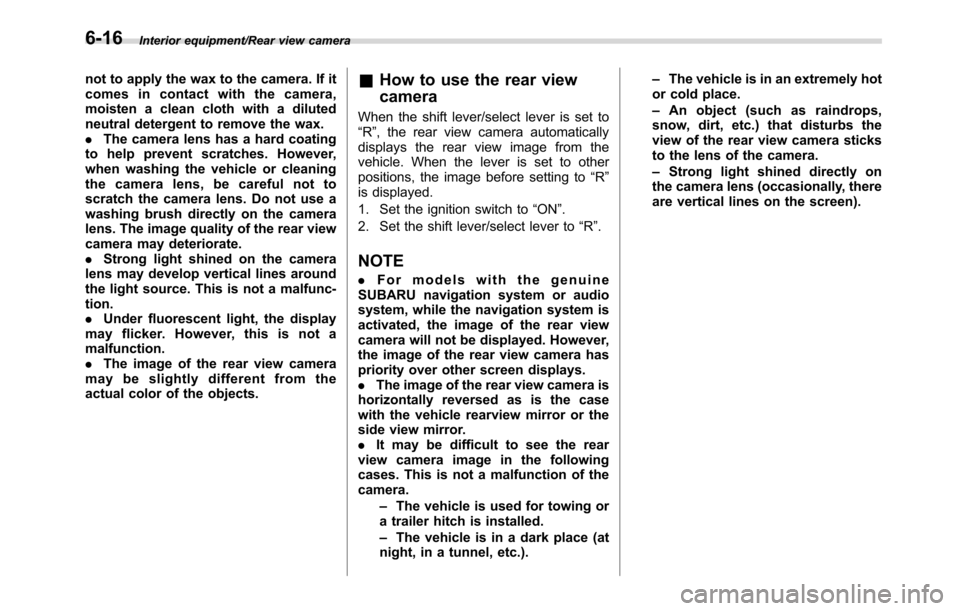
When the shift lever/select lever is set to
“R”, the rear view camera automatically
displays the rear view image from the
vehicle. When the lever is set to other
positions, the image before setting to“R”
is displayed.
1. Set the ignition switch to“ON”.
2. Set the shift lever/select lever to“R”.
NOTE
.For models with the genuine
SUBARU navigation system or audio
system, while the navigation system is
activated, the image of the rear view
camera will not be displayed. However,
the image of the rear view camera has
priority over other screen displays.
.The image of the rear view camera is
horizontally reversed as is the case
with the vehicle rearview mirror or the
side view mirror.
.It may be difficult to see the rear
view camera image in the following
cases. This is not a malfunction of the
camera.
–The vehicle is used for towing or
a trailer hitch is installed.
–The vehicle is in a dark place (at
night, in a tunnel, etc.).–The vehicle is in an extremely hot
or cold place.
–An object (such as raindrops,
snow, dirt, etc.) that disturbs the
view of the rear view camera sticks
to the lens of the camera.
–Strong light shined directly on
the camera lens (occasionally, there
are vertical lines on the screen).
6-16
Page 376 of 572
Starting and operating/Preparing to drive
The U.S. Environmental Protection
Agency (EPA) and states using two-wheel
dynamometers in their emission testing
program have EXEMPTED SUBARU
AWD vehicles from the portion of the
testing program that involves a two-wheel
dynamometer. There are some states that
use four-wheel dynamometers in their
testing program. When properly used, this
equipment should not damage a SUBARU
AWD vehicle.
Under no circumstances should the rear
wheels be jacked off the ground, nor
should the driveshaft be disconnected for
state emission testing.Preparing to drive
You should perform the following checks
and adjustments every day before you
start driving.
1. Check that all windows, mirrors, and
lights are clean and unobstructed.
2. Check the appearance and condition
of the tires. Also check tires for proper
inflation.
3. Look under the vehicle for any sign of
leaks.
4. Check that the hood and rear gate are
fully closed.
5. Check the adjustment of the seat.
6. Check the adjustment of the inside
and outside mirrors.
7. Fasten your seatbelt. Check that your
passengers have fastened their seatbelts.
8. Check the operation of the warning
and indicator lights when the ignition
switch is turned to the“ON”position.
9. Check the gauges, indicator and warn-
ing lights after starting the engine.
10. Check that no small animals enter the
engine compartment.
CAUTION
Trapping small animals in the cool-
ing fan and belts of the engine may
result in a malfunction. Check that
no small animal enters the engine
compartment and under the vehicle
before starting the engine.
NOTE
.Engine oil, engine coolant, brake
fluid, washer fluid and other fluid levels
should be checked daily, weekly or at
fuel stops.
.When towing a trailer, refer to“Trai-
ler hitch (dealer option)”F8-15.
7-8
Page 392 of 572
Starting and operating/Continuously variable transmission
transmission fluid to overheat.
.Never move the vehicle rearward
by inertia with the select lever set
in a forward driving position or
move the vehicle forward by
inertia with the select lever set
in the“R”position. Doing so may
result in an unexpected accident
or malfunction.
.When parking the vehicle, first
securely apply the parking brake
and then place the select lever in
the“P”position. Do not park for
a long time with the select lever
in any other position as doing so
could result in a dead battery.
&Continuously variable trans-
mission features
The continuously variable transmission is
electronically controlled and provides an
infinite number of forward speeds and 1
reverse speed. It also has a manual mode.
NOTE
.When the engine coolant tempera-
ture is still low, the transmission will
upshift or downshift at higher engine
speeds than when the coolant tempera-
ture is sufficiently high in order to
shorten the warm-up time and improvedriveability. The gearshift timing will
automatically shift to the normal timing
after the engine has warmed up.
.Immediately after transmission fluid
is replaced, you may feel that the
transmission operation is somewhat
unusual. This results from invalidation
of data which the on-board computer
has collected and stored in memory to
allow the transmission to shift at the
most appropriate times for the current
condition of your vehicle. Optimized
shifting will be restored as the vehicle
continues to be driven for a while.
.When driving a CVT model under
continuous heavy load conditions such
as when towing a camper or climbing a
long, steep hill, the engine speed or the
vehicle speed may automatically be
reduced. This is not a malfunction. This
phenomenon results from the engine
control function maintaining the cool-
ing performance of the vehicle. The
engine and vehicle speed will return to
a normal speed when the engine is able
to maintain the optimum cooling per-
formance after the heavy load de-
creases. Driving under a heavy load
must be performed with extreme care.
Do not try to pass a vehicle in front
when driving on an uphill slope while
towing..The continuously variable transmis-
sion is a chain type system that
provides superior transmission effi-
ciency for maximum fuel economy. At
times, depending on varying driving
conditions, a chain operating sound
may be heard that is characteristic of
this type of system.
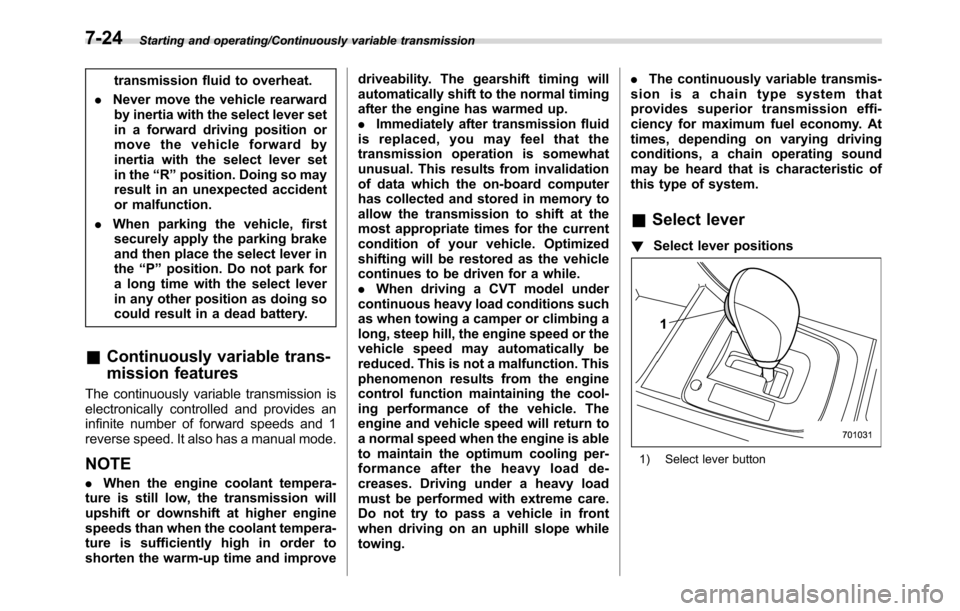
&Select lever
!Select lever positions
1) Select lever button
7-24
Page 402 of 572
Starting and operating/Vehicle Dynamics Control system
2. Apply the parking brake.
3. Check the brake fluid level. For details
about checking the brake fluid level, refer
to“Checking the fluid level”F11-15.
.If the brake fluid level is not below the
“MIN”mark, the EBD system may be
malfunctioning. Drive carefully to the
nearest SUBARU dealer and have the
system inspected.
.If the brake fluid level is below the
“MIN”mark, DO NOT drive the vehicle.
Instead, have the vehicle towed to the
nearest SUBARU dealer for repair.
WARNING
.Driving with the brake system
warning light illuminated is dan-
gerous. This indicates your brake
system may not be working
properly. If the light remains
illuminated, have the brakes in-
spected by a SUBARU dealer
immediately.
.If at all in doubt about whether
the brakes are operating prop-
erly, do not drive the vehicle.
Have your vehicle towed to the
nearest SUBARU dealer for re-
pair.
Vehicle Dynamics Control
system
&Safety precautions
WARNING
Always use the utmost care in
driving–overconfidence because
you are driving a vehicle with the
Vehicle Dynamics Control system
could easily lead to a serious acci-
dent.
CAUTION
.Even if your vehicle is equipped
with Vehicle Dynamics Control
system, winter tires should be
used when driving on snow-cov-
ered or icy roads; in addition,
vehicle speed should be reduced
considerably. Simply having a
Vehicle Dynamics Control sys-
tem does not guarantee that the
vehicle will be able to avoid
accidents in any situation.
.Activation of the Vehicle Dy-
namics Control system is an
indication that the road being
travelled on has a slippery sur-face; since having Vehicle Dy-
namics Control is no guarantee
that full vehicle control will be
maintained at all times and under
all conditions, its activation
should be seen as a sign that
the speed of the vehicle should
be reduced considerably.
.Whenever suspension compo-
nents, steering components, or
an axle are removed from a
vehicle, have an inspection of
that system performed by an
authorized SUBARU dealer.
.The following precautions should
be observed in order to ensure
that the Vehicle Dynamics Con-
trol system is operating properly:
–All four wheels should be
fitted with tires of the same
size, type, and brand. Further-
more, the amount of wear
should be the same for all
four tires.
–Keep the tire pressure at the
proper level as shown on the
vehicle placard attached to
the driver’s side door pillar.
–Use only the specified tem-
porary spare tire to replace a
flat tire. With a temporary
7-34