light SUBARU CROSSTREK 2017 1.G Workshop Manual
[x] Cancel search | Manufacturer: SUBARU, Model Year: 2017, Model line: CROSSTREK, Model: SUBARU CROSSTREK 2017 1.GPages: 572, PDF Size: 41.52 MB
Page 132 of 572
Keys and doors/Windows
Windows
WARNING
To avoid serious personal injury
caused by entrapment, always con-
form to the following instructions
without exception.
.When operating the power win-
dows, be extremely careful to
prevent anyone’s fingers, arms,
neck, head or other objects from
being caught in the window.
.Always lock the passengers’win-
dows using the lock switch when
children are riding in the vehicle.
.For safety reasons, always carry
the key with you when leaving
the vehicle and never allow an
unattended child to remain in the
vehicle. Failure to follow this
procedure could result in injury
to a child operating the power
window.
The power windows operate only when
the ignition switch is in the“ON”position.
&Power window operation by
driver
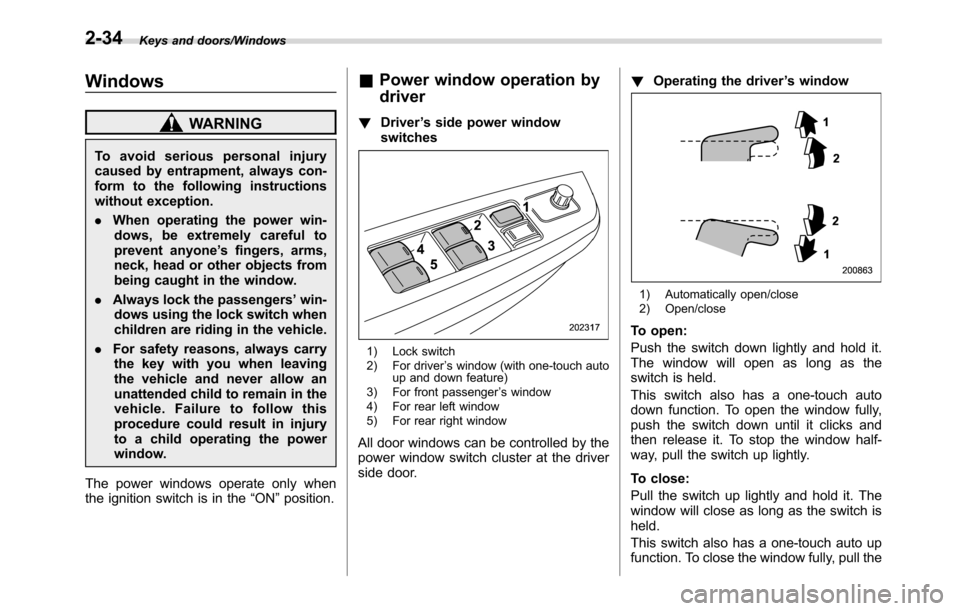
!Driver’s side power window
switches
1) Lock switch
2) For driver’s window (with one-touch auto
up and down feature)
3) For front passenger’s window
4) For rear left window
5) For rear right window
All door windows can be controlled by the
power window switch cluster at the driver
side door.!Operating the driver’s window
1) Automatically open/close
2) Open/close
To open:
Push the switch down lightly and hold it.
The window will open as long as the
switch is held.
This switch also has a one-touch auto
down function. To open the window fully,
push the switch down until it clicks and
then release it. To stop the window half-
way, pull the switch up lightly.
To close:
Pull the switch up lightly and hold it. The
window will close as long as the switch is
held.
This switch also has a one-touch auto up
function. To close the window fully, pull the
2-34
Page 133 of 572
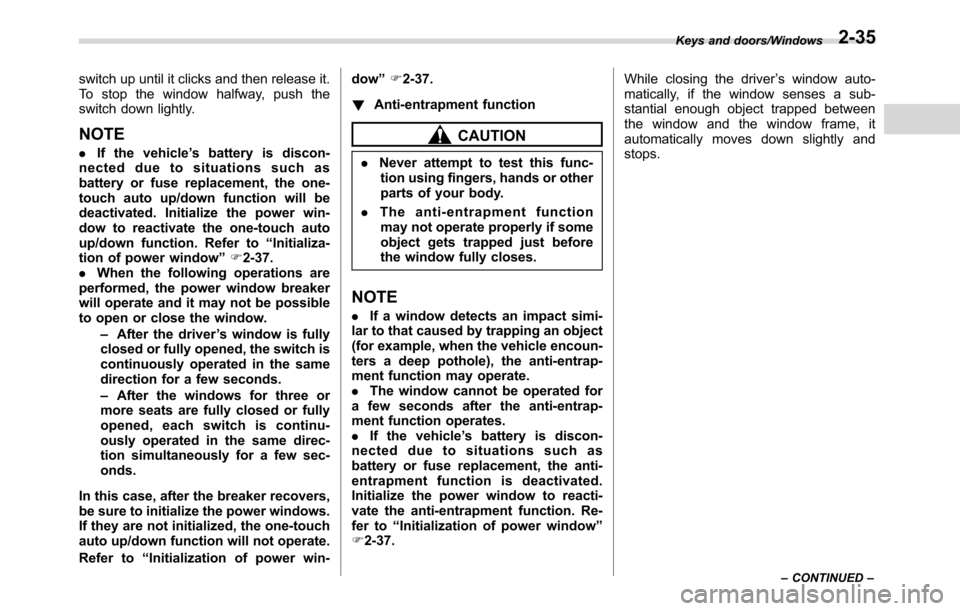
switch up until it clicks and then release it.
To stop the window halfway, push the
switch down lightly.
NOTE
.If the vehicle’s battery is discon-
nected due to situations such as
battery or fuse replacement, the one-
touch auto up/down function will be
deactivated. Initialize the power win-
dow to reactivate the one-touch auto
up/down function. Refer to“Initializa-
tion of power window”F2-37.
.When the following operations are
performed, the power window breaker
will operate and it may not be possible
to open or close the window.
–After the driver’s window is fully
closed or fully opened, the switch is
continuously operated in the same
direction for a few seconds.
–After the windows for three or
more seats are fully closed or fully
opened, each switch is continu-
ously operated in the same direc-
tion simultaneously for a few sec-
onds.
In this case, after the breaker recovers,
be sure to initialize the power windows.
If they are not initialized, the one-touch
auto up/down function will not operate.
Refer to“Initialization of power win-dow”F2-37.
!Anti-entrapment function
CAUTION
.Never attempt to test this func-
tion using fingers, hands or other
parts of your body.
.The anti-entrapment function
may not operate properly if some
object gets trapped just before
the window fully closes.
NOTE
.If a window detects an impact simi-
lar to that caused by trapping an object
(for example, when the vehicle encoun-
ters a deep pothole), the anti-entrap-
ment function may operate.
.The window cannot be operated for
a few seconds after the anti-entrap-
ment function operates.
.If the vehicle’s battery is discon-
nected due to situations such as
battery or fuse replacement, the anti-
entrapment function is deactivated.
Initialize the power window to reacti-
vate the anti-entrapment function. Re-
fer to“Initialization of power window”
F2-37.While closing the driver’s window auto-
matically, if the window senses a sub-
stantial enough object trapped between
the window and the window frame, it
automatically moves down slightly and
stops.
Keys and doors/Windows
–CONTINUED–2-35
Page 139 of 572
Ignition switch (models without“keyless
access with push-button start system”)......... 3-4
LOCK.................................................................. 3-4
ACC.................................................................... 3-5
ON...................................................................... 3-5
START ................................................................ 3-5
Key reminder chime............................................ 3-5
Ignition switch light (if equipped)......................... 3-6
Push-button ignition switch (models with
push-button start system)............................... 3-6
Safety precautions.............................................. 3-6
Operating range for push-button start system...... 3-6
Switching power status....................................... 3-7
When access key does not operate properly........ 3-8
Hazard warning flasher....................................... 3-8
Meters and gauges.............................................. 3-9
Combination meter illumination........................... 3-9
Canceling the function for meter/gauge needle
movement upon turning on the ignition
switch............................................................... 3-9
Speedometer...................................................... 3-10
Odometer........................................................... 3-10
Double trip meter............................................... 3-10
Tachometer........................................................ 3-11
Fuel gauge......................................................... 3-12
ECO gauge (if equipped).................................... 3-12
Warning and indicator lights............................. 3-13
Initial illumination for system check.................... 3-13
Seatbelt warning light and chime........................ 3-14
SRS airbag system warning light........................ 3-15Front passenger’s frontal airbag ON and OFF
indicators........................................................ 3-16
CHECK ENGINE warning light/Malfunction
indicator light.................................................. 3-16
Coolant temperature low indicator light/Coolant
temperature high warning light......................... 3-17
Charge warning light.......................................... 3-18
Oil pressure warning light.................................. 3-18
Engine low oil level warning light....................... 3-18
Windshield washer fluid warning light................ 3-19
AT OIL TEMP warning light (CVT models)........... 3-19
Low tire pressure warning light (U.S.-spec.
models)........................................................... 3-19
ABS warning light.............................................. 3-21
Brake system warning light (red)........................ 3-21
Low fuel warning light....................................... 3-22
Hill start assist warning light/Hill start assist OFF
indicator light.................................................. 3-22
Door open warning light.................................... 3-23
All-Wheel Drive warning light (CVT models) ........ 3-23
Power steering warning light.............................. 3-23
Vehicle Dynamics Control warning light/Vehicle
Dynamics Control operation indicator light ....... 3-24
Vehicle Dynamics Control OFF indicator light..... 3-25
Warning chimes and warning indicator of the
keyless access with push-button start system (if
equipped)........................................................ 3-25
Security indicator light....................................... 3-30
Select lever/gear position indicator (CVT
models)........................................................... 3-30
Turn signal indicator lights................................. 3-31
High beam indicator light................................... 3-31
Instruments and controls
3
Page 140 of 572
Instruments and controls
Cruise control indicator light (if equipped).......... 3-31
Cruise control set indicator light (if
equipped)......................................................... 3-31
Automatic headlight beam leveler warning light
(models with HID headlights)............................ 3-31
Front fog light indicator light.............................. 3-31
Headlight indicator light..................................... 3-32
Steering responsive fog lights warning indicator/
Steering responsive fog lights OFF indicator
(models with EyeSight system)......................... 3-32
BSD/RCTA warning indicator (if equipped).......... 3-32
BSD/RCTA OFF indicator (if equipped)................ 3-32
Information display (if equipped)...................... 3-32Outside temperature indicator............................ 3-33
Driving information display................................. 3-33
Clock................................................................. 3-37
Multi information display (models with type
B combination meter)..................................... 3-38
Basic operation.................................................. 3-39
Welcome screen and Good-bye screen............... 3-39
Warning screen.................................................. 3-39
Basic screens.................................................... 3-39
Menu screens.................................................... 3-40
Multi function display (if equipped).................. 3-42Models without multi function display................. 3-42
Safety precautions............................................. 3-42
Features............................................................ 3-43
Locations........................................................... 3-43
Basic operation.................................................. 3-43
Welcome screen................................................. 3-44
Date screen........................................................ 3-44Ending screen................................................... 3-44
Self-check screen.............................................. 3-45
Interruption screen............................................ 3-46
Basic screens.................................................... 3-46
Selection screen................................................ 3-53
Date and time settings....................................... 3-56
Image quality and volume settings..................... 3-63
Screen settings.................................................. 3-65
Maintenance settings......................................... 3-73
Driving history registration................................. 3-76
Car settings....................................................... 3-77
Initialize............................................................. 3-85
Light control switch........................................... 3-88Headlights......................................................... 3-89
High/low beam change (dimmer) ........................ 3-90
Headlight flasher............................................... 3-91
Daytime running light system............................. 3-91
Turn signal lever................................................ 3-92One-touch lane changer..................................... 3-92
Illumination brightness control......................... 3-92
Headlight beam leveler (if equipped)............... 3-93
Automatic headlight beam leveler (models with
HID headlights)................................................ 3-93
Fog light switch................................................. 3-93
Steering responsive fog lights system (models
with EyeSight system)..................................... 3-94
Wiper and washer.............................................. 3-95Windshield wiper and washer switches.............. 3-96
Rear window wiper and washer switch............... 3-98
Mirrors................................................................ 3-99Inside mirror...................................................... 3-99
Page 142 of 572
Instruments and controls/Ignition switch (models without“keyless access with push–button start system”)
Ignition switch (models with-
out“keyless access with
push-button start system”)
WARNING
.Never turn the ignition switch to
the“LOCK”position while the
vehicle is being driven or towed
because that will lock the steer-
ing wheel, preventing steering
control. And when the engine is
turned off, it takes a much great-
er effort than usual to steer.
.Before leaving the vehicle, al-
ways remove the key from the
ignition switch for safety and
never allow an unattended child
to remain in the vehicle. Failure
to follow this procedure could
result in injury to a child or
others. Children could operate
the power windows, the moon-
roof or other controls or even
make the vehicle move.
CAUTION
Do not attach a large key holder or
key case to either key. If it banged
against your knees or hands while
you are driving, it could turn the
ignition switch from the“ON”posi-
tion to the“ACC”or“LOCK”posi-
tion, thereby stopping the engine.
Also, if the key is attached to a key
holder or to a large bunch of other
keys, centrifugal force may act on it
as the vehicle moves, resulting in
unwanted turning of the ignition
switch.
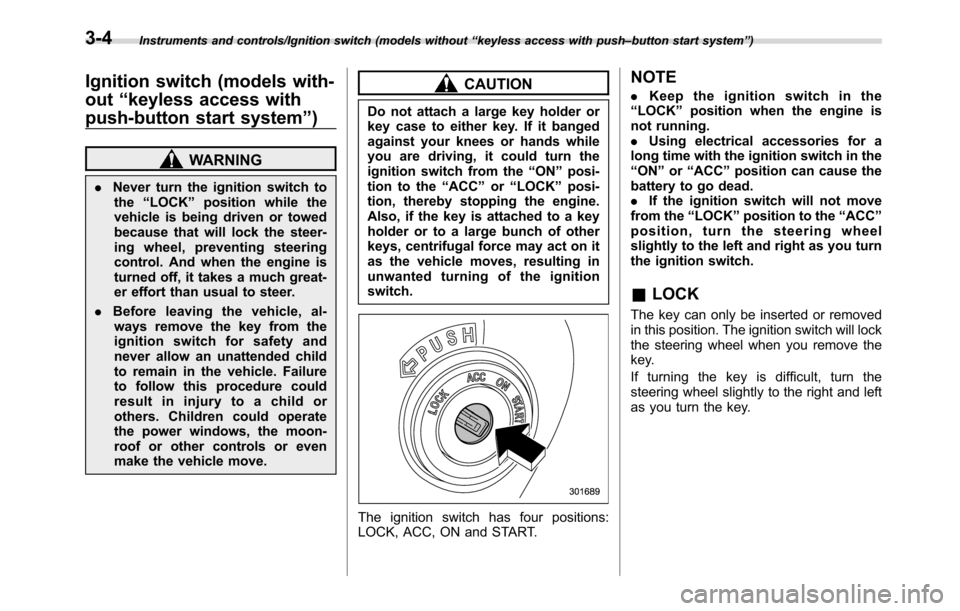
The ignition switch has four positions:
LOCK, ACC, ON and START.
NOTE
.Keep the ignition switch in the
“LOCK”position when the engine is
not running.
.Using electrical accessories for a
long time with the ignition switch in the
“ON”or“ACC”position can cause the
battery to go dead.
.If the ignition switch will not move
from the“LOCK”position to the“ACC”
position, turn the steering wheel
slightly to the left and right as you turn
the ignition switch.
&LOCK
The key can only be inserted or removed
in this position. The ignition switch will lock
the steering wheel when you remove the
key.
If turning the key is difficult, turn the
steering wheel slightly to the right and left
as you turn the key.
3-4
Page 143 of 572
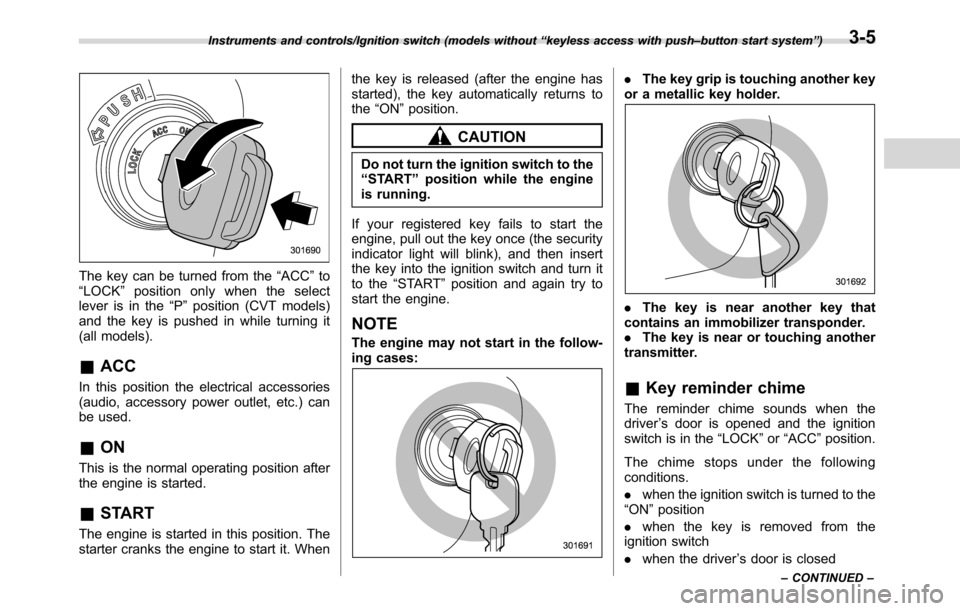
The key can be turned from the“ACC”to
“LOCK”position only when the select
lever is in the“P”position (CVT models)
and the key is pushed in while turning it
(all models).
&ACC
In this position the electrical accessories
(audio, accessory power outlet, etc.) can
be used.
&ON
This is the normal operating position after
the engine is started.
&START
The engine is started in this position. The
starter cranks the engine to start it. Whenthe key is released (after the engine has
started), the key automatically returns to
the“ON”position.
CAUTION
Do not turn the ignition switch to the
“START”position while the engine
is running.
If your registered key fails to start the
engine, pull out the key once (the security
indicator light will blink), and then insert
the key into the ignition switch and turn it
to the“START”position and again try to
start the engine.
NOTE
The engine may not start in the follow-
ing cases:
.The key grip is touching another key
or a metallic key holder.
.The key is near another key that
contains an immobilizer transponder.
.The key is near or touching another
transmitter.
&Key reminder chime
The reminder chime sounds when the
driver’s door is opened and the ignition
switch is in the“LOCK”or“ACC”position.
The chime stops under the following
conditions.
.when the ignition switch is turned to the
“ON”position
.when the key is removed from the
ignition switch
.when the driver’s door is closed
Instruments and controls/Ignition switch (models without“keyless access with push–button start system”)
–CONTINUED–3-5
Page 144 of 572
Instruments and controls/Push–button ignition switch (models with push–button start system)
&Ignition switch light (if
equipped)
For easy access to the ignition switch in
the dark, the ignition switch light illumi-
nates when the driver’s door is opened or
when the driver’s door is unlocked using
the remote keyless entry transmitter.
The light remains illuminated for several
tens of seconds and then gradually turns
off under the following conditions.
.when the driver’s door is closed
.when the doors are unlocked using the
remote keyless entry transmitter
The light turns off immediately under the
following conditions.
.when the ignition switch is turned to the
“ON”position
.when all doors and the rear gate are
locked using the remote keyless entry
transmitter
Push-button ignition switch
(models with push-button
start system)
&Safety precautions
Refer to“Safety precautions”F2-10.
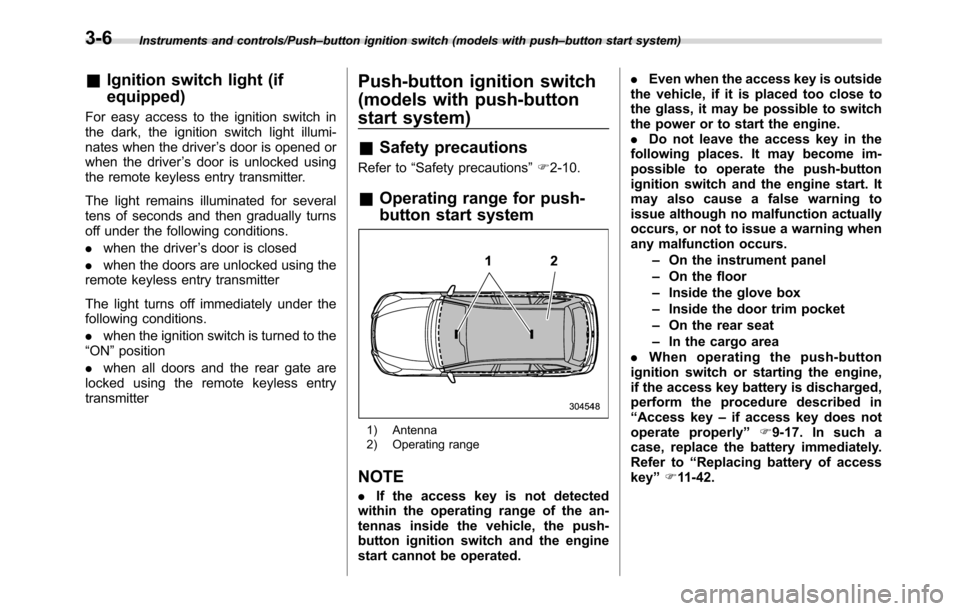
&Operating range for push-
button start system
1) Antenna
2) Operating range
NOTE
.If the access key is not detected
within the operating range of the an-
tennas inside the vehicle, the push-
button ignition switch and the engine
start cannot be operated..Even when the access key is outside
the vehicle, if it is placed too close to
the glass, it may be possible to switch
the power or to start the engine.
.Do not leave the access key in the
following places. It may become im-
possible to operate the push-button
ignition switch and the engine start. It
may also cause a false warning to
issue although no malfunction actually
occurs, or not to issue a warning when
any malfunction occurs.
–On the instrument panel
–On the floor
–Inside the glove box
–Inside the door trim pocket
–On the rear seat
–In the cargo area
.When operating the push-button
ignition switch or starting the engine,
if the access key battery is discharged,
perform the procedure described in
“Access key–if access key does not
operate properly”F9-17. In such a
case, replace the battery immediately.
Refer to“Replacing battery of access
key”F11-42.
3-6
Page 145 of 572
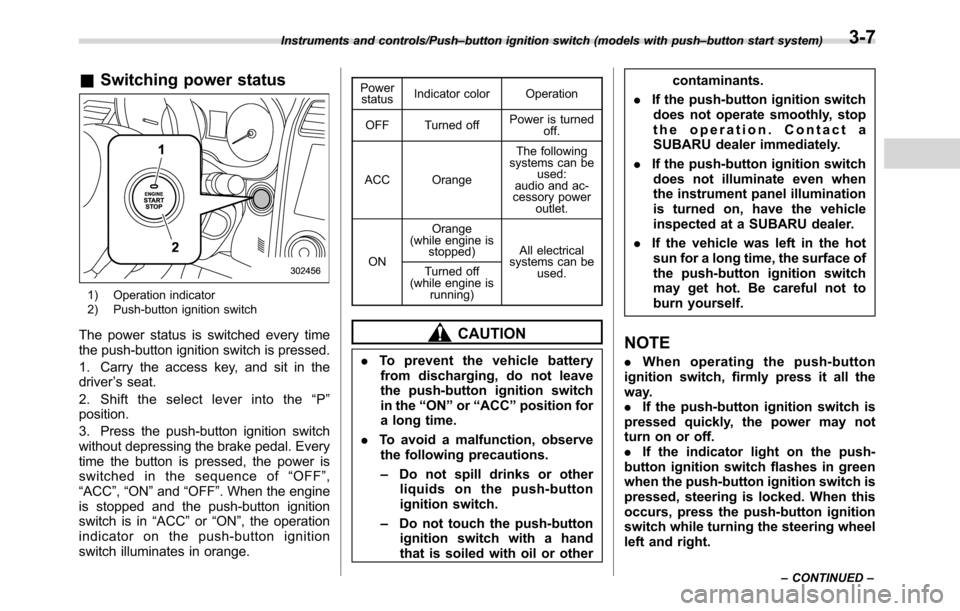
&Switching power status
1) Operation indicator
2) Push-button ignition switch
The power status is switched every time
the push-button ignition switch is pressed.
1. Carry the access key, and sit in the
driver’s seat.
2. Shift the select lever into the“P”
position.
3. Press the push-button ignition switch
without depressing the brake pedal. Every
time the button is pressed, the power is
switched in the sequence of“OFF”,
“ACC”,“ON”and“OFF”. When the engine
is stopped and the push-button ignition
switch is in“ACC”or“ON”, the operation
indicator on the push-button ignition
switch illuminates in orange.
Power
statusIndicator color Operation
OFF Turned offPower is turned
off.
ACC OrangeThe following
systems can be
used:
audio and ac-
cessory power
outlet.
ONOrange
(while engine is
stopped)All electrical
systems can be
used. Turned off
(while engine is
running)
CAUTION
.To prevent the vehicle battery
from discharging, do not leave
the push-button ignition switch
in the“ON”or“ACC”position for
a long time.
.To avoid a malfunction, observe
the following precautions.
–Do not spill drinks or other
liquids on the push-button
ignition switch.
–Do not touch the push-button
ignition switch with a hand
that is soiled with oil or othercontaminants.
.If the push-button ignition switch
does not operate smoothly, stop
the operation. Contact a
SUBARU dealer immediately.
.If the push-button ignition switch
does not illuminate even when
the instrument panel illumination
is turned on, have the vehicle
inspected at a SUBARU dealer.
.If the vehicle was left in the hot
sun for a long time, the surface of
the push-button ignition switch
may get hot. Be careful not to
burn yourself.
NOTE
.When operating the push-button
ignition switch, firmly press it all the
way.
.If the push-button ignition switch is
pressed quickly, the power may not
turn on or off.
.If the indicator light on the push-
button ignition switch flashes in green
when the push-button ignition switch is
pressed, steering is locked. When this
occurs, press the push-button ignition
switch while turning the steering wheel
left and right.
Instruments and controls/Push–button ignition switch (models with push–button start system)
–CONTINUED–3-7
Page 146 of 572
Instruments and controls/Hazard warning flasher
!Battery drainage prevention func-
tion
When the push-button ignition switch is
left in the“ACC”or“ON”position for
approximately 1 hour, the push-button
ignition switch will be automatically
switched to“OFF”to prevent the battery
from going dead. This function is activated
when the select lever is in the“P”position.
&When access key does not
operate properly
Refer to“Access key–if access key does
not operate properly”F9-17.
Hazard warning flasher
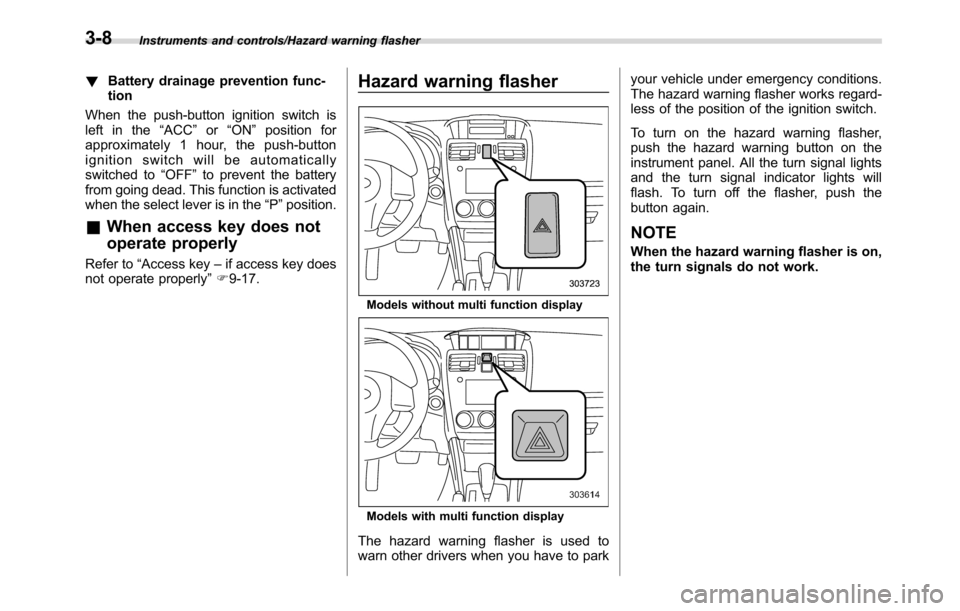
Models without multi function display
Models with multi function display
The hazard warning flasher is used to
warn other drivers when you have to parkyour vehicle under emergency conditions.
The hazard warning flasher works regard-
less of the position of the ignition switch.
To turn on the hazard warning flasher,
push the hazard warning button on the
instrument panel. All the turn signal lights
and the turn signal indicator lights will
flash. To turn off the flasher, push the
button again.
NOTE
When the hazard warning flasher is on,
the turn signals do not work.
3-8
Page 147 of 572
Meters and gauges
NOTE
Some of the meters and gauges on the
combination meter use liquid-crystal
displays. You will find their indications
hard to see if you wear polarized
glasses.
&Combination meter illumina-
tion
When the ignition switch is turned to the
“ON”position, various parts of the combi-
nation meter will illuminate in the following
sequence.
1. Warning lights, indicator lights, meter
needles, gauge needles and liquid crystal
display illuminate.
2. Meter and gauge indications each
show MAX position.
3. Meter and gauge indications each
show MIN position.
4. Regular illumination (for driving) be-
gins.
&Canceling the function for
meter/gauge needle move-
ment upon turning on the
ignition switch
It is possible to activate or deactivate the
movement of the meter needles and
gauge needles that takes place when the
ignition switch is turned to the“ON”
position.
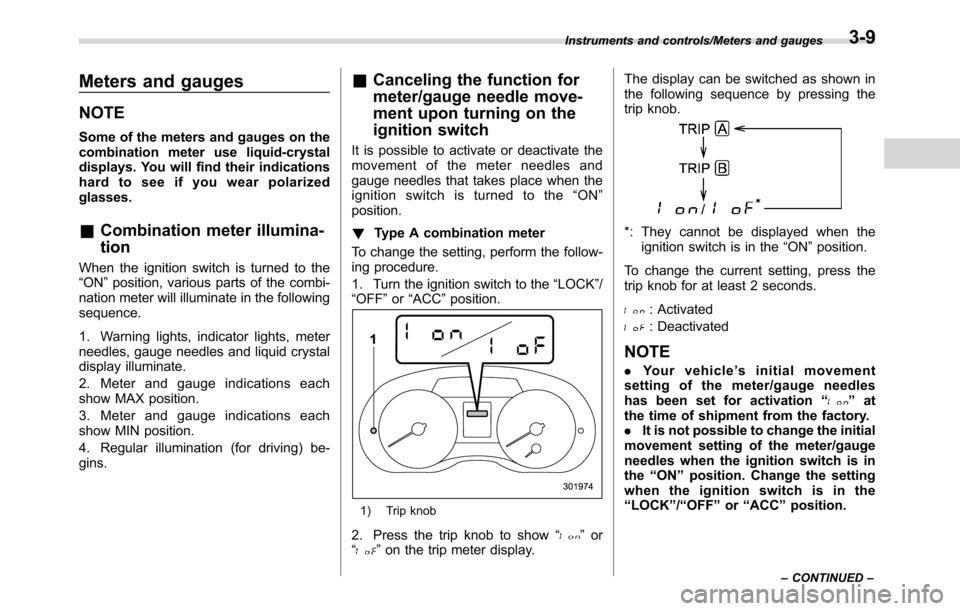
!Type A combination meter
To change the setting, perform the follow-
ing procedure.
1. Turn the ignition switch to the“LOCK”/
“OFF”or“ACC”position.
1) Trip knob
2. Press the trip knob to show“”or
“”on the trip meter display.The display can be switched as shown in
the following sequence by pressing the
trip knob.
*: They cannot be displayed when the
ignition switch is in the“ON”position.
To change the current setting, press the
trip knob for at least 2 seconds.
: Activated
: Deactivated
NOTE
.Your vehicle’s initial movement
setting of the meter/gauge needles
has been set for activation“
”at
the time of shipment from the factory.
.It is not possible to change the initial
movement setting of the meter/gauge
needles when the ignition switch is in
the“ON”position. Change the setting
when the ignition switch is in the
“LOCK”/“OFF”or“ACC”position.
Instruments and controls/Meters and gauges
–CONTINUED–3-9