warning SUBARU CROSSTREK 2018 Owners Manual
[x] Cancel search | Manufacturer: SUBARU, Model Year: 2018, Model line: CROSSTREK, Model: SUBARU CROSSTREK 2018Pages: 474, PDF Size: 20.76 MB
Page 163 of 474
(168,1)
北米Model "A1320BE-C" EDITED: 2017/ 10/ 10
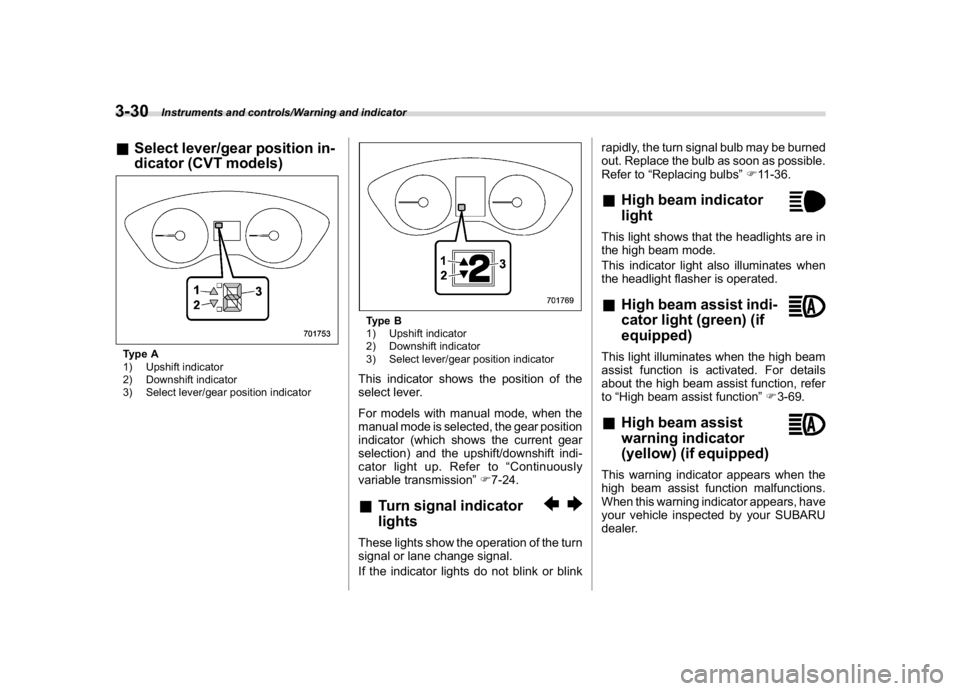
&Select lever/gear position in-
dicator (CVT models)Type A
1) Upshift indicator
2) Downshift indicator
3) Select lever/gear position indicator
Type B
1) Upshift indicator
2) Downshift indicator
3) Select lever/gear position indicatorThis indicator shows the position of the
select lever.
For models with manual mode, when the
manual mode is selected, the gear position
indicator (which shows the current gear
selection) and the upshift/downshift indi-
cator light up. Refer to“Continuously
variable transmission”F7-24.&Turn signal indicator
lightsThese lights show the operation of the turn
signal or lane change signal.
If the indicator lights do not blink or blinkrapidly, the turn signal bulb may be burned
out. Replace the bulb as soon as possible.
Refer to“Replacing bulbs”F11-36.
&High beam indicator
lightThis light shows that the headlights are in
the high beam mode.
This indicator light also illuminates when
the headlight flasher is operated.&High beam assist indi-
cator light (green) (if
equipped)This light illuminates when the high beam
assist function is activated. For details
about the high beam assist function, refer
to“High beam assist function”F3-69.&High beam assist
warning indicator
(yellow) (if equipped)This warning indicator appears when the
high beam assist function malfunctions.
When this warning indicator appears, have
your vehicle inspected by your SUBARU
dealer.
Instruments and controls/Warning and indicator
3-30
Page 164 of 474
(169,1)
北米Model "A1320BE-C" EDITED: 2017/ 10/ 10
&Cruise control indicator
light (if equipped)This light illuminates when the cruise
control main button is pressed to activate
the cruise control function. For details,
refer to“To set cruise control”F7-48.
If this light blinks, do not use the cruise
control. In addition, if it blinks frequently,
contact your SUBARU dealer for an
inspection.
CAUTION
If the CHECK ENGINE warning light/
malfunction indicator light illumi-
nates, the cruise control indicator
light flashes at the same time. At this
time, avoid driving at high speed and
have your vehicle inspected at a
SUBARU dealer as soon as possi-
ble.&Cruise control set indi-
cator light (if equipped)This light illuminates when vehicle speed
has been set to use the cruise control
function. Refer to“To set cruise control”
F7-48.
&Automatic headlight
beam leveler warning
light (models with LED
headlights)This light illuminates when the automatic
headlight beam leveler does not operate
normally.
If this light illuminates during driving, have
your vehicle inspected at your SUBARU
dealer.&LED headlight warning
light (models with LED
headlights)This light illuminates if the LED headlights
malfunction. Have your vehicle inspected
at a SUBARU dealer as soon as possible.&Steering Responsive
Headlight warning light/
Steering Responsive
Headlight OFF indicator
light (if equipped)This light illuminates when the Steering
Responsive Headlight OFF switch is
pressed to deactivate the Steering Re-
sponsive Headlight. Also, the light flashes
when a malfunction occurs in the Steering
Responsive Headlight. Refer to“SteeringResponsive Headlight (SRH)”F3-72.
&Front fog light indicator
light (if equipped)This indicator light illuminates while the
front fog lights are illuminated.&Headlight indicator
light (if equipped)This indicator light illuminates under the
following conditions.
.when the light switch is turned to the
“
”or“
”position
.when the light control switch is in the
“AUTO”position and the headlights illumi-
nate automatically
&Steering responsive fog
lights warning indicator/
Steering responsive fog
lights OFF indicator (if
equipped)NOTEFor details about the steering respon-
sive fog lights system, refer to“Steer-
ing responsive fog lights system”F3-
74.
–CONTINUED–
Instruments and controls/Warning and indicator
3-31
3
Page 165 of 474
(170,1)
北米Model "A1320BE-C" EDITED: 2017/ 10/ 10
!Steering responsive fog lights
warning indicator
This indicator appears when the steering
responsive fog lights system malfunctions.
When this indicator appears while the
system is activated, contact your SUBARU
dealer for an inspection.
!Steering responsive fog lights OFF
indicator
This indicator appears when the steering
responsive fog lights system is deacti-
vated. This indicator disappears when the
system is activated.&X-mode indicator (if
equipped)This indicator appears while the X-mode is
activated. It will disappear when the X-
mode is deactivated. Refer to“To activate/
deactivate the X-mode”F7-39.&Hill descent control in-
dicator (if equipped)This indicator appears while the hill des-
cent control function is in standby. It will
flash while the hill descent control function
is operating. It will disappear when the hill
descent control function is not available.
Refer to“Hill descent control function”F7-
40.
&BSD/RCTA warning in-
dicator (if equipped)This warning indicator appears when the
BSD/RCTA is malfunctioning. In this case
the BSD/RCTA warning indicator will be
shown on the combination meter display
(color LCD). When this indicator appears,
have your vehicle inspected by your
SUBARU dealer as soon as possible.&BSD/RCTA OFF indica-
tor (if equipped)The indicator appears when the BSD/
RCTA OFF switch is pressed to deactivate
the BSD/RCTA. In this case the BSD/
RCTA OFF indicator will be shown on the
combination meter display (color LCD).
For details, refer to“BSD/RCTA”F7-52.&RAB warning
indicator (if equipped)This indicator illuminates if the Reverse
Automatic Braking System malfunctions.
Refer to“Reverse Automatic Braking
System”F7-61.
&RAB OFF indicator light
(if equipped)This indicator illuminates when the Re-
verse Automatic Braking System is turned
OFF, or when the Reverse Automatic
Braking System is suspended temporarily.
Refer to“Reverse Automatic Braking
System”F7-61.&Icy road surface warn-
ing indicator (if
equipped)When the outside temperature is 378F
(38C) or less, the icy road surface warning
will illuminate to inform the driver that the
road surface may be frozen.NOTE.The outside temperature indicator
shows the temperature in the area
around the sensor. Therefore, the tem-
perature indication may differ from the
actual outside air temperature.
.The icy road surface warning screen
should be treated only as a guide. Be
sure to check the condition of the road
surface before driving.
.Once the icy road surface warning
screen appears, it will not disappear
unless the outside temperature has
increased to 418F(58C) or higher.
Instruments and controls/Warning and indicator
3-32
Page 166 of 474
(171,1)
北米Model "A1320BE-C" EDITED: 2017/ 10/ 10
Combination meter display
(color LCD) (if equipped)
WARNING
Always pay adequate attention to
safe driving when operating the
combination meter display (color
LCD) while the vehicle is in motion.
When operation of the combination
meter display (color LCD) interferes
with your ability to concentrate on
driving, stop the vehicle before
performing operations on the
screen. Also, do not concentrate on
the display while driving. Doing so
may cause you to look away from the
road and could result in an accident.
Various information will be shown on the
combination meter display (color LCD).
Also, a warning message will appear on
the display if a malfunction, etc. is
detected. In addition, several settings for
the displayed content can be performed.
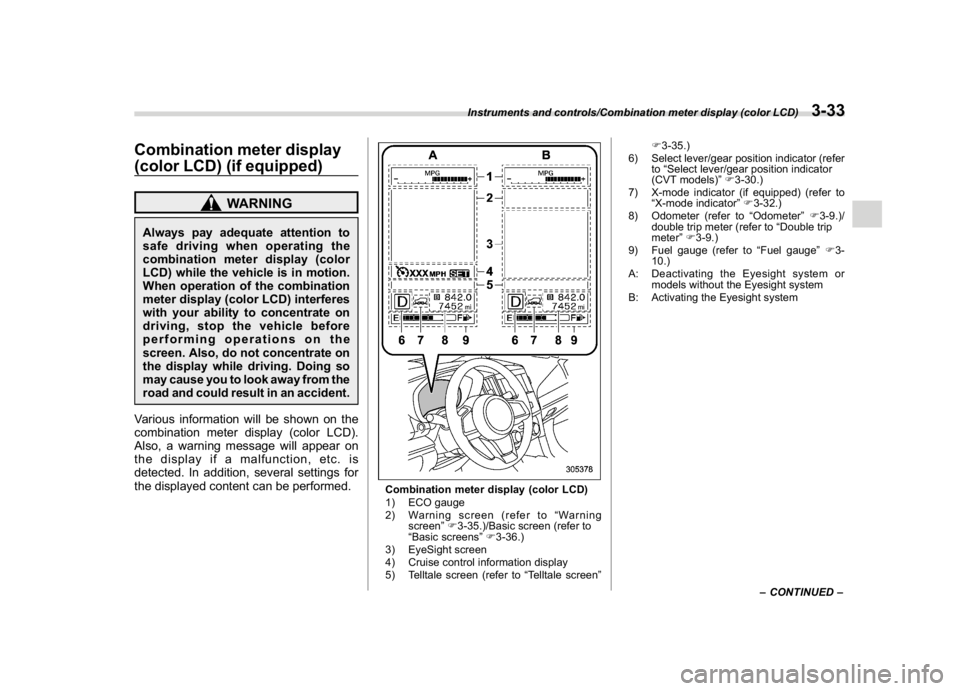
Combination meter display (color LCD)
1) ECO gauge
2) Warning screen (refer to“Warning
screen”F3-35.)/Basic screen (refer to
“Basic screens”F3-36.)
3) EyeSight screen
4) Cruise control information display
5) Telltale screen (refer to“Telltale screen”F3-35.)
6) Select lever/gear position indicator (refer
to“Select lever/gear position indicator
(CVT models)”F3-30.)
7) X-mode indicator (if equipped) (refer to
“X-mode indicator”F3-32.)
8) Odometer (refer to“Odometer”F3-9.)/
double trip meter (refer to“Double trip
meter”F3-9.)
9) Fuel gauge (refer to“Fuel gauge”F3-
10.)
A: Deactivating the Eyesight system or
models without the Eyesight system
B: Activating the Eyesight system
–CONTINUED–
Instruments and controls/Combination meter display (color LCD)
3-33
3
Page 167 of 474
(172,1)
北米Model "A1320BE-C" EDITED: 2017/ 10/ 10
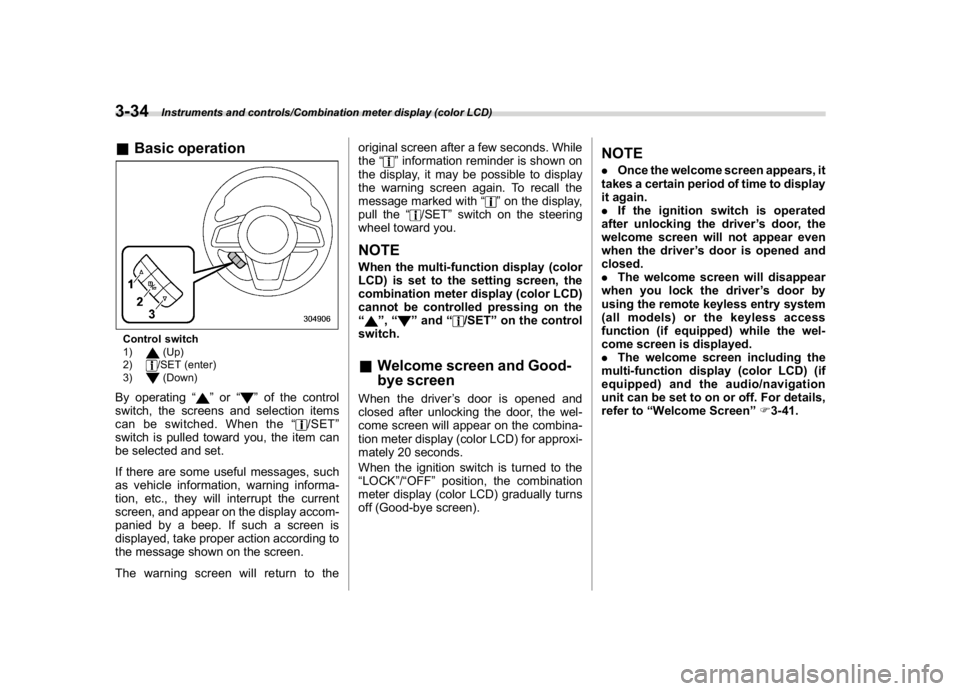
&Basic operationControl switch
1)
(Up)
2)/SET (enter)
3)(Down)
By operating“
”or“
”of the control
switch, the screens and selection items
can be switched. When the“
/SET”
switch is pulled toward you, the item can
be selected and set.
If there are some useful messages, such
as vehicle information, warning informa-
tion, etc., they will interrupt the current
screen, and appear on the display accom-
panied by a beep. If such a screen is
displayed, take proper action according to
the message shown on the screen.
The warning screen will return to theoriginal screen after a few seconds. While
the“
”information reminder is shown on
the display, it may be possible to display
the warning screen again. To recall the
message marked with“
”on the display,
pull the“
/SET”switch on the steering
wheel toward you.
NOTEWhen the multi-function display (color
LCD) is set to the setting screen, the
combination meter display (color LCD)
cannot be controlled pressing on the
“
”,“
”and“
/SET”on the control
switch.
&Welcome screen and Good-
bye screenWhen the driver’s door is opened and
closed after unlocking the door, the wel-
come screen will appear on the combina-
tion meter display (color LCD) for approxi-
mately 20 seconds.
When the ignition switch is turned to the
“LOCK”/“OFF”position, the combination
meter display (color LCD) gradually turns
off (Good-bye screen).
NOTE.Once the welcome screen appears, it
takes a certain period of time to display
it again.
.If the ignition switch is operated
after unlocking the driver’s door, the
welcome screen will not appear even
when the driver’s door is opened and
closed.
.The welcome screen will disappear
when you lock the driver’s door by
using the remote keyless entry system
(all models) or the keyless access
function (if equipped) while the wel-
come screen is displayed.
.The welcome screen including the
multi-function display (color LCD) (if
equipped) and the audio/navigation
unit can be set to on or off. For details,
refer to“Welcome Screen”F3-41.
Instruments and controls/Combination meter display (color LCD)
3-34
Page 168 of 474
(173,1)
北米Model "A1320BE-C" EDITED: 2017/ 10/ 10
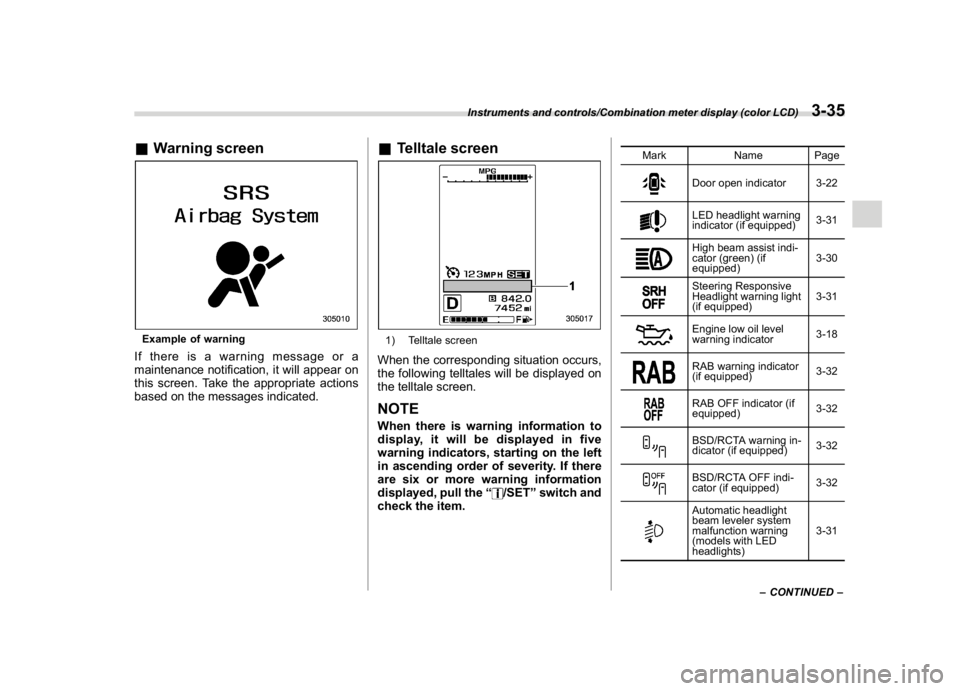
&Warning screenExample of warningIf there is a warning message or a
maintenance notification, it will appear on
this screen. Take the appropriate actions
based on the messages indicated.
&Telltale screen1) Telltale screenWhen the corresponding situation occurs,
the following telltales will be displayed on
the telltale screen.NOTEWhen there is warning information to
display, it will be displayed in five
warning indicators, starting on the left
in ascending order of severity. If there
are six or more warning information
displayed, pull the“
/SET”switch and
check the item.
Mark Name Page
Door open indicator 3-22LED headlight warning
indicator (if equipped)3-31High beam assist indi-
cator (green) (if
equipped)3-30Steering Responsive
Headlight warning light
(if equipped)3-31Engine low oil level
warning indicator3-18RAB warning indicator
(if equipped)3-32RAB OFF indicator (if
equipped)3-32BSD/RCTA warning in-
dicator (if equipped)3-32BSD/RCTA OFF indi-
cator (if equipped)3-32Automatic headlight
beam leveler system
malfunction warning
(models with LED
headlights)3-31
–CONTINUED–
Instruments and controls/Combination meter display (color LCD)
3-35
3
Page 169 of 474
(174,1)
北米Model "A1320BE-C" EDITED: 2017/ 10/ 10
Mark Name Page
Steering responsive fog
lights OFF indicator (if
equipped)3-31High beam assist warn-
ing indicator (yellow) (if
equipped)3-30Windshield washer fluid
warning indicator3-18Hill descent control in-
dicator (if equipped)3-32Icy road surface warn-
ing indicator3-32
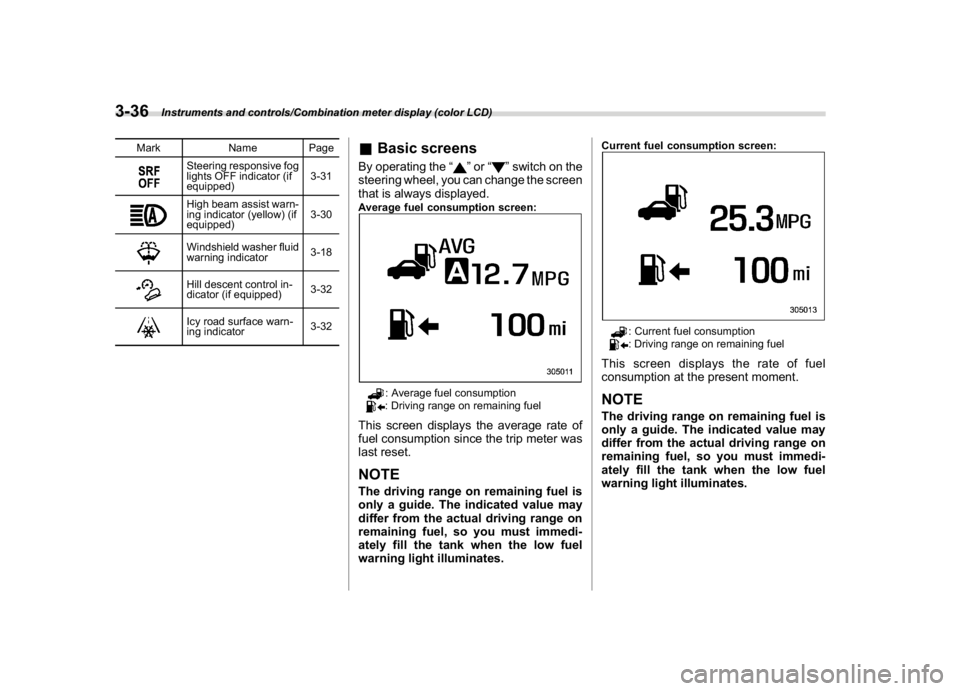
&Basic screensBy operating the“
”or“
”switch on the
steering wheel, you can change the screen
that is always displayed.
Average fuel consumption screen:
: Average fuel consumption: Driving range on remaining fuel
This screen displays the average rate of
fuel consumption since the trip meter was
last reset.NOTEThe driving range on remaining fuel is
only a guide. The indicated value may
differ from the actual driving range on
remaining fuel, so you must immedi-
ately fill the tank when the low fuel
warning light illuminates.
Current fuel consumption screen:
: Current fuel consumption: Driving range on remaining fuel
This screen displays the rate of fuel
consumption at the present moment.NOTEThe driving range on remaining fuel is
only a guide. The indicated value may
differ from the actual driving range on
remaining fuel, so you must immedi-
ately fill the tank when the low fuel
warning light illuminates.
Instruments and controls/Combination meter display (color LCD)
3-36
Page 172 of 474
(177,1)
北米Model "A1320BE-C" EDITED: 2017/ 10/ 10
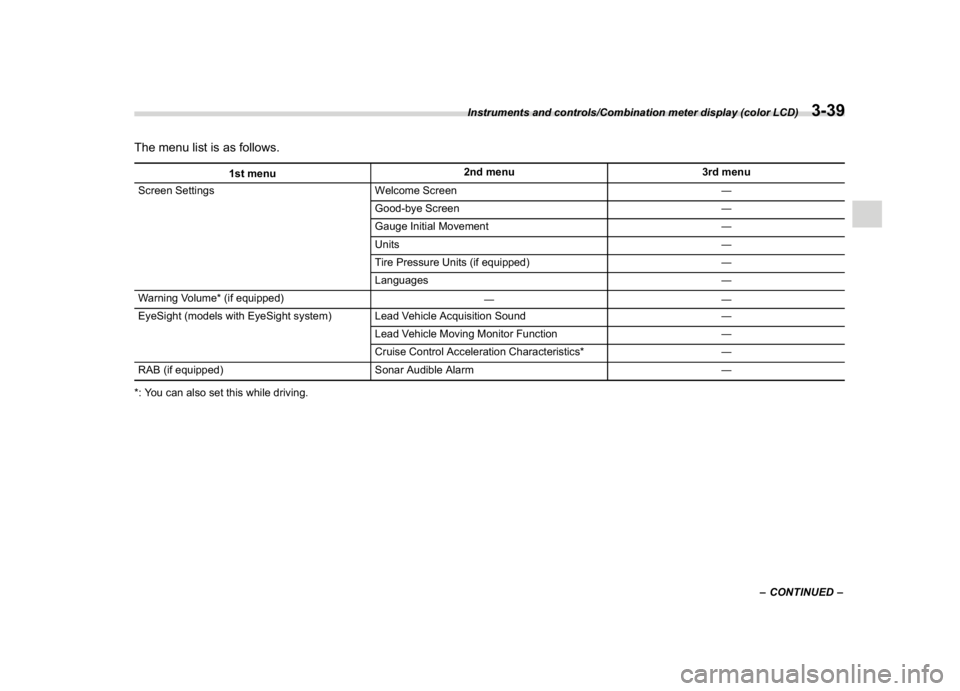
The menu list is as follows.
1st menu2nd menu 3rd menu
Screen Settings Welcome Screen―
Good-bye Screen―
Gauge Initial Movement―
Units―
Tire Pressure Units (if equipped)―
Languages―
Warning Volume* (if equipped)
――
EyeSight (models with EyeSight system) Lead Vehicle Acquisition Sound―
Lead Vehicle Moving Monitor Function―
Cruise Control Acceleration Characteristics*―
RAB (if equipped) Sonar Audible Alarm―
*: You can also set this while driving.
–CONTINUED–
Instruments and controls/Combination meter display (color LCD)
3-39
3
Page 173 of 474
(178,1)
北米Model "A1320BE-C" EDITED: 2017/ 10/ 10
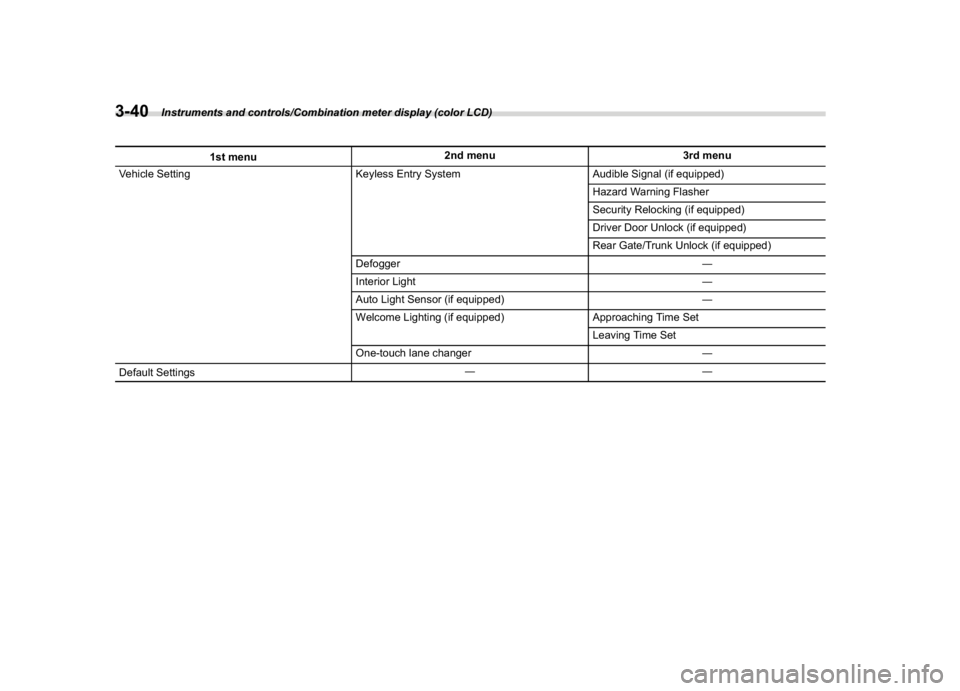
1st menu2nd menu 3rd menu
Vehicle Setting Keyless Entry System Audible Signal (if equipped)
Hazard Warning Flasher
Security Relocking (if equipped)
Driver Door Unlock (if equipped)
Rear Gate/Trunk Unlock (if equipped)
Defogger―
Interior Light―
Auto Light Sensor (if equipped)―
Welcome Lighting (if equipped) Approaching Time Set
Leaving Time Set
One-touch lane changer―
Default Settings――
Instruments and controls/Combination meter display (color LCD)
3-40
Page 174 of 474
(179,1)
北米Model "A1320BE-C" EDITED: 2017/ 10/ 10
By operating the“
”or“
”switch on the
steering wheel, you can select the menu.
Pull the“
/SET”switch to enter the
selected menu.
NOTEIf you enter the“Go Back”menu, the
system will return to the previous
screen.
!Screen Settings
After entering the“Screen Settings”menu,
select one of the following menus.
!Welcome Screen
The welcome screen can be activated or
deactivated.
!Good-bye Screen
The good-bye screen can be activated or
deactivated.
!Gauge Initial Movement
The movement of the meter needles and
gauge needles that occurs when the
ignition switch is turned to the“ON”
position can be activated or deactivated.
!Units
Changes the units displayed in the combi-
nation meter display (color LCD), the type
A multi-function display (black and white)
and the type B multi-function display (colorLCD).
!Tire Pressure Units (if equipped)
Changes the units displayed in the Tire
Pressure Monitoring system.
!Languages
Changes the language displayed in the
combination meter display (color LCD)
and the multi-function display (color LCD).
!Warning Volume (if equipped)
Sets the EyeSight warning volume, the
BSD/RCTA warning volume and the RAB
warning volume.
!EyeSight (models with EyeSight
system)
NOTEFor models with the EyeSight system,
refer to the Owner’s Manual supple-
ment for the EyeSight system.
!RAB (models with EyeSight system)
The Sonar Audible Alarm can be set to on
or off.NOTEFor models with Reverse Automatic
Braking system, refer to“Reverse
Automatic Braking System”F7-61.!Sonar Audible Alarm
When the Reverse Automatic Braking
system is in operation, the warning sound
to notify that an obstacle is detected in the
rear can be activated or deactivated.
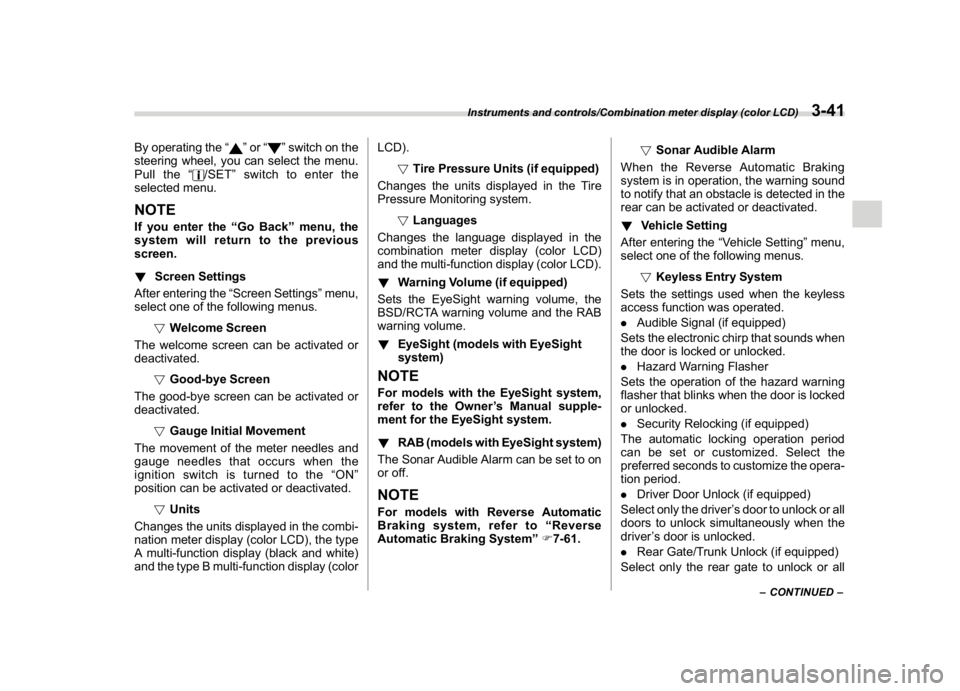
!Vehicle Setting
After entering the“Vehicle Setting”menu,
select one of the following menus.
!Keyless Entry System
Sets the settings used when the keyless
access function was operated.
.Audible Signal (if equipped)
Sets the electronic chirp that sounds when
the door is locked or unlocked.
.Hazard Warning Flasher
Sets the operation of the hazard warning
flasher that blinks when the door is locked
or unlocked.
.Security Relocking (if equipped)
The automatic locking operation period
can be set or customized. Select the
preferred seconds to customize the opera-
tion period.
.Driver Door Unlock (if equipped)
Select only the driver’s door to unlock or all
doors to unlock simultaneously when the
driver’s door is unlocked.
.Rear Gate/Trunk Unlock (if equipped)
Select only the rear gate to unlock or all
–CONTINUED–
Instruments and controls/Combination meter display (color LCD)
3-41
3