warning light SUBARU CROSSTREK 2018 Owners Manual
[x] Cancel search | Manufacturer: SUBARU, Model Year: 2018, Model line: CROSSTREK, Model: SUBARU CROSSTREK 2018Pages: 474, PDF Size: 20.76 MB
Page 307 of 474
(316,1)
北米Model "A1320BE-C" EDITED: 2017/ 10/ 10
WARNING
For CVT models, you can cancel the
cruise control by shifting the select
lever into the“N”position. However,
do not shift the lever into the“N”
position while driving except in case
of emergency. If the select lever is
shifted into the“N”position, the
engine brake will no longer work.
This could result in an accident.
The cruise control set indicator light in the
combination meter turns off when the
cruise control is canceled.To resume the cruise control after it has
been temporarily canceled and with vehi-
cle speed of approximately 20 mph (30
km/h) or more, press the“RES/SET”switch to the“RES”side to return to the
original cruising speed automatically.
The cruise control set indicator light in the
combination meter will automatically illu-
minate at this time.
&To turn off the cruise controlThere are two ways to turn off the cruise
control:
.Press the cruise control main button
again.
.Turn the ignition switch to the“ACC”or
“LOCK”/“OFF”position (but only when the
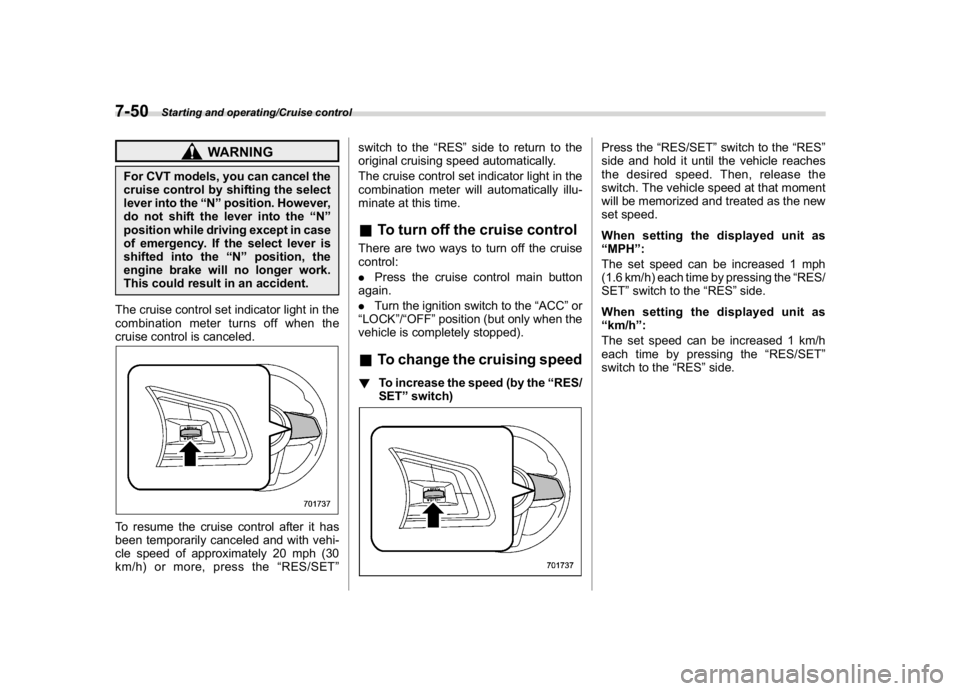
vehicle is completely stopped).&To change the cruising speed!To increase the speed (by the“RES/
SET”switch)
Press the“RES/SET”switch to the“RES”
side and hold it until the vehicle reaches
the desired speed. Then, release the
switch. The vehicle speed at that moment
will be memorized and treated as the new
set speed.
When setting the displayed unit as
“MPH”:
The set speed can be increased 1 mph
(1.6 km/h) each time by pressing the“RES/
SET”switch to the“RES”side.
When setting the displayed unit as
“km/h”:
The set speed can be increased 1 km/h
each time by pressing the“RES/SET”
switch to the“RES”side.
Starting and operating/Cruise control
7-50
Page 309 of 474
(318,1)
北米Model "A1320BE-C" EDITED: 2017/ 10/ 10
&Cruise control indicator lightRefer to“Cruise control indicator light”F3-
31.&Cruise control set indicator
lightRefer to“Cruise control set indicator light”
F3-31.
BSD/RCTA (if equipped)The BSD/RCTA consists of rear radar with
Blind Spot Detection and Rear Cross
Traffic Alert.
These functions enable the system to
detect objects or vehicles to the rear,
drawing attention to the driver when
changing a lane or when driving in reverse.
WARNING
The driver is responsible for driving
safely. Always be sure to check the
surroundings with your eyes when
changing lanes or reversing the
vehicle.
The system is designed to assist the
driver to change lanes or reverse
safely by monitoring the rear and
side areas of the vehicle. However,
you cannot rely on this system alone
in assuring the safety during a lane
change or reversing. Overconfi-
dence in this system could result in
an accident and lead to serious
injury or death. Since the system
operation has various limitations,
the flashing or illumination of the
BSD/RCTA approach indicator light
may be delayed or it may not operateat all even when a vehicle is present
in a neighboring lane or approach-
ing from either side.
The driver is responsible for paying
attention to the rear and side areas
of the vehicle.
&System featuresBSD/RCTA consists of the following func-
tions.
.To detect a vehicle in a blind spot on an
adjacent lane or a vehicle approaching at
high speed while driving the vehicle (Blind
Spot Detection)
.To detect a vehicle approaching from
the right or left while reversing the vehicle
(Rear Cross Traffic Alert)
The system uses radar sensors for the
above functions.NOTEThe BSD/RCTA radar sensor has been
certified by the radio wave related laws
of the U.S. and Canada. When driving in
other countries, certification of the
country where the vehicle is driven
must be obtained. For certification in
the U.S. and Canada, refer to“Certifica-
tion for the BSD/RCTA”F7-60.
Starting and operating/BSD/RCTA
7-52
Page 311 of 474
(320,1)
北米Model "A1320BE-C" EDITED: 2017/ 10/ 10
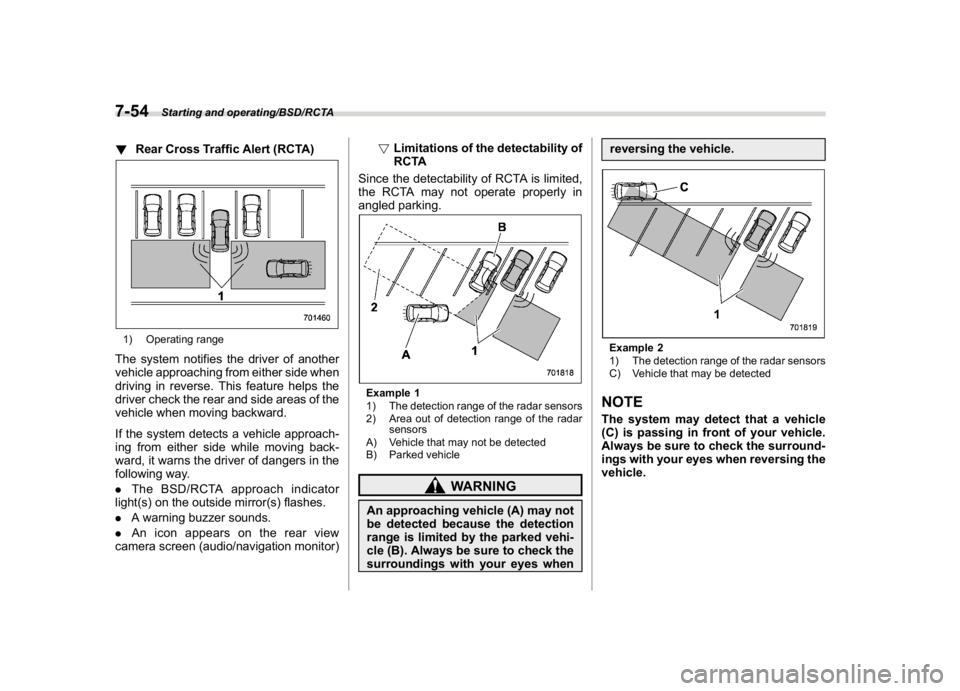
!Rear Cross Traffic Alert (RCTA)1) Operating rangeThe system notifies the driver of another
vehicle approaching from either side when
driving in reverse. This feature helps the
driver check the rear and side areas of the
vehicle when moving backward.
If the system detects a vehicle approach-
ing from either side while moving back-
ward, it warns the driver of dangers in the
following way.
.The BSD/RCTA approach indicator
light(s) on the outside mirror(s) flashes.
.A warning buzzer sounds.
.An icon appears on the rear view
camera screen (audio/navigation monitor)!Limitations of the detectability of
RCTA
Since the detectability of RCTA is limited,
the RCTA may not operate properly in
angled parking.
Example 1
1) The detection range of the radar sensors
2) Area out of detection range of the radar
sensors
A) Vehicle that may not be detected
B) Parked vehicle
WARNING
An approaching vehicle (A) may not
be detected because the detection
range is limited by the parked vehi-
cle (B). Always be sure to check the
surroundings with your eyes whenreversing the vehicle.
Example 2
1) The detection range of the radar sensors
C) Vehicle that may be detectedNOTEThe system may detect that a vehicle
(C) is passing in front of your vehicle.
Always be sure to check the surround-
ings with your eyes when reversing the
vehicle.
Starting and operating/BSD/RCTA
7-54
Page 312 of 474
(321,1)
北米Model "A1320BE-C" EDITED: 2017/ 10/ 10
&System operation!Operating conditions
The BSD/RCTA will operate when all of the
following conditions are met.
.Theignitionswitchisinthe“ON”
position.
.The BSD/RCTA warning indicator and
BSD/RCTA OFF indicator are turned off.
.The vehicle is driven at speeds above 6
mph (10 km/h) (except when reversing).
.The shift lever/select lever is in the“R”
position (when reversing).
The BSD/RCTA will not operate in the
following situations.
.The BSD/RCTA OFF indicator is on.
.The vehicle speed is below 6 mph (10
km/h) even when the BSD/RCTA OFF
indicator remains off (except when rever-
sing).NOTE.In the following case, the BSD/RCTA
will stop operating and the BSD/RCTA
warning indicator will appear. If the
BSD/RCTA warning indicator appears,
have your vehicle inspected at a
SUBARU dealer as soon as possible.
–When a malfunction occurs in the
system, including the BSD/RCTA
approach indicator light.In the following cases, the BSD/
RCTA will temporarily stop operating
(or may stop operating) and the BSD/
RCTA warning indicator will appear.
–When the radar sensor becomes
significantly misaligned (If the or-
ientation of the radar sensor is
shifted for any reason, readjust-
ment is required. Have the sensor
adjusted at a SUBARU dealer.)
–When a large amount of snow or
ice sticks to the rear bumper sur-
face around the radar sensors
–When the vehicle is driven on a
snow-covered road or in an envir-
onment in which there are no ob-
jects around (such as in a desert) for
a long time
–When the temperature around the
radar sensors increased exces-
sively due to long driving on uphill
grades in summer, etc.
–When the temperature around the
radar sensors becomes extremely
low
–When the vehicle battery voltage
lowers
–When the vehicle battery be-
comes overvoltage
When the above conditions are cor-
rected, the BSD/RCTA will resume op-eration and the BSD/RCTA warning
indicator will disappear. However, if
the BSD/RCTA warning indicator has
appeared for a prolonged time, have the
system inspected at a SUBARU dealer
as soon as possible.
.The detectability of the radar sen-
sors is restricted. The BSD/RCTA de-
tection may be impaired and the system
may not operate properly under the
following conditions.
–When the rear bumper around the
radar sensors is distorted
–When ice, snow or mud adheres
to the rear bumper surface around
the radar sensors
–When stickers, etc. are affixed on
the areas of the radar sensors on
the rear bumper
–During adverse weather condi-
tions such as rain, snow or fog
–When driving on wet roads such
as snow-covered roads and through
puddles
.The radar sensors may not detect or
may have difficulty detecting the fol-
lowing.
–Small motorcycles, bicycles, pe-
destrians, stationary objects on the
road or road side, etc.
–Vehicles with body shapes that
the radar may not reflect (vehicles
–CONTINUED–
Starting and operating/BSD/RCTA
7-55
7
Page 313 of 474
(322,1)
北米Model "A1320BE-C" EDITED: 2017/ 10/ 10
with a low body height such as
sports cars or a trailer with no
cargo)
–Vehicles that are not approaching
your vehicle even though they are in
the detection area (either on a
neighboring lane to the rear or be-
side your vehicle when reversing)
(The system determines the pre-
sence of approaching vehicles
based on data detected by the radar
sensors.)
–Vehicles traveling at significantly
different speeds
–Vehicles driving in parallel at al-
most the same speed as your vehi-
cle for a prolonged time
–Oncoming vehicles
–Vehicles in a lane beyond the
neighboring lane
–Vehicles travelling at a signifi-
cantly lower speed that you are
trying to overtake
.On a road with extremely narrow
lanes, the system may detect vehicles
driving in a lane next to the neighboring
lane.
.When the 8-inch audio/navigation
system is performing a software up-
date, the RCTA warning icons may not
be displayed on the audio/navigation
screen until the update is complete.
&BSD/RCTA approach indica-
tor light/warning buzzerWhen the BSD/RCTA is active, the BSD/
RCTA approach indicator light will operate
to alert the driver when there are vehicles
in the neighboring lanes. When reversing
the vehicle, the BSD/RCTA approach
indicator light and warning buzzer will
operate to alert the driver that a vehicle is
approaching from the left or right side.
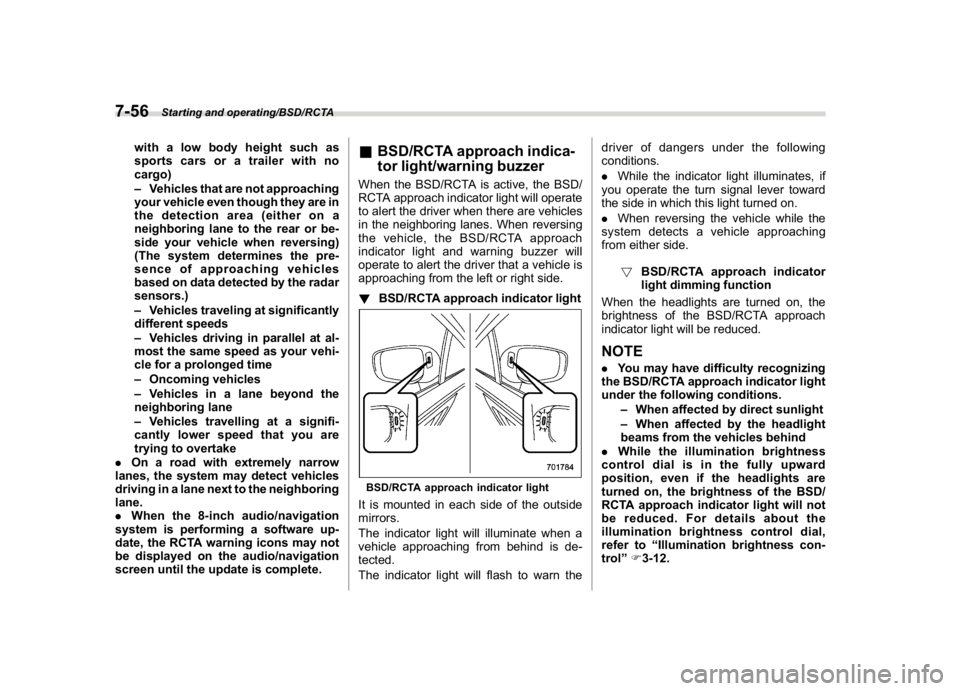
!BSD/RCTA approach indicator lightBSD/RCTA approach indicator lightIt is mounted in each side of the outside
mirrors.
The indicator light will illuminate when a
vehicle approaching from behind is de-
tected.
The indicator light will flash to warn thedriver of dangers under the following
conditions.
.While the indicator light illuminates, if
you operate the turn signal lever toward
the side in which this light turned on.
.When reversing the vehicle while the
system detects a vehicle approaching
from either side.
!BSD/RCTA approach indicator
light dimming function
When the headlights are turned on, the
brightness of the BSD/RCTA approach
indicator light will be reduced.
NOTE.You may have difficulty recognizing
the BSD/RCTA approach indicator light
under the following conditions.
–When affected by direct sunlight
–When affected by the headlight
beams from the vehicles behind
.While the illumination brightness
control dial is in the fully upward
position, even if the headlights are
turned on, the brightness of the BSD/
RCTA approach indicator light will not
be reduced. For details about the
illumination brightness control dial,
refer to“Illumination brightness con-
trol”F3-12.
Starting and operating/BSD/RCTA
7-56
Page 314 of 474
(323,1)
北米Model "A1320BE-C" EDITED: 2017/ 10/ 10
!BSD/RCTA approach warning buz-
zer (only when reversing)
A warning buzzer sounds along with
flashing of the BSD/RCTA approach in-
dicator light to warn the driver of dangers.
The setting of the warning buzzer volume
can be changed by operating the combi-
nation meter display (color LCD). For
details, refer to“Menu screens”F3-38.
!Safety tips regarding the BSD/RCTA
approach indicator light/warning
buzzer
.In the following cases, operation of the
BSD/RCTA approach indicator light and
the warning buzzer may be delayed or the
system may fail to issue these warnings.
–When a vehicle moves to the neigh-
boring lane from a lane next to the
neighboring lane
–When driving on a steep incline or
on repeated sharp uphill and downhill
grades
–When going beyond a pass
–When both your vehicle and a
vehicle driving on a neighboring lane
are driving on the far side of each lane.
–When several narrowly-spaced ve-
hicles are approaching in a row
–In low radius bends (tight bends or
when making turns at an intersection)–When there is a difference in height
between your lane and the neighboring
lane
–Immediately after the BSD/RCTA is
activated by pressing the BSD/RCTA
OFF switch
–Immediately after the shift lever/
select lever is shifted to the“R”position
–When extremely heavy cargo is
loaded in the cargo area
.During reversing, operation of the BSD/
RCTA approach indicator light and the
warning buzzer may be delayed or the
system may fail to issue these warnings
under the following conditions.
–When backing out of an angled
parking space
–When a large-sized vehicle is
parked next to your vehicle (That
vehicle prevents the propagation of
radar waves.)
–When reversing on sloped roads
–When reversing at a high speed
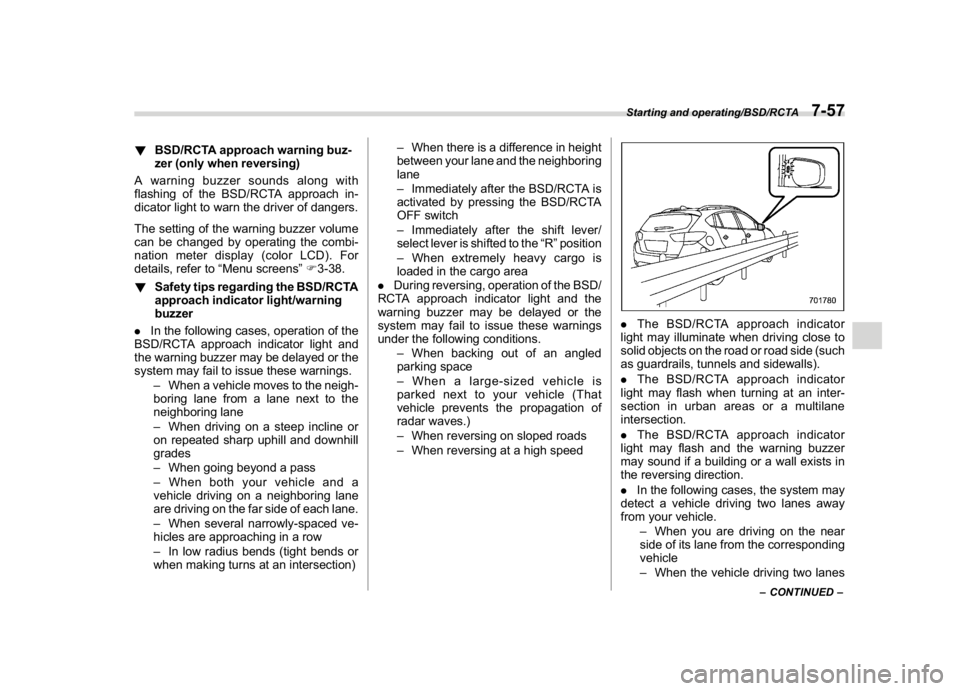
.The BSD/RCTA approach indicator
light may illuminate when driving close to
solid objects on the road or road side (such
as guardrails, tunnels and sidewalls).
.The BSD/RCTA approach indicator
light may flash when turning at an inter-
section in urban areas or a multilane
intersection.
.The BSD/RCTA approach indicator
light may flash and the warning buzzer
may sound if a building or a wall exists in
the reversing direction.
.In the following cases, the system may
detect a vehicle driving two lanes away
from your vehicle.
–When you are driving on the near
side of its lane from the corresponding
vehicle
–When the vehicle driving two lanes
–CONTINUED–
Starting and operating/BSD/RCTA
7-57
7
Page 338 of 474
(349,1)
北米Model "A1320BE-C" EDITED: 2017/ 10/ 10
&Tire chains
CAUTION
Tire chains cannot be used on your
vehicle because of the lack of clear-
ance between the tires and vehicle
body.NOTEWhen tire chains cannot be used, use of
another type of traction device (such as
spring chains) may be acceptable if use
on your vehicle is recommended by the
device manufacturer, taking into ac-
count tire size and road conditions.
Follow the device manufacturer’s in-
structions, especially regarding max-
imum vehicle speed.
To help avoid damage to your vehicle,
drive slowly, readjust or remove the
device if it is contacting your vehicle,
and do not spin your wheels. Damage
caused to your vehicle by use of a
traction device is not covered under
warranty.
Make certain that any traction device
you use is an SAE class S device, and
use it on the front wheels only. Always
use the utmost care when driving with a
traction device. Overconfidence be-cause you are using a traction device
could easily lead to a serious accident.
&Rocking the vehicleIf you must rock the vehicle to free it from
snow, sand, or mud, depress the accel-
erator pedal slightly and move the shift
lever/select lever back and forth between
“1”/“D”and“R”repeatedly. Do not race the
engine. For the best possible traction,
avoid spinning the wheels when trying to
free the vehicle.
When the road surface is extremely
slippery, you can obtain better traction by
starting the vehicle with the transmission in
2nd than 1st (both for MT and CVT
models).
If your vehicle is a CVT model, for
information about holding the transmission
in the 2nd position, refer to“Selection of
manual mode”F7-26.
Loading your vehicle
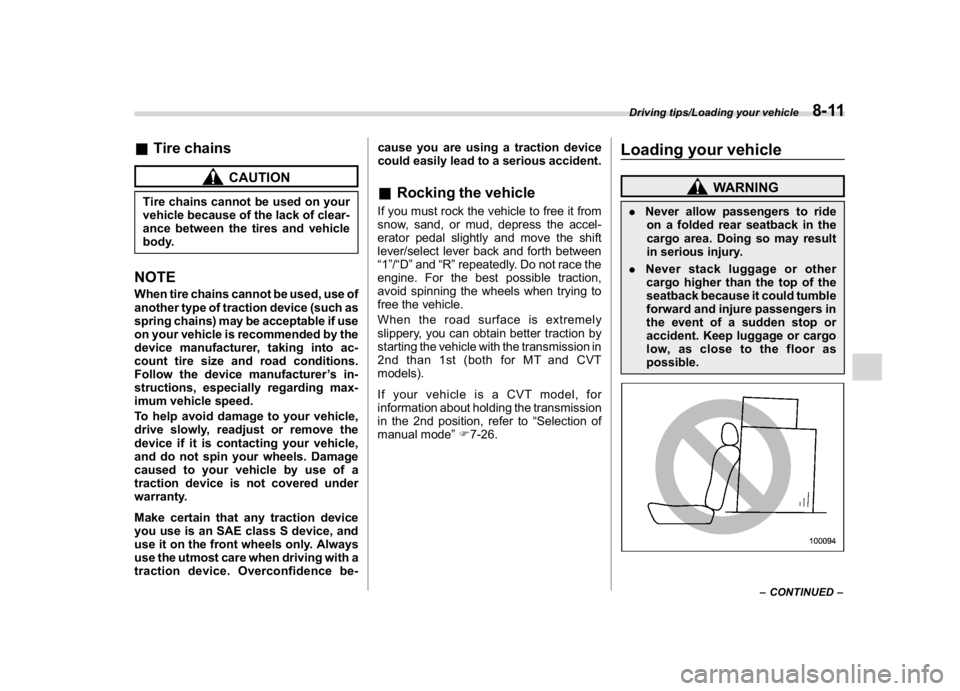
WARNING
.Never allow passengers to ride
on a folded rear seatback in the
cargo area. Doing so may result
in serious injury.
.Never stack luggage or other
cargo higher than the top of the
seatback because it could tumble
forward and injure passengers in
the event of a sudden stop or
accident. Keep luggage or cargo
low, as close to the floor as
possible.
–CONTINUED–
Driving tips/Loading your vehicle
8-11
8
Page 343 of 474
(354,1)
北米Model "A1320BE-C" EDITED: 2017/ 10/ 10
maximum gross weight. The chains should
cross under the trailer tongue to prevent
the tongue from dropping onto the ground
in case it should disconnect from the hitch
ball. Allow sufficient slack in the chains
taking tight turn situations into account;
however, be careful not to let them drag on
the ground.
WARNING
Do not connect safety chains to any
part of the vehicle other than the
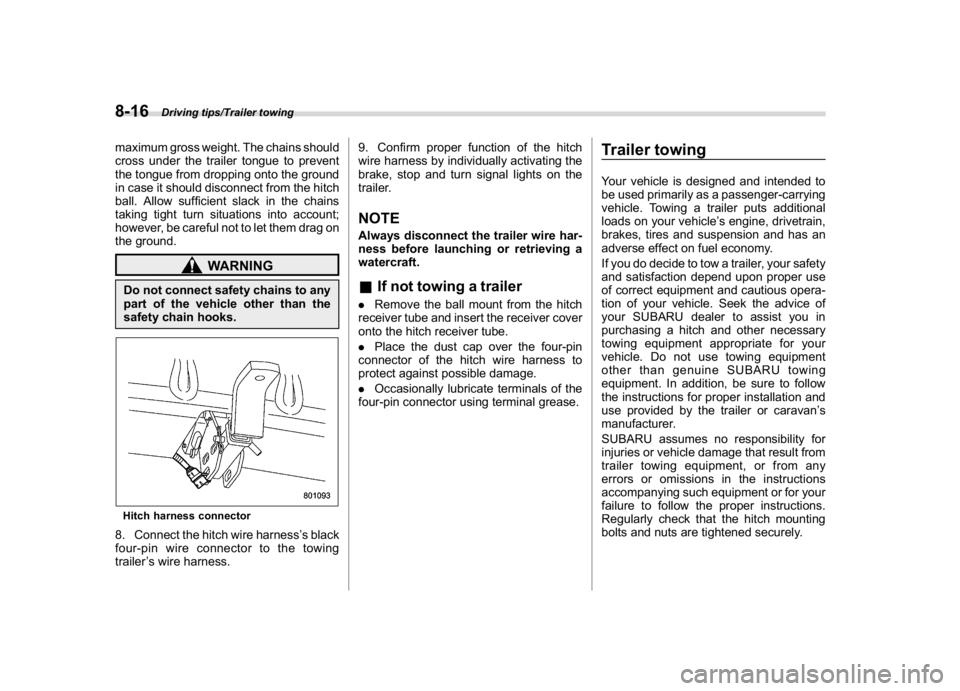
safety chain hooks.Hitch harness connector8. Connect the hitch wire harness’s black
four-pin wire connector to the towing
trailer’s wire harness.9. Confirm proper function of the hitch
wire harness by individually activating the
brake, stop and turn signal lights on the
trailer.
NOTEAlways disconnect the trailer wire har-
ness before launching or retrieving a
watercraft.&If not towing a trailer.Remove the ball mount from the hitch
receiver tube and insert the receiver cover
onto the hitch receiver tube.
.Place the dust cap over the four-pin
connector of the hitch wire harness to
protect against possible damage.
.Occasionally lubricate terminals of the
four-pin connector using terminal grease.
Trailer towingYour vehicle is designed and intended to
be used primarily as a passenger-carrying
vehicle. Towing a trailer puts additional
loads on your vehicle’s engine, drivetrain,
brakes, tires and suspension and has an
adverse effect on fuel economy.
If you do decide to tow a trailer, your safety
and satisfaction depend upon proper use
of correct equipment and cautious opera-
tion of your vehicle. Seek the advice of
your SUBARU dealer to assist you in
purchasing a hitch and other necessary
towing equipment appropriate for your
vehicle. Do not use towing equipment
other than genuine SUBARU towing
equipment. In addition, be sure to follow
the instructions for proper installation and
use provided by the trailer or caravan’s
manufacturer.
SUBARU assumes no responsibility for
injuries or vehicle damage that result from
trailer towing equipment, or from any
errors or omissions in the instructions
accompanying such equipment or for your
failure to follow the proper instructions.
Regularly check that the hitch mounting
bolts and nuts are tightened securely.
Driving tips/Trailer towing
8-16
Page 349 of 474
(360,1)
北米Model "A1320BE-C" EDITED: 2017/ 10/ 10
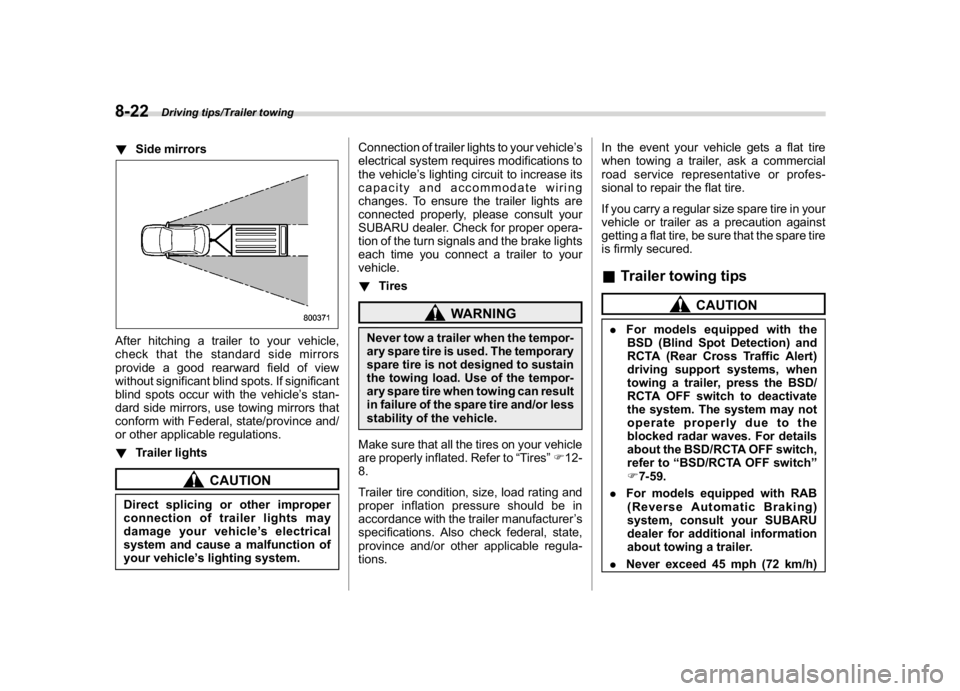
!Side mirrorsAfter hitching a trailer to your vehicle,
check that the standard side mirrors
provide a good rearward field of view
without significant blind spots. If significant
blind spots occur with the vehicle’s stan-
dard side mirrors, use towing mirrors that
conform with Federal, state/province and/
or other applicable regulations.
!Trailer lights
CAUTION
Direct splicing or other improper
connection of trailer lights may
damage your vehicle’s electrical
system and cause a malfunction of
your vehicle’s lighting system.Connection of trailer lights to your vehicle’s
electrical system requires modifications to
the vehicle’s lighting circuit to increase its
capacity and accommodate wiring
changes. To ensure the trailer lights are
connected properly, please consult your
SUBARU dealer. Check for proper opera-
tion of the turn signals and the brake lights
each time you connect a trailer to your
vehicle.
!Tires
WARNING
Never tow a trailer when the tempor-
ary spare tire is used. The temporary
spare tire is not designed to sustain
the towing load. Use of the tempor-
ary spare tire when towing can result
in failure of the spare tire and/or less
stability of the vehicle.
Make sure that all the tires on your vehicle
are properly inflated. Refer to“Tires”F12-
8.
Trailer tire condition, size, load rating and
proper inflation pressure should be in
accordance with the trailer manufacturer’s
specifications. Also check federal, state,
province and/or other applicable regula-
tions.In the event your vehicle gets a flat tire
when towing a trailer, ask a commercial
road service representative or profes-
sional to repair the flat tire.
If you carry a regular size spare tire in your
vehicle or trailer as a precaution against
getting a flat tire, be sure that the spare tire
is firmly secured.
&Trailer towing tips
CAUTION
.For models equipped with the
BSD (Blind Spot Detection) and
RCTA (Rear Cross Traffic Alert)
driving support systems, when
towing a trailer, press the BSD/
RCTA OFF switch to deactivate
the system. The system may not
operate properly due to the
blocked radar waves. For details
about the BSD/RCTA OFF switch,
refer to“BSD/RCTA OFF switch”
F7-59.
.For models equipped with RAB
(Reverse Automatic Braking)
system, consult your SUBARU
dealer for additional information
about towing a trailer.
.Never exceed 45 mph (72 km/h)
Driving tips/Trailer towing
8-22
Page 351 of 474
(362,1)
北米Model "A1320BE-C" EDITED: 2017/ 10/ 10
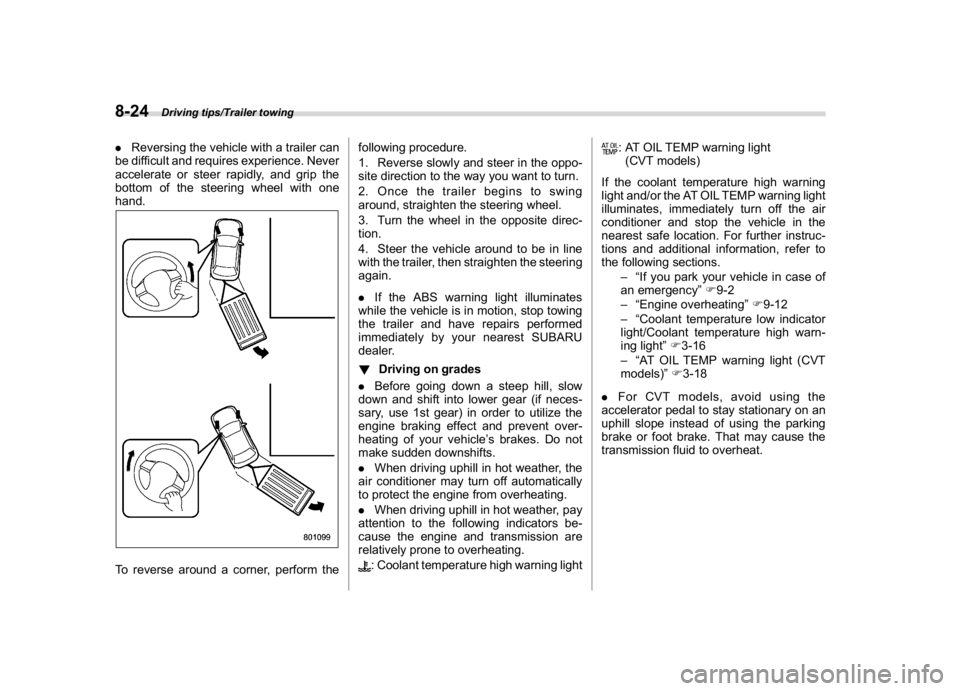
.Reversing the vehicle with a trailer can
be difficult and requires experience. Never
accelerate or steer rapidly, and grip the
bottom of the steering wheel with one
hand.To reverse around a corner, perform thefollowing procedure.
1. Reverse slowly and steer in the oppo-
site direction to the way you want to turn.
2. Once the trailer begins to swing
around, straighten the steering wheel.
3. Turn the wheel in the opposite direc-
tion.
4. Steer the vehicle around to be in line
with the trailer, then straighten the steering
again.
.If the ABS warning light illuminates
while the vehicle is in motion, stop towing
the trailer and have repairs performed
immediately by your nearest SUBARU
dealer.
!Driving on grades
.Before going down a steep hill, slow
down and shift into lower gear (if neces-
sary, use 1st gear) in order to utilize the
engine braking effect and prevent over-
heating of your vehicle’s brakes. Do not
make sudden downshifts.
.When driving uphill in hot weather, the
air conditioner may turn off automatically
to protect the engine from overheating.
.When driving uphill in hot weather, pay
attention to the following indicators be-
cause the engine and transmission are
relatively prone to overheating.
: Coolant temperature high warning light
: AT OIL TEMP warning light
(CVT models)
If the coolant temperature high warning
light and/or the AT OIL TEMP warning light
illuminates, immediately turn off the air
conditioner and stop the vehicle in the
nearest safe location. For further instruc-
tions and additional information, refer to
the following sections.
–“If you park your vehicle in case of
an emergency”F9-2
–“Engine overheating”F9-12
–“Coolant temperature low indicator
light/Coolant temperature high warn-
ing light”F3-16
–“AT OIL TEMP warning light (CVT
models)”F3-18
.For CVT models, avoid using the
accelerator pedal to stay stationary on an
uphill slope instead of using the parking
brake or foot brake. That may cause the
transmission fluid to overheat.
Driving tips/Trailer towing
8-24