warning light SUBARU CROSSTREK 2018 Workshop Manual
[x] Cancel search | Manufacturer: SUBARU, Model Year: 2018, Model line: CROSSTREK, Model: SUBARU CROSSTREK 2018Pages: 474, PDF Size: 20.76 MB
Page 168 of 474
(173,1)
北米Model "A1320BE-C" EDITED: 2017/ 10/ 10
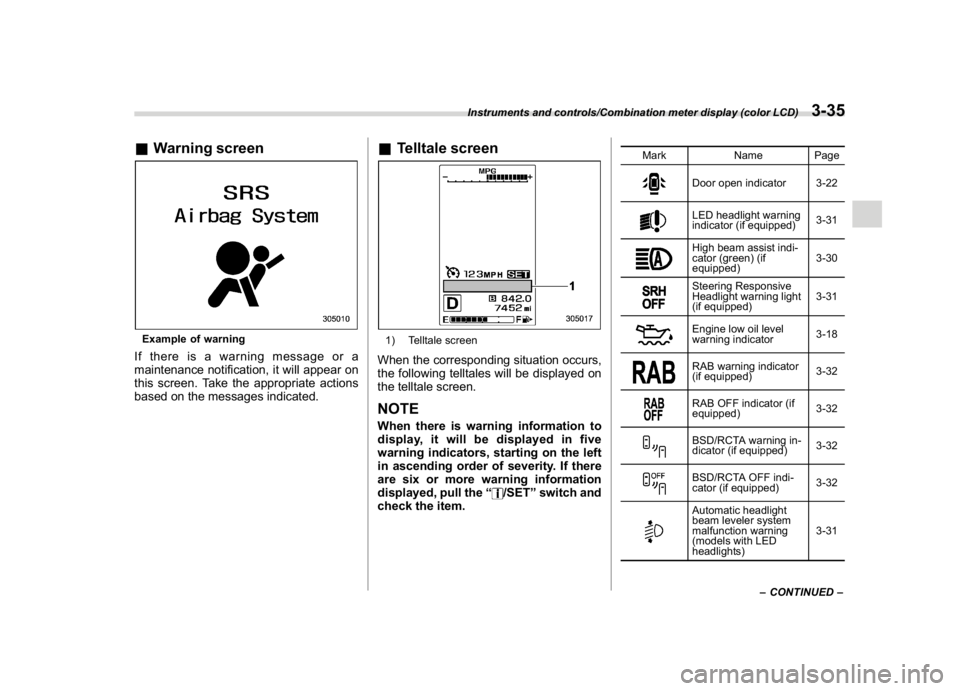
&Warning screenExample of warningIf there is a warning message or a
maintenance notification, it will appear on
this screen. Take the appropriate actions
based on the messages indicated.
&Telltale screen1) Telltale screenWhen the corresponding situation occurs,
the following telltales will be displayed on
the telltale screen.NOTEWhen there is warning information to
display, it will be displayed in five
warning indicators, starting on the left
in ascending order of severity. If there
are six or more warning information
displayed, pull the“
/SET”switch and
check the item.
Mark Name Page
Door open indicator 3-22LED headlight warning
indicator (if equipped)3-31High beam assist indi-
cator (green) (if
equipped)3-30Steering Responsive
Headlight warning light
(if equipped)3-31Engine low oil level
warning indicator3-18RAB warning indicator
(if equipped)3-32RAB OFF indicator (if
equipped)3-32BSD/RCTA warning in-
dicator (if equipped)3-32BSD/RCTA OFF indi-
cator (if equipped)3-32Automatic headlight
beam leveler system
malfunction warning
(models with LED
headlights)3-31
–CONTINUED–
Instruments and controls/Combination meter display (color LCD)
3-35
3
Page 169 of 474
(174,1)
北米Model "A1320BE-C" EDITED: 2017/ 10/ 10
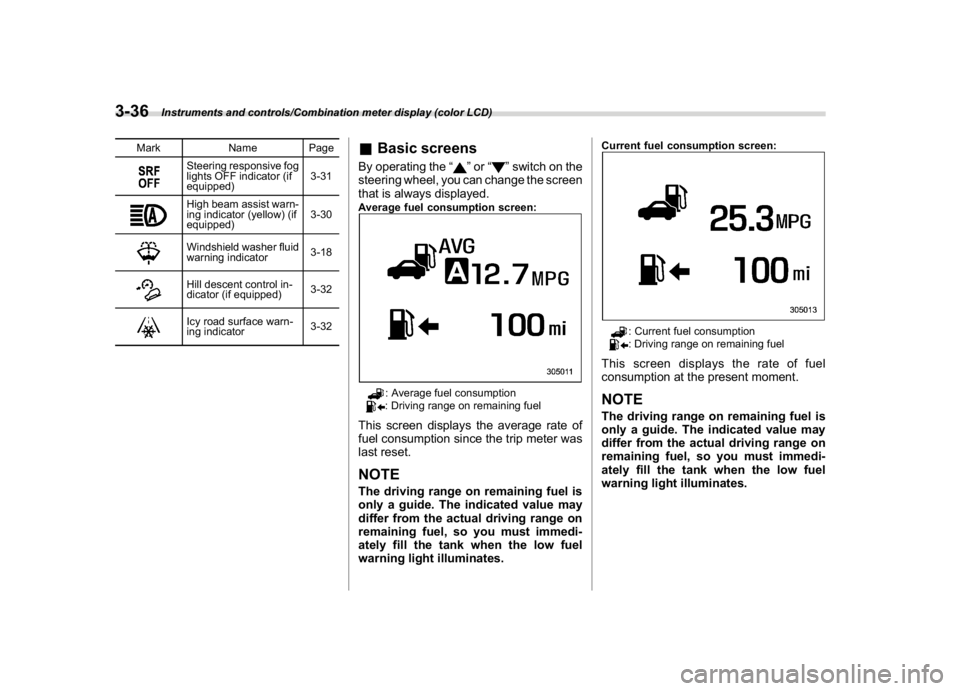
Mark Name Page
Steering responsive fog
lights OFF indicator (if
equipped)3-31High beam assist warn-
ing indicator (yellow) (if
equipped)3-30Windshield washer fluid
warning indicator3-18Hill descent control in-
dicator (if equipped)3-32Icy road surface warn-
ing indicator3-32
&Basic screensBy operating the“
”or“
”switch on the
steering wheel, you can change the screen
that is always displayed.
Average fuel consumption screen:
: Average fuel consumption: Driving range on remaining fuel
This screen displays the average rate of
fuel consumption since the trip meter was
last reset.NOTEThe driving range on remaining fuel is
only a guide. The indicated value may
differ from the actual driving range on
remaining fuel, so you must immedi-
ately fill the tank when the low fuel
warning light illuminates.
Current fuel consumption screen:
: Current fuel consumption: Driving range on remaining fuel
This screen displays the rate of fuel
consumption at the present moment.NOTEThe driving range on remaining fuel is
only a guide. The indicated value may
differ from the actual driving range on
remaining fuel, so you must immedi-
ately fill the tank when the low fuel
warning light illuminates.
Instruments and controls/Combination meter display (color LCD)
3-36
Page 173 of 474
(178,1)
北米Model "A1320BE-C" EDITED: 2017/ 10/ 10
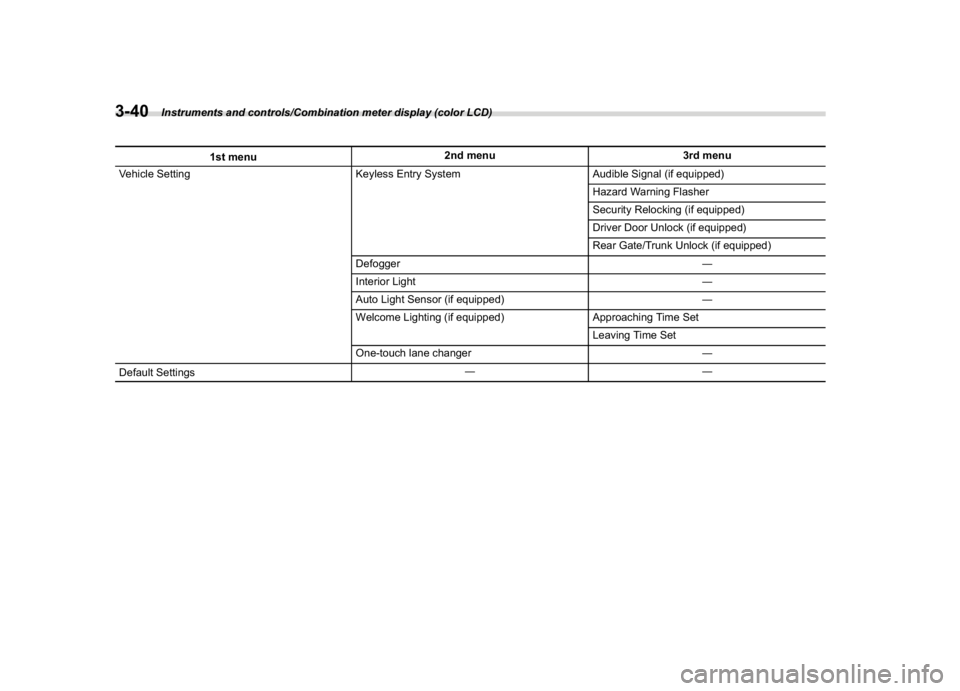
1st menu2nd menu 3rd menu
Vehicle Setting Keyless Entry System Audible Signal (if equipped)
Hazard Warning Flasher
Security Relocking (if equipped)
Driver Door Unlock (if equipped)
Rear Gate/Trunk Unlock (if equipped)
Defogger―
Interior Light―
Auto Light Sensor (if equipped)―
Welcome Lighting (if equipped) Approaching Time Set
Leaving Time Set
One-touch lane changer―
Default Settings――
Instruments and controls/Combination meter display (color LCD)
3-40
Page 177 of 474
(182,1)
北米Model "A1320BE-C" EDITED: 2017/ 10/ 10
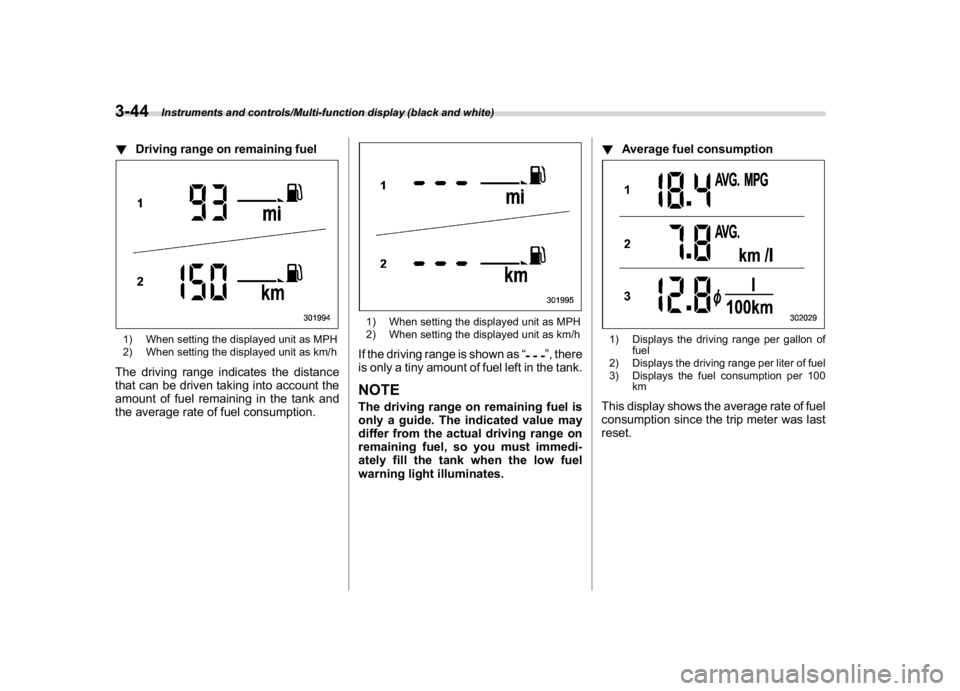
!Driving range on remaining fuel1) When setting the displayed unit as MPH
2) When setting the displayed unit as km/hThe driving range indicates the distance
that can be driven taking into account the
amount of fuel remaining in the tank and
the average rate of fuel consumption.
1) When setting the displayed unit as MPH
2) When setting the displayed unit as km/hIf the driving range is shown as“
”, there
is only a tiny amount of fuel left in the tank.
NOTEThe driving range on remaining fuel is
only a guide. The indicated value may
differ from the actual driving range on
remaining fuel, so you must immedi-
ately fill the tank when the low fuel
warning light illuminates.!Average fuel consumption
1) Displays the driving range per gallon of
fuel
2) Displays the driving range per liter of fuel
3) Displays the fuel consumption per 100
kmThis display shows the average rate of fuel
consumption since the trip meter was last
reset.
Instruments and controls/Multi-function display (black and white)
3-44
Page 186 of 474
(191,1)
北米Model "A1320BE-C" EDITED: 2017/ 10/ 10
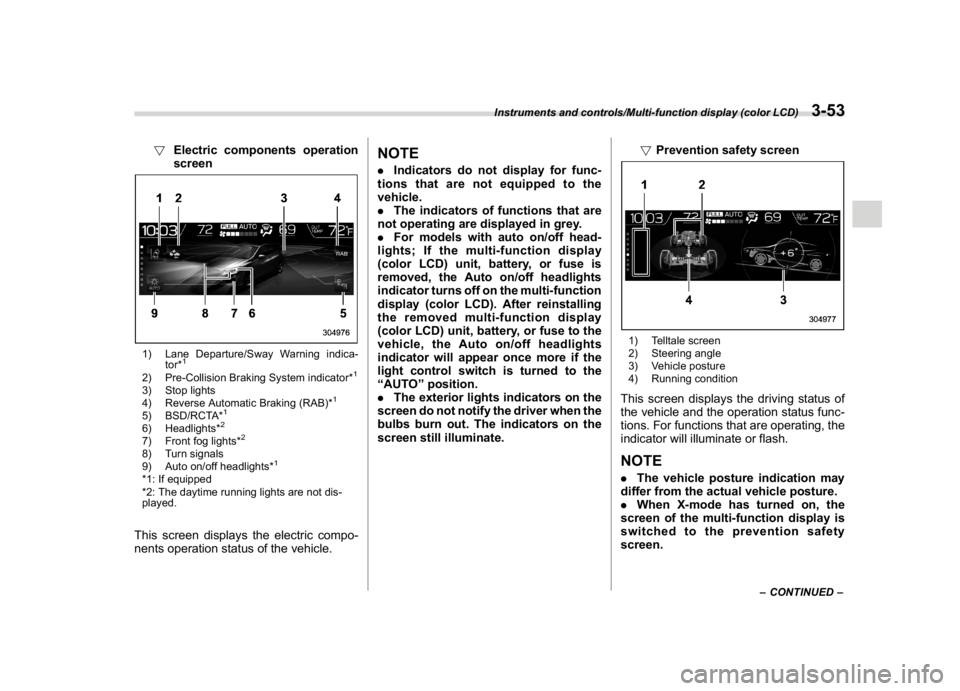
!Electric components operation
screen1) Lane Departure/Sway Warning indica-
tor*
1
2) Pre-Collision Braking System indicator*
1
3) Stop lights
4) Reverse Automatic Braking (RAB)*
1
5) BSD/RCTA*
1
6) Headlights*
2
7) Front fog lights*
2
8) Turn signals
9) Auto on/off headlights*
1
*1: If equipped
*2: The daytime running lights are not dis-
played.This screen displays the electric compo-
nents operation status of the vehicle.
NOTE.Indicators do not display for func-
tions that are not equipped to the
vehicle.
.The indicators of functions that are
not operating are displayed in grey.
.For models with auto on/off head-
lights; If the multi-function display
(color LCD) unit, battery, or fuse is
removed, the Auto on/off headlights
indicator turns off on the multi-function
display (color LCD). After reinstalling
the removed multi-function display
(color LCD) unit, battery, or fuse to the
vehicle, the Auto on/off headlights
indicator will appear once more if the
light control switch is turned to the
“AUTO”position.
.The exterior lights indicators on the
screen do not notify the driver when the
bulbs burn out. The indicators on the
screen still illuminate.!Prevention safety screen
1) Telltale screen
2) Steering angle
3) Vehicle posture
4) Running conditionThis screen displays the driving status of
the vehicle and the operation status func-
tions. For functions that are operating, the
indicator will illuminate or flash.NOTE.The vehicle posture indication may
differ from the actual vehicle posture.
.When X-mode has turned on, the
screen of the multi-function display is
switched to the prevention safety
screen.
–CONTINUED–
Instruments and controls/Multi-function display (color LCD)
3-53
3
Page 189 of 474
(194,1)
北米Model "A1320BE-C" EDITED: 2017/ 10/ 10
remain displayed on the screen.
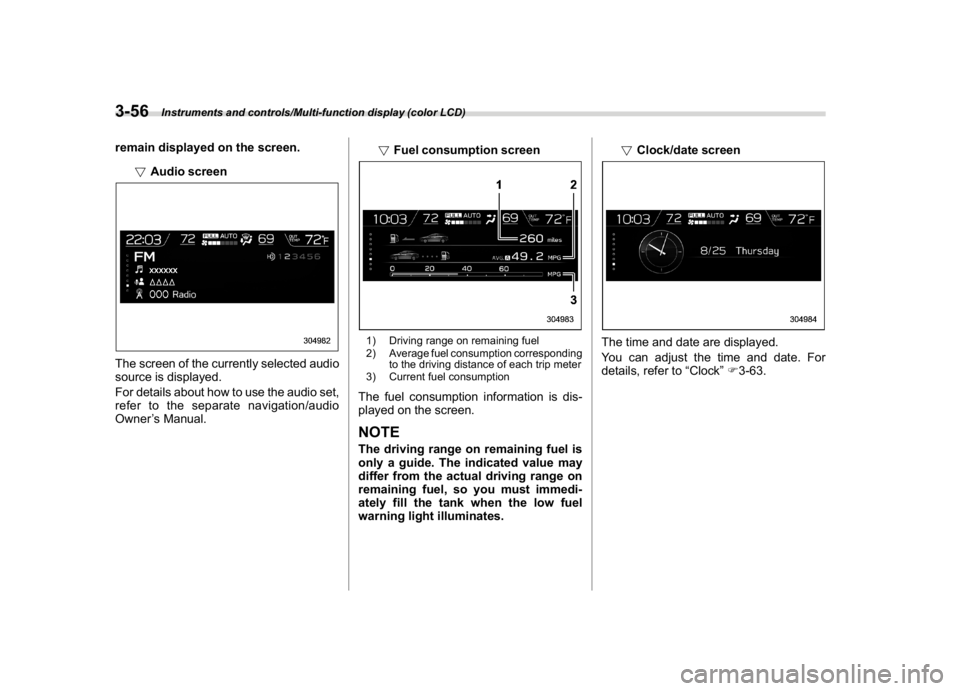
!Audio screenThe screen of the currently selected audio
source is displayed.
For details about how to use the audio set,
refer to the separate navigation/audio
Owner’s Manual.!Fuel consumption screen
1) Driving range on remaining fuel
2) Average fuel consumption corresponding
to the driving distance of each trip meter
3) Current fuel consumptionThe fuel consumption information is dis-
played on the screen.NOTEThe driving range on remaining fuel is
only a guide. The indicated value may
differ from the actual driving range on
remaining fuel, so you must immedi-
ately fill the tank when the low fuel
warning light illuminates.!Clock/date screen
The time and date are displayed.
You can adjust the time and date. For
details, refer to“Clock”F3-63.
Instruments and controls/Multi-function display (color LCD)
3-56
Page 203 of 474
(208,1)
北米Model "A1320BE-C" EDITED: 2017/ 10/ 10
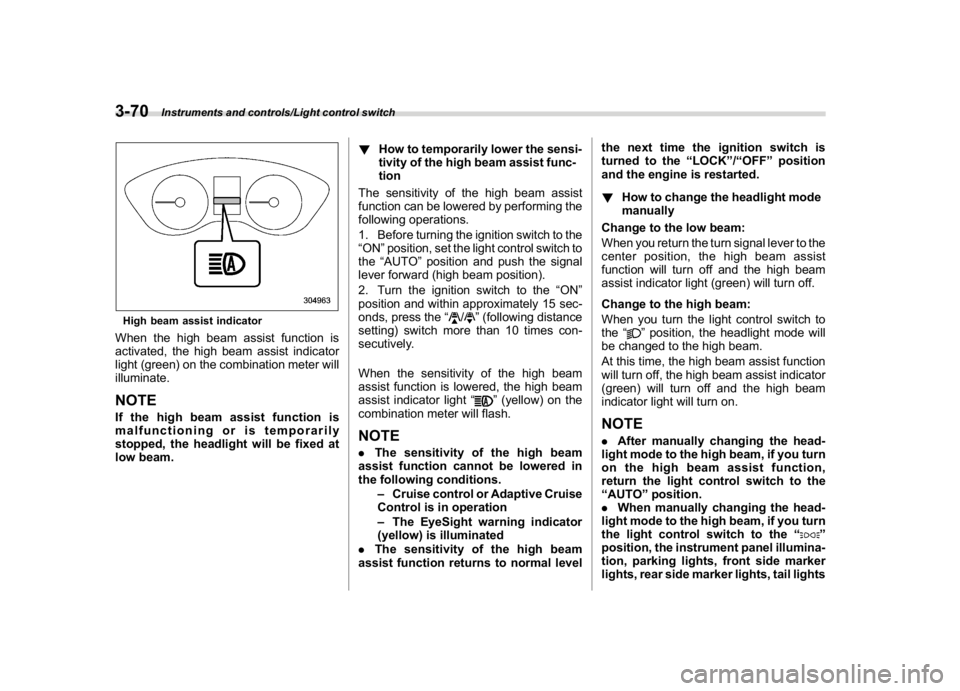
High beam assist indicatorWhen the high beam assist function is
activated, the high beam assist indicator
light (green) on the combination meter will
illuminate.NOTEIf the high beam assist function is
malfunctioning or is temporarily
stopped, the headlight will be fixed at
low beam.!How to temporarily lower the sensi-
tivity of the high beam assist func-
tion
The sensitivity of the high beam assist
function can be lowered by performing the
following operations.
1. Before turning the ignition switch to the
“ON”position, set the light control switch to
the“AUTO”position and push the signal
lever forward (high beam position).
2. Turn the ignition switch to the“ON”
position and within approximately 15 sec-
onds, press the“
/
”(following distance
setting) switch more than 10 times con-
secutively.
When the sensitivity of the high beam
assist function is lowered, the high beam
assist indicator light“
”(yellow) on the
combination meter will flash.
NOTE.The sensitivity of the high beam
assist function cannot be lowered in
the following conditions.
–Cruise control or Adaptive Cruise
Control is in operation
–The EyeSight warning indicator
(yellow) is illuminated
.The sensitivity of the high beam
assist function returns to normal levelthe next time the ignition switch is
turned to the“LOCK”/“OFF”position
and the engine is restarted.
!How to change the headlight mode
manually
Change to the low beam:
When you return the turn signal lever to the
center position, the high beam assist
function will turn off and the high beam
assist indicator light (green) will turn off.
Change to the high beam:
When you turn the light control switch to
the“
”position, the headlight mode will
be changed to the high beam.
At this time, the high beam assist function
will turn off, the high beam assist indicator
(green) will turn off and the high beam
indicator light will turn on.
NOTE.After manually changing the head-
light mode to the high beam, if you turn
on the high beam assist function,
return the light control switch to the
“AUTO”position.
.When manually changing the head-
light mode to the high beam, if you turn
the light control switch to the“
”
position, the instrument panel illumina-
tion, parking lights, front side marker
lights, rear side marker lights, tail lights
Instruments and controls/Light control switch
3-70
Page 205 of 474
(210,1)
北米Model "A1320BE-C" EDITED: 2017/ 10/ 10
–When the headlights of an oncom-
ing vehicle or the tail lights of a vehicle
ahead illuminate on only one side.
–When the oncoming vehicle or
vehicle ahead is a motorcycle.
–Conditions of a road (slope, curve,
road surface, etc.).
–Number of passengers and weight
of loaded cargo.
–Limitation of the detection ability of
the stereo camera.
&Daytime running light system
WARNING
When the daytime running lights are
illuminated, the tail lights do not
illuminate. When it becomes dark
outside, turn the light switch to the
“
”position to illuminate the head-
lights and tail lights. This will im-
prove visibility and allow other dri-
vers to see your vehicle more easily.
The daytime running lights will automati-
cally illuminate when the following condi-
tions are fulfilled.
.The engine is running.
.The parking brake is fully released.
.The light control switch is in the“AUTO”
(if equipped),“
”or off position..For CVT models, the select lever is in a
position other than the“P”position.
NOTEWhen the light switch is in the“
”
position, the instrument panel illumina-
tion, front side marker lights, tail lights
and license plate lights are also illumi-
nated.
Steering Responsive Head-
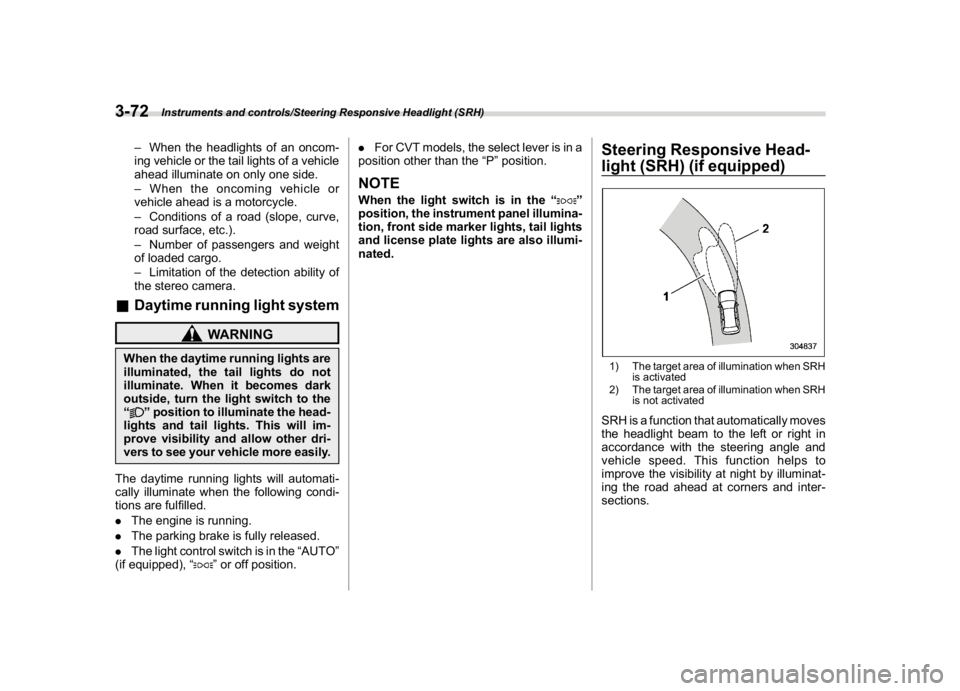
light (SRH) (if equipped)1) The target area of illumination when SRH
is activated
2) The target area of illumination when SRH
is not activatedSRH is a function that automatically moves
the headlight beam to the left or right in
accordance with the steering angle and
vehicle speed. This function helps to
improve the visibility at night by illuminat-
ing the road ahead at corners and inter-
sections.
Instruments and controls/Steering Responsive Headlight (SRH)
3-72
Page 209 of 474
(214,1)
北米Model "A1320BE-C" EDITED: 2017/ 10/ 10
&One-touch lane changerTo flash the turn signal and turn signal
indicator light three times, push the turn
signal lever up or down slightly and
immediately release it.NOTEThe operational/non-operational
setting of the one-touch lane changer
can be changed by a SUBARU dealer.
Contact the nearest SUBARU dealer for
details. For models with the combina-
tion meter display (color LCD), the
setting can also be changed by operat-
ing the combination meter display
(color LCD). For details, refer to“Vehi-
cle Setting”F3-41.
Wiper and washer
WARNING
In freezing weather, do not use the
windshield washer until the wind-
shield is sufficiently warmed by the
defroster.
Otherwise the washer fluid can
freeze on the windshield, blocking
your view.
CAUTION
.Do not operate the washer con-
tinuously for more than 10 sec-
onds, or when the washer fluid
tank is empty. This may cause
overheating of the washer motor.
Check the washer fluid level fre-
quently, such as at fuel stops.
.Do not operate the wipers when
the windshield or rear window is
dry. This may scratch the glass,
damage the blade rubbers and
might cause the wiper motor to
fail. Before operating the wiper
on a dry windshield or rear win-
dow, always use the windshield
washer..In freezing weather, be sure that
the blade rubbers are not frozen
to the windshield or rear window
before switching on the wipers.
Attempting to operate the wiper
withthebladesfrozentothe
window glass could cause not
only the blade rubbers to be
damaged but also might cause
the wiper motor to fail. If the blade
rubbers are frozen to the window
glass, be sure to operate the
defroster, windshield wiper dei-
cer (if equipped) or rear window
defogger before turning on the
wiper.
.If the wipers stop during opera-
tion because of ice or some other
obstruction on the window, this
might cause the wiper motor to
fail even if the wiper switch is
turned off. If this occurs,
promptly stop the vehicle in a
safe place, turn the ignition
switch to the“LOCK”/“OFF”po-
sition and clean the window glass
to allow proper wiper operation.
.Use clean water if windshield
washer fluid is unavailable. In
areas where water freezes in
winter, use SUBARU Windshield
Washer Fluid or the equivalent.
Instruments and controls/Wiper and washer
3-76
Page 211 of 474
(216,1)
北米Model "A1320BE-C" EDITED: 2017/ 10/ 10
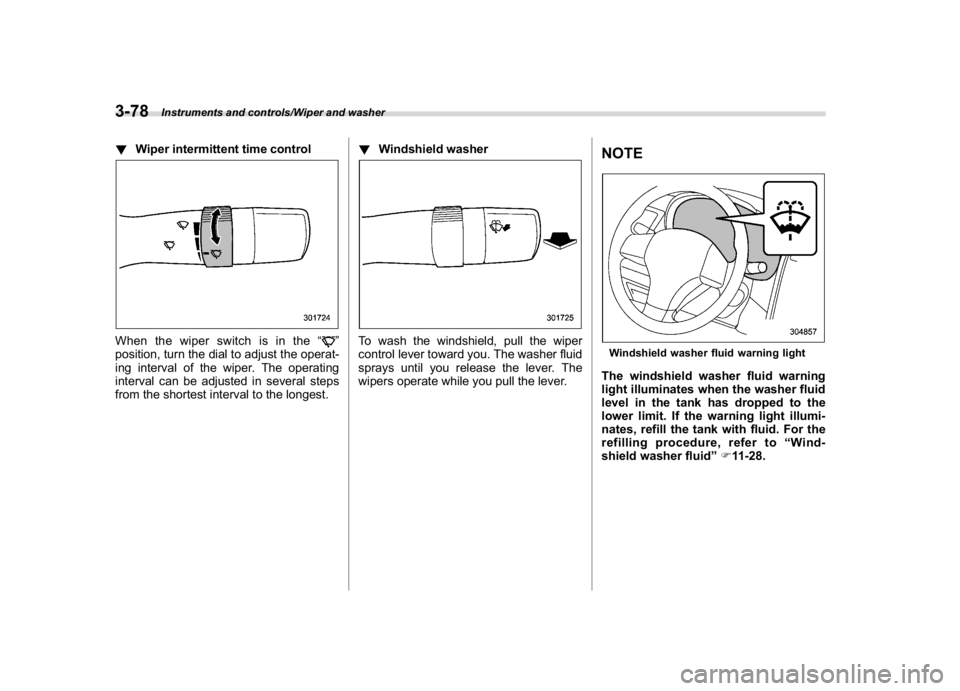
!Wiper intermittent time controlWhen the wiper switch is in the“
”
position, turn the dial to adjust the operat-
ing interval of the wiper. The operating
interval can be adjusted in several steps
from the shortest interval to the longest.!Windshield washer
To wash the windshield, pull the wiper
control lever toward you. The washer fluid
sprays until you release the lever. The
wipers operate while you pull the lever.
NOTEWindshield washer fluid warning lightThe windshield washer fluid warning
light illuminates when the washer fluid
level in the tank has dropped to the
lower limit. If the warning light illumi-
nates, refill the tank with fluid. For the
refilling procedure, refer to“Wind-
shield washer fluid”F11-28.
Instruments and controls/Wiper and washer
3-78